Sigma fp: Discussion and Image Thread
p.8 #2Sigma fp: Discussion and Image Thread
RE: Sigma fp video files wont save or download to my computer..
Hi guys,
Yes I read most of the manual..
I use Sony and Pany cams all the time for video..and normally just download the files to the program that came w/camera..and then transfer the files and edit in my Cyberlink Power director video program.
But with the fp..I cant save the videos at all to the computer and when I turn off the fp..the files are removed from the video program. I need to save them in a permanent file on my computer and then transfer to the video editing program. But I dont know how to do this..
Whats the best way to save the fp video files to computer hard drive?
Sep 05, 2020 at 03:00 PM
p.8 #3Sigma fp: Discussion and Image Thread
Already told ya. Just transfer the files to the computer. Unless you are recording in CinemaDNG, they'll just be MOV video files. CinemaDNG will be a folder containing an audio file and a bunch of DNG image files. That you'll need to convert using another software (DaVinci Resolve etc) - Sigma Photo Pro doesn't handle video as far as I know. Just transfer (drag and drop) the files from the card/camera to the computer.
EDL7 wrote:
RE: Sigma fp video files wont save or download to my computer..
Hi guys,
Yes I read most of the manual..
I use Sony and Pany cams all the time for video..and normally just download the files to the program that came w/camera..and then transfer the files and edit in my Cyberlink Power director video program.
But with the fp..I cant save the videos at all to the computer and when I turn off the fp..the files are removed from the video program. I need to save them in a permanent file on my computer and then transfer to the video editing program. But...Show more →
Sep 05, 2020 at 04:56 PM
p.8 #4Sigma fp: Discussion and Image Thread
Alien Invasion
 SIGMA fp 45mm F2.8 DG DN Contemporary 019 f4.5 FP000775
Sep 09, 2020 at 04:26 PM
p.8 #5Sigma fp: Discussion and Image Thread
I guess this is your FP:
A Teardown of the Sigma fp Mirrorless Camera
I see that all Kolari sensor mod is backordered also, most probably same reason as you said...
imagesfromobjects wrote:
Oh, that's awesome! Mine is still at Kolari, due to a shipment delay from their glass supplier, but they said the good news is that they got the camera open and the glass is removable.
By the way, the sensor stack is approximately ~1.3mm by their measurements.
Thanks for the heads up!
*EDIT- being that you are in Japan, would you happen to have any suggestions on the best way to reach them? It seems like they're addressed every one of my gripes besides the focusing square not disappearing in firmware, so I'd like to submit a proper request for...Show more →
https://www.sigma-global.com/en/news/2020/08/27/2924/
--------------------------------
[Benefits of the update]
(Ver2.01)
-Corrected the phenomenon of displaying white corners on DNGs or CinemaDNGs in some development software when using the following combination;
SIGMA fp and Panasonic’s LUMIX S 20-60mm F3.5-5.6 with the Lens Optics Correction function Vignetting setting set to ‘auto’, when the focal length is 20mm and aperture value of F3.5.
-Corrected the bug related to Blackmagic RAW codec recording over HDMI with Blackmagic Video Assist 12G model manufactured by Blackmagic Design.*1
– Corrected the bug related to Compressed RAW over HDMI recording with Atomos Ninja V monitor-recorder.*2
*1 Requires firmware update of Video Assist 12G models using Video Assist Update.
*2 A free ATOMOS firmware update for Ninja V is required.
--------------------------------
A Teardown of the Sigma fp Mirrorless Camera
I see that all Kolari sensor mod is backordered also, most probably same reason as you said...
imagesfromobjects wrote:
Oh, that's awesome! Mine is still at Kolari, due to a shipment delay from their glass supplier, but they said the good news is that they got the camera open and the glass is removable.
By the way, the sensor stack is approximately ~1.3mm by their measurements.
Thanks for the heads up!
*EDIT- being that you are in Japan, would you happen to have any suggestions on the best way to reach them? It seems like they're addressed every one of my gripes besides the focusing square not disappearing in firmware, so I'd like to submit a proper request for...Show more →
Juha Kannisto wrote
Sigma released new fp firmware 2.0.1 with a couple of bug fixes earlier this week:https://www.sigma-global.com/en/news/2020/08/27/2924/
--------------------------------
[Benefits of the update]
(Ver2.01)
-Corrected the phenomenon of displaying white corners on DNGs or CinemaDNGs in some development software when using the following combination;
SIGMA fp and Panasonic’s LUMIX S 20-60mm F3.5-5.6 with the Lens Optics Correction function Vignetting setting set to ‘auto’, when the focal length is 20mm and aperture value of F3.5.
-Corrected the bug related to Blackmagic RAW codec recording over HDMI with Blackmagic Video Assist 12G model manufactured by Blackmagic Design.*1
– Corrected the bug related to Compressed RAW over HDMI recording with Atomos Ninja V monitor-recorder.*2
*1 Requires firmware update of Video Assist 12G models using Video Assist Update.
*2 A free ATOMOS firmware update for Ninja V is required.
--------------------------------
Oct 08, 2020 at 07:28 AM


p.8 #9Sigma fp: Discussion and Image Thread
Hi guys, quick tip which many might be aware of, but I've only just worked out, and which has really improved my fp shooting experience - regarding the very sensitive rear dial inadvertently changing exposure compensation. If you use a lens which has an aperture ring, you can swap the operation of the two camera dials, so exposure compensation moves to the top dial, and aperture (which does nothing when you're using the lens ring), moves to the rear dial. This example is for aperture priority mode of course, but it works for manual and shutter priority as well.
Nov 17, 2020 at 06:02 AM
p.8 #10Sigma fp: Discussion and Image Thread
Another, perhaps obvious, "tip" - if you use the add-on viewfinder/loupe with the larger of the two handgrips, it actually clips to the camera using a locating pin, as well as being "held in" by the grip, which on my setup at least, is plenty secure enough to use temporarily, thus avoiding the need to fully tighten the locking bolt with a tool (I usually just wind it in with the tip of my finger, to stop it rattling).
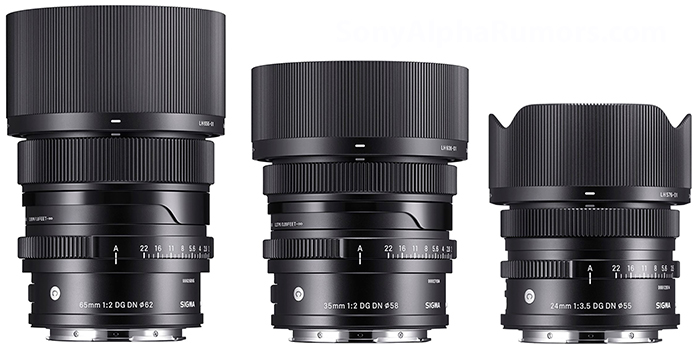
On a different note, it looks like the companion lenses to the 45mm (i.e. small and light), are coming very soon now, which will really give my fp a new lease of life:
On a different note, it looks like the companion lenses to the 45mm (i.e. small and light), are coming very soon now, which will really give my fp a new lease of life:
 |
||
 |
||
|
Nov 25, 2020 at 08:22 AM
|
p.8 #11Sigma fp: Discussion and Image Thread
Where did you read about the new lenses? Something was mentioned back in March, but still waiting.
In related news, I FINALLY got my Kolari mod back, after much delay. Here's my in depth and highly scientific review: it's awesome. Field curvature is all but gone, so bokeh is smoother. Edge sharpness much improved. Auto white balance not affected at all.
I'm still currently torn about swapping for an A7C, to be honest. I really wish Sigma would put out an auxiliary EVF, because the current viewfinder triples the size of the setup when using small rangefinder lenses.
Other than that and minor software quirks (the white focusing square that never goes away with manual lenses attached, not being able to focus magnify while shooting video) I have no complaints. The Kolari mod FP setup is maybe the best alternative to a digital M.
AndyG wrote:
Another, perhaps obvious, "tip" - if you use the add-on viewfinder/loupe with the larger of the two handgrips, it actually clips to the camera using a locating pin, as well as being "held in" by the grip, which on my setup at least, is plenty secure enough to use temporarily, thus avoiding the need to fully tighten the locking bolt with a tool (I usually just wind it in with the tip of my finger, to stop it rattling).
On a different note, it looks like the companion lenses to the 45mm (i.e. small and light), are coming very soon now,...Show more →
Nov 25, 2020 at 11:21 AM
p.8 #12Sigma fp: Discussion and Image Thread
Sigma announced an event recently, to happen on the 1st of December (details on their website), at which point the usual social media leaks started ... pretty sure they leak the images themselves, to generate even more interest for the events!
Nov 25, 2020 at 12:02 PM
p.8 #13Sigma fp: Discussion and Image Thread
how is the low-light compared to something like A7III or A7S cameras? I know it won't be as good, but is it miles off?
Dec 08, 2020 at 07:07 PM
p.8 #14Sigma fp: Discussion and Image Thread
FP sensor in low light is good, comparable to Sony. I use max ISO 16,000 with FP. I don't have the A7III/A7S, but I have A7R III/A7C.
ISO1600 wrote:
how is the low-light compared to something like A7III or A7S cameras? I know it won't be as good, but is it miles off?
ISO1600 wrote:
how is the low-light compared to something like A7III or A7S cameras? I know it won't be as good, but is it miles off?
Dec 09, 2020 at 08:15 AM
p.8 #15Sigma fp: Discussion and Image Thread
No, not miles off. Before the fp, the Sony a7S was my main camera. Contrary to popular belief, that camera still had noise, even at 400-800 ISO. Evenwith their different pixel pitch, to my eye the Sigma noise looks nice and dynamic range is good at 6400 ISO, and still very usable at 12000. My personal cutoff with the fp is around 25000 ISO, and with the a7S it was the same.
The a7S had the advantage of being able to crank the ISO to levels where you could actually *see* in total darkness, but the noise stopped looking nice and "film like" at around the same level as the fp.
ISO1600 wrote:
how is the low-light compared to something like A7III or A7S cameras? I know it won't be as good, but is it miles off?
Dec 09, 2020 at 09:59 AM
p.8 #16Sigma fp: Discussion and Image Thread
I read through this thread while waiting for my FP arrival, a lot of useful information here. thank you for all the contributors. My expected user case will be different than most. This is simple 3rd or 4th system for me that will be used mostly AF lens, LCD based shooting which is not totally new for me because I pretty much use my RX1 this way.
I might use this as a good chance to wade short video shooting. CinemaDNG have huge potential. Most likely, this will be a dedicated small 24/45 setting for me. With occasionally 35/65 if people image involved. finger crossed.
I might use this as a good chance to wade short video shooting. CinemaDNG have huge potential. Most likely, this will be a dedicated small 24/45 setting for me. With occasionally 35/65 if people image involved. finger crossed.
Dec 09, 2020 at 11:01 AM
p.8 #17Sigma fp: Discussion and Image Thread
The CinemaDNG video is simply jaw-dropping. Be advised that you need DaVinci Resolve to render out the files, each clip is simply a folder containing an audio file and a bunch of DNG files. There may be other programs that do it, I'm not sure. If you decide to go that route, there's a very simple workflow that doesn't involve hours of tutorials (Resolve is DENSE) so let me know, I'll be happy to give you the "quick start" version.
Also, CinemaDNG absolutely requires recording to an SSD. Even using MOV, I haven't found an SD card that can write fast enough for 4k, so you're limited to 1080p without an external device. Not a huge deal, those still look great, but you probably want to drop sharpening down all the way if you shoot in MOV, otherwise moire is present. I shoot a lot just using MOV in 1080p and the files look "pro" even viewed on a 55inch TV.
For the most natural-looking colors and tones in SOOC video, I really like the "Vivid" profile, set to -1, with contrast dropped a notch. Oddly, those colors look more realistic than "Standard" to my eye, but of course this is down to preference. Excited to hear more folks are picking up the fp!!
Fun side note- I just watched Tenet and there's a scene in a secret CIA lab where they're using an fp for video. If it's good enough for a Christopher Nolan film, it's good enough for me.
zhangyue wrote:
I read through this thread while waiting for my FP arrival, a lot of useful information here. thank you for all the contributors. My expected user case will be different than most. This is simple 3rd or 4th system for me that will be used mostly AF lens, LCD based shooting which is not totally new for me because I pretty much use my RX1 this way.
I might use this as a good chance to wade short video shooting. CinemaDNG have huge potential. Most likely, this will be a dedicated small 24/45 setting for me. With occasionally 35/65 if...Show more →
Dec 09, 2020 at 11:35 AM
p.8 #18Sigma fp: Discussion and Image Thread
Here's an off-the-cuff example. This is with the 45/2.8C using 1080p MOV, resized to 720p. I spent 30 seconds grading it in Premiere, just to tone the shadows and add saturation. Maybe a little bit too "punchy" with the colors, but this was just something to send to Granny. It's rare these days that I'll have time, or shoot something I feel like spending time grading.
https://drive.google.com/file/d/1ZEQ6Gdbww6RicXsKkJU-tmWbdGENofcB/view?usp=drivesdk
https://drive.google.com/file/d/1ZEQ6Gdbww6RicXsKkJU-tmWbdGENofcB/view?usp=drivesdk
Dec 09, 2020 at 12:04 PM
p.8 #19Sigma fp: Discussion and Image Thread
imagesfromobjects wrote:
The CinemaDNG video is simply jaw-dropping. Be advised that you need DaVinci Resolve to render out the files, each clip is simply a folder containing an audio file and a bunch of DNG files. There may be other programs that do it, I'm not sure. If you decide to go that route, there's a very simple workflow that doesn't involve hours of tutorials (Resolve is DENSE) so let me know, I'll be happy to give you the "quick start" version.
Also, CinemaDNG absolutely requires recording to an SSD. Even using MOV, I haven't found an SD card that can write...Show more →
I might use this as a good chance to wade short video shooting. CinemaDNG have huge potential. Most likely, this will be a dedicated small 24/45 setting for me. With occasionally 35/65 if people image involved. finger crossed.
Hi, Thank you I will slowly dive into it. I did research a little on video side know that at least I need a small cage, T5 or T7 SSD and AF in video is crap. For now, I will just get myself familiar with the camera. It is really an unfortunate situation we have to cancel all of our 2020 travel plan and there is no one for 2021 yet

It will be a snap shot camera for me to document regular day life which is I enjoy the most anyway. I will definitely come back with question and health discussion about plus and minus.
Edited on Dec 09, 2020 at 12:13 PM · View previous versions
The CinemaDNG video is simply jaw-dropping. Be advised that you need DaVinci Resolve to render out the files, each clip is simply a folder containing an audio file and a bunch of DNG files. There may be other programs that do it, I'm not sure. If you decide to go that route, there's a very simple workflow that doesn't involve hours of tutorials (Resolve is DENSE) so let me know, I'll be happy to give you the "quick start" version.
Also, CinemaDNG absolutely requires recording to an SSD. Even using MOV, I haven't found an SD card that can write...Show more →
zhangyue wrote
I read through this thread while waiting for my FP arrival, a lot of useful information here. thank you for all the contributors. My expected user case will be different than most. This is simple 3rd or 4th system for me that will be used mostly AF lens, LCD based shooting which is not totally new for me because I pretty much use my RX1 this way.I might use this as a good chance to wade short video shooting. CinemaDNG have huge potential. Most likely, this will be a dedicated small 24/45 setting for me. With occasionally 35/65 if people image involved. finger crossed.
Hi, Thank you
I will slowly dive into it. I did research a little on video side know that at least I need a small cage, T5 or T7 SSD and AF in video is crap. For now, I will just get myself familiar with the camera. It is really an unfortunate situation we have to cancel all of our 2020 travel plan and there is no one for 2021 yet It will be a snap shot camera for me to document regular day life which is I enjoy the most anyway. I will definitely come back with question and health discussion about plus and minus.
Edited on Dec 09, 2020 at 12:13 PM · View previous versions
Dec 09, 2020 at 12:11 PM
p.8 #20Sigma fp: Discussion and Image Thread
imagesfromobjects wrote:
Here's an off-the-cuff example. This is with the 45/2.8C using 1080p MOV, resized to 720p. I spent 30 seconds grading it in Premiere, just to tone the shadows and add saturation. Maybe a little bit too "punchy" with the colors, but this was just something to send to Granny. It's rare these days that I'll have time, or shoot something I feel like spending time grading.
https://drive.google.com/file/d/1ZEQ6Gdbww6RicXsKkJU-tmWbdGENofcB/view?usp=drivesdk
Looks like I can't access it.
Dec 09, 2020 at 12:12 PM