p.9 #1 · A1 Firmware v 2.01 is out now. On the fence about installing it though. :)
Uao....that's incredible, actually no similar situation in Italy but it seems obvious to me that any lawyer would take such a class action on the fly, there is all the elements to win it without any problem.
The defect is obviously hidden from the user and only after a system update does this appear limiting its operation.
Sony is paying dearly for it no doubt
my doubt is that the answer given by email was given automatically or by a person who did not follow the case, because I find the whole thing really absurd.
Talking to a Sony technician in Italy, he told me that he had no doubts about recognizing the defect post-update, it needs to be understood though if other similar answers start coming out.
In any case they are absolutely challengeable, also because it is Sony itself that states that after the update that message could appear....
p.9 #3 · A1 Firmware v 2.01 is out now. On the fence about installing it though. :)
A lot of talk on the FB A1 forum about this issue. The board on mine was replaced last summer after bluetooth stopped working but over on the FB forum I see a couple of people who said they had motherboard replaced like mine having this not working wifi issue!! I am going to write to Sony Pro support and see what they say as I certainly won't be updating if I could be liable for a repair
p.9 #7 · A1 Firmware v 2.01 is out now. On the fence about installing it though. :)
If interested, my A1 serial number begins with: 337xxxx
Upgraded from v1.32 to v2.0, no issues
Upgraded from v2.0 to v2.01, no issues
I've always been a regular user of both BT and Wifi both of which continue to work w/ v2.0 and now v2.01. FWIW, I feel the Creator's Cloud app now makes it quicker and easier to setup and use both services.
p.9 #8 · A1 Firmware v 2.01 is out now. On the fence about installing it though. :)
schlotz wrote:
It was said earlier, getting a list of body serial numbers with the issue(s) might point to a range that have susceptible hardware.
Might not be so simple as I see that someone with bluetooth issue like me had their motherboard changed last year as I did and is having this issue. I have emailed Sony pro support in the UK and will see what reply I get. No way will I upgrade until I get a clear reply that it will not cost me if the board needs changing again as all is working fine on 1.32
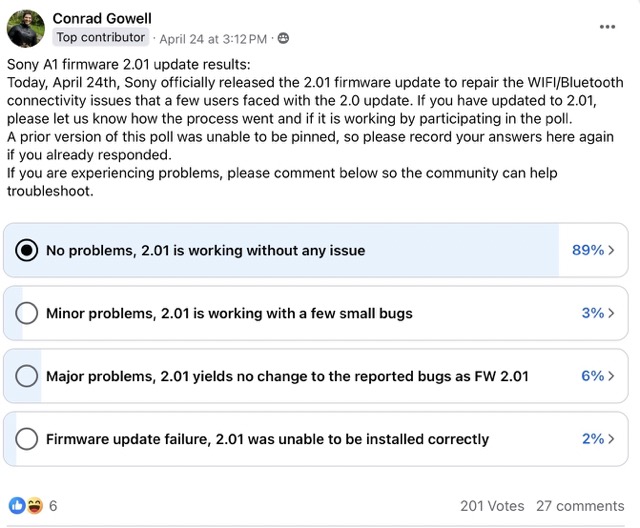
Wow!! 11% failure potential is very bad. I would consider this to be a high risk firmware update based on this pole. What this version brings to the table for a still Photographer is really nothing of value that I see. If I heard that there was pre-capture or a radically improved AF then maybe.
p.9 #10 · A1 Firmware v 2.01 is out now. On the fence about installing it though. :)
LBJ2 wrote:
Morning BIF battery test w/ A1 v. 2.10 + G 200-600 v. 03 and Sony NP-FZ100 battery about 4.5 years old (not sure how long these Sony Z batteries last)
-From 100% battery charge to 0% camera shut down in two hours twenty minutes
-5858 Lossless Comp (L) RAW images taken ( Just to show how hard I was pushing the camera; Springtime = lots of birds coming and going preparing for nesting, nesting and feeding broods). Now to cull 🥺
-AF-C, Drive Mode H, CFexpress cards
Edit: Forgot to add:
All in electronic shutter and Power Save Start Time was set to 30 mins....Show more →
I bought a new Sony NP-FZ100 battery. I'll be out to do the BIF v 2.01 battery drain test again soon to see the difference using a brand new vs old battery. This time w/ Power Save Start Time set to my normal 1 min vs 30 mins I used on the last test.
p.9 #11 · A1 Firmware v 2.01 is out now. On the fence about installing it though. :)
_MacTwin_ wrote:
Uao....that's incredible, actually no similar situation in Italy but it seems obvious to me that any lawyer would take such a class action on the fly, there is all the elements to win it without any problem.
The thing is, it's not that simple.
Remember the class action suit against Sony for the A7iii shutter failures? Loads of people online complaining about premature physical failure of the A7iii mechanical shutter. People had shutters replaced that failed again with low shot counts. Sony refused to acknowledge that there was a problem, and charged for out-of-warranty replacements. Lots of calls online for something to be done, and a John Guerriero decided to file a class actions suit against Sony. It was lodged in New York in 2021 to much fanfare and comment on the various camera fora and news sites. (here and here for example)
The District Court in New York struck the class action out, and ruled that "The parties are ORDERED to arbitrate their dispute on an individual basis.". I wonder how many bothered to take on Sony in court on an individual basis?
Sony aren't afraid of a class action suit for these firmware/motherboard issues. Even if someone did go to the effort of filing it, there's a huge hill to climb to prove that there's actually a "class" and that there's merit to the claim. Then the case itself would drag on for years before a ruling. If Sony were to weigh up the risks of charging for board replacements now vs the chances of them losing that case at some point in the future, they'll go with charging for the board replacements and take their chances. And I say this as someone who's A1 can't connect to any WiFi networks after the 2.01 update (it worked fine last week on 2.00, and I'm not getting the hardware error message).
And that's only taking into account the jurisdictions that allow class action suits in their legal systems. A successful class action suit in the US won't have any impact on consumers in Germany - they'd have to take their own action, which isn't guaranteed to win under a different system. I live in Ireland - we don't have a concept of class action in our legal system. Any successful action in any other country would have absolutely no effect on my situation.
Class action lawsuits sound great in theory, and they do work for consumers sometimes, but they're a steep hill to climb and certainly NOT an easy solution to our woes.
p.9 #13 · A1 Firmware v 2.01 is out now. On the fence about installing it though. :)
For me the important thing here is how Sony handles this conundrum, rather than if my A1 survives the upgrade or not...
Things like that can happen to any company, especially during the covid craze, but it's not their customers ($6500 ) who should now pay for fixing it...
p.9 #15 · A1 Firmware v 2.01 is out now. On the fence about installing it though. :)
All this bad press for Sony on a firmware update that no one was asking for...accumulative damage is being done. I feel Sony is about to lose their lead in cameras by refusing to listen to their customers.
p.9 #16 · A1 Firmware v 2.01 is out now. On the fence about installing it though. :)
Josef K. wrote:
The thing is, it's not that simple.
Remember the class action suit against Sony for the A7iii shutter failures? Loads of people online complaining about premature physical failure of the A7iii mechanical shutter. People had shutters replaced that failed again with low shot counts. Sony refused to acknowledge that there was a problem, and charged for out-of-warranty replacements. Lots of calls online for something to be done, and a John Guerriero decided to file a class actions suit against Sony. It was lodged in New York in 2021 to much fanfare and comment on the various camera fora and news sites. (here and here for example)
The District Court in New York struck the class action out, and ruled that "The parties are ORDERED to arbitrate their dispute on an individual basis.". I wonder how many bothered to take on Sony in court on an individual basis?
Sony aren't afraid of a class action suit for these firmware/motherboard issues. Even if someone did go to the effort of filing it, there's a huge hill to climb to prove that there's actually a "class" and that there's merit to the claim. Then the case itself would drag on for years before a ruling. If Sony were to weigh up the risks of charging for board replacements now vs the chances of them losing that case at some point in the future, they'll go with charging for the board replacements and take their chances. And I say this as someone who's A1 can't connect to any WiFi networks after the 2.01 update (it worked fine last week on 2.00, and I'm not getting the hardware error message).
And that's only taking into account the jurisdictions that allow class action suits in their legal systems. A successful class action suit in the US won't have any impact on consumers in Germany - they'd have to take their own action, which isn't guaranteed to win under a different system. I live in Ireland - we don't have a concept of class action in our legal system. Any successful action in any other country would have absolutely no effect on my situation.
Class action lawsuits sound great in theory, and they do work for consumers sometimes, but they're a steep hill to climb and certainly NOT an easy solution to our woes.
The Sony warranty card says disputes must be arbitrated unless you opt out of arbitration within 30 days of purchase. It does look like the door is still open for small claims outside of arbitration.
p.9 #17 · A1 Firmware v 2.01 is out now. On the fence about installing it though. :)
Software on cameras and computers can be pretty complicated and though I'm not a software developer i can usually troubleshoot things on my camera and computer and sometimes better than the tech support people in my company or commercial software product support. I just solve an issue on my Mac and MS Outlook (home edition) where it would not let me change my email protocol from POP to IMAP for one of my email accounts (I have several of them). I tried to contact Microsoft for tech support. That is a waste of time. No humans that one can talk to, there FAQ's are useless and similar questions were asked in their forums with inaccurate solutions. Finally I figured out how to do it. I have to admit that the APPLE support is much better.
So that gets me to camera software. I have used both the Nikon SnapBridge, Sony Imaging and now Creator Apps and find them all painful to use and unreliable (I think SnapBridge is the worst). I only use them when I want to look at a photo quickly on a larger screen than my camera's and I only use it for uploading one or two photos to my iPhone or iPad using wifi or bluetooth and it's always an adventure and I hold my breath. With that said, I updated my A1 from FW 1.32 to 2.0 and then a few weeks later to 2.01 on my Mac. The updates went slowly but without a problem each time. I transferred a few photos from the A1 to iPhone using wifi with each update and it worked without a hitch. I have limited needs in using the software and it works fine for me. "Your mileage might vary" and hope it gets resolved for you. Not sure if it's too early to talk about class action yet. Time will tell.
p.9 #18 · A1 Firmware v 2.01 is out now. On the fence about installing it though. :)
For those that might want to proceed with firmware v2.01 update and given some have experienced BT/Wifi issues afterwards as described and warned in this thread:
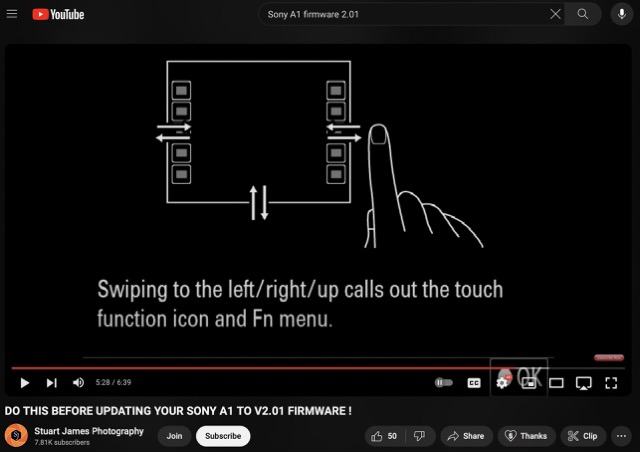
This 6:39 minute video provides a few suggestions to do before updating the firmware ( fresh from a discussion with Sony Tech) FWIW, I didn't do any of these prior to a successful install of both v2.0 and v2.01. But may be worth considering:
1. Use the Reset feature to reset all camera settings
2. Initialize the camera
3. Disconnect lens ( I never have a lens connected when updating the Camera firmware)
I would also recommend additional preps prior to the update:
#1 Check and Record the camera's BT and Wifi is operating correctly even if you've never used either before, set it up and confirm operations. *Save this recorded evidence!
#2 Delete the Imaging Edge app from your mobile and then install the latest Creators' App ( make sure it's the latest version, if you already have this app installed)
#3 Create your Creators' App login credentials, add your camera model get your free 25GB cloud storage and confirm access & the app is operational.
*After firmware install use the Creators' App to set up BT and Wifi and some basic/initial settings date/time etc.,
Also a small illustration on this video @5:24 mark helped me to better understand the new "Swipping L/R/Up Touch Function Icon and Fn menu feature I haven't explored til now (I'm still experimenting with the new menus/features)
Edit: This Swipping feature takes a very light touch/swipe. I was initially using too much pressure for inconsistent results.
p.9 #19 · A1 Firmware v 2.01 is out now. On the fence about installing it though. :)
LBJ2 wrote:
For those that might want to proceed with firmware v2.01 update and given some have experienced BT/Wifi issues afterwards as described and warned in this thread:
This 6:39 minute video provides a few suggestions to do before updating the firmware ( fresh from a discussion with Sony Tech) FWIW, I didn't do any of these prior to a successful install of both v2.0 and v2.01. But may be worth considering:
1. Use the Reset feature to reset all camera settings
2. Initialize the camera
3. Disconnect lens ( I never have a lens connected when updating the Camera firmware)
I would also recommend additional preps prior to the update:
#1 Check and Record the camera's BT and Wifi is operating correctly even if you've never used either before, set it up and confirm operations. *Save this recorded evidence!
#2 Delete the Imaging Edge app from your mobile and then install the latest Creators' App ( make sure it's the latest version, if you already have this app installed)
#3 Create your Creators' App login credentials, add your camera model get your 25GB cloud storage and confirm access & the app is operational.
*After firmware install use the Creators' App to set up BT and Wifi and some basic/initial settings date/time etc.,
Also a small illustration on this video @5:24 mark helped me to better understand the new "Swipping L/R/Up Touch Function Icon and Fn menu feature I haven't explored til now (I'm still experimenting with the new menus/features)...Show more →
Thanks for the information. I did not use the Creators App, but installed from my computer. I wonder if there is a difference in problems encountered using the App vs the older method from the computer?
p.9 #20 · A1 Firmware v 2.01 is out now. On the fence about installing it though. :)
Laslo Varadi wrote:
Thanks for the information. I did not use the Creators App, but installed from my computer. I wonder if there is a difference in problems encountered using the App vs the older method from the computer?
I used the App to complete setup more out of convenience, particularly entering the WIFI credentials. But also might give an early indication too if there are BT/Wifi issues post update IF the account is confirmed set up correctly prior to the new firmware.
Currently Sony UK and Germany ( that I have seen) posted messages about a potential BT/Wifi HW issue for some which is why everyone should who hasn't already, check their BT and Wifi operations before installing the app, even if they do not intend to wait and/or not install the new firmware. I could imagine many don't use either BT/Wifi so they might not know they have or had an existing HW problem--but I'm just guessing. But critical IMO for those still under warranty.
Either way, Sony has to sort this out further for their customers. I think/hope Sony will do the right thing once this is sorted and an appropriate remedy will be made available for those affected.


 ) who should now pay for fixing it...