p.1 #5 · A1 Firmware v 2.01 is out now. On the fence about installing it though. :)
USB connection only - no SD card option. It goes smoothly but slowly. CAMSET from v200 can be loaded (but not when the camera is in one of the 1,2 or 3 presets). I am sure that load/save settings was not greyed out when you were in a preset in the v1xx firmware. But who knows! No obvious problems.
p.1 #6 · A1 Firmware v 2.01 is out now. On the fence about installing it though. :)
I’ve been running fw2.0 , even though I get a few issues like increased battery drainage I’m still not sure if fw2.01 will help . Think I’ll give it a week before trying it
p.1 #7 · A1 Firmware v 2.01 is out now. On the fence about installing it though. :)
certainly not rushing to update as I can't see any major benefits for the stills on photographer and will wait to see how others find it. reports of excessive battery drain are a concern and only time will tell if they are correct. Also the thought of having to spend an hour or so rebuilding all the custom settings is not appealing
p.1 #8 · A1 Firmware v 2.01 is out now. On the fence about installing it though. :)
I am not going to take any chance with the only A1 I have now, regret I sold one about 2 months ago. Now it seems to be out of stock in most retailers. Strange.
p.1 #10 · A1 Firmware v 2.01 is out now. On the fence about installing it though. :)
Constable wrote:
USB connection only - no SD card option. It goes smoothly but slowly. CAMSET from v200 can be loaded (but not when the camera is in one of the 1,2 or 3 presets). I am sure that load/save settings was not greyed out when you were in a preset in the v1xx firmware. But who knows! No obvious problems.
I was hoping to use the new update via the SD card, but didn't see that approach listed in V 2.01 update notes. When the update is available via SD card is that normally included in the update notes?
BTW for those that have updated via SD Card on other cameras, can we also update via CFexpress Type A card?
p.1 #11 · A1 Firmware v 2.01 is out now. On the fence about installing it though. :)
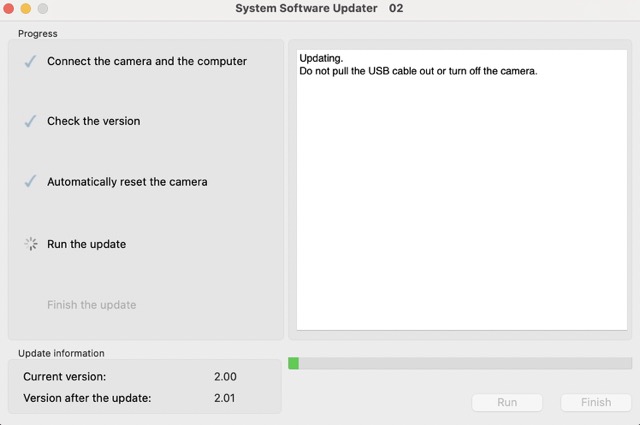
Onward and upward... the old way via the USBC cable on macOS Sonoma 14.4.1
*Since I was updating from ver 2.0 to ver 2.01 I was able to save my A1 settings to CFE-A card
p.1 #12 · A1 Firmware v 2.01 is out now. On the fence about installing it though. :)
Comparing what was fixed on ver 2.01 vs 2.0
Others: ( ver 2.01)
Fixes an issue where the camera would occasionally become unstable during continuous shooting
Fixes an issue where the color of a JPEG image may change when cropped in the camera
Fixes an issue where images may not be transferred properly during FTP transfer
Fixes an issue where the folder name setting for still images may switch from the set value to the default value (MSDCF) when the battery is removed
Fixes an issue where the camera may not be able to connect to the network
Fixes an issue where the timecode wasn’t always retained after a power restart
Improves the functionality and operational stability of the camera
Others: (ver 2.0)
Fixes an issue where the time code wasn't always retained after a power restart
Improves the exposure stability when using extended ISO during movie recordings
Improves the operational stability of the camera
p.1 #14 · A1 Firmware v 2.01 is out now. On the fence about installing it though. :)
Has anyone tried to use a memory card following A9III directions?
Dumb that Sony added that feature but isn't letting us use it.
On another forum a member did A9III FW via CFe-A in 5mins and that is 1.0-2.0.
A1 via computer took 25mins 2.0 to 2.01 but didn't wipe settings. Thankfully but I suppose Camset would work also if it did.
p.1 #15 · A1 Firmware v 2.01 is out now. On the fence about installing it though. :)
A1 2.01 doesn't work via memory card. A9III gives you a totally different type of file for the memory card update.
My 2.01 update is moving along at a sloth's pace as per normal.
Hope this fixes battery drain even if inadvertently.
p.1 #16 · A1 Firmware v 2.01 is out now. On the fence about installing it though. :)
arbitrage wrote:
A1 2.01 doesn't work via memory card. A9III gives you a totally different type of file for the memory card update.
My 2.01 update is moving along at a sloth's pace as per normal.
Hope this fixes battery drain even if inadvertently.
Yes. I noticed two different file types : ( I was really hoping to update to ver 2.01 via the sd card)
.DAT for update via SD card and,
.dng for update via macOS computer.
I've not experienced any noticeable difference in battery drain on A1 ver 2.0 from ver 1.32, even pushing the camera hard in H and H+, AF-C mode. I tested several different scenarios with different lenses and battery drain seemed about the same from what I remember on ver 1.32. I was still able to use the battery over a few days of couple hours of shooting each day as normal.
I didn't get a chance to test the G 200-600 on A1 ver 2.0 for battery drain as much as I could have. But now with ver 2.01 I'll make a point to do more extensive battery drain testing with the G 200-600 since that lens incudes the new IBIS/OSS coordination feature.
*My youngest NP-FZ100 battery is about 3 years old.
p.1 #17 · A1 Firmware v 2.01 is out now. On the fence about installing it though. :)
arbitrage wrote:
A1 2.01 doesn't work via memory card. A9III gives you a totally different type of file for the memory card update.
My 2.01 update is moving along at a sloth's pace as per normal.
Hope this fixes battery drain even if inadvertently.
Please let us know how you get on , normally I'd just update straightaway but since after the FW2.0 its made me hesitant , I'll be amazed if FW2.01 helps with the battery drainage but we can live in hope, also be interesting to see if the focus remains ok.
p.1 #19 · A1 Firmware v 2.01 is out now. On the fence about installing it though. :)
LBJ2 wrote:
Yes. I noticed two different file types : ( I was really hoping to update to ver 2.01 via the sd card)
.DAT for update via SD card and,
.dng for update via macOS computer.
I've not experienced any noticeable difference in battery drain on A1 ver 2.0 from ver 1.32, even pushing the camera hard in H and H+, AF-C mode. I tested several different scenarios with different lenses and battery drain seemed about the same from what I remember on ver 1.32. I was still able to use the battery over a few days of couple hours of shooting each day as normal.
I didn't get a chance to test the G 200-600 on A1 ver 2.0 for battery drain as much as I could have. But now with ver 2.01 I'll make a point to do more extensive battery drain testing with the G 200-600 since that lens incudes the new IBIS/OSS coordination feature.
*My youngest NP-FZ100 battery is about 3 years old. ...Show more →
It is interesting that you haven't felt the battery drain.
I have 6 friend with A1 and all confirm they are seeing noticeable increase in drain.
My one friend hasn't updated yet. We shot side by side this weekend...similar shooting but not identical.
I was at 17% at one point...him at 51%.
p.1 #20 · A1 Firmware v 2.01 is out now. On the fence about installing it though. :)
arbitrage wrote:
Well update is complete.
All settings from 2.0 are preserved in 2.01.
No need for CAMSET load.
Will test this weekend.
One idea about the Sony NP-FZ100 batteries. If you haven't already, try exhausting the battery completely in-camera. All the way to camera shut down. Then charge the battery all the way to a complete 100% with a Sony OEM charger ( not third party).
I learned from Leica battery paperwork, which recommend to do the above cycle about every 20-25 battery uses/cycles to maintain best overall health of their lithium camera batteries.
No idea if the above will help the one-hour complete battery drain scenario you experienced with the A1 ver 2.0 + GM 600. But maybe worth a try.


 ...
...