arbitrage wrote:
I don't like the sound of the delay but I don't need to be flipping my screen in either. What I would like to know is if I shut off Auto sensor between LCD/EVF and run the camera with a programmed button to switch between EVF/LCD does the EVF shut off still when I drop it down from my eye (leaving the LCD off also, but not flipping the LCD inwards) and then do we get that same wake-up delay in the EVF when I bring it back to my eye. Or does the EVF actually just stay on all the time if I am manually switching between the two? Which would eliminate the delay but waste battery....Show more →
Sorry for all the posts. I was experimenting.
1. You can set the M-Fn or other buttons to toggle between the Display and VF. You can still use auto by keeping the EVF sensor enabled but it is faster using the M-Fn button. There is a bit of a delay when the sensor does it.
2. As long as whatever is in the Display is the same as VF using the M-Fn button is quick. If you are toggling between for example between the menus on the Display and the scene in the VF there is a delay.
3. The VF always shuts off after about 6 seconds if there is nothing in front of it. If you have the power savings settings set high so nothing shuts off for a long period of time and press the shutter or BBF before lifting the camera to your eye the VF will be awake by the time you get it there.
4. You can avoid needing to press the shutter or BBF by tricking the sensor with some tape but there has to be a gap between it and the sensor. If you are using the M-Fn button and manually switching between the VF and Display, the Display will be off thus saving battery power.
If something is inaccurate with anything here let me know as it is a work in progress.
Zenon Char wrote:
Sorry for all the posts. I was experimenting.
1. You can set the M-Fn button to toggle between the Display and VF. You can still use auto by keeping the EVF sensor enabled but it is faster using the M-Fn button. There is a bit of a delay when the sensor does it.
2. As long as whatever is in the Display is the same as VF using the M-Fn button is quick. If you are toggling between for example between the menus on the Display and the scene in the VF there is a delay.
3. The VF always shuts off after about 6 seconds if there is nothing in front of it. If you have the power savings settings set high so nothing shuts off for a long period of time and press the shutter or BBF before lifting the camera to your eye the VF will be awake by the time you get it there.
4. You can avoid needing to press the shutter or BBF by tricking the sensor with some tape but there has to be a gap between it and the sensor. If you are using the M-Fn button and manually switching between the VF and Display, the Display will be off thus saving battery power. ...Show more →
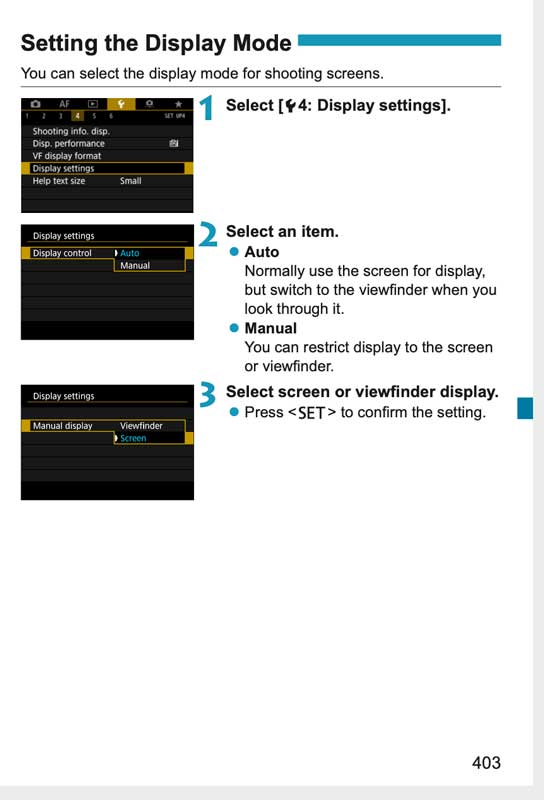
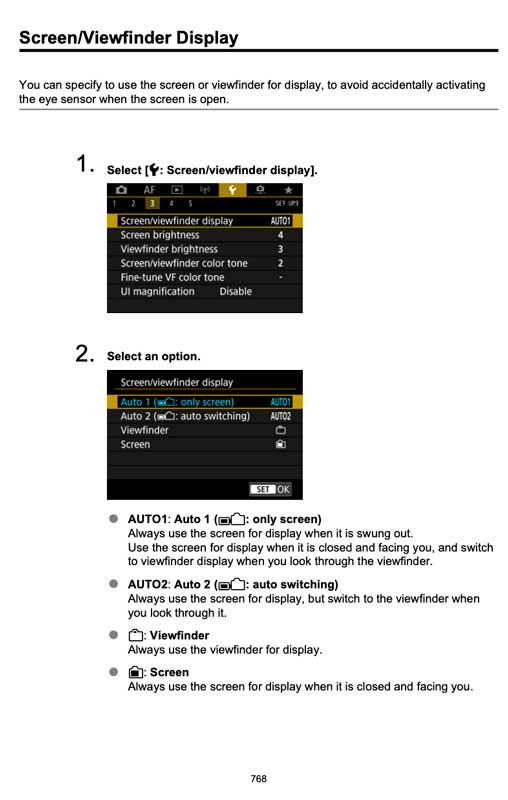
Can someone with an R5 verify something for me so Geoff does not get a surprise. The power savings menu is the same between the R and R5. The display settings are little different on the R5. The first screen shot is the R where you can disable the VF sensor. The R5 does not have that option but offers either the VF or Screen. Assigning a button to toggle between both is available for the R5 (3rd image). Can someone make sure it will toggle back and forth with the VF or Screen. I'm positive it will but you never know. Thanks
Zenon Char wrote:
Can someone with an R5 verify something for me so Geoff does not get a surprise. The power savings menu is the same between the R and R5. The display settings are little different on the R5. The first screen shot is the R where you can disable the VF sensor. The R5 does not have that option but offers either the VF or Screen. Assigning a button to toggle between both is available for the R5 (3rd image). Can someone make sure it will toggle back and forth with the VF or Screen. I'm positive it will but you never know. Thanks ...Show more →
I have a whole thread about this being frustratingly stupid. The only way to swap between VF and screen is to go into wrench screen 3 and change the setting there (or save it as a favorite). There is way to assign a button to toggle between the two. Hoping this is fixed in update later. What I would love is to have the viewfinder set to activate only when my eye is close and for the back screen to only show menus (and never view through lens).
Pius Sullivan wrote:
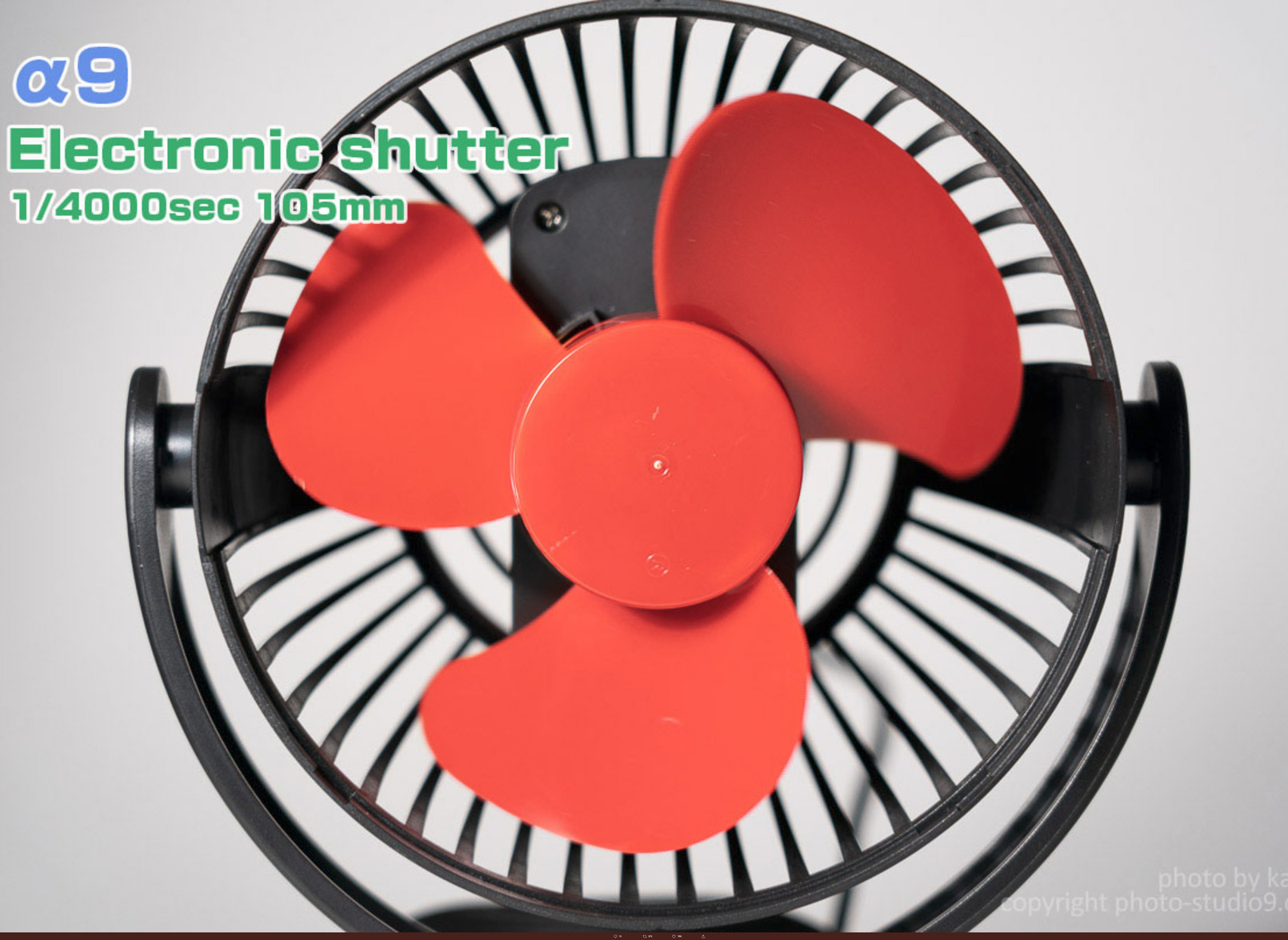
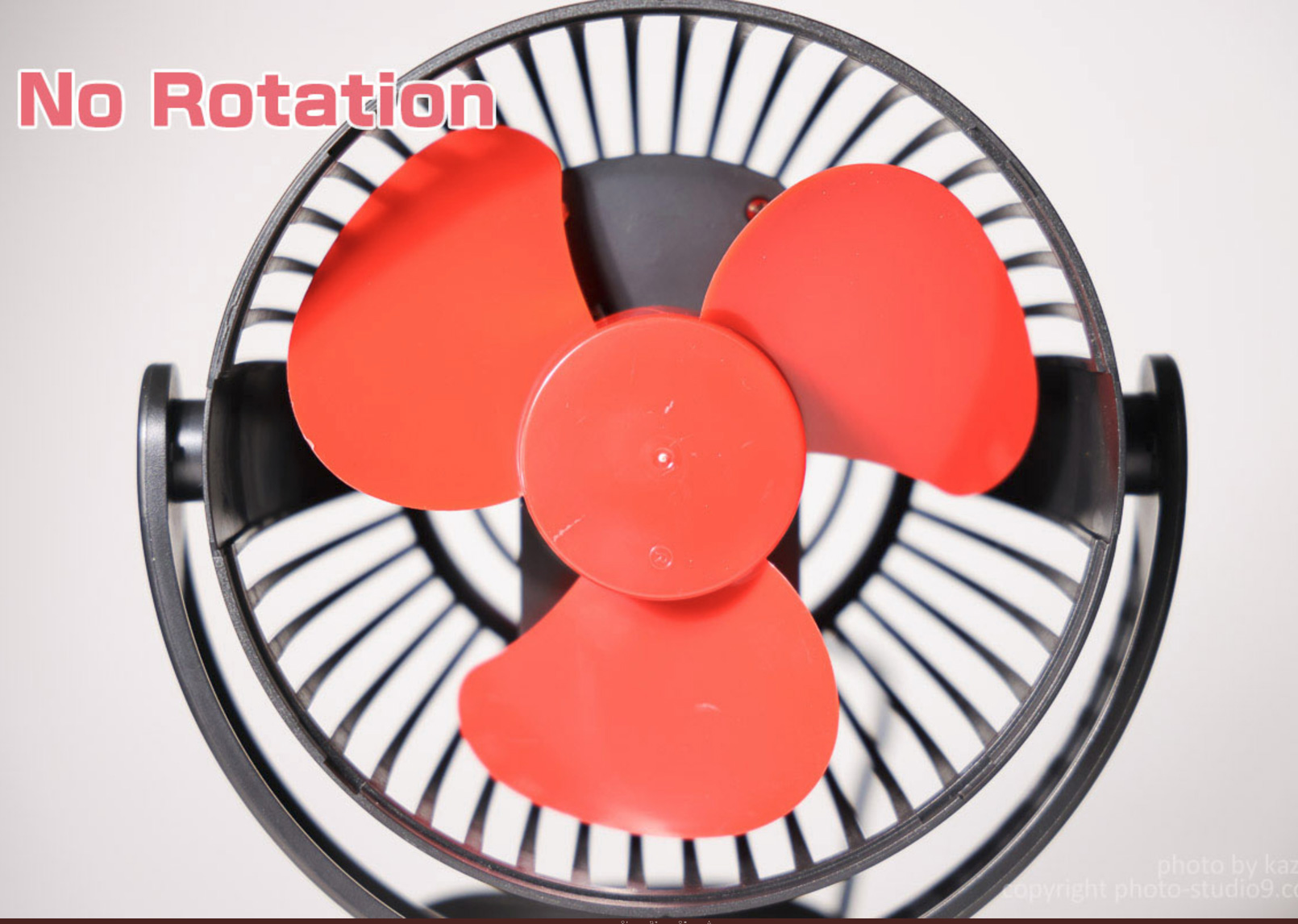
The a9 is not totally without rolling shutter / distortion...
Is one blade longer than the other two on that fan? Seems like the non-rotation image the UL one is longer and then that blade is in the UR of the A9 frame.
As noted, would be nice if they'd used a fan with straight blades and not those uneven wonky shapes.
Regardless, there is still distortion in the A9 image as the scan speed is still only 1/160 or so. MS is still faster.
kezeka wrote:
I have a whole thread about this being frustratingly stupid. The only way to swap between VF and screen is to go into wrench screen 3 and change the setting there (or save it as a favorite). There is way to assign a button to toggle between the two. Hoping this is fixed in update later. What I would love is to have the viewfinder set to activate only when my eye is close and for the back screen to only show menus (and never view through lens).
Macht nichts
Thanks. Yes on the R it only will toggle back and forth between what you see in the VF and the last one of the 5 LCD options. The Q screen is one of those. If I select the menus and the put my eye to the VF I see the menu screen. When I press the shutter half way the scene appears but when I pull cam away Q screen appears. When you press the menu it goes back to the previous screen you were on. That is why I have critical settings in the My Menu section.
Zenon Char wrote:
An update. I don't want to mislead anyone. I am seeing a delay in both auto or manually switching between the VF and Display. However in the VF I see the scene and when I activate the Display I get the Q screen. I'm working on it.
There still isn’t a review that clearly shows if there’s any lag or blackouts at 20fps.
Gordon said he shot continuously for 7 secs. Wasn’t clear if he got 140 raw or jpg and what the hit rate was.
Still waiting. Sigh.
Dely wrote:
This is a very good review of the Canon R5 where your question about blackout was addressed. According to the Reviewer’s comments:
“No Blackout. None!!!“…….“The R5’s autofocus system surpasses the A9II’s, especially the animal eye autofocus. It’s amazing. I was shocked...”
Note: The Reviewer was recently shooting with a Sony A9II. He also previously shot with 1DX MKII so he provides a very well rounded viewpoint.
Credit goes to @Tony5787@ for originally posting this video
Hope you all find this helpful
There was folks on another forum asking why he was using only center focus.
So I Spoke with my buddy (reviewer) yesterday evening, here is what he had to say
"I was not set on center AF I was set on Animal Eye AF with Tracking. The starting point for getting lock on in that setting is the small center zone area. Once the camera locked on with eye focus it tracked the bird. It never really lost the bird I just let up on the AF button when it lost eye tracking and tried to get the camera to get on the eye again by reinitalizing AF. I have used Zone on the R5 and it is excellent as is Animal Eye AF. I trust both. AF has come a long way since having to depend on a single center AF point "
There was folks on another forum asking why he was using only center focus.
So I Spoke with my buddy (reviewer) yesterday evening, here is what he had to say
"I was not set on center AF I was set on Animal Eye AF with Tracking. The starting point for getting lock on in that setting is the small center zone area. Once the camera locked on with eye focus it tracked the bird. It never really lost the bird I just let up on the AF button when it lost eye tracking and tried to get the camera to get on the eye again by reinitalizing AF. I have used Zone on the R5 and it is excellent as is Animal Eye AF. I trust both. AF has come a long way since having to depend on a single center AF point "
Yes, I had assumed that must be "User Selected Start Point" for the Tracking AF mode. The R5 is able to do Eye-AF with Tracking mode, Large and Small Zone modes. Tracking mode can be fully Auto or User Selected. If he had been using Spot, Single or one of the two Expand modes then there is no Eye-AF function available. I would like to see Canon expand the Eye-AF function to allow it to be activated in all the modes like what Sony allows for Real-Time-Tracking and for their Animal Eye-AF. It would just give you a little more control to tell the camera where to look which sometimes is helpful. But at least having this User Selected Start point mode is likely good enough. The square may be a bit large for some use cases but if the algorithms are smart enough then it seems it will work even if there is clutter around the bird. It even seems the system in Full Auto is smart enough to find birds entangled in brush so that is good.
arbitrage wrote:
Yes, I had assumed that must be "User Selected Start Point" for the Tracking AF mode. The R5 is able to do Eye-AF with Tracking mode, Large and Small Zone modes. Tracking mode can be fully Auto or User Selected. If he had been using Spot, Single or one of the two Expand modes then there is no Eye-AF function available. I would like to see Canon expand the Eye-AF function to allow it to be activated in all the modes like what Sony allows for Real-Time-Tracking and for their Animal Eye-AF. It would just give you a little more control to tell the camera where to look which sometimes is helpful. But at least having this User Selected Start point mode is likely good enough. The square may be a bit large for some use cases but if the algorithms are smart enough then it seems it will work even if there is clutter around the bird. It even seems the system in Full Auto is smart enough to find birds entangled in brush so that is good....Show more →
I'm telling ya Geoff. You have got to get your hands on this camera even if for a few minutes using Pius's rig or someone else. The eye AF is just astonishing to me. For the limited BIF I've done so far with the R5, I honestly don't see a need for any zone AF. It's actually kinda creepy how fast the AF will find an eyeball in the frame.
It's so nuts, that I'm now trying to train myself to point the camera in the general direction then activate AF as I pull the camera up to my face because it just finds the eye so quickly. It's far faster than I am. When I have done this, most often the AF point is already locked on an eyeball by the time I look through the VF. Think about that for a minute.
It's not 100% every time and sometimes I've had to nudge the AF over to a different eye by pointing the camera over further to make it snap to a new target but it's intuitive and quick. With time I'm sure I'll figure out different ways to do this such as bumping the joystick perhaps, but for now it works.
How soon are you going to be able to get your hands on one? Soon I hope.
lighthound wrote:
I'm telling ya Geoff. You have got to get your hands on this camera even if for a few minutes using Pius's rig or someone else. The eye AF is just astonishing to me. For the limited BIF I've done so far with the R5, I honestly don't see a need for any zone AF. It's actually kinda creepy how fast the AF will find an eyeball in the frame.
It's so nuts, that I'm now trying to train myself to point the camera in the general direction then activate AF as I pull the camera up to my face because it just finds the eye so quickly. It's far faster than I am. When I have done this, most often the AF point is already locked on an eyeball by the time I look through the VF. Think about that for a minute.
It's not 100% every time and sometimes I've had to nudge the AF over to a different eye by pointing the camera over further to make it snap to a new target but it's intuitive and quick. With time I'm sure I'll figure out different ways to do this such as bumping the joystick perhaps, but for now it works.
How soon are you going to be able to get your hands on one? Soon I hope....Show more →
Probably will be awhile before I get to play with one. Even if Pius is able to get one (which in itself could be awhile if supply is delayed/slow), it could be a month before I am up in his area. I'm not in a rush to buy my own at this time. There is little to photograph right now around here and I still don't know what to do about lenses.
arbitrage wrote:
Probably will be awhile before I get to play with one. Even if Pius is able to get one (which in itself could be awhile if supply is delayed/slow), it could be a month before I am up in his area. I'm not in a rush to buy my own at this time. There is little to photograph right now around here and I still don't know what to do about lenses.
Well that sucks.
If I had a longer layover in SEA, I'd drive up towards you to let you try mine. I could toss it out the window as I'm flying over your house but I don't think that would end well.
lighthound wrote:
Well that sucks.
If I had a longer layover in SEA, I'd drive up towards you to let you try mine. I could toss it out the window as I'm flying over your house but I don't think that would end well.
Pius said he'll come down and shoot swallows with me if he gets it in the next few weeks before the swallows head south. So now we have to see if there is any new supply in Canada coming in the next few weeks and how long the backorder list is.
The closed US/Can border may interfere with plans to pass it off during a layover.