A7R6 readout speed
p.5 #1A7R6 readout speed
speedmaster20d wrote:
I think it's best to refrain from framing speculations / rumors as facts without solid proof.Thanks for performing this test! While I said it was unlikely the a7rVI was reading only a single row at a time, it's even more unlikely for the A1. It's implausible the A1 is achieving its readout speeds with a single row readout - that would represent almost half an order of magnitude improvement in sensor technology, over just a single sensor generation. The fact the Z9 sensor has 12-row readouts makes it A1 not having exceedingly unlikely - the Z9 sensor has identical readout speeds as the A1 when normalized for their slight row count differences, indicating they're share the same core sensor IP.
I'm much more apt to believe the absence of the stair-case artifact in your A1 test indicates this particular ceiling fan / speed / arrangement / image noise is failing to manifest it or, more unlikely, that Sony is using one of the alternate, novel readout schemes I referenced from their patent and that this changed for the A1 II vs A1 I sensor.I recently used an R5m2 shooting swallows and the jagis on the wings were clearly visible and awful.
I have seen this on the A9 where they are barely visible but have never seen this on any A1/A1ii or A9iii images - and I have many thousands from the A1 - the edges all appear to be consistently smooth like the edges in the fan images above.
A9 Jaggies
https://duncangroenewald.com/img/tests/Canon_R1/A9-Jagies.jpg
R5M2 Jaggies
https://duncangroenewald.com/img/tests/Canon_R1/R52_20240126_1_8687_DxD.jpg
EDIT:
Couldn't find any evidence of these artifacts in the Z9 swallow images either.Z9 sensor is a variant of the A1 sensor so no surprise there. I assume that R5II image is at high magnification and I can barely see the "horrible" jaggies and I doubt anyone would notice them at 100%. They look less than the A9 jaggies. I never ever noticed jaggies at all on my A9 in 40000 shots, but I never looked beyond 100%.Z8/Z9 exhibits the 12-row staircase pattern, both in Jim Kasson's test and also in third-party flash photography. Which brings into question whether the Z8/Z9 share the same core sensor IP as the A1, which is something I previously assumed based on their nearly-identical readout times after normalizing for their row count differences.
https://blog.kasson.com/z9/nikon-z9-readout-details/so this is where the 12 row thing come from?
it's too bad the blog owner is not here to comment. When I read his comments he does not claim to know what is causing this issue
"’I’m having a hard time figuring out just what’s happening, although it is pretty clear to me that the camera is performing analog to digital conversion on more than one row at a time."
as we know now the conversion can happen in parallel so this his second part of the statement can be true but neither is he saying nor can we conclude...Show more →
I'll invite Jim to this thread so you guys can talk it out. He's an EE as well (retired). Here's his observation from the A9:
https://blog.kasson.com/the-last-word/sony-a9-electronic-shutter-operation-single-shot/
snapsy wrote
Pixel Perfect wrote
duncangr wrote
snapsy wrote
speedmaster20d wrote
this should debunk the claim / speculation about A1 II is reading in 12 or 8 rows.I think it's best to refrain from framing speculations / rumors as facts without solid proof.
I'm much more apt to believe the absence of the stair-case artifact in your A1 test indicates this particular ceiling fan / speed / arrangement / image noise is failing to manifest it or, more unlikely, that Sony is using one of the alternate, novel readout schemes I referenced from their patent and that this changed for the A1 II vs A1 I sensor.
I have seen this on the A9 where they are barely visible but have never seen this on any A1/A1ii or A9iii images - and I have many thousands from the A1 - the edges all appear to be consistently smooth like the edges in the fan images above.
A9 Jaggies
https://duncangroenewald.com/img/tests/Canon_R1/A9-Jagies.jpg
R5M2 Jaggies
https://duncangroenewald.com/img/tests/Canon_R1/R52_20240126_1_8687_DxD.jpg
EDIT:
Couldn't find any evidence of these artifacts in the Z9 swallow images either.
https://blog.kasson.com/z9/nikon-z9-readout-details/
it's too bad the blog owner is not here to comment. When I read his comments he does not claim to know what is causing this issue
"’I’m having a hard time figuring out just what’s happening, although it is pretty clear to me that the camera is performing analog to digital conversion on more than one row at a time."
as we know now the conversion can happen in parallel so this his second part of the statement can be true but neither is he saying nor can we conclude...Show more →
I'll invite Jim to this thread so you guys can talk it out. He's an EE as well (retired). Here's his observation from the A9:
https://blog.kasson.com/the-last-word/sony-a9-electronic-shutter-operation-single-shot/
Jun 11, 2026 at 01:07 AM
p.5 #2A7R6 readout speed
snapsy wrote:
I'm much more apt to believe the absence of the stair-case artifact in your A1 test indicates this particular ceiling fan / speed / arrangement / image noise is failing to manifest it or, more unlikely, that Sony is using one of the alternate, novel readout schemes I referenced from their patent and that this changed for the A1 II vs A1 I sensor.I recently used an R5m2 shooting swallows and the jagis on the wings were clearly visible and awful.
I have seen this on the A9 where they are barely visible but have never seen this on any A1/A1ii or A9iii images - and I have many thousands from the A1 - the edges all appear to be consistently smooth like the edges in the fan images above.
A9 Jaggies
https://duncangroenewald.com/img/tests/Canon_R1/A9-Jagies.jpg
R5M2 Jaggies
https://duncangroenewald.com/img/tests/Canon_R1/R52_20240126_1_8687_DxD.jpg
EDIT:
Couldn't find any evidence of these artifacts in the Z9 swallow images either.Z9 sensor is a variant of the A1 sensor so no surprise there. I assume that R5II image is at high magnification and I can barely see the "horrible" jaggies and I doubt anyone would notice them at 100%. They look less than the A9 jaggies. I never ever noticed jaggies at all on my A9 in 40000 shots, but I never looked beyond 100%.Z8/Z9 exhibits the 12-row staircase pattern, both in Jim Kasson's test and also in third-party flash photography. Which brings into question whether the Z8/Z9 share the same core sensor IP as the A1, which is something I previously assumed based on their nearly-identical readout times after normalizing for their row count differences.
https://blog.kasson.com/z9/nikon-z9-readout-details/so this is where the 12 row thing come from?
it's too bad the blog owner is not here to comment. When I read his comments he does not claim to know what is causing this issue
"’I’m having a hard time figuring out just what’s happening, although it is pretty clear to me that the camera is performing analog to digital conversion on more than one row at a time."
as we know now the conversion can happen in parallel so this his second part of the statement can be true but neither is he saying nor can we conclude that the charge transfer itself is happening for groups of row... or that it is responsible for this artifact
I don't think we can explain this bizarre artifact this simply. In fact the patten looks as if there is something different between even and odd columns in those 12 rows.
If we had access to the raw images, we could split each image into 2 images, one for even columns and one for off columns to see if the bands appear in just one or both images to shed more light....
It is very difficult to say what is causing this, but it this looks some kind of design bug, some kind unwanted effect that is not result of just rolling shutter.... whatever it was it seems to have been fixedI'll invite Jim to this thread so you guys can talk it out. He's an EE as well (retired). Here's his observation from the A9:
https://blog.kasson.com/the-last-word/sony-a9-electronic-shutter-operation-single-shot/
that would be a good discussion
speedmaster20d wrote
snapsy wrote
Pixel Perfect wrote
duncangr wrote
snapsy wrote
Thanks for performing this test! While I said it was unlikely the a7rVI was reading only a single row at a time, it's even more unlikely for the A1. It's implausible the A1 is achieving its readout speeds with a single row readout - that would represent almost half an order of magnitude improvement in sensor technology, over just a single sensor generation. The fact the Z9 sensor has 12-row readouts makes it A1 not having exceedingly unlikely - the Z9 sensor has identical readout speeds as the A1 when normalized for their slight row count differences, indicating they're share the same core sensor IP.I'm much more apt to believe the absence of the stair-case artifact in your A1 test indicates this particular ceiling fan / speed / arrangement / image noise is failing to manifest it or, more unlikely, that Sony is using one of the alternate, novel readout schemes I referenced from their patent and that this changed for the A1 II vs A1 I sensor.
I have seen this on the A9 where they are barely visible but have never seen this on any A1/A1ii or A9iii images - and I have many thousands from the A1 - the edges all appear to be consistently smooth like the edges in the fan images above.
A9 Jaggies
https://duncangroenewald.com/img/tests/Canon_R1/A9-Jagies.jpg
R5M2 Jaggies
https://duncangroenewald.com/img/tests/Canon_R1/R52_20240126_1_8687_DxD.jpg
EDIT:
Couldn't find any evidence of these artifacts in the Z9 swallow images either.
https://blog.kasson.com/z9/nikon-z9-readout-details/
it's too bad the blog owner is not here to comment. When I read his comments he does not claim to know what is causing this issue
"’I’m having a hard time figuring out just what’s happening, although it is pretty clear to me that the camera is performing analog to digital conversion on more than one row at a time."
as we know now the conversion can happen in parallel so this his second part of the statement can be true but neither is he saying nor can we conclude that the charge transfer itself is happening for groups of row... or that it is responsible for this artifact
I don't think we can explain this bizarre artifact this simply. In fact the patten looks as if there is something different between even and odd columns in those 12 rows.
If we had access to the raw images, we could split each image into 2 images, one for even columns and one for off columns to see if the bands appear in just one or both images to shed more light....
It is very difficult to say what is causing this, but it this looks some kind of design bug, some kind unwanted effect that is not result of just rolling shutter.... whatever it was it seems to have been fixed
https://blog.kasson.com/the-last-word/sony-a9-electronic-shutter-operation-single-shot/
that would be a good discussion
Jun 11, 2026 at 01:12 AM
p.5 #3A7R6 readout speed
Here is an image taken in APS-C mode and there is not much evidence of lean in the background objects and I am panning sideways to try and keep the bird in the frame.

Jun 16, 2026 at 04:33 PM
p.5 #4A7R6 readout speed
I have been doing testing with the A7RVI and have found that in APS-C mode the scan rate seems similar to my A1. Maybe slightly slower. Hummingbird shots are mostly usable. FF mode? Only certain wing movements look normal...maybe only 40-50%.
My suggestion is stick to APS-C for hummingbirds with the A7RVI.
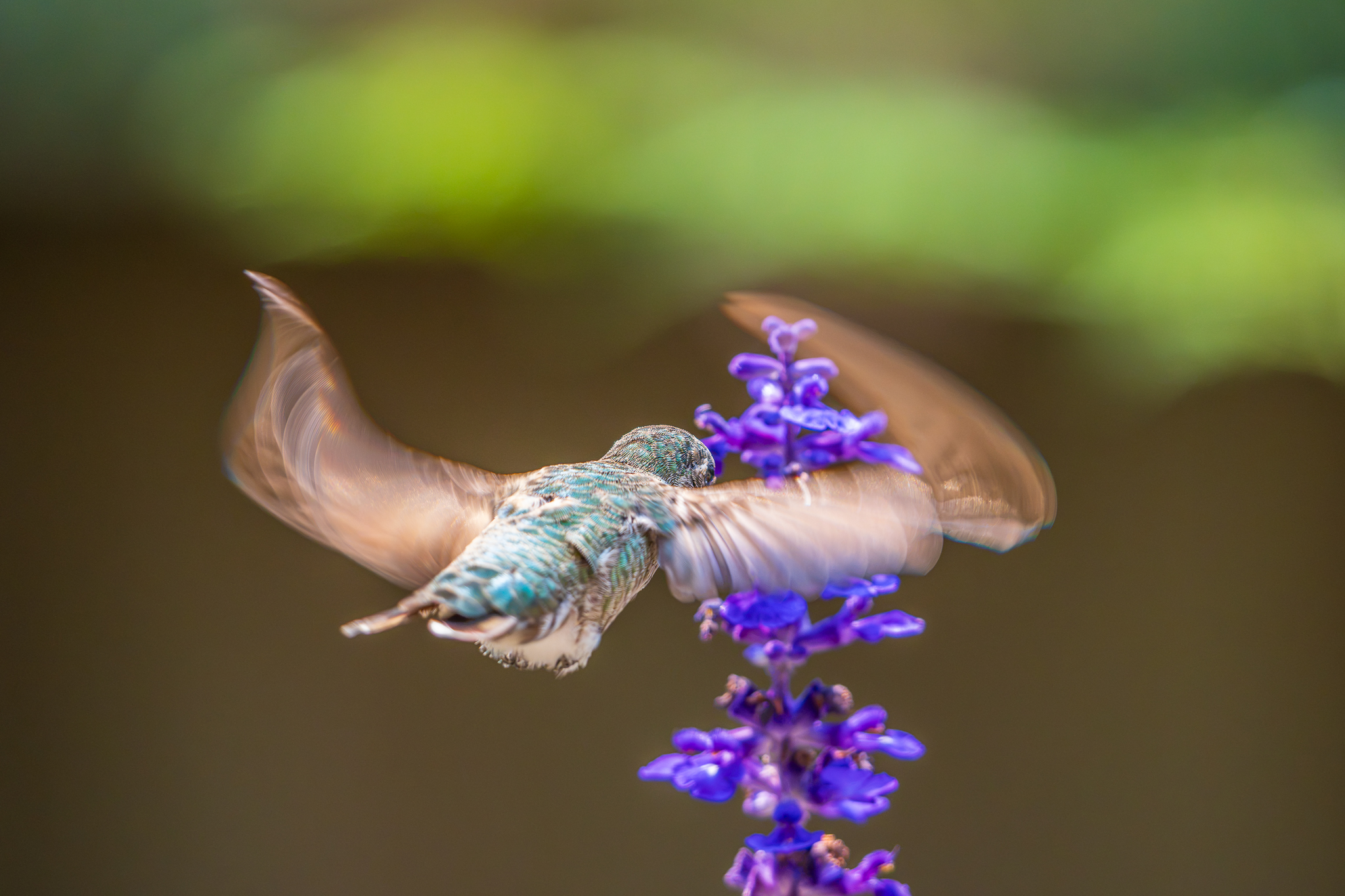
The first image here shows how weird things can get in the FF mode on the A7RVI. Some look completely normal but then this happens...
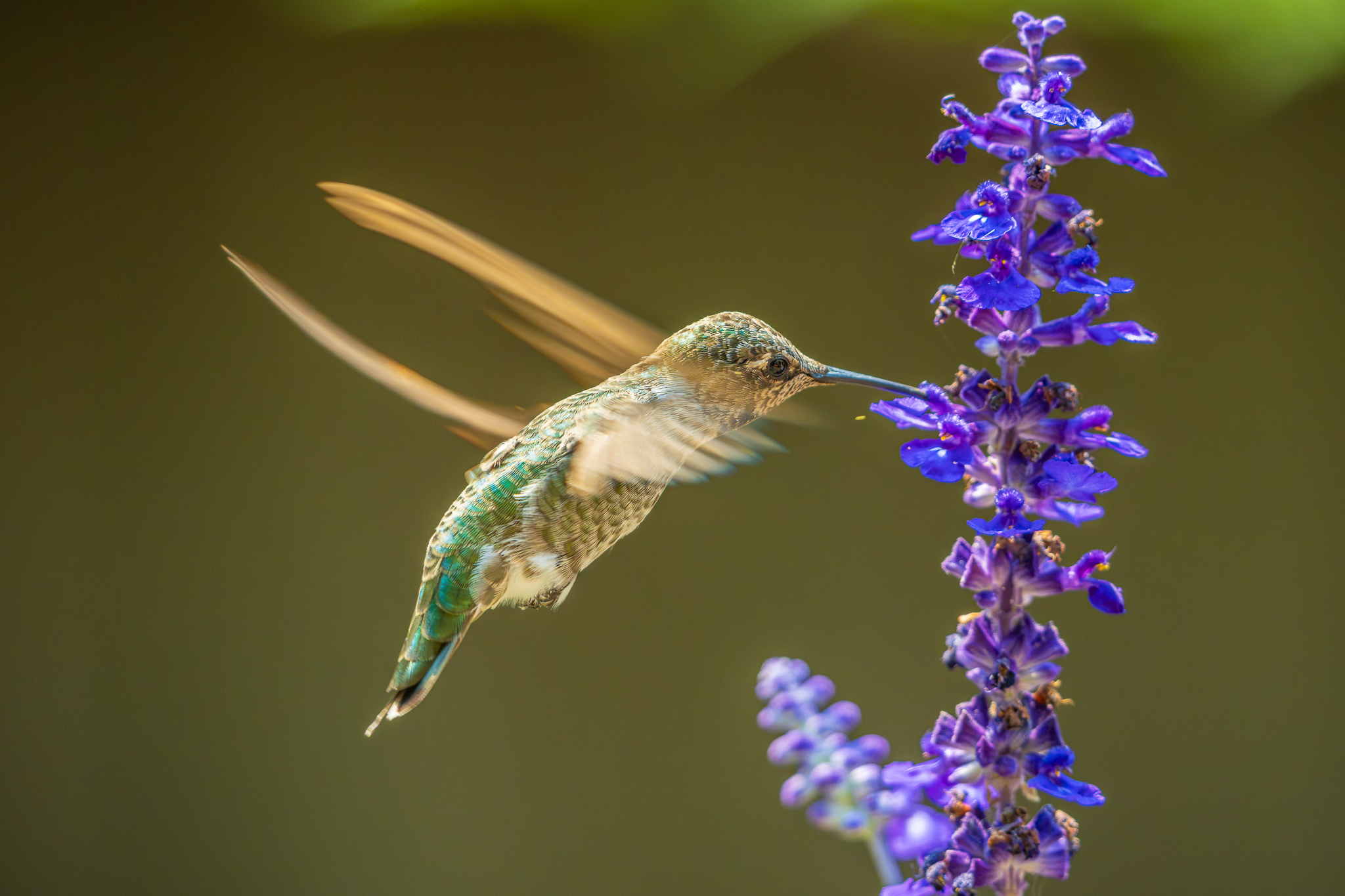
The second image is full-frame and looks normal -- so not all bad!
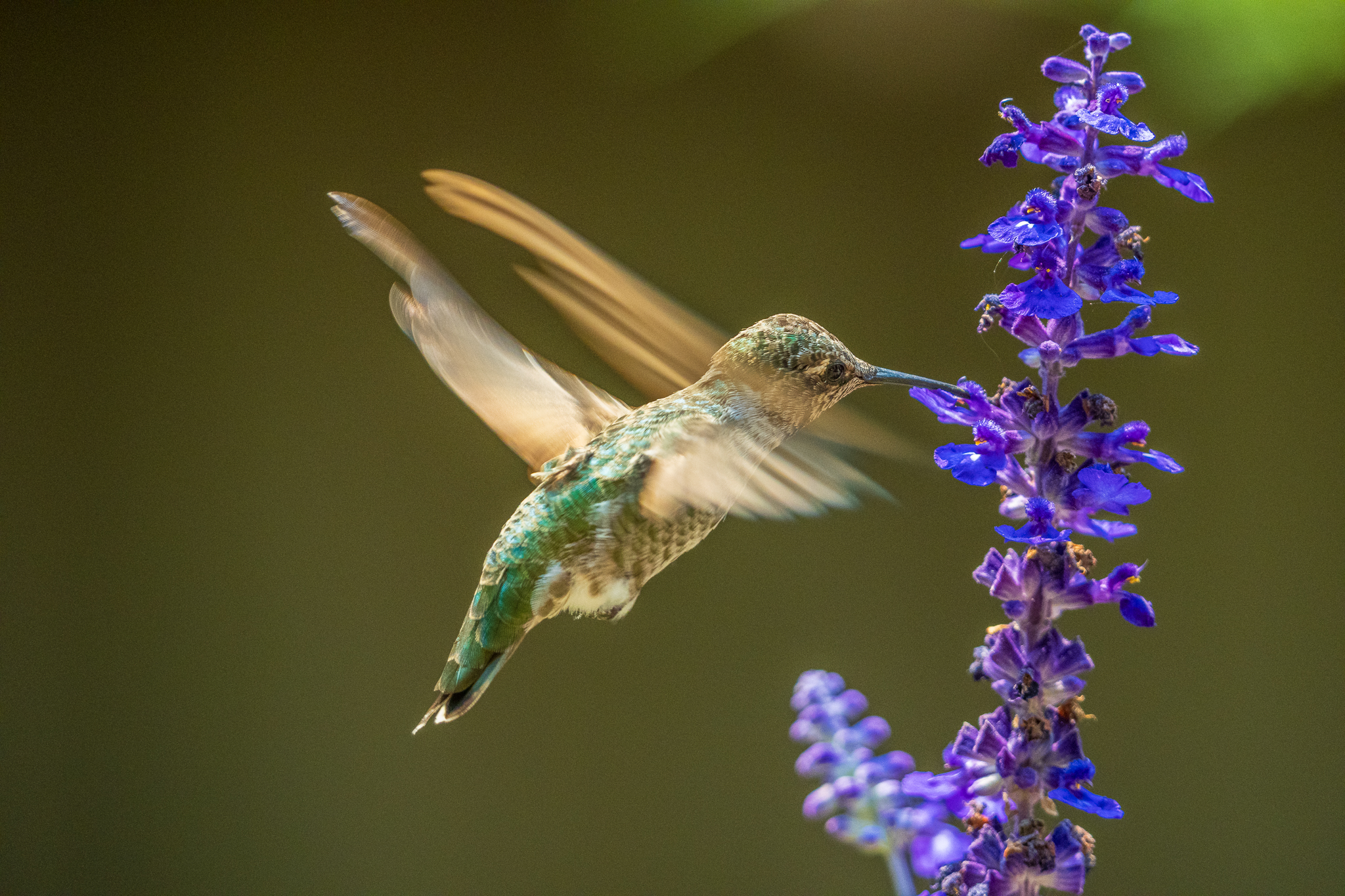
The third image appears typically what I get in APS-C mode. Much better keeper rate.
I also tried mechanical shutter full-frame and I did not like that at all. Shutter blackout and inconsistent focus -- ugly. I would never use it for fast action.

Very strange scanning on the a7RVI full-frame

Wing beats look normal here in full-frame -- sometimes it looks good!

APS-C A7RVI mode. Looks like the best option.
My suggestion is stick to APS-C for hummingbirds with the A7RVI.
The first image here shows how weird things can get in the FF mode on the A7RVI. Some look completely normal but then this happens...
The second image is full-frame and looks normal -- so not all bad!
The third image appears typically what I get in APS-C mode. Much better keeper rate.
I also tried mechanical shutter full-frame and I did not like that at all. Shutter blackout and inconsistent focus -- ugly. I would never use it for fast action.
Very strange scanning on the a7RVI full-frame
Wing beats look normal here in full-frame -- sometimes it looks good!
APS-C A7RVI mode. Looks like the best option.
Aug 04, 2026 at 01:28 PM
p.5 #5A7R6 readout speed
AJay wrote:
I have been doing testing with the A7RVI and have found that in APS-C mode the scan rate seems similar to my A1. Hummingbird shots are mostly usable. Uncropped mode? Only certain wing movements look normal...maybe only 20-40%. I also have the A9III and of course they are all usable, at least from a distortion standpoint.
My suggestion is stick to APS-C for hummingbirds with the A7RVI.
The first image here shows how weird things get in the FF mode on the A7RVI. Some look completely normal but then this happens...
The second image is full-frame and looks normal -- so not all...Show more →
Holy shxt! That distortion in the first one is off the chart. I thought you would only see that kind of distortion using electronic shutter of A7R5. I tried the A7RVI on hummingbirds and did get maybe 1 out 5 that showed very visible rolling shutter effect but nothing close to you first shot. Still plenty of good shots to choose from though.
Since I have two A1IIs, I am not going to bother to use the A7RVI for fast stuff, not that it can't do it but the A1II is just more suitable for that type of stuff, IMO, of course.
Edited on Aug 04, 2026 at 02:38 PM · View previous versions
I have been doing testing with the A7RVI and have found that in APS-C mode the scan rate seems similar to my A1. Hummingbird shots are mostly usable. Uncropped mode? Only certain wing movements look normal...maybe only 20-40%. I also have the A9III and of course they are all usable, at least from a distortion standpoint.
My suggestion is stick to APS-C for hummingbirds with the A7RVI.
The first image here shows how weird things get in the FF mode on the A7RVI. Some look completely normal but then this happens...
The second image is full-frame and looks normal -- so not all...Show more →
Holy shxt! That distortion in the first one is off the chart. I thought you would only see that kind of distortion using electronic shutter of A7R5. I tried the A7RVI on hummingbirds and did get maybe 1 out 5 that showed very visible rolling shutter effect but nothing close to you first shot. Still plenty of good shots to choose from though.
Since I have two A1IIs, I am not going to bother to use the A7RVI for fast stuff, not that it can't do it but the A1II is just more suitable for that type of stuff, IMO, of course.
Edited on Aug 04, 2026 at 02:38 PM · View previous versions
Aug 04, 2026 at 02:12 PM
p.5 #6A7R6 readout speed
AJay wrote:
I have been doing testing with the A7RVI and have found that in APS-C mode the scan rate seems similar to my A1. Maybe slightly slower. Hummingbird shots are mostly usable. FF mode? Only certain wing movements look normal...maybe only 40-50%.
My suggestion is stick to APS-C for hummingbirds with the A7RVI.
The first image here shows how weird things can get in the FF mode on the A7RVI. Some look completely normal but then this happens...
The second image is full-frame and looks normal -- so not all bad!
The third image appears typically what I get in APS-C mode. Much better...Show more →
We've had a discussion on this on the main topic for the camera and it is a great input you have given here thank you very much!
The seemingly random nature of this is quite interesting. I shared on the other topic this post from arbitrage which could help explain why your second photo looks great https://bcgforums.com/threads/rolling-shutter-query.9231/#post-92484 .
APS-C looks very promising. I do wonder if it is about the APS-C mode itself or rather about not filling the frame in the FF mode.
I think this camera seems to have only minor weaknesses even for tough action, great job by Sony. I would still love to see how it would perform in a pre-capture takeoff scenario but signs are overall positive.
I have been doing testing with the A7RVI and have found that in APS-C mode the scan rate seems similar to my A1. Maybe slightly slower. Hummingbird shots are mostly usable. FF mode? Only certain wing movements look normal...maybe only 40-50%.
My suggestion is stick to APS-C for hummingbirds with the A7RVI.
The first image here shows how weird things can get in the FF mode on the A7RVI. Some look completely normal but then this happens...
The second image is full-frame and looks normal -- so not all bad!
The third image appears typically what I get in APS-C mode. Much better...Show more →
We've had a discussion on this on the main topic for the camera and it is a great input you have given here thank you very much!
The seemingly random nature of this is quite interesting. I shared on the other topic this post from arbitrage which could help explain why your second photo looks great https://bcgforums.com/threads/rolling-shutter-query.9231/#post-92484 .
APS-C looks very promising. I do wonder if it is about the APS-C mode itself or rather about not filling the frame in the FF mode.
I think this camera seems to have only minor weaknesses even for tough action, great job by Sony. I would still love to see how it would perform in a pre-capture takeoff scenario but signs are overall positive.
Aug 04, 2026 at 02:18 PM
p.5 #7A7R6 readout speed
umut_h_toprak wrote:
My suggestion is stick to APS-C for hummingbirds with the A7RVI.
The first image here shows how weird things can get in the FF mode on the A7RVI. Some look completely normal but then this happens...
The second image is full-frame and looks normal -- so not all bad!
The third image appears typically what I get in APS-C mode. Much better keeper rate.
I also tried mechanical shutter full-frame and I did not like that at all. Shutter blackout and inconsistent focus -- ugly. I would never use it for fast action.We've had a discussion on this on the main topic for the camera and it is a great input you have given here thank you very much!
The seemingly random nature of this is quite interesting. I shared on the other topic this post from arbitrage which could help explain why your second photo looks great https://bcgforums.com/threads/rolling-shutter-query.9231/#post-92484 .
APS-C looks very promising. I do wonder if it is about the APS-C mode itself or rather about not filling the frame in the FF mode.
I think this camera seems to have only minor weaknesses even for tough action, great job by Sony....Show more →
Like I said, even though the rolling shutter effect is present some times but there are still plenty of good ones what don't show that. But If you are panning with a lot of vertical trees/buildings in the background, then most of your shots will show the leaning.
AJay wrote
I have been doing testing with the A7RVI and have found that in APS-C mode the scan rate seems similar to my A1. Maybe slightly slower. Hummingbird shots are mostly usable. FF mode? Only certain wing movements look normal...maybe only 40-50%.My suggestion is stick to APS-C for hummingbirds with the A7RVI.
The first image here shows how weird things can get in the FF mode on the A7RVI. Some look completely normal but then this happens...
The second image is full-frame and looks normal -- so not all bad!
The third image appears typically what I get in APS-C mode. Much better keeper rate.
I also tried mechanical shutter full-frame and I did not like that at all. Shutter blackout and inconsistent focus -- ugly. I would never use it for fast action.
The seemingly random nature of this is quite interesting. I shared on the other topic this post from arbitrage which could help explain why your second photo looks great https://bcgforums.com/threads/rolling-shutter-query.9231/#post-92484 .
APS-C looks very promising. I do wonder if it is about the APS-C mode itself or rather about not filling the frame in the FF mode.
I think this camera seems to have only minor weaknesses even for tough action, great job by Sony....Show more →
Like I said, even though the rolling shutter effect is present some times but there are still plenty of good ones what don't show that. But If you are panning with a lot of vertical trees/buildings in the background, then most of your shots will show the leaning.
Aug 04, 2026 at 02:29 PM
p.5 #8A7R6 readout speed
Douglas L wrote:
Like I said, even though the rolling shutter effect is present some times but there are still plenty of good ones what don't show that. But If you are panning with a lot of vertical trees/buildings in the background, then most of your shots will show the leaning.
Yes indeed, it seems so. Thank you again also for your input.
I am less concerned about the panning-related artifacts than the broken wings as a mode of failure.
If I were to buy a camera today, it would be this one based on what I have seen on the subject so far.
Like I said, even though the rolling shutter effect is present some times but there are still plenty of good ones what don't show that. But If you are panning with a lot of vertical trees/buildings in the background, then most of your shots will show the leaning.
Yes indeed, it seems so. Thank you again also for your input.
I am less concerned about the panning-related artifacts than the broken wings as a mode of failure.
If I were to buy a camera today, it would be this one based on what I have seen on the subject so far.
Aug 04, 2026 at 02:34 PM
p.5 #9A7R6 readout speed
Every once in a while it appears the scan rate slows dramatically in FF. Maybe it happens once the buffer is full? Not sure, but it has happened a couple of times with really weird results.
Aug 04, 2026 at 04:07 PM
p.5 #10A7R6 readout speed
AJay wrote:
Every once in a while it appears the scan rate slows dramatically in FF. Maybe it happens once the buffer is full? Not sure, but it has happened a couple of times with really weird results.
It's not the scan rate that changes on the camera - it's just that the scan coincided with a downward wing beat at maximum speed. Bear in mind that it is only the image of the tip of the wing that is moving fast enough over the sensor to match the scan speed and therefor appear in many places in the captured image.
In most frames the wing is going up or moving more slowly near the top/bottom of the wingbeat and so shows little rolling shutter distortion because it doesn't move much in the frame during the exposure/scan.
Every once in a while it appears the scan rate slows dramatically in FF. Maybe it happens once the buffer is full? Not sure, but it has happened a couple of times with really weird results.
It's not the scan rate that changes on the camera - it's just that the scan coincided with a downward wing beat at maximum speed. Bear in mind that it is only the image of the tip of the wing that is moving fast enough over the sensor to match the scan speed and therefor appear in many places in the captured image.
In most frames the wing is going up or moving more slowly near the top/bottom of the wingbeat and so shows little rolling shutter distortion because it doesn't move much in the frame during the exposure/scan.
Aug 04, 2026 at 05:02 PM
|
p.5 #11A7R6 readout speed
It's not hard to get rolling shutter effects with hummingbirds on the A7R VI...
Edit: After observing the phenomenon through the EVF as well as in some of my photos, I started to wonder what was wrong with the camera. Then I remembered I had turned on DGO (dual gain output) during harsh mid-day light the other day - and that effectively doubles the sensor readout time. So - the images below are largely due to user error.
Edited on Aug 05, 2026 at 07:00 PM · View previous versions
Edit: After observing the phenomenon through the EVF as well as in some of my photos, I started to wonder what was wrong with the camera. Then I remembered I had turned on DGO (dual gain output) during harsh mid-day light the other day - and that effectively doubles the sensor readout time. So - the images below are largely due to user error.
 |
||
 |
||
|
ILCE-7RM6 FE 400-800mm F6.3-8 G OSS lens 800mm f/8.0 1/1000s 8000 ISO 0.0 EV
|
||
 |
||
|
ILCE-7RM6 FE 400-800mm F6.3-8 G OSS lens 800mm f/8.0 1/1000s 8000 ISO 0.0 EV
|
||
 |
||
|
ILCE-7RM6 FE 400-800mm F6.3-8 G OSS lens 800mm f/8.0 1/1000s 6400 ISO 0.0 EV
Edited on Aug 05, 2026 at 07:00 PM · View previous versions
Aug 04, 2026 at 05:42 PM
p.5 #12A7R6 readout speed
Very artistic shots, Cliff! . I didn't see it this bad in my brief experiment with the A7RVI for hummingbirds. I did see some of the bird pictures others posted that showed extra long wings. Most people would not have associated the extra long wings with rolling shutter, it's not very obvious. I think most people can easily identify rolling shutter effect in hummingbirds shots such as yours, leaning buildings/trees, curvy golf clubs, egg shape balls.... If I only had the A7RVI, I would not hesitate to use it to shoot fast actions. There are still plenty of acceptable shots to choose from even if rolling effect is visible in others. On the other hand, the A7RVI would not be my first choice to shoot fast actions with since I have other tools better suited for it. But it's just me.
 Aug 04, 2026 at 06:14 PM
p.5 #13A7R6 readout speed
Douglas L wrote:
Very artistic shots, Cliff!. I didn't see it this bad in my brief experiment with the A7RVI for hummingbirds. I did see some of the bird pictures others posted that showed extra long wings. Most people would not have associated the extra long wings with rolling shutter, it's not very obvious. I think most people can easily identify rolling shutter effect in hummingbirds shots such as yours, leaning buildings/trees, curvy golf clubs, egg shape balls.... If I only had the A7RVI, I would not hesitate to use it to shoot fast actions. There are still plenty of acceptable shots...Show more →
You can always switch to the mechanical shutter... but it' easy to get spoiled by the speed of that electronic shutter.
Very artistic shots, Cliff!
. I didn't see it this bad in my brief experiment with the A7RVI for hummingbirds. I did see some of the bird pictures others posted that showed extra long wings. Most people would not have associated the extra long wings with rolling shutter, it's not very obvious. I think most people can easily identify rolling shutter effect in hummingbirds shots such as yours, leaning buildings/trees, curvy golf clubs, egg shape balls.... If I only had the A7RVI, I would not hesitate to use it to shoot fast actions. There are still plenty of acceptable shots...Show more →You can always switch to the mechanical shutter... but it' easy to get spoiled by the speed of that electronic shutter.
Aug 04, 2026 at 06:51 PM
p.5 #14A7R6 readout speed
Cliff L. wrote:
You can always switch to the mechanical shutter... but it' easy to get spoiled by the speed of that electronic shutter.
Mechanical was too much of a compromise for my taste even beyond the 10 fps limit. I found the best option was to shoot in APS-C with the Sony 300mm 2.8 for hummingbirds. Very little noticeable distortion (if any) and plenty of detail. The smaller file size also means the buffer won't fill up as fast.
You can always switch to the mechanical shutter... but it' easy to get spoiled by the speed of that electronic shutter.
Mechanical was too much of a compromise for my taste even beyond the 10 fps limit. I found the best option was to shoot in APS-C with the Sony 300mm 2.8 for hummingbirds. Very little noticeable distortion (if any) and plenty of detail. The smaller file size also means the buffer won't fill up as fast.
Aug 05, 2026 at 05:06 AM
p.5 #15A7R6 readout speed
AJay wrote:
I have been doing testing with the A7RVI and have found that in APS-C mode the scan rate seems similar to my A1. Maybe slightly slower. Hummingbird shots are mostly usable. FF mode? Only certain wing movements look normal...maybe only 40-50%.
My suggestion is stick to APS-C for hummingbirds with the A7RVI.
It's important to clarify this. While the total sensor scan time decreases by 1/1.5 (0.66x) in APS-C vs FF mode, the relative readout rate from row to row doesn't change. This means that if a subject of equal magnification is moving at the same vertical rate across the frame there will be no reduction in rolling shutter artifacts. You'll only get a reduction in rolling shutter artifacts in APS-C mode if you reduce the magnification of the subject to produce equivalent framing, ie if you either step back or use a wider angle - in that scenario the subject moves at a slower relative speed vertically across the sensor, thus even though the row-to-row readout rate is the same there is less vertical movement across the rows during that time. Since a lot of bird shooting can be focal-length limited, stepping back or using a wider angle has obvious consequences for detail / resolution.
I have been doing testing with the A7RVI and have found that in APS-C mode the scan rate seems similar to my A1. Maybe slightly slower. Hummingbird shots are mostly usable. FF mode? Only certain wing movements look normal...maybe only 40-50%.
My suggestion is stick to APS-C for hummingbirds with the A7RVI.
It's important to clarify this. While the total sensor scan time decreases by 1/1.5 (0.66x) in APS-C vs FF mode, the relative readout rate from row to row doesn't change. This means that if a subject of equal magnification is moving at the same vertical rate across the frame there will be no reduction in rolling shutter artifacts. You'll only get a reduction in rolling shutter artifacts in APS-C mode if you reduce the magnification of the subject to produce equivalent framing, ie if you either step back or use a wider angle - in that scenario the subject moves at a slower relative speed vertically across the sensor, thus even though the row-to-row readout rate is the same there is less vertical movement across the rows during that time. Since a lot of bird shooting can be focal-length limited, stepping back or using a wider angle has obvious consequences for detail / resolution.
Aug 05, 2026 at 06:59 AM
p.5 #16A7R6 readout speed
AJay wrote:
I have been doing testing with the A7RVI and have found that in APS-C mode the scan rate seems similar to my A1. Maybe slightly slower. Hummingbird shots are mostly usable. FF mode? Only certain wing movements look normal...maybe only 40-50%.
My suggestion is stick to APS-C for hummingbirds with the A7RVI.
The first image here shows how weird things can get in the FF mode on the A7RVI. Some look completely normal but then this happens...
The second image is full-frame and looks normal -- so not all bad!
The third image appears typically what I get in APS-C mode. Much better...Show more →
APS-C mode isn't really buying you anything apart from longer buffer - just step back or zoom out to get equivalent subject size in the full frame and you will get the same result. Easier to keep the bird in the frame.
I have been doing testing with the A7RVI and have found that in APS-C mode the scan rate seems similar to my A1. Maybe slightly slower. Hummingbird shots are mostly usable. FF mode? Only certain wing movements look normal...maybe only 40-50%.
My suggestion is stick to APS-C for hummingbirds with the A7RVI.
The first image here shows how weird things can get in the FF mode on the A7RVI. Some look completely normal but then this happens...
The second image is full-frame and looks normal -- so not all bad!
The third image appears typically what I get in APS-C mode. Much better...Show more →
APS-C mode isn't really buying you anything apart from longer buffer - just step back or zoom out to get equivalent subject size in the full frame and you will get the same result. Easier to keep the bird in the frame.
Aug 05, 2026 at 07:56 AM

p.5 #17A7R6 readout speed
AJay wrote:
Have you guys tested APS-C with hummingbirds with the A7RVI? There's definitely an improvement with rolling shutter artifacts and I can guarantee you that stepping forward, stepping back, filling the frame or not filling the frame...it does not matter. Maybe it has something to do with processing, buffering or file size differences. Whatever the case, it performs much better.
Think about it this way, if you use FF and step back or zoom out and then crop to an APS-C sized image you are doing exactly the same thing as using APS-C mode. APS-C mode does help in two ways. The viewfinder will provide exactly what the image will look like (you would have to guess at this if you step back or zoom out and plan to crop to APS-C), and you won't fill up the buffer as fast, but APS-C mode will give you no advantage in preventing rolling shutter. It can't. If you take the FF shot and then crop down to APS-C size later you literally are using the same sensor and the same area of the sensor so you will get the same results with rolling shutter.
Have you guys tested APS-C with hummingbirds with the A7RVI? There's definitely an improvement with rolling shutter artifacts and I can guarantee you that stepping forward, stepping back, filling the frame or not filling the frame...it does not matter. Maybe it has something to do with processing, buffering or file size differences. Whatever the case, it performs much better.
Think about it this way, if you use FF and step back or zoom out and then crop to an APS-C sized image you are doing exactly the same thing as using APS-C mode. APS-C mode does help in two ways. The viewfinder will provide exactly what the image will look like (you would have to guess at this if you step back or zoom out and plan to crop to APS-C), and you won't fill up the buffer as fast, but APS-C mode will give you no advantage in preventing rolling shutter. It can't. If you take the FF shot and then crop down to APS-C size later you literally are using the same sensor and the same area of the sensor so you will get the same results with rolling shutter.
Aug 05, 2026 at 08:35 AM
p.5 #18A7R6 readout speed
Let's forget the hummingbirds for the moment and let's look at drone propellers. The drone was hovering about 70' above ground, calm winds. All shots that I took were at 1/8000 sec which is max for the A7R6. There's some extreme smearing happening every so often.
Here are 3 test shots:
(1) What propellers should look like with no rolling shutter. Taken with my A93, 1/8000 sec.
(2) What propellers should look like with the A7R6 due to rolling shutter (IMO).
(3) What I did not expect to see with hummingbirds or propellers. About every fifth frame or so...
So for those that have tested rolling shutter on other cameras, is it normal for extreme smearing to occur while other frames do not show this?
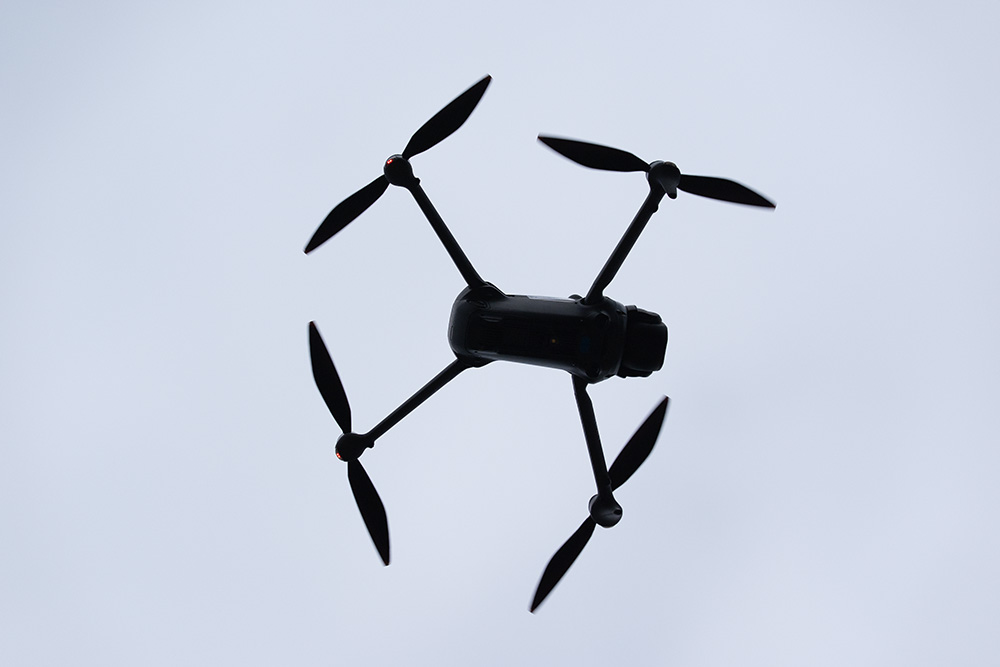
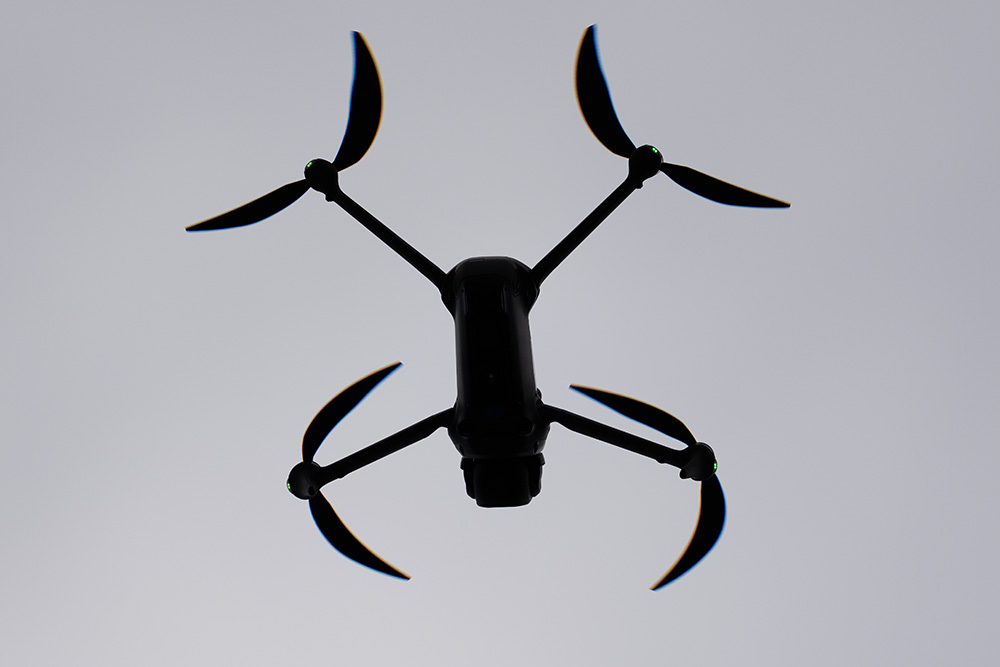
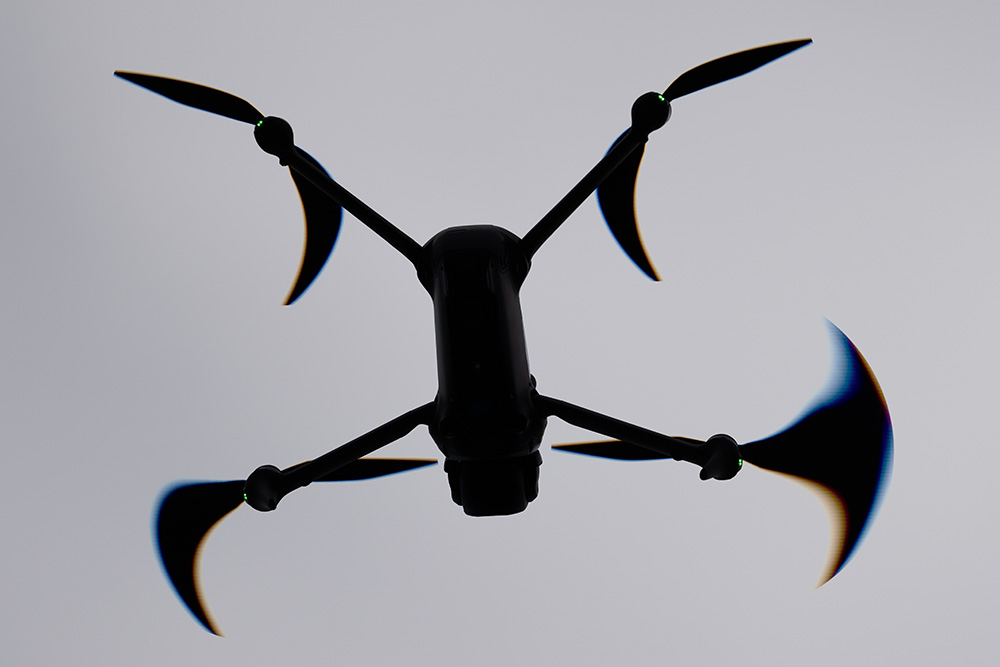
Here are 3 test shots:
(1) What propellers should look like with no rolling shutter. Taken with my A93, 1/8000 sec.
(2) What propellers should look like with the A7R6 due to rolling shutter (IMO).
(3) What I did not expect to see with hummingbirds or propellers. About every fifth frame or so...
So for those that have tested rolling shutter on other cameras, is it normal for extreme smearing to occur while other frames do not show this?
Aug 05, 2026 at 09:25 AM
p.5 #19A7R6 readout speed
AJay wrote:
Let's forget the hummingbirds for the moment and let's look at drone propellers. The drone was hovering about 70' above ground, calm winds. All shots that I took were at 1/8000 sec which is max for the A7R6. There's some extreme smearing happening every so often.
Here are 3 test shots:
(1) What propellers should look like with no rolling shutter. Taken with my A93, 1/8000 sec.
(2) What propellers should look like with the A7R6 due to rolling shutter (IMO).
(3) What I did not expect to see with hummingbirds or propellers. About every fifth frame or so...
So for those that have tested...Show more →
The degree of artifacts is a function of the vertical movement of the subject across the image plane. The propellers as shot move both horizontally and vertically relative to the image plane, depending on the phase you capture them in a given photo. That's why the amount of rolling shutter distortion varies from one image to the next.
Let's forget the hummingbirds for the moment and let's look at drone propellers. The drone was hovering about 70' above ground, calm winds. All shots that I took were at 1/8000 sec which is max for the A7R6. There's some extreme smearing happening every so often.
Here are 3 test shots:
(1) What propellers should look like with no rolling shutter. Taken with my A93, 1/8000 sec.
(2) What propellers should look like with the A7R6 due to rolling shutter (IMO).
(3) What I did not expect to see with hummingbirds or propellers. About every fifth frame or so...
So for those that have tested...Show more →
The degree of artifacts is a function of the vertical movement of the subject across the image plane. The propellers as shot move both horizontally and vertically relative to the image plane, depending on the phase you capture them in a given photo. That's why the amount of rolling shutter distortion varies from one image to the next.
Aug 05, 2026 at 11:10 AM
p.5 #20A7R6 readout speed
snapsy wrote:
The degree of artifacts is a function of the vertical movement of the subject across the image plane. The propellers as shot move both horizontally and vertically relative to the image plane, depending on the phase you capture them in a given photo. That's why the amount of rolling shutter distortion varies from one image to the next.
I get that but look at the lower right propeller. Why is only one side of the propeller smeared? I'm assuming the image is being scanned either top to bottom or bottom to top. The smearing should be identical on both sides of the bottom right propeller should it not if the scan is consistent in speed?
The degree of artifacts is a function of the vertical movement of the subject across the image plane. The propellers as shot move both horizontally and vertically relative to the image plane, depending on the phase you capture them in a given photo. That's why the amount of rolling shutter distortion varies from one image to the next.
I get that but look at the lower right propeller. Why is only one side of the propeller smeared? I'm assuming the image is being scanned either top to bottom or bottom to top. The smearing should be identical on both sides of the bottom right propeller should it not if the scan is consistent in speed?
Aug 05, 2026 at 12:22 PM