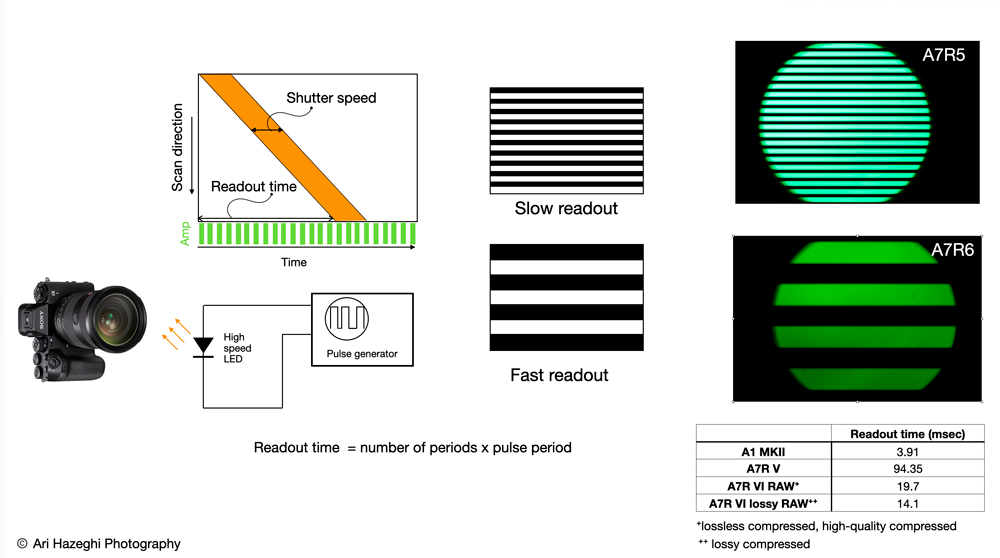
For those interested I just measured the readout speed for the A7R6 (as well as A7R5 and A1 II that I have at hand). I had preordered the camera and it came yesterday.
I used a pulse generator driving a high speed LED to generate a precisie optical waveform and capture it with each camera (will put more details on my channel)
summary
--------------------
A1 II : 3.9 msec
A7R5 : 94.35 msec
A7R6 : 19.7 msec for RAW (Lossless compressed or compressed HQ) / 14.1 msec for lossy compressed
it is quite a bit behind A1 series
one pleasant surprise : In A7R6 the EVF resolution does NOT drop like all other Sony cameras when you engage the continuous AF by half-pressing the shutter. It remains high and the EVF brightness is great as well
speedmaster20d wrote:
For those interested I just measured the readout speed for the A7R6 (as well as A7R5 and A1 II that I have at hand). I had preordered the camera and it came yesterday.
I used a pulse generator driving a high speed LED to generate a precisie optical waveform and capture it with each camera (will put more details on my channel)
summary
--------------------
A1 II : 3.9 msec
A7R5 : 94.35 msec
A7R6 : 19.7 msec for RAW (Lossless compressed or compressed HQ) / 14.1 msec for lossy compressed
it is quite a bit behind A1 series
one pleasant surprise : In A7R6 the EVF resolution does NOT drop like all other Sony cameras when you engage the continuous AF by half-pressing the shutter. It remains high and the EVF brightness is great as well ...Show more →
How do you tell the EVF resolution has dropped when pressing AF ON - no matter how hard I try I have never seen that on the A1, A1ii or A9iii. I have recorded the EVF with a second camera and it's not possible to see any difference in the image.
The only thing I have seen is that if you have Zebras on and you engage AF ON you can often see very small zebra stripes on a lot of high contrast edges. Without zebras the image looks identical.
Sorry ignore this - I was already in low res mode - as a result of selecting highest frame rate. duh!
Forgot that neither of the higher frame rates display in 9M dots they both display using 5M dots.
EVF cannot be 120FPS when shooting 30FPS, it will be either 50 or 60fps.
like A7V..., goes to 60FPS when shooting
A1 goes down to 3.69M Dots, sure, but it stays 120FPS
How do you ever get 3.6mdots in the A1 EVF ? I usually shoot with it set to highest speed which is 240p and lower resolution which is 5.7mdots or something.
How do you manage to get it down to A9 EVF resolution of 3.6mdots ?
duncangr wrote:
How do you ever get 3.6mdots in the A1 EVF ? I usually shoot with it set to highest speed which is 240p and lower resolution which is 5.7mdots or something.
How do you manage to get it down to A9 EVF resolution of 3.6mdots ?
I was comparing with A7V, it shows almost the same detail
duncangr wrote:
How do you tell the EVF resolution has dropped when pressing AF ON - no matter how hard I try I have never seen that on the A1, A1ii or A9iii. I have recorded the EVF with a second camera and it's not possible to see any difference in the image.
The only thing I have seen is that if you have Zebras on and you engage AF ON you can often see very small zebra stripes on a lot of high contrast edges. Without zebras the image looks identical.
Sorry ignore this - I was already in low res mode - as a result of selecting highest frame rate. duh!
Forgot that neither of the higher frame rates display in 9M dots they both display using 5M dots. ...Show more →
it is subtle but visible, I think most members here can see it (must view on YouTube high res)
The A1/A1 II :
- finder is normally 3 megapixels (I hate calling sub pixel dots) (2048 x 1536) or QXGA at 60Hz
- when you select 120Hz "High" it renders only 2 mega pixels (1600 x 1200)
- when you select 240 Hz (highest) it puts a black frame around the image in the finder (image becomes smaller) which helps it render fewer pixels
What I am describing is not the behavior above (disclosed in the Sony manual), but a different behavior not disclosed by Sony officially . In any mode, as soon as you half-press the shutter to engage continuous AF, the image quality in the EVF takes a hit , the EVF appears to be operating in sub-sample mode, i.e. it renders even fewer pixels which manifest as aliasing
It is this latter behavior that seems to have improved in A7R6. The A7R6 does not support 240Hz on the other hand.
BTW, all of this is orthogonal to the sensor readout speed (main topic)
speedmaster20d wrote:
it is subtle but visible, I think most members here can see it (must view on YouTube high res)
The A1/A1 II :
- finder is normally 3 megapixels (I hate calling sub pixel dots) (2048 x 1536) or QXGA at 60Hz
- when you select 120Hz "High" it renders only 2 mega pixels (1600 x 1200)
- when you select 240 Hz (highest) it puts a black frame around the image in the finder (image becomes smaller) which helps it render fewer pixels
What I am describing is not the behavior above (disclosed in the Sony manual), but a different behavior not disclosed by Sony officially . In any mode, as soon as you half-press the shutter to engage continuous AF, the image quality in the EVF takes a hit , the EVF appears to be operating in sub-sample mode, i.e. it renders even fewer pixels which manifest as aliasing
It is this latter behavior that seems to have improved in A7R6. The A7R6 does not support 240Hz on the other hand.
BTW, all of this is orthogonal to the sensor readout speed (main topic) ...Show more →
Yes I can see it clearly in the loss of clear horizontal wing feather detail when I start in the 60fps mode.
However in the other two modes (high, highest frame rates) I am not seeing any such change nor do I see any sudden appearance of moire.
duncangr wrote:
Yes I can see it clearly in the loss of clear horizontal wing feather detail when I start in the 60fps mode.
However in the other two modes (high, highest frame rates) I am not seeing any such change nor do I see any sudden appearance of moire.
it's a bit harder to see in the other 2 modes, especially 240Hz since the image is already small. I am used to half pressing for a very long time in anticipation of a take off and in those boring moments I tend to notice these sublet issues.
I have asked Sony Pro about this, they have neither conformed nor denied it, and of course they say my cameras are within spec. it seems it is entirely eliminated or reduced below a just noticeble difference in A7R6...
Thanks for doing the measurements Arash. Seems to confirm what the different discussions had settled on after a number of confusing data points had trickled over the past few weeks.
I think 14.1ms is good enough for most BIF. People often bring up hummingbirds but almost every hummingbird image I've ever selected to post process has the wings either fully extended to the back or the front where you don't get distortion even with slower scanning sensors. I think there will be some issues with very erratic movements like a swallow doing a crazy change in direction. Also maybe there will be some of that staircase stepping when you zoom in on a wing edge?
For me the biggest issue with 14.1ms will be leaning lines of trees and grass in the backgrounds. Glass half full that will force me to choose better OOF backgrounds
arbitrage wrote:
Thanks for doing the measurements Arash. Seems to confirm what the different discussions had settled on after a number of confusing data points had trickled over the past few weeks.
I think 14.1ms is good enough for most BIF. People often bring up hummingbirds but almost every hummingbird image I've ever selected to post process has the wings either fully extended to the back or the front where you don't get distortion even with slower scanning sensors. I think there will be some issues with very erratic movements like a swallow doing a crazy change in direction. Also maybe there will be some of that staircase stepping when you zoom in on a wing edge?
For me the biggest issue with 14.1ms will be leaning lines of trees and grass in the backgrounds. Glass half full that will force me to choose better OOF backgrounds...Show more →
If you don't mind me asking, why are you getting the 7RVI? Don't you already have the A1II?
speedmaster20d wrote:
For those interested I just measured the readout speed for the A7R6 (as well as A7R5 and A1 II that I have at hand). I had preordered the camera and it came yesterday.
I used a pulse generator driving a high speed LED to generate a precisie optical waveform and capture it with each camera (will put more details on my channel)
summary
--------------------
A1 II : 3.9 msec
A7R5 : 94.35 msec
A7R6 : 19.7 msec for RAW (Lossless compressed or compressed HQ) / 14.1 msec for lossy compressed
it is quite a bit behind A1 series
one pleasant surprise : In A7R6 the EVF resolution does NOT drop like all other Sony cameras when you engage the continuous AF by half-pressing the shutter. It remains high and the EVF brightness is great as well ...Show more →
BTW thanks, you didn't happen to test in APS-C mode did you.
Jun 07, 2026 at 06:41 AM
Steve Spencer Offline • • • • • • • Upload & Sell: Off
duncangr wrote:
BTW thanks, you didn't happen to test in APS-C mode did you.
Hopefully Arash can give us an actual measurement, but it should be basically a function of the crop factor so something close to 13.1 msec (i.e., 19.7 / 1.5) in RAW or lossless compressed or compressed HQ and 9.4 msec (i.e., 14.1 / 1.5) in lossy compressed.
Wouldn't we divide by 1.5 squared for area since it's reading the sensor area? I thought I saw readout speeds for shooting in crop factor or one of the video modes that doesn't sample the whole sensor that were single digit. Jared Polin, Jan Wegener, and another technical youtuber among others talked about this.
Steve Spencer wrote:
Hopefully Arash can give us an actual measurement, but it should be basically a function of the crop factor so something close to 13.1 msec (i.e., 19.7 / 1.5) in RAW or lossless compressed or compressed HQ and 9.4 msec (i.e., 14.1 / 1.5) in lossy compressed.
dugaut wrote:
Wouldn't we divide by 1.5 squared for area since it's reading the sensor area? I thought I saw readout speeds for shooting in crop factor or one of the video modes that doesn't sample the whole sensor that were single digit. Jared Polin, Jan Wegener, and another technical youtuber among others talked about this.
The columns of Sony Exmor sensors are read in parallel, so there's no readout time savings from skipping the columns outside the crop. The only savings is from skipping the rows.
Jun 07, 2026 at 07:26 AM
Steve Spencer Offline • • • • • • • Upload & Sell: Off
dugaut wrote:
Wouldn't we divide by 1.5 squared for area since it's reading the sensor area? I thought I saw readout speeds for shooting in crop factor or one of the video modes that doesn't sample the whole sensor that were single digit. Jared Polin, Jan Wegener, and another technical youtuber among others talked about this.
As snapsy described you only gain speed by reading less rows and you don't gain by reading shorter rows, so the sensor scan speed should just be divided by 1.5, and that does get you just into single digits for sensor scan speed if you use both APS-C and lossy compression. Perhaps the single digit numbers you saw were both APS-C and lossy compression.
arbitrage wrote:
Thanks for doing the measurements Arash. Seems to confirm what the different discussions had settled on after a number of confusing data points had trickled over the past few weeks.
I think 14.1ms is good enough for most BIF. People often bring up hummingbirds but almost every hummingbird image I've ever selected to post process has the wings either fully extended to the back or the front where you don't get distortion even with slower scanning sensors. I think there will be some issues with very erratic movements like a swallow doing a crazy change in direction. Also maybe there will be some of that staircase stepping when you zoom in on a wing edge?
For me the biggest issue with 14.1ms will be leaning lines of trees and grass in the backgrounds. Glass half full that will force me to choose better OOF backgrounds...Show more →
I have many thousands of good hummer images in the MS mode. Unfortunately Sony has a crummy MS that only does 10FPS, but you can still get plenty of good images in a session. In addition to having some images where the wings are slowed in front/behind some images are nice with a little blur.
arbitrage wrote:
Thanks for doing the measurements Arash. Seems to confirm what the different discussions had settled on after a number of confusing data points had trickled over the past few weeks.
I think 14.1ms is good enough for most BIF. People often bring up hummingbirds but almost every hummingbird image I've ever selected to post process has the wings either fully extended to the back or the front where you don't get distortion even with slower scanning sensors. I think there will be some issues with very erratic movements like a swallow doing a crazy change in direction. Also maybe there will be some of that staircase stepping when you zoom in on a wing edge?
For me the biggest issue with 14.1ms will be leaning lines of trees and grass in the backgrounds. Glass half full that will force me to choose better OOF backgrounds...Show more →
Hey Geoff,
Hope you are doing well! Did you guys get the 7R6 too?
I am also mostly concerned about BG distortion and stair-case wings.... Looking back at my A9 II files from back then , I can find few examples of staircase wings (oddly with Canada geese)... that camera was ~6 msec I believe so 14msec sounds a bit on the borderline but might end up being OK.
I got this camera since I had the 7R5 so this would be an upgrade to that. Would be nice all-arounder and backup to the A1-2