fredmiranda.com
Login

Moderated by: Fred Miranda
  New fredmiranda.com Mobile Site
  New Feature: SMS Notification alert
  New Feature: Buy & Sell Watchlist
  

FM Forums | Fuji Forum | Join Upload & Sell

1       2       3       4              6       7       end
  

DR100% vs 200/400%


mdude85
Offline
• • • • •
Upload & Sell: Off
p.5 #1 · DR100% vs 200/400%


gyoung143 wrote:
Just a small point, I don't think Photoshop can do non destructive editing. Ok while your original is open, you can undo any edits you had made, but as soon as you close it it saves the changes. Likewise if your original is a tiff, you 'save as' a jpeg rather than 'export'.
In those far off days before Lightroom etc I used to 'save as' with a numerical suffix so that the original file could stay unaltered.
I still use an old version that has a TWAIN interface to drive mt scanners direct. Not sure what happens if you 'open' a
...Show more

When you want to close the file, it will prompt you to "Save As..." -- you can choose to overwrite the original JPG file, or save as a PSD file, which will not mess with the original (out of camera) JPG.


Feb 03, 2026 at 04:11 PM
gdanmitchell
Online
• • • • • • •
Upload & Sell: Off
p.5 #2 · DR100% vs 200/400%


mdude85 wrote:
So, just correcting a few minor -- maybe semantic-- issues. Both RAW and JPG files are interpreted nondestructively (i.e., they are not altered when they are processed by software such as Lightroom, Capture One, Photoshop, etc).


Nope. JPGs are always the result of “destructive editing.”

On the off chance that the word “destructive” is confusing some people, it doesn’t mean that the file is “destroyed” or anything like that. It simply means that the original image data is lost and cannot be retrieved.

For example, if you apply a luminosity curve to your jpg file and save it, you can no longer go back to your original luminosity levels. If you sharpen when you create a jpg, you cannot remove that sharpening. If you alter color balance when you create a jpg the original color balance is lost and you cannot get it back. If you apply NR you cannot undone it or replace it with different NR. While you can push the shadows a great deal — even many stops — when working with a raw file, once you convert to jpg doing so will create some pretty big problems. Typically, jpg files also drastically reduce the bit depth of the file by throwing out quite a bit of image data.

The data in your raw file, however, is not altered by editing in a raw editor. The underlying raw data remains intact and the edits are essentially instructions to the software about how to interpret those data. For example, if you open a raw file in ACR and turn brightness up as far as it can go, throw the blue/yellow fader all the way to yellow, set vignetting to -100, and whatever else you want to do…

… you can undo those settings at any time in the application, even after saving, since that original underlying raw data is still there.

I know this is hard to accept, but I’m not wrong about this stuff. ;-)


Feb 03, 2026 at 04:16 PM
mdude85
Offline
• • • • •
Upload & Sell: Off
p.5 #3 · DR100% vs 200/400%


gdanmitchell wrote:
Nope. JPGs are always the result of “destructive editing.”

On the off chance that the word “destructive” is confusing some people, it doesn’t mean that the file is “destroyed” or anything like that. It simply means that the original image data is lost and cannot be retrieved.

For example, if you apply a luminosity curve to your jpg file and save it, you can no longer go back to your original luminosity levels. If you sharpen when you create a jpg, you cannot remove that sharpening. If you alter color balance when you create a jpg the original color balance
...Show more

So, you originally said "a big part of the power of raw file based editing [is that] the underlying file is never changed, only interpreted non-destructively."

But in fact, JPGs and RAW files are both interpreted nondestructively -- no data is lost or changed when importing the file into one's desired editor.

What you seem to be discussing is editing, not interpreting. JPG files can be edited destructively (as you noted), but modern software (like Lightroom) permits them to be edited nondestructively as well.

The data in RAW files cannot really be edited at all, so it's a bit of a moot point. What makes a RAW file powerful for editing is that it simply contains more data from the sensor than JPG files do.


Feb 03, 2026 at 04:25 PM
gdanmitchell
Online
• • • • • • •
Upload & Sell: Off
p.5 #4 · DR100% vs 200/400%


mdude85 wrote:
So, you originally said "a big part of the power of raw file based editing [is that] the underlying file is never changed, only interpreted non-destructively."

But in fact, JPGs and RAW files are both interpreted nondestructively -- no data is lost or changed when importing the file into one's desired editor.

What you seem to be discussing is editing, not interpreting. JPG files can be edited destructively (as you noted), but modern software (like Lightroom) permits them to be edited nondestructively as well.

The data in RAW files cannot really be edited at all, so it's a bit of a moot
...Show more

A jpg file is the product of the destructive conversion of raw image data from the camera’s sensor. The raw file holds the original image data captured by the sensor.

Sure, you can put a jpg in the lowest layer in PS and not edit it further in PS beyond the prior destructive editing that took place during conversion, but I can’t imagine what relevance that has to this discussion.

I’m impressed by how much you either willfully misinterpret things or hold stubbornly to incorrect notions. I hate to do this, but I have to say that it brings to mind the following:

“ To argue with a man who has renounced the use and authority of reason… is like administering medicine to the dead…”
Thomas Paine


Feb 03, 2026 at 05:06 PM
mdude85
Offline
• • • • •
Upload & Sell: Off
p.5 #5 · DR100% vs 200/400%


gdanmitchell wrote:
A jpg file is the product of the destructive conversion of raw image data from the camera’s sensor. The raw file holds the original image data captured by the sensor.

Sure, you can put a jpg in the lowest layer in PS and not edit it further in PS beyond the prior destructive editing that took place during conversion, but I can’t imagine what relevance that has to this discussion.


The upshot is that nondestructive editing is great, but it can be done on either JPGs or RAW files -- so the real advantage of RAW files is not that they can be nondestructively edited but rather that the RAW file contains a lot more editable data than a JPG file does.

I guess this whole discussion was about whether DR mode actually changes a RAW file's data while, or before, it's processed by the camera. So far there hasn't been much overwhelming evidence to support one side or the other. It seems that there is, at least, some software that will "bake in" the DR mode irreversibly.


Feb 03, 2026 at 05:24 PM
gyoung143
Offline
• • •
Upload & Sell: Off
p.5 #6 · DR100% vs 200/400%


gdanmitchell wrote:
You may indeed be a bit more that a little out of date. ;-)

There are some things that PS does that must involve destructive editing — e.g. they cannot be undone or later changed in the application. But there are a whole lot of things that very much can be done non-destructively.

Adjustment layers, for example, can be turned off and on, have their opacity changed, and change their settings even after saving, closing, and reopening the file. One easy example: if you create a curves adjustment layer you can go back to it at any point and adjust the curve.
...Show more
Thanks. I only use PS now for scanning, or to create a 'title' slide for a show, where I go to it from LR via 'edit with external editor' to add a text overlay on an image, all done on the master as imported and edited before going back in to LR to export yo the final jpg.
So I haven't kept up with the later possibilities in PS

Gerry


Feb 04, 2026 at 09:13 AM
gdanmitchell
Online
• • • • • • •
Upload & Sell: Off
p.5 #7 · DR100% vs 200/400%


gyoung143 wrote:
Thanks. I only use PS now for scanning, or to create a 'title' slide for a show, where I go to it from LR via 'edit with external editor' to add a text overlay on an image, all done on the master as imported and edited before going back in to LR to export yo the final jpg.
So I haven't kept up with the later possibilities in PS

Gerry


I figured that you might just be using other software.

I remember that maybe 20 years ago using PS was a very different experience than it is today. While we could do a number of things (at least somewhat) non-destructively, many operations did irretrievably alter the file data and could not be undone. I also recall that we relied a lot on and-on plug-in products. I remember, for example, discussions about the best plugins for things like sharpening and NR.

These days, it may be people like me who are the dinosaurs, sticking to our well-developed ACR/PS workflows rather than moving to LR like the rest of the world. Though PS does have a few sometimes-useful tricks up is sleeve still…


Feb 04, 2026 at 09:57 AM
Jack Flesher
Offline
• • • •
Upload & Sell: On
p.5 #8 · DR100% vs 200/400%


If I edit a raw file, I have to output it in some other standard format for other software to read it, this can be tiff or psd or even jpeg and a host of others. However, in doing that, the raw file is unchanged. I can open it 5 years from now and reprocess it to anything I want. Moreover, I cannot save over that raw file; it remains the raw in its original format.

If I edit a jpeg, I can save the edited version under a different name so as not to overwrite the original. But it’s really easy to forget that step and save the edited one without changing the name, and now I have effectively “destroyed” the original and there’s no getting it back to that original state as all original pixels are different. (Yes, I understand it can theoretically be reconstructed from the exif data, but that’s an arduous process.)

Hence why raw editing is considered “non destructive” and directly editing any other standard format image can easily be destructive to the original.


Feb 04, 2026 at 06:45 PM
gyoung143
Offline
• • •
Upload & Sell: Off
p.5 #9 · DR100% vs 200/400%


Jack Flesher wrote:
If I edit a raw file, I have to output it in some other standard format for other software to read it, this can be tiff or psd or even jpeg and a host of others. However, in doing that, the raw file is unchanged. I can open it 5 years from now and reprocess it to anything I want. Moreover, I cannot save over that raw file; it remains the raw in its original format.

If I edit a jpeg, I can save the edited version under a different name so as not to overwrite the original. But
...Show more

You couldn't reconstruct it from Exif data as its re-compressed every time you save it. That is the primary reason why editing jpegs is 'as bad idea', its already compressed to make the jpeg, each time you save it it goes through compression again.

Gerry


Feb 05, 2026 at 02:55 AM
gdanmitchell
Online
• • • • • • •
Upload & Sell: Off
p.5 #10 · DR100% vs 200/400%


gyoung143 wrote:
You couldn't reconstruct it from Exif data as its re-compressed every time you save it. That is the primary reason why editing jpegs is 'as bad idea', its already compressed to make the jpeg, each time you save it it goes through compression again.

Gerry


I was going to say that, too, but I decided to let it go.

But when you save a jpg a whole lot of data is permanently lost and cannot be restored, even if you were to try to replicate settings used for the original capture.

Here’s an analogy that might make sense for some people.

Back in the days of cassette tapes, people used to duplicate cassettes. In fact, there were cassette player/records with two sets of heads for just this purpose. You could borrow a cassette from someone, load it into one of the cassette bays, put a black cassette into the other one, and “dub” a copy.

It worked pretty well. But the copy could never be quite as good as the original — some degradation of the information was unavoidable. The first copy was OK, though an attentive listener could hear the difference. But when someone took hat copy and duplicated IT on their machine, the degradation continued, and it wasn’t long until the quality was not good.

However, if you had access to the original reel-to-reel master recording, you could (limited only by the life-span of tape recordings, a separate topic…) make essentially unlimited “dubs” from that with excellent quality since (a) the source was the original full quality original (or perhaps one generation removed) and (b) the copy was a first generation copy of the high quality original.

Think of that master tape as the rough equivalent of the raw file.

(For serious audio recording folks, studio automation moved that source tape even closer to what we get from a raw file today. Rather than doing a hard edit of the master recording, the automation data could be used to apply editing — dynamics, panning, tone controls, effects — to the output of the master.)

One of the reasons that jpg files are smaller is that the format was designed to be “lossy.” It makes some assumptions about what data can be thrown away without being noticed. This is not a significant problem for displaying images on screens or, arguably, even for transmitting files for printing. But it does mean that any alterations to the file — curves, color adjustments, noise reduction, retouching, etc. — are permanently baked into the file and simply be undone to return to the original.

Edited on Mar 01, 2026 at 05:00 PM · View previous versions


Feb 05, 2026 at 10:33 AM


Search in Used Dept. 

mdude85
Offline
• • • • •
Upload & Sell: Off
p.5 #11 · DR100% vs 200/400%


gyoung143 wrote:
You couldn't reconstruct it from Exif data as its re-compressed every time you save it. That is the primary reason why editing jpegs is 'as bad idea', its already compressed to make the jpeg, each time you save it it goes through compression again.

Gerry


Yep, once that JPG is edited, you can't really get that data back unless you have the original RAW file.

The original RAW file contains a high resolution preview in its EXIF data, which can be sometimes be extracted and saved as a JPG. But the resolution is not that high... some have said it's only around 13 megapixels for newer Fuji models. Enough for most people in a pinch, but obviously not a replacement for the original JPG.

I suspect those on this board already know that rewriting original JPGs is not best practice (preaching to the choir so to speak), but most software these days (Lightroom, Capture 1, DxO PhotoLab, ON1 Photo RAW, Affinity, etc etc) already does nondestructive editing by default -- I think PS might be the exception...


Feb 05, 2026 at 12:44 PM
ruthenium
Offline
• • • •
Upload & Sell: On
p.5 #12 · DR100% vs 200/400%


I would like to add a few additional observations with my camera GFX100S II on what happens when switching from DR100 to DR200 (or DR400).

I had a closer look at the EXIF with the help of exiftool. Particularly, I looked at any and all differences in EXIF when comparing files with DR100 and DR200. There is one difference. Fuji RAF files have "Raw Exposure Bias" in EXIF that is set to -0.7 with DR100 at ISO100 to 12800 (or -0.5 at ISO80). This exposure bias should not be confused with the conventional exposure compensation that one can set in camera. The "Raw Exposure Bias" is not among the camera settings, and it is applied "silently" under the hood.
With DR200, the Raw Exposure Bias changes to -1.7, and with DR400, the bias is set to -2.5.
The effect of this bias is straightforward, with DR200 it reduces by 1 stop (that is by 50%) the analogue gain that is applied on the signal from the sensor, prior to the analogue-to-digital conversion (ADC). For example, when the ISO is at 320 with DR200, the actual gain is the same as at ISO160 with DR100.

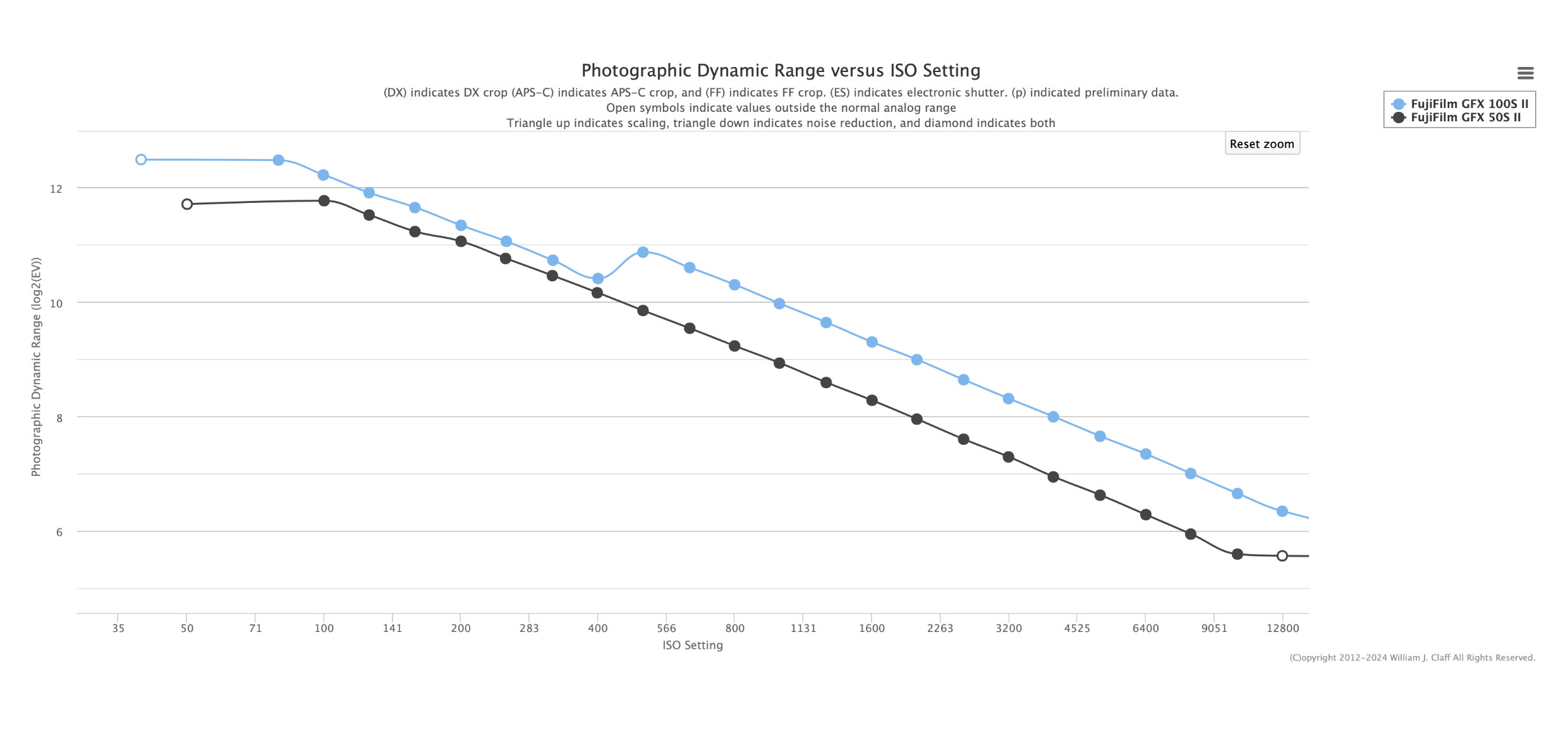
I further consulted with Bill Claff - you may know him or his website photonstophotos if you have been interested in the photographic dynamic range (PDR) of different cameras. First, I collected the raw data on my GFX100S II that allowed Bill to calculate the PDR for this camera that hasn't been known so far. This brought no surprises. All GFX100 bodies (GFX100, GFX100 II, GFX100S, and GFX100S II) have practically induistinguishable PDR, and all have dual-gain at ISO 500.

My main interest in this was to ask Bill whether the PDR of the GFX100S II is reduced upon switching from DR100 to DR200. He looked into this at ISO 320, but his observations should be valid at other ISO values from 160 and higher.
I am going to quote Bill who gave only very brief responses to my questions about the PDR. Here is what he wrote me:
"PDR measures shadow performance so ISO 320 at DR200 looks like ISO 160 at DR100.
PDR at ISO 320 at DR200 is identical to PDR for ISO 160 at DR100."

The first statement, about the shadow performance, made immediate sense to me, Indeed, as I mentioned above, when the ISO is at 320 with DR200, the actual gain is the same as at ISO160 with DR100. This means that the read noise isn't amplified at ISO320 with DR200 and remains of the same intensity as it is at ISO160 with DR100.

It was the second statement from Bill about the PDR that surprised me at first, as I (mistakenly) thought that reducing gain with DR200 (or DR400) should reduce the dynamic range. After some thinking, I believe I see my mistake. The dynamic range is calculated as the maximum signal-to-noise ratio. We can think about this as telling how much room above the noise there is for signal. Also, the dynamic range tells us how low is the noise relative to the largest signal a camera can handle. The important point is that the maximum signal is decided by the dynamic range of the ADC. E.g., for a 14-bit ADC, the largest signal is 16383, and this doesn't change with the gain (ISO), only the read noise scales with the ISO.
This simple consideration naturally implies that if the noise at ISO320 with DR200 is of the same intensity at it is normally (that is with DR100) at ISO160, then indeed the PDR at ISO320 with DR200 should be the same as PDR at ISO160 with DR100.

Thus, it is true that switching from DR100 to DR200 at a given ISO (e.g. ISO 500) has the effect of increasing the PDR by 1 stop. Note however, that while the increased PDR can prevent clipping of a strong signal, this is useful only when there is a strong signal that could be clipped if the camera hadn't reduced gain with DR200. In the absence of such strong signals (extremely bright areas in a photographed scene), the increased PDR is of no benefit, because no extra headroom is needed to begin with.

I have recently experimented with the DR in the GFX100S II set to AUTO. From the behaviour of the camera, I can see that it auto-switches from DR100 to DR200 when it senses strong highlights in the presence of dark shadows. The behaviour seems intelligent enough that I am going to keep DR at AUTO for now, as most of my photography is happening outdoors when high-contrast scenes are common.


Mar 01, 2026 at 12:46 PM
Jack Flesher
Offline
• • • •
Upload & Sell: On
p.5 #13 · DR100% vs 200/400%


^^^ As I said multiple pages ago, it effs around with stuff under the hood that you cannot undo, even on the raw file.


Mar 01, 2026 at 01:06 PM
Makten
Offline
• • • • •
Upload & Sell: On
p.5 #14 · DR100% vs 200/400%


ruthenium wrote:
I would like to add a few additional observations with my camera GFX100S II on what happens when switching from DR100 to DR200 (or DR400).

I had a closer look at the EXIF with the help of exiftool. Particularly, I looked at any and all differences in EXIF when comparing files with DR100 and DR200. There is one difference. Fuji RAF files have "Raw Exposure Bias" in EXIF that is set to -0.7 with DR100 at ISO100 to 12800 (or -0.5 at ISO80). This exposure bias should not be confused with the conventional exposure compensation that one can set in camera.
...Show more

I think it's much easier to understand what's going on if you consider the collection of photons instead of gain and what not. If you use DR100 and want to retain highlights, you might have to underexpose 1-2 stops. If you instead use DR200 or DR400, you will end up with the exact same amount of collected photons (since shutter speed and aperture will be the same, unless you change them for other reasons)

The only difference is that you will have to raise the shadows in PP when using DR100, and the camera will raise the shadows directly in the raw file when using DR200 or DR400. But, it will of course not look identical because your raw converter and the camera doesn't do it in the exact same way, so even if actual dynamic range is the same, the "look" will be slightly different.
IMO the DR modes are useful for many things except a very bright sky, because then things start to look a bit too funky compared to when lifting shadows in PP.


Mar 01, 2026 at 01:34 PM
ruthenium
Offline
• • • •
Upload & Sell: On
p.5 #15 · DR100% vs 200/400%


It is worth keeping in mind that GFX100 and GFX50 bodies don't have the same dynamic range. From ISO 500, the PDR of GFX100 bodies is about 1 stop better than that of the GFX50 bodies. I attached the relevant PDR data from Bill Claff (photonstophotos).
Thus, the experience of shadow recovery on a raw file from a GFX100 can be different from the experience of shadow recovery on a raw file from a GFX50.


Mar 01, 2026 at 01:55 PM
Makten
Offline
• • • • •
Upload & Sell: On
p.5 #16 · DR100% vs 200/400%


ruthenium wrote:
It is worth keeping in mind that GFX100 and GFX50 bodies don't have the same dynamic range. From ISO 500, the PDR of GFX100 bodies is about 1 stop better than that of the GFX50 bodies. I attached the relevant PDR data from Bill Claff (photonstophotos).
Thus, the experience of shadow recovery on a raw file from a GFX100 can be different from the experience of shadow recovery on a raw file from a GFX50.


Sure, what I'm trying to say is that "ISO doesn't matter". DR100/200/400 isn't about ISO. It's about exposure.


Mar 01, 2026 at 03:03 PM
ruthenium
Offline
• • • •
Upload & Sell: On
p.5 #17 · DR100% vs 200/400%


Makten wrote:
Sure, what I'm trying to say is that "ISO doesn't matter". DR100/200/400 isn't about ISO. It's about exposure.


"exposure" has a certain technical meaning (amount of light per unit sensor surface area); it depends exclusively on two settings: the shutter speed and the aperture. The problem is that this term "exposure" is used by photographers loosely, to mean something else, e.g. the brightness of an image.
It is because of this misunderstanding (or loose language) that there might be some ambiguity about what you have written above. You may want to elaborate. At ISO 160 and above (on a GFX100 II or GFX100S II body) switching from DR100 to DR200 doesn't change the exposure (the shutter speed and the aperture remain unchanged). In this case, only the analogue gain is different by a factor of 2 between DR100 and DR200 at ISO 160 or above (without changing the ISO when switching from DR100 to DR200).


Mar 01, 2026 at 03:20 PM
Makten
Offline
• • • • •
Upload & Sell: On
p.5 #18 · DR100% vs 200/400%


ruthenium wrote:
"exposure" has a certain technical meaning (amount of light per unit sensor surface area); it depends exclusively on two settings: the shutter speed and the aperture. The problem is that this term "exposure" is used by photographers loosely, to mean something else, e.g. the brightness of an image.
It is because of this misunderstanding (or loose language) that there might be some ambiguity about what you have written above. You may want to elaborate. At ISO 160 and above (on a GFX100 II or GFX100S II body) switching from DR100 to DR200 doesn't change the exposure (the shutter speed and
...Show more

This is exactly what I mean by exposure. How much light the sensor is exposed to.
The camera uses higher gain (which is equivalent to higher ISO) to lift the shadows, while the highlights are (more or less) unaffected.

I think a lot of confusion comes from the fact that many (not necessarily you) don't understand that lifting an image 1 stop in PP is effectively the same as using 1 stop higher ISO when taking the image. Same exposure. Same theoretical DR (if you ignore that the camera and your computer program probably don't give exactly the same results).
The DR200/400 modes do that with a curve that affects the shadows, but not the highlights.


Mar 01, 2026 at 04:51 PM
ruthenium
Offline
• • • •
Upload & Sell: On
p.5 #19 · DR100% vs 200/400%


Makten wrote:
This is exactly what I mean by exposure. How much light the sensor is exposed to.
The camera uses higher gain (which is equivalent to higher ISO) to lift the shadows, while the highlights are (more or less) unaffected.

I think a lot of confusion comes from the fact that many (not necessarily you) don't understand that lifting an image 1 stop in PP is effectively the same as using 1 stop higher ISO when taking the image. Same exposure. Same theoretical DR (if you ignore that the camera and your computer program probably don't give exactly the same results).
...Show more

Do you refer to out of camera jpegs when you say "The camera uses higher gain (which is equivalent to higher ISO) to lift the shadows, while the highlights are (more or less) unaffected"?
I am asking this because the highlights in raw files obtained with DR200 are shifted by 1 stop to the left in raw histograms, when compared to the equivalent images obtained with DR100 at the same ISO.
It would help if you make this clear whether you suggest that a curve is baked into the raw files with DR200 when you suggest "The DR200/400 modes do that with a curve that affects the shadows."
My understanding is that you refer to out of camera jpegs but this needs to be stated, for clarity. I haven't paid attention to what is happening in the DR100/DR200 jpegs out of my camera; thus, I cannot comment on this. My interest here is about the effect of DR200 on the raw data.


Mar 02, 2026 at 07:25 AM
gdanmitchell
Online
• • • • • • •
Upload & Sell: Off
p.5 #20 · DR100% vs 200/400%


As best as I can tell, the raw file image data itself isn’t changed by these settings. However, the camera “flags” images that use those settings and some raw converters “respect” the in-camera settings and apply equivalent curves by default in the raw processor. (Of course, since the underling raw file is still… raw… you don’t have to accept that modified conversion.)


Mar 02, 2026 at 12:17 PM
1       2       3       4              6       7       end


FM Forums | Fuji Forum | Join Upload & Sell

1       2       3       4              6       7       end


Welcome back
Log in to your account