p.5 #1 · Canon video thread for hybrid shooters...
I won't speak for n8rv as I'm sure he has his reasons for preferring AVC.
Over the last few days I'd been doing a semi-deep dive into the codecs. Since these are codecs are not brands, and not tied to say hardware/software sales, I think most of the reliable information I've found on the web can be trusted since none of these sources had anything to gain or lose by promoting one codec over the other. In general this seems to be fairly widespread consensus.
HEVC is a more efficient codec than AVC.
Just so I don't presume everyone knows the basics about each one, they are both video compression standards used/licensed by the Motion Pictures Experts Group (MPEG). The AVC (aka H.264) standard was first published and has been in use since 2004. HEVC (aka H.265) standard was first published in 2013 and was created as the successor to AVC.
HEVC can do up to 8K, AVC (in its current implementation in our cameras) is capped to 4K
AVC can, in theory, support up to 8K. But you already see how big 8K files are in RAW (even cRAW) and HEVC files. Since AVC is less efficient than HEVC, implementing 8K AVC probably gets file sizes close RAW with no tangible benefit over HEVC. My guess is they're assuming if you're recording in 8K, you probably have a fairly powerful and modern PC/Mac hardware that not only fully supports HEVC, but may actually handle that codec as well (or better than) AVC.
AVC is less taxing on older hardware to encode and play back
Many online sources repeat this mantra. I realize I'm not a typical use case and my computers are more powerful than what most people have in their houses. However, as I said in earlier posts, most of the sharing that I do with others is via YouTube. YT will encode it down anyway to what people can view online, and as I've shared a few videos in this forum, I think you all can see HEVC via YT looks every bit as good as AVC on YT. Anyone who will be looking at my original HEVC files will have computers that can handle it. And when I mean "handle playback" I'm not referring to $2500+ PCs or Macs. Just a decently powered PC/Mac built in, say, the last 5 years or so. If you're sharing with family members determined to make their 2014 PC/Mac go until the hardware dies...maybe go AVC.
AVC is (relatively) easy to burn onto a BD disc for BD playback
If you're a physical media person (or your family is) then AVC plays nice with BD authoring tools to burn BD-Rs that can be played on a BD player. Or so I read. I don't do this. Don't get me wrong, I have a lot of BDs and UHDs of movies I love (I prefer physical media over streaming for my movies). But sharing videos I shoot with family and friends is done via YT, or sharing the raw files via hard drive.
AVC has LGOP and 3 levels of Intraframe options, while HEVC only has LGOP...so is AVC with Intraframe at the highest level better?
That is what I wondered, especially since you see how much higher the data rate is for Intraframe. 4K30 HEVC @ LGOP is 135Mbps. 4K30 AVC @ LGOP is 150Mbps, and for Low/Med/High Intraframe it's 300/450/600 Mbps so clearly there has to be some benefit to the 600Mbps data rate of AVC/High Intraframe setting? I can't find a definitive answer, but some sources say that HEVC is actually better at encoding and doesn't need all the additional data that the Intraframe compression gives AVC due to AVC being an older and less efficient codec. I admit I am not committed enough to pixel peeping to try and compare an HEVC LGOP vs. AVC Intra High/Med/Low/LGOP. Here's an abstract to a white paper (behind a paywall): https://dl.acm.org/doi/10.1145/3579109.3579131 which says "The new generation video codec standard H.265/HEVC expands many coding techniques compared with the previous generation video codec standard H.264/AVC, using larger coding blocks and a tree-recursive quadtree split method for coding. In the intra-frame prediction, the number of intra-frame prediction modes has been increased from 9 to 35, which improved the accuracy of angle prediction. These improvements enable HEVC to compress video at 1080p with a theoretical 50% improvement over AVC while also increasing the coding complexity significantly." So apparently HEVC is simply better at intraframe encoding and prediction than AVC, so perhaps Intraframe either isn't needed, or any benefit it provides is so minimal given how good HEVC is at encoding, that it isn't worth the additional bandwidth hit.
Sorry for the dense wordage. For me, I'll keep using HEVC. But if you need to share the source files with people who can't decode HEVC, then AVC is your huckleberry.
High (Intra-frame) Compresses each frame, one at a time, for recording. Although file sizes are larger than with Long GOP, movies are more suitable for editing. Available when [Shooting: Main rec. format] is set to [XF-AVC S YCC422 10bit].
All-I: the I stands for Intraframe, and in this method each individual frame is compressed, one at a time. This does not produce file sizes as small as the other methods available, but potentially results in better quality, which is ideal for editing in particular – because there is more picture information, the files can withstand more extensive editing in post-production.
So in theory Intra-Frame (available only with XF-AVC S) is “better” for grading, etc. Might be useful when working with difficult scenes that may require more extensive grading to account for lighting (eg shadow recovery, etc).
All that said, it’s entirely possible that these benefits are minimal and barely noticeable to most people unless they’re really pixel peeping.
I sort of defaulted to choosing the highest theoretical malleability without going all the way to RAW. But I’m also curious to test HEVC x LGOP. Might be doing that on my next session. Maybe even post a comparison here between codecs, see if there’s a noticeable difference, and comment on that vs. file size and handling.
I’ll be back home in NYC later today, so I’ll have more time for this over the next few days.
p.5 #3 · Canon video thread for hybrid shooters...
Hi Carlo and n8rv,
Thanks very much for both of your posts. I read each one carefully as well as the supporting online articles you linked to.
As a relative newbie, two-year Canon R5 owner (I was a Nikon shooter from 1987 until 2022 when I switched to Canon), I won't be updating to the R5ii for a while. Because of this I've been ignoring all the new video terms and codec designations etc., that have come with the R5ii. They seemed a bit bewildering, and of course irrelevant to me being an R5 owner.
However, it appears that most of the folks here in this new Canon video thread are using R5iis, so it's important that I know what they're talking about with these new terms and designations and how they relate to my R5 terms and designations.
After reading your posts I was motivated to do some further study and now that I know the key differences and equivalents with the R5, I feel like I'm back in the game and can understand what you guys are talking about. Good stuff!
p.5 #4 · Canon video thread for hybrid shooters...
For DaVinci users, do you guys usually convert/export the Canon CRM Raw file into h.265 for storage? I love the malleability of the raw file, but it really takes up space at times. I shoot in 8k 60p RAW to downsample to 4k though. I've been noticing some artifacting recently (like at kid carousels) when converted to h.265, so I was wondering if anyone exports to some other space-saving format.
p.5 #5 · Canon video thread for hybrid shooters...
@n8rv what the manual says is absolutely true and correct for *within* the XF-AVC codec compression options (meaning all the benefits apply as one goes from LGOP and up the Intraframe options from lowest to highest setting.
What I'm not sure is if it applies in comparison the HEVC which is a codec that was released nearly a decade later.
This is an imperfect analogy, but I think a lot of this applies. It's kind of like when digital music first became portable on the original iPods (and other similar devices). You could burn your CDs into WAVs (audio equivalent to RAW) but it took up a ton of room and in the original iPods you could store like 1000 songs (I'm making that number up for this analogy). When the iPod was first released the primary compression option was .mp3 and similar to AVC using LGOP and 3 levels of Intraframe, you could increase the bit rate (aka lessen the amount of compression) of mp3 to yield better audio results. Most use 128kbps mp3 which I thought sounded very compromised, so I burned all my CDs at 320kbps mp3 which I thought sounded pretty close to WAV. Whatever audio quality was still lost was more than offset by letting me put 4000 mp3 songs on my iPod vs. 1000 wav songs.
Then came a more widespread adoption for .mp4 (or Apple's implementation of it .aac). The parallels here to our discussion are eerie. Both codecs are MPEG licensed. Both were initially released a decade apart (1991 for mp3, 2001 for mp4). And the promise of mp4 was that it was more efficient, giving you equal or better sound quality as mp3 for a smaller file size. Being an audio nut (still am) I burned a bunch of my favorite songs at 320mp3, and 128/160/192/256/320 mp4 (aac). What did I find? That right around 192kbps mp4 I couldn't tell reliably tell a difference between those songs and the master WAV files on a good pair of headphones (back in the early 2000s I was using Beyerdynamic DT880s). So my findings then were that 192kbps mp4 (in our analogy this would be HEVC) was at least equal and maybe even a bit better than 320kbps mp3 (akin to AVC All-I, the highest quality level of the decade-older codec).
What's missing to make this analogy true, is someone doing exhaustive A/B'ing like I did back in the mp3/mp4 day. I was in my twenties then and full of beans, but less motivated to do that level of intense A/B. Plus judging video clips is way harder because unless you can record in both formats simultaneously, you're always judging different clips. Even if it's the same scene, they'll be filmed minutes apart. Whereas compressing your favorite Zeppelin tune to either mp3 or mp4...you're starting with the identical WAV (or AIFF) master file. Any jitter, moire, stutter you perceive in a AVC or HEVC output of "similar but not identical clips" could be due to a difference in camera shake, or slightly changed light conditions, or slightly different camera positioning or subject motion...
So what I did was just took clips on HEVC and AVC and thought that if I was shown these in isolation I couldn't reliably tell which was which visually, and then I went with the one offering the smallest file sizes. Turns out my Mac gets on well with an HEVC input to HEVC output workflow too so that's a bonus.
p.5 #6 · Canon video thread for hybrid shooters...
PS - funny addendum that literally just happened. So I mentioned the main reason I'm getting back into photography and starting out in videography is documenting the early childhood of my best friends' newborn (which I don't share outside of friends and family for privacy).
We have a large friend group, and they have a large extended family group, that they've been sharing my videos with.
I just got a text from one of their extended family members whose daughter is getting married, asking if I do weddings. Based solely on the videos I'm taking of the child.
Of course I'm going to say No (I'm not skilled enough and don't want to ruin someone's "best day") but I will offer that after they do hire someone who is a professional, I'll be happy to be a B-cameraman/videographer to help out and get shots that the main photographer wasn't able to get.
So that kind of proves the point that most people who aren't in our hobby won't be judging us using standards higher than what's shared on YouTube.
It covers inter/intraframe compression and what the job does. Near as I understand it, both are lossy compression (if you want no loss, you have to go RAW). Part of lossy compression is comparing what is the same vs. what is different between frames and then the algorithm does its reduce file size by not repeatedly capturing the same full picture information for the block of the video that is the same from frame to frame. An easy way to think about it is shooting something absolutely still in absolutely the identical conditions that don't change one iota. RAW will capture each individual frame fully, while a lossy compression scheme should identify that it's essentially the same frame over and over and over again and provide a much smaller file. Now of course, nothing in real life that we shoot doesn't have a single iota of change over the length of a video (otherwise just take a picture ).
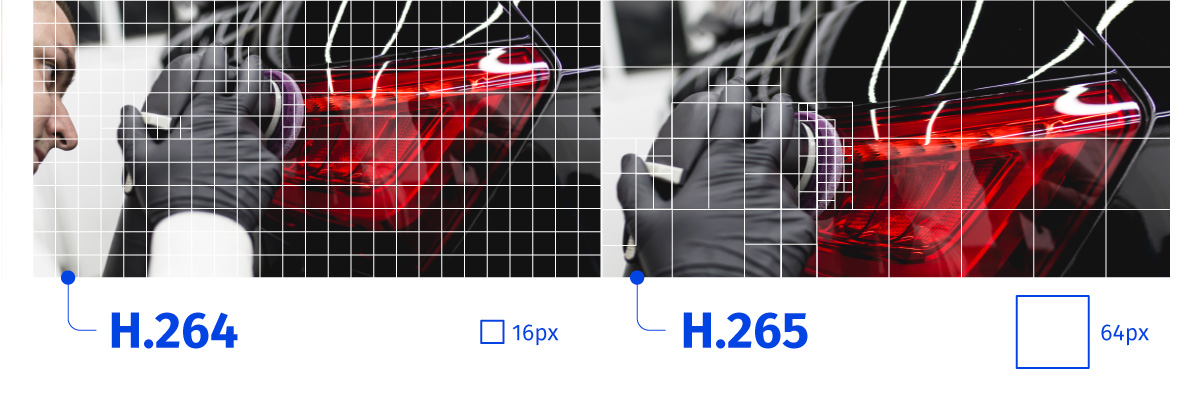
So what that article shows is that AVC/h.264 codec, when comparing frame to frame, can only do it in 16x16 pixel macroblocks (which can then be split 4 ways into 4x4 pixel blocks within it.
With HEVC/h.265, the codec is no longer constrained by the 16x16 pixel macroblocks of AVC. HEVC macroblocks can go as small as 8x8 pixels, and also 16x16, 32x32 and 64x64 pixels, and each macroblock can still be split into 4 smaller blocks, so for the 8x8 macroblock you can get down to 2x2 pixel to help capture changes in even finer detail than AVC. Conversely, for larger areas of the frame that don't change (say a pure white wall, blue sky, black background) it can save bandwidth and use a 32x32 or 64x64 block as appropriate. But of course the hardware has to make all these decisions on when to use 8/16/32/64 pixel blocks so that's why it's more taxing on the hardware to encode.
Now obviously we don't know what that car is doing so that picture is just for illustrative purposes. But what you see on the AVC side is the 16x16 macroblock and how it has to be used all across the frame, with some areas that change using the smaller 8x8 pixel sub-blocks within the macroblock. On the HEVC side, that frame assumes the car isn't moving, so it's using much larger blocks on the car (saving data bandwidth) and using smaller macroblocks for the person's hand which may be moving a little, and even finer macroblocks for the buffer which is cleaning the car (spinning at high speed).
p.5 #10 · Canon video thread for hybrid shooters...
hsiunghsiung wrote:
For DaVinci users, do you guys usually convert/export the Canon CRM Raw file into h.265 for storage? I love the malleability of the raw file, but it really takes up space at times. I shoot in 8k 60p RAW to downsample to 4k though. I've been noticing some artifacting recently (like at kid carousels) when converted to h.265, so I was wondering if anyone exports to some other space-saving format.
I use Davinci. I have tried to convert 8K/24p RAWLight to 8k 10bit DNxHD and HEVC. DNxHD files ended up bigger than the RAW files so dismissed that. 8k 10bit 4:4:4 HEVC at 200mbps, set all the export settings to highest quality (Preset, Tuning, Two pass, Force debayer quality) and the output looked great to me. But i must say I haven't done ton of work with these files yet, so it's possible I will discover some problems later.
What export bitrate/settings are you using that give you problems?
p.5 #11 · Canon video thread for hybrid shooters...
Tip for anyone with an iPhone with lightning connector and R5II. You can use your iPhone as an external camera monitor with the right USB-C to Lightning cable. Canon recommends a very specific Anker branded cable that doesn't seem to be available anymore. I found some users that use the following cable "AGVEE 1.5ft USB-C to Lightning OTG DAC Adapter Cable Converter Cord" and can confirm that it works great. No other cable worked for me and I tried a ton of them. You can use your Camera Connect app as a "wired" external monitor that you can mount to your hotshoe or camera rig. It shows no lag, is large, allows you to touch to focus on it. Only wish the Camera Connect app allowed the display of histogram or waveform on it.
p.5 #12 · Canon video thread for hybrid shooters...
Carlo, art supreme, n8rv, Rudy, p9168k and others,
Thanks for all the info. Some I have seen and some not.
I am just starting using HVAC/H265 as I could not view it on my computer and the free Resolve did not seem to work without adding something.
Due to computer issues, I got a new desktop and I also got Resolve Studio.
Zero issue in Resolve now, but computer did not want to play the videos straight out of camera. Windows 11 pro.
So I ran across a media player that solved that.
VLC media player. https://www.videolan.org/vlc/
Been using it for a couple of weeks and no issues so far.
If anyone else has that issue, this solves it.
Dave
p.5 #13 · Canon video thread for hybrid shooters...
dj63401 wrote:
Carlo, art supreme, n8rv, Rudy, p9168k and others,
Thanks for all the info. Some I have seen and some not.
I am just starting using HVAC/H265 as I could not view it on my computer and the free Resolve did not seem to work without adding something.
Due to computer issues, I got a new desktop and I also got Resolve Studio.
Zero issue in Resolve now, but computer did not want to play the videos straight out of camera. Windows 11 pro.
So I ran across a media player that solved that.
VLC media player. https://www.videolan.org/vlc/
Been using it for a couple of weeks and no issues so far.
If anyone else has that issue, this solves it.
Dave...Show more →
Microsoft sells an HEVC codec in their app store for $0.99 that lets Windows' video player play those files. VLC is also my go-to player for random file types, but I found it doesn't play 60fps video smoothly.
p.5 #14 · Canon video thread for hybrid shooters...
Mike_5D wrote:
Microsoft sells an HEVC codec in their app store for $0.99 that lets Windows' video player play those files. VLC is also my go-to player for random file types, but I found it doesn't play 60fps video smoothly.
Ugh, that's a bummer that the Windows codec support is so fractured. Admittedly since I got my M4 Max laptop (around the same time I got my R5ii), I've moved almost my entire Canon workflow to it since IME Apple really does a good job working with Adobe CC apps and being able to handle modern codecs. So another good reason to choose AVC is if your chosen PC workflow ecosystem just doesn't play nice with HEVC.
p.5 #15 · Canon video thread for hybrid shooters...
Carlo_M wrote:
Ugh, that's a bummer that the Windows codec support is so fractured. Admittedly since I got my M4 Max laptop (around the same time I got my R5ii), I've moved almost my entire Canon workflow to it since IME Apple really does a good job working with Adobe CC apps and being able to handle modern codecs. So another good reason to choose AVC is if your chosen PC workflow ecosystem just doesn't play nice with HEVC.
It'll take a lot more than a $1 codec to get me to use a Mac. A lot more.
p.5 #16 · Canon video thread for hybrid shooters...
Mike_5D wrote:
Microsoft sells an HEVC codec in their app store for $0.99 that lets Windows' video player play those files. VLC is also my go-to player for random file types, but I found it doesn't play 60fps video smoothly.
Thanks Mike. When I was searching, I saw that about when I saw the VLC media player. Someone said they had problems with the MS codec, and I tried VLC so I went no further. I don't think I have played any 60 fps, but if I have problems I know what to do.
Dave
It covers inter/intraframe compression and what the job does. Near as I understand it, both are lossy compression (if you want no loss, you have to go RAW). Part of lossy compression is comparing what is the same vs. what is different between frames and then the algorithm does its reduce file size by not repeatedly capturing the same full picture information for the block of the video that is the same from frame to frame. An easy way to think about it is shooting something absolutely still in absolutely the identical conditions that don't change one iota. RAW will capture each individual frame fully, while a lossy compression scheme should identify that it's essentially the same frame over and over and over again and provide a much smaller file. Now of course, nothing in real life that we shoot doesn't have a single iota of change over the length of a video (otherwise just take a picture ).
So what that article shows is that AVC/h.264 codec, when comparing frame to frame, can only do it in 16x16 pixel macroblocks (which can then be split 4 ways into 4x4 pixel blocks within it.
With HEVC/h.265, the codec is no longer constrained by the 16x16 pixel macroblocks of AVC. HEVC macroblocks can go as small as 8x8 pixels, and also 16x16, 32x32 and 64x64 pixels, and each macroblock can still be split into 4 smaller blocks, so for the 8x8 macroblock you can get down to 2x2 pixel to help capture changes in even finer detail than AVC. Conversely, for larger areas of the frame that don't change (say a pure white wall, blue sky, black background) it can save bandwidth and use a 32x32 or 64x64 block as appropriate. But of course the hardware has to make all these decisions on when to use 8/16/32/64 pixel blocks so that's why it's more taxing on the hardware to encode.
Here's an example pic from that article: https://flussonic.com/blog/news/h264-vs-h265/2.jpg
Now obviously we don't know what that car is doing so that picture is just for illustrative purposes. But what you see on the AVC side is the 16x16 macroblock and how it has to be used all across the frame, with some areas that change using the smaller 8x8 pixel sub-blocks within the macroblock. On the HEVC side, that frame assumes the car isn't moving, so it's using much larger blocks on the car (saving data bandwidth) and using smaller macroblocks for the person's hand which may be moving a little, and even finer macroblocks for the buffer which is cleaning the car (spinning at high speed)....Show more →
My time for reading is very limited right now so my head is spinning trying to keep up. With everything you have read, does it seem HEVC is still the way to go for you over XF-AVC? I'll never dig as deep as you are into the technicals of these codecs but I would just like to know what the best possible quality footage I can capture one step below RAW. We are probably splitting very small hairs between the two but it would be nice to know if one can produce a better final output than the other. The comment about XF-AVC below got my attention as it seems like that's the best option for "professional workflows", but that could be at a level that I'll never see on the editing side (from the article above)
MP4 (H.264): MP4 is a container file format, so you will see different MP4 variations. H.264 (or AVC) is the video compression codec most widely used for digital video today, particularly for streaming services, and these files can be played back on almost any device.
MP4 (HEVC): HEVC stands for High Efficiency Video Coding. This codec – also known as H.265 – offers 50% better compression efficiency than H.264, meaning it produces smaller files and requires lower bandwidth while streaming. It is also the first to support 8K resolution.
XF-AVC: This is a file format developed by Canon specifically for 4K DCI or 4K UHD footage. It's suitable for professional workflows, with creatives using it when recording high-resolution footage. The file name extension is .MXF.
p.5 #18 · Canon video thread for hybrid shooters...
Mike_5D wrote:
It'll take a lot more than a $1 codec to get me to use a Mac. A lot more.
Lol don't worry, I'm not looking to convert anybody. I've got a work/productivity PC (i13700KF+RTX 4070TI) and a gaming PC (i14900KF+RTX 4080 super) as well as an M4 Max 15" Macbook Pro. Each one has their strengths for their specific tasks. I was honestly shocked though at how optimized the M4Max chip is for video encoding because it outperforms my i14900/4080S/96GB DDR5/m.2 WD Black SN850 NVME when working on 4K HEVC files on Premiere Pro...and not by a small unnoticeable margin.
Yes the R5ii only supports up to Type 2 so there's no extra speed gained there. But at the "transfer from card to computer" end there's a huge speed gain. I literally transferred 30GB worth of 4K30 footage I shot this weekend of the infant in under 10 seconds. Out of curiosity I transferred the same files to my PC using USB 3.2 port and it took about 35-40 seconds. As I work on larger projects over time, or fill up that card on long shoots that approach the 1TB limit, that time savings is going to really pay for itself.
p.5 #19 · Canon video thread for hybrid shooters...
@artsupreme the way I see it is this: HEVC is more efficient codec that gives you nearly indistinguishable quality from AVC at smaller file sizes. It may even be superior video quality at the lowest AVC compression scheme of LGOP, and jury is out on whether it's better than using the highest level of Intraframe compression. Many of the things I read seem to indicate that HEVC's base compression method of being able to use macroblocks of varying sizes from 8x8 to 64x64, along with better motion vector prediction that it actually negates (or minimizes) the need for Intraframe compression, at least to the level that Intraframe improves AVC because of AVC's more rudimentary encoding technique (which is a decade older). I look at it like this: a 180hp car with a turbocharger benefits from that turbocharging, but if you have a 500hp car, it doesn't need that turbocharge to go as fast, if not faster than the 180hp car with the turbo.
The only reason I can think of to go AVC is if
1. Your hardware doesn't play nice with HEVC (and the only way you'll know is to test)
2. Your target customer/friend/family member you'll want to share the native files with needs it in AVC
3. You want to burn a Blu-Ray of it (I think the tools for doing that with AVC are pretty straight forward, I don't burn BDs).
I think if your PC can handle HEVC, I find it a very easy format to edit and color grade. I've not noticed any difference in Premiere Pro on my Mac working with AVC vs HEVC files in the editing and color grading step. The big difference I've noted is in the final encoding/output step, where my Mac+Adobe PP really gets on well with an HEVC incoming + HEVC outgoing file, encoding it at a speed of about 3:1 (3 minute video takes about 1 minute to encode).
If you need the ultimate in picture quality and editing/color grading flexibility (e.g. you are going after pro-quality final product like a documentary or film worthy of Netflix) you're probably shooting in RAW.
p.5 #20 · Canon video thread for hybrid shooters...
Carlo_M wrote:
@artsupreme@ the way I see it is this: HEVC is more efficient codec that gives you nearly indistinguishable quality from AVC at smaller file sizes. It may even be superior video quality at the lowest AVC compression scheme of LGOP, and jury is out on whether it's better than using the highest level of Intraframe compression. Many of the things I read seem to indicate that HEVC's base compression method of being able to use macroblocks of varying sizes from 8x8 to 64x64, along with better motion vector prediction that it actually negates (or minimizes) the need for Intraframe compression, at least to the level that Intraframe improves AVC because of AVC's more rudimentary encoding technique (which is a decade older). I look at it like this: a 180hp car with a turbocharger benefits from that turbocharging, but if you have a 500hp car, it doesn't need that turbocharge to go as fast, if not faster than the 180hp car with the turbo.
The only reason I can think of to go AVC is if
1. Your hardware doesn't play nice with HEVC (and the only way you'll know is to test)
2. Your target customer/friend/family member you'll want to share the native files with needs it in AVC
3. You want to burn a Blu-Ray of it (I think the tools for doing that with AVC are pretty straight forward, I don't burn BDs).
I think if your PC can handle HEVC, I find it a very easy format to edit and color grade. I've not noticed any difference in Premiere Pro on my Mac working with AVC vs HEVC files in the editing and color grading step. The big difference I've noted is in the final encoding/output step, where my Mac+Adobe PP really gets on well with an HEVC incoming + HEVC outgoing file, encoding it at a speed of about 3:1 (3 minute video takes about 1 minute to encode).
If you need the ultimate in picture quality and editing/color grading flexibility (e.g. you are going after pro-quality final product like a documentary or film worthy of Netflix) you're probably shooting in RAW....Show more →
Perfect, thanks Carlo. I'm sticking with HEVC unless someone else can show/prove the IQ is better with AVC. I'm a Mac user as well and trying to hold out for the M4 Max Studio this year. Glad to know your M4 Max breezes through the 4K HEVC.