p.14 #1 · Canon video thread for hybrid shooters...
artsupreme wrote:
Well, I set a deadline for myself of Feb 1st to try and get something exported from Resolve and I missed it by a few days. But last night I was able to finally export a mashup of some of my clips from Indonesia. This is in no way a final edit, but simply a sample test for a youtube quality check as I've never uploaded anythng to youtube. I would normally never upload a sample that's nowhere near complete but I figure this is progress for me to have finally have finished the whole process from Davinci import to Youtube upload. Some notes:
...
- There was no stablization done and I was filming handeld on a boat so that explains some of the shakiness
...
- The music thing is going to kill me and probably prevent me from sharing on youtube. I'm super picky with music for my slideshows as it's just as important as the visuals....
...
- Learning Davinci is quite fun. I still have no idea what I'm doing in there but at least I know the basics of how to cut/arrange clips now. As for color grading, I'm totally clueless ....
...
The audio is going to be quite a task to figure out but for now you can mute it or play your own music instead of the place holder chant I have in there.
"TOAL" is a term I use for "trip of a lifetime"...little did I know it happens to be the name of a goth band on Youtube
Gear used:
R5, R5II, DJI Mini 3 Pro, RF 70-200 2.8, RF 14-35
Clog2 & Clog3
24fps and one clip of 120fps
4K DCI (during the process realized my drone doesn't match this format so I need to learn how to change in Davinci) ...Show more →
Hi Brett,
Your debut video is, in a word, "stunning!" - a dramatic and captivating audio-visual experience that is anything but run of the mill.
Sixteen minutes, as I'm sure you know, is a pretty long video on youtube, and yet the creatively arranged visuals, the tight closeups, the awesome drone footage, the wonderful rich colours, the haunting music sprinkled with live ambient sounds, all worked together to keep me watching right to the end. Well done!
Regarding learning Davinci Resolve you wrote: "I still have no idea what I'm doing in there.... and as for color grading, I'm totally clueless," Well my friend, for someone who has no idea what they're doing and is totally clueless, you sure hit it out of the park!!! Can't wait to see your next one(s).
Cheers,
Rudy
P.S. If you prefer we use you forum name "artsupreme" just let me know, no worries.
p.14 #2 · Canon video thread for hybrid shooters...
n8rv wrote:
Was left sort of wanting to see some surf action, especially when I saw a shot of someone preparing their surfboard.
Ha, exactly! That's the plan but I hit a wall wtih the music issue as I wanted to ramp up the video with some good music and fast beats to get into the action. It will eventually be a surf documentary but I have a long way to go in Davinci before I can create my vision.
n8rv wrote:
That aside, I think this all looked very good. The scenery is beautiful. Really liked that shot at sunset with the waves spraying in the distance.
Thanks. The scene at the 10 minute mark was actually really special because I haven't seen anything like that in 30 years. The video doesn't do justice, at all, because there's nothing to scale it with. There was a huge swell that day and 40mph offshore winds, so those sprays off the back were 30+ft high. I was filming it at 200mm with the 70-200. There's nothing to scale that but if there was a boat there it would look tiny compared to the swell/spray. On video it looks about 10ft high at most, but I guess you can see the island to the right for a little perspective. It was one of those things you really needed to see it in person to understand the size, and it looked like it was in slow motion real time due to the size of the swell.
n8rv wrote:
Grading looks good. Clean without being clinical and does justice to the tropical colors.
Thanks, the reason the video is so long is that I was playing around with different Luts and settings. This is going to be very fun once I learn but right now I feel lost in the color tab. At least I'm making progress.
p.14 #3 · Canon video thread for hybrid shooters...
Rudy Pohl wrote:
Hi Brett,
Your debut video is, in a word, "stunning!" - a dramatic and captivating audio-visual experience that is anything but run of the mill.
Sixteen minutes, as I'm sure you know, is a pretty long video on youtube, and yet the creatively arranged visuals, the tight closeups, the awesome drone footage, the wonderful rich colours, the haunting music sprinkled with live ambient sounds, all worked together to keep me watching right to the end. Well done!
Regarding learning Davinci Resolve you wrote: "I still have no idea what I'm doing in there.... and as for color grading, I'm totally clueless," Well my friend, for someone who has no idea what they're doing and is totally clueless, you sure hit it out of the park!!! Can't wait to see your next one(s).
Cheers,
Rudy
P.S. If you prefer we use you forum name "artsupreme" just let me know, no worries. ...Show more →
Rudy,
Brett is fine, that's my name. The video is way too long especially without dedicated audio tracks but I wanted to see what the many different profiles and settings would look like on the big screen via YouTube (my TV). I think once I cut it way down and add all the content of the surf crew I can keep it under 10 minutes, but being that it's for them maybe they'll want me to keep some of the scenery shots for memories. The real big bummer for all of us is seeing rivers of trash flood into our oceans daily. It's really doing serious damage and affecting sea life which will affect the planet in the end. It takes 57 hours of travel to get to this location and it's not cool to see trash floating in the ocean so far from civilization.
With as little as I know in Davinci I'm pretty satisfied with what it's outputting from an image perspective. I'm probably missing some key settings but I'm okay with my first attempt. I know exactly what I want to do with audio but it's a matter of finding all the sound effects and getting to know how to blend all the layers in Davinci.
While going through this process I learned I forgot to set the rack focus speed on one of my R5II's....so I'll get that updated before my next outing. Also, I'm pretty impressed with Canon's IS for video as I was shooting at the long end of my 70-200 often, hand held.
p.14 #4 · Canon video thread for hybrid shooters...
artsupreme wrote:
Well, I set a deadline for myself of Feb 1st to try and get something exported from Resolve and I missed it by a few days. But last night I was able to finally export a mashup of some of my clips from Indonesia. This is in no way a final edit, but simply a sample test for a youtube quality check as I've never uploaded anytihng to youtube. I would normally never upload a sample that's nowhere near complete but I figure this is progress for me to have finally have finished the whole process from Davinci import to Youtube upload. Some notes:
- The note about 4 men becoming true surfers is an inside joke to a few friends
- After uploading I see I have an aspect ratio issue which was the purpose of this test
- There was no stablization done and I was filming handeld on a boat so that explains some of the shakiness
- You can see the rivers of trash at the beginning which are flowing into our oceans on a daily basis
- The music thing is going to kill me and probably prevent me from sharing on youtube. I'm super picky with music for my slideshows as it's just as important as the visuals. Like Howie said above, I don't see myself searching for free music that I like as I already have my favorite music that I want to use and it won't be allowed on Youtube. IMO, the music/audio is what brings the edit together as I will be syncing my cuts to it and pacing the clips with music, so this will be tough to do for Youtube. As for this sample I just added a place holder chant to run for the whole 16 minute test
-Learning Davinci is quite fun. I still have no idea what I'm doing in there but at least I know the basics of how to cut/arrange clips now. As for color grading, I'm totally clueless and need to learn how to use the color tab so I can dial in the footage. I used a bunch of different color settings in this video for different scenes. Anyone know if there's a way in the color tab to put the playead on one frame and then scroll through the different luts wtih a simple L/R key stroke? Right now I'm having to click on each lut thumbnail for a preview and I'm hoping there's a more efficient way to scroll through Lut previews.
Anyway, the goal of this sample clip was to watch it on a large 4K TV to check video quality and it looks pretty good on my TV's. My TV adds a lot of contrast so I'll have to navigate how to process for viewing on different devices. I'm going to leave it up for a few days for some friends to watch and then probably take it down and start learning the things I need to start a final edit. It's long and repetetive but definitely serves it's purpose for a quality check on a large TV. If anyone has a chance to view on their large TV let me know your thoughts on video quality. Changing the youtube settings to 4k (2160) is key as Youtube defaults to 1080p for most players. The audio is going to be quite a task to figure out but for now you can mute it or play your own music instead of the place holder chant I have in there.
"TOAL" is a term I use for "trip of a lifetime"...little did I know it happens to be the name of a goth band on Youtube
Gear used:
R5, R5II, DJI Mini 3 Pro, RF 70-200 2.8, RF 14-35
Clog2 & Clog3
24fps and one clip of 120fps
4K DCI (during the process realized my drone doesn't match this format so I need to learn how to change in Davinci)
This 16 minute 4K export only took about 5 minutes on a baseline M4 Macbook Pro that I used for this. Uploading to Youtube took almost an hour for a 5.87GB file. Not sure if I'm exporting the correct format but that's it for now.
Congratulations, it looks really nice, some very cool material for your surf video! I also like the color grading.
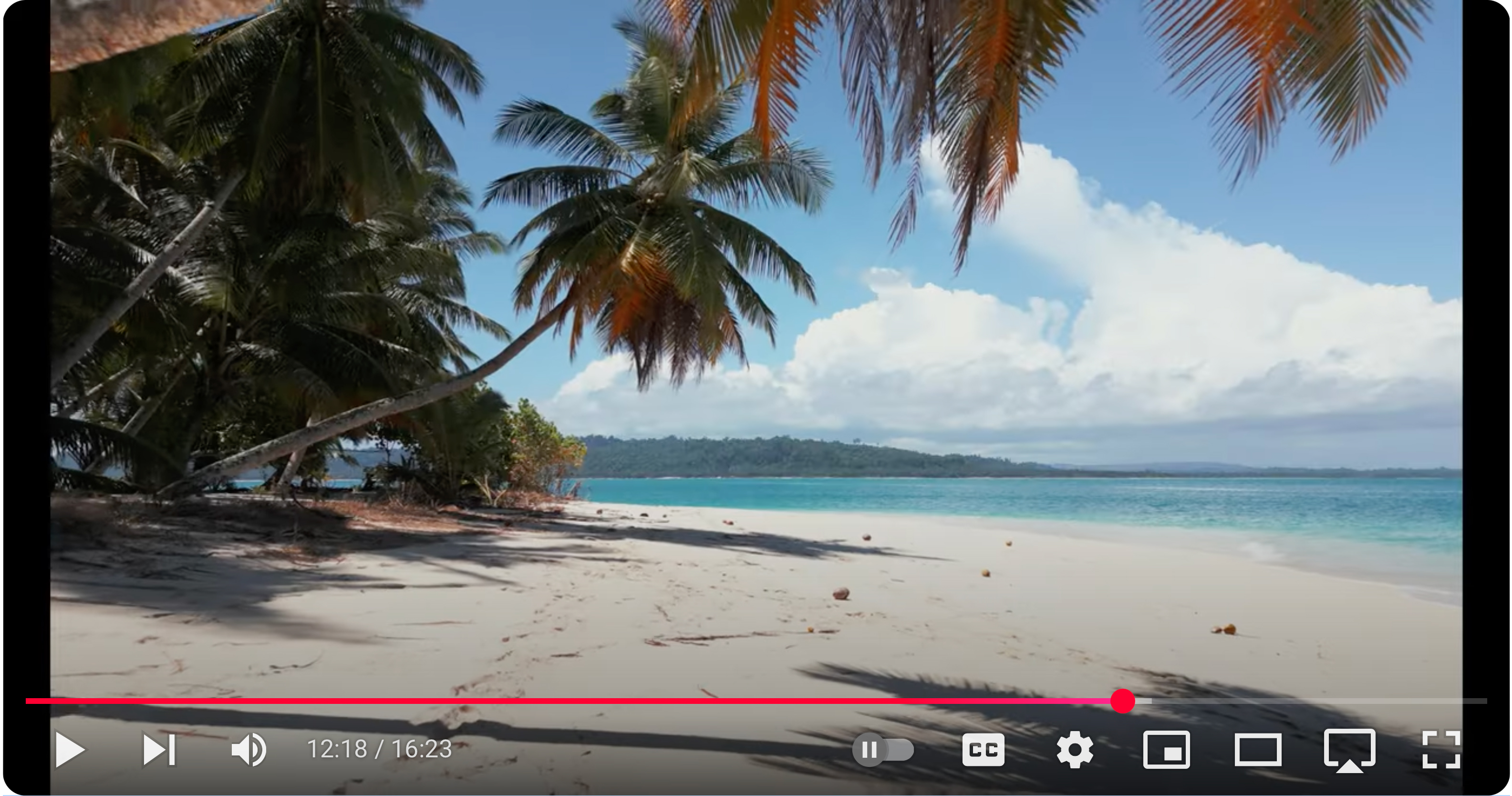
A small detail and it maybe a taste thing but I find some of the drone shoots (btw all really nice) a bit over sharpened, the one that caught my eyes was at 12:18.
p.14 #5 · Canon video thread for hybrid shooters...
artsupreme wrote:
Rudy,
... The video is way too long especially without dedicated audio tracks but I wanted to see what the many different profiles and settings would look like on the big screen via YouTube (my TV). I think once I cut it way down and add all the content of the surf crew I can keep it under 10 minutes, but being that it's for them maybe they'll want me to keep some of the scenery shots for memories. The real big bummer for all of us is seeing rivers of trash flood into our oceans daily. It's really doing serious damage and affecting sea life which will affect the planet in the end. It takes 57 hours of travel to get to this location and it's not cool to see trash floating in the ocean so far from civilization.
With as little as I know in Davinci I'm pretty satisfied with what it's outputting from an image perspective. I'm probably missing some key settings but I'm okay with my first attempt. I know exactly what I want to do with audio but it's a matter of finding all the sound effects and getting to know how to blend all the layers in Davinci.
While going through this process I learned I forgot to set the rack focus speed on one of my R5II's....so I'll get that updated before my next outing. Also, I'm pretty impressed with Canon's IS for video as I was shooting at the long end of my 70-200 often, hand held.
First, regarding the length of the video and my mention of that fact: I knew that this was not a final video nor that it had a strong storyline that gave clear focus and direction to the overall piece, but rather that this was a test "mashup" of a large number of different clips so that you could see what the footage looked like and how it displays on a large high-res screen via Youtube. That's exactly why I wrote, "and yet the creatively arranged visuals, the tight closeups, the awesome drone footage, the wonderful rich colours, the haunting music sprinkled with live ambient sounds, all worked together to keep me watching right to the end.
In others words, I was really impressed with your strong artistic and creative editing skills in weaving together a huge amount of material that didn't have a clear storyline (because it wasn't meant to) that nevertheless moved in such an effective way that it held my attention to the end. I don't know if I'm explaining myself very well, but said another way - this video had the risk of being kind of boring despite the awesome visuals, but instead it was wonderfully engaging and compelling because of the great editing IMO!
The second thing...
I too was really struck and saddened by seeing the community's garbage (and likely sewage) slowly flowing into that pristine ocean we see in the rest of the video. I presume that you intentionally included that disturbing footage at the beginning to make the reality evident - what a contrast! A great example of the communication axiom - "Don't tell them, show them."
p.14 #6 · Canon video thread for hybrid shooters...
action99 wrote:
Congratulations, it looks really nice, some very cool material for your surf video! I also like the color grading.
A small detail and it maybe a taste thing but I find some of the drone shoots (btw all really nice) a bit over sharpened, the one that caught my eyes was at 12:18.
Thanks Action, I'll have to take a look. I'm not even sure how to sharpen in Davinci yet so I'm not sure how some drone footage got sharpened more than other clips. If Luts apply sharpening then it's possible one Lut applied more sharpening than the other, but I definitely didn't do any manual sharpening to any of my clips as I don't even know how yet. I'm assuming the Luts must provide the sharpening but I will look into it.
Since you are proficient in Davinci, is there a way to scroll through Lut previews quickly without having to click on the Lut thumbnails? I'm hoping there's a way to do it just like lightroom, where you have one image frozen in the preview window and you can quickly scroll through the presets to see how it affects the image. So in Davinci, I would like to select one frame, and see how each Lut renders that frame to compare....and I would like to be able to do this very quickly arrow or L/R key strokes if possible. Let me know if there's a way. Thanks.
p.14 #7 · Canon video thread for hybrid shooters...
Rudy Pohl wrote:
Brett, a couple of things....
First, regarding the length of the video and my mention of that fact: I knew that this was not a final video nor that it had a strong storyline that gave clear focus and direction to the overall piece, but rather that this was a test "mashup" of a large number of different clips so that you could see what the footage looked like and how it displays on a large high-res screen via Youtube. That's exactly why I wrote, "and yet the creatively arranged visuals, the tight closeups, the awesome drone footage, the wonderful rich colours, the haunting music sprinkled with live ambient sounds, all worked together to keep me watching right to the end.
In others words, I was really impressed with your strong artistic and creative editing skills in weaving together a huge amount of material that didn't have a clear storyline (because it wasn't meant to) that nevertheless moved in such an effective way that it held my attention to the end. I don't know if I'm explaining myself very well, but said another way - this video had the risk of being kind of boring despite the awesome visuals, but instead it was wonderfully engaging and compelling because of the great editing IMO!
The second thing...
I too was really struck and saddened by seeing the community's garbage (and likely sewage) slowly flowing into that pristine ocean we see in the rest of the video. I presume that you intentionally included that disturbing footage at the beginning to make the reality evident - what a contrast! A great example of the communication axiom - "Don't tell them, show them."
Thanks Rudy, it's going to be way more fun and challenging to edit a motion picture compared to edting a photo in Lightroom. I will continue to shoot stills as photography is one of my passions but it's just hasn't been creating the stoke it used to. Video is exciting and new and I'll be much more gratified from creating a nice video edit vs framing a wall hanger from Africa on my wall. I have a long way to go with learning how motion (clips) flow together, but I'm up for the challenge. We are fortunate to have such great hybrid cameras in small packages.
As for the trash, it is a tragedy and I pointed out the affects we are seeing in the winter thread:
On the topic of fish and other wildlife, I've been going there for 25+ years and back in the day the fish used to pretty much jump in the boat. There were always huge boils of fish everywhere and you could literally snag a fish in the side with a bare hook by simply casting into the boil. Nowadays the fishing is much much slower but still plentiful if I compare it with offshore fishing in SoCal. Not only are there much less fish around but the reefs are dying off and affecting all the other wildlife. Our boats used to get inundated with the sea snakes and up until about 15 years ago, I would see 10-20 snakes a day both on the boat and while paddling in the water. Now we are down to seeing maybe one a day, sometimes none at all. And these are in the same exact locations out in the very very remote archipelagos. This is all due to the pollution and plastics we litter the ocean with. It's a damn shame as I can see the reefs dying off as well. There are rivers of trash flooding into the ocean over there. I have some video footage of this and I'll try to upload a clip in the video thread once I figure out Resolve. It's a horrible sight to see and very sad to realize how quickly we are ruining our oceans/planet. There's a lot of factors and types of pollution but the plastics are just killing everything.
p.14 #8 · Canon video thread for hybrid shooters...
action99 wrote:
Congratulations, it looks really nice, some very cool material for your surf video! I also like the color grading.
A small detail and it maybe a taste thing but I find some of the drone shoots (btw all really nice) a bit over sharpened, the one that caught my eyes was at 12:18.
I googled how to sharpen in Davinci and I definitely haven't been to that area yet and I checked the settings for that clip and the sliders were at the default location. I also checked my drone and my sharpening settings are at zero. So unless these Luts apply sharpening then that's just the unsharpened footage out of the drone.
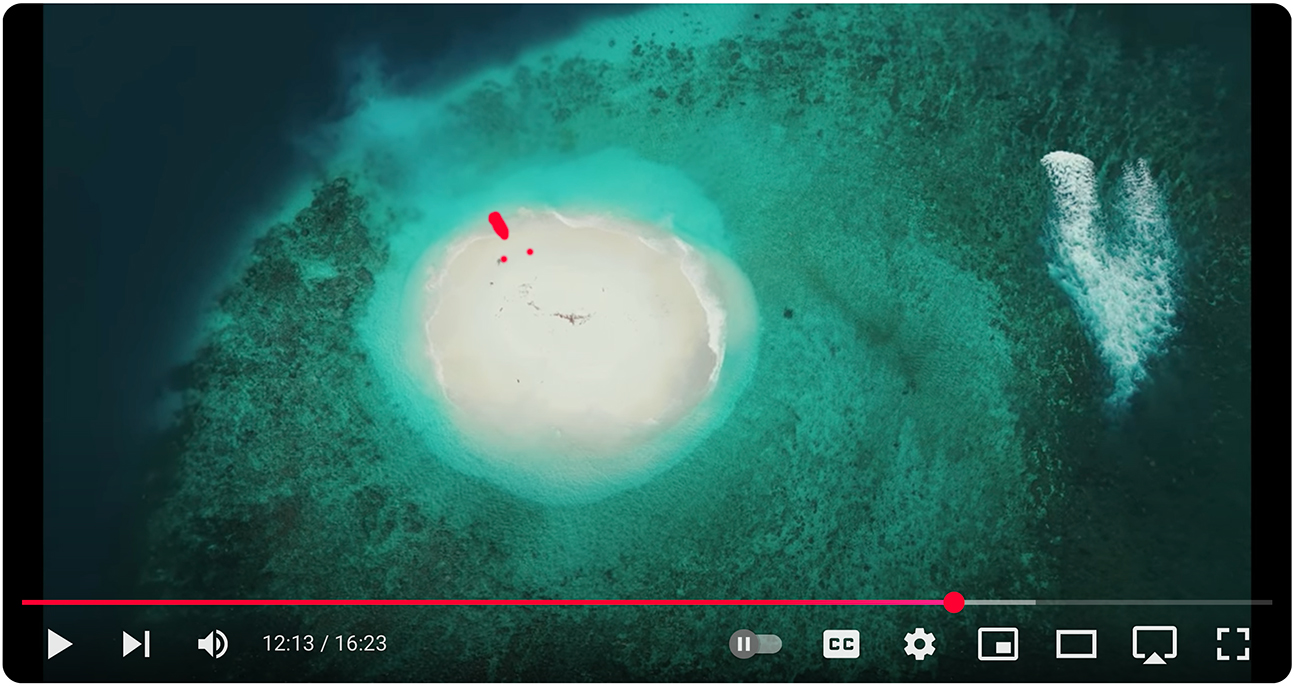
Is this the clip you were referring to below? This is a sand bar island. If there was a boat and people on it they would be the size of the red dots. Let me know if this is what looks over sharpened as it's a large shallow reef with a lot of texture:
p.14 #9 · Canon video thread for hybrid shooters...
action99 wrote:
Congratulations, it looks really nice, some very cool material for your surf video! I also like the color grading.
A small detail and it maybe a taste thing but I find some of the drone shoots (btw all really nice) a bit over sharpened, the one that caught my eyes was at 12:18.
Oops, I guess I looked at the wrong clip. This is the one at 12:18. Same thing though, no sharpening applied in Davinci and drone set to 0.
p.14 #10 · Canon video thread for hybrid shooters...
Nothing all that interesting here, just quickly testing my new RF 50mm F1.4 VCM.
R5II handheld, ISO 4000,1/50, F1.4, 24FPS, 4K Fine-D, XF AVC S 422, Intra High.
For some reason Youtube compression is doing a number on this one. Maybe it'll look better after it's had some more time to process. That or I messed up when exporting from Resolve. But I followed my usual method, which has worked fine in the past
Anyway LOVE these lenses (also got the 24mm - happy early birthday to me). They're so small and light. And the images look fantastic. Love the bokeh, the controlled / nonexistent focus breathing, and overall rendering. I know the declicked aperture ring is divisive but I like it. It reminds me of vintage prime lenses, and it's easy enough to deactivate to rely on the camera dials as per usual.
p.14 #11 · Canon video thread for hybrid shooters...
n8rv wrote:
Nothing all that interesting here, just quickly testing my new RF 50mm F1.4 VCM.
R5II handheld, ISO 4000,1/50, F1.4, 24FPS, 4K Fine-D, XF AVC S 422, Intra High.
For some reason Youtube compression is doing a number on this one. Maybe it'll look better after it's had some more time to process. That or I messed up when exporting from Resolve. But I followed my usual method, which has worked fine in the past
Anyway LOVE these lenses (also got the 24mm - happy early birthday to me). They're so small and light. And the images look fantastic. Love the bokeh, the controlled / nonexistent focus breathing, and overall rendering. I know the declicked aperture ring is divisive but I like it. It reminds me of vintage prime lenses, and it's easy enough to deactivate to rely on the camera dials as per usual. ...Show more →
Looks great. Nice focus rack and bokeh. I bought the VCM trio as well, now we just need the 85 f1.4 VCM to match.
p.14 #12 · Canon video thread for hybrid shooters...
artsupreme wrote:
Oops, I guess I looked at the wrong clip. This is the one at 12:18. Same thing though, no sharpening applied in Davinci and drone set to 0.
DJI Drones over sharpens like crazy, I would recommend setting it to -2 (what a stupid scala) both sharpness and NR and then eventually add back in Resolve. For drone video I rarely add sharpens in post.
p.14 #13 · Canon video thread for hybrid shooters...
artsupreme wrote:
Since you are proficient in Davinci, is there a way to scroll through Lut previews quickly without having to click on the Lut thumbnails? I'm hoping there's a way to do it just like lightroom, where you have one image frozen in the preview window and you can quickly scroll through the presets to see how it affects the image. So in Davinci, I would like to select one frame, and see how each Lut renders that frame to compare....and I would like to be able to do this very quickly arrow or L/R key strokes if possible. Let me know if there's a way. Thanks....Show more →
In the color tab on top left click on LUTs, click on the lut folder that you want, show thumbnails, move the mouse over the one(s) that you want to try, move the mouse left and right on the thumbnail to scrub the video with the LUT applied. Basically, just move the mouse over the one that you want to test.
p.14 #14 · Canon video thread for hybrid shooters...
Eight short clips of Bald Eagles. A variety of views, with near misses, catches, drops, eating on the fly, and chases over the Mississippi River below Lock and Dam 21 at Quincy, Il. on Jan 15, 2025.
Canon R5 MKII RF200-800 4k 120fps slow motion Resolve 19
p.14 #15 · Canon video thread for hybrid shooters...
dj63401 wrote:
Eight short clips of Bald Eagles. A variety of views, with near misses, catches, drops, eating on the fly, and chases over the Mississippi River below Lock and Dam 21 at Quincy, Il. on Jan 15, 2025.
Canon R5 MKII RF200-800 4k 120fps slow motion Resolve 19
Hi Dave,
What a great set of action clips. Looks like you really got some quality time with these Eagles this season.
Cheers,
Rudy
p.14 #16 · Canon video thread for hybrid shooters...
Rudy Pohl wrote:
Hi Dave,
What a great set of action clips. Looks like you really got some quality time with these Eagles this season.
Cheers,
Rudy
Thanks so much Rudy!
I look forward to it every winter, sometimes it happens, sometime it doesn't.
Since restarting photography a few years ago, I have only had 3 years with the big numbers.
Dave
p.14 #17 · Canon video thread for hybrid shooters...
action99 wrote:
In the color tab on top left click on LUTs, click on the lut folder that you want, show thumbnails, move the mouse over the one(s) that you want to try, move the mouse left and right on the thumbnail to scrub the video with the LUT applied. Basically, just move the mouse over the one that you want to test.
This is exactly what I've been doing and it's very inefficient and that's why I asked. A program like this should allow you to select a frame with the playhead to compare it across all presets (Luts) quickly and easily. It should allow you to display your selected frame in one of the two preview windows. Then, you should be able to scroll through the other Luts with quick L/R key strokes to allow you to not only compare it with your original Lut selection, but also quickly compare to other Luts by quickly toggling through the presets (Luts). I hope that makes sense as it's how I would design the software.
Trying to place your mouse at the exact frame on each thumbnail for every Lut is kind of a joke. Maybe it's possible to do what I want but I just don't know how to do it yet.
p.14 #18 · Canon video thread for hybrid shooters...
dj63401 wrote:
100 Bald Eagles in the first clip doing what Eagles do, Eagle chase in second clip with tail wiggle at end, proud Eagle with catch of the day flying by in the third and extreme close up in last clip. All captured below Lock and Dam 21 over the Mississippi River at Quincy, IL on Jan 15, 2025. About 5 degrees and a mostly frozen river, making the eagles gather in large groups to fish. Canon R5 MKII RF 200-800 120fps 4k slow motion
Very nice. I think if I saw that many eagles flying around, I would get distracted and switch from one bird to another.
Were you closer to the 200 or 800 end of the zoom range, and were you shooting hand held? Shooting at 120 fps, did you follow the 180 degree rule and shoot at 1/250 go faster? I can't imagine shooting 1/250 at 800mm, especially panning and at 5 degrees, even with IS, but maybe that's my stills-shooting bias.
p.14 #19 · Canon video thread for hybrid shooters...
vbnut wrote:
Very nice. I think if I saw that many eagles flying around, I would get distracted and switch from one bird to another.
Were you closer to the 200 or 800 end of the zoom range, and were you shooting hand held? Shooting at 120 fps, did you follow the 180 degree rule and shoot at 1/250 go faster? I can't imagine shooting 1/250 at 800mm, especially panning and at 5 degrees, even with IS, but maybe that's my stills-shooting bias.
Thank You! In this location, many Eagles were somewhat far. So I would pick the ones closer or ones I thought would end up closer. There were trees to the left and right of my shooting location,just behind me, maybe 10% of the successful(and unsuccessful) eagle would fly to eat or rest. So some I could see coming. Staying on them as they passed was the challenge. I was mostly in the 650 to 800mm range. I did not have the 200-800 last year, so I started the day with a 1.4X on. It came off fairly quickly as it was too much lens most of the time. No way I could hand hold video at those focal lengths.( I've tried with very poor results) I was on a tripod 100% of the time.I did follow the 180 rule and shot at 1/250 sec all morning. I have shot at 1/500 and a little higher with satisfactory results on flying and perched eagles on brighter days. To tell the truth, I'm still undecided as to IS on or off is better in this shooting environment panning video.
Thanks for asking.
Dave
p.14 #20 · Canon video thread for hybrid shooters...
artsupreme wrote:
Looks great. Nice focus rack and bokeh. I bought the VCM trio as well, now we just need the 85 f1.4 VCM to match.
Thanks! I decided to skip the 35mm (for now) but might also consider adding it in the future. Definitely getting the 85 if and when it comes.
Another not-so-exciting video testing focus rack and breathing with the 24mm: