Ayoul wrote:
It depends on the choices that you make with Deep Prime. There is a "noise model" slider, at least in DPL 6 (don't know if it's present in Pure Raw).
At the default value and in cunjunction with the lens sharpness, it leads to what you describe. There are indeed more Picasso like artefacts on the faces than Denoise AI. But if you slide it into the negative values, Deep Prime behaves more like Denoise AI Lr.
I just did a test with a group picture taken indoor at a very high iso settings, and I have in the end more Picasso like faces with Denoise AI than with Deep Prime with "noise model" at -25....Show more →
I believe it is not accurate and fair to attribute the high-ISO "artifacts" in distant (that is relatively small in size) faces to denoising algorithms in DxO PL6 (I am not familiar with PureRaw). I am well familiar with this problem. These artifacts can all be traced to the original raw files. They are high-ISO artifacts, visible in the raw files upon a close inspection. When the random noise is removed by DeepPRIME, the non-random features become more prominent. In my experience, DeepPRIME is faithful to the original content and does not introduce any AI-generated artifacts. DeepPRIME denoising can be tuned to make it more or less aggressive, as was explained above. For example, on very high ISO images, I would move the Luminance slider to 70 - 80. DeepPRIME XD is a rather different story. This method is very successful at removing ALL noise from high ISO images, yet it also attempts some image reconstruction and refining using AI. As a result, the "artifacts", that might be barely discernible in the raw files, become prominent in the denoised images when using the default settings. When using DeepPRIME XD, I normally change the Noise model slider to around -50. Also the Lens sharpness might need to be dialled down (I don't like the recent change of the default value from 0 to +1).
Exporting raw files from DxO PL6, using DeepPRIME denoising, takes only 5 s per file on my 16 in MacBook Pro M2 Max. This changed my culling procedure. After the first round of culling in PM, I convert the remaining images to JPGs in PL6, using a custom default profile, then continue culling in FastStone by looking at the generated JPGs. Exporting 100 images from PL6 using DeepPRIME takes only about 8 min. DxO PL6 is a very competent program for post processing in my experience.
UPDATE: I updated my graphics drivers... I thought I had the latest but I was wrong... they could not have been outdated by very long... 6 months, and performance was transformed. Really shocking.
Canon R5 file at 1000 ISO ... cropped to maybe 25%? of whole RAW.
To Topaz: 5 seconds to denoise
LR denoise: 2.5 mnts !!!
So down from 20-some minutes to 2.5 mnts just with a driver update. WOW.
Verdict? At this moment, I still lean to using Topaz because of performance, but Topaz give me more options/levers to tweak. My powerful computer opens and closes Topaz super fast... I can open Topaz first and LR won't open and close the program to improve performance further.
What about quality? I will let you decide but right now, it is pretty much a toss up to my eye. I know that will change as my eye learns and sees things... but for right now, both systems are great and Topaz is just faster.
Oh, in LR I had sharpening and noise reduction turned down to zero... processed each in the denoise app/tool, then into Topaz sharpen using the same settings for each. In other words, below are what would be my final results.
Peace
Bruce in Philly
Screen snip from LR
Left is LR denoise... Right is Topaz denoise.... Topaz sharpen added to each after denoising.
I don't see any significant difference. I think LR Denoise has a little more detail but not enough to drop it based on the speeds. I like the simplicity of LR Denoise. I was watching more videos. Doesn't matter if it is 400 or 12,800 ISO you just adjust as needed. It is so good across the board no need for several options.
I also like that it only removes noise and you need to sharpen back in LR. I can now push Texture, Sharpening and Detail much further.
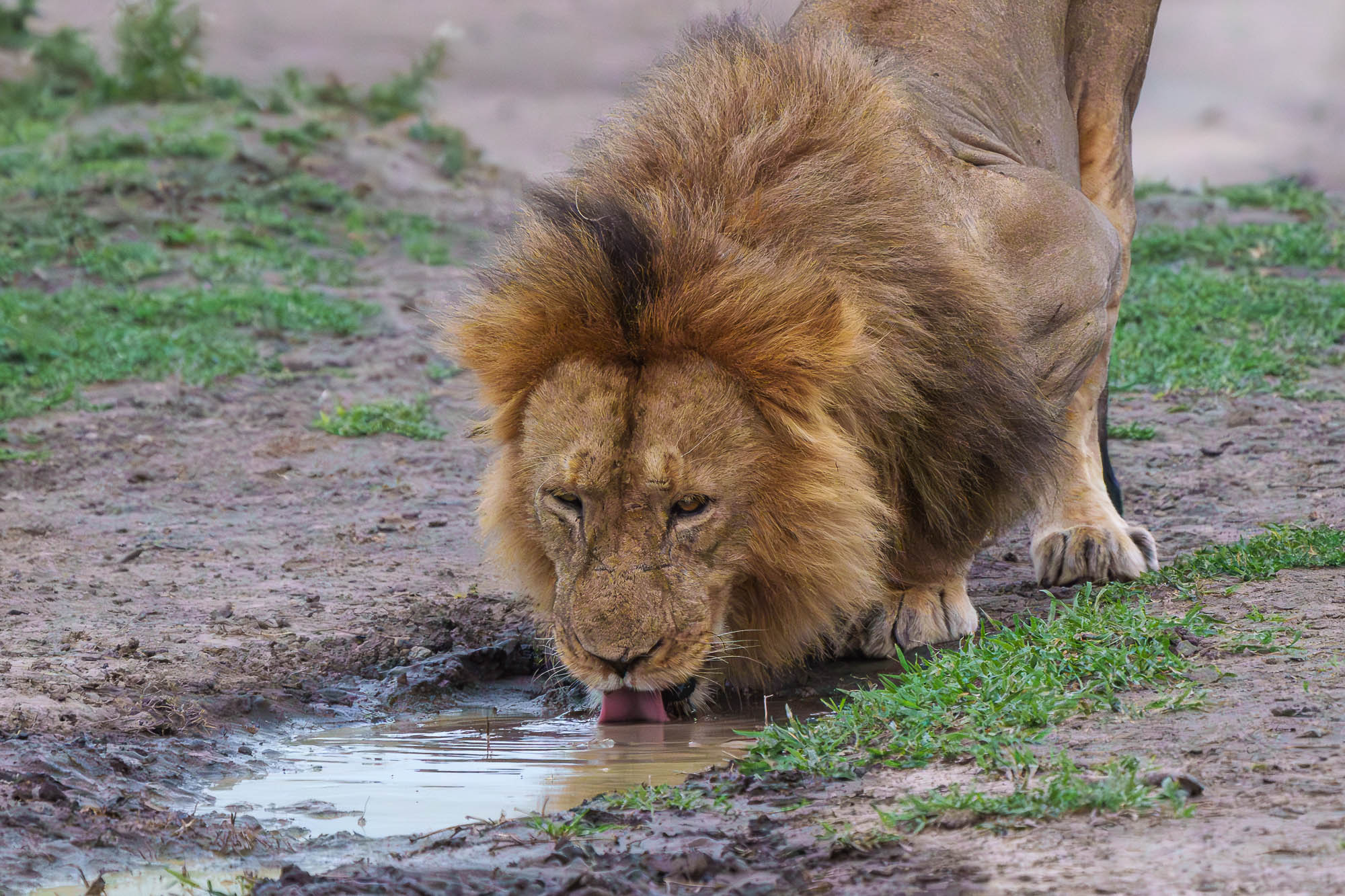
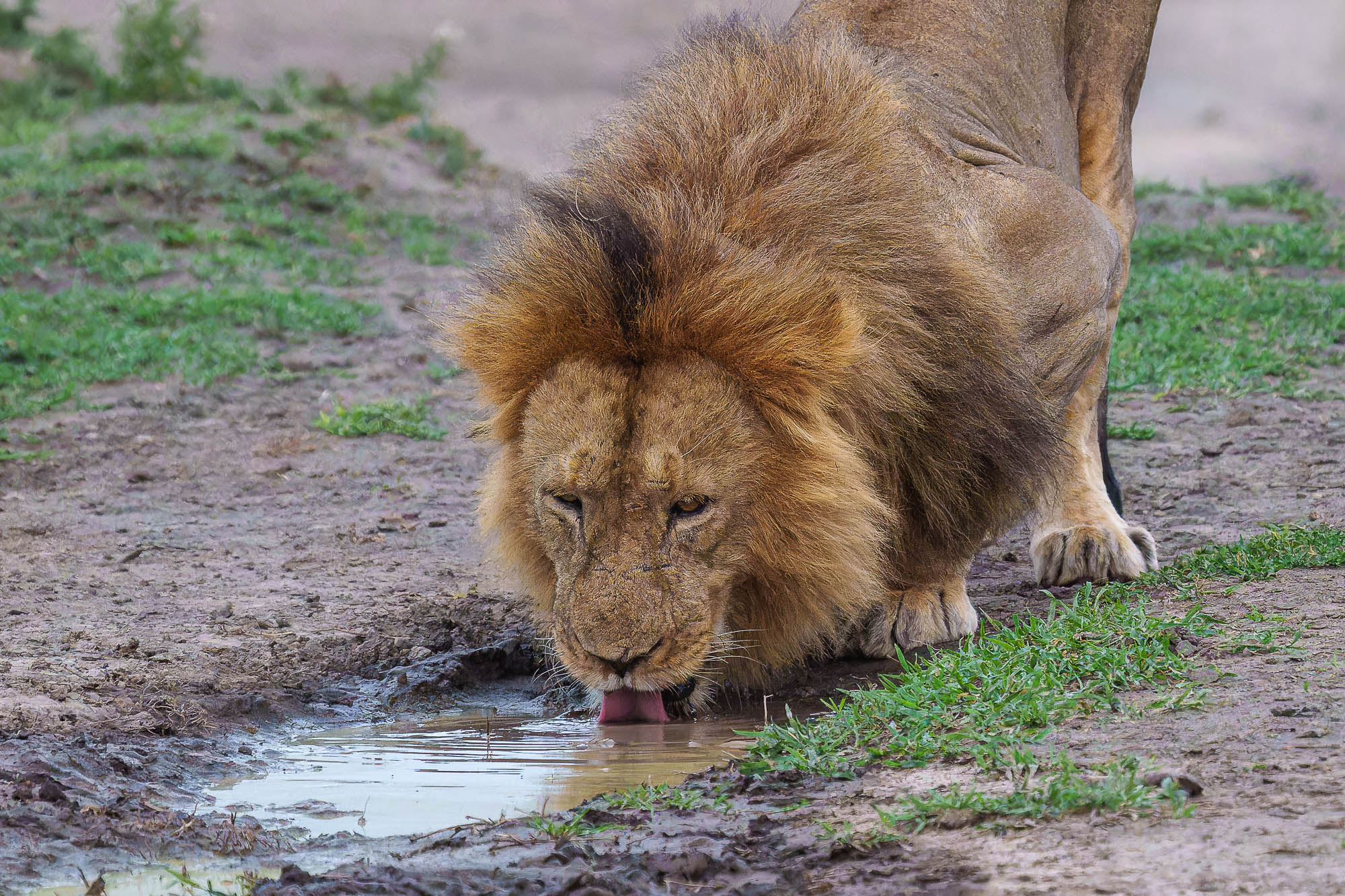
LR Classic Denoise vs. DxO DeepPRIMEXD test on lion at 12,800 ISO shot just before nightfall.
A couple of notes, I processed both on unedited Sony raw files. The Adobe version stacked the processed file with the original raw. The DxO doesn't do that. When I applied my previous edits (including cropping) to the Adobe version, it looked identical to my originally processed version except with less noise. But the DxO had color shifts compared to my original version. I re-edited the DxO version to match my original version. In addition the DxO version did not copy over my keywords to the new dng. I have been working with their tech support ever since version 3 came out to find out why this is happening. So the workflow has more steps with DxO.
You can judge for yourself which you find more appealing.
dallvr wrote:
LR Classic Denoise vs. DxO DeepPRIMEXD test on lion at 12,800 ISO shot just before nightfall.
A couple of notes, I processed both on unedited Sony raw files. The Adobe version stacked the processed file with the original raw. The DxO doesn't do that. When I applied my previous edits (including cropping) to the Adobe version, it looked identical to my originally processed version except with less noise. But the DxO had color shifts compared to my original version. I re-edited the DxO version to match my original version. In addition the DxO version did not copy over my keywords to the new dng. I have been working with their tech support ever since version 3 came out to find out why this is happening. So the workflow has more steps with DxO.
You can judge for yourself which you find more appealing.
Bruce, while running your tests, open task manager and look at the graphs....it will paint a better picture about what on the system is running at peak capacity and be more helpful to discuss resolution than arbitrary times. My guess is that Adobe's algorithm is a greater stress on your GPU than Topaz's algorithm.
Cnyphotoguy wrote:
Bruce, while running your tests, open task manager and look at the graphs....it will paint a better picture about what on the system is running at peak capacity and be more helpful to discuss resolution than arbitrary times. My guess is that Adobe's algorithm is a greater stress on your GPU than Topaz's algorithm.
Yes, I will do that. Gotta run though.. will have to wait until tomorrow. The first test I did... 25 mnts in LR... I saw that my GPU was slammed at 100% on and off for the full 25 mnts. Topaz did the same, slammed it at 100% but it was over darn quickly. CPU was dozing for both. Using NZTCam... that just shows a summary.
Odd that I got vastly different timings on three different shots from the same day. Topaz has always been consistent. Oh, and my screen flashes and stutters when LR runs... no issue with Topaz. I have three monitors running... the center monitor is a pro NEC and the sides are just cheapo 1080 units.
dallvr wrote:
LR Classic Denoise vs. DxO DeepPRIMEXD test on lion at 12,800 ISO shot just before nightfall.
A couple of notes, I processed both on unedited Sony raw files. The Adobe version stacked the processed file with the original raw. The DxO doesn't do that. When I applied my previous edits (including cropping) to the Adobe version, it looked identical to my originally processed version except with less noise. But the DxO had color shifts compared to my original version. I re-edited the DxO version to match my original version. In addition the DxO version did not copy over my keywords to the new dng. I have been working with their tech support ever since version 3 came out to find out why this is happening. So the workflow has more steps with DxO.
You can judge for yourself which you find more appealing.
dallvr wrote:
LR Classic Denoise vs. DxO DeepPRIMEXD test on lion at 12,800 ISO shot just before nightfall.
A couple of notes, I processed both on unedited Sony raw files. The Adobe version stacked the processed file with the original raw. The DxO doesn't do that. When I applied my previous edits (including cropping) to the Adobe version, it looked identical to my originally processed version except with less noise. But the DxO had color shifts compared to my original version. I re-edited the DxO version to match my original version. In addition the DxO version did not copy over my keywords to the new dng. I have been working with their tech support ever since version 3 came out to find out why this is happening. So the workflow has more steps with DxO.
You can judge for yourself which you find more appealing.
I regretted buying the first version of PureRAW. I use DeepPRIME(XD) through Photolab 6 and it offers far more control. (My use of Photolab is restricted to the DeepPRIME technology.) As for colour shift, yes that is an issue. Upon export to Adobe ACR or Lightroom, DxO does not retain the original colour profile and you have to manually choose your preferred profile from the dropdown menu. Otherwise the shift is colour can be quite significant.
RoamingScott wrote:
DXO definitely looks overly crunch in this one, especially in the foreground bokeh and mane hair.
These are 2.7MP images! No surprise DeepPRIME XD looks "overly crunch". In general, DeepPRIME XD should not be used as the main denoising method in DxO applications. DeepPRIME XD makes attempts at refining the image; this can easily produce oversharpening when used with the default settings. I would say that DeepPRIME XD is a denoising method that requires some experience and understanding of the associated settings. DeepPRIME should be used most times, while DeepPRIME XD is reserved for use in some special circumstances.
dallvr wrote:
LR Classic Denoise vs. DxO DeepPRIMEXD test on lion at 12,800 ISO shot just before nightfall.
A couple of notes, I processed both on unedited Sony raw files. The Adobe version stacked the processed file with the original raw. The DxO doesn't do that. When I applied my previous edits (including cropping) to the Adobe version, it looked identical to my originally processed version except with less noise. But the DxO had color shifts compared to my original version. I re-edited the DxO version to match my original version. In addition the DxO version did not copy over my keywords to the new dng. I have been working with their tech support ever since version 3 came out to find out why this is happening. So the workflow has more steps with DxO.
You can judge for yourself which you find more appealing.
I’ve never liked how DXO creates subfolder and a collection. I spent the last two days getting rid of all of it.
I think Adobe looks more natural too. They sure hit it out it out if the ball park. Maybe some AI Sharpening is on the way but I’m pretty happy with the LrC’s Detail panel and Texture.
ruthenium wrote:
These are 2.7MP images! No surprise DeepPRIME XD looks "overly crunch". In general, DeepPRIME XD should not be used as the main denoising method in DxO applications. DeepPRIME XD makes attempts at refining the image; this can easily produce oversharpening when used with the default settings. I would say that DeepPRIME XD is a denoising method that requires some experience and understanding of the associated settings. DeepPRIME should be used most times, while DeepPRIME XD is reserved for use in some special circumstances.
These are reduced in size from the originals for posting here.
dallvr wrote:
These are reduced in size from the originals for posting here.
This was unnecessary (unless you have concerns about someone stealing your work). Your files are 0.6 - 0.7 MB in (disk) size. This forum allows uploading much larger files, e.g. around 3 MB.
ruthenium wrote:
I believe it is not accurate and fair to attribute the high-ISO "artifacts" in distant (that is relatively small in size) faces to denoising algorithms in DxO PL6 (I am not familiar with PureRaw). I am well familiar with this problem. These artifacts can all be traced to the original raw files. They are high-ISO artifacts, visible in the raw files upon a close inspection. When the random noise is removed by DeepPRIME, the non-random features become more prominent. In my experience, DeepPRIME is faithful to the original content and does not introduce any AI-generated artifacts. DeepPRIME denoising can be tuned to make it more or less aggressive, as was explained above. For example, on very high ISO images, I would move the Luminance slider to 70 - 80. DeepPRIME XD is a rather different story. This method is very successful at removing ALL noise from high ISO images, yet it also attempts some image reconstruction and refining using AI. As a result, the "artifacts", that might be barely discernible in the raw files, become prominent in the denoised images when using the default settings. When using DeepPRIME XD, I normally change the Noise model slider to around -50. Also the Lens sharpness might need to be dialled down (I don't like the recent change of the default value from 0 to +1). ...Show more →
Good points. Getting DeepPRIME to work well takes some trial-and-error with the settings (available in Photolab, not in PureRAW). In my experience, virtually every image - even those at lower ISOs - benefits from passing it through DeepPRIME/(XD) as it makes it more robust for further adjustments.
My first reaction to Adobe's new AI Denoise is very positive. They have closed the gap significantly and this is just their opening salvo. No doubt this puts pressure on DxO.
RoamingScott wrote:
Unfortunately not being able to disable RAW details is probably slowing things down.
From the Adobe webpage that is linked inside the Enhance module: Denoise is a GPU intensive feature. Therefore, a faster GPU is recommended to Enhance images quickly.
Not new, not shocking. Every major LR Classic update has focused around increasing the amount of work the GPU is allowed to do. If your GPU is underpowered, processing times will suffer.
As for the point of not being able to disable the RAW Details processing: Well DUH, the AI Denoise is an integral part of the RAW Details processing - it uses the information the RAW Details AI processing computed to do its noise reduction. So both are intrinsically linked. That's also the reason that the processing deals better with the ubiquitous moiree that some sensors are producing...
And if you want AI processing you need to know that AI itself is very intensively leaning on tensor math - and that's the one thing the CPU can not do well and a GPU or ML processor like in the Apple Silicon can do very very well!
ruthenium wrote:
I believe it is not accurate and fair to attribute the high-ISO "artifacts" in distant (that is relatively small in size) faces to denoising algorithms in DxO PL6 (I am not familiar with PureRaw). I am well familiar with this problem. These artifacts can all be traced to the original raw files. They are high-ISO artifacts, visible in the raw files upon a close inspection. When the random noise is removed by DeepPRIME, the non-random features become more prominent. In my experience, DeepPRIME is faithful to the original content and does not introduce any AI-generated artifacts. DeepPRIME denoising can be tuned to make it more or less aggressive, as was explained above. For example, on very high ISO images, I would move the Luminance slider to 70 - 80. DeepPRIME XD is a rather different story. This method is very successful at removing ALL noise from high ISO images, yet it also attempts some image reconstruction and refining using AI. As a result, the "artifacts", that might be barely discernible in the raw files, become prominent in the denoised images when using the default settings. When using DeepPRIME XD, I normally change the Noise model slider to around -50. Also the Lens sharpness might need to be dialled down (I don't like the recent change of the default value from 0 to +1).
Exporting raw files from DxO PL6, using DeepPRIME denoising, takes only 5 s per file on my 16 in MacBook Pro M2 Max. This changed my culling procedure. After the first round of culling in PM, I convert the remaining images to JPGs in PL6, using a custom default profile, then continue culling in FastStone by looking at the generated JPGs. Exporting 100 images from PL6 using DeepPRIME takes only about 8 min. DxO PL6 is a very competent program for post processing in my experience. ...Show more →
Of course you're right, I don't pretend that these so called artefacts comes from nothing. If there is a Picasso effect on a face, a few weirds lines, it means that there was some line of pixels to begin with in the original file, I fully agree on that. Deep Prime is the best at maintaining a faithful picture (in my memories, Topaz is the worst).
I did a lot of comparisons between Deep Prime and Deep Prime XD and indeed, XD tries on a larger scale to guess what is details and what is noise. I almost never use XD, even if it can be spectacular on some pictures. I batch edit my raw files with Deep Prime before finishing the job, and it's Deep Prime that I trust the most. Deep Prime XD is just to risky with human faces. But I'm pretty sure that it's very nice with BIF or other animals, with some furs or feathers to accentuate on one side, and a soft background on the other.
In the end, I just think that it's a huge success for Adobe. Even if it's not really as good as Deep Prime, it's not that important. The simple fact that there are some discussions on every forum comparing their new noise reduction to the reference is a proof that they nailed it. I will continue to use Deep Prime (and I use C1 way more often than LR anyway!)
Rajan Parrikar wrote:
Good points. Getting DeepPRIME to work well takes some trial-and-error with the settings (available in Photolab, not in PureRAW). In my experience, virtually every image - even those at lower ISOs - benefits from passing it through DeepPRIME/(XD) as it makes it more robust for further adjustments.
My first reaction to Adobe's new AI Denoise is very positive. They have closed the gap significantly and this is just their opening salvo. No doubt this puts pressure on DxO.
Some but not a lot I don't think. PL is a full blown developer with long time loyal users. Then you have the I'll never pay a subscription free crowd. I think Topaz employees are likely not having a very good weekend.
I have PureRaw 2. I tried PR3 when travelling but I couldn't really judge anything on a 14" screen. The super users were saying you really need PL6 to get the most out of XD so I never upgraded.
Since Adobe released Denoise I removed PR 2 off my system. I also got rid of Topaz DeNoise and Gigapixel. I was never into upscaling. I only bought it to get Photo AI for free which also gave support for Sharpen AI and DeNoise AI for another year.
I left Photo AI and Sharpen AI. I pre cull my files using Canon's DPP so most OOF files never get into LrC. I really can't see using Photo AI much anymore. If I need de-blur Sharpen AI is twice as fast. This fall I doubt I'll get the annual support package.