Please forgive me as I have not read through all seventeen pages of this post. I hope I am discussing the proper topic. With the Eos R, I was not able to track fast or moderately fast moving subjects as after the shutter fired, the image appeared in the viewfinder. When I look at page 258 it offers some hope. It appears that you can access an option called Image Review, then Viewfinder Review, and there appears to be an option whereby one can disable the viewfinder review. How it works in practice may be interesting.
Greg Futral wrote:
Please forgive me as I have not read through all seventeen pages of this post. I hope I am discussing the proper topic. With the Eos R, I was not able to track fast or moderately fast moving subjects as after the shutter fired, the image appeared in the viewfinder. When I look at page 258 it offers some hope. It appears that you can access an option called Image Review, then Viewfinder Review, and there appears to be an option whereby one can disable the viewfinder review. How it works in practice may be interesting.
Read starting from here and some of this is covered.
So on pg. 256 of the manual, there's a high speed display mode - wonder if it will help the tracking? does the R have this mode?
https://i.imgur.com/ZJvUgy5.png
I doesn't make much difference with my R, panning and lag. Maybe at 12/20 fps. It only works with RF lenses. Since it only works with RF lenses it must be lens related in some way instead of EVF lag.
Maybe the lag won't be so bad. We have seen what the R5's electronic shutter does. It isn't that bad. I just tried my R in silent shutter which is electronic shutter and it is just as laggy as when in mechanical shutter. It's pretty bad.
The R5 will already have some lag because of mechanical shutter. Maybe that will be the worst of it.
Interestingly, I can't find any reference in the R5 manual specifying that an RF lens must be used for high speed display to activate. It is certainly spelled out for the EOS R. We'll find out either way soon enough.
Greg Schneider wrote:
Interestingly, I can't find any reference in the R5 manual specifying that an RF lens must be used for high speed display to activate. It is certainly spelled out for the EOS R. We'll find out either way soon enough.
You are correct. I can't find it either. I just assumed. I still want to see the manual from the Canon USA site.
Zenon Char wrote:
Minute 8:10 is in mechanical shutter
Ugh just saw this thread so apologies for the cross post...
The clue to when the shutter is firing is the shots remaining counter blinks. If that's correct then I see zero blackout in this video for mechanical shutter and the slightest of stuttering - totally acceptable. Am I right?
Zonefocus wrote:
Ugh just saw this thread so apologies for the cross post...
The clue to when the shutter is firing is the shots remaining counter blinks. If that's correct then I see zero blackout in this video for mechanical shutter and the slightest of stuttering - totally acceptable. Am I right?
Yes it as blinking but you can also tell by the white frame as well. It flickers in e-shutter.
It appears there is no blackout which is coming from multiple sources. I'm convinced about that part and I have not seen anyone say there is. There is the stuttering or jitter in m-shutter. I can't say if it will be acceptable to you. It looks OK to me but there have not been any real side to side movement like a dog running, etc videos yet. That can make a big difference depending on the stutter. There will be some stutter because of the shutter mechanics. What else like frame insertion (if they use it) etc contributes to the jitter we don't know.
There was some side to side movement in that video and it seemed OK to me.
Zenon Char wrote:
Yes it as blinking but you can also tell by the white frame as well. It flickers in e-shutter.
It appears there is no blackout which is coming from multiple sources. I'm convinced about that part and I have not seen anyone say there is. There is the stuttering or jitter in m-shutter. I can't say if it will be acceptable to you. It looks OK to me but there have not been any real side to side movement like a dog running, etc videos yet. That can make a big difference depending on the stutter. There will be some stutter because of the shutter mechanics. What else like frame insertion (if they use it) etc contributes to the jitter we don't know.
There was some side to side movement in that video and it seemed OK to me. ...Show more →
The only person who said there is lag is Chelsea Northrup After 17 pages of trying to find out the answer, I hope someone with an actual camera can do a proper test soon.
tifa3 wrote:
The only person who said there is lag is Chelsea Northrup After 17 pages of trying to find out the answer, I hope someone with an actual camera can do a proper test soon.
Yes that was brutal. Poor exposure. Anything they could do to make it look bad. I bet they have the A7s III between them in bed. They just removed the bottle and burped it.
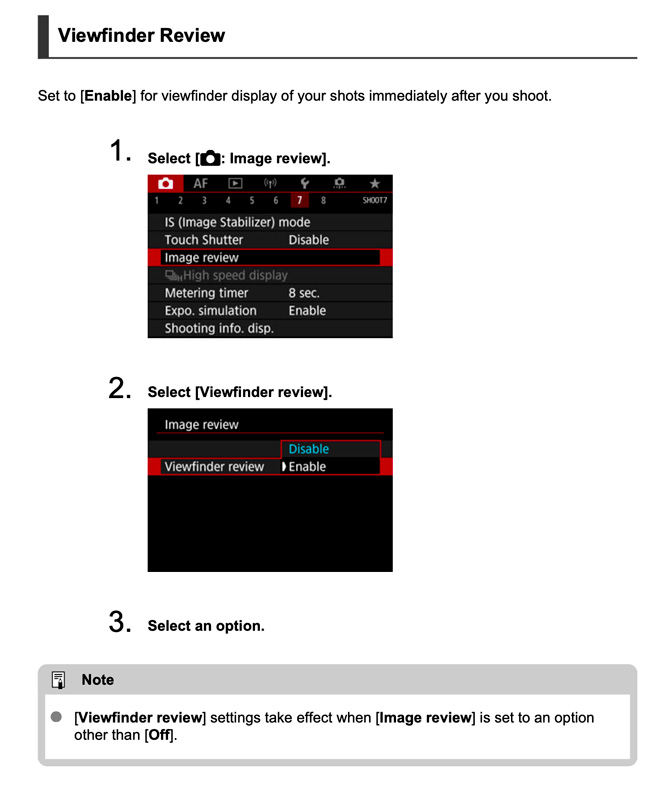
Viewfinder Review
Set to [Enable] for viewfinder display of your shots immediately after you shoot.
1. Select [ : Image review].
2. Select [Viewfinder review].
3. Select an option.
Note
[Viewfinder review] settings take effect when [Image review] is set to an option
other than [Off].
2
I couldn't get page 258 from the English Manual to post in the same format as the instructions appear.
To me this would imply that one would need set the Viewfinder Image Review to "on". I think you can look at a lot of footage, but until you determine what the camera settings of those videos are, one cannot really determine how things work. I agree with tifa3 that we will have to wait until someone does a better test. I had asked Vanessa Joy if one could turn the Viewfinder Image Review off, and she checked around and the consensus was that you can. If you cannot turn this off, I don't understand how one will be able to photograph quickly moving objects because you will not be able to follow them as you couldn't with the EOS R.
Yes you can disable VF image review. If enabled and burst shooting you are seeing the previous shots preview at each frame which would create more lag, in theory. It would be like frame insertion. There already may be some and it could compound it. I don't know it VF review disables on it's own when you burst shoot. It would be great if it did and if I was an engineer I'd set it up that way. Image review will come in handy for stills. No LCD chimping. it would be nice not to have to worry about it.
Of course this is just theory right now. I read about it somewhere else but it seems to make sense.
EF lens capable of continuous shooting of 12 frames/second
The following EF lenses are capable of continuous shooting of 12 frames/sec when the drive mode is set to [ ] (as of July 2020).
EF24mm F2.8 IS USM
EF28mm F2.8 IS USM
EF35mm F1.4L II USM
EF35mm F2 IS USM
EF40mm F2.8 STM
EF50mm F1.8 STM
EF85mm F1.4L IS USM
EF100mm F2.8L Macro IS USM
EF300mm F2.8L IS II USM
EF400mm F2.8L IS II USM
EF400mm F2.8L IS III USM
EF400mm F4 DO IS II USM
EF500mm F4L IS II USM
EF600mm F4L IS II USM
EF600mm F4L IS III USM
EF8-15mm F4L Fish Eye USM
EF11-24mm F4L USM
EF16-35mm F2.8L III USM
EF16-35mm F4L IS USM
EF24-105mm F3.5-5.6 IS STM
EF24-105mm F4L IS II USM
EF24-70mm F2.8L II USM
EF24-70mm F4L IS USM
EF70-200mm F2.8L IS II USM
EF70-200mm F2.8L IS III USM
EF70-200mm F4L IS II USM
EF70-300mm F4-5.6 IS II USM
EF70-300mm F4-5.6L IS USM
EF100-400mm F4.5-5.6L IS II USM
EF200-400mm F4L IS USM Extender 1.4x
EF-S24mm F2.8 STM
EF-S35mm F2.8 Macro IS STM
EF-S10-18mm F4.5-5.6 IS STM
EF-S15-85mm F3.5-5.6 IS USM
EF-S18-55mm F3.5-5.6 IS STM
EF-S18-55mm F4-5.6 IS STM
EF-S18-135mm F3.5-5.6 IS USM
EF-S18-135mm F3.5-5.6 IS STM
EF-S55-250mm F4-5.6 IS STM
When [Electronic shutter] is set for the shutter method
When continuous shooting is set, high-speed continuous shooting (up to approx. 20 shots/sec.) will be taken if the following conditions are met.
Except when using EF-S lens* With the aperture open
* Refer to " Lenses at which continuous shooting speeds of up to approx. 20 fps do not easily decrease ".
The continuous shooting speed varies depending on the shutter speed, aperture, aperture status during continuous shooting, subject conditions, brightness (such as when shooting in a dark place), and lens type.
A lens that does not easily reduce continuous shooting speeds up to approx. 20 shots/sec.
The following is a list of lenses with a maximum continuous shooting speed of approx. 20 fps that is unlikely to slow down (as of July 2020).
RF15-35mm F2.8 L IS USM
RF24-70mm F2.8 L IS USM
RF24-105mm F4 L IS USM
RF24-240mm F4-6.3 IS USM
RF28-70mm F2 L USM
EF14mm F2.8L II USM
EF20mm F2.8 USM
EF24mm F1.4L II USM
EF28mm F1.8 USM
EF35mm F1.4L USM
EF50mm F1.2L USM
EF50mm F1.4 USM
EF85mm F1.2L II USM
EF85mm F1.8 USM
EF100mm F2 USM
EF100mm F2.8 Macro USM
EF135mm F2L USM
EF135mm F2L USM + Extender EF1.4x III
EF135mm F2L USM + Extender EF2.0x III
EF200mm F2.8L II USM
EF300mm F2.8L IS USM
EF300mm F2.8L IS II USM + Extender EF2.0x III
EF300mm F4L IS USM + Extender EF1.4x III
EF300mm F4L IS USM + Extender EF2.0x III
EF400mm F4 DO IS USM
EF400mm F4 DO IS II USM
EF400mm F4 DO IS II USM + Extender EF2.0x III
EF400mm F5.6L USM
EF400mm F5.6L USM + Extender EF1.4x III
EF400mm F5.6L USM + Extender EF2.0x III
EF500mm F4L IS USM
EF500mm F4L IS II USM
EF500mm F4L IS II USM + Extender EF2.0x III
EF600mm F4L IS USM
EF600mm F4L IS II USM
EF800mm F5.6L IS USM
EF800mm F5.6L IS USM + Extender EF1.4x III
EF800mm F5.6L IS USM + Extender EF2.0x III
EF8-15mm F4L Fish Eye USM
EF16-35mm F2.8L III USM
EF16-35mm F2.8L II USM
EF16-35mm F2.8L USM
EF16-35mm F4L IS USM
EF17-40mm F4L USM
EF24-105mm F4L IS II USM
EF24-105mm F4L IS USM
EF24-70mm F2.8L II USM
EF24-70mm F2.8L USM
EF24-70mm F4L IS USM
EF28-105mm F3.5-4.5 II USM
EF28-300mm F3.5-5.6L IS USM
EF70-200mm F2.8L IS USM
EF70-200mm F2.8L IS II USM
EF70-200mm F2.8L IS II USM + Extender EF2.0x III
EF70-200mm F2.8L IS III USM
EF70-200mm F2.8L USM
EF70-200mm F4L USM
EF70-200mm F4L USM + Extender EF1.4x III
EF70-200mm F4L USM + Extender EF2.0x III
EF70-200mm F4L IS USM
EF70-200mm F4L IS II USM
EF70-200mm F4L IS II USM + Extender EF1.4x III
EF70-300mm F4-5.6 IS II USM
EF70-300mm F4.5-5.6 DO IS USM
EF100-400mm F4.5-5.6L IS USM
EF200-400mm F4L IS USM Extender 1.4x
EF200-400mm F4L IS USM Extender 1.4x + Extender EF1.4x III
EF200-400mm F4L IS USM Extender 1.4x + Extender EF2.0x III
EF200-400mm F4L IS USM Extender 1.4x (with built-in) + Extender EF1.4x III
EF200-400mm F4L IS USM Extender 1.4x (with built-in) + Extender EF2.0x III


 After 17 pages of trying to find out the answer, I hope someone with an actual camera can do a proper test soon.