This topic is in the 2020 archive. You can read it and like its posts here. It is read only.
Archive 2020R5/6 lag/blackout
p.1 #1R5/6 lag/blackout
Could Canon get rid of the blackout/lag in the R5/6 viewfinder?
Any info?
Any info?
Jul 09, 2020 at 08:08 PM
p.1 #3R5/6 lag/blackout
Well they certainly didn't advertise anything about a blackout free EVF like A9 so that tells me it doesn't have one....because if I was releasing a new camera and it did have that feature I'd be shouting it pretty loud.
That said, the 1DXIII LV (which is what I assume the R5/6 is like) doesn't appear to have blackout but as far as I can tell is doing very fast frame insertion and at such a high FPS is useable for tracking moving subjects.
That said, the 1DXIII LV (which is what I assume the R5/6 is like) doesn't appear to have blackout but as far as I can tell is doing very fast frame insertion and at such a high FPS is useable for tracking moving subjects.
Jul 09, 2020 at 09:23 PM
p.1 #4R5/6 lag/blackout
Look at the image on the flip out screen at around 1:45 mark of this video:
Looks like some lag/stutter/blackout....
14:45 also has some images with the 85/2 vs. 85/1.2.
Looks like some lag/stutter/blackout....
14:45 also has some images with the 85/2 vs. 85/1.2.
Jul 09, 2020 at 09:36 PM
p.1 #5R5/6 lag/blackout
Videos show that with electronic shutter there is virtually zero lag - A9 style.
Jul 09, 2020 at 09:43 PM
p.1 #6R5/6 lag/blackout
rscheffler wrote:
Look at the image on the flip out screen at around 1:45 mark of this video:
Looks like some lag/stutter/blackout....
14:45 also has some images with the 85/2 vs. 85/1.2.
That is not in burst mode. She is pressing the shutter at each shot. I'm no expert but I said in another thread perhaps Canon just didn't worry about it for single shooting.
Jul 09, 2020 at 10:37 PM
p.1 #7R5/6 lag/blackout
This was out for any least a month. There is no burst example but it says the same as 1DXIII.
https://www.usa.canon.com/internet/portal/us/home/explore/product-showcases/cameras-and-lenses/eos-r5
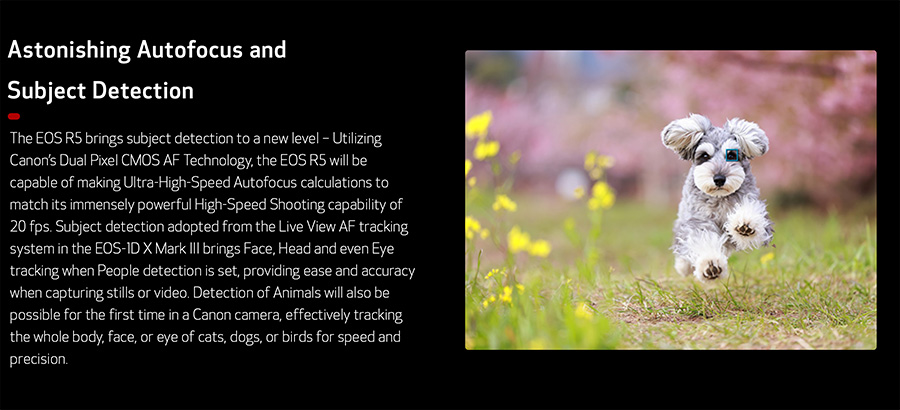
https://www.usa.canon.com/internet/portal/us/home/explore/product-showcases/cameras-and-lenses/eos-r5
Jul 09, 2020 at 10:41 PM
p.1 #8R5/6 lag/blackout
Unless he was paid to or is ignoring blackout watch his reaction at minute 6:20. We need to rewatch this.
Jul 09, 2020 at 10:51 PM
p.1 #10R5/6 lag/blackout
rscheffler wrote:
Look at the image on the flip out screen at around 1:45 mark of this video:
Looks like some lag/stutter/blackout....
14:45 also has some images with the 85/2 vs. 85/1.2.
also seems image preview after taking a shot is on?
Look at the image on the flip out screen at around 1:45 mark of this video:
Looks like some lag/stutter/blackout....
14:45 also has some images with the 85/2 vs. 85/1.2.
also seems image preview after taking a shot is on?
Jul 10, 2020 at 12:20 AM
p.1 #11R5/6 lag/blackout
Thanks guys.
People ask about about lag/blackout at the Canon Creator Lab Live Creator Showcase yesterday night.... the question was eluded by moderator and speakers.
That said, I really hope R5 comes lag free. It is very annoying in my opinion.
People ask about about lag/blackout at the Canon Creator Lab Live Creator Showcase yesterday night.... the question was eluded by moderator and speakers.
That said, I really hope R5 comes lag free. It is very annoying in my opinion.
Jul 10, 2020 at 05:03 AM
p.1 #12R5/6 lag/blackout
I have the A9 II and the no blackout feature is huge for me, looks like I will remain a Sony guy
Jul 10, 2020 at 05:22 AM
p.1 #13R5/6 lag/blackout
mikmau wrote:
Thanks guys.
People ask about about lag/blackout at the Canon Creator Lab Live Creator Showcase yesterday night.... the question was eluded by moderator and speakers.
That said, I really hope R5 comes lag free. It is very annoying in my opinion.
Around what time. That was 2 ½ hrs and I couldn't watch it all.
Jul 10, 2020 at 07:03 AM
p.1 #14R5/6 lag/blackout
Zenon Char wrote:
Unless he was paid to or is ignoring blackout watch his reaction at minute 6:20. We need to rewatch this.
I mean, it's a video released by Canon that includes many Canon Ambassadors. I haven't seen a single review yet, just "previews" by people who received pre-production copies. They're likely prohibited from sharing any shortcomings since they're pre-production.
Jul 10, 2020 at 07:14 AM
p.1 #16R5/6 lag/blackout
It’s electronic shutter. Notice the white border flashing
Zenon Char wrote:
Not sure it mechanical or electronic. Minute 3:21
Zenon Char wrote:
Not sure it mechanical or electronic. Minute 3:21
Jul 10, 2020 at 07:18 AM
p.1 #17R5/6 lag/blackout
Thanks. Not too bad. Still looking for mechanical and I think I found something.
jdavidse1901 wrote:
It’s electronic shutter. Notice the white border flashing
jdavidse1901 wrote:
It’s electronic shutter. Notice the white border flashing
Zenon Char wrote
Not sure it mechanical or electronic. Minute 3:21Jul 10, 2020 at 07:22 AM
p.1 #18R5/6 lag/blackout
"Around what time. That was 2 ½ hrs and I couldn't watch it all.
Zenon, I am trying to get a recorded version of the webinar but I can not find it.
I have personally posted the question in the QA chat almost at the end of the zoom meeting when I realized lag issue has not been mentioned by speakers .
Jul 10, 2020 at 08:00 AM
p.1 #19R5/6 lag/blackout
mikmau wrote:
"Around what time. That was 2 ½ hrs and I couldn't watch it all.
Zenon, I am trying to get a recorded version of the webinar but I can not find it.
I have personally posted the question in the QA chat almost at the end of the zoom meeting when I realized lag issue has not been mentioned by speakers .
If you are talking about the morning presentation.
https://www.youtube.com/watch?time_continue=446&v=D_8YCWMgIuY&feature=emb_logo
Jul 10, 2020 at 08:02 AM
p.1 #20R5/6 lag/blackout
Zenon, I am referring to the yesterday night webinar. It was interesting by the way.
"Event starts in 1 hour! Join us at 8PM EST for the Canon Creator Lab Live Creator Showcase. Learn more about the new EOS R5 and EOS R6 with our creator panel. Each creator had the opportunity to put the EOS R5 and EOS R6 to the test. They’ll be sharing their experiences using the gear and answering your questions. Tune in to see what they were able to create!
Today’s event will be hosted using Zoom Webinar and we've included the direct link below so you have it handy to join at 5PM PST / 8PM EST:
NOTE: If you have any problems with the link - try copy and pasting the link into your browser window. You can also find the most up-to-date link in the "digital links" area of your digital ticket via your Eventbrite account.
HERE'S THE DIRECT LINK FOR THE EVENT:
https://us02web.zoom.us/j/86213014733?pwd=K3hjSm8xNk9aaDFOR0U5OVBCeVRpUT09
The webinar shouldn't ask you for a password if you use the direct link, but if for some reason it does, you can use the following:
PASSWORD: CreatorLab"
Jul 10, 2020 at 08:08 AM