p.4 #1 · Lightroom's new Enhance Details sample with Sony FE 50/1.4 ZA
There don't seem to be any menu settings for it, it's just a push button tool.
Andrew Rodney on LuLa posted a slightly different way to compare images than the straight subtract or difference in PS using layers. It uses the same blend but shows the result offset to mid grey which may help.
Open both original and enhanced in PS, but not as layers in the same file
Use Apply Image (Image > Apply Image)
Switch to chose the other file in the top pull down
Change Blend Mode to Subtract
Change offset to 128
You'll now have an even grey screen from the differences between the 2 images. Also the histogram will have a tall spike at 128.
I've done this now for all of the images I tested (about 1/2 a dozen) and got either nothing visible, or only the very faintest of a ghost image that I could only see if I panned around the image at 100% (ie it had to be moving). I've deleted all the files I made and don't plan to use this for anything other than an image with moire (I don't have any images with moire to test right now)
p.4 #3 · Lightroom's new Enhance Details sample with Sony FE 50/1.4 ZA
Ver 8.2
I've done a quick test of a few Sony A9 RAW and Leica DNG files and so far not seeing changes applied/differences when viewing side by side with compare tool even zooming in at 2:1on iMac 5K. All seems to be working ok on macOS 10.14.3 otherwise. I really like the promise of this new Details Enhancement feature, but I need to do more critical scrutiny to see what's going on.
p.4 #4 · Lightroom's new Enhance Details sample with Sony FE 50/1.4 ZA
LBJ2 wrote:
Ver 8.2
I've done a quick test of a few Sony A9 RAW and Leica DNG files and so far not seeing changes applied/differences when viewing side by side with compare tool even zooming in at 2:1on iMac 5K. All seems to be working ok on macOS 10.14.3 otherwise. I really like the promise of this new Details Enhancement feature, but I need to do more critical scrutiny to see what's going on.
I’m guessing that the pixel density of a 5k screen is too high to see the benefit at 1:1, and maybe the interpolating to get 2:1 undoes the benefit. Which tells us that there are few real situations in which the benefit is noticeable.
p.4 #5 · Lightroom's new Enhance Details sample with Sony FE 50/1.4 ZA
mcbroomf wrote:
It's not faulty. This is exactly how Adobe describe it in their release notes (ie RAW only, no JPG/TIFF but also not for DNGs from merge or pano).
Ah, ok. There were no available release notes when I first downloaded this release several days ago before everyone else could get it. I looked for any info but it took me to some other Adobe web page with no mention of this new feature.
p.4 #6 · Lightroom's new Enhance Details sample with Sony FE 50/1.4 ZA
I have used Enhance Details on CS5 w Google Selective (NIK) for years. It works on all formats and appears better than Adobe examples provided. I have a 16 year old HP computer.
Am I missing something or are you missing something ?
p.4 #7 · Lightroom's new Enhance Details sample with Sony FE 50/1.4 ZA
LBJ2 wrote:
Hi Fred
I use the BlackMagic eGPU 580 with my 2018 MBP. Since this new Enhance Details feature is supposed to use the GPU, I am curious to compare Enhance Details time estimate with the numbers you listed with your MBP but I don't see any Estimated Time message when I run the process. Is there some menu setting to turn time estimate on/off?
I only get the Enhance Details screen when going to menu: Photo >> Enhance Details...
If I use the shortcut directly on the file instead, the process starts without a preview or estimation time. (option+control+I)
p.4 #8 · Lightroom's new Enhance Details sample with Sony FE 50/1.4 ZA
Fred Miranda wrote:
I only get the Enhance Details screen when going to menu: Photo >> Enhance Details...
If I use the shortcut directly on the file instead, the process starts without a preview or estimation time. (option+control+I)
Must be a Mac thing, I get the time estimation/preview window when launching from right clicking a photo in the film strip and picking the Enhance Details option.
p.4 #9 · Lightroom's new Enhance Details sample with Sony FE 50/1.4 ZA
RoamingScott wrote:
Must be a Mac thing, I get the time estimation/preview window when launching from right clicking a photo in the film strip and picking the Enhance Details option.
That's correct, right-clicking a photo in the film strip works the same as the menu option. Having the estimation and previewing the results is a nice option. (instead of just starting the process with the shortcut keys)
p.4 #14 · Lightroom's new Enhance Details sample with Sony FE 50/1.4 ZA
Fred Miranda wrote:
I just checked the image sizes and when using "Enhance Details", the compressed RAW file goes from ~43MB to about 190MB so more than quadruples in size!
So, It's not something I will use all the time, perhaps only for my landscape keepers.
I will test starting with an uncompressed raw. (~85MB)
Sounds similar to AI gigapixel by Topaz also out for awhile
p.4 #15 · Lightroom's new Enhance Details sample with Sony FE 50/1.4 ZA
RoamingScott wrote:
I would agree but the disturbing part about that is that it appears to add new colors between hard edges to achieve that and falsify extra detail.
Either way, this feature isn't for me.
Are you sure that it is adding color that was not captured by the camera? Is it possible that the lens had some minor CA here or that it was Fuji's original algorithm that wasn't smoothing away true color variations? Just hard to tell from your example here.
p.4 #16 · Lightroom's new Enhance Details sample with Sony FE 50/1.4 ZA
Maybe try the Sony 50 1.4 as we know it has no CA. I have those Raws up on that three lens test Fred started. The wood in Big Bronco would be something to look at
p.4 #17 · Lightroom's new Enhance Details sample with Sony FE 50/1.4 ZA
grahamgibson wrote:
Are you sure that it is adding color that was not captured by the camera? Is it possible that the lens had some minor CA here or that it was Fuji's original algorithm that wasn't smoothing away true color variations? Just hard to tell from your example here.
Not sure how I'd ever be able to give you an accurate answer on that, but if the RAW file displays grey tones and the Adobe enhanced image suddenly displays orange tones, I can say with some certainty that colors are being added. Whether that's a mechanic of Adobe's machine learning algorithm, or some sort of neighbor extrapolation, or some other process, I now have colors in my photos along contrast edges that weren't present in the RAW.
How big of a deal you want to make of that is up to the photographer. I'm not too hot on it.
I was going to pick this up, now I'll see how the LR update works. I will say, though, that AI Clear by Topaz is amazing for noise reduction without loss of detail.
p.4 #19 · Lightroom's new Enhance Details sample with Sony FE 50/1.4 ZA
I've downloaded LR CC today (I'm not a big fan of this CC iteration) and just finished updating my LR Classic CC, which I prefer for display, menus, and controls.
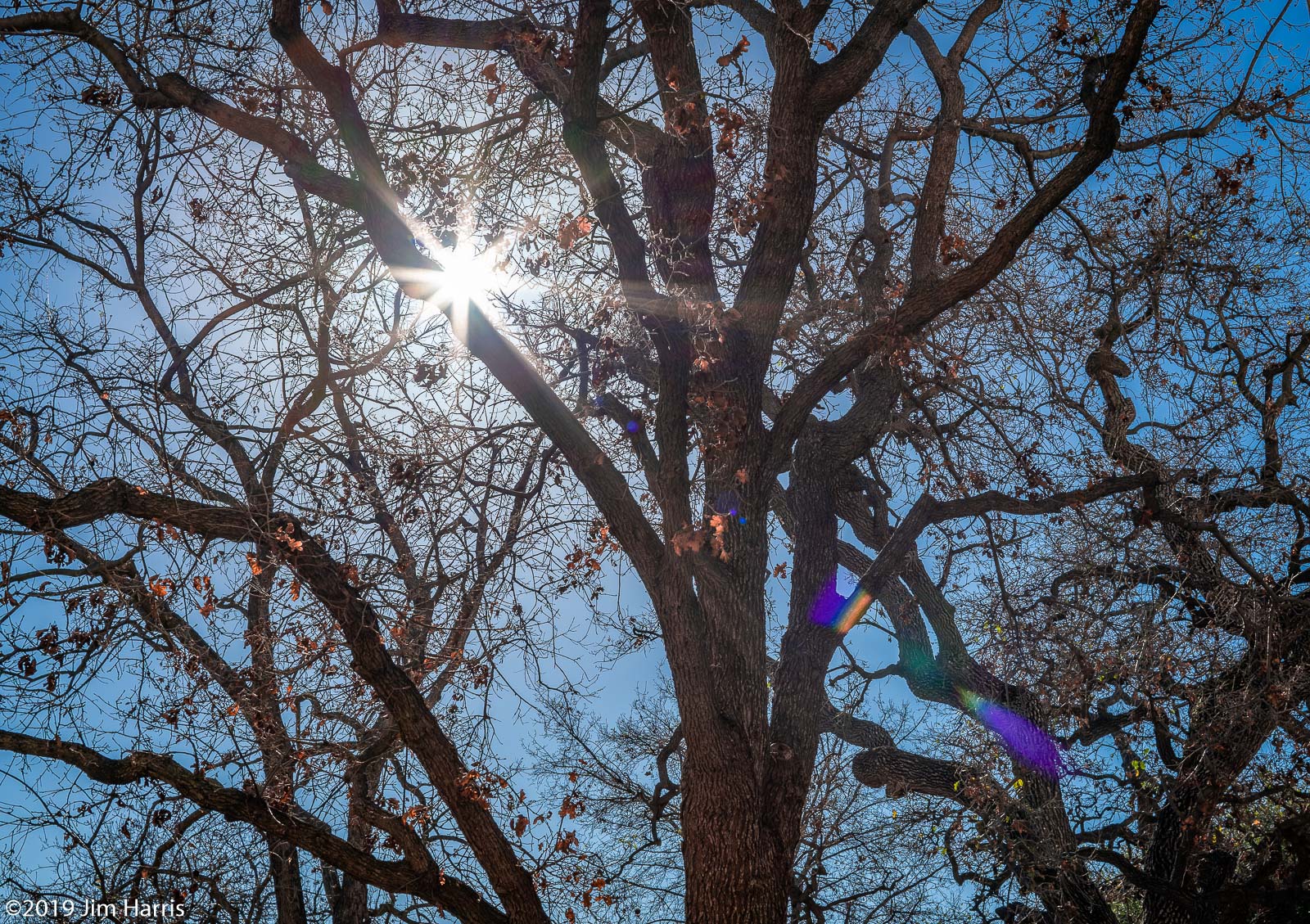
Here's a silhouette shot of oak trees/branches with sun star from a lens we all know has CA fringing issues: Canon 45/2.8 TSE. I did the conversion in LR Classic, then PP from the Classic tools.
The positive take away is that the Enhance Details works well on the compressed RAW image, but the image size won't suit general use, this one coming in at 194MB after conversion to DNG. Then reduced to just over 700k for display here. Still, it looks clean without fringing or and the bark on the trees and leaf details pop nicely without smearing or blur. Looks like a great tool to have in LR.
p.4 #20 · Lightroom's new Enhance Details sample with Sony FE 50/1.4 ZA
RoamingScott wrote:
Must be a Mac thing, I get the time estimation/preview window when launching from right clicking a photo in the film strip and picking the Enhance Details option.
Thank you, right click did it for me on macOS too. I see the estimate now.


 Still, it looks clean without fringing or and the bark on the trees and leaf details pop nicely without smearing or blur. Looks like a great tool to have in LR.