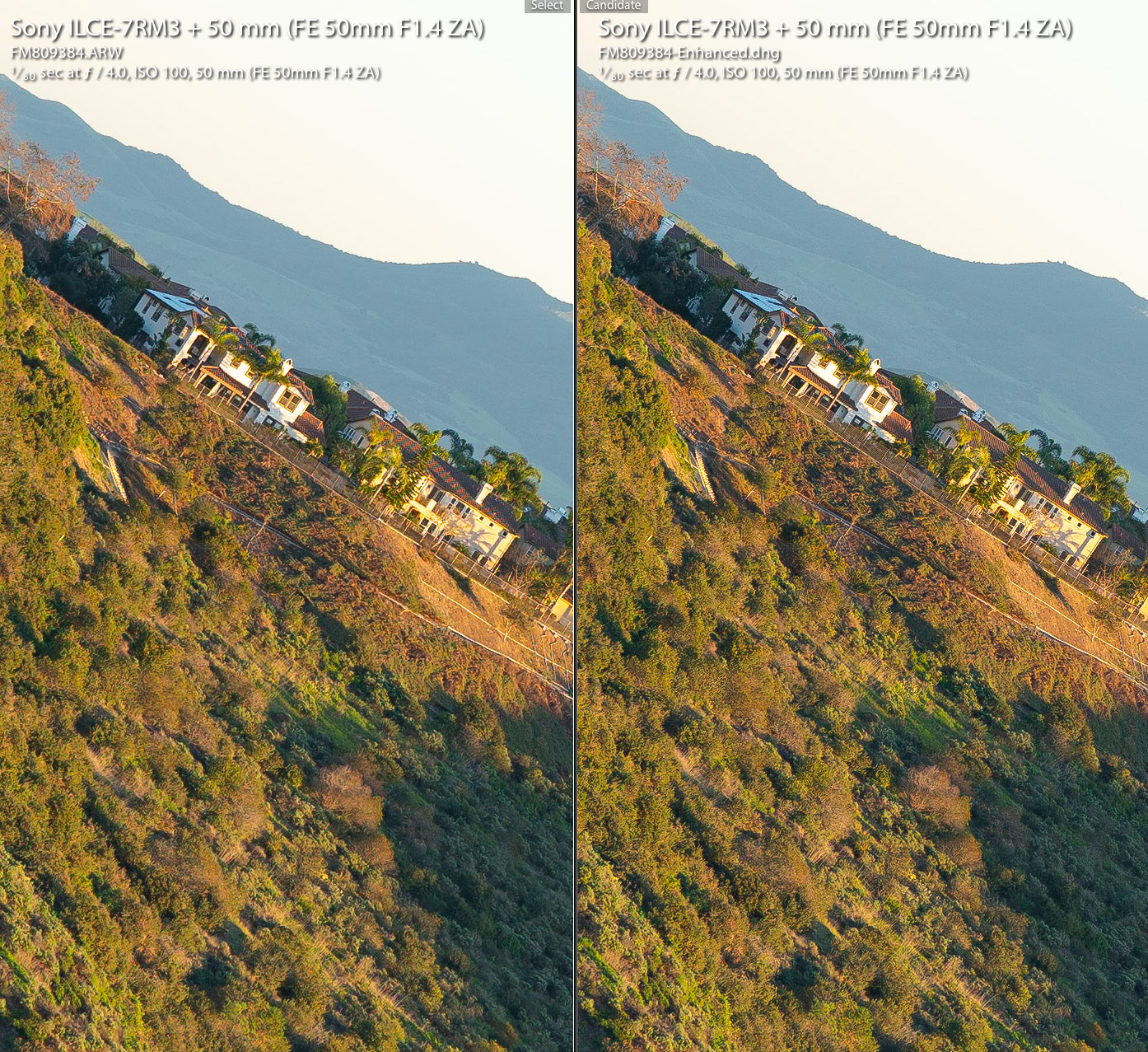
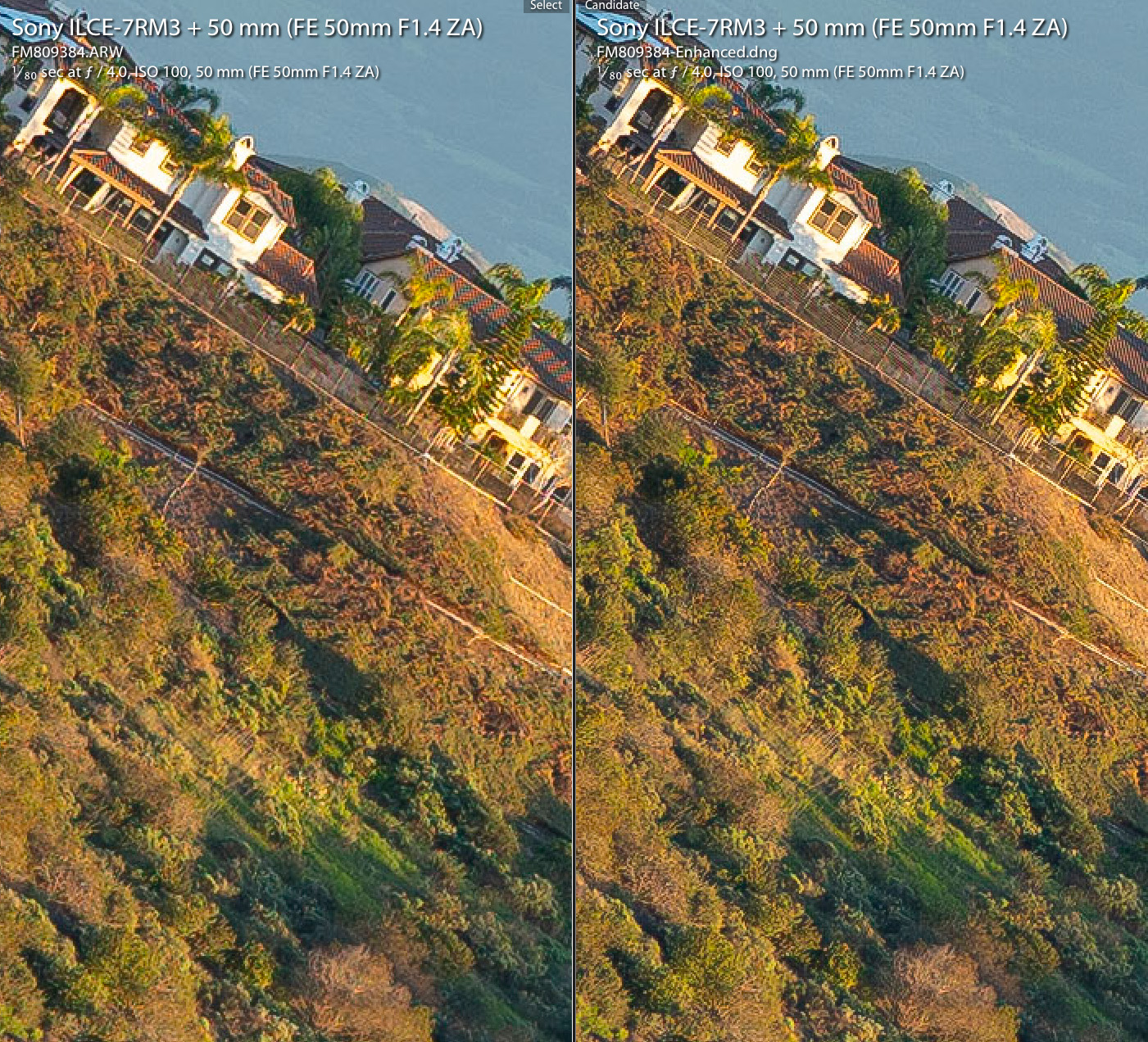
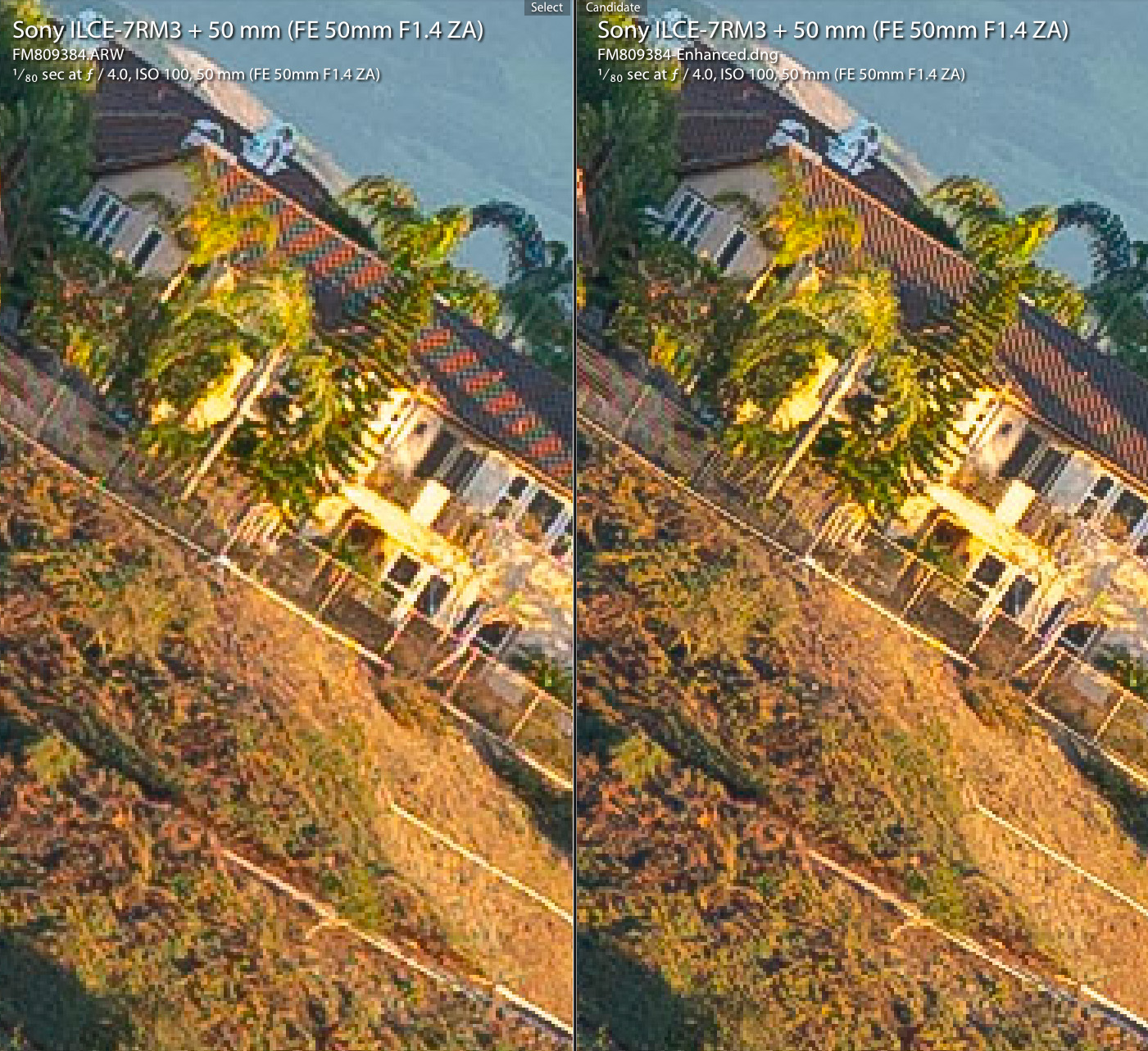
p.2 #1 · Lightroom's new Enhance Details sample with Sony FE 50/1.4 ZA
Very interesting tech. You have to save it out as a DNG raw file though, so is it more than an enhanced demosaic algorithm since the result have to be saved? Just wondering...
p.2 #2 · Lightroom's new Enhance Details sample with Sony FE 50/1.4 ZA
It did a good job cleaning up moire on the roof and certainly looks sharper. Can you notice much difference when not cropped and output to say 1600 wide? Probably a mode best reserved for big prints or maybe deep bird crops?
p.2 #3 · Lightroom's new Enhance Details sample with Sony FE 50/1.4 ZA
rdeloe wrote:
I tried it on some X-H1 RAFs. At high magnification I can just see a slight increase in detail. However, I compared the enhanced and non-enhanced files to what I'm getting with IXT using the "More Detailed" setting, and I think IXT still does a better job. Adobe is slowly closing the gap, but I'm going to continue using my IXT workflow.
Did you see this? To my eye, he's getting noticeably better results than his IXT workflow, but I've never been interested in IXT so I probably can't speak with any authority here
p.2 #5 · Lightroom's new Enhance Details sample with Sony FE 50/1.4 ZA
RoamingScott wrote:
Did you see this? To my eye, he's getting noticeably better results than his IXT workflow, but I've never been interested in IXT so I probably can't speak with any authority here
Nope, didn't see that.
One thing I've noticed in blog posts like that, and in debates on forums like this, is people almost never supply the RAW files you need to actually compare your workflow to someone else's. Instead we see screenshots and text describing what people found, often with little or no info on how the image was produced. For example, I have no idea how Thomas uses IXT. There are ways that work well, and ways that work poorly. Similarly, some people can get WAY better results using straight Lightroom than others. It all comes down to how you develop the file and then sharpen.
p.2 #6 · Lightroom's new Enhance Details sample with Sony FE 50/1.4 ZA
I just posted Raws of the CV 50 3.5 and Sony 501.4 that I tested together on Big Bronco and infinity. Big Bronco would be a excellent set of files to try this on. It’s detail heaven . I don’t use LR but someone should try it. You have my permission to post here on the forum. The raws are in the thread Fred started on the Cv40,50 and Sony 50 1.4. Oh the CV is in that Big Bronco test as well. Have fun love to see the results
p.2 #7 · Lightroom's new Enhance Details sample with Sony FE 50/1.4 ZA
I've tried a dozen times and each time the resulting DNG is completely black. The dialogue box opens, but the preview box is black, and if I hit "enhance," I get a black DNG. Anybody have a theory? Thanks.
p.2 #8 · Lightroom's new Enhance Details sample with Sony FE 50/1.4 ZA
Thanks Fred! Any chance you could post 2:1 and 4:1 crops as well? I'd do it myself but unfortunately this feature isn't supported yet on Adobe's Windows version due to Microsoft pulling the Windows 10 October 2018 update that it requires.
p.2 #10 · Lightroom's new Enhance Details sample with Sony FE 50/1.4 ZA
snapsy wrote:
Thanks Fred! Any chance you could post 2:1 and 4:1 crops as well? I'd do it myself but unfortunately this feature isn't supported yet on Adobe's Windows version due to Microsoft pulling the Windows 10 October 2018 update that it requires.
p.2 #13 · Lightroom's new Enhance Details sample with Sony FE 50/1.4 ZA
Fred Miranda wrote:
Lightroom version 8.2 was officially released today and one of the new features is called "Enhance Details".
From Adobe:
"The new Enhance Details feature available in Camera Raw, Lightroom Classic, and Lightroom CC approaches demosaicing in a new way to better resolve fine details and fix issues like false colors and zippering. Enhance Details uses machine learning—an extensively trained convolutional neural network (CNN)—to provide state-of-the-art quality for the images that really matter. Enhance Details works well on both Bayer (Canon, Nikon, Sony, etc.) and X-Trans (Fujifilm) raw mosaic files."
I tried with files with high frequency detail and really liked the results. Not only my "compressed" RAWs are cleaner with less artifacts and moire, they also have the appearance of more detail.
Here is an example from the FE 50/1.4 ZA lens at infinity distance (f/4). This lens is so sharp that it causes moire patterns in some areas. Here is the before and after:
(The process took about 12-15 seconds on my machine and created a separate DNG file)...Show more →
The first thing that struck my eyes was an apparent difference in the vividness of the colors and in the sense of separation and the perceived depth differences among different elements in the enhanced image. It seems like the various parts of the house, for example, are more separate from each other.
p.2 #14 · Lightroom's new Enhance Details sample with Sony FE 50/1.4 ZA
Ronny Olsson wrote:
+1
Windows 10, oktober 2018-uppdate and GeForce GTX 770 2GB
+2
Except my issue is slightly different. Getting an error message saying that I need to update to at least the October Win10 in order for the feature to work even though I'm already on the December update. Running this on a Win10 laptop with a 6GB GTX 1060.
p.2 #15 · Lightroom's new Enhance Details sample with Sony FE 50/1.4 ZA
I will have to look for images with moire. I tested it on 3 images, all with some good detail, and found no difference. I exported the original and the enhanced to PS as layers and changed to difference and subtractive blend modes and got a black file. In normal mode I turned the top (enhanced) on and off and really could not see any difference (1:1 and 2:1).
Win 10 Oct 2018 (1809) Nvidia Quadro P2000
I did notice that I got nothing (spinning wheel) if I was magnified when I selected DE. Works fine if I'm at full screen rez and says it's taking 25 secs
p.2 #16 · Lightroom's new Enhance Details sample with Sony FE 50/1.4 ZA
mcbroomf wrote:
I tested it on 3 images, all with some good detail, and found no difference. I exported the original and the enhanced to PS as layers and changed to difference and subtractive blen
It's no accident that Fred posted a photo with such a silly angle. The Adobe blog/white-paper specifically mentioned that the new algorithm show the most dramatic improvement and increased detail in diagonal lines.
p.2 #18 · Lightroom's new Enhance Details sample with Sony FE 50/1.4 ZA
kevphoto wrote:
Wow, 12 seconds? On my MacBook Pro (mid-2014) a Z7 file the estimate is 5 minutes and for my Fuji X-T2 it's two minutes. And it is definitely not quick!
From the notes on Adobe's blog, it looks like the processing utilizes the GPU, so I'm guessing Fred's rig uses something better than integrated graphics. There are some other best practice notes there and an interesting read:
p.2 #19 · Lightroom's new Enhance Details sample with Sony FE 50/1.4 ZA
amacal1 wrote:
It's no accident that Fred posted a photo with such a silly angle. The Adobe blog/white-paper specifically mentioned that the new algorithm show the most dramatic improvement and increased detail in diagonal lines.
That was not intentional and the diagonal angle is not silly. It's deliberate and that's how I test my lenses at infinity distance in order to gauge how they perform at center, mid-zone and extreme edges. Here is the resized full image.
p.2 #20 · Lightroom's new Enhance Details sample with Sony FE 50/1.4 ZA
grahamgibson wrote:
From the notes on Adobe's blog, it looks like the processing utilizes the GPU, so I'm guessing Fred's rig uses something better than integrated graphics. There are some other best practice notes there and an interesting read: