p.1 #1 · Lightroom's new Enhance Details sample with Sony FE 50/1.4 ZA
Lightroom version 8.2 was officially released today and one of the new features is called "Enhance Details".
From Adobe:
"The new Enhance Details feature available in Camera Raw, Lightroom Classic, and Lightroom CC approaches demosaicing in a new way to better resolve fine details and fix issues like false colors and zippering. Enhance Details uses machine learning—an extensively trained convolutional neural network (CNN)—to provide state-of-the-art quality for the images that really matter. Enhance Details works well on both Bayer (Canon, Nikon, Sony, etc.) and X-Trans (Fujifilm) raw mosaic files."
I tried with files with high frequency detail and really liked the results. Not only my "compressed" RAWs are cleaner with less artifacts and moire, they also have the appearance of more detail.
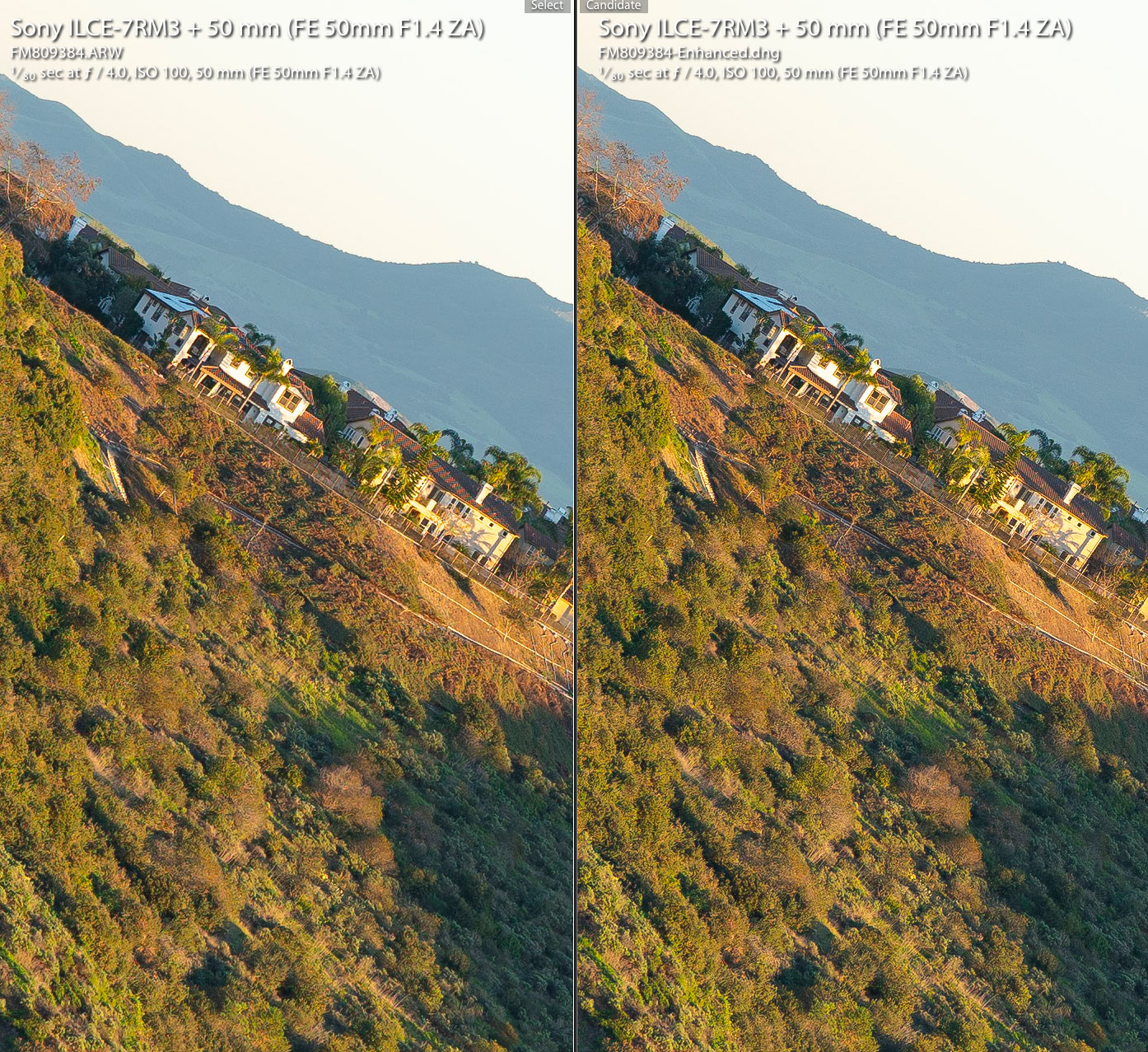
Here is an example from the FE 50/1.4 ZA lens at infinity distance (f/4). This lens is so sharp that it causes moire patterns in some areas. Here is the before and after:
(The process took about 12-15 seconds on my machine and created a separate DNG file)
p.1 #3 · Lightroom's new Enhance Details sample with Sony FE 50/1.4 ZA
amacal1 wrote:
Is this a 100% crop? From the examples I saw on all of the blogs/white papers, most of the differences are not apparent except at 100% or greater.
p.1 #4 · Lightroom's new Enhance Details sample with Sony FE 50/1.4 ZA
amacal1 wrote:
Is this a 100% crop? From the examples I saw on all of the blogs/white papers, most of the differences are not apparent except at 100% or greater.
"...approaches demosaicing in a new way to better resolve fine details and fix issues like false colors and zippering..."
This should be subtle and only apparent at 100% or more. It could be easier to see with fabrics.
p.1 #5 · Lightroom's new Enhance Details sample with Sony FE 50/1.4 ZA
Good to know! You have to really look to notice the differences, but there are differences. The moire, as you've noted, is the standout difference. Less artifacting is also somewhat apparent. And, if you look really, really carefully, you can see some extra detail.
Considering how much money is spent on lenses and camera bodies to chase such dramatic improvements in resolving power, it's amazing that re-thinking the math on the RAW converter can deliver similar results. I know it's the understatement of the year, but it's a bit like saying, "Oh, hey, I forgot to carry the 0 on your change, mate. Turns out you had an extra 30% coming back to you!"
p.1 #7 · Lightroom's new Enhance Details sample with Sony FE 50/1.4 ZA
IMO, this is better than "pixel shift" since it can be applied to any single RAW file. I love it. Similarly, the advantage of pixel shifted images can only be detected at 1:1 magnification.
p.1 #8 · Lightroom's new Enhance Details sample with Sony FE 50/1.4 ZA
Unfortunately to take advantage of this I would need to go to the Subscription CC version of LR. Like many of us on FM, I do not have any cameras or lenses later than an A7rIII and 100-400mm GM so we are using the last stand alone version of LR with 6.14.
p.1 #13 · Lightroom's new Enhance Details sample with Sony FE 50/1.4 ZA
Wow, 12 seconds? On my MacBook Pro (mid-2014) a Z7 file the estimate is 5 minutes and for my Fuji X-T2 it's two minutes. And it is definitely not quick!
Interestingly I can see some improvements in my Z7 images but not really seeing anything in the X-T2 files. I would have thought the lower res files would show more improvement.
p.1 #14 · Lightroom's new Enhance Details sample with Sony FE 50/1.4 ZA
Do we need a dedicated GPU to utilize this? Does it work with PS CC 2019? I saw the camera raw update but not sure where to find the feature. I don't have dedicated graphics card. If it's required is it worth buying one?
p.1 #15 · Lightroom's new Enhance Details sample with Sony FE 50/1.4 ZA
kevphoto wrote:
Interestingly I can see some improvements in my Z7 images but not really seeing anything in the X-T2 files. I would have thought the lower res files would show more improvement.
I wonder if you'd notice more of a difference by cranking up the sharpening sliders, including the detail sliders. Maybe the improved demosaicing means the image won't fall apart as fast with more sharpening.
p.1 #17 · Lightroom's new Enhance Details sample with Sony FE 50/1.4 ZA
RoamingScott wrote:
I’m far more interested in this for Fuji files with foliage then Sony files!
I tried it on some X-H1 RAFs. At high magnification I can just see a slight increase in detail. However, I compared the enhanced and non-enhanced files to what I'm getting with IXT using the "More Detailed" setting, and I think IXT still does a better job. Adobe is slowly closing the gap, but I'm going to continue using my IXT workflow.