edwardkaraa wrote:
I'm already back yesterday, Adam.
Anyone tried the new firmware?
New firmware isn't out.. Found bugs, only a link, no download available... Else I would try and compare and let everyone know, since I have backup cameras that I can take the risk for you guys
EDIT: Just refreshed the page.. It's downloading. Want me to try and let everyone know?
About one hour ago this was the only thing I could download:
Improvements – Leica M (Typ 240) Firmware Version 2.0.1.5.
• Improved description of the lens type in Exif-Data
• Live view is now possible with every lens (including older screw lenses via an adapter) using
“manual lens detection”
• A “Video off” option is now available in the Set menu (see submenu item “Video recording”)
The M-Button on the Top-cover is deactivated when this option is chosen.
• The Horizon (level) is now visible in Live View, overlaying the live image. This additional info-
screen is enabled using the menu item “Horizon”
• New menu item “Exposure Simulation”
o Exposure simulation -> Permanent: Live View accurately shows image brightness according to the shutter speed and aperture set in manual exposure (as long as the chosen exposure time is shorter than 1/30s)
o Exposure simulation -> Release button half-pressed: Image brightness in live view is adjusted for best visibility, regardless of the actual exposure.
Half pressing the shutter button shows the actual exposure.
• Extended Auto ISO options
o All Auto ISO options are now visible using the ISO button
o Extra options for “Maximum Exposure Time” - 1x, 2 x, or 4x focal length - can be selected
to help avoid camera shake when using auto ISO and long lenses.
o “Auto ISO in M mode” is now offered as an option. This varies ISO sensitivity for correct
exposure when shutter speed and aperture are set manually.
o AlternativelythecamerachoosesthepreviousmanuallychosenISOspeed
• Crop marks
In Live View, new crop marks for 3:4 / 6:7 / 1:1 / and 16:9 aspect ratios can be displayed. By pressing the up/down keys, the crop marks are superimposed on the live view screen (without additional information)
• Korean language
Korean is now available as a menu language
• During video recording, 1/25s is now used instead of 1/24s. This reduces flicker effects with 50Hz mains voltage
Page 1 of 2
Leica Camera AG / Am Leitz-Park 5 / D-35578 Wetzlar / Phone +49 (0) 6441-2080-0 / Telefax +49 (0) 6441-2080-333 / www.leica-camera.com

• Exposure bracketing settings are now saved when the camera is switched off
• Direct exposure correction
An “EV correction” option in the menu enables direct adjustment.
So EV compensation can be altered by turning the thumb wheel, without having to press additional buttons.
• New Light Metering Mode “Classic / LV disabled”
In this mode, only Classic light-metering is possible; the LV button is disabled to avoid the activation of live view by accident.
• New menu item “Focus Peaking”
For improved visibility, the color of focus peaking can now be set to red, green or blue.
• Better display of GPS location data
Position is now shown for JPG files in Adobe Lightroom®
Where the GPS signal is weak, the last position is now deleted after 5min instead of 24h as in previous firmware versions.
• Bugfix in Live View at high temperatures
Occasional malfunction of Live View at high temperatures has been fixed
• Bugfix in light metering (Live view)
• Bugfix regarding sensor cleaning function
adamdewilde wrote:
New firmware isn't out.. Found bugs, only a link, no download available... Else I would try and compare and let everyone know, since I have backup cameras that I can take the risk for you guys
EDIT: Just refreshed the page.. It's downloading. Want me to try and let everyone know?
It seems there are no bugs discovered yet as per the new FW thread on the Leica user forum. Still I would wait a few days before I update. I wouldn't recommend you do so unless you're feeling adventurous
And these are the only ones I found useful in the reading.. Since a lot of the time EVF is impossible when trying to focus on backlit subjects. And of course, sometimes you just want auto ISO to work right. Even if you don't EVER use it, it's nice to know that it actually works as it should... Although the camera is updating, so I don't actually know if it works yet or not, will revert back soon.
• New menu item “Exposure Simulation”
o Exposure simulation -> Permanent: Live View accurately shows image brightness according to the shutter speed and aperture set in manual exposure (as long as the chosen exposure time is shorter than 1/30s)
o Exposure simulation -> Release button half-pressed: Image brightness in live view is adjusted for best visibility, regardless of the actual exposure.
Half pressing the shutter button shows the actual exposure.
• Extended Auto ISO options
o All Auto ISO options are now visible using the ISO button
o Extra options for “Maximum Exposure Time” - 1x, 2 x, or 4x focal length - can be selected
to help avoid camera shake when using auto ISO and long lenses.
o “Auto ISO in M mode” is now offered as an option. This varies ISO sensitivity for correct
exposure when shutter speed and aperture are set manually.
o AlternativelythecamerachoosesthepreviousmanuallychosenISOspeed
Wow ok, update took longer then 4 minutes... It was more like 10 minutes. BUT everything works as it should.. Auto ISO is actually working now, and pretty well I might add.. I'll test the camera tomorrow and let everyone know if anything bad happens.. But camera hasn't blown up yet.
One thing to note, if you half press the shutter it locks in auto iso and lets you know if the scene is to bright or dark, which is nice, but now there's also a little distracting red dot above the arrows to let you know auto iso is on.. Which brings me to a point of contention with Leica.. About three months back I asked them to add a feature so that even in manual shutter mode, the shutter speed would be displayed, and they told me that anything related to the changing of the LED lights inside the camera couldn't be done by firmware and would need a hardware fix to implement.. I thought it was rubbish, and now seeing the little LED lights change, I know that it could be done. BAD LEICA!
Honestly after trying it out, I would almost not update my camera because of that little dot that shows up. I just did a back and forth with my updated camera and my non-updated camera, and really that dot annoys the hell out of me.
edwardkaraa wrote:
I would add to that EC by turning the rear wheel only (without the gymnastics required to push the tiny front button simultaneously).
Oh, yeah true.. And it's good that you can set it as you like.. Since I wouldn't accidentally want to turn on EC, as honestly I've never used it. BUT if you use it frequently, then it's a good idea to be able to set it as one touch, or multistep process.
Ok that little dot is REALLY driving me crazy. Even on full manual it just shows up when you half press the shutter.. It's really distracting beyond belief. Wow, it feels like I'm going crazy. Wish that wasn't there. I don't need to know that I've half pressed the shutter, I can feel my finger half pressing it.
EDIT: It's fine/good that it shows up in auto mode (either auto iso or auto shutter) because that makes sense.. Indicating that you've locked the exposure.. But showing up in manual mode just distracts me, and makes me think that I'm shooting with auto ISO engaged. Then I have to check and make sure auto iso is off..
Sorry, stressful day I've already emailed Leica about it though
EDIT#2: Ok, if you turn off auto ISO in M mode (which is silly, as I'd just change the iso to say 400 if I wanted to turn it off).. Anyway, if you do that, the red dot goes away. Although again, I think it should go away if you just switch away from auto.. Anyway, happy I got the dot to go away. But really it's a functional flaw in the update that should not have been overlooked.
Did want to mention.. Auto ISO doesn't stop at min shutter speed still, although it should. As in, if you set min shutter speed to be 1/focal length or 1/125, it doesn't care.. Will just go down to whatever once it's hit it's wall. As in, if I set max auto iso to 1600, it'll hit 1600 then bring my shutter down to 1/15th even though I set it to 1/focal length or 1/125. BUT they've added options like max shutter speed (no idea what that means, as they don't even allow it to go to a max or a min). Think they should have had an option where it lets you pick an ideal shutter, then an option where when it hits the iso wall, it goes down to your lowest shutter, but warns you its to dark. To much to ask for?
On the road for a few days tomorrow, and my lens set will be: 21SEM, CV35/1.4, 50 cron, and the CV90.
I'd love to take a few more, but I'm staying light on this one.
@Phil re mountain bikes.
The event shown in the previous posts was an "enduro" so there is alot of pedaling, even on the downhills---so they tell me , hence FF helmet to hot I guess. Lot's of tech in the bike industry these days, like the backpacking industry, and tons of competition to make the best bits. If only the camera industry was similar, eh? Lots of innovation, but not so tuned to real needs.
BTW my brunton monopod/trekking pole arrived today (bought it esp for the 135 apo), and it's pretty darn cool, good quality pretty light, and a big soft knob on top, like a cane top, which screws right off to reveal a tripod screw.
also the ultrapod, at only 100grams, looks killer. It's lighter than the SLR gorilla pod! I'm taking that one on my trip to test with a cable release using the CV 90.
Update: Still so far no issues with the camera and the new firmware.. Been using it here and there this morning during coffee and then again at lunch.. No issues yet.
Thank you Charlie. Yes the 35 Biogon is unbelievably sharp on the M240 and I frequently get moire. Nice kids biking shots!
I too have updated the firmware and there are no issues whatsoever. It only took 2 minutes. However, it reset my file numbering but it was easy to put it back the way it was. The start ups seem to be faster but I can't tell for sure.
edwardkaraa wrote:
Thank you Charlie. Yes the 35 Biogon is unbelievably sharp on the M240 and I frequently get moire. Nice kids biking shots!
I too have updated the firmware and there are no issues whatsoever. It only took 2 minutes. However, it reset my file numbering but it was easy to put it back the way it was. The start ups seem to be faster but I can't tell for sure.
Yeah, startup to frame lines on seems a touch faster (testing with two cameras, one with and one without firmware). But actual startup time to actual shoot time doesn't change any.
Two minutes eh? seriously, mine really took more then 5 actual minutes to update?! Felt like 10
It actually resets everything, all the settings.
Nice images BTW, really like the colours in the candy barrels.
adamdewilde wrote:
Yeah, startup to frame lines on seems a touch faster (testing with two cameras, one with and one without firmware). But actual startup time to actual shoot time doesn't change any.
Two minutes eh? seriously, mine really took more then 5 actual minutes to update?! Felt like 10
It actually resets everything, all the settings.
Nice images BTW, really like the colours in the candy barrels.
Thank you Adam!
Yes, I think you're right. The framelines seem to light up faster especially from standby but the shooting readiness is still the same. But I have no other M to compare to
It took just about 2 minutes but I think it depends on the memory card.
burningheart, what happened to the right side of that shot of the barn/ranch?
I was shooting from aboard a moving train in Heritage Park we were pulling up to Laggan station in the background. I wanted to capture the rodeo grounds in the foregraound and the station but I captured part of one of the bars that was close to the camera. I would have cropped it all off except there is a horse laying on the ground on the right side so I left most of the out of focus bar.
Nice shots all.
Today is Canada Day so I am off for a lot of shooting today and tonight, though I don't know if I will be using my Monochrom tonight I will likely use my 5D MKII or D800E.
Edward nice Jelly beans shot.I also like the shot of the manequins.
unoh7 I like the podium shot, the kids tye-dye tshirt reminds me of the old Colorado Rockies hockey team crest. Not identical but very similar in design. In your earlier set I love how you captured the dust trails from the riders on the trail.
Jojo lovely shades in the shot of the youngster with I assuming Mom. Delicious looking cake in the earlier shot.
Phillip interesting bikini shot.
Zhangyue Bryce Canyon such a beautiful place to photograph. The only thing missing is the snow. I have only been there in winter.
Allen I like the handout.
Joakim nice solitary bicycle with cars and building in the background reminds me of an earlier time and place.
Well since everyone's already doing it, I just updated as well.
adamdewilde wrote:
Ok that little dot is REALLY driving me crazy. Even on full manual it just shows up when you half press the shutter.. It's really distracting beyond belief. Wow, it feels like I'm going crazy. Wish that wasn't there. I don't need to know that I've half pressed the shutter, I can feel my finger half pressing it.
Yes! I have no idea why it's even there, it's such a distraction!


 I've already emailed Leica about it though
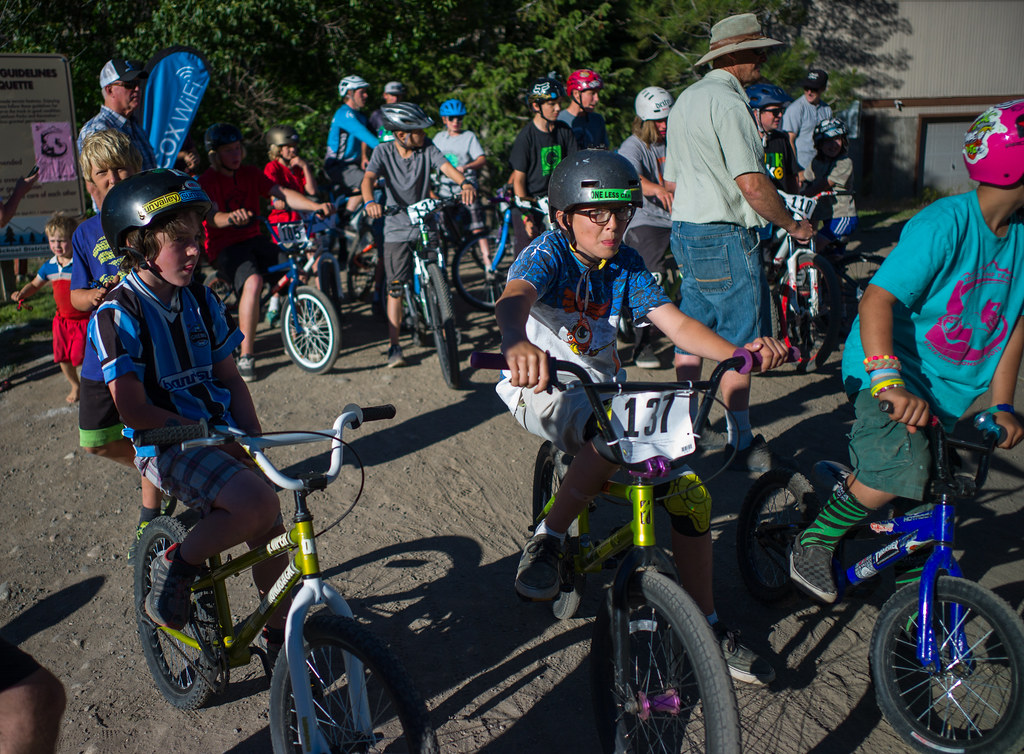
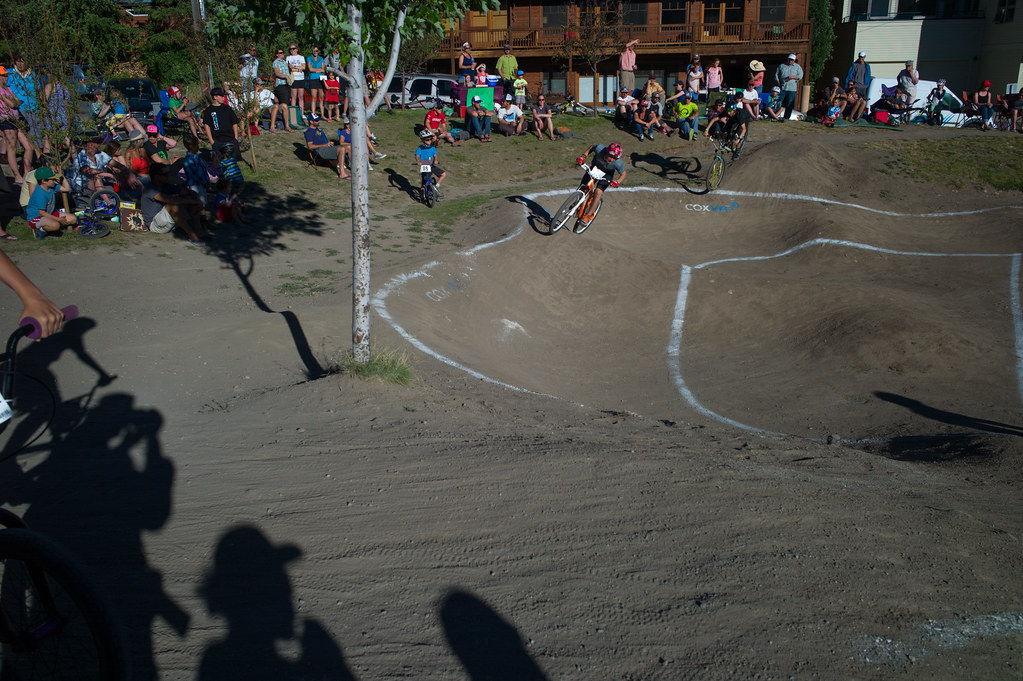


 , hence FF helmet to hot I guess. Lot's of tech in the bike industry these days, like the backpacking industry, and tons of competition to make the best bits. If only the camera industry was similar, eh? Lots of innovation, but not so tuned to real needs.