I'm pacing myself with the Christmascising of Rainforest Lane, we're about 60% complete at this point. I'm kicking myself for buying a 12' tree a few years back, it's beautiful but takes forever to trim out properly. I told Sheila this afternoon that we should wrap it in ribbon and toss a couple of bows on it and call it a day..........................still waiting for a response...............
Funny, some of the models that have long been expected still haven't surfaced, and then ones that weren't on the radar pop up. I love my R5/R5c so much, I'll buy upgrades of those cameras without a second thought. Going back to the subject of high frame rates and shutter life expectancy, we'll be wearing these high speed cameras out much quicker than the previous models.
Danpbphoto wrote:
I am having the same quandary Zane. I took JIm's advice on a RAID ARRAY and it works well BUT...I need a program that backsup those photo edits done since the last full backup automatically. I have used up way to many Mbs of space with doubled entries.
Dan
Dan, a few years ago Rodolfo recommended SyncBackPro. At the time I was using the free Microsoft software they had, but it hasn't been updated since Windows 7 (maybe even XP).
I switched to SyncBackPro, and I really like it. Right now it is 30% off for Cyber Monday, so it costs $38 for a perpetual license. You can set it up to automatically backup files that have changed, and it supports multiple drives. The Pro version gives you file integrity checking, so I went with that.
msalvetti wrote:
Dan, a few years ago Rodolfo recommended SyncBackPro. At the time I was using the free Microsoft software they had, but it hasn't been updated since Windows 7 (maybe even XP).
I switched to SyncBackPro, and I really like it. Right now it is 30% off for Cyber Monday, so it costs $38 for a perpetual license. You can set it up to automatically backup files that have changed, and it supports multiple drives. The Pro version gives you file integrity checking, so I went with that.
So all your files/pictures/documents are on a cloud and not in your house or safe or one there and one off site ?
I'm still a little skeptical about cloud storage for some things but their pricing is really good.
msalvetti wrote:
Dan, a few years ago Rodolfo recommended SyncBackPro. At the time I was using the free Microsoft software they had, but it hasn't been updated since Windows 7 (maybe even XP).
I switched to SyncBackPro, and I really like it. Right now it is 30% off for Cyber Monday, so it costs $38 for a perpetual license. You can set it up to automatically backup files that have changed, and it supports multiple drives. The Pro version gives you file integrity checking, so I went with that.
Bill Gass wrote:
So all your files/pictures/documents are on a cloud and not in your house or safe or one there and one off site ?
I'm still a little skeptical about cloud storage for some things but their pricing is really good.
I have not heard of anyone having problems storing their files "offsite". That's great! But..I agree will Bill.....possession is 9/10th of the law.
If I screw up, and I do more often than not!, I have only myself to shoot!
Thanks Bill and Mark!
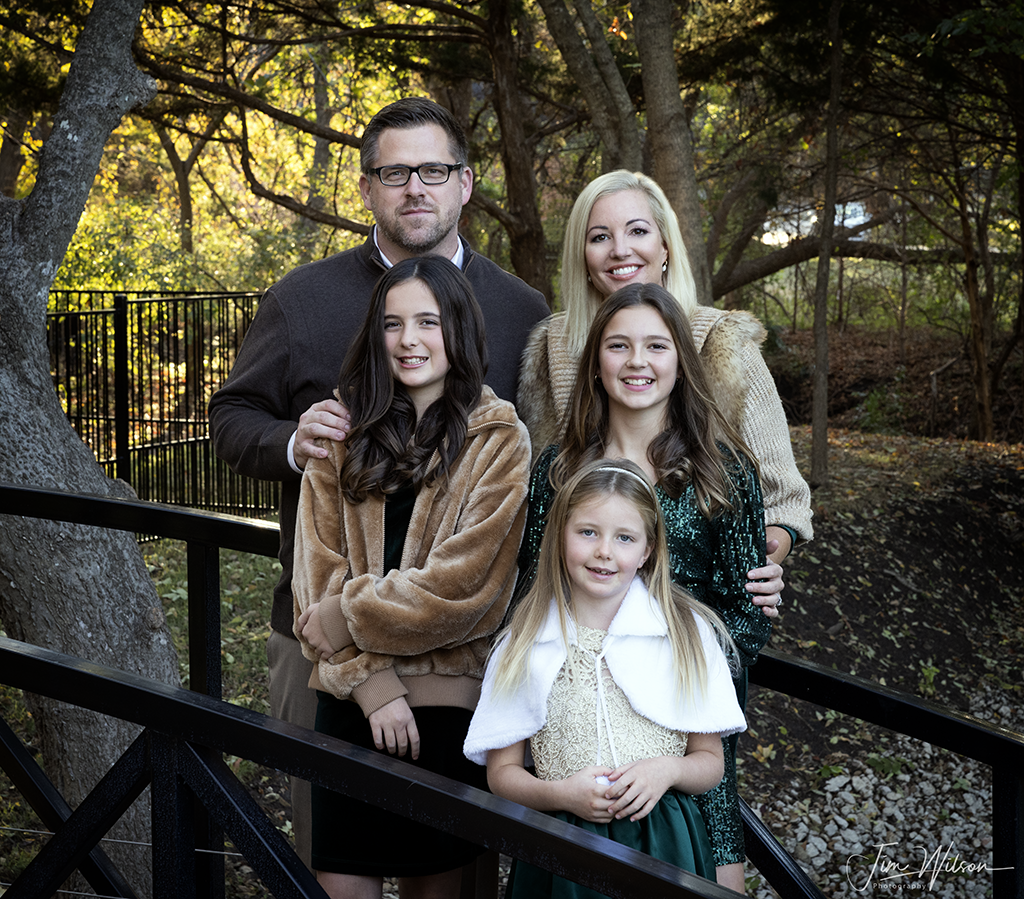
Had a different request a few weeks ago. One of my client's clients emailed me asking if I would consider capturing a family portrait for them. I shot their pool earlier this summer and we hit it off, nice family. Typically family portraiture and commercial work aren't really compatible schedule wise, but these folks were really great so I told them I would shoot it for them. We started the dance between schedules and weather, the two collided right before Thanksgiving and we got the shoot accomplished. Pretty setting, beautiful family, ideal weather, they should all go so smoothly..................
Danpbphoto wrote:
I have not heard of anyone having problems storing their files "offsite". That's great! But..I agree will Bill.....possession is 9/10th of the law.
If I screw up, and I do more often than not!, I have only myself to shoot!
Thanks Bill and Mark!
Dan and Bill,
You misunderstood - all my files are local. SyncBackPro installs on your PC or Mac, and it only moves files that have changed from your working drive to the backup drive. No Cloud storage involved.
Here is how I use it. I have a 1TB hard drive in my laptop, and two backup hard drives that are now up to around 12TB each. I keep one backup drive offsite (at work). At home I have the working disk on the laptop and the other 12TB backup drive. I always make sure I have at least two copies of everything. SyncBackPro keeps my working drive and the backup drive synced. I could have the software keep both drives identical, but I don't trust myself - I worry that I'll delete something important and then it would be gone from both drives. So I have the software set to only add new files to the backup drive and not delete anything. Any cleanup there I do manually.
Every now and then I bring the remote drive back from work, copy files from backup to remote so those drives are identical, and only then do I delete anything from the laptop working drive.
I don't do video, so these drive sizes work for me.
You misunderstood - all my files are local. SyncBackPro installs on your PC or Mac, and it only moves files that have changed from your working drive to the backup drive. No Cloud storage involved.
Here is how I use it. I have a 1TB hard drive in my laptop, and two backup hard drives that are now up to around 12TB each. I keep one backup drive offsite (at work). At home I have the working disk on the laptop and the other 12TB backup drive. I always make sure I have at least two copies of everything. SyncBackPro keeps my working drive and the backup drive synced. I could have the software keep both drives identical, but I don't trust myself - I worry that I'll delete something important and then it would be gone from both drives. So I have the software set to only add new files to the backup drive and not delete anything. Any cleanup there I do manually.
Every now and then I bring the remote drive back from work, copy files from backup to remote so those drives are identical, and only then do I delete anything from the laptop working drive.
I don't do video, so these drive sizes work for me.
Mark...Show more →
Ah, ok Mark, sorry, thought you were talking using a cloud but makes sense now.
Five of them in a big oak. Tricky to hang because I had to be careful to stay away from the power line to the house that passes nearby. But they look good.
Hope to finish the rest tomorrow before it starts raining.
Also need to change out some LED bulbs - the garland we bought that hangs over the front door had bright white LEDs that I don't like. So I bought a bunch of warm white LEDs as replacements. Only 180 bulbs to swap. Not sure how long that is going to take me.
Its raining here and cold. Wife thinks door wreath is to low Have 1 hedge to finish tomorrow.
WE have thousands of C5/C7 strings of lights but wifey wants those minature bulbs!
Oh well...
Thanks Mark!
Dan
Interesting side note on that family portrait, one of the young ladies is on the Autism spectrum. I didn't know that until after our shoot was complete, don't believe that I would have handled anything differently but I wish I had known. There is a lot going on at once in a group portrait shoot like that, expressions, collars flipped up, necklaces not centered, body language. I am sensitive to all of those things but it happens in such a rush it's easy to miss something. You really need a second set of (female) eyes backing up the photographer. I remember, subconsciously, thinking that the daughter on the spectrum didn't seem as comfortable as the other sisters, so I worked with her a little bit more, in retrospect I don't know if that helped or hurt the cause. Anyway, it's good to know as much as possible about one's subjects so you can tailor each assignment accordingly.
JWilsonphoto wrote:
Had a different request a few weeks ago. One of my client's clients emailed me asking if I would consider capturing a family portrait for them. I shot their pool earlier this summer and we hit it off, nice family. Typically family portraiture and commercial work aren't really compatible schedule wise, but these folks were really great so I told them I would shoot it for them. We started the dance between schedules and weather, the two collided right before Thanksgiving and we got the shoot accomplished. Pretty setting, beautiful family, ideal weather, they should all go so smoothly..................
Jim, All of your compositions exude excellence. Yours always add that little bit of sensuality to the frame.
And that goes for ALL the members posting here!
Well done!
RD
JWilsonphoto wrote:
Interesting side note on that family portrait, one of the young ladies is on the Autism spectrum. I didn't know that until after our shoot was complete, don't believe that I would have handled anything differently but I wish I had known. There is a lot going on at once in a group portrait shoot like that, expressions, collars flipped up, necklaces not centered, body language. I am sensitive to all of those things but it happens in such a rush it's easy to miss something. You really need a second set of (female) eyes backing up the photographer. I remember, subconsciously, thinking that the daughter on the spectrum didn't seem as comfortable as the other sisters, so I worked with her a little bit more, in retrospect I don't know if that helped or hurt the cause. Anyway, it's good to know as much as possible about one's subjects so you can tailor each assignment accordingly....Show more →
Suzanne had an down syndrome sister who died way to young. Your compassion and insight only exemplify why this forum has survived the length it has!
God Bless!
RD
Mark, good luck with those spheres, outta look neat, give us all a pix when done.
.
Dan, get to Costco and buy 10 packs of those little lights, hang five, keep the rest to cover ya for the next 5 years, .
.
My sisters daughter has down syndrome, biggest and brightest star ever and she's 37.


 Not sure how long that is going to take me.
 Have 1 hedge to finish tomorrow.
 .
.