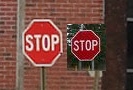
Thanks for the input, would you be able to post a pure primary "red" image. Anything that is pure primary red is what I would like to see from this camera's IQ. I'm not saying that the camera is incapable of doing this, I am simply looking for a photograph that clearly shows a non-pastel primary red. Thanks for the shots and review, much appreciated. Something pure red that doesn't have that "pinkish" hue.
I did a quick search of a stop sign that I believe has the pure primary red, and have set it alongside your stop sign. I personally see a huge difference. Were you using AWB in these shots or did you use a manual white balance? Thanks for your input
wcastleman wrote:
My initial performance comparison among the 40D, 20D and XTI. I also initially evaluated remote capture and live preview for use with photomicroscopy here:
wcastleman wrote:
AWB with default standard color/tone and DPP settings.
Thanks very much for your response, I would really be interested in seeing the same sort of shot with manual white balance, using a real grey card, to see what happens with the color red. Much appreciated
Thanks Max HUGELY appreciated, I have thoroughly read the manual now
Contacted my Supplier they are shipping my camera & new lenses today will have tomorrow------ can't wait to get my hands on!!
are you sure that the DPP default settings work the same way on the 3 cameras? Especially looking at the shadow area samples I have the impression DPP applies stronger sharpening on the 40D and 400D files and less so on the 20D file.
How do they compare if you increase sharpening on the 20D files?
Thanks for sharing, much appreciated!
Rainer Raffalski
wcastleman wrote:
My initial performance comparison among the 40D, 20D and XTI. I also initially evaluated remote capture and live preview for use with photomicroscopy here:
You're welcome, nativeridge, hope your camera arrives as promised.
Here the definite answer to all settings screen questions:
1. The settings can be shown on the main screen, yes!
2. In custom functions, the info button can be set to show these settings straight away (so no need for multiple presses)
3. The settings will remain on the main screen, even after a picture is taken (the picture just taken will show for how long the review time is set, and then return automatically to the screen with the settings)
4. The settings will vanish if anything of the following is done:
- accessing image review by pressing play
- accessing the menu by pressing menu
- accessing the picture styles by pressing the funny star symbol
Summary: If you only change exposure settings and not press any buttons described in 4., then your settings screen will remain visible.
So tripod shooting is fine, I guess. And if the screen does go away, pressing Info once will bring it back.
I was lucky enough to be one the first first users to get a 40D in Hong Kong and I have finished writing and posting a review on the 40D. I hope it will be useful for many who are considering buying it new or upgrading from 20D or 30D. You can view the review here:-
great write up Roland, very informative. I definitely think the 40D is extracting more detail than the 20D, but it's not a big amount, but larger than we saw with the 400D. I also think the 40D has improved chroma noise at least, which has always been a weakness on the Canons compared to Nikon.
Nice review. There is one error, though. On the settings part, you say that the 40D can control ETTL-II metering, FEC and 1st/2nd curtain sync, and that' s new from the 20D/30D. Well, all 3 of those are native on the 30D (don't require external flash.) They're not all in one menu, but they are there...FEC, of course, from the FEC button on the camera, ETTL-II metering is C.F 14 and 1st/2nd Curtain sync is C.F 15.
Great review. One thing I noticed was the "shooting info" screen (on the LCD) doesn't show which auto-focus point is selected like the 400D does (?) - surprised this was left out since kinda handy to see everything in one place there.
Max Ackermann wrote:
You're welcome, nativeridge, hope your camera arrives as promised.
Here the definite answer to all settings screen questions:
1. The settings can be shown on the main screen, yes!
2. In custom functions, the info button can be set to show these settings straight away (so no need for multiple presses)
3. The settings will remain on the main screen, even after a picture is taken (the picture just taken will show for how long the review time is set, and then return automatically to the screen with the settings)
4. The settings will vanish if anything of the following is done:
- accessing image review by pressing play
- accessing the menu by pressing menu
- accessing the picture styles by pressing the funny star symbol
Summary: If you only change exposure settings and not press any buttons described in 4., then your settings screen will remain visible.
So tripod shooting is fine, I guess. And if the screen does go away, pressing Info once will bring it back....Show more →
Thanks Max for clearing that up - as an XTI owner, this is a very, very handy feature. One thing I noticed on another post was that the 40D info screen does NOT show which AF points are selected (the XTi does) - is that true?