June 2026 LRC/PS updates ... faster Denoise measurements for Mac M with...
p.3 #1June 2026 LRC/PS updates ... faster Denoise measurements for Mac M with Neural Engine
Extra M4 Max data :
10.0 seconds for the reference Raw with LRc 15.4,
M4 max 16 cpu 40 gpu 16 bit NPU.
Ruud
Edited on Jun 25, 2026 at 06:55 AM · View previous versions
10.0 seconds for the reference Raw with LRc 15.4,
M4 max 16 cpu 40 gpu 16 bit NPU.
Ruud
Edited on Jun 25, 2026 at 06:55 AM · View previous versions
Jun 25, 2026 at 04:35 AM
p.3 #2June 2026 LRC/PS updates ... faster Denoise measurements for Mac M with Neural Engine
ruududg wrote:
Extra M4 Max data :
10.0 seconds for the reference Raw with LRc 14.4,
M4 max 16 cpu 40 gpu 16 bit NPU.
Ruud
Thanks, I assume you meant LRC 15.4
Will add to the table
Extra M4 Max data :
10.0 seconds for the reference Raw with LRc 14.4,
M4 max 16 cpu 40 gpu 16 bit NPU.
Ruud
Thanks, I assume you meant LRC 15.4
Will add to the table
Jun 25, 2026 at 05:09 AM
p.3 #3June 2026 LRC/PS updates ... faster Denoise measurements for Mac M with Neural Engine
Not really related to Denoise, but Mac prices just took a jump. I feel a little smug as I bit the bullet and ordered a pretty high end M5 Max MBP last week. Cost just increased by ~$1500 ...
https://arstechnica.com/apple/2026/06/apple-ratchets-up-prices-blames-the-cost-of-memory/?comments-page=1#comments
https://arstechnica.com/apple/2026/06/apple-ratchets-up-prices-blames-the-cost-of-memory/?comments-page=1#comments
Jun 25, 2026 at 11:38 AM
p.3 #4June 2026 LRC/PS updates ... faster Denoise measurements for Mac M with Neural Engine
mcbroomf wrote:
Thanks, I assume you meant LRC 15.4
Will add to the table
of course. Sorry.
Thanks, I assume you meant LRC 15.4
Will add to the table
of course. Sorry.
Jun 25, 2026 at 11:39 AM
p.3 #5June 2026 LRC/PS updates ... faster Denoise measurements for Mac M with Neural Engine
I will throw my Macbook Neo into the mix.
45s in LRc 15.4
A18 Pro
8gb memory
CPU 6-Core
GPU 5-Core
My 20mp m43 files takes only 17s, so I am fine with this performance.
45s in LRc 15.4
A18 Pro
8gb memory
CPU 6-Core
GPU 5-Core
My 20mp m43 files takes only 17s, so I am fine with this performance.
Jun 25, 2026 at 01:31 PM
p.3 #6June 2026 LRC/PS updates ... faster Denoise measurements for Mac M with Neural Engine
hoodlum90 wrote:
I will throw my Macbook Neo into the mix.
45s in LRc 15.4
A18 Pro
8gb memory
CPU 6-Core
GPU 5-Core
My 20mp m43 files takes only 17s, so I am fine with this performance.
Nice! I'll republish the table shortly. It fits in well ... I checked Apple's web site for Neo specs and it also has 16 Neural Engine cores.
I will throw my Macbook Neo into the mix.
45s in LRc 15.4
A18 Pro
8gb memory
CPU 6-Core
GPU 5-Core
My 20mp m43 files takes only 17s, so I am fine with this performance.
Nice! I'll republish the table shortly. It fits in well ... I checked Apple's web site for Neo specs and it also has 16 Neural Engine cores.
Jun 25, 2026 at 02:35 PM
p.3 #7June 2026 LRC/PS updates ... faster Denoise measurements for Mac M with Neural Engine
mcbroomf wrote:
Not really related to Denoise, but Mac prices just took a jump. I feel a little smug as I bit the bullet and ordered a pretty high end M5 Max MBP last week. Cost just increased by ~$1500 ...
https://arstechnica.com/apple/2026/06/apple-ratchets-up-prices-blames-the-cost-of-memory/?comments-page=1#comments
I was wondering when this would happen.
I'm currently exploring options at reducing my storage footprint, primarily by addressing how I retain outtakes. I'm also debating rolling back to 12MP image capture options.
Not really related to Denoise, but Mac prices just took a jump. I feel a little smug as I bit the bullet and ordered a pretty high end M5 Max MBP last week. Cost just increased by ~$1500 ...
https://arstechnica.com/apple/2026/06/apple-ratchets-up-prices-blames-the-cost-of-memory/?comments-page=1#comments
I was wondering when this would happen.
I'm currently exploring options at reducing my storage footprint, primarily by addressing how I retain outtakes. I'm also debating rolling back to 12MP image capture options.
Jun 25, 2026 at 07:38 PM
p.3 #8June 2026 LRC/PS updates ... faster Denoise measurements for Mac M with Neural Engine
Interesting article based on a Gurman/Bloomberg rumor that Apple will skip the M6 Pro and Max chips and go from M5 versions to M7 to get more on chip AI performance. It impacts this type of processing as the Pro and Max variants are how we access high GPU cores which drive this. A nugget at the end saying an M5 Ultra Studio is still on the cards with 80 GPU cores.
https://appleinsider.com/articles/26/06/25/apple-will-skip-m6-pro-max-chips-in-favor-of-m7-ai-alternatives
https://appleinsider.com/articles/26/06/25/apple-will-skip-m6-pro-max-chips-in-favor-of-m7-ai-alternatives
Jun 26, 2026 at 03:38 AM
p.3 #9June 2026 LRC/PS updates ... faster Denoise measurements for Mac M with Neural Engine
Mac Mini M4 Pro, 14 CPU, 20 GPU, 16 NE, 64 GB
15 seconds (34 before LR update)
15 seconds (34 before LR update)
Jun 26, 2026 at 11:59 AM
p.3 #10June 2026 LRC/PS updates ... faster Denoise measurements for Mac M with Neural Engine
mcbroomf wrote:
Interesting article based on a Gurman/Bloomberg rumor that Apple will skip the M6 Pro and Max chips and go from M5 versions to M7 to get more on chip AI performance. It impacts this type of processing as the Pro and Max variants are how we access high GPU cores which drive this. A nugget at the end saying an M5 Ultra Studio is still on the cards with 80 GPU cores.
https://appleinsider.com/articles/26/06/25/apple-will-skip-m6-pro-max-chips-in-favor-of-m7-ai-alternatives
I wonder how well the M5 Ultra will perform with 256GB storage and 8GB RAM...
Interesting article based on a Gurman/Bloomberg rumor that Apple will skip the M6 Pro and Max chips and go from M5 versions to M7 to get more on chip AI performance. It impacts this type of processing as the Pro and Max variants are how we access high GPU cores which drive this. A nugget at the end saying an M5 Ultra Studio is still on the cards with 80 GPU cores.
https://appleinsider.com/articles/26/06/25/apple-will-skip-m6-pro-max-chips-in-favor-of-m7-ai-alternatives
I wonder how well the M5 Ultra will perform with 256GB storage and 8GB RAM...
Jun 26, 2026 at 10:55 PM
|
p.3 #11June 2026 LRC/PS updates ... faster Denoise measurements for Mac M with Neural Engine
Here’s the updated table and a couple of graphs. (I will redirect the links to post #9 and just update this page from now on).
In the past the denoise time has correlated well with # of GPU cores. I had used data provided by Artisright some time ago and I may do that again if he updates it. There seemed no point in plotting vs Neural Engine cores as, except for Ultra chips, the core count is the same. So I stuck with GPU and got a reasonably good correlation (1st graph below), so it appears that the NE is accelerating the GPU and more (GPU) is better, no shock. It makes sense that there are more NE cores for the Ultra, to ensure full acceleration. I guess that 16 is enough for all other configs and simplifies chip design.
While the correlation is OK I wanted to take into account that each generation, M1-> M2 etc gets faster, either by design or by process shrink (which speeds up transistors). I could have tried scouring the web to get speed tests for each device, GPU or CPU as a stand-in, but I took the easy way out and just used a 10% multiplier for each new rev. So M2 runs 10% faster than M1 (x 1.10), M3 would run 21% faster than M1 (1.10 x 1.10) etc. Rather than divide these values into the denoise time I multiplied them by the GPU core count and came up with what I called Virtual Cores on the horizontal axis (2nd graph). As you can see it tightens up the correlation a little though there are a couple of outliers.
So how useful is this? Not very .. just playing with numbers here. The table might be of some use if you plan to upgrade and AI/Denoise is important to your PP workflow/time. Set your pain threshold for Denoise time then look at configurations (GPU core count especially) that have better results. Discard older revs if you don’t want to buy used.
PS. I used M5 as the chip rev (and multiplier) for the device in the Neo. I read that is it on the 3nm process at TSMC.
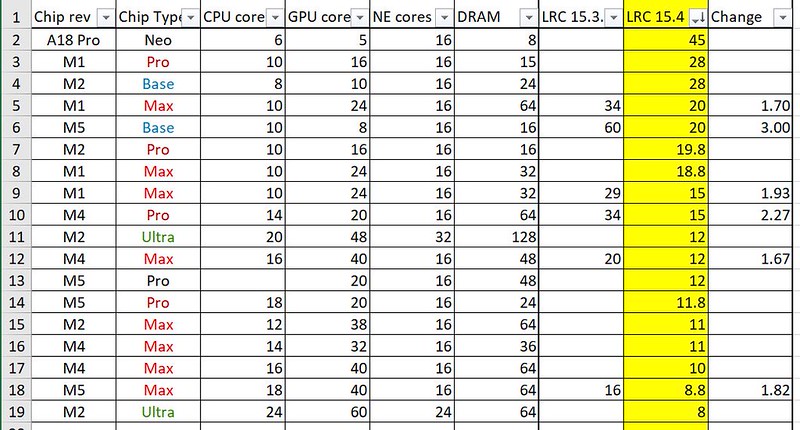 LRC15_4 denoise data by Mike Broomfield, on Flickr
GPU cores vs denoise
 LRC15_4 denoise GPU cores by Mike Broomfield, on Flickr
GPU Virtual cores vs denoise
 LRC15_4 denoise M rev _ GPU cores by Mike Broomfield, on Flickr
 LRC15_4 denoise data2 by Mike Broomfield, on Flickr
Edited on Jun 29, 2026 at 10:43 AM · View previous versions
In the past the denoise time has correlated well with # of GPU cores. I had used data provided by Artisright some time ago and I may do that again if he updates it. There seemed no point in plotting vs Neural Engine cores as, except for Ultra chips, the core count is the same. So I stuck with GPU and got a reasonably good correlation (1st graph below), so it appears that the NE is accelerating the GPU and more (GPU) is better, no shock. It makes sense that there are more NE cores for the Ultra, to ensure full acceleration. I guess that 16 is enough for all other configs and simplifies chip design.
While the correlation is OK I wanted to take into account that each generation, M1-> M2 etc gets faster, either by design or by process shrink (which speeds up transistors). I could have tried scouring the web to get speed tests for each device, GPU or CPU as a stand-in, but I took the easy way out and just used a 10% multiplier for each new rev. So M2 runs 10% faster than M1 (x 1.10), M3 would run 21% faster than M1 (1.10 x 1.10) etc. Rather than divide these values into the denoise time I multiplied them by the GPU core count and came up with what I called Virtual Cores on the horizontal axis (2nd graph). As you can see it tightens up the correlation a little though there are a couple of outliers.
So how useful is this? Not very .. just playing with numbers here. The table might be of some use if you plan to upgrade and AI/Denoise is important to your PP workflow/time. Set your pain threshold for Denoise time then look at configurations (GPU core count especially) that have better results. Discard older revs if you don’t want to buy used.
PS. I used M5 as the chip rev (and multiplier) for the device in the Neo. I read that is it on the 3nm process at TSMC.
LRC15_4 denoise data by Mike Broomfield, on FlickrGPU cores vs denoise
LRC15_4 denoise GPU cores by Mike Broomfield, on FlickrGPU Virtual cores vs denoise
LRC15_4 denoise M rev _ GPU cores by Mike Broomfield, on FlickrLRC15_4 denoise data2 by Mike Broomfield, on FlickrEdited on Jun 29, 2026 at 10:43 AM · View previous versions
Jun 27, 2026 at 05:10 AM
p.3 #12June 2026 LRC/PS updates ... faster Denoise measurements for Mac M with Neural Engine
@mcbroomf, my memory is 64GB --> missing in table
M4 Max, CPU 16, GPU 40, 16 NE cores
M4 Max, CPU 16, GPU 40, 16 NE cores
Jun 27, 2026 at 05:20 AM
p.3 #13June 2026 LRC/PS updates ... faster Denoise measurements for Mac M with Neural Engine
Thanks, I'll update it later (I'm not using it in the graphs)
Edit : Done
Edit : Done
Jun 27, 2026 at 05:27 AM
p.3 #14June 2026 LRC/PS updates ... faster Denoise measurements for Mac M with Neural Engine
It would interesting to see a couple of newer Windows systems with non-integrated GPU for comparison.
Jun 27, 2026 at 08:14 AM
p.3 #15June 2026 LRC/PS updates ... faster Denoise measurements for Mac M with Neural Engine
hoodlum90 wrote:
It would interesting to see a couple of newer Windows systems with non-integrated GPU for comparison.
If anyone has a system and would like to run the test on the reference file then please post the times and system specs (CPU/GPU/RAM and I'll add it to the table. Even a system that might not be new but has a recent(ish) GPU upgrade.
It would interesting to see a couple of newer Windows systems with non-integrated GPU for comparison.
If anyone has a system and would like to run the test on the reference file then please post the times and system specs (CPU/GPU/RAM and I'll add it to the table. Even a system that might not be new but has a recent(ish) GPU upgrade.
Jun 27, 2026 at 08:39 AM
p.3 #16June 2026 LRC/PS updates ... faster Denoise measurements for Mac M with Neural Engine
I wonder if we will see Denoise enabled for the iPhone Lightroom app now. Performance should be comparable to the MacBook Neo.
Jun 27, 2026 at 10:25 AM
p.3 #17June 2026 LRC/PS updates ... faster Denoise measurements for Mac M with Neural Engine
Matt suggested I re-order the table; M rev, then chip type, the GPU core. I added a 2nd table below the graphs (I still like to be able to see the table in denoise time order). Ignore the colour of the chip type, I used it to order that column so that it came out Base < Pro < Max < Ultra
https://www.fredmiranda.com/forum/topic/1946591/2#17062341
https://www.fredmiranda.com/forum/topic/1946591/2#17062341
Jun 28, 2026 at 09:36 AM
p.3 #18June 2026 LRC/PS updates ... faster Denoise measurements for Mac M with Neural Engine
MacBook Pro M5 Pro with 48GB with Lightroom 15.4 using ANE:
50 Nikon Z9 High Efficiency* Raw files @ 3200 ISO
Total time 8:18 = 9.96 sec/image
Previous run of same with prior Lightroom version without ANE was about 22 seconds per image.
50 Nikon Z9 High Efficiency* Raw files @ 3200 ISO
Total time 8:18 = 9.96 sec/image
Previous run of same with prior Lightroom version without ANE was about 22 seconds per image.
Jun 28, 2026 at 10:36 AM
p.3 #19June 2026 LRC/PS updates ... faster Denoise measurements for Mac M with Neural Engine
davidrwilliams wrote:
MacBook Pro M5 Pro with 48GB with Lightroom 15.4 using ANE:
50 Nikon Z9 High Efficiency* Raw files @ 3200 ISO
Total time 8:18 = 9.96 sec/image
Previous run of same with prior Lightroom version without ANE was about 22 seconds per image.
Great improvement!
If you can run this file and let me know the time I'll add it to the table
Download link
https://drive.google.com/file/d/15UAKmx9IA1k2Zt877ShHeUewCcHquyhu/view
MacBook Pro M5 Pro with 48GB with Lightroom 15.4 using ANE:
50 Nikon Z9 High Efficiency* Raw files @ 3200 ISO
Total time 8:18 = 9.96 sec/image
Previous run of same with prior Lightroom version without ANE was about 22 seconds per image.
Great improvement!
If you can run this file and let me know the time I'll add it to the table
Download link
https://drive.google.com/file/d/15UAKmx9IA1k2Zt877ShHeUewCcHquyhu/view
Jun 28, 2026 at 10:46 AM
p.3 #20June 2026 LRC/PS updates ... faster Denoise measurements for Mac M with Neural Engine
mcbroomf wrote:
50 Nikon Z9 High Efficiency* Raw files @ 3200 ISO
Total time 8:18 = 9.96 sec/image
Previous run of same with prior Lightroom version without ANE was about 22 seconds per image.Great improvement!
If you can run this file and let me know the time I'll add it to the table
Download link
https://drive.google.com/file/d/15UAKmx9IA1k2Zt877ShHeUewCcHquyhu/view
You bet - 10 copies of the image = 3:32 so roughly 21 seconds per image.
(Something's not right with my LR - I need to rerun to confirm as it's running at a glacial pace at the moment.)
Edited on Jun 29, 2026 at 09:56 AM · View previous versions
davidrwilliams wrote
MacBook Pro M5 Pro with 48GB with Lightroom 15.4 using ANE:50 Nikon Z9 High Efficiency* Raw files @ 3200 ISO
Total time 8:18 = 9.96 sec/image
Previous run of same with prior Lightroom version without ANE was about 22 seconds per image.
If you can run this file and let me know the time I'll add it to the table
Download link
https://drive.google.com/file/d/15UAKmx9IA1k2Zt877ShHeUewCcHquyhu/view
You bet - 10 copies of the image = 3:32 so roughly 21 seconds per image.
(Something's not right with my LR - I need to rerun to confirm as it's running at a glacial pace at the moment.)
Edited on Jun 29, 2026 at 09:56 AM · View previous versions
Jun 29, 2026 at 09:35 AM