kosin wrote:
In my case, my primary use for these fast drives is as a “cache” drive for Lightroom and Final Cut Pro. Generally when editing videos faster drives help a lot. Also, while traveling it is less time consuming to do memory card backups and these drives are usually more drop resistant that regular HDD. But for general backup of large amount of data/photos, regular HDD are a better choice. In upcoming days, expect good deals on 16-20TB drives. Don’t hesitate to buy large capacity drives. As you have noticed, it is rather easy to fill them up with high megapixel photos Remember to follow the 3-2-1 backup strategy: “The 3-2-1 backup strategy simply states that you should have 3 copies of your data (your production data and 2 backup copies) on two different media (disk and tape) with one copy off-site for disaster recovery.”
So purchase at least 2 external drives to backup your photos. Look also into getting the NAS, preferably a Synology unit.
To summarize, fast drives help to speed up editing (especially video) and backups on the go. For general backup at home, fast drives are a “waste”/to expensive when compared to regular HDDs. ...Show more →
Thanks for your reply! That makes a lot of sense. Comparing these NVME drives to something like a Samsung T9 it seems the prices aren't too far off between them for a 4TB. I may grab one. I did see this 20 TB WD HDD on Best Buy for $250. I'm wondering if that is a good deal on a hard drive of this size or if I should wait for better deals?
Swimming_trouble_718 wrote:
Thanks for your reply! That makes a lot of sense. Comparing these NVME drives to something like a Samsung T9 it seems the prices aren't too far off between them for a 4TB. I may grab one. I did see this 20 TB WD HDD on Best Buy for $250. I'm wondering if that is a good deal on a hard drive of this size or if I should wait for better deals?
If something like this is in your budget, these things are great for NAS-type storage. Not super-fast like a SSD, but long-term stability and constant run times and this is the best price I've seen on them.
Swimming_trouble_718 wrote:
Could you speak a little bit about your use case with this drive? I’ve been considering getting one but not sure if I need it or not. I have a MacBook Pro M1 Max with 1 TB of storage and I shoot on an a7rv. I also have a Samsung T7 1TB SSD (don’t use much) and a 8TB WD Elements HDD that’s somehow about half way full (those 61 mp files add up I guess). I’m planning on getting another HDD for back ups, but wondering about these very fast 4TB external SSDs. I used to keep photos that I was editing on my Mac, but the 1TB goes quick and my computer starts to run poorly if it’s too full. I don’t do any video at this point but I’d like to get into it more. ...Show more →
We have the same camera and laptop (mine has a 2TB drive, and I don't do vide0 - BTW, with this camera I see "storage creep"). I keep the folders that I'm still working on on the internal drive; you can ask, but you have a 2TB drive? Well, "working on" could mean even a few years ago as I don't rush to process. When I feel I'm done I move them off the laptop. Until now, Ive been using a home-built NAS but that is very slow as it goes through gigE. I feel this as I occasional go back to older shots to reprocess them. An external/fast drive is amazing, it's within a factor of 2 from the internal one. When I'll fill this new fast SSD, I'll get another one .
My LR catalog is spread between the internal and external drive. Then I have 2-3 slower external (magnetic) drives that I use for backups in different ways. Like others, I'm pretty paranoid about backups.... Others have tried to convince me to use backblaze or similar..... maybe I'll do for peace of mind.
ajmiller32 wrote:
If something like this is in your budget, these things are great for NAS-type storage. Not super-fast like a SSD, but long-term stability and constant run times and this is the best price I've seen on them.
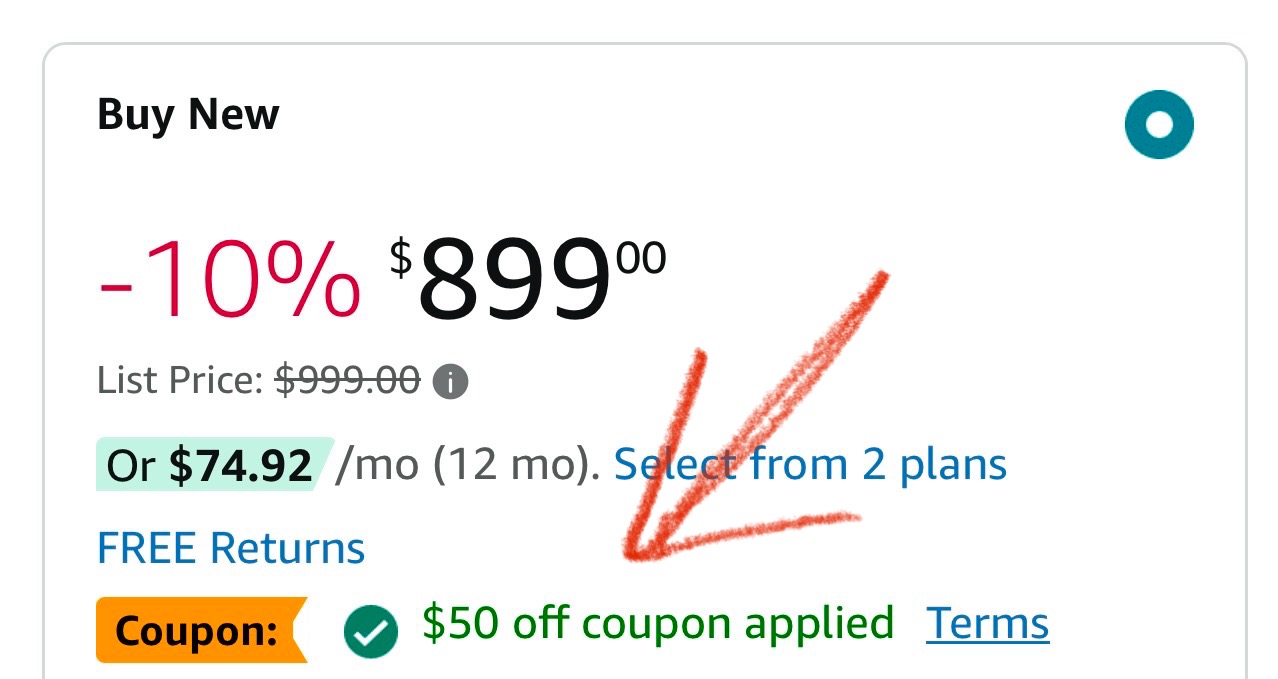
Apple iPad Pro 11-Inch (M4) for $849 on Amazon, remember to clip the $50 coupon. Final discounted price will be shown at the checkout. https://amzn.to/3AW6rj6
Swimming_trouble_718 wrote:
Thanks for your reply! That makes a lot of sense. Comparing these NVME drives to something like a Samsung T9 it seems the prices aren't too far off between them for a 4TB. I may grab one. I did see this 20 TB WD HDD on Best Buy for $250. I'm wondering if that is a good deal on a hard drive of this size or if I should wait for better deals?
In the past few seasons, I found the best deals on hard drives either exactly on Black Friday or Cyber Monday. For that reason, I would wait just couple more days. Or you can buy now and return/ask for a partial refund later if you find a better deal. Also, check your credit cards as some of them may offer additional savings. Also, Best abut has its own membership. As for credit cards, Chase Freedom for example offers 5% cash back on purchases made via PayPal until the end of the year.
@nmerc_photos Thanks for the reminder about Ulanzi. After briefly pondering the Peak Designs' sale, I decided to try the Ulanzi Zero Y tripod instead...$218 total.
zuru wrote:
My NAS should be upgraded. Can I ask what are you using for an NAS?
I’m sorry to jump in but I highly recommend Synology NAS. Also, wait until official Black Friday to purchase any hard drives. Western Digital usually has excellent deals between the Black Friday and Cyber Monday, especially on its Red (NAS rated) drives. Don’t forget that external drives can be opened and HDD reused in NAS systems which yield more $$$ in savings - google “shuckable drives”.
As for NAS suggestions, I recommend buying not what you need right now but what you will need in the future. Or at least double the storage of what you are thinking of purchasing right now. Your photo library will only grow from now on. If you think of buying a 2-bay NAS. Do not. Buy at least 4-bay. Synology is great in mixing the hard drive capacity but remember to use it accordingly to the RAID system you choose, have at least 2 drives of the same capacity (preferably all) - https://www.synology.com/en-global/support/RAID_calculator
Select items are 50% off and the rest 30% off. These ship from Canada, so not sure if it complicates matters for those in the US. I noticed that a lot of the 30% discounted items have the same discount/final price at B&H.
FWIW, as a longtime Pelican user, I really like what Nanuk is offering and have purchased a number of their cases recently. The latches are superior and the wheels are smoother. The regular Pelican (non-Air models) might be slightly more durable, but for average use it won't make a difference.
Looking for advice here. I've never used CF Express Type A cards but I'm getting more and more into video. Amazon has a great deal (or is it?) for two 256GB Cards for $167 by a company called Pergear that I have never heard of. This seems like a case of too good to be true and Buyer Beware to me.
Anybody have any experience with these cards or cheaper cards from some unknown/obscure brand? Thanks in advance for any advice, link to the deal below.
kosin wrote:
I saw that price on Amazon: https://amzn.to/3V4FsZH and I was wondering if there are any external cases that would take advantage of the speed of these drives when connected to the laptop? I guess it would have to be Thunderbolt 5 case as max speed of Thunderbolt 4 is 5000 MB/s I think.
Yes, the Sabrent Aluminum case (no tools required). On sale at Amazon for $70-normally $100. Very fast.
BillD208 wrote:
Looking for advice here. I've never used CF Express Type A cards but I'm getting more and more into video. Amazon has a great deal (or is it?) for two 256GB Cards for $167 by a company called Pergear that I have never heard of. This seems like a case of too good to be true and Buyer Beware to me.
Anybody have any experience with these cards or cheaper cards from some unknown/obscure brand? Thanks in advance for any advice, link to the deal below.
arbitrage does - he uses them with his A1 with no issue.
I went with some Nextorage A1Pro cards as they have the fastest sustained write speeds of any Type A card (not counting 4.0 cards) at 850mb/s which is what I use in my A9iii. The company was founded by former Sony engineers with experience specifically in memory and storage development. They have a really good rep - and knock on wood I have had zero issues with them.
Also they have another version called A1SE which aren't as fast but still fast and a fair bit cheaper.
For those using CFE-A 4.0 cards, which card reader are you using?
I see that ProGrade has its USB 4.0 reader on sale now - https://bit.ly/3OpUGo8 are there better options on the market? Any chance on dual card readers that utilize Thunderbolt 4 or USB 4?


 Remember to follow the 3-2-1 backup strategy: “The 3-2-1 backup strategy simply states that you should have 3 copies of your data (your production data and 2 backup copies) on two different media (disk and tape) with one copy off-site for disaster recovery.”