Thanks for catching. I noticed it after posting but you passed me in fixing. 12fps mechanical for 230 frames, is what made me optimistic that at 15fps (where I would mostly shoot for culling optimisation) but my tests yesterday was no gain in lessor fps in electronic, so back to the worry. I don't want to shoot in noisy EFCS for wildlife. But I am optimistic that Canon can fix this in firmware update or I just had some setting wrong that slowed it down at 15fps.
7% throughput gain x 30mpx/20mpx = 11% improvement. Note that I got 99 raw frames in some circumstances with the sd I tried yesterday at 30fps. Other times I got 70 - lower light causes bigger files. The +- overwhelms the gains you make.
p.18 #2 · Official Canon EOS R5 Mark II Images & Specifications
artsupreme wrote:
What the heck? This is not looking very good when you compare the two bodies 4yrs apart
Considering it's now a stacked sensor and I would probably use it mostly in e-shutter and no longer be 12-bit penalized, the R5II in CRAW with ~6 seconds burst depth is better than what I get with the R6II at 40fps (2.5 seconds). But it still feels compromised and restricted by some arbitrary decision by someone at Canon. Those values are likely low ISO and total frame count will certainly be lower at high ISOs.
p.18 #4 · Official Canon EOS R5 Mark II Images & Specifications
lighthound wrote:
How so?
It looks like the R5II is almost double and @ 14bit looking at the Mechanical.
I shoot in E-shutter to CF card 100% of the time and I know the R5 @ 20fps is approx 100-115 frames in RAW, and the chart is showing 93 frames in RAW for the R5II.
p.18 #5 · Official Canon EOS R5 Mark II Images & Specifications
What did the manual say for the R5 when 1st launched?
artsupreme wrote:
I shoot in E-shutter to CF card 100% of the time and I know the R5 @ 20fps is approx 100-115 frames in RAW, and the chart is showing 93 frames in RAW for the R5II.
p.18 #6 · Official Canon EOS R5 Mark II Images & Specifications
goalerjones wrote:
What did the manual say for the R5 when 1st launched?
I'm not sure but this is a comparison I would like to see in real life with real images with no black lens cap tests, etc. It's one of those things that will depend on how busy the image is and what the ISO levels are. I'm wondering if the real life buffer will be very close to the same amount of shots between the R5/R5II, due to the extra 14-bit data increasing the load.
If this is the case, I would love to have the option to shoot in 12-bit on the R5II as well to get the extra buffer over the R5 for some situations.
p.18 #7 · Official Canon EOS R5 Mark II Images & Specifications
Tollefsen wrote:
Why, why Canon no zebras in live view…..one of the big things I was hoping for…
I was sure I would miss that feature from my Sonys, but I find the R5's EVF remarkably accurate for judging exposure, and the camera's exposure metering is almost always spot-on. Hopefully the R5 II is the same.
p.18 #8 · Official Canon EOS R5 Mark II Images & Specifications
artsupreme wrote:
I shoot in E-shutter to CF card 100% of the time and I know the R5 @ 20fps is approx 100-115 frames in RAW, and the chart is showing 93 frames in RAW for the R5II.
You can exceed the normal 93 frames raw at iso 100 and a good cfx card (eg delkin black) and you ignore the initial stutters - but I shoot dusk and dawn and that slows it down with bigger files/higher iso's. The good news is that yesterday I got 99 frames a few times in better light with R5II and sd card and it was at 14 bit. But the bad news is that when I hit the R5ii buffer, it took about 8s to clear and was not very useful in that time. Yesterday the surprising thing was that the R5ii buffer hit the same frame limit at 15fps as 30fps on the R5ii (near 99 in good light). Eg it did not seem to be able to do read and write from buffer at the same time in electronic. I expected improvements in frames at 15 fps given the 12 fps EFCS is able to more than double the frames. There was something inexplicable going on - no simultaneous read and write on electronic vs mechanical?
On my old R5, the cfx did not improve frames much from Cfx from SD - so this is likely again - it just improved buffer clear from 8s to 4s. My Kingston Canvas (v90) got about 60 frame with 8s buffer clear when I tested r5 in lowish lighting (iso 1250, 1/500) earlier this week. Similarly my Delkin Black (1400 sustained) and my Angelbird Se CFe (800 sustained) the R5 got about 65 in same light with 3s clear. The 65 frames jumped to 120 frames in Craw/ CFx. In 12fps, 14 bit EFCS CFx, the frames carried on beyond 250 and I stopped testing. Eg. The R5v1 and CFx has a marginal gain on frames (vs sd) but it cuts buffer clear by 5/8's.
p.18 #9 · Official Canon EOS R5 Mark II Images & Specifications
At least in mechanical, speed writing to buffer and buffer size seem a little slower for R5II.
R5 at 12fps to CFe writes 180 45.4 MB files (8.2GB) in 15 seconds. 1.83GB/S
R5II at 12 fps to CFe writes 230 47.6 MB files (10.95 GB) in 19 seconds. 1.73 GB/S
I'm guessing actual buffer is less than 2 GB.
A1 clears buffer at 530 MB/S.
Using 19 secs × 500 MB/S = 9.5 GB, R5II should have cleared 9.5 GB of the 10.95 GB written at 230 frames leaving 1.45 GB.
So maybe between 1 and 2 GB buffer.
Of course, this assumes read and write to buffer at the same time.
So I may be way, way off.
p.18 #10 · Official Canon EOS R5 Mark II Images & Specifications
@Choderboy I think your GB/s calculations are incorrect. See chart below.
lighthound wrote:
How so?
It looks like the R5II is almost double and @ 14bit looking at the Mechanical.
artsupreme wrote:
I shoot in E-shutter to CF card 100% of the time and I know the R5 @ 20fps is approx 100-115 frames in RAW, and the chart is showing 93 frames in RAW for the R5II.
The chart might be on the conservative side, but probably won't be off by a huge amount.
Sounds like R5 will give you 5-6 second bursts and during that time it's offloading some images to the card, freeing up buffer space and allowing slightly extended burst depth. R5II at 30fps and 14-bits produces more information a lot faster than the R5. If the R5II's general buffer capacity, performance and/or card write speed hasn't been proportionally improved, it likely causes a bottleneck and can't get the files to the card fast enough, which would be unfortunate. Just my guess.
It is interesting to see that R5II 12fps EFCS jpeg buffer depth is slightly more than 2x greater while RAW is only 27%, and CRAW is similar to jpeg at slightly 2x greater than the R5. I'm guessing this is primarily due to the R5II probably having a significantly faster processor to crunch all those files down to final size before offloading to the buffer.
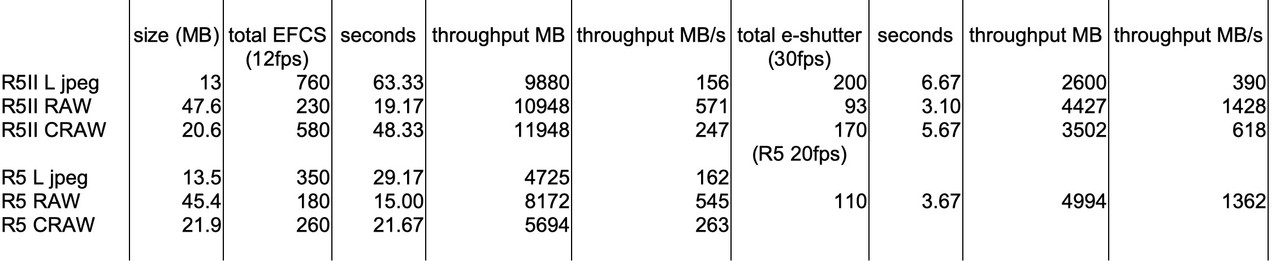
I went through the manuals and put the relevant numbers into a basic spreadsheet below. The R5 e-shutter information is based on what artsupreme stated above because the R5 manual does not provide any e-shutter stats.
The numbers I don't have are buffer to card write times for each camera and category.
So what do you interpret from these numbers? I see that MB/s throughput between R5 and R5II is very similar, even in e-shutter, yet here the R5II is generating 50% more images per second...
What do we know about the max CFe card write speed of the R5 (and R5II)?
Choderboy wrote:
I'm guessing actual buffer is less than 2 GB.
I wouldn't be surprised if it's around this number. I think this and the card write speed is and continues to be a bottleneck.
What we also don't know is how much throughput the camera can handles between the sensor and the processor. There might be some buffering here too and could also be a factor.
p.18 #13 · Official Canon EOS R5 Mark II Images & Specifications
biggles2002 wrote:
Wasn't the R5 mechanical/EFCS shutter messured to 13bits when in H+ ?
So maybe the RAW's are a bit smaller than R5II's 14bits RAW.
Canon expands both 12-bit and 13-bit captures to 14-bit files, no size difference after saving. This is why there is so much confusion about the bit depths, you can only tell by analyzing the data, there isn’t a nice EXIF tag
And yes, nothing over 8fps is the full 14-bit on the R5.
p.18 #14 · Official Canon EOS R5 Mark II Images & Specifications
IDK, my R5 must be broken or I'm doing something wrong because in the 4 years I've owned it, I've only hit the buffer maybe 3 times. Should I send it in to get fixed?
I think we could simplify the charts by just showing CRAW speeds. I don't know of anyone that is concerned about shooting high frame rate action that shoots full raw and jpeg well... maybe family outings where I might want to simplify the sharing over cell phones.
This shows what I consider an extreme burst. I didn't hit the buffer and still captured every moment I needed including the flip.
p.18 #15 · Official Canon EOS R5 Mark II Images & Specifications
I can't think of a single time I've ever hit the buffer on any camera, at least since the days of 36-exposure rolls of film (and that was recording a building demolition). For wildlife photography, watching and learning subject behaviour helps you capture the important moments with much shorter bursts.
p.18 #17 · Official Canon EOS R5 Mark II Images & Specifications
lighthound wrote:
IDK, my R5 must be broken or I'm doing something wrong because in the 4 years I've owned it, I've only hit the buffer maybe 3 times. Should I send it in to get fixed?
I think we could simplify the charts by just showing CRAW speeds. I don't know of anyone that is concerned about shooting high frame rate action that shoots full raw and jpeg well... maybe family outings where I might want to simplify the sharing over cell phones.
Great for you. I can tell you that every football game I shoot, I hit the buffer with the R6II, especially if at 40fps. It would probably happen less frequently with the R5 at 20fps because it appears to have a deeper CRAW buffer depth. The R6II gets about 100-120 depending on the ISO. That's max 3 seconds. Some plays can develop into long ones, especially if there is reaction/celebration afterwards. Here being able to switch fps rate might be helpful IF it extends the buffer depth. But from Scott's initial R5II tests at 15fps, that didn't seem to be the case in e-shutter.
Coming from the 1DXII to the R6/R6II, there is also a difference in how the buffer in each behaves. The 1DXII will immediately clear space and continue shooting, though with momentary pauses. Waiting a half second was usually enough to get 5-10 or more frames. With the R6/R6II, and by the sounds of it, the R5 and possibly also the R5II, if you totally fill the buffer, it locks you out for however long it takes to start clearing. I've noticed delays of 3-8 seconds with V90 SDXC cards in the R6II before the buffer counter starts climbing from zero and I can start shooting again. There was never such a delay with the 1DXII. It's frankly annoying to deal with because I have to try to avoid hitting absolute zero to avoid getting locked out for a few painfully long seconds. Tough to do when concentrating on dynamic action. Sure, R6II is not the ideal camera for this application. I'd be better with the R3, but in 2022 that's what the budget allowed and it worked out better than I expected, for the most part. I also felt the R3 was priced too high, though it's better now.
p.18 #18 · Official Canon EOS R5 Mark II Images & Specifications
lighthound wrote:
IDK, my R5 must be broken or I'm doing something wrong because in the 4 years I've owned it, I've only hit the buffer maybe 3 times. Should I send it in to get fixed?
I think we could simplify the charts by just showing CRAW speeds. I don't know of anyone that is concerned about shooting high frame rate action that shoots full raw and jpeg well... maybe family outings where I might want to simplify the sharing over cell phones.
This shows what I consider an extreme burst. I didn't hit the buffer and still captured every moment I needed including the flip.
Wonderful capture Dave. Can you explain to me how you put together the series of images to create what I call a "slide show" in fast motion. Not sure how to call it. Do you use a specific program to assemble all the shots? thanks in advance!
p.18 #19 · Official Canon EOS R5 Mark II Images & Specifications
cjacques wrote:
Wonderful capture Dave. Can you explain to me how you put together the series of images to create what I call a "slide show" in fast motion. Not sure how to call it. Do you use a specific program to assemble all the shots? thanks in advance!
You can do this in photoshop, search for making a GIF in PS on YouTube. If you don't have PS there's a free program called Canva that allows you to make GIF's from images or movies.
p.18 #20 · Official Canon EOS R5 Mark II Images & Specifications
Jeff wrote:
There's a surprise.
Guessing no one cares, but does anyone know if Canon fixed the kludgy Timelapse mode initiation from the R5?
This is something I would really love and it shouldn't be difficult to update the internal interval timer. I would love the option to choose up to 2-3fps as well, instead of the max at 1fps.



 Should I send it in to get fixed?
 I can tell you that every football game I shoot, I hit the buffer with the R6II, especially if at 40fps. It would probably happen less frequently with the R5 at 20fps because it appears to have a deeper CRAW buffer depth. The R6II gets about 100-120 depending on the ISO. That's max 3 seconds. Some plays can develop into long ones, especially if there is reaction/celebration afterwards. Here being able to switch fps rate might be helpful IF it extends the buffer depth. But from Scott's initial R5II tests at 15fps, that didn't seem to be the case in e-shutter.