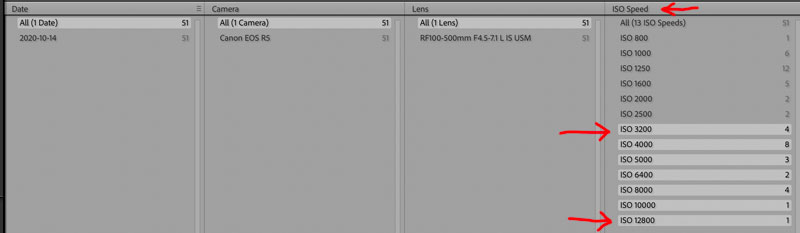
I spend a little time at the Lightroom Queen's site. To save time someone asked how to Denoise only files from ISO 3200 and higher. I messed around with it and came up with a procedure and one of experts refined it. You can also do this with collections but I like this approach.
1. In Library Grid view select metadata
2. Use the Library filter and select a column to set for ISO Speed
3. Click on the entry for 3200
4. Shift-click on the final entry in that column and it selects all the speeds from 3200 and upwards
5. Go to the Develop module
6. Edit > Select All (if required)
7. Denoise
8. Back to Library
9. Select All ISO speeds
10. Back to Develop
I make denoise in a similar way, I choose high ISO images through the Library filter - after selecting the photos, i denoise them all at once in the Develop.
I tried almost 130 photos at once as a stress test for the computer / graphics card. The entire denoise was done in just over 30 minutes, one photo from the A7R3 took an average of 14.37 seconds (RTX 3070).
For those using the new AI for denoise and doing batch processing, has anyone compared the amount of time it takes for a batch using the older stand alone version vs. the newer AI version? Reason: I shoot pro soccer and need to supply edits while on the field so the processing time is important given I'm under deadline. The AI version sounds interesting but if its any slower than the stand alone, it would be a no go for me.
schlotz wrote:
For those using the new AI for denoise and doing batch processing, has anyone compared the amount of time it takes for a batch using the older stand alone version vs. the newer AI version? Reason: I shoot pro soccer and need to supply edits while on the field so the processing time is important given I'm under deadline. The AI version sounds interesting but if its any slower than the stand alone, it would be a no go for me.
It will always take longer because adjustments you make using the traditional method respond instantly so they take no time at all.
The time it takes it takes Denoise to process a file is device dependant. I’ve seen form 6 to 10 seconds to 30 minutes. Unless you have the most decked out laptop (which I assume you are using) I doubt it will be fast enough for your requirements.
I should asked. Are these day or night games? I shot a marathon last summer. 500 files and if I do it again this year I won't use Denoise. Traditional NR method is plenty.
Also this will change. As I understand it there are issues with the Mac M1/2 not using the neural engine. Adobe will continue to make speed improvements and is already looking at dropping the DNG route. I guess I forgot to mention the DNG part.
These are night matches. ISO usually for the 2nd half is from 8000-12500 using my Sony A1 +400 2.8. Processing is done on a MBP M1 Max w/32gb. The 50MB A1 files run between 2-5 seconds per frame using LR Classic and the stand alone Denoise version plug-in. The new AI Denoise built into LrC is definitely a no go. Takes forever and the file sizes are insane ~225MB DNG's.
I downloaded the trail. Selected 10 raws in LrC and asked it to process in Photo AI. In the Topaz window it shows the 10 files but only processes 1. Can't find a way in this demo to have it process all of them so no way to evaluate the time it takes. This might be due to the demo being crippled to not save anything. Bummer.... with no way to properly evaluate I can't justify the cost.
In the end, I will leave Topaz installed, because sometimes there are just images that LR can't seem to get its arms around, like this one. It refused to both reduce the grain and sharpen the infocus portion...had to slide the denoise to almost 100 to get the grain down and by then the butterfly and flower were just waxy.
I plan to leave Topaz installed as well. Aside from reducing motion blur I find it better for very abstract images where I can oversharpen files and denoise them a lot. With Topaz AI I can dial them separately and occasionally get better results than Adobe Denoise + the Detail panel settings.
mcbroomf wrote:
I plan to leave Topaz installed as well. Aside from reducing motion blur I find it better for very abstract images where I can oversharpen files and denoise them a lot. With Topaz AI I can dial them separately and occasionally get better results than Adobe Denoise + the Detail panel settings.
I will say, however, that I'm using LR's new tool for around 90% of my files that need noise reduction/enhancement.
I've been refining my workflow and as I mentioned I prefer to zero everything out, including sharpening.
I apply just enough Denoise to just get luminance looking good. Back in LrC I apply sharpening which introduces a little noise which is good for printing. It's also good for subject detail. You can see noise at 300% but not at 100%. Then I can add a little masking. If I want a complete clean background for web presentation I can go into masks and remove it all. Even too much masking in the Detail panel can start to lose some detail.
By leaving sharpening at 40 or whatever I tend to push Denosie a little more which is not bad. I just prefer the minimal required. It's good for my hobby which is mostly birding but may not work for everyone. For speed editing I doubt I'd be doing that.
mcbroomf wrote:
I plan to leave Topaz installed as well. Aside from reducing motion blur I find it better for very abstract images where I can oversharpen files and denoise them a lot. With Topaz AI I can dial them separately and occasionally get better results than Adobe Denoise + the Detail panel settings.
I'm not a member of Luminous Landscape anymore but the LrC Adobe Denoise thread was interesting. Not so good at first but after a few days starting to lean towards it's more natural look.
My computer: i7 9700K, 32GB RAM, RTX 3070:
Esimated 15sec, real time 22sec
Batch processing of 8 files: 20.4sec /image
And add in the # of Tensor cores for each GPU and you can see the trend. It also appears that the 40 series Tensor is more efficient that the 30 series
mcbroomf wrote:
And add in the # of Tensor cores for each GPU and you can see the trend. It also appears that the 40 series Tensor is more efficient that the 30 series
I see that the folks over there are timing it differently than I would have in the past; I include the time from when you press the "DeNoise" button as there are differences in how fast the computer loads the preview. Not sure how much that loading time depends on the GPU, but as an example, if I do it that way on my PC with an Nvidia 4080 card (304 tensor cores) I get the same total time as my Mac Studio Ultra (either 64GB or 128GB, I have both and the performance is identical): 22s. If I time just the part from when I hit "Enhance" like they are doing over on the LRQ forum, it's 17s for the Studio Ultra and 15s for the 4080.
What's interesting to me at the moment is that Adobe is not using the Apple Neural Engines, so it's not a fair comparison yet, as they serve the a similar function as the Nvidia tensor cores. According to Adobe, once Apple addresses a bug they've found, the performance will increase substantially. So a crippled Apple Silicon Mac at the moment can compete with Nvidia's second best consumer card that costs $1399 on its own. Pretty impressive IMO.
On another note, it appears that you are just as fine buying an older Nvidia 3070 series card and saving a ton of money for not much less performance.
If they can get it down to the speed of the stand-alone Topaz DeNoise app (about 10s), then the only "objection" I have will be removed. As is, I have used Topaz maybe once since Adobe has released this.
For me its speed, file size and accuracy of the Denoise. I'm pretty much sold on the degree of denoise in Adobe's AI via LR but the speed and file size is a no go for me. The stand alone Topaz Denoise running a batch of Sony A1 files is usually between 3-4 seconds per file. Adobe's version doesn't come close PLUS the resulting file size is approximately 225mb
schlotz wrote:
For me its speed, file size and accuracy of the Denoise. I'm pretty much sold on the degree of denoise in Adobe's AI via LR but the speed and file size is a no go for me. The stand alone Topaz Denoise running a batch of Sony A1 files is usually between 3-4 seconds per file. Adobe's version doesn't come close PLUS the resulting file size is approximately 225mb
No video card or computer I've ever tested is 3-4 seconds--what are you using? The absolute fastest I've ever seen is about 7-8 seconds per file, and that's with top of the line equipment (Mac Studio Ultra; even an Nvidia RTX 4080 or A6000 isn't that fast). That's half the speed of Lightroom but unless you're batching hundreds of files regularly, that's not a big deal.
As for file size, I assume you must be having Topaz DeNoise output low-bit sized TIFF or jpeg? Because when I have it create a DNG it's just as huge as the one LR creates, and the same size as a 16-bit TIFF file. In fact, the LR DNG is smaller than the the Topaz DNG or TIFF file. BTW, all Sony A1 files here, too.
jhapeman wrote:
No video card or computer I've ever tested is 3-4 seconds--what are you using? The absolute fastest I've ever seen is about 7-8 seconds per file, and that's with top of the line equipment (Mac Studio Ultra; even an Nvidia RTX 4080 or A6000 isn't that fast). That's half the speed of Lightroom but unless you're batching hundreds of files regularly, that's not a big deal.
As for file size, I assume you must be having Topaz DeNoise output low-bit sized TIFF or jpeg? Because when I have it create a DNG it's just as huge as the one LR creates, and the same size as a 16-bit TIFF file. In fact, the LR DNG is smaller than the the Topaz DNG or TIFF file. BTW, all Sony A1 files here, too. ...Show more →
I see from an earlier reply you posted that you are using an M1 Max MBP. I think your 3-4 seconds is an overly optimistic estimate vs. a measured number, unless you are using small raws or something different than I and others are using. As a refresher on performance numbers for performance testing I've done, here's a graph from this past February for a range of different Macs and PCs with various graphics cards using Sony A1 files:
The king of the hill in that batch is the M2 Max; the M1 Max was very consistent across several I tested (14" and 16" and an M1 Max Mac Studio). In the more thermally-constrained laptops it basically never does better than 8s per file on average when processing lossless compressed Sony A1 raw files.
An interesting note is that Topaz uses both the GPU and Apple Neural Engines; right now Adobe has stated that they aren't using the ANE due to a bug, but that using it will provide significant performance gains. My expectation is that we will see Adobe match or beat the Topaz times when this issue is addressed by Apple.
Unless you have a bone to pick with Adobe or have no use at all for Lightroom, I can't see much reason for using Topaz DeNoise any more. The file size issue is a non-issue, as Topaz produces the same large files unless you want to go straight to jpeg. The performance hit is minor now and will likely be completely gone when Apple fixes the bug. Finally, in all of the testing I have done, Adobe's denoise produces much fewer artifacts in files than Topaz does. In fact, that's the number one reason I was so willing to ditch Topaz. The new PhotoAI they are positioning to replace the current DeNoise/Sharpen/Gigapixel standalones is even worse in this regard, and on top of that is much slower.
As an addendum here, I just ran the same 10 test files through Adobe's denoise on my Studio Ultra and it took an average of 13.2 seconds, so 97% longer. It will be interesting to see how fast that gets with the ANE's enabled, especially on the Ultra versions as they have double the number of ANE cores.
jhapeman wrote:
I see from an earlier reply you posted that you are using an M1 Max MBP. I think your 3-4 seconds is an overly optimistic estimate vs. a measured number, unless you are using small raws or something different than I and others are using. As a refresher on performance numbers for performance testing I've done, here's a graph from this past February for a range of different Macs and PCs with various graphics cards using Sony A1 files:
The king of the hill in that batch is the M2 Max; the M1 Max was very consistent across several I tested (14" and 16" and an M1 Max Mac Studio). In the more thermally-constrained laptops it basically never does better than 8s per file on average when processing lossless compressed Sony A1 raw files.
An interesting note is that Topaz uses both the GPU and Apple Neural Engines; right now Adobe has stated that they aren't using the ANE due to a bug, but that using it will provide significant performance gains. My expectation is that we will see Adobe match or beat the Topaz times when this issue is addressed by Apple.
Unless you have a bone to pick with Adobe or have no use at all for Lightroom, I can't see much reason for using Topaz DeNoise any more. The file size issue is a non-issue, as Topaz produces the same large files unless you want to go straight to jpeg. The performance hit is minor now and will likely be completely gone when Apple fixes the bug. Finally, in all of the testing I have done, Adobe's denoise produces much fewer artifacts in files than Topaz does. In fact, that's the number one reason I was so willing to ditch Topaz. The new PhotoAI they are positioning to replace the current DeNoise/Sharpen/Gigapixel standalones is even worse in this regard, and on top of that is much slower.
M1 Max is still SUPER competitive. So much so that I just ordered my Mac Studio with a Max in it.
Regarding why keep Topaz around, well...it performs better under certain conditions still...not many, but a few, and it's worth keeping in the back pocket. That said, I won't pay for any new versions, as I have full confidence that the LR version will exceed anything the current version of Denoise can do in the next year.
RoamingScott wrote:
M1 Max is still SUPER competitive. So much so that I just ordered my Mac Studio with a Max in it.
Regarding why keep Topaz around, well...it performs better under certain conditions still...not many, but a few, and it's worth keeping in the back pocket. That said, I won't pay for any new versions, as I have full confidence that the LR version will exceed anything the current version of Denoise can do in the next year.
Oh they are very good for sure, but if I were buying a new MacBook right now I'd get the M2 as it's quite a bit faster. In the Studio, it's the best value for the dollar at this point since there's no M2 option available.
I haven't deleted Topaz either, I just haven't come across a situation where I found it to perform better--yet. But I suppose that might happen, and since I've paid for it, no sense deleting it. I am thinking of deleting the PhotoAI app though, as it has not IMO gotten any better with any of the updates. It's too dumbed down and produces way too many artifacts--and it's slower on top of all of that. Just a bad move all around by Topaz IMO.
I still use Sharpen AI on some shots, it would be nice if someone else took a stab at this. There are cases where smart mathematics applied to sharpening can really improve results, such as true deconvolution (I know that Canon does a form of this in their app but even when I used Canon I never used it as the app was so slow and clunky it wasn't worth it) or cases where there's obvious motion blur that can be solved. That's one place SharpenAI can sometimes produce remarkably good results.
jhapeman wrote:
No video card or computer I've ever tested is 3-4 seconds--what are you using? The absolute fastest I've ever seen is about 7-8 seconds per file, and that's with top of the line equipment (Mac Studio Ultra; even an Nvidia RTX 4080 or A6000 isn't that fast). That's half the speed of Lightroom but unless you're batching hundreds of files regularly, that's not a big deal.
As for file size, I assume you must be having Topaz DeNoise output low-bit sized TIFF or jpeg? Because when I have it create a DNG it's just as huge as the one LR creates, and the same size as a 16-bit TIFF file. In fact, the LR DNG is smaller than the the Topaz DNG or TIFF file. BTW, all Sony A1 files here, too. ...Show more →
MBP M1 Max w/32gb ram. The 3-4 sec is what Topaz Denoise reports as it finishes processing each file in a batch feed. Yes, LR Topaz plug-in first creates a TIFF and sends it to Topaz Denoise for processing.