This topic is in the 2023 archive. You can read it and like its posts here. It is read only.
Archive 2023*Edited* Denoise software is amazing. Image.
p.4 #1*Edited* Denoise software is amazing. Image.
mudlake wrote:
I can see what you are talking about, but at a reasonable viewing size, would these things be noticeable? Just wondering. Again, I’m just starting out with this denoise stuff. 🙂
One hesitation I have about DXO is that it only accepts true raw files, correct? So it wouldn’t work when I shoot in crop mode and lossless compressed medium (which is what the A7R5 defaults to using lossless compressed in crop mode) since the file isn’t a “true” raw.
To my eye it is clearly noticeable at any reasonable viewing size, yes. You would notice it easily in a print as well. If it was a social media post or thumbnail, then maybe not, but you wouldn't really benefit from using DeNoise on a tiny web-sized photo in the first place. Also, knowing that there is other software that doesn't have any of these problems just gives me a much better option.
DXO Pure RAW (the batch processing, stand-alone version of the software) only works on RAW files, yes. At the RAW conversion stage is actually where you want all this improvement to happen. It does NR, sharpening, and distortion correction, removes light CA, etc. Another area it sets itself apart from similar programs is it applies sharpening and lens corrections differently across the frame, relative to how that specific lens behaves and proportionate to what is needed. This is a much better approach, but the downside as mentioned is it takes a very long time for DXO to develop those profiles for every lens/camera combo. Most popular equipment is already supported but there are a few outliers.
DXO also has Photolab 5 (more of a Photoshop competitor) and you can process any file with that but I don't use it, so I am not sure how they handle JPEG NR. As for Sony's cooked RAWs, I don't actually know, but they have a free trial and you can find out for sure. My guess is they are supported, as DXO can handle my small and medium 12bit RAWs from my D850 which are similar.
Feb 02, 2023 at 09:50 PM
p.4 #2*Edited* Denoise software is amazing. Image.
Jonathan wrote:
mudlake wrote
I can see what you are talking about, but at a reasonable viewing size, would these things be noticeable? Just wondering. Again, I’m just starting out with this denoise stuff. 🙂One hesitation I have about DXO is that it only accepts true raw files, correct? So it wouldn’t work when I shoot in crop mode and lossless compressed medium (which is what the A7R5 defaults to using lossless compressed in crop mode) since the file isn’t a “true” raw.
Could you do a quick experiment? Take two images at high(er) iso of the same subject - one in full frame lossless large and one in crop mode. Then see if you can process the image in crop mode. If DxO lets you process the crop image, see how the result compares with the full frame image. That would be nice to know if you can do it!
Feb 02, 2023 at 09:54 PM
p.4 #3*Edited* Denoise software is amazing. Image.
mudlake wrote:
One hesitation I have about DXO is that it only accepts true raw files, correct? So it wouldn’t work when I shoot in crop mode and lossless compressed medium (which is what the A7R5 defaults to using lossless compressed in crop mode) since the file isn’t a “true” raw.I'm shooting lossless compressed and the files work fine in DxO, but I'm not using crop mode.Could you do a quick experiment? Take two images at high(er) iso of the same subject - one in full frame lossless large and one in crop mode. Then see if you can process the image in crop mode. If DxO lets you process the crop image, see how the result compares with the full frame image. That would be nice to know if you can do it!
Sure, I'll report back here and send you a PM letting you know the results. If not tonight, I will in the a.m.
Jonathan wrote
mudlake wrote
I can see what you are talking about, but at a reasonable viewing size, would these things be noticeable? Just wondering. Again, I’m just starting out with this denoise stuff. 🙂One hesitation I have about DXO is that it only accepts true raw files, correct? So it wouldn’t work when I shoot in crop mode and lossless compressed medium (which is what the A7R5 defaults to using lossless compressed in crop mode) since the file isn’t a “true” raw.
Sure, I'll report back here and send you a PM letting you know the results. If not tonight, I will in the a.m.
Feb 02, 2023 at 09:56 PM
p.4 #4*Edited* Denoise software is amazing. Image.
CanadaMark wrote:
Tonight I took this image of a hummingbird just after sunset in very dim light at ISO 12,800. I'm astounded. I thought I'd share for those who haven't tried one of the software programs available.I also love Topaz, but do have problems at times with random patches of artifacts. I seem to have most success with "Low Light" mode.
I'm curious to know which mode you used and the levels you selected for your sample photo. It certainly cleaned up very well.Are you feeding it a RAW image? I had similar problems and ended up in email correspondence with Topaz' CEO. He told me that if there is any pre-processing done at all (for example anything you do via photoshop plugin, because Adobe converted the RAW, that counts as processing), it will not work properly. They are not forthcoming with this information in any of their marketing, which admittedly bothered me a bit.
If you feed it an untouched RAW file in the standalone program it usually solves the blotchiness problem, but I still haven't found a solution for all the strange...Show more →
Good to know, thanks. It does explain why Topaz has been pushing its RAW processing for Denoise over the other modes but it would be nice to be able to rely on it a bit better to denoise processed images more reliably. My usual solution, beyond trying each mode in turn, is to dial back the sliders as much as possible yet still get acceptable results. Leaving it in auto mode is usually a recipe for disaster, unless you like abstract impressionism
I feel like it has actually become harder to tame as it's become more complex with each update. Or maybe my memory is forgetting past problems. Either way I'll give it one more bird migration season and if I'm still having issues then perhaps it's time to investigate some alternatives.
There are plenty of reviews out there comparing the various de-noising options, but I'd be specifically interested in seeing comparisons with only bird photos, since the feather detail seems to present a unique challenge. PetaPixel did a comparison a few months back specifically for astrophotography, which put Topaz Denoise ahead of the pack. But it did ask a question I've also been pondering for a while -- why the heck hasn't Adobe invested more into its LR/ACR noise reduction capabilities? For all the advances in masking and other assorted AI tools in LR, the noise reduction capability feels like its stuck in in the past.
wordfool wrote
mudlake wrote
I'm new to the denoise software. I ended up purchasing Topaz Denoise. I'm frankly astounded at how good it is, especially with raw files.Tonight I took this image of a hummingbird just after sunset in very dim light at ISO 12,800. I'm astounded. I thought I'd share for those who haven't tried one of the software programs available.
I'm curious to know which mode you used and the levels you selected for your sample photo. It certainly cleaned up very well.
If you feed it an untouched RAW file in the standalone program it usually solves the blotchiness problem, but I still haven't found a solution for all the strange...Show more →
Good to know, thanks. It does explain why Topaz has been pushing its RAW processing for Denoise over the other modes but it would be nice to be able to rely on it a bit better to denoise processed images more reliably. My usual solution, beyond trying each mode in turn, is to dial back the sliders as much as possible yet still get acceptable results. Leaving it in auto mode is usually a recipe for disaster, unless you like abstract impressionism
I feel like it has actually become harder to tame as it's become more complex with each update. Or maybe my memory is forgetting past problems. Either way I'll give it one more bird migration season and if I'm still having issues then perhaps it's time to investigate some alternatives.
There are plenty of reviews out there comparing the various de-noising options, but I'd be specifically interested in seeing comparisons with only bird photos, since the feather detail seems to present a unique challenge. PetaPixel did a comparison a few months back specifically for astrophotography, which put Topaz Denoise ahead of the pack. But it did ask a question I've also been pondering for a while -- why the heck hasn't Adobe invested more into its LR/ACR noise reduction capabilities? For all the advances in masking and other assorted AI tools in LR, the noise reduction capability feels like its stuck in in the past.
Feb 02, 2023 at 09:59 PM
p.4 #5*Edited* Denoise software is amazing. Image.
CanadaMark wrote:
mudlake wrote
I can see what you are talking about, but at a reasonable viewing size, would these things be noticeable? Just wondering. Again, I’m just starting out with this denoise stuff. 🙂One hesitation I have about DXO is that it only accepts true raw files, correct? So it wouldn’t work when I shoot in crop mode and lossless compressed medium (which is what the A7R5 defaults to using lossless compressed in crop mode) since the file isn’t a “true” raw.
DXO Pure RAW (the batch processing, stand-alone version of the software) only works on RAW files, yes. At the RAW conversion stage is actually where you want all...Show more →
Good info! Thanks. 👍
Hopefully Jonathan will be able to confirm if Pure Raw can process the lossless compressed medium files. It’s much easier shooting small birds/wildlife in crop mode since I’ll be cropping anyway and they are 40MB files instead of 80MB.
Feb 02, 2023 at 10:01 PM
p.4 #6*Edited* Denoise software is amazing. Image.
Jonathan wrote:
mudlake wrote
Jonathan wrote
mudlake wrote
I can see what you are talking about, but at a reasonable viewing size, would these things be noticeable? Just wondering. Again, I’m just starting out with this denoise stuff. 🙂One hesitation I have about DXO is that it only accepts true raw files, correct? So it wouldn’t work when I shoot in crop mode and lossless compressed medium (which is what the A7R5 defaults to using lossless compressed in crop mode) since the file isn’t a “true” raw.
Right on! Thanks.
Feb 02, 2023 at 10:02 PM
p.4 #7*Edited* Denoise software is amazing. Image.
mudlake wrote:
One hesitation I have about DXO is that it only accepts true raw files, correct? So it wouldn’t work when I shoot in crop mode and lossless compressed medium (which is what the A7R5 defaults to using lossless compressed in crop mode) since the file isn’t a “true” raw.I'm shooting lossless compressed and the files work fine in DxO, but I'm not using crop mode.Could you do a quick experiment? Take two images at high(er) iso of the same subject - one in full frame lossless large and one in crop mode. Then see if you can process the image in crop mode. If DxO lets you process the crop image, see how the result compares with the full frame image. That would be nice to know if you can do it!
Well, I have an answer, but it surprised me. This is the exact message I get.
"The image cannot be processed because sRAW/mRAW is not supported by DxO PhotoLab".
The surprise is that APC-C is easily processed, but must be a L lossless file. The strangest thing is that the medium and large files in APS-C were almost the same size with the exact same shot at iso6400 using the 50mm 1.2.
I hope this helps and will test more tomorrow.
Jonathan wrote
mudlake wrote
I can see what you are talking about, but at a reasonable viewing size, would these things be noticeable? Just wondering. Again, I’m just starting out with this denoise stuff. 🙂One hesitation I have about DXO is that it only accepts true raw files, correct? So it wouldn’t work when I shoot in crop mode and lossless compressed medium (which is what the A7R5 defaults to using lossless compressed in crop mode) since the file isn’t a “true” raw.
Well, I have an answer, but it surprised me. This is the exact message I get.
"The image cannot be processed because sRAW/mRAW is not supported by DxO PhotoLab".
The surprise is that APC-C is easily processed, but must be a L lossless file. The strangest thing is that the medium and large files in APS-C were almost the same size with the exact same shot at iso6400 using the 50mm 1.2.
I hope this helps and will test more tomorrow.
Feb 02, 2023 at 10:41 PM
p.4 #8*Edited* Denoise software is amazing. Image.
Jonathan wrote:
One hesitation I have about DXO is that it only accepts true raw files, correct? So it wouldn’t work when I shoot in crop mode and lossless compressed medium (which is what the A7R5 defaults to using lossless compressed in crop mode) since the file isn’t a “true” raw.I'm shooting lossless compressed and the files work fine in DxO, but I'm not using crop mode.Could you do a quick experiment? Take two images at high(er) iso of the same subject - one in full frame lossless large and one in crop mode. Then see if you can process the image in crop mode. If DxO lets you process the crop image, see how the result compares with the full frame image. That would be nice to know if you can do it!Well, I have an answer, but it surprised me. This is the exact message I get.
"The image cannot be processed because sRAW/mRAW is not supported by DxO PhotoLab".
The surprise is that APC-C is easily processed, but must be a L lossless file. The strangest thing is that the medium and large files in APS-C were almost the same size with the exact same shot at iso6400 using the 50mm 1.2.
I hope this helps and will test more tomorrow.
Thanks for testing that out! I thought that would be the case with the lossless compressed medium files.
To clarify, you were able to process raw images in DxO using either uncompressed raws or compressed raws in crop mode?
After reading your reply, I grabbed my A7r5 and the 35GM and did a test for RAW file sizes at 6400 iso. Here are the sizes:
Full frame images shooting lossless compressed(L), uncompressed, and lossy compressed: 92.5MB, 136.5MB, and 75.3MB.
Crop mode images shooting in the same order: 42.3MB, 58.7MB, and 32.3MB.
So...will DxO process crop mode images if I use either uncompressed raws or lossy compressed raws? If so, I think I can easily get by using compressed raw files in crop mode like I've done before with the A7r3.
mudlake wrote
Jonathan wrote
mudlake wrote
I can see what you are talking about, but at a reasonable viewing size, would these things be noticeable? Just wondering. Again, I’m just starting out with this denoise stuff. 🙂One hesitation I have about DXO is that it only accepts true raw files, correct? So it wouldn’t work when I shoot in crop mode and lossless compressed medium (which is what the A7R5 defaults to using lossless compressed in crop mode) since the file isn’t a “true” raw.
"The image cannot be processed because sRAW/mRAW is not supported by DxO PhotoLab".
The surprise is that APC-C is easily processed, but must be a L lossless file. The strangest thing is that the medium and large files in APS-C were almost the same size with the exact same shot at iso6400 using the 50mm 1.2.
I hope this helps and will test more tomorrow.
Thanks for testing that out! I thought that would be the case with the lossless compressed medium files.
To clarify, you were able to process raw images in DxO using either uncompressed raws or compressed raws in crop mode?
After reading your reply, I grabbed my A7r5 and the 35GM and did a test for RAW file sizes at 6400 iso. Here are the sizes:
Full frame images shooting lossless compressed(L), uncompressed, and lossy compressed: 92.5MB, 136.5MB, and 75.3MB.
Crop mode images shooting in the same order: 42.3MB, 58.7MB, and 32.3MB.
So...will DxO process crop mode images if I use either uncompressed raws or lossy compressed raws?
If so, I think I can easily get by using compressed raw files in crop mode like I've done before with the A7r3.Feb 02, 2023 at 11:32 PM
p.4 #9*Edited* Denoise software is amazing. Image.
So I own DXO PureRAW2 and Photolab 6 with DeepPrime XD and Topaz DeNoise AI and now also Topaz Photo AI. Using LightRoom Classic as my front end I use PureRAW2 or Topaz Photo AI as my second step to demosaic and create a DNG for further editing. If it’s only noise I’m most likely to use PureRAW2. If it needs sharpening also ai will use Topaz Photo AI. All are good products IMHO.
Feb 03, 2023 at 10:04 AM
p.4 #10*Edited* Denoise software is amazing. Image.
wordfool wrote:
Tonight I took this image of a hummingbird just after sunset in very dim light at ISO 12,800. I'm astounded. I thought I'd share for those who haven't tried one of the software programs available.I also love Topaz, but do have problems at times with random patches of artifacts. I seem to have most success with "Low Light" mode.
I'm curious to know which mode you used and the levels you selected for your sample photo. It certainly cleaned up very well.Are you feeding it a RAW image? I had similar problems and ended up in email correspondence with Topaz' CEO. He told me that if there is any pre-processing done at all (for example anything you do via photoshop plugin, because Adobe converted the RAW, that counts as processing), it will not work properly. They are not forthcoming with this information in any of their marketing, which admittedly bothered me a bit.
If you feed it an untouched RAW file in the standalone program it usually solves the blotchiness problem, but I still haven't found a solution for all the strange artifacts, and "pastel" look it often gives feathers/fur. Topaz' proposed solution at this juncture was to turn up NR so high that it obliterated all the detail in the image, taking the artifacts with it. I've moved on to their all new "Photo AI" program and am still having all the same issues with artifacting.
I've been using DXO now and every test I have done comes out much better, and perhaps most importantly, you can trust it to batch process, where Topaz requires user input for best results on every individual image. This alone has saved me literally hundreds of hours in post processing time. The downside to DXO is that it is lens specific, so some very popular camera/lens combos are sometimes slow to be supported (such as the Nikon Z 100-400). If you feed it an image with camera support but no lens support, it only applies basic NR.
This is an example of how every photo comes out of Photo AI, and I have tweaked the settings to reduce artifacting as much as possible:
https://photos.smugmug.com/photos/i-58rBC4J/0/ff8867d9/X4/i-58rBC4J-X4.jpg
You can see the white feathers are ruined, NR and sharpening was applied randomly on the black feathers on the head, the snow on the beak is ruined, and it added ugly artifacts in the middle of the eye as well as the eyebrow. DXO has none of these problems, and gives me better results in all other areas as well, but the lens support can be annoying depending what you have.Good to know, thanks. It does explain why Topaz has been pushing its RAW processing for Denoise over the other modes but it would be nice to be able to rely on it a bit better to denoise processed images more reliably. My usual solution, beyond trying each mode in turn, is to dial back the sliders as much as possible yet still get acceptable results. Leaving it in auto mode is usually a recipe for disaster, unless you like abstract impressionism
I feel like it has actually become harder to tame as it's become more complex with each update....Show more →
How I discovered that limitation of Topaz was actually when using it as a Photoshop plug-in. As soon as you open a RAW file in Photoshop (or Lightroom) Adobe does a RAW conversion and applies some correction even if all your sliders are set to zero and NR turned off. At that point, the file has been "processed" even though you haven't really done anything to it yet. If you then use the DeNoise plug-in, you get the blotchy results, even though you think you're working on a RAW file. If you load the same RAW file into the standalone DeNoise program and make sure to select the "RAW" profile, you (usually) don't get the blotchiness, but in my experience anyway, there are still other issues like poor edge detection.
I agree with you that the more they try to blend everything together (i.e. Photo AI), the harder it is to tweak the settings. It's got to the point now that having to tweak every image individually is just not worth the time, especially when previews aren't instant. With DXO you can batch process hundreds of images without worrying about any of that. The only thing I would suggest is if it's already a very sharp image, turn off their sharpening - it can sometimes over sharpen just a little bit, but to an extent that is personal preference.
I use these programs almost exclusively for bird photos as well, so fine-detail edge detection and the way feathers are handled are very important to me. I just don't like how Topaz handles that, at least with current versions. The reason why I would like Topaz to be usable (for me) is so I have a backup when DXO doesn't yet support a new lens I buy or whatever. DXO also doesn't support every smartphone, so it would be nice to have a backup for that as well. Thy do have good drone support.
My workflow is basically batch process with Pure RAW for the RAW conversion, and then process all the TIFFs the rest of the way in ACR. It just saves me so much time because DXO does such a good RAW conversion, and then I have just minor tweaks to do in ACR provided I did my job behind the camera in the first place and got a good exposure, etc.
And to your last point, I agree, it sure would be nice if Adobe could build something similar into ACR/LR or buy one of these companies and integrate it properly. Adobe's RAW conversion is, by far, the worst out there and has been for as long as I can remember. Easier said than done perhaps, but if any company has the resources do it it, it's Adobe.
CanadaMark wrote
wordfool wrote
mudlake wrote
I'm new to the denoise software. I ended up purchasing Topaz Denoise. I'm frankly astounded at how good it is, especially with raw files.Tonight I took this image of a hummingbird just after sunset in very dim light at ISO 12,800. I'm astounded. I thought I'd share for those who haven't tried one of the software programs available.
I'm curious to know which mode you used and the levels you selected for your sample photo. It certainly cleaned up very well.
If you feed it an untouched RAW file in the standalone program it usually solves the blotchiness problem, but I still haven't found a solution for all the strange artifacts, and "pastel" look it often gives feathers/fur. Topaz' proposed solution at this juncture was to turn up NR so high that it obliterated all the detail in the image, taking the artifacts with it. I've moved on to their all new "Photo AI" program and am still having all the same issues with artifacting.
I've been using DXO now and every test I have done comes out much better, and perhaps most importantly, you can trust it to batch process, where Topaz requires user input for best results on every individual image. This alone has saved me literally hundreds of hours in post processing time. The downside to DXO is that it is lens specific, so some very popular camera/lens combos are sometimes slow to be supported (such as the Nikon Z 100-400). If you feed it an image with camera support but no lens support, it only applies basic NR.
This is an example of how every photo comes out of Photo AI, and I have tweaked the settings to reduce artifacting as much as possible:
https://photos.smugmug.com/photos/i-58rBC4J/0/ff8867d9/X4/i-58rBC4J-X4.jpg
You can see the white feathers are ruined, NR and sharpening was applied randomly on the black feathers on the head, the snow on the beak is ruined, and it added ugly artifacts in the middle of the eye as well as the eyebrow. DXO has none of these problems, and gives me better results in all other areas as well, but the lens support can be annoying depending what you have.
I feel like it has actually become harder to tame as it's become more complex with each update....Show more →
How I discovered that limitation of Topaz was actually when using it as a Photoshop plug-in. As soon as you open a RAW file in Photoshop (or Lightroom) Adobe does a RAW conversion and applies some correction even if all your sliders are set to zero and NR turned off. At that point, the file has been "processed" even though you haven't really done anything to it yet. If you then use the DeNoise plug-in, you get the blotchy results, even though you think you're working on a RAW file. If you load the same RAW file into the standalone DeNoise program and make sure to select the "RAW" profile, you (usually) don't get the blotchiness, but in my experience anyway, there are still other issues like poor edge detection.
I agree with you that the more they try to blend everything together (i.e. Photo AI), the harder it is to tweak the settings. It's got to the point now that having to tweak every image individually is just not worth the time, especially when previews aren't instant. With DXO you can batch process hundreds of images without worrying about any of that. The only thing I would suggest is if it's already a very sharp image, turn off their sharpening - it can sometimes over sharpen just a little bit, but to an extent that is personal preference.
I use these programs almost exclusively for bird photos as well, so fine-detail edge detection and the way feathers are handled are very important to me. I just don't like how Topaz handles that, at least with current versions. The reason why I would like Topaz to be usable (for me) is so I have a backup when DXO doesn't yet support a new lens I buy or whatever. DXO also doesn't support every smartphone, so it would be nice to have a backup for that as well. Thy do have good drone support.
My workflow is basically batch process with Pure RAW for the RAW conversion, and then process all the TIFFs the rest of the way in ACR. It just saves me so much time because DXO does such a good RAW conversion, and then I have just minor tweaks to do in ACR provided I did my job behind the camera in the first place and got a good exposure, etc.
And to your last point, I agree, it sure would be nice if Adobe could build something similar into ACR/LR or buy one of these companies and integrate it properly. Adobe's RAW conversion is, by far, the worst out there and has been for as long as I can remember. Easier said than done perhaps, but if any company has the resources do it it, it's Adobe.
Feb 03, 2023 at 10:54 AM
p.4 #11*Edited* Denoise software is amazing. Image.
I would prefer more competition and independent development instead of "Adobe ... buy one of these companies and integrate it"
Feb 03, 2023 at 11:40 AM
p.4 #12*Edited* Denoise software is amazing. Image.
ruthenium wrote:
I would prefer more competition and independent development instead of "Adobe ... buy one of these companies and integrate it"
Completely agree. Lightroom is a nice product but I prefer my workflow without it. I don't want to be forced to use Adobe for anything.
Feb 03, 2023 at 12:18 PM
p.4 #13*Edited* Denoise software is amazing. Image.
ruthenium wrote:
I would prefer more competition and independent development instead of "Adobe ... buy one of these companies and integrate it"
+1.
I agree wholeheartedly.
K-H.
Feb 03, 2023 at 12:19 PM
p.4 #14*Edited* Denoise software is amazing. Image.
I tried the new Lightroom and while their masking was pretty nice, the rest didn't impress. I deleted and discontinued it. I'm a devout DXO Photolab 6 guy. It to me is so intuitive, fast and easy to whip out great results. And of course, the icing on the cake the NR is simply the overall best in most cases. I have all 3 Topaz programs to address higher ISO's if needed.
Feb 03, 2023 at 12:36 PM
p.4 #15*Edited* Denoise software is amazing. Image.
I remain with LR in part due to its DAM capabilities and in part because it's not that bad for RAW processing IMO, especially its masking, although granted I've only compared it to C1 in that regard. It's also useful to have integration with PS for those times an image needs more work that LR can do.
How is the DAM capability of Photolab compared to LR?
ruthenium wrote:
I would prefer more competition and independent development instead of "Adobe ... buy one of these companies and integrate it"
Agreed. I think my point was that Adobe should have the resources to have developed its own competitive NR algorithms but for some reason hasn't. I would not want them to buy the competition just to catch up.
Feb 03, 2023 at 01:00 PM
p.4 #16*Edited* Denoise software is amazing. Image.
Photo AI gets better literally every week. I used to find it a novelty. Now it's my default RAW software.
Just downloaded this so I haven't tried it but they emphasize that there are some additional modes that are supposed to deliver more natural results.
I use it as a standalone instead of with a different processor and will go to DeNoise or Gigapixel of Sharpen individually if PhotoAI doesn't do the trick but those occurrences are getting to be pretty rare.
Notes from the latest update:
v1.2.0
Released February 2, 2023
Mac: Download 48
Windows: Download 211
Changes since 1.1.9:
Added new High Fidelity upscaling model
Added new Standard upscaling model which replaces the old Natural model
Added ability to crop in plugin modes that support resizing
Remove open images and show images in finder/explorer while in plugin mode
Cropping on import via metadata now handles CropArea tag
Automatically try to correct cases where crop size is knowably incorrect
Updated app icons
Updated upscaling Autopilot models
Update lens correction files
Fixed HEIC files being incorrectly oriented
Fixed Standard Sharpen clarity slider not doing anything
Fixed crash when combining crop and masking
Fixed alpha channel not being oriented the same as the image
Fixed CLI not accepting directories as arguments
Fixed edges of original image showing behind preview on images with transparency
Fixed RAW images having incorrect size due to order of lens correction and metadata cropping
Fixed issue where Autopilot values were incorrectly cached between cropped and non-cropped images
Fixed crash when re-entering cropping after refining the mask
Fixed Olympus Stylus 1 and 1s camera profile mappings
Fixed some images with unsupported lens correction data showing wrong image after cropping
Feb 03, 2023 at 01:36 PM
p.4 #17*Edited* Denoise software is amazing. Image.
This time around I shot jpeg and tried an ISO 800 image without a ton of noise.
I used the default settings in Topaz Denoise and chose the best looking image from the four choices (standard, clear, lowlight, severe noise). The one was "clear".
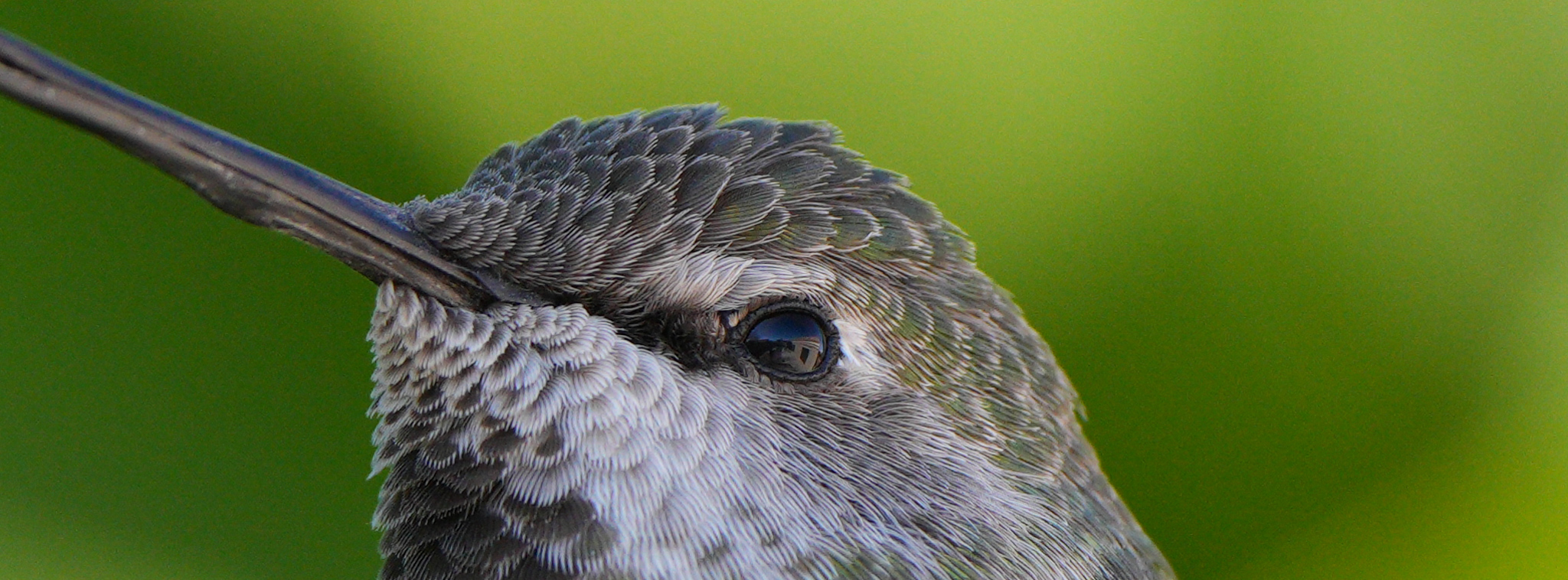
Original
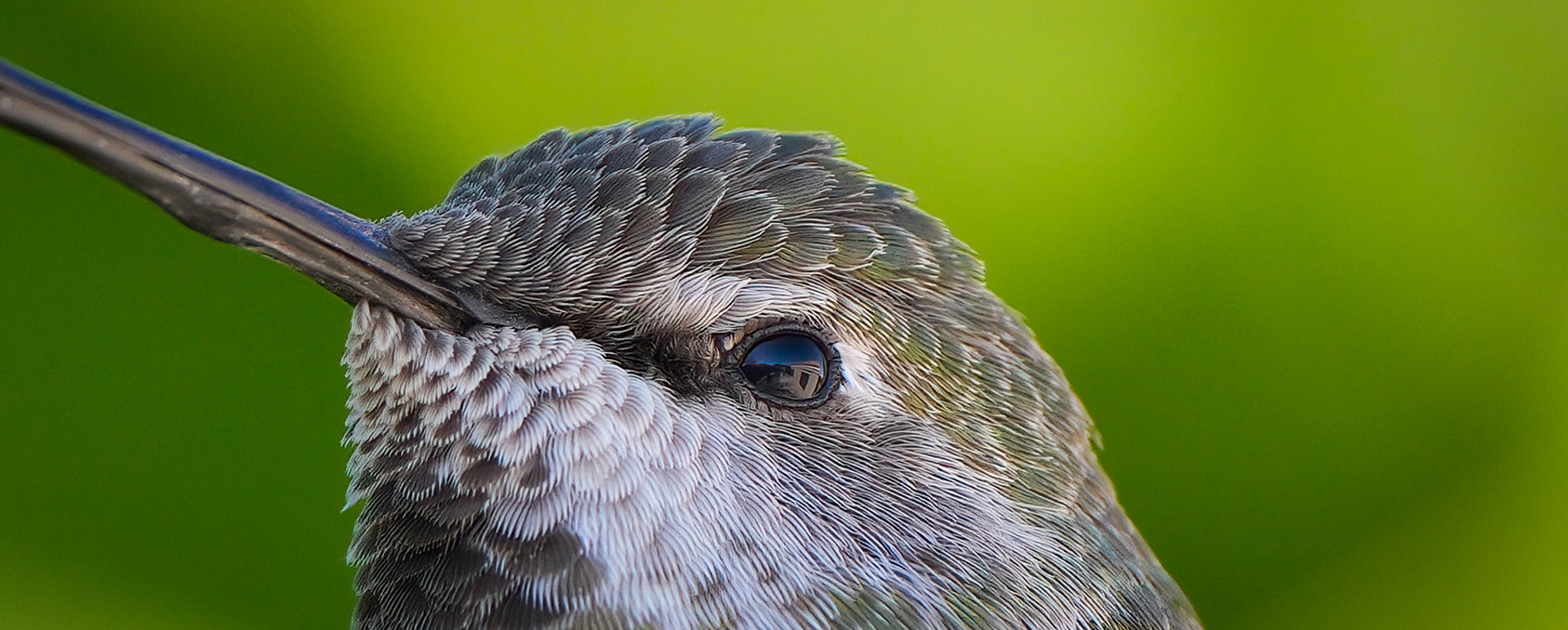
Topaz
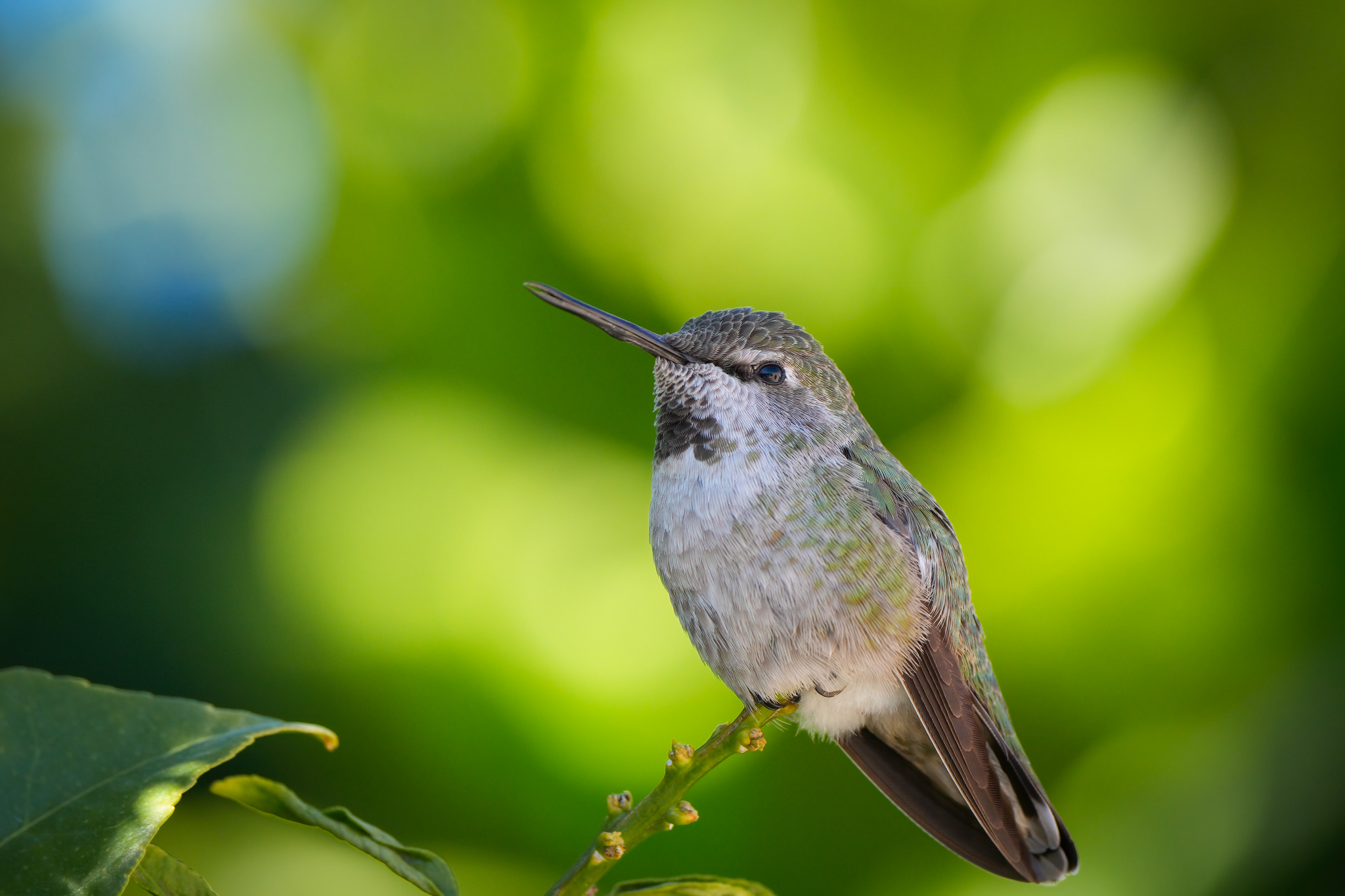
Edited on Feb 05, 2023 at 09:33 PM · View previous versions
I used the default settings in Topaz Denoise and chose the best looking image from the four choices (standard, clear, lowlight, severe noise). The one was "clear".
Original
ILCE-7RM5 FE 200-600mm F5.6-6.3 G OSS lens 600mm f/6.3 1/500s 800 ISO 0.0 EV
Topaz
ILCE-7RM5 FE 200-600mm F5.6-6.3 G OSS lens 600mm f/6.3 1/500s 800 ISO 0.0 EV
ILCE-7RM5 FE 200-600mm F5.6-6.3 G OSS lens 600mm f/6.3 1/500s 800 ISO 0.0 EV
Edited on Feb 05, 2023 at 09:33 PM · View previous versions
Feb 05, 2023 at 04:25 PM
p.4 #18*Edited* Denoise software is amazing. Image.
That's one sweet bird shot. I have found myself checking out the Photo AI more and more as it keeps improving. Now it doesn't tend to oversharpen as it once did. Also I love the way it utterly banishes any grain (I hate grain). When I'm processing a file in DXO Photolab 6 I will first, if it's needed run the best NR to see if it gets completely rid of grain. If it does I move no further. If not I swing it over to Photo AI or Sharpen AI and finish.
Feb 05, 2023 at 04:38 PM
p.4 #19*Edited* Denoise software is amazing. Image.
dcisive wrote:
That's one sweet bird shot. I have found myself checking out the Photo AI more and more as it keeps improving. Now it doesn't tend to oversharpen as it once did. Also I love the way it utterly banishes any grain (I hate grain). When I'm processing a file in DXO Photolab 6 I will first, if it's needed run the best NR to see if it gets completely rid of grain. If it does I move no further. If not I swing it over to Photo AI or Sharpen AI and finish.
Thanks!
I'm still debating on whether to download Dxo Photolab 6. On the A7r5, the jpgs I'm getting are pretty good. I have enough hard drive space to shoot everything in raw, but sometimes a nice, small, high quality jpeg is all I need. I think Photolab 6 allows processing of jpegs, right? But maybe not the DeepPrime XD noise processing on jpegs?
Feb 05, 2023 at 04:45 PM
p.4 #20*Edited* Denoise software is amazing. Image.
Right DeepPrime is only available on RAW images. But I get around that using Topaz PhotoAI typically or DeNoise AI and if the noise isn't bad Sharpen AI. Something you mentioned also has me shaking my head. Right out of the camera the Jpegs I'm getting are frighteningly close to the RAW results. Unless I have a challenging sky or something extreme I'm dealing with indeed the Jpeg images provide the quality that is ALL one would need. The detail, lack of noise and color rendition is simply astounding. How Sony pulled this off is beyond me. Just as advertised I'm finding the AWB is DEAD ON which is truly a first for all the brands and bodies I've owned. And that is saying a LOT. This is the first camera I can honestly say if someone tied my hands behind my back and forced me to shoot ONLY in Jpeg I wouldn't lose sleep.
Feb 05, 2023 at 05:09 PM