This topic is in the 2023 archive. You can read it and like its posts here. It is read only.
Archive 2023*Edited* Denoise software is amazing. Image.
p.2 #1*Edited* Denoise software is amazing. Image.
Here's the 2nd of a small number of images I shot in a fairly dim interior of a very cool looking side room in a Vancouver hotel restaurant. The first is in the earlier thread on the PZ 16-35. The chess motif is strictly decor, the room is used for high tea service.
ISO 1600, 18.5mm focal length, A7RIV, PZ 16-35/4.
The perspective distortion on the closest chess pieces is normal with a wide lens and foreground objects close to the lens.
I opened the RAW file in Adobe Camera RAW, made some minor tone and geometric adjustments, then opened in PS CC. Topaz Denoise AI run on a separate layer, Standard mode, adjustments to taste, including setting NR and Artifacts both to 0. Output sharpening in Sharpen AI (best to look at the posted image in Flickr).
Brian
 Chess Room 2 by Brian Gammon, on Flickr
ISO 1600, 18.5mm focal length, A7RIV, PZ 16-35/4.
The perspective distortion on the closest chess pieces is normal with a wide lens and foreground objects close to the lens.
I opened the RAW file in Adobe Camera RAW, made some minor tone and geometric adjustments, then opened in PS CC. Topaz Denoise AI run on a separate layer, Standard mode, adjustments to taste, including setting NR and Artifacts both to 0. Output sharpening in Sharpen AI (best to look at the posted image in Flickr).
Brian
Chess Room 2 by Brian Gammon, on FlickrJan 30, 2023 at 01:31 PM
p.2 #2*Edited* Denoise software is amazing. Image.
Ripolini wrote:
mudlake wrote
I'm frankly astounded at how good it is, especially with raw files.I use the following raw converters :
C1 Pro 22, Nikon Capture NX-D and ACR in Photoshop CS6.
Does Topaz Denoise AI work with ACR in CS6?
Thanx.
Cheers,
Riccardo
I’m don’t use ACR so I can’t answer your question. 🙂. Maybe some else knows?
Jan 30, 2023 at 01:56 PM
p.2 #3*Edited* Denoise software is amazing. Image.
I used Topaz DeNoise for about 3 - 4 years, but stopped using the program lately.
The reason this happened was two-fold.
On the one hand, the denoising capability of DxO Photolab improved in recent years to the point when (now) I don't feel a real need for Topaz.
On the other hand, my lens kit changed: the 100-400 GM is gone; it was replaced by the 70-200 GM II and 200-600 G. I also often use the Tamron 35-150. These later three lenses give better image quality (more sharp) than was my copy of the 100-400. When processing images obtained with the 100-400, I liked the added sharpening in Topaz DeNoise.
With the newer lenses in my kit, I find the default output from Topaz over-sharpened.
Thus, my main concern about Topaz is about the sharpening that is added with the denoising.
This may or may not be beneficial. My preference is to have the two corrections "decoupled" and applied independently.
I think that Topaz tries to make users happy by the added sharpening: look, the noise is gone and the fine detail looks better resolved! In some usage this is not a problem. In other, this may become a problem.
I have been using DxO Photolab for years. When using PL, the nice part is that the default lens corrections can be applied and typically do not require changes (e.g. the sharpening, vignetting, chromatic aberrations). Plus, the denoising (DeepPRIME) also works well "behind the curtains" and does not require adjustments. This saves time. Only the most recent addition DeepPRIME XD (XD stands for extra detail) needs attention because it makes the detail sharper, like Topaz. And, this (on top of the default sharpening) can be a problem. There is a slider, however, that can be used to reduce the amount of this sharpening.
I don't mean to say that one program is better than the other.
My point is all about the sharpening that happens there, that can improve the apparent IQ in some cases, yet damage IQ (by over-sharpening) in others.
With some naturally sharp modern lenses the added sharpening of Topaz can be unwanted.
Jan 30, 2023 at 02:23 PM
p.2 #4*Edited* Denoise software is amazing. Image.
mudlake wrote:
Ripolini wrote
mudlake wrote
I'm frankly astounded at how good it is, especially with raw files.I use the following raw converters :
C1 Pro 22, Nikon Capture NX-D and ACR in Photoshop CS6.
Does Topaz Denoise AI work with ACR in CS6?
Thanx.
Cheers,
Riccardo
Denoise AI doesn't work with ACR per se. My habit has been to do only very basic adjustments in ACR, and then bring the file into PSCC. I then copy it to a new layer, and call Denoise AI from the Filters tab.
Current generations of Lightroom can send the original RAW file directly to Denoise AI, where it can be processed, and then round-tripped back to LR for further editing.
Alternatively you can open Denoise as a stand-alone app, and navigate to the file location and open it that way. This is what Topaz encourages with a RAW file.
Possibly with an older version of PS, this may be either the best or perhaps the only option.
Brian
Jan 30, 2023 at 02:32 PM
p.2 #5*Edited* Denoise software is amazing. Image.
How this would perform on our favorite type of images - high resolution images of tree branches and foliage with high level of details in it?
Jan 30, 2023 at 02:45 PM
p.2 #6*Edited* Denoise software is amazing. Image.
Ripolini wrote:
Nice results. Thanx for sharing.
I use the following raw converters :
C1 Pro 22, Nikon Capture NX-D and ACR in Photoshop CS6.
Does Topaz Denoise AI work with ACR in CS6?
Thanx.
Cheers,
Riccardo
You can use Topaz Denoise AI as a plugin in for PS Cs6, but not from ACR, as another option, you can first process raw file in the standalone Topaz Denoise AI on your desktop, and then send it to ACR to do your basic editing, and then finish up in PS. This way you are denoising the raw file first .
mudlake wrote
I'm frankly astounded at how good it is, especially with raw files.I use the following raw converters :
C1 Pro 22, Nikon Capture NX-D and ACR in Photoshop CS6.
Does Topaz Denoise AI work with ACR in CS6?
Thanx.
Cheers,
Riccardo
You can use Topaz Denoise AI as a plugin in for PS Cs6, but not from ACR, as another option, you can first process raw file in the standalone Topaz Denoise AI on your desktop, and then send it to ACR to do your basic editing, and then finish up in PS. This way you are denoising the raw file first .
Jan 30, 2023 at 02:57 PM
p.2 #7*Edited* Denoise software is amazing. Image.
wordfool wrote:
My only gripe against using the RAW workflow model with Lightroom is that you end up with two RAW files (original ARW and de-noised DNG), and syncing LR edits/masks between them does not always work as expected (as highlighted in the Topaz video's example). So the best solution is to only edit the DNG file in LR.
I much prefer just working with one RAW file, making edits in LR/PS, then sending to Denoise for a final output. I guess ultimately it's not a huge difference, just more of a preference based on my long-standing editing workflow.
You will always get back a tiff file, or file of choice when you send it to PS from LR,.so you will always have the original and the image you worked on in PS coming back as your file of choice.
I always delete my denoised file when finished, I keep the tiff file I get back from PS which has been denoised and worked on in PS .
So ultimately you are stuck with two files. No matter how you look at it.
IndyFab wrote
Topaz says >>>>You will get the best image quality if you import your RAW files directly into DeNoise AI or Photo AI".I much prefer just working with one RAW file, making edits in LR/PS, then sending to Denoise for a final output. I guess ultimately it's not a huge difference, just more of a preference based on my long-standing editing workflow.
You will always get back a tiff file, or file of choice when you send it to PS from LR,.so you will always have the original and the image you worked on in PS coming back as your file of choice.
I always delete my denoised file when finished, I keep the tiff file I get back from PS which has been denoised and worked on in PS .
So ultimately you are stuck with two files. No matter how you look at it.
Jan 30, 2023 at 03:07 PM
p.2 #8*Edited* Denoise software is amazing. Image.
At noise reduction? LR is terrible, it just blurs everything.
NJPhotographer wrote:
Lightroom already does a good job. I'm hesitant to add anything beyond that, especially when editing a lot of photos.
NJPhotographer wrote:
Lightroom already does a good job. I'm hesitant to add anything beyond that, especially when editing a lot of photos.
Jan 30, 2023 at 05:55 PM
p.2 #9*Edited* Denoise software is amazing. Image.
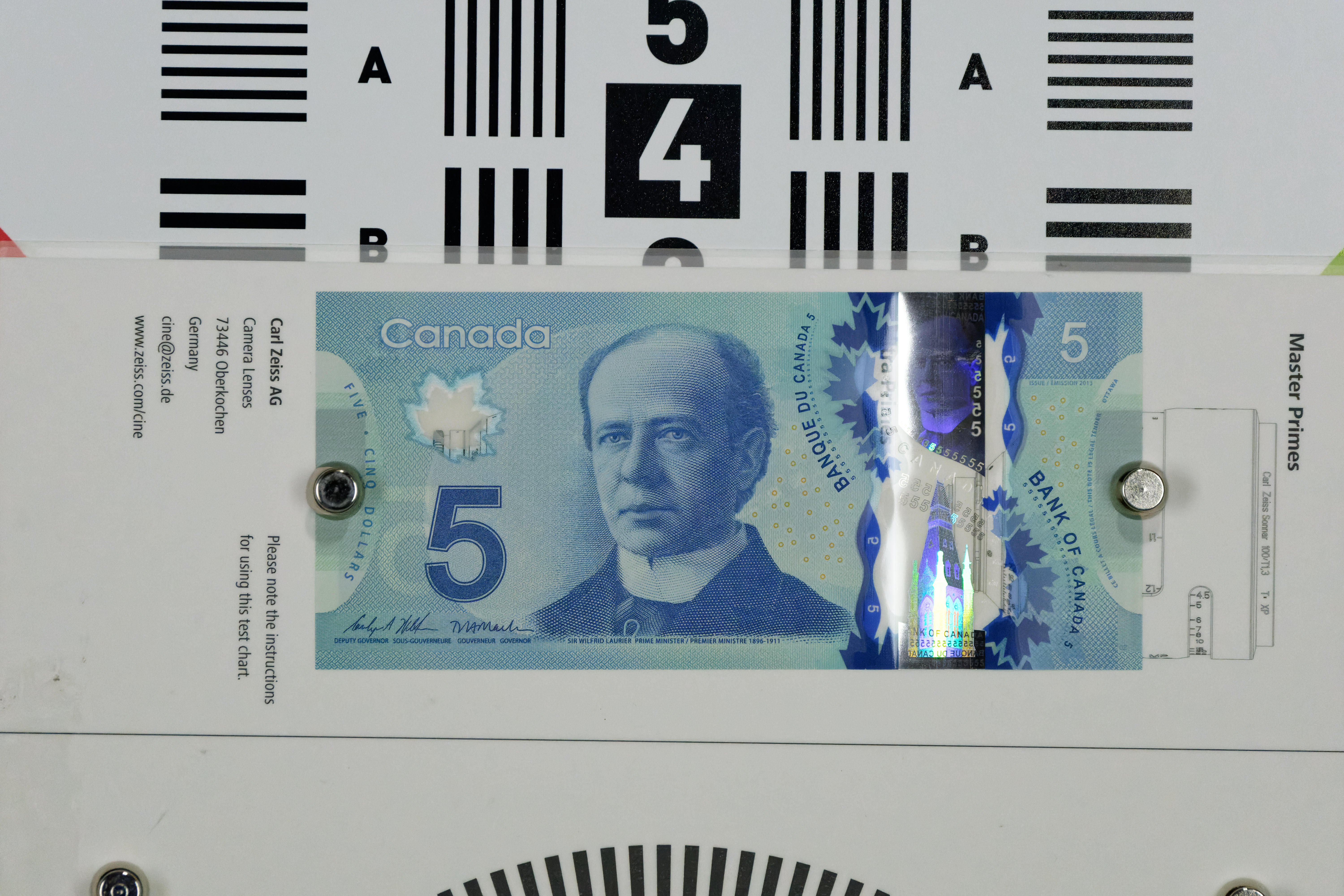
Just for fun, I looked at this $5 Canadian bill (the size of an average small bird), at 600 mm f/6.3, using ISO 100, 6400, and 12800, then processed in DxO Photolab first without denoising, then with DeepPRIME, and DeepPRIME XD denoising.
The first image is uncropped 50MP, then there are the three series of crops, all labelled.
There is some loss of detail in low-contrast areas at high ISO, but overall the denoising worked well.
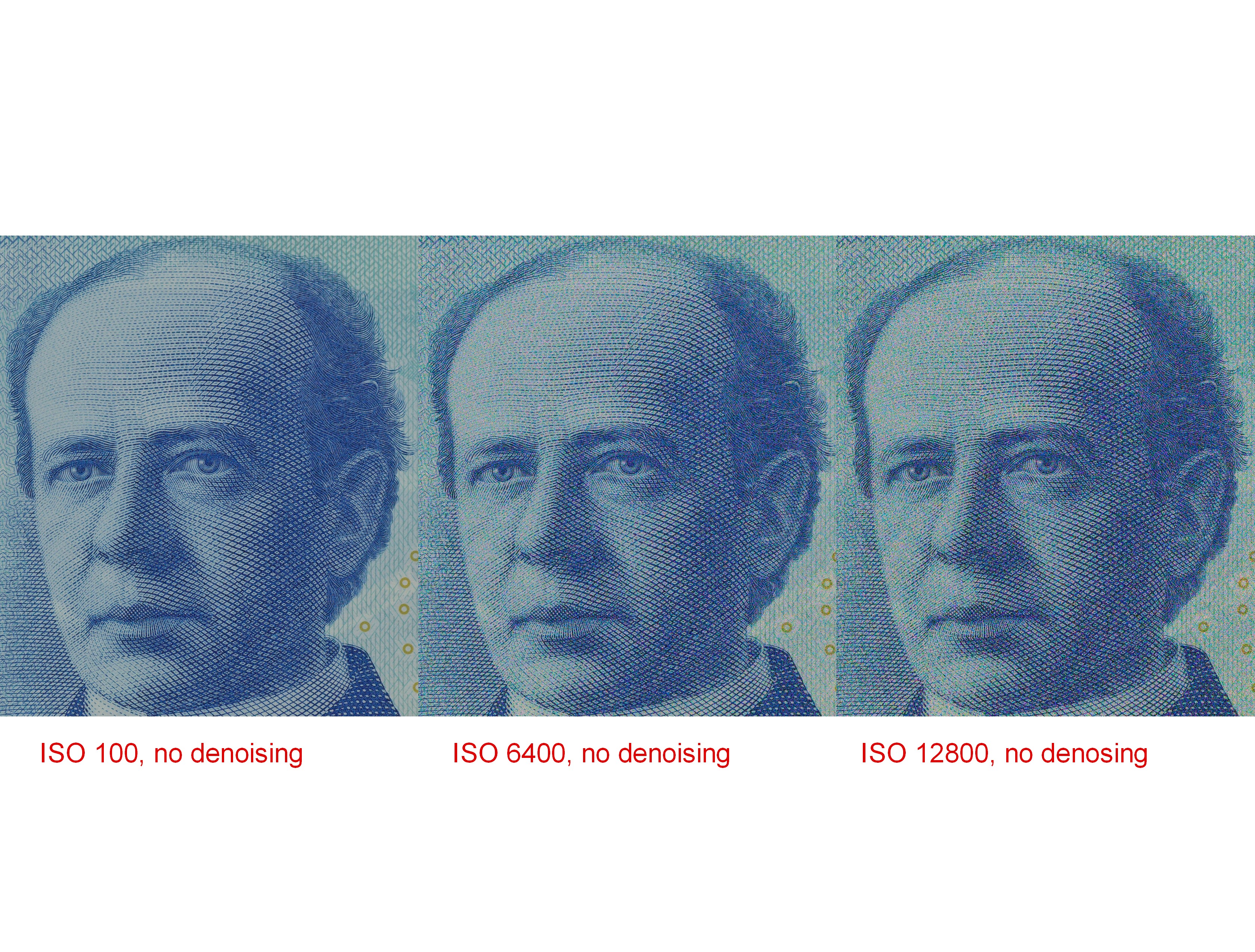
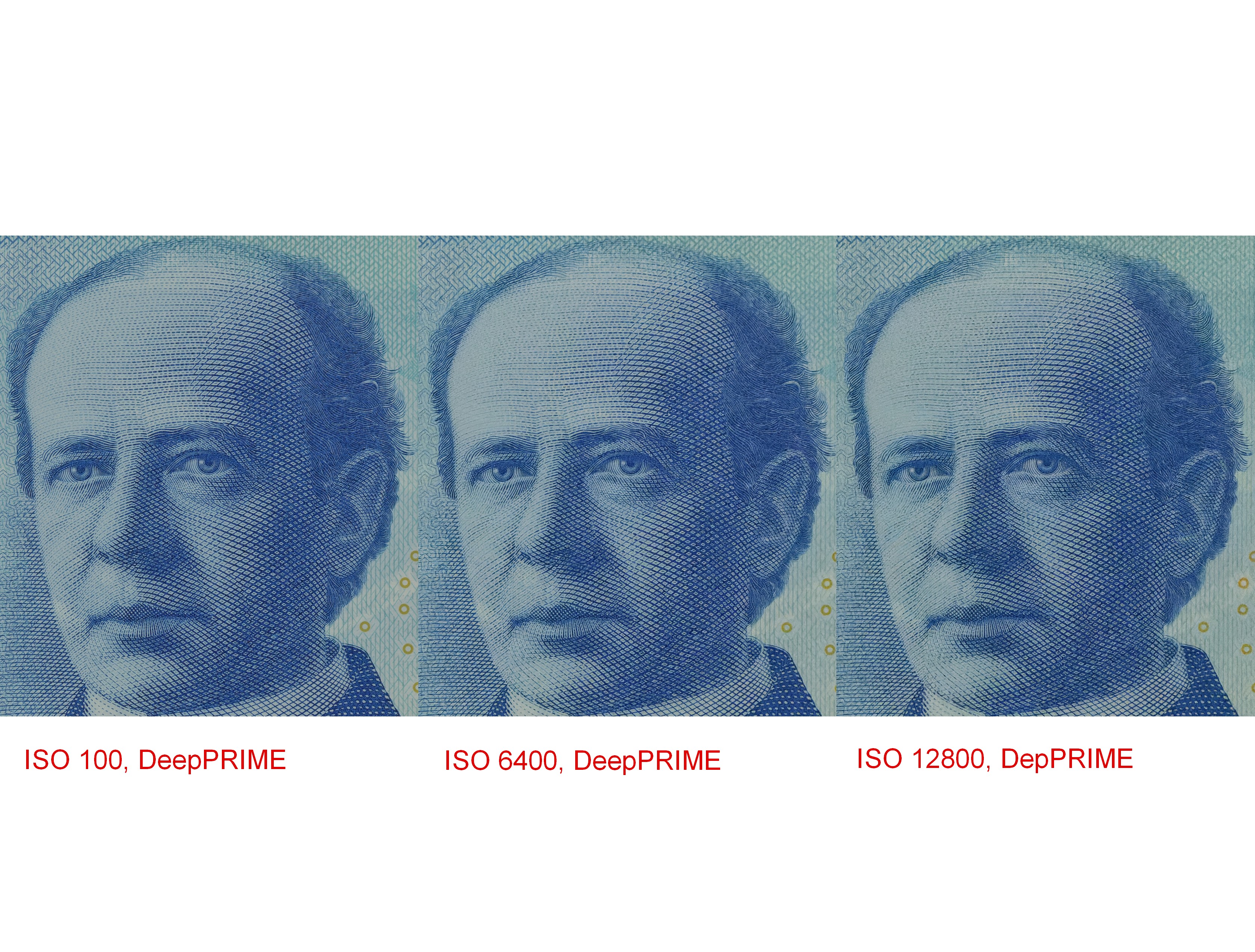
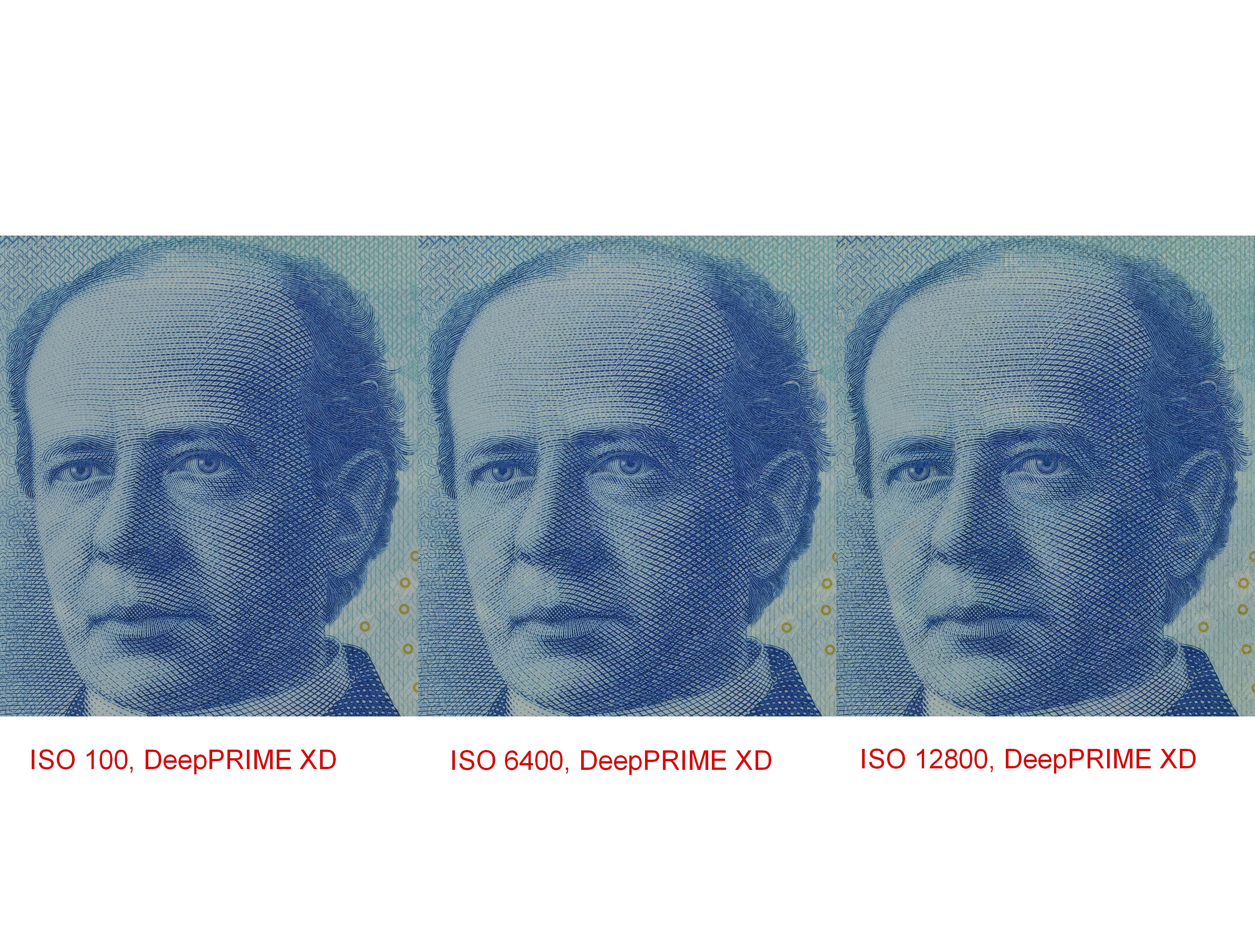
The first image is uncropped 50MP, then there are the three series of crops, all labelled.
There is some loss of detail in low-contrast areas at high ISO, but overall the denoising worked well.
 |
||
 |
||
|
ILCE-1 FE 200-600mm F5.6-6.3 G OSS lens 65535 lens 600mm f/6.3 1/1250s 12800 ISO 0.0 EV
Jan 30, 2023 at 08:48 PM
p.2 #10*Edited* Denoise software is amazing. Image.
I shoot mostly human subjects and find both Topaz and DeepPrime to almost always produce cartoon faces (even more so with face recovery in Topaz). The brain is really well programmed to pick out odd looking faces (evolutionary survival I guess!).
Jan 31, 2023 at 01:30 AM
p.2 #11*Edited* Denoise software is amazing. Image.
IndyFab wrote:
You can use Topaz Denoise AI as a plugin in for PS Cs6, but not from ACR, as another option, you can first process raw file in the standalone Topaz Denoise AI on your desktop, and then send it to ACR to do your basic editing, and then finish up in PS. This way you are denoising the raw file first .
Thank you so much.
Jan 31, 2023 at 02:04 AM
p.2 #12*Edited* Denoise software is amazing. Image.
ruthenium wrote:
I used Topaz DeNoise for about 3 - 4 years, but stopped using the program lately.
The reason this happened was two-fold.
On the one hand, the denoising capability of DxO Photolab improved in recent years to the point when (now) I don't feel a real need for Topaz.
On the other hand, my lens kit changed: the 100-400 GM is gone; it was replaced by the 70-200 GM II and 200-600 G. I also often use the Tamron 35-150. These later three lenses give better image quality (more sharp) than was my copy of the 100-400. When processing images obtained with...Show more →
I experienced the same thing. For many of my lenses, a small amount of sharpening is needed for optimum IQ (in addition to the default "40" applied by ACR/LR). That all changed with the release of many of these new lenses - i.e., the GM 35, GM 50mm, 70-200mm f2.8 II, GM 24-70mm f2.8 II, GM 135mm, etc. These lenses are so darned sharp, adding any additional sharpening (beyond the default ACR settings) creates 'over-sharpening' by my taste. Even the 35-150mm can easily be over-sharpened. I now only use Topaz AI Sharpening for lenses like the 100-400mm, 200-600mm and 28-200mm, now. Even then, I typically 'dial-back' the settings.
Jan 31, 2023 at 06:54 AM
p.2 #13*Edited* Denoise software is amazing. Image.
I been using mostly PureRaw and/or PhotoAi to process my raw files. I prefer photoAi over denoise ai due to the way it handles sony raw files-- it seems to keep the sony camera color profile in the metadata when round-tripping back the DNG file back to ACR or lightroom.
Jan 31, 2023 at 09:29 AM
p.2 #14*Edited* Denoise software is amazing. Image.
This is a comparison of denoising in DxO PL6 and Topaz DeNoise.
Unfortunately, the color profiles are different in the two programs. Furthermore, the output from Topaz becomes darker for some reason. On top of this, the default corrections in DxO PL6 can only be applied on raw files. These cannot be applied on a tif output from Topaz. Thus, an exact direct comparison is challenging, and some differences can be attributed to the differences in postprocessing.
Nevertheless, it seems that Topaz manages to retain more information in the lighter (low-contrast?) areas of the image. It is possible that Topaz denoising is not as aggressive as DxO PL. In some areas, it looks like there might be some residual noise left by Topaz.
It is always difficult to know how visible in real life images should be the small differences discernable when pixel-peeping.
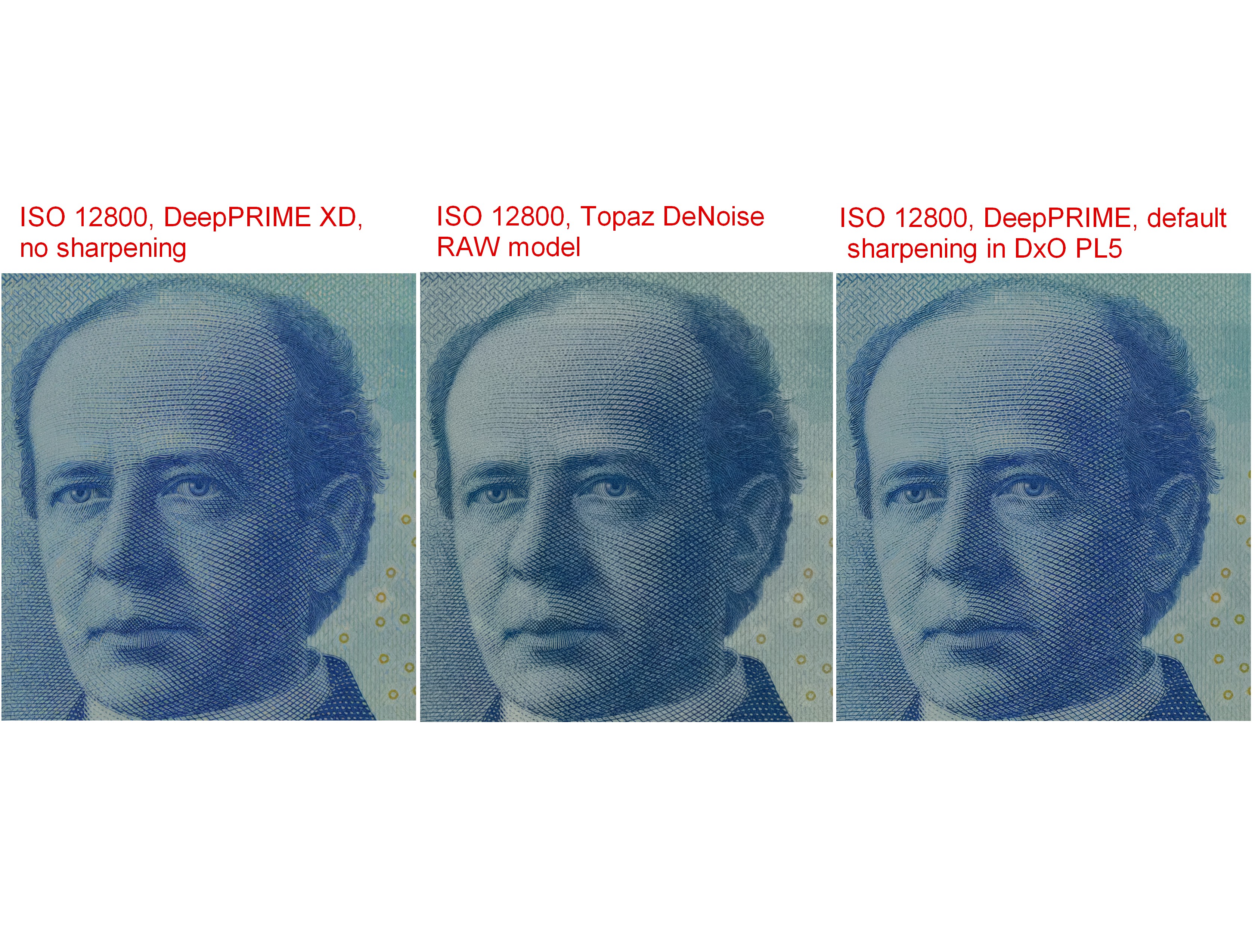
Unfortunately, the color profiles are different in the two programs. Furthermore, the output from Topaz becomes darker for some reason. On top of this, the default corrections in DxO PL6 can only be applied on raw files. These cannot be applied on a tif output from Topaz. Thus, an exact direct comparison is challenging, and some differences can be attributed to the differences in postprocessing.
Nevertheless, it seems that Topaz manages to retain more information in the lighter (low-contrast?) areas of the image. It is possible that Topaz denoising is not as aggressive as DxO PL. In some areas, it looks like there might be some residual noise left by Topaz.
It is always difficult to know how visible in real life images should be the small differences discernable when pixel-peeping.
Jan 31, 2023 at 10:41 AM
p.2 #15*Edited* Denoise software is amazing. Image.
newdom wrote:
I shoot mostly human subjects and find both Topaz and DeepPrime to almost always produce cartoon faces (even more so with face recovery in Topaz). The brain is really well programmed to pick out odd looking faces (evolutionary survival I guess!).
I also experienced this problem at ISO at and above 3200.
When there is a face, my own preference is to have ISO at 1600 at maximum, in low light (on A1).
The problem with noise is not so much the ugly look, but the loss of image information. In a noisy picture, too many pixels are "lost" to noise.
The practical question is whether one can spot the loss of image information?
When looking at a bird or an insect, we often cannot tell what the subject might have looked like in good light and at a close distance. The missing details may not necessarily register in our mind when there is no good quality reference image. Thus, a denoised image of a bird at 12800 may look near perfect. This does not mean it is the same as an equivalent low-ISO image - there is always loss of information at high ISO, an inevitable image degradation.
This situation is different with human faces. It seems that our mind is way more sensitive to the loss of some image information (at high ISO) when looking at a human face. I guess we know how human faces should look much better than we know how birds or insects should look in a picture.
Jan 31, 2023 at 11:04 AM
p.2 #16*Edited* Denoise software is amazing. Image.
The noise/sharpening software is amazing.
I have Pureraw II and both Topaz DeNoise and Sharpen. (AI)
I mostly use DeNoise just for ease of use through Photoshop.
If I don't like the results with that, I try one of the other ones.
I believe I took this shot with a 400 f2.8 with the 2x tc.
I don't think I have the best 2x tc, but with the use of software, it can work.
Noise reduction software isn't just for noise.
Edited on Jan 31, 2023 at 03:19 PM · View previous versions
I have Pureraw II and both Topaz DeNoise and Sharpen. (AI)
I mostly use DeNoise just for ease of use through Photoshop.
If I don't like the results with that, I try one of the other ones.
I believe I took this shot with a 400 f2.8 with the 2x tc.
I don't think I have the best 2x tc, but with the use of software, it can work.
Noise reduction software isn't just for noise.
|
||
| https://photos.smugmug.com/Sharing/Noise/i-mCx4zrb/0/8302d2dc/X3/Screen%20Shot%202022-08-21%20at%207.25.30%20AM-X3.png | ||
|
Edited on Jan 31, 2023 at 03:19 PM · View previous versions
Jan 31, 2023 at 12:05 PM
p.2 #17*Edited* Denoise software is amazing. Image.
Tried them all - wanted to find a quick one-click solution; found tedious workflows, screwed up colors, artifacts, invented details, overprocessing, and lack of control.
KarmaKramer wrote:
At noise reduction? LR is terrible, it just blurs everything.
It does do that, if you just hit the luminance slider hoping to remove all the grain.
Using every slider in the Detail tab is required for good results.
KarmaKramer wrote:
At noise reduction? LR is terrible, it just blurs everything.
It does do that, if you just hit the luminance slider hoping to remove all the grain.
Using every slider in the Detail tab is required for good results.
Jan 31, 2023 at 12:56 PM
p.2 #18*Edited* Denoise software is amazing. Image.
It is worth mentioning that the best quality denoising in Topaz is achieved from raw, using the RAW model.
In the following example, the central image was produced by feeding to Topaz a fully corrected (except no denoising) image from DxO Photolab as TIFF, then denoising in Topaz using the default Low Light.
The image on the right for comparison is from DxO PL6, and the image on the left is from Topaz RAW model.
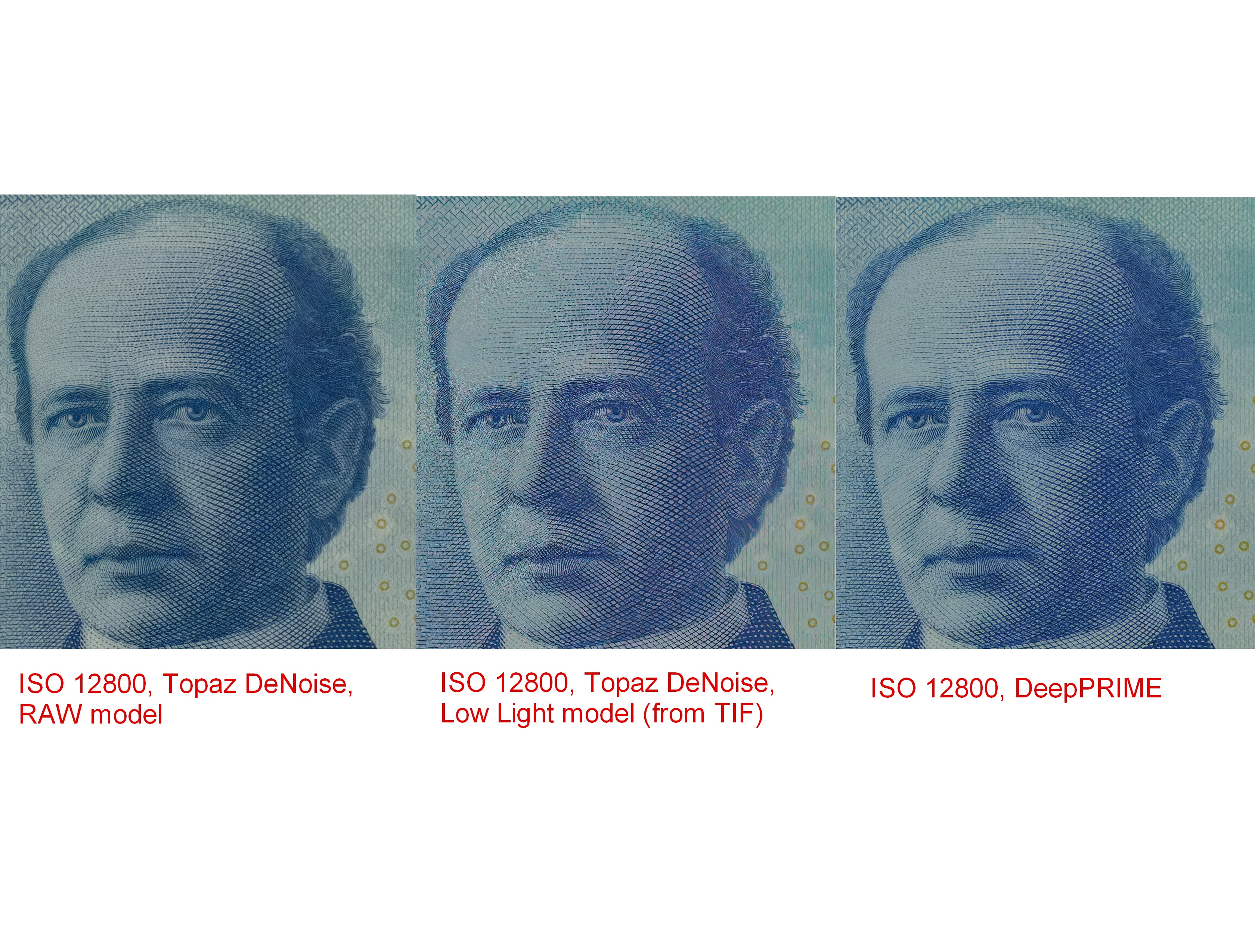
In the following example, the central image was produced by feeding to Topaz a fully corrected (except no denoising) image from DxO Photolab as TIFF, then denoising in Topaz using the default Low Light.
The image on the right for comparison is from DxO PL6, and the image on the left is from Topaz RAW model.
Jan 31, 2023 at 02:11 PM
p.2 #19*Edited* Denoise software is amazing. Image.
That's a great demonstration!
My issue with LR workflow with both Topaz RAW and DxO DP was that, as you mentioned, both affect colors. So, for regular stuff that does not need extreme denoising, I go with "normal" Topaz mostly...
My issue with LR workflow with both Topaz RAW and DxO DP was that, as you mentioned, both affect colors. So, for regular stuff that does not need extreme denoising, I go with "normal" Topaz mostly...
Jan 31, 2023 at 02:25 PM
p.2 #20*Edited* Denoise software is amazing. Image.
ruthenium wrote:
It is worth mentioning that the best quality denoising in Topaz is achieved from raw, using the RAW model.
In the following example, the central image was produced by feeding to Topaz a fully corrected (except no denoising) image from DxO Photolab as TIFF, then denoising in Topaz using the default Low Light.
The image on the right for comparison is from DxO PL6, and the image on the left is from Topaz RAW model.
Can you post the original??
Jan 31, 2023 at 03:32 PM