This topic is in the 2021 archive. You can read it and like its posts here. It is read only.
Archive 2021CaptureOne broken for A1.
p.5 #1CaptureOne broken for A1.
Oops, something went wrong with my answer to K-H
The significant question to me is whether the above reported observations of the black dots/stripes reveal something that is (like it or not) a property of the A1 sensor. To this effect, more than two cameras must be tested, and hopefully other A1 users on this forum would be able to look at the RAW files of their pictures of flowers in RawDigger (which is really easy), or take a picture or two following the approach explained earlier in this thread.
Furthermore, two other questions remain. One is whether the "black dots" is a defect? This must be answered by someone who is an expert in sensors and in raw data conversion. From my very simplistic point of view this seems to be perfectly legitimate when an image in parts of certain colors has little-to-none contribution of blue, as no blue in the red-orange-yellow-green. As was pointed earlier, these colors have no blue component in the sRGB color space. Thus, to me the observations are not unwarranted. It should be mentioned that in addition to the "black dots" (intensity zero) there are additional many points in the images where the blue is low (e.g. 2 - 6 - 10 values), that is nearly black, although not exactly.
The last question is actually the question that started this thread, which is whether Capture One treats the A1 RAW files incorrectly. Considering the above, I would say "yes" simply because the points of blue naturally have low (and in some parts possibly zero) intensity in the red--orange-yellow-green areas. As a user, I expect a RAW convertor to deal with this without producing artifacts (black dots in a yellow picture is an artefact, from a user's perspective).
Aug 06, 2021 at 06:08 AM
p.5 #2CaptureOne broken for A1.
j4nu wrote:
And for those who want to try to reproduce the issue, here are the kind of photos that in my experience show the issue most, if not all, of the time:
* bright, rather heavily sun-lit, orange/yellow-ish (Blue channel low, other channels high) flower petals (esp. contrasty edges, so need to be sharp - properly focused)
* ISO100, "normal-ish" focal length preferrably (I used mostly 35-50mm), uncompressed / lossless (in order to eliminate possibility of compression artifacts), all in-cam corrections off (again to minimize the variables)
* view at 100% at least.
Examples (these are embedded jpegs so no black pixels visible, but in...Show more →
Perhaps unlikely, nevertheless, would you please confirm that there was no filter on the lens used to obtain the images of the flowers?
Aug 06, 2021 at 07:33 AM
p.5 #3CaptureOne broken for A1.
Faraday wrote:
Haha, thanks! I guess I'm actually more of a "techie", as I was called out here once, than a photographer so I'm unhealthily intrigued by things like this.
Believe me or not, all I wanted to do is process some raw files and I was just unlucky for CO to be my RAW processor of choice...
from raw files originating in 2 different A1 cameras.
So unless both these apps are faulty and create these black dots out of thin air
then logic would imply their data must be already in the A1 raw files, no?
If so then Sony needs to get on top of this issue, no?
If the 2 apps are at fault then one would want to know
how do they differ from apps that don’t reveal the problem.
You reported before that ON1 Photo RAW 2021 and
Sony’s own Imaging Edge don’t show the black dots.
So indeed, thanks again for starting this discussion, K-H.Well, this is where it gets slippery... Both RawDigger (which is supposed to show data as close to RAW as possible) and CaptureOne are 3rd party software. So, unless somebody here has some priority relation with Sony tech support, the most likely answer from Sony will be that this is an issue with these programs (as Sony own software and embedded jpegs do not display the issue).It seems worth contacting SPS at least? Doesn't hurt to ask. Also, there is a professional partnership between C1 and Sony and that Sony-specific offering, so it's fair to expect C1 to work perfectly with a1 files.
Thank you for this excellent point, quote:
“Also, there is a professional partnership between C1 and Sony and that Sony-specific offering, so it's fair to expect C1 to work perfectly with a1 files.“
Therefore I would expect Capture One and Imaging Edge to produce
similar results, essentially free of artifacts such as black dots.
However, Capture One doesn’t seem to do this in its current version.
K-H.
Edited on Aug 06, 2021 at 07:57 AM · View previous versions
j4nu wrote
k-h.a.w wrote
Well j4nu, thanks for paying tremendous attention to detail and starting this thread.Believe me or not, all I wanted to do is process some raw files and I was just unlucky for CO to be my RAW processor of choice...
k-h.a.w wrote
It seems both Capture one and RawDigger show these black dotsfrom raw files originating in 2 different A1 cameras.
So unless both these apps are faulty and create these black dots out of thin air
then logic would imply their data must be already in the A1 raw files, no?
If so then Sony needs to get on top of this issue, no?
If the 2 apps are at fault then one would want to know
how do they differ from apps that don’t reveal the problem.
You reported before that ON1 Photo RAW 2021 and
Sony’s own Imaging Edge don’t show the black dots.
So indeed, thanks again for starting this discussion, K-H.
Thank you for this excellent point, quote:
“Also, there is a professional partnership between C1 and Sony and that Sony-specific offering, so it's fair to expect C1 to work perfectly with a1 files.“
Therefore I would expect Capture One and Imaging Edge to produce
similar results, essentially free of artifacts such as black dots.
However, Capture One doesn’t seem to do this in its current version.
K-H.
Edited on Aug 06, 2021 at 07:57 AM · View previous versions
Aug 06, 2021 at 07:37 AM
p.5 #4CaptureOne broken for A1.
ruthenium wrote:
* bright, rather heavily sun-lit, orange/yellow-ish (Blue channel low, other channels high) flower petals (esp. contrasty edges, so need to be sharp - properly focused)
* ISO100, "normal-ish" focal length preferrably (I used mostly 35-50mm), uncompressed / lossless (in order to eliminate possibility of compression artifacts), all in-cam corrections off (again to minimize the variables)
* view at 100% at least.
Examples (these are embedded jpegs so no black pixels visible, but in RAW they are there):
https://photos.smugmug.com/photos/i-7XNrLbD/0/8c0ba326/XL/i-7XNrLbD-XL.jpg
https://photos.smugmug.com/photos/i-95NNhk6/0/3a66ed43/XL/i-95NNhk6-XL.jpg
https://photos.smugmug.com/photos/i-DcRfLxQ/0/e7bde3ba/XL/i-DcRfLxQ-XL.jpg
https://photos.smugmug.com/photos/i-s3wmdVz/0/1d5f1dd3/XL/i-s3wmdVz-XL.jpg
https://photos.smugmug.com/photos/i-6vrpVz6/0/e0e4c225/XL/i-6vrpVz6-XL.jpg
And a counter example that does not show the black pixel artifacts:
https://photos.smugmug.com/photos/i-8SS94dB/0/f233368c/XL/i-8SS94dB-XL.jpg
All of those are available as RAWs on my gdrive I shared previously:
https://drive.google.com/drive/folders/1MrvSGlwLjwc1ZA9oRsCsMfHDYmecfDOKPerhaps unlikely, nevertheless, would you please confirm that there was no filter on the lens used to obtain the images of the flowers?
That's a very good question, I always forget about UV filters I have mostly on. However, in this case the answer is two-fold:
* Sigma 24-70 DN shot was without any filter (DSC00221)
* 35GM shots had a B+W XS-PRO UV filter on (all the other flower shots).
j4nu wrote
And for those who want to try to reproduce the issue, here are the kind of photos that in my experience show the issue most, if not all, of the time:* bright, rather heavily sun-lit, orange/yellow-ish (Blue channel low, other channels high) flower petals (esp. contrasty edges, so need to be sharp - properly focused)
* ISO100, "normal-ish" focal length preferrably (I used mostly 35-50mm), uncompressed / lossless (in order to eliminate possibility of compression artifacts), all in-cam corrections off (again to minimize the variables)
* view at 100% at least.
Examples (these are embedded jpegs so no black pixels visible, but in RAW they are there):
https://photos.smugmug.com/photos/i-7XNrLbD/0/8c0ba326/XL/i-7XNrLbD-XL.jpg
https://photos.smugmug.com/photos/i-95NNhk6/0/3a66ed43/XL/i-95NNhk6-XL.jpg
https://photos.smugmug.com/photos/i-DcRfLxQ/0/e7bde3ba/XL/i-DcRfLxQ-XL.jpg
https://photos.smugmug.com/photos/i-s3wmdVz/0/1d5f1dd3/XL/i-s3wmdVz-XL.jpg
https://photos.smugmug.com/photos/i-6vrpVz6/0/e0e4c225/XL/i-6vrpVz6-XL.jpg
And a counter example that does not show the black pixel artifacts:
https://photos.smugmug.com/photos/i-8SS94dB/0/f233368c/XL/i-8SS94dB-XL.jpg
All of those are available as RAWs on my gdrive I shared previously:
https://drive.google.com/drive/folders/1MrvSGlwLjwc1ZA9oRsCsMfHDYmecfDOK
That's a very good question, I always forget about UV filters I have mostly on. However, in this case the answer is two-fold:
* Sigma 24-70 DN shot was without any filter (DSC00221)
* 35GM shots had a B+W XS-PRO UV filter on (all the other flower shots).
Aug 06, 2021 at 07:49 AM
p.5 #5CaptureOne broken for A1.
Thank you ruthenium, much appreciated.
ruthenium wrote:
Oops, something went wrong with my answer to K-H
The significant question to me is whether the above reported observations of the black dots/stripes reveal something that is (like it or not) a property of the A1 sensor.
I agree. It may well be a property of the A1.
ruthenium wrote:
To this effect, more than two cameras must be tested, and hopefully other A1 users on this forum would be able to look at the RAW files of their pictures of flowers in RawDigger (which is really easy), or take a picture or two following the approach explained earlier in this thread.
Yes.
ruthenium wrote:
Furthermore, two other questions remain.
One is whether the "black dots" is a defect? This must be answered by someone who is an expert in sensors and in raw data conversion. From my very simplistic point of view this seems to be perfectly legitimate when an image in parts of certain colors has little-to-none contribution of blue, as no blue in the red-orange-yellow-green. As was pointed earlier, these colors have no blue component in the sRGB color space. Thus, to me the observations are not unwarranted. It should be mentioned that in addition to the "black dots" (intensity zero) there...Show more →
I agree. Your arguments certainly convinced me.
A pixel with no or a low blue component seems legitimate.
ruthenium wrote:
The last question is actually the question that started this thread, which is whether Capture One treats the A1 RAW files incorrectly. Considering the above, I would say "yes" simply because the points of blue naturally have low (and in some parts possibly zero) intensity in the red--orange-yellow-green areas. As a user, I expect a RAW convertor to deal with this without producing artifacts (black dots in a yellow picture is an artefact, from a user's perspective).
I agree. Capture One seems at fault here.
Until proven otherwise that would be my working assumption at this stage.
Thanks again for your analysis, K-H.
ruthenium wrote:
Oops, something went wrong with my answer to K-H
The significant question to me is whether the above reported observations of the black dots/stripes reveal something that is (like it or not) a property of the A1 sensor.
I agree. It may well be a property of the A1.
ruthenium wrote:
To this effect, more than two cameras must be tested, and hopefully other A1 users on this forum would be able to look at the RAW files of their pictures of flowers in RawDigger (which is really easy), or take a picture or two following the approach explained earlier in this thread.
Yes.
ruthenium wrote:
Furthermore, two other questions remain.
One is whether the "black dots" is a defect? This must be answered by someone who is an expert in sensors and in raw data conversion. From my very simplistic point of view this seems to be perfectly legitimate when an image in parts of certain colors has little-to-none contribution of blue, as no blue in the red-orange-yellow-green. As was pointed earlier, these colors have no blue component in the sRGB color space. Thus, to me the observations are not unwarranted. It should be mentioned that in addition to the "black dots" (intensity zero) there...Show more →
I agree. Your arguments certainly convinced me.
A pixel with no or a low blue component seems legitimate.
ruthenium wrote:
The last question is actually the question that started this thread, which is whether Capture One treats the A1 RAW files incorrectly. Considering the above, I would say "yes" simply because the points of blue naturally have low (and in some parts possibly zero) intensity in the red--orange-yellow-green areas. As a user, I expect a RAW convertor to deal with this without producing artifacts (black dots in a yellow picture is an artefact, from a user's perspective).
I agree. Capture One seems at fault here.
Until proven otherwise that would be my working assumption at this stage.
Thanks again for your analysis, K-H.
Aug 06, 2021 at 09:38 AM
p.5 #6CaptureOne broken for A1.
j4nu wrote:
* bright, rather heavily sun-lit, orange/yellow-ish (Blue channel low, other channels high) flower petals (esp. contrasty edges, so need to be sharp - properly focused)
* ISO100, "normal-ish" focal length preferrably (I used mostly 35-50mm), uncompressed / lossless (in order to eliminate possibility of compression artifacts), all in-cam corrections off (again to minimize the variables)
* view at 100% at least.
Examples (these are embedded jpegs so no black pixels visible, but in RAW they are there):
https://photos.smugmug.com/photos/i-7XNrLbD/0/8c0ba326/XL/i-7XNrLbD-XL.jpg
https://photos.smugmug.com/photos/i-95NNhk6/0/3a66ed43/XL/i-95NNhk6-XL.jpg
https://photos.smugmug.com/photos/i-DcRfLxQ/0/e7bde3ba/XL/i-DcRfLxQ-XL.jpg
https://photos.smugmug.com/photos/i-s3wmdVz/0/1d5f1dd3/XL/i-s3wmdVz-XL.jpg
https://photos.smugmug.com/photos/i-6vrpVz6/0/e0e4c225/XL/i-6vrpVz6-XL.jpg
And a counter example that does not show the black pixel artifacts:
https://photos.smugmug.com/photos/i-8SS94dB/0/f233368c/XL/i-8SS94dB-XL.jpg
All of those are available as RAWs on my gdrive I shared previously:
https://drive.google.com/drive/folders/1MrvSGlwLjwc1ZA9oRsCsMfHDYmecfDOKPerhaps unlikely, nevertheless, would you please confirm that there was no filter on the lens used to obtain the images of the flowers?That's a very good question, I always forget about UV filters I have mostly on. However, in this case the answer is two-fold:
* Sigma 24-70 DN shot was without any filter (DSC00221)
* 35GM shots had a B+W XS-PRO UV filter on (all the other flower shots).
Similar story here: a Polarpro QuartzLine circular polarizer filter is on the 35mm GM most of the time except when used in low light. I checked whether this makes a difference and it seems it doesn't. The first image in the blue channel is without CPL and the next is with the CPL. This time I used uncompressed RAW.
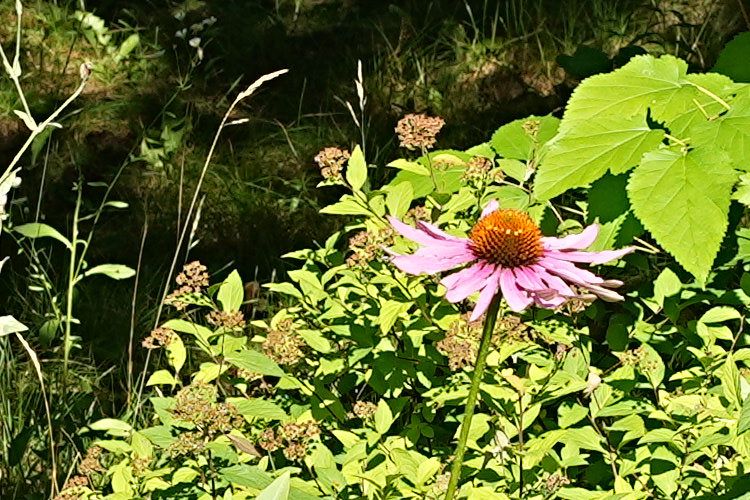
750 x 500 crop (central part of the out-of-camera 50 MP JPG, no CPL)
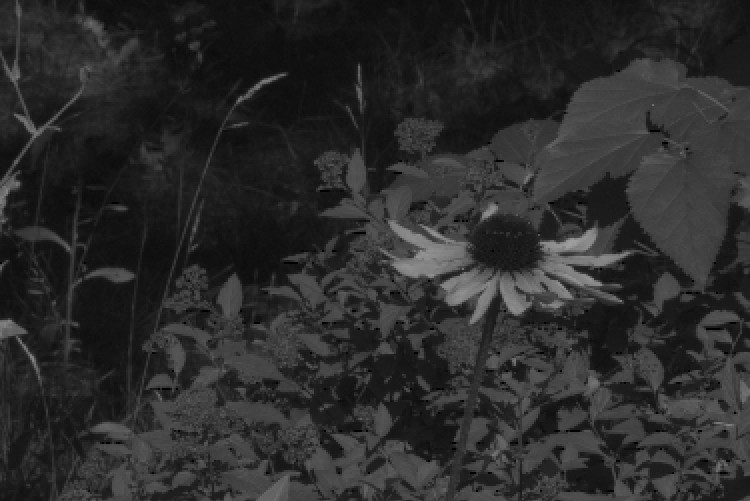
750 x 500 crop, no CPL
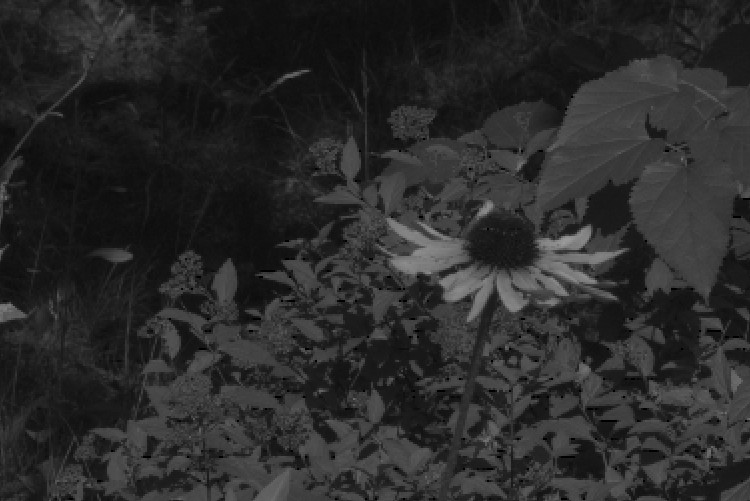
750 x 500 crop, with CPL
ruthenium wrote
j4nu wrote
And for those who want to try to reproduce the issue, here are the kind of photos that in my experience show the issue most, if not all, of the time:* bright, rather heavily sun-lit, orange/yellow-ish (Blue channel low, other channels high) flower petals (esp. contrasty edges, so need to be sharp - properly focused)
* ISO100, "normal-ish" focal length preferrably (I used mostly 35-50mm), uncompressed / lossless (in order to eliminate possibility of compression artifacts), all in-cam corrections off (again to minimize the variables)
* view at 100% at least.
Examples (these are embedded jpegs so no black pixels visible, but in RAW they are there):
https://photos.smugmug.com/photos/i-7XNrLbD/0/8c0ba326/XL/i-7XNrLbD-XL.jpg
https://photos.smugmug.com/photos/i-95NNhk6/0/3a66ed43/XL/i-95NNhk6-XL.jpg
https://photos.smugmug.com/photos/i-DcRfLxQ/0/e7bde3ba/XL/i-DcRfLxQ-XL.jpg
https://photos.smugmug.com/photos/i-s3wmdVz/0/1d5f1dd3/XL/i-s3wmdVz-XL.jpg
https://photos.smugmug.com/photos/i-6vrpVz6/0/e0e4c225/XL/i-6vrpVz6-XL.jpg
And a counter example that does not show the black pixel artifacts:
https://photos.smugmug.com/photos/i-8SS94dB/0/f233368c/XL/i-8SS94dB-XL.jpg
All of those are available as RAWs on my gdrive I shared previously:
https://drive.google.com/drive/folders/1MrvSGlwLjwc1ZA9oRsCsMfHDYmecfDOK
* Sigma 24-70 DN shot was without any filter (DSC00221)
* 35GM shots had a B+W XS-PRO UV filter on (all the other flower shots).
Similar story here: a Polarpro QuartzLine circular polarizer filter is on the 35mm GM most of the time except when used in low light. I checked whether this makes a difference and it seems it doesn't. The first image in the blue channel is without CPL and the next is with the CPL. This time I used uncompressed RAW.
750 x 500 crop (central part of the out-of-camera 50 MP JPG, no CPL)
750 x 500 crop, no CPL
750 x 500 crop, with CPL
Aug 06, 2021 at 06:10 PM
p.5 #7CaptureOne broken for A1.
I only wish we'd get more data samples, but on the other hand I understand this is a rather rare issue (visible at 100% and beyond, limited to CO users in actual images) and nobody wants to find some strange quirks in their brand new shiny 6.5k $ camera  .
We did learn some interesting stuff here through RawDigger though, such as PDAF stripes tech moving from B+G2 (dpr A7III backlight samples) to B channel alone (A1).
I think this is something worth investigating by the likes of Jim Kasson, but I think he has moved away from Sony some time ago already...
.We did learn some interesting stuff here through RawDigger though, such as PDAF stripes tech moving from B+G2 (dpr A7III backlight samples) to B channel alone (A1).
I think this is something worth investigating by the likes of Jim Kasson, but I think he has moved away from Sony some time ago already...
Aug 08, 2021 at 02:04 AM
p.5 #8CaptureOne broken for A1.
I can now confirm this with my camera. The weather improved and I took some flower images. My first sample set had hardly any issue, as wind had reduced the sharpness. It did show some hints though and so I tried again. Second set has the distortions on practically every image. So this is in fact an ubiquitous issue with A1 cameras.
Aug 08, 2021 at 02:12 AM
p.5 #9CaptureOne broken for A1.
ruthenium wrote:
The significant question to me is whether the above reported observations of the black dots/stripes reveal something that is (like it or not) a property of the A1 sensor. To this effect, more than two cameras must be tested, and hopefully other A1 users on this forum would be able to look at the RAW files of their pictures of flowers in RawDigger (which is really easy), or take a picture or two following the approach explained earlier in this thread.
Including my camera there are three A1 checked and all three produce dirty daisies. While it could still be limited to a manufacturing batch, it certainly isn't merely specific copies of the camera.
Furthermore, two other questions remain. One is whether the "black dots" is a defect?
It clearly is a defect in terms of IQ.
... It should be mentioned that in addition to the "black dots" (intensity zero) there are additional many points in the images where the blue is low (e.g. 2 - 6 - 10 values), that is nearly black, although not exactly.
Some of the extra dark blue tints pixels are actually zero. It should be noted that a value of zero does not mean black (aka no light). In the RAWs black is represented with the value 512 (the so called bias). So if you take a picture of the lens cap, all pixels have a tint of around 512, due to noise some have a bit more some less, but on average they are 512. The lowest values I saw in such a completely black image (aka dark frame) was 479. Some of the blue pixels of the dirty daisies go all the way down 0. That's akin to negative light. To see this in RawDigger set the "Black Level" to Manual 0.
The last question is actually the question that started this thread, which is whether Capture One treats the A1 RAW files incorrectly.
The RAW is faulty. C1 could certainly filter negative tints but that would merely reduce the impact, not eliminate it.
What I see as the more relevant question is whether this is something that Sony can improve via firmware.
Aug 08, 2021 at 02:37 AM
p.5 #10CaptureOne broken for A1.
Daran wrote:
Including my camera there are three A1 checked and all three produce dirty daisies. While it could still be limited to a manufacturing batch, it certainly isn't merely specific copies of the camera.
It clearly is a defect in terms of IQ.
Some of the extra dark blue tints pixels are actually zero. It should be noted that a value of zero does not mean black (aka no light). In the RAWs black is represented with the value 512 (the so called bias). So if you take a picture of the lens cap, all pixels have a tint of around 512, due...Show more →
Thanks, much appreciated.
Can you confirm that Sony’s Imaging Edge app doesn’t show those pixels as black? TIA.
K-H.
ruthenium wrote
The significant question to me is whether the above reported observations of the black dots/stripes reveal something that is (like it or not) a property of the A1 sensor. To this effect, more than two cameras must be tested, and hopefully other A1 users on this forum would be able to look at the RAW files of their pictures of flowers in RawDigger (which is really easy), or take a picture or two following the approach explained earlier in this thread.Earlier quote
Furthermore, two other questions remain. One is whether the "black dots" is a defect?Earlier quote
... It should be mentioned that in addition to the "black dots" (intensity zero) there are additional many points in the images where the blue is low (e.g. 2 - 6 - 10 values), that is nearly black, although not exactly.Earlier quote
The last question is actually the question that started this thread, which is whether Capture One treats the A1 RAW files incorrectly.Thanks, much appreciated.
Can you confirm that Sony’s Imaging Edge app doesn’t show those pixels as black? TIA.
K-H.
Aug 08, 2021 at 06:31 AM
p.5 #11CaptureOne broken for A1.
Daran wrote:
Including my camera there are three A1 checked and all three produce dirty daisies. While it could still be limited to a manufacturing batch, it certainly isn't merely specific copies of the camera.
It clearly is a defect in terms of IQ.
Some of the extra dark blue tints pixels are actually zero. It should be noted that a value of zero does not mean black (aka no light). In the RAWs black is represented with the value 512 (the so called bias). So if you take a picture of the lens cap, all pixels have a tint of around 512, due...Show more →
In RawDigger, I looked at the uncompressed RAW file of an image taken with A1+35mmGM with the lens cap on. Most values in the blue channel are at 0, some occasionally are at low values 1 - 2. Thus, it seems that the statement "In the RAWs black is represented with the value 512 (the so called bias)" possibly does not apply to the A1 sensor. Let me know if I misunderstood something.
ruthenium wrote
The significant question to me is whether the above reported observations of the black dots/stripes reveal something that is (like it or not) a property of the A1 sensor. To this effect, more than two cameras must be tested, and hopefully other A1 users on this forum would be able to look at the RAW files of their pictures of flowers in RawDigger (which is really easy), or take a picture or two following the approach explained earlier in this thread.Earlier quote
Furthermore, two other questions remain. One is whether the "black dots" is a defect?Earlier quote
... It should be mentioned that in addition to the "black dots" (intensity zero) there are additional many points in the images where the blue is low (e.g. 2 - 6 - 10 values), that is nearly black, although not exactly.Earlier quote
The last question is actually the question that started this thread, which is whether Capture One treats the A1 RAW files incorrectly.In RawDigger, I looked at the uncompressed RAW file of an image taken with A1+35mmGM with the lens cap on. Most values in the blue channel are at 0, some occasionally are at low values 1 - 2. Thus, it seems that the statement "In the RAWs black is represented with the value 512 (the so called bias)" possibly does not apply to the A1 sensor. Let me know if I misunderstood something.
Aug 08, 2021 at 09:26 AM
p.5 #12CaptureOne broken for A1.
Daran wrote:
Including my camera there are three A1 checked and all three produce dirty daisies. While it could still be limited to a manufacturing batch, it certainly isn't merely specific copies of the camera.
It clearly is a defect in terms of IQ.
Some of the extra dark blue tints pixels are actually zero. It should be noted that a value of zero does not mean black (aka no light). In the RAWs black is represented with the value 512 (the so called bias). So if you take a picture of the lens cap, all pixels have a tint of around 512, due...Show more →
Regarding "The RAW is faulty. C1 could certainly filter negative tints but that would merely reduce the impact, not eliminate it." - 0 meaning black (i.e. no light) superficially makes perfect sense to a non-expert like myself. Quite possibly, there might be a good technical reason for this being not correct and, instead, the value 512 to be taken as standing for black. Nevertheless, it seems that this is simply not the case with the A1. Whether this means that "the RAW is faulty", requires more evidence or objective reasoning. Like I said, I might be missing something important in this whole issue. I would really appreciate this if you continue sharing your expertise.
C1 is another issue. I keep wondering whether this is plausible that C1 decided to be brutally honest about the "defects" in the A1 RAW and do not hide these, whereas the other companies (e.g. DxO, in my Photolab) are all participating in a conspiracy to hide the "defects." It is more likely, in my opinion, that C1 is simply not interpreting the A1 RAW files correctly. For example, if they also expect 0 to be an illegitimate data point.
ruthenium wrote
The significant question to me is whether the above reported observations of the black dots/stripes reveal something that is (like it or not) a property of the A1 sensor. To this effect, more than two cameras must be tested, and hopefully other A1 users on this forum would be able to look at the RAW files of their pictures of flowers in RawDigger (which is really easy), or take a picture or two following the approach explained earlier in this thread.Earlier quote
Furthermore, two other questions remain. One is whether the "black dots" is a defect?Earlier quote
... It should be mentioned that in addition to the "black dots" (intensity zero) there are additional many points in the images where the blue is low (e.g. 2 - 6 - 10 values), that is nearly black, although not exactly.Earlier quote
The last question is actually the question that started this thread, which is whether Capture One treats the A1 RAW files incorrectly.Regarding "The RAW is faulty. C1 could certainly filter negative tints but that would merely reduce the impact, not eliminate it." - 0 meaning black (i.e. no light) superficially makes perfect sense to a non-expert like myself. Quite possibly, there might be a good technical reason for this being not correct and, instead, the value 512 to be taken as standing for black. Nevertheless, it seems that this is simply not the case with the A1. Whether this means that "the RAW is faulty", requires more evidence or objective reasoning. Like I said, I might be missing something important in this whole issue. I would really appreciate this if you continue sharing your expertise.
C1 is another issue. I keep wondering whether this is plausible that C1 decided to be brutally honest about the "defects" in the A1 RAW and do not hide these, whereas the other companies (e.g. DxO, in my Photolab) are all participating in a conspiracy to hide the "defects." It is more likely, in my opinion, that C1 is simply not interpreting the A1 RAW files correctly. For example, if they also expect 0 to be an illegitimate data point.
Aug 08, 2021 at 10:30 AM
p.5 #13CaptureOne broken for A1.
I think it’s very likely that C1 is not interpreting the ARW correctly.
Two theories that I don’t have any more time to figure out:
1. They are not reading the black point correctly from the file.
2. Sony is actually leaving the raw sensor data untouched, and the bad pixel mask is somewhere in the ARW, and C1 is not using it.
Two theories that I don’t have any more time to figure out:
1. They are not reading the black point correctly from the file.
2. Sony is actually leaving the raw sensor data untouched, and the bad pixel mask is somewhere in the ARW, and C1 is not using it.
Aug 08, 2021 at 10:48 AM
p.5 #14CaptureOne broken for A1.
Dedicated to Malevich's "Black Square"
According to Wikipedia: Malevich made some remarks about his painting:
"It is from zero, in zero, that the true movement of being begins."
I guess this explains why black = 0 in the A1 RAW files. Needless to say, the 50 MP camera and a sharp lens have been critical in acquiring this impressive image

Black rectangle
According to Wikipedia: Malevich made some remarks about his painting:
"It is from zero, in zero, that the true movement of being begins."
I guess this explains why black = 0 in the A1 RAW files. Needless to say, the 50 MP camera and a sharp lens have been critical in acquiring this impressive image
Black rectangle
Aug 08, 2021 at 11:54 AM
p.5 #15CaptureOne broken for A1.
ruthenium wrote:
Dedicated to Malevich's "Black Square"
According to Wikipedia: Malevich made some remarks about his painting:
"It is from zero, in zero, that the true movement of being begins."
I guess this explains why black = 0 in the A1 RAW files. Needless to say, the 50 MP camera and a sharp lens have been critical in acquiring this impressive image
Great detail!
K-H.
Aug 08, 2021 at 12:01 PM
p.5 #16CaptureOne broken for A1.
Well, if the discussion is going into this direction, I think the first question to ask is:
do you see any image degradation in the areas affected by the Blue channel "black" pixels?
Of course disregarding CO, as it's the only RAW processor "so true, it hurts" itself unfortunately, as I don't see how anyone can find those black pixels useful in final processed images (I'll reiterate here that even RawDigger does not show these pixels as black in "RGB" display mode).
Aug 08, 2021 at 01:17 PM
p.5 #17CaptureOne broken for A1.
ruthenium wrote:
In RawDigger, I looked at the uncompressed RAW file of an image taken with A1+35mmGM with the lens cap on. Most values in the blue channel are at 0, some occasionally are at low values 1 - 2. Thus, it seems that the statement "In the RAWs black is represented with the value 512 (the so called bias)" possibly does not apply to the A1 sensor. Let me know if I misunderstood something.
It seams my description wasn't sufficiently clear. In RawDigger: at the bottom left there is a button called "Black Level". It summons a preference setting page with "Black Level Settings". The black level (aka bias) is subtracted from the RAW data before it is used. The default of 512 comes from the cameras EXIF. In order to see the unbiased value and identify values below the bias: set this to manual and change the bias value to 0. And presto!
Aug 08, 2021 at 02:21 PM
p.5 #18CaptureOne broken for A1.
Daran wrote:
It seams my description wasn't sufficiently clear. In RawDigger: at the bottom left there is a button called "Black Level". It summons a preference setting page with "Black Level Settings". The black level (aka bias) is subtracted from the RAW data before it is used. The default of 512 comes from the cameras EXIF. In order to see the unbiased value and identify values below the bias: set this to manual and change the bias value to 0. And presto!
Quote:
And presto!
What do you get?
Thanks, K-H.
ruthenium wrote
In RawDigger, I looked at the uncompressed RAW file of an image taken with A1+35mmGM with the lens cap on. Most values in the blue channel are at 0, some occasionally are at low values 1 - 2. Thus, it seems that the statement "In the RAWs black is represented with the value 512 (the so called bias)" possibly does not apply to the A1 sensor. Let me know if I misunderstood something.Quote:
And presto!
What do you get?
Thanks, K-H.
Aug 08, 2021 at 04:56 PM
p.5 #19CaptureOne broken for A1.
k-h.a.w wrote:
It seams my description wasn't sufficiently clear. In RawDigger: at the bottom left there is a button called "Black Level". It summons a preference setting page with "Black Level Settings". The black level (aka bias) is subtracted from the RAW data before it is used. The default of 512 comes from the cameras EXIF. In order to see the unbiased value and identify values below the bias: set this to manual and change the bias value to 0. And presto!Quote:
And presto!
What do you get?
Thanks, K-H.
Negative blue tints, lower in value than even a black image. Some artifacts go all the way down to (unbiased) zero, which is -512 normalized or about -3% in terms of the full color range.
Daran wrote
ruthenium wrote
In RawDigger, I looked at the uncompressed RAW file of an image taken with A1+35mmGM with the lens cap on. Most values in the blue channel are at 0, some occasionally are at low values 1 - 2. Thus, it seems that the statement "In the RAWs black is represented with the value 512 (the so called bias)" possibly does not apply to the A1 sensor. Let me know if I misunderstood something.And presto!
What do you get?
Thanks, K-H.
Negative blue tints, lower in value than even a black image. Some artifacts go all the way down to (unbiased) zero, which is -512 normalized or about -3% in terms of the full color range.
Aug 08, 2021 at 05:10 PM
p.5 #20CaptureOne broken for A1.
Daran wrote:
It seams my description wasn't sufficiently clear. In RawDigger: at the bottom left there is a button called "Black Level". It summons a preference setting page with "Black Level Settings". The black level (aka bias) is subtracted from the RAW data before it is used. The default of 512 comes from the cameras EXIF. In order to see the unbiased value and identify values below the bias: set this to manual and change the bias value to 0. And presto!Quote:
And presto!
What do you get?
Thanks, K-H.Negative blue tints, lower in value than even a black image. Some artifacts go all the way down to (unbiased) zero, which is -512 normalized or about -3% in terms of the full color range.
Thank you Daran. That’s what I thought.
So knowing that, shouldn’t it be easy for Capture One
to fix their software so that it works correctly for the A1 too?
TIA, K-H.
Edited on Aug 08, 2021 at 05:26 PM · View previous versions
k-h.a.w wrote
Daran wrote
ruthenium wrote
In RawDigger, I looked at the uncompressed RAW file of an image taken with A1+35mmGM with the lens cap on. Most values in the blue channel are at 0, some occasionally are at low values 1 - 2. Thus, it seems that the statement "In the RAWs black is represented with the value 512 (the so called bias)" possibly does not apply to the A1 sensor. Let me know if I misunderstood something.And presto!
What do you get?
Thanks, K-H.
Thank you Daran. That’s what I thought.
So knowing that, shouldn’t it be easy for Capture One
to fix their software so that it works correctly for the A1 too?
TIA, K-H.
Edited on Aug 08, 2021 at 05:26 PM · View previous versions
Aug 08, 2021 at 05:15 PM