This topic is in the 2021 archive. You can read it and like its posts here. It is read only.
Archive 2021CaptureOne broken for A1.
p.3 #1CaptureOne broken for A1.
j4nu wrote:
I'm trying to remain open-minded, so if you could tell me how this can be caused by the user (me ) or the settings, then I'd honestly appreciate.
Uncompressed RAW, no corrections in-cam, STD default Creative Look, Sigma 24-70DN @50mm@ f2.8, 100% crop from exported JPEG with ICC profile: No Color Correction and Curve: Linear Response (DSC00221 on my shared gdrive above):
https://photos.smugmug.com/photos/i-TnRqCnc/0/67bdd9ef/O/i-TnRqCnc.png
The information to convert RAW-numbers into colors is written in the profile. Adobe-Profiles do a lot of compression on bright colors to reduce as much issues with overexposion as possible. I think this is the reason why you don't see the artifacts within lightroom. Some may call this a good thing. I don't. And it's one of the main reasons why I use C1.
Please don't push Phase One to handle artifacts within raw files in C1 with some black-box-algorithms.I don't really want this to get too philosophical but of course I respect your opinion, even though I don't agree with it.
So you are saying it's A1 sensor that is at fault?
I actually never noticed it with my previous cam - A7III, so I don't know if it happens with other sensors (maybe high resolution ones, e.g A7RIV or only stacked ones - A9).
My other question is how to deal with this? As I said I wasn't able to eliminate those black pixels in CO, only distortion correction slider had any effect on them... I'll repeat also that CO does not display the numerical color values of these spots as black... EDIT: Correction, they *do* have near 0 blue value.
Again don't want to get too philosphical, but the reality is that there are no such black spots on the flower so I think after demosaicing the RAW data, they should also not be visible...I don't say it's A1 sensors fault. but Daran showed the artifacts in the RAW file. Therefore the issue is made BEFORE the RAW conversion. Wether it is A1 sensors fault, wrong settings or the user I don't know.
On the other hand there is still the possibility that C1s profile of the A1 does handle the RAW file wrong and makes a small artifact into a big one. This could be checked with the the general profile "no color correction".
If I would know it, I would already told you.
I'm trying to remain open-minded, so if you could tell me how this can be caused by the user (me
) or the settings, then I'd honestly appreciate.Uncompressed RAW, no corrections in-cam, STD default Creative Look, Sigma 24-70DN @50mm@ f2.8, 100% crop from exported JPEG with ICC profile: No Color Correction and Curve: Linear Response (DSC00221 on my shared gdrive above):
https://photos.smugmug.com/photos/i-TnRqCnc/0/67bdd9ef/O/i-TnRqCnc.png
sebbe wrote
j4nu wrote
sebbe wrote
It surprises me you want to tell Phase One to handle artifacts that are within a RAW file. Isn't a RAW converter made to visualize a RAW file? With all it's flaws?The information to convert RAW-numbers into colors is written in the profile. Adobe-Profiles do a lot of compression on bright colors to reduce as much issues with overexposion as possible. I think this is the reason why you don't see the artifacts within lightroom. Some may call this a good thing. I don't. And it's one of the main reasons why I use C1.
Please don't push Phase One to handle artifacts within raw files in C1 with some black-box-algorithms.
So you are saying it's A1 sensor that is at fault?
I actually never noticed it with my previous cam - A7III, so I don't know if it happens with other sensors (maybe high resolution ones, e.g A7RIV or only stacked ones - A9).
My other question is how to deal with this? As I said I wasn't able to eliminate those black pixels in CO, only distortion correction slider had any effect on them... I'll repeat also that CO does not display the numerical color values of these spots as black... EDIT: Correction, they *do* have near 0 blue value.
Again don't want to get too philosphical, but the reality is that there are no such black spots on the flower so I think after demosaicing the RAW data, they should also not be visible...
On the other hand there is still the possibility that C1s profile of the A1 does handle the RAW file wrong and makes a small artifact into a big one. This could be checked with the the general profile "no color correction".
If I would know it, I would already told you.
Aug 04, 2021 at 09:19 AM
p.3 #2CaptureOne broken for A1.
I think I have to send this to the Northrups.
Imagine YT headlines: Sony Best Critically Flawed!
sebbe wrote:
) or the settings, then I'd honestly appreciate.
Uncompressed RAW, no corrections in-cam, STD default Creative Look, Sigma 24-70DN @50mm@@ f2.8, 100% crop from exported JPEG with ICC profile: No Color Correction and Curve: Linear Response (DSC00221 on my shared gdrive above):
https://photos.smugmug.com/photos/i-TnRqCnc/0/67bdd9ef/O/i-TnRqCnc.png
The information to convert RAW-numbers into colors is written in the profile. Adobe-Profiles do a lot of compression on bright colors to reduce as much issues with overexposion as possible. I think this is the reason why you don't see the artifacts within lightroom. Some may call this a good thing. I don't. And it's one of the main reasons why I use C1.
Please don't push Phase One to handle artifacts within raw files in C1 with some black-box-algorithms.I don't really want this to get too philosophical but of course I respect your opinion, even though I don't agree with it.
So you are saying it's A1 sensor that is at fault?
I actually never noticed it with my previous cam - A7III, so I don't know if it happens with other sensors (maybe high resolution ones, e.g A7RIV or only stacked ones - A9).
My other question is how to deal with this? As I said I wasn't able to eliminate those black pixels in CO, only distortion correction slider had any effect on them... I'll repeat also that CO does not display the numerical color values of these spots as black... EDIT: Correction, they *do* have near 0 blue value.
Again don't want to get too philosphical, but the reality is that there are no such black spots on the flower so I think after demosaicing the RAW data, they should also not be visible...I don't say it's A1 sensors fault. but Daran showed the artifacts in the RAW file. Therefore the issue is made BEFORE the RAW conversion. Wether it is A1 sensors fault, wrong settings or the user I don't know.
On the other hand there is still the possibility that C1s profile of the A1 does handle the RAW file wrong and makes a small artifact into a big one. This could be checked with the the general profile "no color correction".If I would know it, I would already told you.
Imagine YT headlines: Sony Best Critically Flawed!
sebbe wrote:
j4nu wrote
I'm trying to remain open-minded, so if you could tell me how this can be caused by the user (me ) or the settings, then I'd honestly appreciate.Uncompressed RAW, no corrections in-cam, STD default Creative Look, Sigma 24-70DN @50mm@@ f2.8, 100% crop from exported JPEG with ICC profile: No Color Correction and Curve: Linear Response (DSC00221 on my shared gdrive above):
https://photos.smugmug.com/photos/i-TnRqCnc/0/67bdd9ef/O/i-TnRqCnc.png
sebbe wrote
j4nu wrote
sebbe wrote
It surprises me you want to tell Phase One to handle artifacts that are within a RAW file. Isn't a RAW converter made to visualize a RAW file? With all it's flaws?The information to convert RAW-numbers into colors is written in the profile. Adobe-Profiles do a lot of compression on bright colors to reduce as much issues with overexposion as possible. I think this is the reason why you don't see the artifacts within lightroom. Some may call this a good thing. I don't. And it's one of the main reasons why I use C1.
Please don't push Phase One to handle artifacts within raw files in C1 with some black-box-algorithms.
So you are saying it's A1 sensor that is at fault?
I actually never noticed it with my previous cam - A7III, so I don't know if it happens with other sensors (maybe high resolution ones, e.g A7RIV or only stacked ones - A9).
My other question is how to deal with this? As I said I wasn't able to eliminate those black pixels in CO, only distortion correction slider had any effect on them... I'll repeat also that CO does not display the numerical color values of these spots as black... EDIT: Correction, they *do* have near 0 blue value.
Again don't want to get too philosphical, but the reality is that there are no such black spots on the flower so I think after demosaicing the RAW data, they should also not be visible...
On the other hand there is still the possibility that C1s profile of the A1 does handle the RAW file wrong and makes a small artifact into a big one. This could be checked with the the general profile "no color correction".
Aug 04, 2021 at 09:22 AM
p.3 #3CaptureOne broken for A1.
Is it just me thinking this conspicuous that the blue channel goes down to 0 in some points of orange images? Have the "black dots" been seen in other than the blue? This is off-topic perhaps, yet I am curious about the origin of the problem. is this normal in a way, or do the observations indicate a technical problem/some sort of defect?
Aug 04, 2021 at 09:22 AM
p.3 #4CaptureOne broken for A1.
ruthenium wrote:
.
So, I reported it to CO supoport 3 months ago but they didn't do a thing about it. I think they don't care since I'm probably the only person who reported this issue and there are probably not that many A1 + CO users in the end...I think you are barking up the wrong tree. Those pixels have no business being zero in the blue channel. If I were a RAW processor, I'd also estimate black as resultant color for those pixels.
This could be due to (decreasing likelihood):
I can't see how this would be Capture One to blame as converting a zero valued blue bayer-mask tint into a black RGB pixel is mathematically correct. Given the scene and the surrounding pixel values I also don't see any plausible way to interpret the zero values as noise.Well, I decided to check whether there are the mysterious black dots in the RAW files produced by my A1. I selected a contrasty one (see the full image below). And, sure they are there - also only in the blue channel. The images are given below. Since I don't use Capture One, I didn't know about these artifacts. Thus, perhaps this issue is not about a defective camera (unless, by chance, j4nu and I both have defective cameras).Interesting. They do look similar, but seem less pronounced. Except for the left group they look less like an artificial artifact. May be the same thing, not sure. Are the blue tints actually zero or merely dark? Care to post a raw somewhere?I hope the link should work (for some reason, you have to select the whole link, then paste)
https://1drv.ms/u/s!Am5chmswMfBkgYo7Y9ZRymFlmeXybw?e=eXWPOP
Regarding the numerical values, you are right (and I should have checked this) - they are actually a mix. Most have low values and just appear black. Yet a few (circled on the left) are zeroes. In general, I wonder whether this is possible for the combined signal (i.e. including the noise) to be so low as to become digitized as 0? I don't believe this should be true, as I believe the sensor must return some noise even when there is no...Show more →
Only the group on the left has zero blue pixels. Apparently all the scattered dark pixels on the right are merely dark. Hmm. There might be a single zero pixel causing the dark group on the left, which then combines with lossy compression to harshly round a short horizontal section, which in turn causes other dark pixels in that section to be "rounded" to zero. In which case another shot under similar conditions with lossless compression would not show such a group.
Daran wrote
ruthenium wrote
Daran wrote
j4nu wrote
I don't believe it is a Sony issue, as any other RAW processor I can think of is capable of producing jpegs without those artifacts .So, I reported it to CO supoport 3 months ago but they didn't do a thing about it. I think they don't care since I'm probably the only person who reported this issue and there are probably not that many A1 + CO users in the end...
This could be due to (decreasing likelihood):
- an artifact caused by specific camera settings
- a firmware issue with in camera RAW data fudging, e.g. while masking PDAF pixels or during compression
- a defective camera
- a general hardware limitation
I can't see how this would be Capture One to blame as converting a zero valued blue bayer-mask tint into a black RGB pixel is mathematically correct. Given the scene and the surrounding pixel values I also don't see any plausible way to interpret the zero values as noise.
https://1drv.ms/u/s!Am5chmswMfBkgYo7Y9ZRymFlmeXybw?e=eXWPOP
Regarding the numerical values, you are right (and I should have checked this) - they are actually a mix. Most have low values and just appear black. Yet a few (circled on the left) are zeroes. In general, I wonder whether this is possible for the combined signal (i.e. including the noise) to be so low as to become digitized as 0? I don't believe this should be true, as I believe the sensor must return some noise even when there is no...Show more →
Only the group on the left has zero blue pixels. Apparently all the scattered dark pixels on the right are merely dark. Hmm. There might be a single zero pixel causing the dark group on the left, which then combines with lossy compression to harshly round a short horizontal section, which in turn causes other dark pixels in that section to be "rounded" to zero. In which case another shot under similar conditions with lossless compression would not show such a group.
Aug 04, 2021 at 09:29 AM
p.3 #5CaptureOne broken for A1.
ruthenium wrote:
Is it just me thinking this conspicuous that the blue channel goes down to 0 in some points of orange images? Have the "black dots" been seen in other than the blue? This is off-topic perhaps, yet I am curious about the origin of the problem. is this normal in a way, or do the observations indicate a technical problem/some sort of defect?
I think it would be nice to check (preferably the same) images from other cameras:
* highres - A7RIV/III
* stacked-sensor - A9/II .
I never noticed it with my A7III and I doubt this would have gone unnoticed with the other cameras...
And regarding the orange question:
https://www.colorhexa.com/ffa500
In a RGB color space, hex #ffa500 (also known as Orange) is composed of 100% red, 64.7% green and 0% blue.
So that might be normal actually I guess...
Aug 04, 2021 at 09:39 AM
p.3 #6CaptureOne broken for A1.
j4nu wrote:
I think it would be nice to check (preferably the same) images from other cameras:
* highres - A7RIV/III
* stacked-sensor - A9/II .
I never noticed it with my A7III and I doubt this would have gone unnoticed with the other cameras...
And regarding the orange question:
In a RGB color space, hex #ffa500 (also known as Orange) is composed of 100% red, 64.7% green and 0% blue.So that might be normal actually I guess...
Checking the uncompressed raw makes the artificial nature of the artifacts even more obvious. At this point I would send the camera back to Sony (or your dealer).
ruthenium wrote
Is it just me thinking this conspicuous that the blue channel goes down to 0 in some points of orange images? Have the "black dots" been seen in other than the blue? This is off-topic perhaps, yet I am curious about the origin of the problem. is this normal in a way, or do the observations indicate a technical problem/some sort of defect?* highres - A7RIV/III
* stacked-sensor - A9/II .
I never noticed it with my A7III and I doubt this would have gone unnoticed with the other cameras...
And regarding the orange question:
Earlier quote
https://www.colorhexa.com/ffa500In a RGB color space, hex #ffa500 (also known as Orange) is composed of 100% red, 64.7% green and 0% blue.
Checking the uncompressed raw makes the artificial nature of the artifacts even more obvious. At this point I would send the camera back to Sony (or your dealer).
Aug 04, 2021 at 10:11 AM
p.3 #7CaptureOne broken for A1.
I think every A1 is like that...
I think what also disproves the 0 Blue channel theory is my DSC09666 file (the letters on the bus stop). There is no orange there, no 0 blue channel (at least in CO I don't see it) and it's a prime example of bad demosaicing:
https://rawpedia.rawtherapee.com/Demosaicing
And still other RAW processors deal with it just fine...
CO vs LR (screengrab from app):
https://photos.smugmug.com/photos/i-vLLz2Z4/0/644606c3/O/i-vLLz2Z4.gif
Daran wrote:
I think it would be nice to check (preferably the same) images from other cameras:
* highres - A7RIV/III
* stacked-sensor - A9/II .
I never noticed it with my A7III and I doubt this would have gone unnoticed with the other cameras...
And regarding the orange question:
In a RGB color space, hex #ffa500 (also known as Orange) is composed of 100% red, 64.7% green and 0% blue.So that might be normal actually I guess...Checking the uncompressed raw makes the artificial nature of the artifacts even more obvious. At this point I would send the camera back to Sony (or your dealer).
I think what also disproves the 0 Blue channel theory is my DSC09666 file (the letters on the bus stop). There is no orange there, no 0 blue channel (at least in CO I don't see it) and it's a prime example of bad demosaicing:
https://rawpedia.rawtherapee.com/Demosaicing
And still other RAW processors deal with it just fine...
CO vs LR (screengrab from app):
https://photos.smugmug.com/photos/i-vLLz2Z4/0/644606c3/O/i-vLLz2Z4.gif
Daran wrote:
j4nu wrote
ruthenium wrote
Is it just me thinking this conspicuous that the blue channel goes down to 0 in some points of orange images? Have the "black dots" been seen in other than the blue? This is off-topic perhaps, yet I am curious about the origin of the problem. is this normal in a way, or do the observations indicate a technical problem/some sort of defect?* highres - A7RIV/III
* stacked-sensor - A9/II .
I never noticed it with my A7III and I doubt this would have gone unnoticed with the other cameras...
And regarding the orange question:
Earlier quote
https://www.colorhexa.com/ffa500In a RGB color space, hex #ffa500 (also known as Orange) is composed of 100% red, 64.7% green and 0% blue.
Aug 04, 2021 at 10:24 AM
p.3 #8CaptureOne broken for A1.
j4nu wrote:
I think every A1 is like that...
Have you tried another copy or are you guessing? You sound like you can't return the camera?
And still other RAW processors deal with it just fine...
Well, Adobe Camera Raw certainly does a better job of hiding the artifacts.
Your uncompressed blue channel has soft striped noise nearly everywhere. The black dots are only the peak of the iceberg. Mine does not have any stripes in the blue channel. Consider my camera:
https://live.staticflickr.com/65535/51358235395_387cdb39e3_o.png
And your image:
https://live.staticflickr.com/65535/51358235380_953a318bfd_o.png
Aug 04, 2021 at 11:56 AM
p.3 #9CaptureOne broken for A1.
I think the only way to have a meaningful discussion is when we respond to each others arguments.
I tried to do that with you (provided info, changed settings, different samples, etc.), but I don't really see the same from the other side .
I didn't try another copy, but another member here posted his sample with similar artifacts...
And it's not only Adobe, it's every other RAW processor I tried (+DXO photolab shown here) including the free RawTherapee and embedded JPEG .
Nevertheless, what I see in your picture is no stripes (yay) but photo parameters (not even mentioning the color of the flower, whjich I don't know obviously) are different (ISO, exposure I guess, ES?, etc.). So, yes on that photo there are no stripes visible (nor black pixels). However, you need to shoot more and I'd recommend similar settings to make it easier. Using similar focal length would also help I guess. I can try with 135GM to see if it behaves the same.
Now, the 2nd screen (the one with my picture) clearly show stripes, but I'm pretty sure these are PDAF stripes, the same we can see when using some lenses and shooting against the sun. That way I think unless we shoot under the same conditions, it's impossible to tell with complete certainty one sensor is devoid of the issue, while the other has it.
I'd also like to reiterate "perfect" orange is 0 in the blue channel and to point again to the bus stop example, which are imho important points in this discussion and which you again ignored .
P.S. I'm not sure what changes if I can return the camera or not. Yes, it's under warranty so I guess I can?
P.S.2 I have to buy RawDigger now .
Daran wrote:
Have you tried another copy or are you guessing? You sound like you can't return the camera?
Well, Adobe Camera Raw certainly does a better job of hiding the artifacts.
Your uncompressed blue channel has soft striped noise nearly everywhere. The black dots are only the peak of the iceberg. Mine does not have any stripes in the blue channel. Consider my camera:
And your image:
Edited on Aug 04, 2021 at 12:51 PM · View previous versions
I tried to do that with you (provided info, changed settings, different samples, etc.), but I don't really see the same from the other side
.I didn't try another copy, but another member here posted his sample with similar artifacts...
And it's not only Adobe, it's every other RAW processor I tried (+DXO photolab shown here) including the free RawTherapee and embedded JPEG
.Nevertheless, what I see in your picture is no stripes (yay) but photo parameters (not even mentioning the color of the flower, whjich I don't know obviously) are different (ISO, exposure I guess, ES?, etc.). So, yes on that photo there are no stripes visible (nor black pixels). However, you need to shoot more and I'd recommend similar settings to make it easier. Using similar focal length would also help I guess. I can try with 135GM to see if it behaves the same.
Now, the 2nd screen (the one with my picture) clearly show stripes, but I'm pretty sure these are PDAF stripes, the same we can see when using some lenses and shooting against the sun. That way I think unless we shoot under the same conditions, it's impossible to tell with complete certainty one sensor is devoid of the issue, while the other has it.
I'd also like to reiterate "perfect" orange is 0 in the blue channel and to point again to the bus stop example, which are imho important points in this discussion and which you again ignored
.P.S. I'm not sure what changes if I can return the camera or not. Yes, it's under warranty so I guess I can?
P.S.2 I have to buy RawDigger now
.Daran wrote:
j4nu wrote
I think every A1 is like that...Earlier quote
And still other RAW processors deal with it just fine...Your uncompressed blue channel has soft striped noise nearly everywhere. The black dots are only the peak of the iceberg. Mine does not have any stripes in the blue channel. Consider my camera:
And your image:
Edited on Aug 04, 2021 at 12:51 PM · View previous versions
Aug 04, 2021 at 12:46 PM
p.3 #10CaptureOne broken for A1.
Daran wrote:
Have you tried another copy or are you guessing? You sound like you can't return the camera?
Well, Adobe Camera Raw certainly does a better job of hiding the artifacts.
Your uncompressed blue channel has soft striped noise nearly everywhere. The black dots are only the peak of the iceberg. Mine does not have any stripes in the blue channel. Consider my camera:
https://live.staticflickr.com/65535/51358235395_387cdb39e3_o.png
And your image:
https://live.staticflickr.com/65535/51358235380_953a318bfd_o.png
Note that the two images are at different ISO (100 vs 1250). From my experience in spectroscopy, I expect this can make a difference. When a strong signal is digitized, the apparent noise is minimal, or possibly even unobservable if the S/N ratio is very large. ISO 100 means strong light, therefore relative low digital noise intensity. When one channel makes little-to-none contribution (as is the case of blue toward orange), then the blue points in a strong light can possibly be digitized as zeroes. Whether this is correct can be verified. One has to take two or three images of an orange object (preferably in direct bright light) at ISO 100, and say 800 and 1600 while allowing the camera to adjust the exposure by increasing the shutter speed. Perhaps, the higher ISO images would not show any black dots, or show a dramatically reduced number of such dots in the blue channel, since they will show some digitized noise instead.
j4nu wrote
I think every A1 is like that...Earlier quote
And still other RAW processors deal with it just fine...Your uncompressed blue channel has soft striped noise nearly everywhere. The black dots are only the peak of the iceberg. Mine does not have any stripes in the blue channel. Consider my camera:
https://live.staticflickr.com/65535/51358235395_387cdb39e3_o.png
And your image:
https://live.staticflickr.com/65535/51358235380_953a318bfd_o.png
Note that the two images are at different ISO (100 vs 1250). From my experience in spectroscopy, I expect this can make a difference. When a strong signal is digitized, the apparent noise is minimal, or possibly even unobservable if the S/N ratio is very large. ISO 100 means strong light, therefore relative low digital noise intensity. When one channel makes little-to-none contribution (as is the case of blue toward orange), then the blue points in a strong light can possibly be digitized as zeroes. Whether this is correct can be verified. One has to take two or three images of an orange object (preferably in direct bright light) at ISO 100, and say 800 and 1600 while allowing the camera to adjust the exposure by increasing the shutter speed. Perhaps, the higher ISO images would not show any black dots, or show a dramatically reduced number of such dots in the blue channel, since they will show some digitized noise instead.
Aug 04, 2021 at 12:49 PM
p.3 #11CaptureOne broken for A1.
Ok, bought RawDigger (very nice!) and went through some of my raws.
My conclusions:
* I think the stripes visible on Blue channel are PDAF stripes. They can be easily seen over bright uniform low Blue channel areas, such as orange petals.
* The stripes either somehow lower Blue channel even more, probably because they are absorbing light or create reflection in high-contrast areas (edges of sunlit petals), so that the blue channel reading is corrupt and results in near 0 value
* I think the degree of the effect might be related to the angle the light is hitting the sensor, so the lens ?might? have some influence on it
* This a property of A1 sensor and I don't believe it can vary much between copies
* I prefer the way other than CO RAW processors handle these black pixels/stripes, as I've not found an efficient way to get rid of them in CO (healing all those pixels is rather time consuming). Even if this means I'm not really exporting raw RAW data into jpeg (well, as long as I'm not taping over the contacts, I'm not really getting raw RAW data anyways).
I'll try with higher ISOs and 135GM tomorrow, to see if I can replicate @Daran's result.
Edited on Aug 05, 2021 at 12:21 AM · View previous versions
Aug 04, 2021 at 04:44 PM
p.3 #12CaptureOne broken for A1.
I remember a time we where seeing the actual pixel rows from the actual sensor construction itself. Something maybe to consider here. Not sure its really a C1 problem . Just throwing that out there. C! As of today has been around quite a long time, some very smart engineers their.
Aug 04, 2021 at 05:09 PM
p.3 #13CaptureOne broken for A1.
I looked at three uncompressed RAW files obtained at ISO 100, 800, and 1600 with A1+35mmGM at F8, with all lens corrections turned off. The following 700 x 400 images show the berries in the central part of each picture. In the blue channel, there are black dots (zero values) in the circled areas. The black dots move as the ISO changes, but I don't see fewer black dots at the higher ISO. The appearance of these dots is not completely random, yet there is no predictable pattern. An area exhibiting black dots in one image at one ISO may have no such dots at a different ISO. The only trend that can be discerned is that the black dots tend to appear more at the lines separating the relatively dark and relatively light areas, that is on the edges of high contrast. Overall, the full 50 MP images do not show many black dots, thus this is of no real practical concern to me.
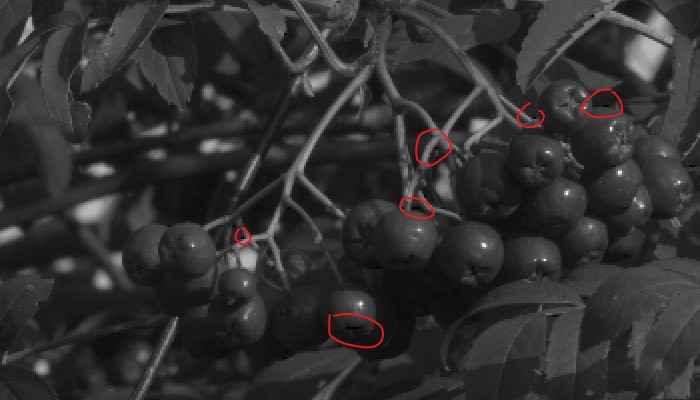
ISO 100
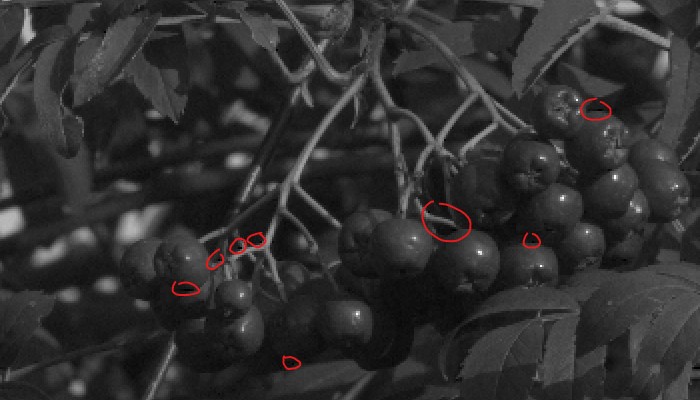
ISO 800
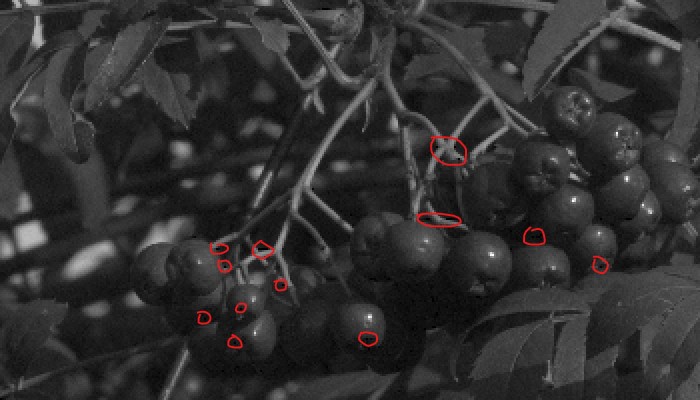
ISO 1600
ISO 100
ISO 800
ISO 1600
Aug 04, 2021 at 09:51 PM
p.3 #14CaptureOne broken for A1.
j4nu wrote:
Ok, bought RawDigger (very nice!) and went through some of my raws.
My conclusions:
* I think the stripes visible on Blue channel are PDAF stripes. They can be easily seen over uniform low Blue channel areas, such as orange petals.
* The stripes either somehow lower Blue channel even more, probably because they are absorbing light or create reflection in high-contrast areas (edges of sunlit petals), so that the blue channel reading is corrupt and results in near 0 value
* I think the degree of the effect might be related to the angle the light is hitting the sensor, so the lens...Show more →
Thanks for your well reasoned professionally worded reply.
Good luck with your efforts to deal with this issue.
K-H.
Aug 04, 2021 at 09:51 PM
p.3 #15CaptureOne broken for A1.
ruthenium wrote:
I looked at three uncompressed RAW files obtained at ISO 100, 800, and 1600 with A1+35mmGM at F8, with all lens corrections turned off. The following 700 x 400 images show the berries in the central part of each picture. In the blue channel, there are black dots (zero values) in the circled areas. The black dots move as the ISO changes, but I don't see fewer black dots at the higher ISO. The appearance of these dots is not completely random, yet there is no predictable pattern. An area exhibiting black dots in one image at one ISO may...Show more →
Thank you so much for looking into this.
I agree, this should not have a practical impact on my A1 images.
K-H.
Aug 04, 2021 at 11:03 PM
p.3 #16CaptureOne broken for A1.
j4nu wrote:
Thanks again.
I have silent shooting off and auto pixel mapping on. I shoot using ES obviously .
According to the ARW files in your drive link, you are shooting in Silent mode, at least according to EXIF.
I suppose it's possible the EXIF is wrong, or just always says Silent when it's in Electronic shutter, but are you sure you're not shooting in silent mode when you see these issues?
Maybe try running manual pixel mapping and see if the issue goes away?
Thanks again.
I have silent shooting off and auto pixel mapping on. I shoot using ES obviously
.According to the ARW files in your drive link, you are shooting in Silent mode, at least according to EXIF.
exiftool ~/Downloads/DSC09720.ARW | grep Shutter

Electronic Front Curtain Shutter: Off

Shutter                         : Silent / Electronic (0 0 0)

Shutter Count                   : 0

Shutter Speed                   : 1/3200
I suppose it's possible the EXIF is wrong, or just always says Silent when it's in Electronic shutter, but are you sure you're not shooting in silent mode when you see these issues?
Maybe try running manual pixel mapping and see if the issue goes away?
Aug 04, 2021 at 11:04 PM
p.3 #17CaptureOne broken for A1.
Yep, blame Sony terminology . I think electronic shutter is called silent shooting in some menus / other cameras...
I'll trigger pixel mapping from the menus after first round of test shots today (but the stripes are not random at all so I doubt it will help).
Thanks for your suggestions.
And to be clear, I don't see the issue with the sensor here (that's how its tech works), maybe even other Sony sensors exhibit similar behavior, but I believe the resulting images should not contain those black artifacts (and unless I use CO, they don't).
Jesse Evans wrote:
I have silent shooting off and auto pixel mapping on. I shoot using ES obviously .According to the ARW files in your drive link, you are shooting in Silent mode, at least according to EXIF.
I suppose it's possible the EXIF is wrong, or just always says Silent when it's in Electronic shutter, but are you sure you're not shooting in silent mode when you see these issues?
Maybe try running manual pixel mapping and see if the issue goes...Show more →
. I think electronic shutter is called silent shooting in some menus / other cameras...I'll trigger pixel mapping from the menus after first round of test shots today (but the stripes are not random at all so I doubt it will help).
Thanks for your suggestions.
And to be clear, I don't see the issue with the sensor here (that's how its tech works), maybe even other Sony sensors exhibit similar behavior, but I believe the resulting images should not contain those black artifacts (and unless I use CO, they don't).
Jesse Evans wrote:
j4nu wrote
Thanks again.I have silent shooting off and auto pixel mapping on. I shoot using ES obviously
.
exiftool ~/Downloads/DSC09720.ARW | grep Shutter

Electronic Front Curtain Shutter: Off

Shutter       : Silent / Electronic (0 0 0)

Shutter Count     : 0

Shutter Speed     : 1/3200
I suppose it's possible the EXIF is wrong, or just always says Silent when it's in Electronic shutter, but are you sure you're not shooting in silent mode when you see these issues?
Maybe try running manual pixel mapping and see if the issue goes...Show more →
Aug 05, 2021 at 12:21 AM
p.3 #18CaptureOne broken for A1.
I’m curious if anyone else can reproduce this on their A1? So far I think we’ve only seen this on j4nu’s samples. Ruthenium’s samples don’t show it on the full color version of the images like j4nu’s which were clearly visible and obvious.
I’ve shot a few thousand images on my A1 and I’ve been using Capture One for years. I have never seen this before, not with my A1 (or my previous A9II or A7S3).
I’ll keep looking but haven’t ever heard of this before this thread.
It’s clear tools outside of Capture One seem to handle these black dots better, but from Daran’s posts it looks like these artifacts are present in the RAW file so there’s really two separate questions here…
1.) why are the artifacts there (the ones that cause the black squares in j4nu’s pics)
and
2.) why do other tools better suppress these artifacts.
I honestly care more about #1, to understand whether there’s an issue with this particular A1 or A1s in general. #2 to me is more secondary as that seems more like a discussion of what tool can better hide artifacts in the RAW file. But I’d like to know why the artifacts are there in the first place.
Aug 05, 2021 at 01:09 AM
p.3 #19CaptureOne broken for A1.
I'm afraid nobody can give a definite answer, unless somebody can shoot multiple A1 bodies next to each other...
@Daran will say it's my copy of A1.
@sebbe will say it's my error/settings.
I will say that's how A1 sensor works and that CO should handle it.
Regarding your shooting, it depends on what you shoot. The easiest way to trigger these pixels / stripes is to shoot something uniform yellow/orange -ish (low blue channel) rather brightly lit to see the stripes. Then, on high contrast edges there should also be black pixels in some places.
Plus there is the bus stop example I posted, which I think shows bad demosaicing in CO...
And also my answer for your 1) question:
I wrote what I think in one of the posts above, it's the intersection of PDAF stripe with high-contrast well-lit low-blue channel edge.
jc75 wrote:
I’m curious if anyone else can reproduce this on their A1? So far I think we’ve only seen this on j4nu’s samples. Ruthenium’s samples don’t show it on the full color version of the images like j4nu’s which were clearly visible and obvious.
I’ve shot a few thousand images on my A1 and I’ve been using Capture One for years. I have never seen this before, not with my A1 (or my previous A9II or A7S3).
I’ll keep looking but haven’t ever heard of this before this thread.
It’s clear tools outside of Capture One seem to handle these black dots better, but...Show more →
Aug 05, 2021 at 01:22 AM
p.3 #20CaptureOne broken for A1.
j4nu wrote:
I'm afraid nobody can give a definite answer, unless somebody can shoot multiple A1 bodies next to each other...
@Daran@ will say it's my copy of A1.
@sebbe@ will say it's my error/settings.
I will say that's how A1 sensor works and that CO should handle it.
Regarding your shooting, it depends on what you shoot. The easiest way to trigger these pixels / stripes is to shoot something uniform yellow/orange -ish (low blue channel) rather brightly lit to see the stripes. Then, on high contrast edges there should also be black pixels in some places.
Plus there is the bus stop example I posted,...Show more →
I’ve shot a few thousand images on my A1 and I’ve been using Capture One for years. I have never seen this before, not with my A1 (or my previous A9II or A7S3).
I’ll keep looking but haven’t ever heard of this before this thread.
It’s clear tools outside of Capture One seem to handle these black dots better, but from Daran’s posts it looks like these artifacts are present in the RAW file so there’s really two separate questions here…
1.) why are the artifacts there (the ones that cause the black squares in j4nu’s pics)
and
2.) why do other tools better suppress these artifacts.
I honestly care more about #1, to understand whether there’s an issue with this particular A1 or A1s in general. #2 to me is more secondary as that seems more like a discussion of what tool can better hide artifacts in the RAW file. But I’d like to know why the artifacts are there in the first place.
I did not say it's your fault.
Anyway: We can hold on there are some weird artifacts in your file that normaly shoudn't be there. C1 does show them other RAW converters don't.
I downloaded your flowers file and pushed the sliders to get everything overexposed. The pixels stay black. I tried different profiles even from other cameras and some I made by my own. The pixels stay black. It looks like C1 cannot handle those very speciall artifacts.
When I try to reproduce this with a7rII or a7rIV files I have no success. Everything works as it should. Even if I use the A1 profiles. But my flower shots with a7RII or a7RIV does also not show any kind of similar artifacts within RAW diggers blue channel view.
It looks like your A1-files show some artifacts that never occur on other cameras. Why they are in your A1-files I don't know but they should normally not show up, if the pics are normally exposed and shot.
C1 does have an issue to handle them. It reminds me on an issue that was with the new released Sony a7s. Very bright areas (e.g. the sun) were shown pitch black. I don't remember if this was a RAW-file-issue or a issue within lightroom or C1. Maybe it's good to send phase one your RAW file and point at the issue. The support did reply to my issues in the past and I got even a fix within the next update. Even though it was an issue no one other seemed to have.
On the other hand I would rather try to find a solution to avoid those artifacts... Maybe send the RAW-file to sony instead?
What helped to reduce your issue in C1: color=0 and single pixel=100 (noise reduction panel)
I'm afraid nobody can give a definite answer, unless somebody can shoot multiple A1 bodies next to each other...
@Daran@ will say it's my copy of A1.
@sebbe@ will say it's my error/settings.
I will say that's how A1 sensor works and that CO should handle it.
Regarding your shooting, it depends on what you shoot. The easiest way to trigger these pixels / stripes is to shoot something uniform yellow/orange -ish (low blue channel) rather brightly lit to see the stripes. Then, on high contrast edges there should also be black pixels in some places.
Plus there is the bus stop example I posted,...Show more →
jc75 wrote
I’m curious if anyone else can reproduce this on their A1? So far I think we’ve only seen this on j4nu’s samples. Ruthenium’s samples don’t show it on the full color version of the images like j4nu’s which were clearly visible and obvious.I’ve shot a few thousand images on my A1 and I’ve been using Capture One for years. I have never seen this before, not with my A1 (or my previous A9II or A7S3).
I’ll keep looking but haven’t ever heard of this before this thread.
It’s clear tools outside of Capture One seem to handle these black dots better, but from Daran’s posts it looks like these artifacts are present in the RAW file so there’s really two separate questions here…
1.) why are the artifacts there (the ones that cause the black squares in j4nu’s pics)
and
2.) why do other tools better suppress these artifacts.
I honestly care more about #1, to understand whether there’s an issue with this particular A1 or A1s in general. #2 to me is more secondary as that seems more like a discussion of what tool can better hide artifacts in the RAW file. But I’d like to know why the artifacts are there in the first place.
I did not say it's your fault.
Anyway: We can hold on there are some weird artifacts in your file that normaly shoudn't be there. C1 does show them other RAW converters don't.
I downloaded your flowers file and pushed the sliders to get everything overexposed. The pixels stay black. I tried different profiles even from other cameras and some I made by my own. The pixels stay black. It looks like C1 cannot handle those very speciall artifacts.
When I try to reproduce this with a7rII or a7rIV files I have no success. Everything works as it should. Even if I use the A1 profiles. But my flower shots with a7RII or a7RIV does also not show any kind of similar artifacts within RAW diggers blue channel view.
It looks like your A1-files show some artifacts that never occur on other cameras. Why they are in your A1-files I don't know but they should normally not show up, if the pics are normally exposed and shot.
C1 does have an issue to handle them. It reminds me on an issue that was with the new released Sony a7s. Very bright areas (e.g. the sun) were shown pitch black. I don't remember if this was a RAW-file-issue or a issue within lightroom or C1. Maybe it's good to send phase one your RAW file and point at the issue. The support did reply to my issues in the past and I got even a fix within the next update. Even though it was an issue no one other seemed to have.
On the other hand I would rather try to find a solution to avoid those artifacts... Maybe send the RAW-file to sony instead?
What helped to reduce your issue in C1: color=0 and single pixel=100 (noise reduction panel)
Aug 05, 2021 at 04:17 AM