This topic is in the 2021 archive. You can read it and like its posts here. It is read only.
Archive 2021CaptureOne broken for A1.
p.6 #1CaptureOne broken for A1.
Daran wrote:
It seams my description wasn't sufficiently clear. In RawDigger: at the bottom left there is a button called "Black Level". It summons a preference setting page with "Black Level Settings". The black level (aka bias) is subtracted from the RAW data before it is used. The default of 512 comes from the cameras EXIF. In order to see the unbiased value and identify values below the bias: set this to manual and change the bias value to 0. And presto!
I am trying to grasp the significance of this. I know I am slow, thank you for being patient with me. If I understand this correctly, the default of 512 is a practical threshold when the signal is deemed to mean no light. Following your suggestion, I set the black level to 0 for the image of a flower earlier posted in this thread. Then the "zero/black" points changed their values from 0 to 300+ (e.g. 312, 320). In practice they all should be interpreted the same, as making zero light contribution toward the image. This makes perfect practical sense.
I still wonder how could you tell that the A1 sensor in our cameras should be defective at some points? For example, is this because every zero value point (when the black level is at the default value of 512) must be defective simply because of the zero value? What exactly made you decide that the A1 sensor must be defective? Would you please elaborate?
ruthenium wrote
In RawDigger, I looked at the uncompressed RAW file of an image taken with A1+35mmGM with the lens cap on. Most values in the blue channel are at 0, some occasionally are at low values 1 - 2. Thus, it seems that the statement "In the RAWs black is represented with the value 512 (the so called bias)" possibly does not apply to the A1 sensor. Let me know if I misunderstood something.I am trying to grasp the significance of this. I know I am slow, thank you for being patient with me. If I understand this correctly, the default of 512 is a practical threshold when the signal is deemed to mean no light. Following your suggestion, I set the black level to 0 for the image of a flower earlier posted in this thread. Then the "zero/black" points changed their values from 0 to 300+ (e.g. 312, 320). In practice they all should be interpreted the same, as making zero light contribution toward the image. This makes perfect practical sense.
I still wonder how could you tell that the A1 sensor in our cameras should be defective at some points? For example, is this because every zero value point (when the black level is at the default value of 512) must be defective simply because of the zero value? What exactly made you decide that the A1 sensor must be defective? Would you please elaborate?
Aug 08, 2021 at 05:25 PM
p.6 #2CaptureOne broken for A1.
k-h.a.w wrote:
It seams my description wasn't sufficiently clear. In RawDigger: at the bottom left there is a button called "Black Level". It summons a preference setting page with "Black Level Settings". The black level (aka bias) is subtracted from the RAW data before it is used. The default of 512 comes from the cameras EXIF. In order to see the unbiased value and identify values below the bias: set this to manual and change the bias value to 0. And presto!Quote:
And presto!
What do you get?
Thanks, K-H.Negative blue tints, lower in value than even a black image. Some artifacts go all the way down to (unbiased) zero, which is -512 normalized or about -3% in terms of the full color range.Thank you Daran. That’s what I thought.
So knowing that, shouldn’t it be easy for Capture One to fix their software?
TIA, K-H.
There is no bug in C1. It would certainly be easy to clamp values to be at least 0, which would reduce the effect of this camera flaw. But it would not really fix the flaw, as those negative outliers are only the most extreme part of bigger horizontal strips of skewed tints. If you look closely much more of the flower has stripes in the blue channel. There is no way for a RAW processor to fix that.
You should also consider that any change to suppress detail will invariably also reduce the fidelity of the converted result. And while the same RAW formats are used for all of Sony's cameras, only the A1 seems to have the dirt on daisies. Maybe someone should check the A9/A9II as that's the only other Sony camera with such a fast sensor readout.
Daran wrote
k-h.a.w wrote
Daran wrote
ruthenium wrote
In RawDigger, I looked at the uncompressed RAW file of an image taken with A1+35mmGM with the lens cap on. Most values in the blue channel are at 0, some occasionally are at low values 1 - 2. Thus, it seems that the statement "In the RAWs black is represented with the value 512 (the so called bias)" possibly does not apply to the A1 sensor. Let me know if I misunderstood something.And presto!
What do you get?
Thanks, K-H.
So knowing that, shouldn’t it be easy for Capture One to fix their software?
TIA, K-H.
There is no bug in C1. It would certainly be easy to clamp values to be at least 0, which would reduce the effect of this camera flaw. But it would not really fix the flaw, as those negative outliers are only the most extreme part of bigger horizontal strips of skewed tints. If you look closely much more of the flower has stripes in the blue channel. There is no way for a RAW processor to fix that.
You should also consider that any change to suppress detail will invariably also reduce the fidelity of the converted result. And while the same RAW formats are used for all of Sony's cameras, only the A1 seems to have the dirt on daisies. Maybe someone should check the A9/A9II as that's the only other Sony camera with such a fast sensor readout.
Aug 08, 2021 at 05:29 PM
p.6 #3CaptureOne broken for A1.
Daran wrote:
It seams my description wasn't sufficiently clear. In RawDigger: at the bottom left there is a button called "Black Level". It summons a preference setting page with "Black Level Settings". The black level (aka bias) is subtracted from the RAW data before it is used. The default of 512 comes from the cameras EXIF. In order to see the unbiased value and identify values below the bias: set this to manual and change the bias value to 0. And presto!Quote:
And presto!
What do you get?
Thanks, K-H.Negative blue tints, lower in value than even a black image. Some artifacts go all the way down to (unbiased) zero, which is -512 normalized or about -3% in terms of the full color range.Thank you Daran. That’s what I thought.
So knowing that, shouldn’t it be easy for Capture One to fix their software?
TIA, K-H.There is no bug in C1. It would certainly be easy to clamp values to be at least 0, which would reduce the effect of this camera flaw. But it would not really fix the flaw, as those negative outliers are only the most extreme part of bigger horizontal strips of skewed tints. If you look closely much more of the flower has stripes in the blue channel. There is no way for a RAW processor to fix that.
You should also consider that any change to suppress detail will invariably also reduce the fidelity of the converted result. And while...Show more →
Thank you Daran, much appreciated.
Should I assume then that the A1 is defective, either hardware- or firmware-wise?
Thanks again, K-H.
k-h.a.w wrote
Daran wrote
k-h.a.w wrote
Daran wrote
ruthenium wrote
In RawDigger, I looked at the uncompressed RAW file of an image taken with A1+35mmGM with the lens cap on. Most values in the blue channel are at 0, some occasionally are at low values 1 - 2. Thus, it seems that the statement "In the RAWs black is represented with the value 512 (the so called bias)" possibly does not apply to the A1 sensor. Let me know if I misunderstood something.And presto!
What do you get?
Thanks, K-H.
So knowing that, shouldn’t it be easy for Capture One to fix their software?
TIA, K-H.
You should also consider that any change to suppress detail will invariably also reduce the fidelity of the converted result. And while...Show more →
Thank you Daran, much appreciated.
Should I assume then that the A1 is defective, either hardware- or firmware-wise?
Thanks again, K-H.
Aug 08, 2021 at 05:35 PM
p.6 #4CaptureOne broken for A1.
Daran wrote:
It seams my description wasn't sufficiently clear. In RawDigger: at the bottom left there is a button called "Black Level". It summons a preference setting page with "Black Level Settings". The black level (aka bias) is subtracted from the RAW data before it is used. The default of 512 comes from the cameras EXIF. In order to see the unbiased value and identify values below the bias: set this to manual and change the bias value to 0. And presto!Quote:
And presto!
What do you get?
Thanks, K-H.Negative blue tints, lower in value than even a black image. Some artifacts go all the way down to (unbiased) zero, which is -512 normalized or about -3% in terms of the full color range.
Have you actually seen the unbiased -512? In the black image obtained with the lens cap on, I see the following statistics in RawDigger (see the screen capture) where the values are apparently between 484 and 548. This means biased -28 and +36 (due to noise, I guess). This does not seem to indicate anything defective.
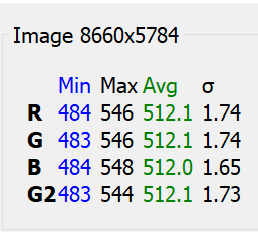
k-h.a.w wrote
Daran wrote
ruthenium wrote
In RawDigger, I looked at the uncompressed RAW file of an image taken with A1+35mmGM with the lens cap on. Most values in the blue channel are at 0, some occasionally are at low values 1 - 2. Thus, it seems that the statement "In the RAWs black is represented with the value 512 (the so called bias)" possibly does not apply to the A1 sensor. Let me know if I misunderstood something.And presto!
What do you get?
Thanks, K-H.
Have you actually seen the unbiased -512? In the black image obtained with the lens cap on, I see the following statistics in RawDigger (see the screen capture) where the values are apparently between 484 and 548. This means biased -28 and +36 (due to noise, I guess). This does not seem to indicate anything defective.
Aug 08, 2021 at 05:36 PM
p.6 #5CaptureOne broken for A1.
Daran wrote:
It seams my description wasn't sufficiently clear. In RawDigger: at the bottom left there is a button called "Black Level". It summons a preference setting page with "Black Level Settings". The black level (aka bias) is subtracted from the RAW data before it is used. The default of 512 comes from the cameras EXIF. In order to see the unbiased value and identify values below the bias: set this to manual and change the bias value to 0. And presto!Quote:
And presto!
What do you get?
Thanks, K-H.Negative blue tints, lower in value than even a black image. Some artifacts go all the way down to (unbiased) zero, which is -512 normalized or about -3% in terms of the full color range.Thank you Daran. That’s what I thought.
So knowing that, shouldn’t it be easy for Capture One to fix their software?
TIA, K-H.There is no bug in C1. It would certainly be easy to clamp values to be at least 0, which would reduce the effect of this camera flaw. But it would not really fix the flaw, as those negative outliers are only the most extreme part of bigger horizontal strips of skewed tints. If you look closely much more of the flower has stripes in the blue channel. There is no way for a RAW processor to fix that.
You should also consider that any change to suppress detail will invariably also reduce the fidelity of the converted result. And while...Show more →
Is there a pattern to how often these impurities occur? Is there a certain number of lines between them before they are repeated?
k-h.a.w wrote
Daran wrote
k-h.a.w wrote
Daran wrote
ruthenium wrote
In RawDigger, I looked at the uncompressed RAW file of an image taken with A1+35mmGM with the lens cap on. Most values in the blue channel are at 0, some occasionally are at low values 1 - 2. Thus, it seems that the statement "In the RAWs black is represented with the value 512 (the so called bias)" possibly does not apply to the A1 sensor. Let me know if I misunderstood something.And presto!
What do you get?
Thanks, K-H.
So knowing that, shouldn’t it be easy for Capture One to fix their software?
TIA, K-H.
You should also consider that any change to suppress detail will invariably also reduce the fidelity of the converted result. And while...Show more →
Is there a pattern to how often these impurities occur? Is there a certain number of lines between them before they are repeated?
Aug 08, 2021 at 05:37 PM
p.6 #6CaptureOne broken for A1.
ruthenium wrote:
It seams my description wasn't sufficiently clear. In RawDigger: at the bottom left there is a button called "Black Level". It summons a preference setting page with "Black Level Settings". The black level (aka bias) is subtracted from the RAW data before it is used. The default of 512 comes from the cameras EXIF. In order to see the unbiased value and identify values below the bias: set this to manual and change the bias value to 0. And presto!Quote:
And presto!
What do you get?
Thanks, K-H.Negative blue tints, lower in value than even a black image. Some artifacts go all the way down to (unbiased) zero, which is -512 normalized or about -3% in terms of the full color range.Have you actually seen the unbiased -512? In the black image obtained with the lens cap on, I see the following statistics in RawDigger (see the screen capture) where the values are apparently between 484 and 548. This means biased -28 and +36 (due to noise, I guess). This does not seem to indicate anything defective.
Your dark image stats are exactly as it is supposed to work. The -512 happens only as part of the dirt on the daisies artifacts, not in normal images or dark frames. It isn't supposed to happen at all.
Daran wrote
k-h.a.w wrote
Daran wrote
ruthenium wrote
In RawDigger, I looked at the uncompressed RAW file of an image taken with A1+35mmGM with the lens cap on. Most values in the blue channel are at 0, some occasionally are at low values 1 - 2. Thus, it seems that the statement "In the RAWs black is represented with the value 512 (the so called bias)" possibly does not apply to the A1 sensor. Let me know if I misunderstood something.And presto!
What do you get?
Thanks, K-H.
Your dark image stats are exactly as it is supposed to work. The -512 happens only as part of the dirt on the daisies artifacts, not in normal images or dark frames. It isn't supposed to happen at all.
Aug 08, 2021 at 06:12 PM
p.6 #7CaptureOne broken for A1.
bjornthun wrote:
Is there a pattern to how often these impurities occur? Is there a certain number of lines between them before they are repeated?
It seems correlated to edge like structures in the image. Otherwise it seems pretty random. How many there are depends on what you wana count. In one of my worse images there were dozens of the obvious dark strips of varying intensity on the daisy. But there are many, many more, that are only very slightly lighter or darker than what they should be. I'm not seeing any similar effect in the green or red channels, but that may be due to deliberately seeking out a yellow flower.
Aug 08, 2021 at 06:18 PM
p.6 #8CaptureOne broken for A1.
j4nu wrote:
I think every A1 is like that...
I think what also disproves the 0 Blue channel theory is my DSC09666 file (the letters on the bus stop). There is no orange there, no 0 blue channel (at least in CO I don't see it) and it's a prime example of bad demosaicing:
https://rawpedia.rawtherapee.com/Demosaicing
And still other RAW processors deal with it just fine...
CO vs LR (screengrab from app):
https://photos.smugmug.com/photos/i-vLLz2Z4/0/644606c3/O/i-vLLz2Z4.gif
I think it would be nice to check (preferably the same) images from other cameras:
* highres - A7RIV/III
* stacked-sensor - A9/II .
I never noticed it with my A7III and I doubt this would have gone unnoticed with the other cameras...
And regarding the orange question:
In a RGB color space, hex #ffa500 (also known as Orange) is composed of 100% red, 64.7% green and 0% blue.So that might be normal actually I guess...Checking the uncompressed raw makes the artificial nature of the artifacts even more obvious. At this point I would send the camera back to Sony (or your dealer).
Looks like the noise reduction and sharpening parameters are vastly different between LR / C1.
Have you tried playing with them? Try to exaggerate them to see which slider tends to amplify / diminish the problem?
Also, do the stripes in the RAW file appear when using mechanical shutter?
As for the Northrups, the likely title would be "Sony FAIL, Switching to Canon".
I think every A1 is like that...
I think what also disproves the 0 Blue channel theory is my DSC09666 file (the letters on the bus stop). There is no orange there, no 0 blue channel (at least in CO I don't see it) and it's a prime example of bad demosaicing:
https://rawpedia.rawtherapee.com/Demosaicing
And still other RAW processors deal with it just fine...
CO vs LR (screengrab from app):
https://photos.smugmug.com/photos/i-vLLz2Z4/0/644606c3/O/i-vLLz2Z4.gif
Daran wrote
j4nu wrote
ruthenium wrote
Is it just me thinking this conspicuous that the blue channel goes down to 0 in some points of orange images? Have the "black dots" been seen in other than the blue? This is off-topic perhaps, yet I am curious about the origin of the problem. is this normal in a way, or do the observations indicate a technical problem/some sort of defect?* highres - A7RIV/III
* stacked-sensor - A9/II .
I never noticed it with my A7III and I doubt this would have gone unnoticed with the other cameras...
And regarding the orange question:
Earlier quote
https://www.colorhexa.com/ffa500In a RGB color space, hex #ffa500 (also known as Orange) is composed of 100% red, 64.7% green and 0% blue.
Looks like the noise reduction and sharpening parameters are vastly different between LR / C1.
Have you tried playing with them? Try to exaggerate them to see which slider tends to amplify / diminish the problem?
Also, do the stripes in the RAW file appear when using mechanical shutter?
As for the Northrups, the likely title would be "Sony FAIL, Switching to Canon".
Aug 08, 2021 at 06:43 PM
p.6 #9CaptureOne broken for A1.
k-h.a.w wrote:
According to Wikipedia: Malevich made some remarks about his painting:
"It is from zero, in zero, that the true movement of being begins."
I guess this explains why black = 0 in the A1 RAW files. Needless to say, the 50 MP camera and a sharp lens have been critical in acquiring this impressive image Great detail!

K-H.
And exquisite rendering!!!
ruthenium wrote
Dedicated to Malevich's "Black Square"According to Wikipedia: Malevich made some remarks about his painting:
"It is from zero, in zero, that the true movement of being begins."
I guess this explains why black = 0 in the A1 RAW files. Needless to say, the 50 MP camera and a sharp lens have been critical in acquiring this impressive image
K-H.
And exquisite rendering!!!
Aug 08, 2021 at 07:21 PM
p.6 #10CaptureOne broken for A1.
Ahh yes, I forgot about the "FAIL" and "switching" hype words .
Most sliders do not affect the black pixels. @sebbe found out some noise reduction settings combination that helps and to my surprise distortion slider (/lens profile) affects them in my testing. That's probably because it moves some pixels around when correcting distortion...
vdo1 wrote:
I think what also disproves the 0 Blue channel theory is my DSC09666 file (the letters on the bus stop). There is no orange there, no 0 blue channel (at least in CO I don't see it) and it's a prime example of bad demosaicing:
https://rawpedia.rawtherapee.com/Demosaicing
And still other RAW processors deal with it just fine...
CO vs LR (screengrab from app):
https://photos.smugmug.com/photos/i-vLLz2Z4/0/644606c3/O/i-vLLz2Z4.gif
I think it would be nice to check (preferably the same) images from other cameras:
* highres - A7RIV/III
* stacked-sensor - A9/II .
I never noticed it with my A7III and I doubt this would have gone unnoticed with the other cameras...
And regarding the orange question:
In a RGB color space, hex #ffa500 (also known as Orange) is composed of 100% red, 64.7% green and 0% blue.So that might be normal actually I guess...Checking the uncompressed raw makes the artificial nature of the artifacts even more obvious. At this point I would send the camera back to Sony (or your dealer).Looks like the noise reduction and sharpening parameters are vastly different between LR / C1.
Have you tried playing with them? Try to exaggerate them to see which slider tends to amplify / diminish the problem?
Also, do the stripes in the RAW file appear when using mechanical shutter?
As for the Northrups, the likely title would be "Sony FAIL, Switching to Canon".
.Most sliders do not affect the black pixels. @sebbe found out some noise reduction settings combination that helps and to my surprise distortion slider (/lens profile) affects them in my testing. That's probably because it moves some pixels around when correcting distortion...
vdo1 wrote:
j4nu wrote
I think every A1 is like that...I think what also disproves the 0 Blue channel theory is my DSC09666 file (the letters on the bus stop). There is no orange there, no 0 blue channel (at least in CO I don't see it) and it's a prime example of bad demosaicing:
https://rawpedia.rawtherapee.com/Demosaicing
And still other RAW processors deal with it just fine...
CO vs LR (screengrab from app):
https://photos.smugmug.com/photos/i-vLLz2Z4/0/644606c3/O/i-vLLz2Z4.gif
Daran wrote
j4nu wrote
ruthenium wrote
Is it just me thinking this conspicuous that the blue channel goes down to 0 in some points of orange images? Have the "black dots" been seen in other than the blue? This is off-topic perhaps, yet I am curious about the origin of the problem. is this normal in a way, or do the observations indicate a technical problem/some sort of defect?* highres - A7RIV/III
* stacked-sensor - A9/II .
I never noticed it with my A7III and I doubt this would have gone unnoticed with the other cameras...
And regarding the orange question:
Earlier quote
https://www.colorhexa.com/ffa500In a RGB color space, hex #ffa500 (also known as Orange) is composed of 100% red, 64.7% green and 0% blue.
Have you tried playing with them? Try to exaggerate them to see which slider tends to amplify / diminish the problem?
Also, do the stripes in the RAW file appear when using mechanical shutter?
As for the Northrups, the likely title would be "Sony FAIL, Switching to Canon".
Aug 08, 2021 at 11:23 PM
p.6 #11CaptureOne broken for A1.
The stripes are PDAF stripes, as I've shown in the comparison to dpr A7III crops from their backlight stripes shots, which @Daran@ conveniently ignores again  .
The black pixels happen at the intersection of the stripe with an edge or other contrasty area I'd say. As @sebbe@ pointed out, CO wrongly treats those pixels as any exposure boost in post processing does not seem to affect them in any way...
So, it is also a CO bug:
* The black pixels are not there in "reality"
* They are in the RAW only in the Blue channel
* They are left as-is during processing in CO, which results in them being present as completely black in the final exported picture.
As I said, there is no practical use of those black pixels...
And again, if those black pixels affect the final image, please show examples of lost detail, deformations, etc. (except CO of course).
And again, the stripes are nothing new in Sony sensors. They might have changed a bit in A1, but they always were visible under certain conditions (vide dpr A7III samples).
The question is whether they affect the image more in A1's case?
.The black pixels happen at the intersection of the stripe with an edge or other contrasty area I'd say. As @sebbe@ pointed out, CO wrongly treats those pixels as any exposure boost in post processing does not seem to affect them in any way...
So, it is also a CO bug:
* The black pixels are not there in "reality"
* They are in the RAW only in the Blue channel
* They are left as-is during processing in CO, which results in them being present as completely black in the final exported picture.
As I said, there is no practical use of those black pixels...
And again, if those black pixels affect the final image, please show examples of lost detail, deformations, etc. (except CO of course).
And again, the stripes are nothing new in Sony sensors. They might have changed a bit in A1, but they always were visible under certain conditions (vide dpr A7III samples).
The question is whether they affect the image more in A1's case?
Aug 08, 2021 at 11:33 PM
p.6 #12CaptureOne broken for A1.
j4nu wrote:
The stripes are PDAF stripes, as I've shown in the comparison to dpr A7III crops from their backlight stripes shots, which @Daran@@ conveniently ignores again .
The black pixels happen at the intersection of the stripe with an edge or other contrasty area I'd say. As @sebbe@@ pointed out, CO wrongly treats those pixels as any exposure boost in post processing does not seem to affect them in any way...
So, it is also a CO bug:
* The black pixels are not there in "reality"
* They are in the RAW only in the Blue channel
* They are left as-is during processing...Show more →
Thank you j4nu.
My sense is Capture One needs to address this.
Unless the A1 firmware has a bug, it’s not clear
to me what Sony needs to do to the A1.
AFAIK currently their Imaging Edge app is not supported on Apple Silicon computers.
That’s too bad. I wish Sony would change that.
Thanks again, K-H.
The stripes are PDAF stripes, as I've shown in the comparison to dpr A7III crops from their backlight stripes shots, which @Daran@@ conveniently ignores again
.The black pixels happen at the intersection of the stripe with an edge or other contrasty area I'd say. As @sebbe@@ pointed out, CO wrongly treats those pixels as any exposure boost in post processing does not seem to affect them in any way...
So, it is also a CO bug:
* The black pixels are not there in "reality"
* They are in the RAW only in the Blue channel
* They are left as-is during processing...Show more →
Thank you j4nu.
My sense is Capture One needs to address this.
Unless the A1 firmware has a bug, it’s not clear
to me what Sony needs to do to the A1.
AFAIK currently their Imaging Edge app is not supported on Apple Silicon computers.
That’s too bad. I wish Sony would change that.
Thanks again, K-H.
Aug 09, 2021 at 12:34 AM
p.6 #13CaptureOne broken for A1.
Well, the proof is in the pudding I'd say, that's why I asked for any final image ilustrating the effect of those zero Blue channel pixels (except CO obviously).
I've taken a look at the output of different RAW processors and they are not the same in the affected areas. Whether this is the result of different processing settings/mechanisms or solely by different handling of those "zero blues" - I don't know. What I know is that in the best ones, I don't see any loss of detail, etc.
I can also say that I've seen strange very small (pixel-level) artifacts on fine detail in other A1 files (even embedded jpegs), but I've not analyzed them with RawDigger yet. I don't know if they are aliasing effects (due to no AA filter) or if they are related to the stripes at all...
k-h.a.w wrote:
.
The black pixels happen at the intersection of the stripe with an edge or other contrasty area I'd say. As @sebbe@@@@ pointed out, CO wrongly treats those pixels as any exposure boost in post processing does not seem to affect them in any way...
So, it is also a CO bug:
* The black pixels are not there in "reality"
* They are in the RAW only in the Blue channel
* They are left as-is during processing in CO, which results in them being present as completely black in the final exported picture.
As I said, there is no practical use of those black pixels...
And again, if those black pixels affect the final image, please show examples of lost detail, deformations, etc. (except CO of course).
And again, the stripes are nothing new in Sony sensors. They might have changed a bit in A1, but they always were visible under certain conditions (vide dpr A7III samples).
The question is whether they affect the image more in A1's case?Thank you j4nu.
My sense is Capture One needs to address this.
Unless the A1 firmware has a bug, it’s not clear
to me what Sony needs to do to the A1.
AFAIK currently their Imaging Edge app is not supported on Apple Silicon computers.
That’s too bad. I wish Sony would change that.
Thanks again, K-H.
I've taken a look at the output of different RAW processors and they are not the same in the affected areas. Whether this is the result of different processing settings/mechanisms or solely by different handling of those "zero blues" - I don't know. What I know is that in the best ones, I don't see any loss of detail, etc.
I can also say that I've seen strange very small (pixel-level) artifacts on fine detail in other A1 files (even embedded jpegs), but I've not analyzed them with RawDigger yet. I don't know if they are aliasing effects (due to no AA filter) or if they are related to the stripes at all...
k-h.a.w wrote:
j4nu wrote
The stripes are PDAF stripes, as I've shown in the comparison to dpr A7III crops from their backlight stripes shots, which @Daran@@@@ conveniently ignores again .The black pixels happen at the intersection of the stripe with an edge or other contrasty area I'd say. As @sebbe@@@@ pointed out, CO wrongly treats those pixels as any exposure boost in post processing does not seem to affect them in any way...
So, it is also a CO bug:
* The black pixels are not there in "reality"
* They are in the RAW only in the Blue channel
* They are left as-is during processing in CO, which results in them being present as completely black in the final exported picture.
As I said, there is no practical use of those black pixels...
And again, if those black pixels affect the final image, please show examples of lost detail, deformations, etc. (except CO of course).
And again, the stripes are nothing new in Sony sensors. They might have changed a bit in A1, but they always were visible under certain conditions (vide dpr A7III samples).
The question is whether they affect the image more in A1's case?
My sense is Capture One needs to address this.
Unless the A1 firmware has a bug, it’s not clear
to me what Sony needs to do to the A1.
AFAIK currently their Imaging Edge app is not supported on Apple Silicon computers.
That’s too bad. I wish Sony would change that.
Thanks again, K-H.
Aug 09, 2021 at 01:56 AM
p.6 #14CaptureOne broken for A1.
j4nu wrote:
Well, the proof is in the pudding I'd say, that's why I asked for any final image ilustrating the effect of those zero Blue channel pixels (except CO obviously).
I've taken a look at the output of different RAW processors and they are not the same in the affected areas. Whether this is the result of different processing settings/mechanisms or solely by different handling of those "zero blues" - I don't know. What I know is that in the best ones, I don't see any loss of detail, etc.
I can also say that I've seen strange very small (pixel-level) artifacts on...Show more → .
The black pixels happen at the intersection of the stripe with an edge or other contrasty area I'd say. As @sebbe@@@@@ pointed out, CO wrongly treats those pixels as any exposure boost in post processing does not seem to affect them in any way...
So, it is also a CO bug:
* The black pixels are not there in "reality"
* They are in the RAW only in the Blue channel
* They are left as-is during processing in CO, which results in them being present as completely black in the final exported picture.
As I said, there is no practical use of those black pixels...
And again, if those black pixels affect the final image, please show examples of lost detail, deformations, etc. (except CO of course).
And again, the stripes are nothing new in Sony sensors. They might have changed a bit in A1, but they always were visible under certain conditions (vide dpr A7III samples).
The question is whether they affect the image more in A1's case?Thank you j4nu.
My sense is Capture One needs to address this.
Unless the A1 firmware has a bug, it’s not clear
to me what Sony needs to do to the A1.
AFAIK currently their Imaging Edge app is not supported on Apple Silicon computers.
That’s too bad. I wish Sony would change that.
Thanks again, K-H.
Thank you j4nu, much appreciated.
Could you please list the different RAW processors you have tried and a short description of their output with regards to the “blue” zones? You already mentioned Capture One, RawDigger and Imaging Edge.Did you try others?
TIA, K-H.
Well, the proof is in the pudding I'd say, that's why I asked for any final image ilustrating the effect of those zero Blue channel pixels (except CO obviously).
I've taken a look at the output of different RAW processors and they are not the same in the affected areas. Whether this is the result of different processing settings/mechanisms or solely by different handling of those "zero blues" - I don't know. What I know is that in the best ones, I don't see any loss of detail, etc.
I can also say that I've seen strange very small (pixel-level) artifacts on...Show more →
k-h.a.w wrote
j4nu wrote
The stripes are PDAF stripes, as I've shown in the comparison to dpr A7III crops from their backlight stripes shots, which @Daran@@@@@ conveniently ignores again .The black pixels happen at the intersection of the stripe with an edge or other contrasty area I'd say. As @sebbe@@@@@ pointed out, CO wrongly treats those pixels as any exposure boost in post processing does not seem to affect them in any way...
So, it is also a CO bug:
* The black pixels are not there in "reality"
* They are in the RAW only in the Blue channel
* They are left as-is during processing in CO, which results in them being present as completely black in the final exported picture.
As I said, there is no practical use of those black pixels...
And again, if those black pixels affect the final image, please show examples of lost detail, deformations, etc. (except CO of course).
And again, the stripes are nothing new in Sony sensors. They might have changed a bit in A1, but they always were visible under certain conditions (vide dpr A7III samples).
The question is whether they affect the image more in A1's case?
My sense is Capture One needs to address this.
Unless the A1 firmware has a bug, it’s not clear
to me what Sony needs to do to the A1.
AFAIK currently their Imaging Edge app is not supported on Apple Silicon computers.
That’s too bad. I wish Sony would change that.
Thanks again, K-H.
Thank you j4nu, much appreciated.
Could you please list the different RAW processors you have tried and a short description of their output with regards to the “blue” zones? You already mentioned Capture One, RawDigger and Imaging Edge.Did you try others?
TIA, K-H.
Aug 09, 2021 at 03:27 AM
p.6 #15CaptureOne broken for A1.
j4nu wrote:
The stripes are PDAF stripes, as I've shown in the comparison to dpr A7III crops from their backlight stripes shots, which @Daran@@ conveniently ignores again
It's no fun to argue if you are convinced you already know the answer.
PDAF strips are an optical effect happening on the sensor surface, before the photons enter the photo site. As there are no anti-photons, I fail to understand how such an effect could possibly darken a pixel to less than black.
Aug 09, 2021 at 05:38 AM
p.6 #16CaptureOne broken for A1.
Sure, I've tried the following ones (short impressions, that are personal of course):
* CaptureOne: completely black pixels, unusable for me
* ImagingEdge: perfectly fine, one of the better if not the best result
* LightRoom: no artifacts, but the affected areas look a bit off, one of worst but still acceptable (contrary to CO) performers
* DxO PhotoLab 4: perfectly fine, one of the better results (though I'll have to take a second look)
* ON1 Photo Raw: no artifacts, I can't get it to match sharpness of others though so hard to tell how good it is
* RawTherapee (bonus points for being free & OpenSource ): no artifacts, one of the better results.
* FastRawViewer: no artifacts, this is a RAW viewer only though, so no export to JPEG
* RawDigger: no artifacts in RGB render / Raw composite display mode, this too is only a viewer
* Windows Photos: no artifacts, again only a viewer and it's microsoft so I don't really know what I'm looking at...
* embedded jpeg: obviously perfectly fine.
I'll try to see if I have the exports in one place so I can link them here...
In my opening post of this thread you can see LR, CO, embeddedJPEG and RT.
k-h.a.w wrote:
I've taken a look at the output of different RAW processors and they are not the same in the affected areas. Whether this is the result of different processing settings/mechanisms or solely by different handling of those "zero blues" - I don't know. What I know is that in the best ones, I don't see any loss of detail, etc.
I can also say that I've seen strange very small (pixel-level) artifacts on fine detail in other A1 files (even embedded jpegs), but I've not analyzed them with RawDigger yet. I don't know if they are aliasing effects (due to no AA filter) or if they are related to the stripes at all...
.
The black pixels happen at the intersection of the stripe with an edge or other contrasty area I'd say. As @sebbe@@@@@@ pointed out, CO wrongly treats those pixels as any exposure boost in post processing does not seem to affect them in any way...
So, it is also a CO bug:
* The black pixels are not there in "reality"
* They are in the RAW only in the Blue channel
* They are left as-is during processing in CO, which results in them being present as completely black in the final exported picture.
As I said, there is no practical use of those black pixels...
And again, if those black pixels affect the final image, please show examples of lost detail, deformations, etc. (except CO of course).
And again, the stripes are nothing new in Sony sensors. They might have changed a bit in A1, but they always were visible under certain conditions (vide dpr A7III samples).
The question is whether they affect the image more in A1's case?Thank you j4nu.
My sense is Capture One needs to address this.
Unless the A1 firmware has a bug, it’s not clear
to me what Sony needs to do to the A1.
AFAIK currently their Imaging Edge app is not supported on Apple Silicon computers.
That’s too bad. I wish Sony would change that.
Thanks again, K-H.Thank you j4nu, much appreciated.
Could you please list the different RAW processors you have tried and a short description of their output with regards to the “blue” zones? You already mentioned Capture One, RawDigger and Imaging Edge.Did you try others?
TIA, K-H.
* CaptureOne: completely black pixels, unusable for me
* ImagingEdge: perfectly fine, one of the better if not the best result
* LightRoom: no artifacts, but the affected areas look a bit off, one of worst but still acceptable (contrary to CO) performers
* DxO PhotoLab 4: perfectly fine, one of the better results (though I'll have to take a second look)
* ON1 Photo Raw: no artifacts, I can't get it to match sharpness of others though so hard to tell how good it is
* RawTherapee (bonus points for being free & OpenSource
): no artifacts, one of the better results.* FastRawViewer: no artifacts, this is a RAW viewer only though, so no export to JPEG
* RawDigger: no artifacts in RGB render / Raw composite display mode, this too is only a viewer
* Windows Photos: no artifacts, again only a viewer and it's microsoft so I don't really know what I'm looking at...
* embedded jpeg: obviously perfectly fine.
I'll try to see if I have the exports in one place so I can link them here...
In my opening post of this thread you can see LR, CO, embeddedJPEG and RT.
k-h.a.w wrote:
j4nu wrote
Well, the proof is in the pudding I'd say, that's why I asked for any final image ilustrating the effect of those zero Blue channel pixels (except CO obviously).I've taken a look at the output of different RAW processors and they are not the same in the affected areas. Whether this is the result of different processing settings/mechanisms or solely by different handling of those "zero blues" - I don't know. What I know is that in the best ones, I don't see any loss of detail, etc.
I can also say that I've seen strange very small (pixel-level) artifacts on fine detail in other A1 files (even embedded jpegs), but I've not analyzed them with RawDigger yet. I don't know if they are aliasing effects (due to no AA filter) or if they are related to the stripes at all...
k-h.a.w wrote
j4nu wrote
The stripes are PDAF stripes, as I've shown in the comparison to dpr A7III crops from their backlight stripes shots, which @Daran@@@@@@ conveniently ignores again .The black pixels happen at the intersection of the stripe with an edge or other contrasty area I'd say. As @sebbe@@@@@@ pointed out, CO wrongly treats those pixels as any exposure boost in post processing does not seem to affect them in any way...
So, it is also a CO bug:
* The black pixels are not there in "reality"
* They are in the RAW only in the Blue channel
* They are left as-is during processing in CO, which results in them being present as completely black in the final exported picture.
As I said, there is no practical use of those black pixels...
And again, if those black pixels affect the final image, please show examples of lost detail, deformations, etc. (except CO of course).
And again, the stripes are nothing new in Sony sensors. They might have changed a bit in A1, but they always were visible under certain conditions (vide dpr A7III samples).
The question is whether they affect the image more in A1's case?
My sense is Capture One needs to address this.
Unless the A1 firmware has a bug, it’s not clear
to me what Sony needs to do to the A1.
AFAIK currently their Imaging Edge app is not supported on Apple Silicon computers.
That’s too bad. I wish Sony would change that.
Thanks again, K-H.
Could you please list the different RAW processors you have tried and a short description of their output with regards to the “blue” zones? You already mentioned Capture One, RawDigger and Imaging Edge.Did you try others?
TIA, K-H.
Aug 09, 2021 at 09:12 AM
p.6 #17CaptureOne broken for A1.
Well, I'm afraid this thread is anti-fun by definition.
I just wanted to process some raws and I'm unable to do so due to the fact that I use CO.
As for your question, I think I've already answered it here:
https://www.fredmiranda.com/forum/topic/1712167/2#15670385
The stripes either somehow lower Blue channel even more, probably because they are absorbing light or create reflection in high-contrast areas (edges of sunlit petals), so that the blue channel reading is corrupt and results in near 0 value
I'd go even further with this and say now that what I think is happening is that in certain conditions (low Blue channel, high exposure, high resolution/sharp focus, fine detail / contrasty edges) possibly due to PDAF stripe reflecting the light, the Blue diodes are not able to read any meaningful signal, which is recorded as that 0 (-512)...
I also think that the same way as A7III stripes were somehow more often induced by some lenses than others, it might be the case here (e.g. the light hits the sensor at a different angle for teles compared to ultra-wides I think).
EDIT: I have to retract that statement a bit, as I thought these artifacts happen only in bright light, but now I see a couple also in darker scenes...
I was also able to brighten up a bit some of the blue zeroes by adding about 2.5 EV exposure in CO...
Daran wrote:
It's no fun to argue if you are convinced you already know the answer.
PDAF strips are an optical effect happening on the sensor surface, before the photons enter the photo site. As there are no anti-photons, I fail to understand how such an effect could possibly darken a pixel to less than black.
Edited on Aug 09, 2021 at 12:42 PM · View previous versions
I just wanted to process some raws and I'm unable to do so due to the fact that I use CO.
As for your question, I think I've already answered it here:
https://www.fredmiranda.com/forum/topic/1712167/2#15670385
The stripes either somehow lower Blue channel even more, probably because they are absorbing light or create reflection in high-contrast areas (edges of sunlit petals), so that the blue channel reading is corrupt and results in near 0 value
I'd go even further with this and say now that what I think is happening is that in certain conditions (low Blue channel, high exposure, high resolution/sharp focus, fine detail / contrasty edges) possibly due to PDAF stripe reflecting the light, the Blue diodes are not able to read any meaningful signal, which is recorded as that 0 (-512)...
I also think that the same way as A7III stripes were somehow more often induced by some lenses than others, it might be the case here (e.g. the light hits the sensor at a different angle for teles compared to ultra-wides I think).
EDIT: I have to retract that statement a bit, as I thought these artifacts happen only in bright light, but now I see a couple also in darker scenes...
I was also able to brighten up a bit some of the blue zeroes by adding about 2.5 EV exposure in CO...
Daran wrote:
j4nu wrote
The stripes are PDAF stripes, as I've shown in the comparison to dpr A7III crops from their backlight stripes shots, which @Daran@@@ conveniently ignores againPDAF strips are an optical effect happening on the sensor surface, before the photons enter the photo site. As there are no anti-photons, I fail to understand how such an effect could possibly darken a pixel to less than black.
Edited on Aug 09, 2021 at 12:42 PM · View previous versions
Aug 09, 2021 at 09:23 AM
p.6 #18CaptureOne broken for A1.
j4nu wrote:
Sure, I've tried the following ones (short impressions, that are personal of course):
* CaptureOne: completely black pixels, unusable for me
* ImagingEdge: perfectly fine, one of the better if not the best result
* LightRoom: no artifacts, but the affected areas look a bit off, one of worst but still acceptable (contrary to CO) performers
* DxO PhotoLab 4: perfectly fine, one of the better results (though I'll have to take a second look)
* ON1 Photo Raw: no artifacts, I can't get it to match sharpness of others though so hard to tell how good it is
* RawTherapee (bonus points for being free...Show more →
I've taken a look at the output of different RAW processors and they are not the same in the affected areas. Whether this is the result of different processing settings/mechanisms or solely by different handling of those "zero blues" - I don't know. What I know is that in the best ones, I don't see any loss of detail, etc.
I can also say that I've seen strange very small (pixel-level) artifacts on fine detail in other A1 files (even embedded jpegs), but I've not analyzed them with RawDigger yet. I don't know if they are aliasing effects (due to no AA filter) or if they are related to the stripes at all...
.
The black pixels happen at the intersection of the stripe with an edge or other contrasty area I'd say. As @sebbe@@@@@@@ pointed out, CO wrongly treats those pixels as any exposure boost in post processing does not seem to affect them in any way...
So, it is also a CO bug:
* The black pixels are not there in "reality"
* They are in the RAW only in the Blue channel
* They are left as-is during processing in CO, which results in them being present as completely black in the final exported picture.
As I said, there is no practical use of those black pixels...
And again, if those black pixels affect the final image, please show examples of lost detail, deformations, etc. (except CO of course).
And again, the stripes are nothing new in Sony sensors. They might have changed a bit in A1, but they always were visible under certain conditions (vide dpr A7III samples).
The question is whether they affect the image more in A1's case?Thank you j4nu.
My sense is Capture One needs to address this.
Unless the A1 firmware has a bug, it’s not clear
to me what Sony needs to do to the A1.
AFAIK currently their Imaging Edge app is not supported on Apple Silicon computers.
That’s too bad. I wish Sony would change that.
Thanks again, K-H.Thank you j4nu, much appreciated.
Could you please list the different RAW processors you have tried and a short description of their output with regards to the “blue” zones? You already mentioned Capture One, RawDigger and Imaging Edge.Did you try others?
TIA, K-H.
Thank you. That is quite a list.
K-H.
Sure, I've tried the following ones (short impressions, that are personal of course):
* CaptureOne: completely black pixels, unusable for me
* ImagingEdge: perfectly fine, one of the better if not the best result
* LightRoom: no artifacts, but the affected areas look a bit off, one of worst but still acceptable (contrary to CO) performers
* DxO PhotoLab 4: perfectly fine, one of the better results (though I'll have to take a second look)
* ON1 Photo Raw: no artifacts, I can't get it to match sharpness of others though so hard to tell how good it is
* RawTherapee (bonus points for being free...Show more →
k-h.a.w wrote
j4nu wrote
Well, the proof is in the pudding I'd say, that's why I asked for any final image ilustrating the effect of those zero Blue channel pixels (except CO obviously).I've taken a look at the output of different RAW processors and they are not the same in the affected areas. Whether this is the result of different processing settings/mechanisms or solely by different handling of those "zero blues" - I don't know. What I know is that in the best ones, I don't see any loss of detail, etc.
I can also say that I've seen strange very small (pixel-level) artifacts on fine detail in other A1 files (even embedded jpegs), but I've not analyzed them with RawDigger yet. I don't know if they are aliasing effects (due to no AA filter) or if they are related to the stripes at all...
k-h.a.w wrote
j4nu wrote
The stripes are PDAF stripes, as I've shown in the comparison to dpr A7III crops from their backlight stripes shots, which @Daran@@@@@@@ conveniently ignores again .The black pixels happen at the intersection of the stripe with an edge or other contrasty area I'd say. As @sebbe@@@@@@@ pointed out, CO wrongly treats those pixels as any exposure boost in post processing does not seem to affect them in any way...
So, it is also a CO bug:
* The black pixels are not there in "reality"
* They are in the RAW only in the Blue channel
* They are left as-is during processing in CO, which results in them being present as completely black in the final exported picture.
As I said, there is no practical use of those black pixels...
And again, if those black pixels affect the final image, please show examples of lost detail, deformations, etc. (except CO of course).
And again, the stripes are nothing new in Sony sensors. They might have changed a bit in A1, but they always were visible under certain conditions (vide dpr A7III samples).
The question is whether they affect the image more in A1's case?
My sense is Capture One needs to address this.
Unless the A1 firmware has a bug, it’s not clear
to me what Sony needs to do to the A1.
AFAIK currently their Imaging Edge app is not supported on Apple Silicon computers.
That’s too bad. I wish Sony would change that.
Thanks again, K-H.
Could you please list the different RAW processors you have tried and a short description of their output with regards to the “blue” zones? You already mentioned Capture One, RawDigger and Imaging Edge.Did you try others?
TIA, K-H.
Thank you. That is quite a list.
K-H.
Aug 09, 2021 at 10:21 AM
p.6 #19CaptureOne broken for A1.
What happens if in "Base Characteristics" you do one or more of the following:
- select a different ICC profile (generic or different Sony camera)
- select the curve as "film extra shadow" or "linear" and work from there
Just curious if it's an overflow / underflow error somewhere.
- select a different ICC profile (generic or different Sony camera)
- select the curve as "film extra shadow" or "linear" and work from there
Just curious if it's an overflow / underflow error somewhere.
Aug 09, 2021 at 01:10 PM
p.6 #20CaptureOne broken for A1.
vdo1 wrote:
What happens if in "Base Characteristics" you do one or more of the following:
- select a different ICC profile (generic or different Sony camera)
- select the curve as "film extra shadow" or "linear" and work from there
Just curious if it's an overflow / underflow error somewhere.
Not exactly what you're asking for but pretty close :
https://www.fredmiranda.com/forum/topic/1712167/1#15669949
And a follow-up:
https://www.fredmiranda.com/forum/topic/1712167/2#15670725
The raws are available for dowload if you want to try yourself ...
What happens if in "Base Characteristics" you do one or more of the following:
- select a different ICC profile (generic or different Sony camera)
- select the curve as "film extra shadow" or "linear" and work from there
Just curious if it's an overflow / underflow error somewhere.
Not exactly what you're asking for but pretty close
:https://www.fredmiranda.com/forum/topic/1712167/1#15669949
And a follow-up:
https://www.fredmiranda.com/forum/topic/1712167/2#15670725
The raws are available for dowload if you want to try yourself
...Aug 09, 2021 at 01:40 PM