This topic is in the 2021 archive. You can read it and like its posts here. It is read only.
Archive 2021CaptureOne broken for A1.
p.4 #1CaptureOne broken for A1.
Thanks, I played around with noise reduction too but didn't notice this combination - I'll try next time.
I truly hope this is an issue only on my A1, but I think I can bet my A1 that I could trigger it on other copies as well (though maybe to a slightly smaller degree) .
I did not think of sending this to Sony support, as I don't have too much belief in my local Sony Service Center, but I might try that.
However, I did send the RAWs right away to PhaseOne but they have not done anything for the 3 months the issue is open... Today they responded to me (after my several-comments-a-day streak ) that they don't have anything to communicate as of now  .
I think I'll simply switch to LR for the time being, as I have a few months of the subscription free through codes included with some external drives I bought to store all these RAWs...
Anyways, thanks again.
I guess life goes on...
sebbe wrote:
@Daran@@ will say it's my copy of A1.
@sebbe@@ will say it's my error/settings.
I will say that's how A1 sensor works and that CO should handle it.
Regarding your shooting, it depends on what you shoot. The easiest way to trigger these pixels / stripes is to shoot something uniform yellow/orange -ish (low blue channel) rather brightly lit to see the stripes. Then, on high contrast edges there should also be black pixels in some places.
Plus there is the bus stop example I posted, which I think shows bad demosaicing in CO...
And also my answer for your 1) question:
I wrote what I think in one of the posts above, it's the intersection of PDAF stripe with high-contrast well-lit low-blue channel edge.
I’ve shot a few thousand images on my A1 and I’ve been using Capture One for years. I have never seen this before, not with my A1 (or my previous A9II or A7S3).
I’ll keep looking but haven’t ever heard of this before this thread.
It’s clear tools outside of Capture One seem to handle these black dots better, but from Daran’s posts it looks like these artifacts are present in the RAW file so there’s really two separate questions here…
1.) why are the artifacts there (the ones that cause the black squares in j4nu’s pics)
and
2.) why do other tools better suppress these artifacts.
I honestly care more about #1, to understand whether there’s an issue with this particular A1 or A1s in general. #2 to me is more secondary as that seems more like a discussion of what tool can better hide artifacts in the RAW file. But I’d like to know why the artifacts are there in the first place.I did not say it's your fault.
Anyway: We can hold on there are some weird artifacts in your file that normaly shoudn't be there. C1 does show them other RAW converters don't.
I downloaded your flowers file and pushed the sliders to get everything overexposed. The pixels stay black. I tried different profiles even from other cameras and some I made by my own. The pixels stay black. It looks like C1 cannot handle those very speciall artifacts.
When I try to reproduce this with a7rII or a7rIV files I have no success. Everything works as it should. Even if I...Show more →
I truly hope this is an issue only on my A1, but I think I can bet my A1 that I could trigger it on other copies as well (though maybe to a slightly smaller degree)
.I did not think of sending this to Sony support, as I don't have too much belief in my local Sony Service Center, but I might try that.
However, I did send the RAWs right away to PhaseOne but they have not done anything for the 3 months the issue is open... Today they responded to me (after my several-comments-a-day streak
) that they don't have anything to communicate as of now .I think I'll simply switch to LR for the time being, as I have a few months of the subscription free through codes included with some external drives I bought to store all these RAWs...
Anyways, thanks again.
I guess life goes on...
sebbe wrote:
j4nu wrote
I'm afraid nobody can give a definite answer, unless somebody can shoot multiple A1 bodies next to each other...@Daran@@ will say it's my copy of A1.
@sebbe@@ will say it's my error/settings.
I will say that's how A1 sensor works and that CO should handle it.
Regarding your shooting, it depends on what you shoot. The easiest way to trigger these pixels / stripes is to shoot something uniform yellow/orange -ish (low blue channel) rather brightly lit to see the stripes. Then, on high contrast edges there should also be black pixels in some places.
Plus there is the bus stop example I posted, which I think shows bad demosaicing in CO...
And also my answer for your 1) question:
I wrote what I think in one of the posts above, it's the intersection of PDAF stripe with high-contrast well-lit low-blue channel edge.
jc75 wrote
I’m curious if anyone else can reproduce this on their A1? So far I think we’ve only seen this on j4nu’s samples. Ruthenium’s samples don’t show it on the full color version of the images like j4nu’s which were clearly visible and obvious.I’ve shot a few thousand images on my A1 and I’ve been using Capture One for years. I have never seen this before, not with my A1 (or my previous A9II or A7S3).
I’ll keep looking but haven’t ever heard of this before this thread.
It’s clear tools outside of Capture One seem to handle these black dots better, but from Daran’s posts it looks like these artifacts are present in the RAW file so there’s really two separate questions here…
1.) why are the artifacts there (the ones that cause the black squares in j4nu’s pics)
and
2.) why do other tools better suppress these artifacts.
I honestly care more about #1, to understand whether there’s an issue with this particular A1 or A1s in general. #2 to me is more secondary as that seems more like a discussion of what tool can better hide artifacts in the RAW file. But I’d like to know why the artifacts are there in the first place.
Anyway: We can hold on there are some weird artifacts in your file that normaly shoudn't be there. C1 does show them other RAW converters don't.
I downloaded your flowers file and pushed the sliders to get everything overexposed. The pixels stay black. I tried different profiles even from other cameras and some I made by my own. The pixels stay black. It looks like C1 cannot handle those very speciall artifacts.
When I try to reproduce this with a7rII or a7rIV files I have no success. Everything works as it should. Even if I...Show more →
Aug 05, 2021 at 05:31 AM
p.4 #2CaptureOne broken for A1.
For $35 plus tax (using a 50% discount code) I am now using ON1 for noise reduction before applying C1 editing. ON1 seems to ignore C1 changes to the raw file but one can copy those back in later. So I don’t know whether ON1 works of its own de-mosaicking or of that of C1. I wonder whether this could influence the outcome of your images?
K-H.
K-H.
Aug 05, 2021 at 06:12 AM
p.4 #3CaptureOne broken for A1.
That might be a good idea to try out, actually a trial for ON1 would allow me to see if it exhibits the same issues as CO .
Edit: Nope, no artifacts in jpeg exported via ON1 Photo RAW 2021.
k-h.a.w wrote:
For $35 plus tax (using a 50% discount code) I am now using ON1 for noise reduction before applying C1 editing. ON1 seems to ignore C1 changes to the raw file but one can copy those back in later. So I don’t know whether ON1 works of its own de-mosaicking or of that of C1. I wonder whether this could influence the outcome of your images?
K-H.
.Edit: Nope, no artifacts in jpeg exported via ON1 Photo RAW 2021.
k-h.a.w wrote:
For $35 plus tax (using a 50% discount code) I am now using ON1 for noise reduction before applying C1 editing. ON1 seems to ignore C1 changes to the raw file but one can copy those back in later. So I don’t know whether ON1 works of its own de-mosaicking or of that of C1. I wonder whether this could influence the outcome of your images?
K-H.
Aug 05, 2021 at 09:26 AM
p.4 #4CaptureOne broken for A1.
j4nu wrote:
My conclusions:
* I think the stripes visible on Blue channel are PDAF stripes. They can be easily seen over bright uniform low Blue channel areas, such as orange petals.
The artifacts do not resemble PDAF stripes. PDAF stripes can be seen e.g. here:
https://www.dpreview.com/forums/post/60909421
* This a property of A1 sensor and I don't believe it can vary much between copies
How can you possibly know that having tested exactly one copy and not knowing the precise cause?
I truly hope this is an issue only on my A1, but I think I can bet my A1 that I could trigger it on other copies as well (though maybe to a slightly smaller degree)
.I'm truly curious where you take that confidence from. So far no one could reproduce the artifacts in your RAWs, neither on an A1 nor on other Sony cameras. I certainly tried. While that does not prove your camera is faulty, it is certainly a plausible explanation.
Aug 05, 2021 at 12:20 PM
p.4 #5CaptureOne broken for A1.
I'll preface my reply by saying that I don't have any definite proof I could show you, so don't expect that .
These are simply my thoughs on the most probable explanation after analyzing a dozen of my images.
Daran wrote:
The artifacts do not resemble PDAF stripes. PDAF stripes can be seen e.g. here:
https://www.dpreview.com/forums/post/60909421
The link shows stripes:
* from a totaly different sensor (24MP, non-stacked) - A7III
* the images are not zoomed enough to check the stripes on pixel level, like we do in this thread.
So, it doesn't change my mind about the stripes visible in A1 blue channel.
Daran wrote:
How can you possibly know that having tested exactly one copy and not knowing the precise cause?
Again, these are only my thoughs after analyzing my images with RawDigger.
Daran wrote:
I'm truly curious where you take that confidence from. So far no one could reproduce the artifacts in your RAWs, neither on an A1 nor on other Sony cameras. I certainly tried. While that does not prove your camera is faulty, it is certainly a plausible explanation.
I don't know why you say nobody else reproduced the artifacts, as @ruthenium has shown the same black pixels. His image is at higher ISO (640) so the stripes are hard to see, but you can see them in some parts of the image if you try hard enough.
To me, the most plausible explanation is that these stripes, even if not exactly PDAF, are part of A1 sensor tech (they are horizontal in landscape orientation and vertical in portrait mode ). That's why I think every A1 will exhibit this behavior. It just needs to be triggered correctly. The images I linked in this thread are the obvious cases, so that it's easy to see what I'm talking about. I also have some images that have either none or very few black pixels and the same with stripes...
EDIT: I remembered now there is this Sony funny software for RAW processing - Imaging Edge. So, exported the jpeg with it and again no artifacts. I'm afraid this means I can't report this directly to Sony...
Also, what is interesting is that even RawDigger in RGB or RAW Composite Display mode does not show these artifacts, so it all still points to CO imho...
.These are simply my thoughs on the most probable explanation after analyzing a dozen of my images.
Daran wrote:
The artifacts do not resemble PDAF stripes. PDAF stripes can be seen e.g. here:
https://www.dpreview.com/forums/post/60909421
The link shows stripes:
* from a totaly different sensor (24MP, non-stacked) - A7III
* the images are not zoomed enough to check the stripes on pixel level, like we do in this thread.
So, it doesn't change my mind about the stripes visible in A1 blue channel.
Daran wrote:
How can you possibly know that having tested exactly one copy and not knowing the precise cause?
Again, these are only my thoughs after analyzing my images with RawDigger.
Daran wrote:
I'm truly curious where you take that confidence from. So far no one could reproduce the artifacts in your RAWs, neither on an A1 nor on other Sony cameras. I certainly tried. While that does not prove your camera is faulty, it is certainly a plausible explanation.
I don't know why you say nobody else reproduced the artifacts, as @ruthenium has shown the same black pixels. His image is at higher ISO (640) so the stripes are hard to see, but you can see them in some parts of the image if you try hard enough.
To me, the most plausible explanation is that these stripes, even if not exactly PDAF, are part of A1 sensor tech (they are horizontal in landscape orientation and vertical in portrait mode
). That's why I think every A1 will exhibit this behavior. It just needs to be triggered correctly. The images I linked in this thread are the obvious cases, so that it's easy to see what I'm talking about. I also have some images that have either none or very few black pixels and the same with stripes...EDIT: I remembered now there is this Sony funny software for RAW processing - Imaging Edge. So, exported the jpeg with it and again no artifacts. I'm afraid this means I can't report this directly to Sony...
Also, what is interesting is that even RawDigger in RGB or RAW Composite Display mode does not show these artifacts, so it all still points to CO imho...
Aug 05, 2021 at 12:42 PM
p.4 #6CaptureOne broken for A1.
j4nu wrote:
The link shows stripes:
* from a totaly different sensor (24MP, non-stacked) - A7III
True. I'm unaware of any posted samples of such stripes on the A1.
* the images are not zoomed enough to check the stripes on pixel level, like we do in this thread.
Well, you can download the dpreview sample RAWs showing the effect and compare. But even in the JPEGs the smooth, optical nature of the effect is rather apparent.
To me, the most plausible explanation is that these stripes, even if not exactly PDAF, are part of A1 sensor tech (they are horizontal in landscape orientation and vertical in portrait mode ).
In a fashion, certainly.
That's why I think every A1 will exhibit this behavior. It just needs to be triggered correctly.
That's where you loose me. Your logic is akin to saying a faulty engine implies that all similar cars are faulty as they all have engines.
The images I linked in this thread are the obvious cases, so that it's easy to see what I'm talking about. I also have some images that have either none or very few black pixels and the same with stripes...
Occasional dark blue tints: sure. Strips of zero or near zero tints: nope. The closest was that single strip of dark pixels in rutheniums image near the bee eye. But the nature of that strip can be explained as a compression artifact (he used lossy compression which will cause aligned strips around stark contrasts). Your strips persist using uncompressed format and are way more pronounced.
One more test I'd suggest is to reset the camera to factory settings to make sure there are no specific settings causing or escalating the issue. You can save your camera setup to a card to avoid having to do it again.
EDIT: I remembered now there is this Sony funny software for RAW processing - Imaging Edge. So, exported the jpeg with it and again no artifacts. I'm afraid this means I can't report this directly to Sony...
Yeah, proving this as a defect to Sony could be a challenge (unless they choose to cooperate). While an actual engineer should not have problems identifying the issue, warranty handling would not normally involve them. So far the only time I had to deal with a warranty issue Sony was fully uncooperative and I gave up in the end, eating the repair cost. Their answer translated roughly to "works within specified limits", where they did not specify any limit whatsoever to the softness of a prime lens.
The link shows stripes:
* from a totaly different sensor (24MP, non-stacked) - A7III
True. I'm unaware of any posted samples of such stripes on the A1.
* the images are not zoomed enough to check the stripes on pixel level, like we do in this thread.
Well, you can download the dpreview sample RAWs showing the effect and compare. But even in the JPEGs the smooth, optical nature of the effect is rather apparent.
To me, the most plausible explanation is that these stripes, even if not exactly PDAF, are part of A1 sensor tech (they are horizontal in landscape orientation and vertical in portrait mode
).In a fashion, certainly.
That's why I think every A1 will exhibit this behavior. It just needs to be triggered correctly.
That's where you loose me. Your logic is akin to saying a faulty engine implies that all similar cars are faulty as they all have engines.
The images I linked in this thread are the obvious cases, so that it's easy to see what I'm talking about. I also have some images that have either none or very few black pixels and the same with stripes...
Occasional dark blue tints: sure. Strips of zero or near zero tints: nope. The closest was that single strip of dark pixels in rutheniums image near the bee eye. But the nature of that strip can be explained as a compression artifact (he used lossy compression which will cause aligned strips around stark contrasts). Your strips persist using uncompressed format and are way more pronounced.
One more test I'd suggest is to reset the camera to factory settings to make sure there are no specific settings causing or escalating the issue. You can save your camera setup to a card to avoid having to do it again.
EDIT: I remembered now there is this Sony funny software for RAW processing - Imaging Edge. So, exported the jpeg with it and again no artifacts. I'm afraid this means I can't report this directly to Sony...
Yeah, proving this as a defect to Sony could be a challenge (unless they choose to cooperate). While an actual engineer should not have problems identifying the issue, warranty handling would not normally involve them. So far the only time I had to deal with a warranty issue Sony was fully uncooperative and I gave up in the end, eating the repair cost. Their answer translated roughly to "works within specified limits", where they did not specify any limit whatsoever to the softness of a prime lens.
Aug 05, 2021 at 03:13 PM
p.4 #7CaptureOne broken for A1.
Daran wrote:
* from a totaly different sensor (24MP, non-stacked) - A7IIITrue. I'm unaware of any posted samples of such stripes on the A1.
I actually have samples of bright flare rings (sun, etc.), where you could see some stripes structure inside. Not traditional PDAF stripes going through most of the image, but only inside the flare ring.
Daran wrote:
Well, you can download the dpreview sample RAWs showing the effect and compare. But even in the JPEGs the smooth, optical nature of the effect is rather apparent.
That was a good lead, although only some of them have RAWs available for download. Anyways, they look pretty similar to me (B channel):
https://photos.smugmug.com/photos/i-BW8G6hx/0/497f99f7/O/i-BW8G6hx.jpg
https://photos.smugmug.com/photos/i-Fdn5C2m/0/d15d71a9/O/i-Fdn5C2m.jpg
https://photos.smugmug.com/photos/i-MvbW2nH/0/428416ca/O/i-MvbW2nH.jpg
They are visible under G2 channel too though...
Daran wrote:
That's where you loose me. Your logic is akin to saying a faulty engine implies that all similar cars are faulty as they all have engines.
Well, my reasoning is that it would take a very specific malfunction to manifest this way...
Daran wrote:
Occasional dark blue tints: sure. Strips of zero or near zero tints: nope. The closest was that single strip of dark pixels in rutheniums image near the bee eye. But the nature of that strip can be explained as a compression artifact (he used lossy compression which will cause aligned strips around stark contrasts). Your strips persist using uncompressed format and are way more pronounced.
Yes, but in his next post there are even more black pixels in stripes visible at various ISOs in uncompressed RAW.
This is simply the matter of testing under the same conditions to me. I'm sure if I got another A1 and shot the same target, under the same light, with the same lens, I'd get the same results as with mine A1.
Daran wrote:
One more test I'd suggest is to reset the camera to factory settings to make sure there are no specific settings causing or escalating the issue. You can save your camera setup to a card to avoid having to do it again.
Yeah, proving this as a defect to Sony could be a challenge (unless they choose to cooperate). While an actual engineer should not have problems identifying the issue, warranty handling would not normally involve them. So far the only time I had to deal with a warranty issue Sony was fully uncooperative and I gave up in the end,...Show more →
Yes, resetting to factory settings is a good idea, I'll try that. As for warranty, as long as the artifacts are only visible in proprietary software (RawDigger, CO), then I think there is 0% chance of Sony doing anything about it. However, I don't really see this as a problem, just the way this sensor works. If it hadn't been for CO, I would have never discovered this behavior of stripes in B channel...
I'd really like to try with another A1, maybe I can rent one one day.
j4nu wrote
The link shows stripes:* from a totaly different sensor (24MP, non-stacked) - A7III
I actually have samples of bright flare rings (sun, etc.), where you could see some stripes structure inside. Not traditional PDAF stripes going through most of the image, but only inside the flare ring.
Daran wrote:
Earlier quote
* the images are not zoomed enough to check the stripes on pixel level, like we do in this thread.That was a good lead, although only some of them have RAWs available for download. Anyways, they look pretty similar to me (B channel):
https://photos.smugmug.com/photos/i-BW8G6hx/0/497f99f7/O/i-BW8G6hx.jpg
https://photos.smugmug.com/photos/i-Fdn5C2m/0/d15d71a9/O/i-Fdn5C2m.jpg
https://photos.smugmug.com/photos/i-MvbW2nH/0/428416ca/O/i-MvbW2nH.jpg
They are visible under G2 channel too though...
Daran wrote:
Earlier quote
That's why I think every A1 will exhibit this behavior. It just needs to be triggered correctly.Well, my reasoning is that it would take a very specific malfunction to manifest this way...
Daran wrote:
Earlier quote
The images I linked in this thread are the obvious cases, so that it's easy to see what I'm talking about. I also have some images that have either none or very few black pixels and the same with stripes...Yes, but in his next post there are even more black pixels in stripes visible at various ISOs in uncompressed RAW.
This is simply the matter of testing under the same conditions to me. I'm sure if I got another A1 and shot the same target, under the same light, with the same lens, I'd get the same results as with mine A1.
Daran wrote:
One more test I'd suggest is to reset the camera to factory settings to make sure there are no specific settings causing or escalating the issue. You can save your camera setup to a card to avoid having to do it again.
Earlier quote
EDIT: I remembered now there is this Sony funny software for RAW processing - Imaging Edge. So, exported the jpeg with it and again no artifacts. I'm afraid this means I can't report this directly to Sony...Yes, resetting to factory settings is a good idea, I'll try that. As for warranty, as long as the artifacts are only visible in proprietary software (RawDigger, CO), then I think there is 0% chance of Sony doing anything about it. However, I don't really see this as a problem, just the way this sensor works. If it hadn't been for CO, I would have never discovered this behavior of stripes in B channel...
I'd really like to try with another A1, maybe I can rent one one day.
Aug 05, 2021 at 05:00 PM
p.4 #8CaptureOne broken for A1.
To add to what has been said above: if you own A1 and want to see the "black dots/strips", the following is important.
1) Focus on a small(!) object, e.g. measuring 700 pixels on the longer side in a 50MP picture.
2) This object should have fine structure, multiple edges; it must be all in focus, and should appear "sharp" (high micro-contrast). A flower would be a good choice.
3) Acquire 2- 3 images, as the number of observed black dots will be different in the different images. One of them may show more pronounced black stripes than the rest.
4) Shoot uncompressed RAW and view the files in RawDigger (free for a 30 day trial) using the program's default settings, select the blue channel.
Here is an example. The following images are (a) full image reduced to 6MP, (b) a cropped central part of the 50 MP out-of-camera JPG, (c) the same central part as it is seen in RawDigger at ISO 100, (d) a repeat of (c) from a subsequent shot at ISO 100. To better see the black dots/stripes you may want to download these JPGs and take a closer view on your computer.
(sorry, unintentionally, the RAW files of these examples happened to be compressed, not uncompressed files)
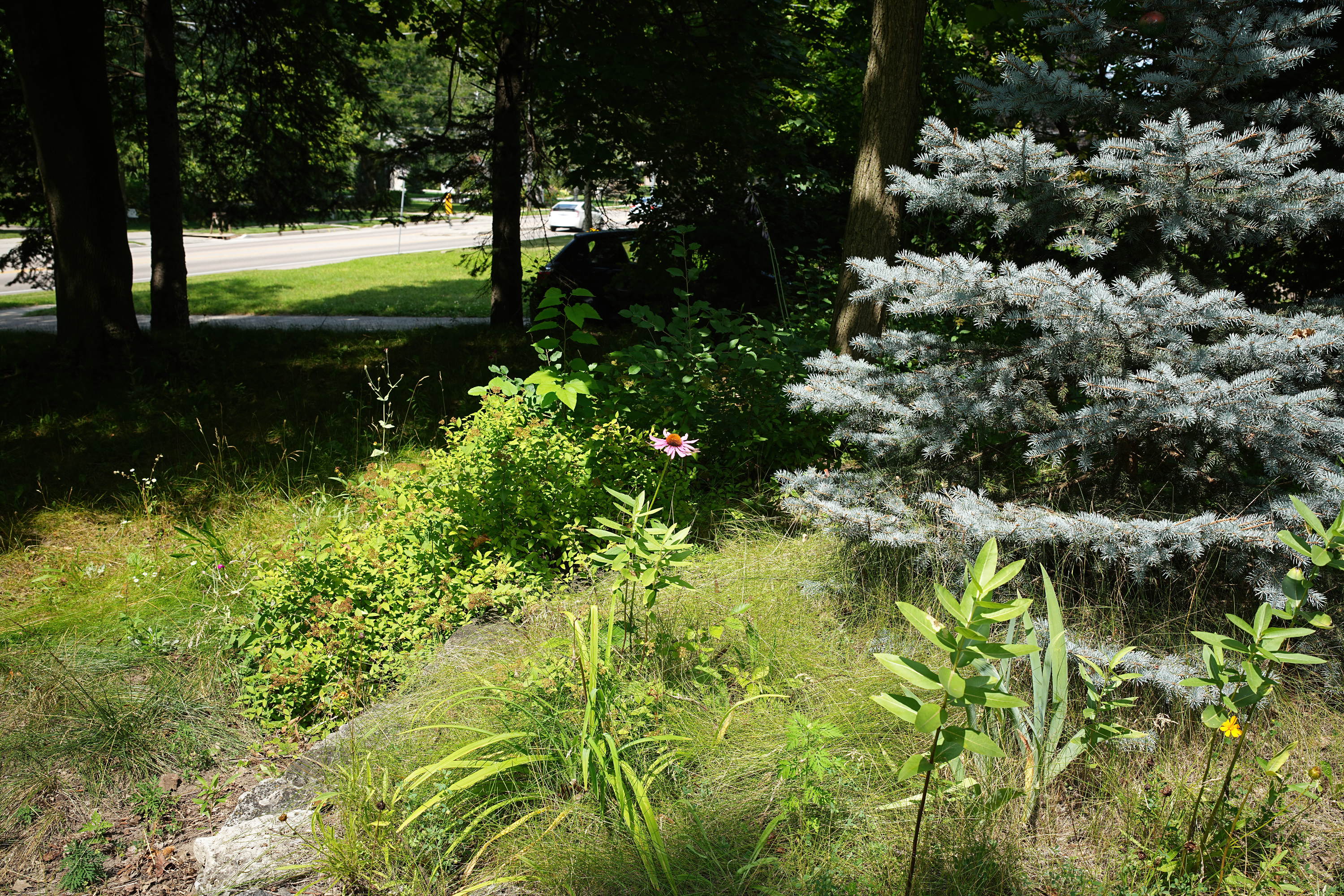
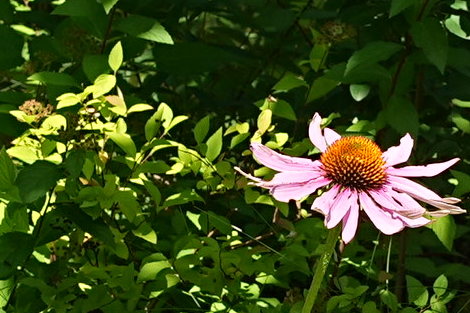
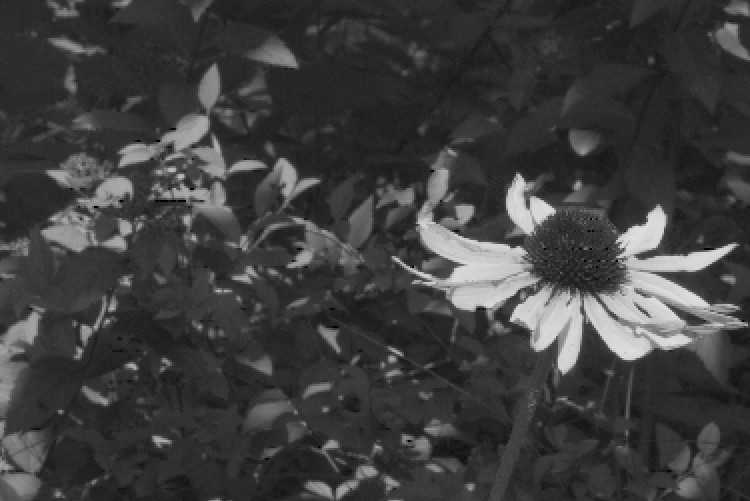
ISO 100
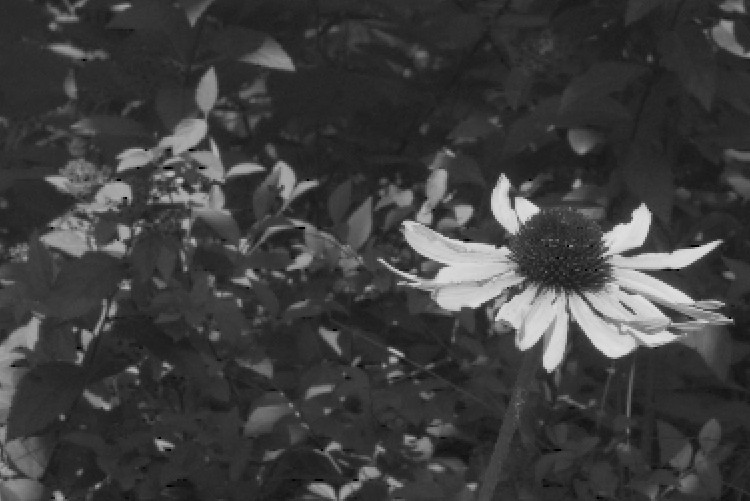
ISO 100
1) Focus on a small(!) object, e.g. measuring 700 pixels on the longer side in a 50MP picture.
2) This object should have fine structure, multiple edges; it must be all in focus, and should appear "sharp" (high micro-contrast). A flower would be a good choice.
3) Acquire 2- 3 images, as the number of observed black dots will be different in the different images. One of them may show more pronounced black stripes than the rest.
4) Shoot uncompressed RAW and view the files in RawDigger (free for a 30 day trial) using the program's default settings, select the blue channel.
Here is an example. The following images are (a) full image reduced to 6MP, (b) a cropped central part of the 50 MP out-of-camera JPG, (c) the same central part as it is seen in RawDigger at ISO 100, (d) a repeat of (c) from a subsequent shot at ISO 100. To better see the black dots/stripes you may want to download these JPGs and take a closer view on your computer.
(sorry, unintentionally, the RAW files of these examples happened to be compressed, not uncompressed files)
ISO 100
ISO 100
Aug 05, 2021 at 06:59 PM
p.4 #9CaptureOne broken for A1.
i don't have much useful information to add other than a data point of 1. i honestly didn't really even read this thread in depth, but the title freaked me out because i shoot the a1 and swear by capture one (am on most current version). well i was worried enough to spend 10 minutes going through my catalogue at shots taken with the a1 looking at 800-1600% so the pixels are SUPER massive and visible and i looked at high contrast things, over-exposed areas, blue areas, in focus areas, ANYTHING... i saw not a single random black dot. and if there were it certainly wasn't relevant to the image on a global level or even at 100-200% magnification. take that fwiw. a data point of 1.
edit: i took no new sample shots, but i viewed my files which were lossless compressed raw
edit: i took no new sample shots, but i viewed my files which were lossless compressed raw
Aug 05, 2021 at 08:41 PM
p.4 #10CaptureOne broken for A1.
ruthenium wrote:
To add to what has been said above: if you own A1 and want to see the "black dots/strips", the following is important.
1) Focus on a small(!) object, e.g. measuring 700 pixels on the longer side in a 50MP picture.
2) This object should have fine structure, multiple edges; it must be all in focus, and should appear "sharp" (high micro-contrast). A flower would be a good choice.
3) Acquire 2- 3 images, as the number of observed black dots will be different in the different images. One of them may show more pronounced black stripes than the rest.
4) Shoot uncompressed...Show more →
Thank you ruthenium, much appreciated.
What is the significance of this?
Is it that the A1 in this case produced a faulty image?
If yes, should Sony be aware of it and correct it?
If no, then what are the implications? Should post-processing software hide it?
Thanks again, K-H.
Aug 05, 2021 at 11:23 PM
p.4 #11CaptureOne broken for A1.
Thanks for the checking this, even if your results do not support my theory .
Luballs wrote:
i don't have much useful information to add other than a data point of 1. i honestly didn't really even read this thread in depth, but the title freaked me out because i shoot the a1 and swear by capture one (am on most current version). well i was worried enough to spend 10 minutes going through my catalogue at shots taken with the a1 looking at 800-1600% so the pixels are SUPER massive and visible and i looked at high contrast things, over-exposed areas, blue areas, in focus areas, ANYTHING... i saw not a single random black dot. and...Show more →
.Luballs wrote:
i don't have much useful information to add other than a data point of 1. i honestly didn't really even read this thread in depth, but the title freaked me out because i shoot the a1 and swear by capture one (am on most current version). well i was worried enough to spend 10 minutes going through my catalogue at shots taken with the a1 looking at 800-1600% so the pixels are SUPER massive and visible and i looked at high contrast things, over-exposed areas, blue areas, in focus areas, ANYTHING... i saw not a single random black dot. and...Show more →
Aug 06, 2021 at 02:07 AM
p.4 #12CaptureOne broken for A1.
k-h.a.w wrote:
Thank you ruthenium, much appreciated.
What is the significance of this?
Is it that the A1 in this case produced a faulty image?
If yes, should Sony be aware of it and correct it?
If no, then what are the implications? Should post-processing software hide it?
Thanks again, K-H.
Well to me:
a.) Looks like Ruthenium’s camera is the second A1 to show black stripes — I still can’t reproduce but I’ll try some more.
b.) Ruthenium is reproducing this and viewing in RawDigger, so this does not seem to be caused by Capture One. It just means Capture One doesn’t try or can’t hide it like some other programs. Should it be able to?
c.) Is this a problem? Either we have a bad batch of A1 bodies, or the rest of us aren’t good at reproducing it but should this happen or should it not? If not, regardless of whether this is a bad batch or impacts all A1s, sounds like Sony should fix?
Thank you ruthenium, much appreciated.
What is the significance of this?
Is it that the A1 in this case produced a faulty image?
If yes, should Sony be aware of it and correct it?
If no, then what are the implications? Should post-processing software hide it?
Thanks again, K-H.
Well to me:
a.) Looks like Ruthenium’s camera is the second A1 to show black stripes — I still can’t reproduce but I’ll try some more.
b.) Ruthenium is reproducing this and viewing in RawDigger, so this does not seem to be caused by Capture One. It just means Capture One doesn’t try or can’t hide it like some other programs. Should it be able to?
c.) Is this a problem? Either we have a bad batch of A1 bodies, or the rest of us aren’t good at reproducing it
but should this happen or should it not? If not, regardless of whether this is a bad batch or impacts all A1s, sounds like Sony should fix?Aug 06, 2021 at 02:16 AM
p.4 #13CaptureOne broken for A1.
Guys, one clarification from my side, because I'm afraid this thread is going into a bit dangerous direction.
I never started this thread with any intent of showing A1 sensor (my copy or in general) faulty behavior. I was honestly believing the issue lies in how CO processes A1 RAWs, as all the other RAW processors produce images without those black artifacts (I did not use RawDigger at the time).
I stand corrected now, as @Daran and @sebbe pointed out, the RAW data already contains those suspicious pixels/stripes. So it seems CO is the only processor that processes RAW data as-is, without "masking" or eliminating outliers (pixels significantly different than its neighbours).
Whether this is good or bad is a personal thing I'd say...
Aug 06, 2021 at 02:17 AM
p.4 #14CaptureOne broken for A1.
And for those who want to try to reproduce the issue, here are the kind of photos that in my experience show the issue most, if not all, of the time:
* bright, rather heavily sun-lit, orange/yellow-ish (Blue channel low, other channels high) flower petals (esp. contrasty edges, so need to be sharp - properly focused)
* ISO100, "normal-ish" focal length preferrably (I used mostly 35-50mm), uncompressed / lossless (in order to eliminate possibility of compression artifacts), all in-cam corrections off (again to minimize the variables)
* view at 100% at least.
Examples (these are embedded jpegs so no black pixels visible, but in RAW they are there):
https://photos.smugmug.com/photos/i-7XNrLbD/0/8c0ba326/XL/i-7XNrLbD-XL.jpg
https://photos.smugmug.com/photos/i-95NNhk6/0/3a66ed43/XL/i-95NNhk6-XL.jpg
https://photos.smugmug.com/photos/i-DcRfLxQ/0/e7bde3ba/XL/i-DcRfLxQ-XL.jpg
https://photos.smugmug.com/photos/i-s3wmdVz/0/1d5f1dd3/XL/i-s3wmdVz-XL.jpg
https://photos.smugmug.com/photos/i-6vrpVz6/0/e0e4c225/XL/i-6vrpVz6-XL.jpg
And a counter example that does not show the black pixel artifacts:
https://photos.smugmug.com/photos/i-8SS94dB/0/f233368c/XL/i-8SS94dB-XL.jpg
All of those are available as RAWs on my gdrive I shared previously:
https://drive.google.com/drive/folders/1MrvSGlwLjwc1ZA9oRsCsMfHDYmecfDOK
Aug 06, 2021 at 03:35 AM
p.4 #15CaptureOne broken for A1.
Well j4nu, thanks for paying tremendous attention to detail and starting this thread.
It seems both Capture one and RawDigger show these black dots
from raw files originating in 2 different A1 cameras.
So unless both these apps are faulty and create these black dots out of thin air
then logic would imply their data must be already in the A1 raw files, no?
If so then Sony needs to get on top of this issue, no?
If the 2 apps are at fault then one would want to know
how do they differ from apps that don’t reveal the problem.
You reported before that ON1 Photo RAW 2021 and
Sony’s own Imaging Edge don’t show the black dots.
So indeed, thanks again for starting this discussion, K-H.
Aug 06, 2021 at 03:57 AM
p.4 #16CaptureOne broken for A1.
k-h.a.w wrote:
Well j4nu, thanks for paying tremendous attention to detail and starting this thread.
Haha, thanks! I guess I'm actually more of a "techie", as I was called out here once, than a photographer so I'm unhealthily intrigued by things like this.
Believe me or not, all I wanted to do is process some raw files and I was just unlucky for CO to be my RAW processor of choice...
k-h.a.w wrote:
It seems both Capture one and RawDigger show these black dots
from raw files originating in 2 different A1 cameras.
So unless both these apps are faulty and create these black dots out of thin air
then logic would imply their data must be already in the A1 raw files, no?
If so then Sony needs to get on top of this issue, no?
If the 2 apps are at fault then one would want to know
how do they differ from apps that don’t reveal the problem.
You reported before that ON1 Photo RAW 2021 and
Sony’s own Imaging Edge don’t show the black...Show more →
Well, this is where it gets slippery... Both RawDigger (which is supposed to show data as close to RAW as possible) and CaptureOne are 3rd party software. So, unless somebody here has some priority relation with Sony tech support, the most likely answer from Sony will be that this is an issue with these programs (as Sony own software and embedded jpegs do not display the issue).
Aug 06, 2021 at 04:46 AM
p.4 #17CaptureOne broken for A1.
j4nu wrote:
Haha, thanks! I guess I'm actually more of a "techie", as I was called out here once, than a photographer so I'm unhealthily intrigued by things like this.
Believe me or not, all I wanted to do is process some raw files and I was just unlucky for CO to be my RAW processor of choice...
from raw files originating in 2 different A1 cameras.
So unless both these apps are faulty and create these black dots out of thin air
then logic would imply their data must be already in the A1 raw files, no?
If so then Sony needs to get on top of this issue, no?
If the 2 apps are at fault then one would want to know
how do they differ from apps that don’t reveal the problem.
You reported before that ON1 Photo RAW 2021 and
Sony’s own Imaging Edge don’t show the black dots.
So indeed, thanks again for starting this discussion, K-H.Well, this is where it gets slippery... Both RawDigger (which is supposed to show data as close to RAW as possible) and CaptureOne are 3rd party software. So, unless somebody here has some priority relation with Sony tech support, the most likely answer from Sony will...Show more →
It seems worth contacting SPS at least? Doesn't hurt to ask. Also, there is a professional partnership between C1 and Sony and that Sony-specific offering, so it's fair to expect C1 to work perfectly with a1 files.
k-h.a.w wrote
Well j4nu, thanks for paying tremendous attention to detail and starting this thread.Believe me or not, all I wanted to do is process some raw files and I was just unlucky for CO to be my RAW processor of choice...
k-h.a.w wrote
It seems both Capture one and RawDigger show these black dotsfrom raw files originating in 2 different A1 cameras.
So unless both these apps are faulty and create these black dots out of thin air
then logic would imply their data must be already in the A1 raw files, no?
If so then Sony needs to get on top of this issue, no?
If the 2 apps are at fault then one would want to know
how do they differ from apps that don’t reveal the problem.
You reported before that ON1 Photo RAW 2021 and
Sony’s own Imaging Edge don’t show the black dots.
So indeed, thanks again for starting this discussion, K-H.
It seems worth contacting SPS at least? Doesn't hurt to ask. Also, there is a professional partnership between C1 and Sony and that Sony-specific offering, so it's fair to expect C1 to work perfectly with a1 files.
Aug 06, 2021 at 05:26 AM
p.4 #18CaptureOne broken for A1.
j4nu wrote:
And for those who want to try to reproduce the issue, here are the kind of photos that in my experience show the issue most, if not all, of the time:
* bright, rather heavily sun-lit, orange/yellow-ish (Blue channel low, other channels high) flower petals (esp. contrasty edges, so need to be sharp - properly focused)
* ISO100, "normal-ish" focal length preferrably (I used mostly 35-50mm), uncompressed / lossless (in order to eliminate possibility of compression artifacts), all in-cam corrections off (again to minimize the variables)
* view at 100% at least.
Examples (these are embedded jpegs so no black pixels visible, but in...Show more →
I am not surprised that the last image (white chrysanthemum) does not show the black dots: the image is mostly out of focus. The image is nice and shows beautiful bokeh but it is indeed a good example of where the dots would not be expected. Perfect focus, high micro contrast, and rich detail (edges) in strong light are the attributes of the images which should be used by those who are interested in examining/replicating the issue (and it would be useful, if more observations were reported).
Aug 06, 2021 at 05:30 AM
p.4 #19CaptureOne broken for A1.
Faraday wrote:
It seems worth contacting SPS at least? Doesn't hurt to ask. Also, there is a professional partnership between C1 and Sony and that Sony-specific offering, so it's fair to expect C1 to work perfectly with a1 files.
I'm not a member unfortunately and I don't really qualify... but my RAWs are available if anyone has the ability to push it through SPS.
As for CO, I reported this issue more than 3 months ago... I think I'm the only one so it's not worth their developers precious time (who I guess are pretty busy right now porting CO to M1).
Aug 06, 2021 at 05:45 AM
p.4 #20CaptureOne broken for A1.
k-h.a.w wrote:
ruthenium wrote:
Thank you ruthenium, much appreciated.
What is the significance of this?
Is it that the A1 in this case produced a faulty image?
If yes, should Sony be aware of it and correct it?
If no, then what are the implications? Should post-processing software hide it?
Thanks again, K-H.
The significant question to me is whether the above reported observations of the black dots/stripes reveal something that is (like it or not) a property of the A1 sensor. To this effect, more than two cameras must be tested, and hopefully other A1 users on this forum would be able to look at the RAW files of their pictures of flowers in RawDigger (which is really easy), or take a picture or two following the approach explained earlier in this thread.
Furthermore, two other questions remain. One is whether the "black dots" is a defect? This must be answered by someone who is an expert in sensors and in raw data conversion. From my very simplistic point of view this seems to be perfectly legitimate when an image in parts of certain colors has little-to-none contribution of blue, as no blue in the red-orange-yellow-green. As was pointed earlier, these colors have no blue component in the sRGB color space. Thus, to me the observations are not unwarranted. It should be mentioned that in addition to the "black dots" (intensity zero) there are additional many points in the images where the blue is low (e.g. 2 - 6 - 10 values), that is nearly black, although not exactly.
The last question is actually the question that started this thread, which is whether Capture One treats the A1 RAW files incorrectly. Considering the above, I would say "yes" simply because the points of blue naturally have low (and in some parts possibly zero) intensity in the red--orange-yellow-green areas. As a user, I expect a RAW convertor to deal with this without producing artifacts (black dots in a yellow picture is an artefact, from a user's perspective).
Edited on Aug 06, 2021 at 06:12 AM · View previous versions
Aug 06, 2021 at 06:06 AM