webzeb
Offline
•
Upload & Sell: Off
|
 p.8 #18 · Struggling with Sony skin tones, want that Canon look, go here --> p.8 #18 · Struggling with Sony skin tones, want that Canon look, go here --> | |
Hello!
I'm currently working on sets of color profiles and presets for the Sony a7R IV.
First step will be a 'neutral' color profile.
It does not aim at getting pleasing results, but a 'neutral basis' to build upon.
Second step will be three sets of color profiles and presets.
They will be built upon the 'neutral profile', but with more subjective and creative adjustements.
Each set will be a post-processing basis for me, fitting a different mood. Of course, that will not avoid processing each picture independently, but I wish it will bring more concistency in my pictures. While not relying on third party color profile or presets, but something more 'personnal'...
This two-step approach aims at being able to adapt my color profiles and presets to any camera with only the first step to be completely redone. Second step should only need some slight adjustments...
(I have a huge backlog of files to process, shot with various cameras...)
Since I only get the camera recently and have been stuck home for the last six weeks, here are examples of the 'neutral' profile applyed to DPReview.com samples (lot of different skin tones and lighting conditions, better to assess how the profile performs than my familly portraits):
Camera JPEG:
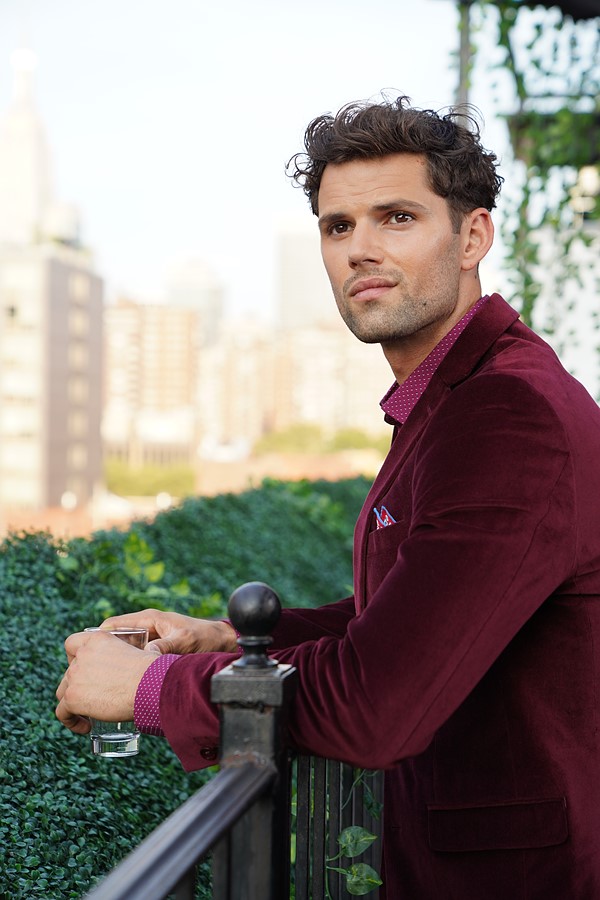
'Neutral' profile:

Note: white balance difference might result from the way WB is handled by the camera vs. the RAW converter.
Note 2: his jacket color is outside sRGB. Different gamut compression between the in-camera RAW converter and the desktop RAW converter I use are very likely to be what cause the saturation differences in the final image.
'Neutral' profile with manually adjusted white balance (with no reference, so highly subjective...):
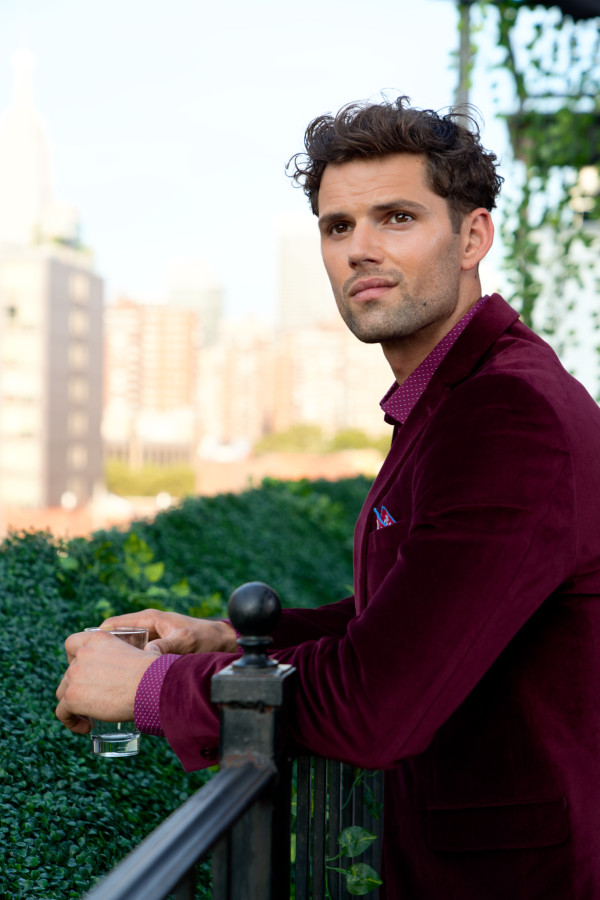
Camera JPEG:

'Neutral' profile':
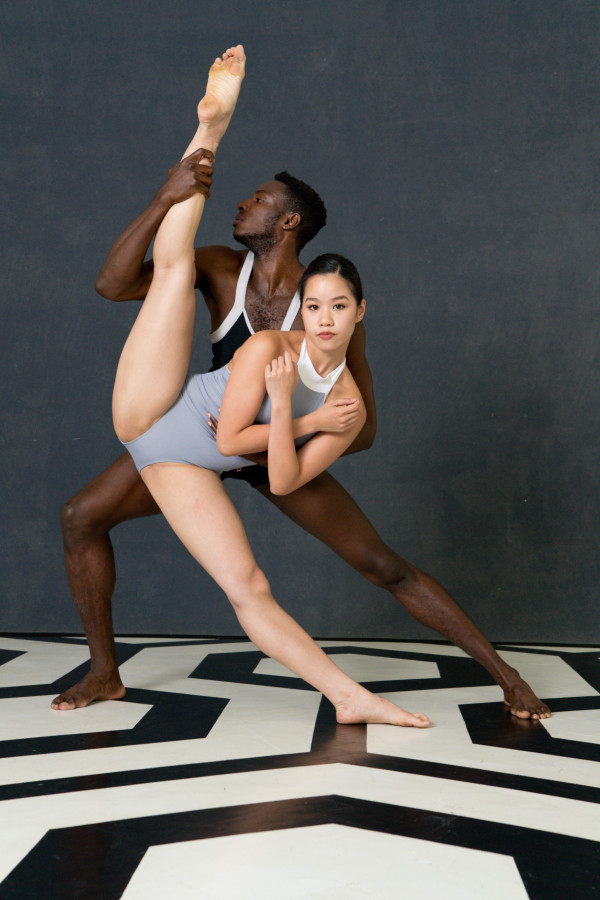
Note: white balance difference might result from the way WB is handled by the camera vs. the RAW converter.
'Neutral' profile with manually adjusted white balance (with no reference, so highly subjective...):
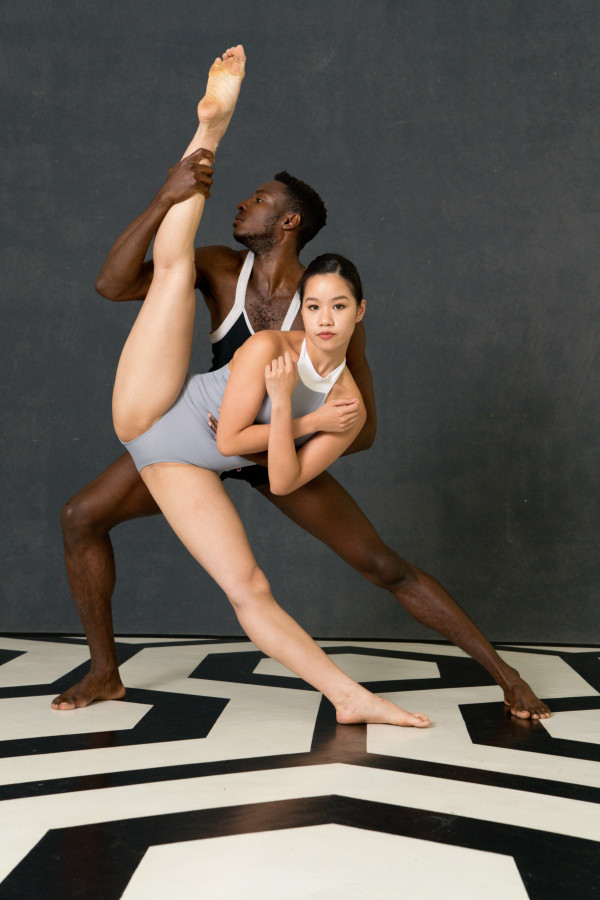
Camera JPEG:

'Neutral' profile':

Note: white balance difference might result from the way WB is handled by the camera vs. the RAW converter.
'Neutral' profile with manually adjusted white balance (with no reference, so highly subjective...):

/!Once gain, the 'neutral' profile does not aim at getting pleasant results, but a 'neutral' basis./!
I used the ACR default tone curve here. It might not be the final tone curve, but it's quite close to the Sony's 'Standard' color profile curve, so it makes the comparison easier. (The Sony it a bit more contrasty though...)
Sony has done a lot of work on the Sony a7R IV color profiles.
Although it's surprinsgly 'neutral' overall, Sony's 'Standard' color profile does desaturates the skin tones in the highlights, what is often considered as more pleasing. My 'neutral' profile does not do that (actually, it does, but to a much lesser extent...).
Sony's 'Standard' profile also has a slightly 'golden' cast, that once again is often considered as more pleasing. My 'neutral' profile doesn't. It's actually a tad reddish on the sample above, but it may be the way WB is handled by my RAW Converter which is a bit different... But if you look closely you'll see that hues variations accross skin tones are quite different between the camera JPEG and the 'neutral' profile. There are more hue variations accross, for example, the 'old guy' face with the in-camera profile. It's quite easy to correct skin hue in post, it's much more difficult to work with these variations: you don't want to remove them (what is easy with let's say Capture One Pro), but you don't want unpleasant hue shift either.
Still work in progress though...
And once again, that's only the first brick of the wall.
|


 ).
).