p.2 #1 · Struggling with Sony skin tones, want that Canon look, go here -->
numbertwo wrote:
I don't think you need an account to download.
In some situations I prefer the presets in the pre-last version, in some others I prefer the last (called RRR preset). The previous is more contrasty and colorful, the RRR is a bit more toned-down, more subtle and elegant. Try all of them, it's free xD. And please share your opinion.
p.2 #2 · Struggling with Sony skin tones, want that Canon look, go here -->
That's because you're clicking and the forum is not redirecting you to the full link but just to the first part instead. Please copy the full link and paste it in the browser...
DaveFP wrote:
Your links take me to the Mega Home page.
p.2 #4 · Struggling with Sony skin tones, want that Canon look, go here -->
numbertwo wrote:
[...] but still in some time I will move to canon (when they add IBIS and more lenses available) because the color science is just better, no matter what some webs or youtubers say, I trust my eyes.
I'd say get the Canon R while it lasts, if by any chance they update the R-series with a more contemporary sensor, it may not have the colors you have grown to like....
p.2 #5 · Struggling with Sony skin tones, want that Canon look, go here -->
The sensor is not really an issue for me, usually people with Sony abuse from DR and the pictures all look like a horrible HDR composition. In properly exposed pictures, the noise is very similar, even i'd say the noise looks finer and more filmic in the eos R vs the a7r2 at 12.800 iso according to my tests. The ibis is the only issue.
vdo1 wrote:
I'd say get the Canon R while it lasts, if by any chance they update the R-series with a more contemporary sensor, it may not have the colors you have grown to like....
p.2 #6 · Struggling with Sony skin tones, want that Canon look, go here -->
numbertwo wrote:
In the first two links there are versions for a9 as well.
When I got the a73 I tested the previously made presets and I found out that because of the change in model-to-model color science they weren't working as good, so I did the new versions using the a73 as Base. Then the a7r3 is just a ported profile from a73, but it would be not working as good... I can do quickly later a port for a9 from the latest Base version but you need to know that.
Anyways, the a7iii is a great improvement in color in light room over the a7r2, and the a9 is even better, maybe the best Sony in color so far.
I still need to say that regarding color, I had the eos r for a couple of weeks and the camera is just awesome in focusing, colors, screen, usability... I really fell in love with the camera but I'll stay in Sony a bit longer because of the ibis.
Thank you for the profile! I compared the file rflata9.dcp to my X-Rite generated profile and I have to say I prefer the X-Rite more. This profile is a bit too green.
p.2 #8 · Struggling with Sony skin tones, want that Canon look, go here -->
numbertwo wrote:
The sensor is not really an issue for me, usually people with Sony abuse from DR and the pictures all look like a horrible HDR composition. In properly exposed pictures, the noise is very similar, even i'd say the noise looks finer and more filmic in the eos R vs the a7r2 at 12.800 iso according to my tests. The ibis is the only issue.
Woot we discuss color science and menu science but dismiss sensor science?
p.2 #10 · Struggling with Sony skin tones, want that Canon look, go here -->
You shouldn't try only the dcp, the dcp is meant to work together with the xmp, the dcp is just a plain ported profile from Canon and it's normal it has funky colors. Furthermore, try it in real pictures, not in synthetic tests, this is the problem with Sony, being great at synthetic test but then real life pictures... hiepphotog wrote:
Thank you for the profile! I compared the file rflata9.dcp to my X-Rite generated profile and I have to say I prefer the X-Rite more. This profile is a bit too green.
p.2 #11 · Struggling with Sony skin tones, want that Canon look, go here -->
To me, the differences in sensor shadow noise are not big enough to make up for the differences in color. Canon pictures are always right ooc, with pleasing white balance and pleasing colors, same as the iPhone compared with some android phones. The android might have more detail and be better in the synthetic tests, but when you just look at the pictures, I always pic the iPhone. This is the problem with Sony, Sony people focus in all the technical part, and canon people just take photos. That's why most professionals still nowadays choose canon and don't complain about the sensor punctuation in dxomark.
vdo1 wrote:
Woot we discuss color science and menu science but dismiss sensor science?
p.2 #12 · Struggling with Sony skin tones, want that Canon look, go here -->
numbertwo wrote:
This is the problem with Sony, Sony people focus in all the technical part, and canon people just take photos.
THAT must be why the Canon subforum is always dead, everyone is out taking amazing photos that they never post
Browsing through the Sony image sharing threads vs the Canon sharing threads, I'm left with two conclusions:
1) The Sony photographers are markedly more talented on FM than the Canon photographers
OR
2) The Sonys, in particular the R bodies, are just better in various ways to the high end Canon bodies
p.2 #13 · Struggling with Sony skin tones, want that Canon look, go here -->
RoamingScott wrote:
THAT must be why the Canon subforum is always dead, everyone is out taking amazing photos that they never post
Browsing through the Sony image sharing threads vs the Canon sharing threads, I'm left with two conclusions:
1) The Sony photographers are markedly more talented on FM than the Canon photographers
OR
2) The Sonys, in particular the R bodies, are just better in various ways to the high end Canon bodies
I have no doubt that Sony people in online forums are way more talented than canon people. Most canon users look amateurs in comparison, even not really knowing how to use a camera sometimes.
But looking at pictures out from this or other forums, looking at photography work, professional portrait work, Sony pictures use to have this veil of unnatural feeling to them, and canon pictures just look right. Even in this forum, when looking at portraits by people, they're technically perfect most of the time, but the skin color, the HDR feeling, I don't know, I don't feel they're natural.
p.2 #14 · Struggling with Sony skin tones, want that Canon look, go here -->
numbertwo wrote:
You shouldn't try only the dcp, the dcp is meant to work together with the xmp, the dcp is just a plain ported profile from Canon and it's normal it has funky colors. Furthermore, try it in real pictures, not in synthetic tests, this is the problem with Sony, being great at synthetic test but then real life pictures...
Right on. I didn't use the XMP file before. I used the 1 and 4. I didn't have anything synthetic file to look at. I used my real life shot. My X-Rite profile is quite close to this with a bit more saturation in the Red. I like the red on yours better. Skin tone wise, there is a slight difference between the two profiles but I can't say yours is better than the X-Rite. Thank you!
p.2 #15 · Struggling with Sony skin tones, want that Canon look, go here -->
People who like Sony color don't need this and shouldn't bother. But people who prefer Canon color but use Sony for other reasons may find Juan's profile & preset to be a great service. I use both Canon and Sony, and I'm happy that with Juan's profile my Sony gives me Canon color (or very close to it). For me it's one less thing to worry about. I think it's a great achievement.
p.2 #17 · Struggling with Sony skin tones, want that Canon look, go here -->
ajamils wrote:
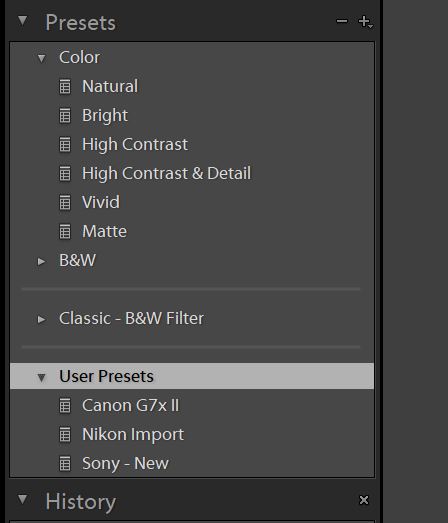
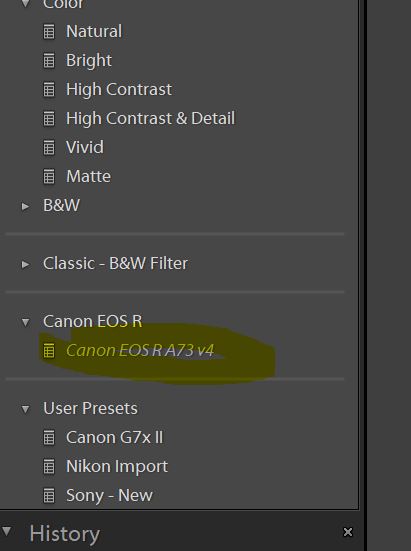
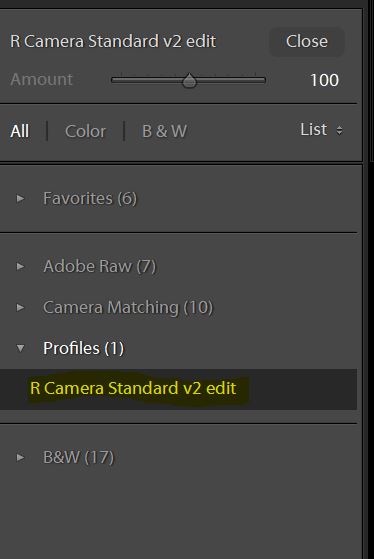
How did you make it work. I imported them in both under profile and preset but I don't see the new profile there. What am I doing wrong?
The preset should be under your presets list, apply the preset and automatically the preset chooses the right profile that's already installed.
p.2 #18 · Struggling with Sony skin tones, want that Canon look, go here -->
numbertwo wrote:
The preset should be under your presets list, apply the preset and automatically the preset chooses the right profile that's already installed.
There is nothing under my preset list. I have restarted LR as well but no joy.
p.2 #19 · Struggling with Sony skin tones, want that Canon look, go here -->
ajamils wrote:
There is nothing under my preset list. I have restarted LR as well but no joy.
Click on that plus sign on the top right of that screenshot. Add the preset, locate your XMP.
p.2 #20 · Struggling with Sony skin tones, want that Canon look, go here -->
Click on that plus sign on the top right of that screenshot. Add the preset, locate your XMP.
Figured it out, I was importing the DCP file in the preset and that's why it was not showing up. Once I imported the XMP, it worked and now I can see a profile that I can select but doing so makes my A7rIII files HORRIBLE.
Is there anything else I need to do? I'm using the V4 version.