fredmiranda.com
Login

Moderated by: Fred Miranda
  New fredmiranda.com Mobile Site
  New Feature: SMS Notification alert
  New Feature: Buy & Sell Watchlist
  

FM Forums | Sony Forum | Join Upload & Sell

1       2       3              7              9       end
  

Archive 2019 · Struggling with Sony skin tones, want that Canon look, go here -->


numbertwo
Offline
• • •
Upload & Sell: Off
p.8 #1 · Struggling with Sony skin tones, want that Canon look, go here -->


RoamingScott wrote:
Lisa knows how to process skin to not look like it's orange, even with very warm scenes. She's in a class by herself.

I really don't understand why you're wringing your hands over Sony when you can just go shoot Canon and get the look you want.

Ultimately the reason most presets don't work very well with Sony is the way the Sony red channel works compared to Canon in my experience. However, I have Mastin Labs presets that are made for Sony and love quite a few of them as starting points. My favorite presets are Replichrome, though.


Thank you so much for your reply.
I'll try replichrome to see if I like the starting look!
Lisa is awesome no doubt, and I love that her photos really have natural looking skintones, and this is what is not easy to get with Sony, the natural feeling, unless you are in a few lighting situations. I love my Sony or other reasons and not only the color is important to me, so nowadays my main camera is a Sony and I'm happy with it, and I'm learning to manage my colors the way I like. I'm asking for Sony photographers with this or this other look because it's the kind of color I like, and if I can find someone with that style shooting Sony maybe he/she can be of any help to get me closer from the Sony files.
Mastin labs is sometimes too much saturation, even with canon files, frequently clipping channels. But they look quite nice in my 6d or in my m50, and with the Sony, most of the time they are off...

Anyways, could you describe how the red channel work in Sony and canon sensors?


Sep 27, 2019 at 10:33 PM
LBJ2
Offline
• • • • •
Upload & Sell: On
p.8 #2 · Struggling with Sony skin tones, want that Canon look, go here -->


Sep 28, 2019 at 06:21 AM
vdo1
Offline
• • • •
Upload & Sell: Off
p.8 #3 · Struggling with Sony skin tones, want that Canon look, go here -->


frezeiss wrote:
Not really, because theres just some people that doesnt like that sterotype Canon skin tones and theres nothing wrong with that, or the ones whos loving the Canon colors. Just dont go out all the time saying Sony colors is shit.


It’s the internet effect. Before internet, you could have tried something like walking into a bikers bar to tell them in no ambiguous terms that Harley sucks. It would had been though followed by a short but intense educational event that would have taught you that such behaviour was not acceptable to them.

In the internet era you can do that without any fear of ever getting educated.


Sep 28, 2019 at 08:10 AM
EstherSP
Offline
• •
Upload & Sell: Off
p.8 #4 · Struggling with Sony skin tones, want that Canon look, go here -->


frezeiss wrote:
Not really, because theres just some people that doesnt like that sterotype Canon skin tones and theres nothing wrong with that, or the ones whos loving the Canon colors. Just dont go out all the time saying Sony colors is shit.


I have a soft spot for Canon color - people love it for good reason. That said, I have found that using Capture 1 for raw processing yields great color, especially on the latest mark 3 bodies. Still not happy with the RAW processor in LR with Sony files, but I suppose it's only a matter of time till Adobe calibrates the profiles.


Sep 29, 2019 at 09:07 AM
frezeiss
Offline
• • •
Upload & Sell: Off
p.8 #5 · Struggling with Sony skin tones, want that Canon look, go here -->


EstherSP wrote:
I have a soft spot for Canon color - people love it for good reason. That said, I have found that using Capture 1 for raw processing yields great color, especially on the latest mark 3 bodies. Still not happy with the RAW processor in LR with Sony files, but I suppose it's only a matter of time till Adobe calibrates the profiles.


Well Im sure in a few fields such as portraiture that maybe those Canon colors are desirable but as I said on an earlier post, the color differences I get with my mark 3 bodies as opose from my mark 1 bodies is for the worse. I do landscapes, street, documentary stuff. However, the mark 3 files are much more malleable in PP. Interesting to see how will the next A7mk4 interpret colors..

I wouldnt hold my breath for Adobe though..


Sep 29, 2019 at 09:15 AM
EstherSP
Offline
• •
Upload & Sell: Off
p.8 #6 · Struggling with Sony skin tones, want that Canon look, go here -->


frezeiss wrote:
Well Im sure in a few fields such as portraiture that maybe those Canon colors are desirable but as I said on an earlier post, the color differences I get with my mark 3 bodies as opose from my mark 1 bodies is for the worse. I do landscapes, street, documentary stuff. However, the mark 3 files are much more malleable in PP. Interesting to see how will the next A7mk4 interpret colors..

I wouldnt hold my breath for Adobe though..


Well I really only do portraits, as primarily got my camera to take photos of my family, and I found the A7R3 to be a significant improvement in terms of skintones from the A7R2. For whatever reason, I find that in direct sun the A7R3 does an amazing job with skintones, but indoors and artificial lighting it tends to have a harder time nailing the right white balance. I'm not a professional though, so perhaps it is user error haha


Sep 29, 2019 at 09:25 AM
frezeiss
Offline
• • •
Upload & Sell: Off
p.8 #7 · Struggling with Sony skin tones, want that Canon look, go here -->


EstherSP wrote:
Well I really only do portraits, as primarily got my camera to take photos of my family, and I found the A7R3 to be a significant improvement in terms of skintones from the A7R2. For whatever reason, I find that in direct sun the A7R3 does an amazing job with skintones, but indoors and artificial lighting it tends to have a harder time nailing the right white balance. I'm not a professional though, so perhaps it is user error haha


IIRC, indoor white balance is Canon's strong point. There's a video by Sean Tucker in Youtube, how to normalize Skin tones (Sony - Canon) you should check it. I'm lazy these days, usually slap on my fave VSCO film preset and tweak from there.


Sep 29, 2019 at 09:37 AM
EstherSP
Offline
• •
Upload & Sell: Off
p.8 #8 · Struggling with Sony skin tones, want that Canon look, go here -->


frezeiss wrote:
IIRC, indoor white balance is Canon's strong point. There's a video by Sean Tucker in Youtube, how to normalize Skin tones (Sony - Canon) you should check it. I'm lazy these days, usually slap on my fave VSCO film preset and tweak from there.


Ha yes, that is what black and white conversion is for!


Sep 29, 2019 at 09:42 AM
vdo1
Offline
• • • •
Upload & Sell: Off
p.8 #9 · Struggling with Sony skin tones, want that Canon look, go here -->


EstherSP wrote:
I have a soft spot for Canon color - people love it for good reason. That said, I have found that using Capture 1 for raw processing yields great color, especially on the latest mark 3 bodies. Still not happy with the RAW processor in LR with Sony files, but I suppose it's only a matter of time till Adobe calibrates the profiles.


I would continue with Capture 1. I suspect that at some point there was some sort of disagreement between Adobe and Sony / Fuji, and that's the reason we saw an arrangement between the latter and Phase One to offer (very deep initially) discounts for their respective brands. My suspicion is that, unless they eventually come to some (expensive?) agreement, we won't see more than minimal support for Sony in Adobe whatever.


Sep 29, 2019 at 09:43 AM
EstherSP
Offline
• •
Upload & Sell: Off
p.8 #10 · Struggling with Sony skin tones, want that Canon look, go here -->


vdo1 wrote:
I would continue with Capture 1. I suspect that at some point there was some sort of disagreement between Adobe and Sony / Fuji, and that's the reason we saw an arrangement between the latter and Phase One to offer (very deep initially) discounts for their respective brands. My suspicion is that, unless they eventually come to some (expensive?) agreement, we won't see more than minimal support for Sony in Adobe whatever.


There are a lot of things I find atrocious regarding the Adobe suite. The only thing that keeps me with them is photoshop, and the catalog system.

That said, I upgraded to C1 12 recently and it is a significant upgrade in terms of usability from 11, and the file/catalog system in some ways is far more logical. I found it a bit intimidating at first, but once I realized that the catalog system is essentially a file folder hierarchy, it made it much easier. I have close to 20k photos in my LR catalog now...


Sep 29, 2019 at 09:49 AM
imagesfromobjects
Offline
• • • •
Upload & Sell: Off
p.8 #11 · Struggling with Sony skin tones, want that Canon look, go here -->


Oh, I remember this thread! The guy never did post the raw files, but still blamed the "anomaly" on the camera.


Hmmmmm.

numbertwo wrote:
Pd: there's also this metameric failure of the sensor, achieving every color we want from a raw sometimes is not as easy as it would seem. For example, the Sony sensors often have problems with shades of purple/blues, whereas canon does just fine.

https://farm2.staticflickr.com/1934/30830994217_2281c33519_o.jpg

From this thread
https://www.fredmiranda.com/forum/topic/1569396/1


Sep 29, 2019 at 03:46 PM
imagesfromobjects
Offline
• • • •
Upload & Sell: Off
p.8 #12 · Struggling with Sony skin tones, want that Canon look, go here -->


Oh, it was you!!!

Yeah, I'd say I was still waiting for the raw files, but I actually forgot about it until someone used your unverifiable glitch as a citation.

The internet is a strange place.


Todd Baugh wrote:
I posted that comparison and was asked about providing RAW files so I could prove the issue. I guess people think I'm bashing Sony or a Canon fanboy....I love both systems and it's just something surprising that I had happen to me. Now, you could say it was a WB issue on one shot, but I had to correct it in every single shot i took of the bride for the day....even formals under very controlled lighting.

I am thankful for "numbertwo" and his efforts to make the Sony colors more like Canon. As I said before, "more accurate colors"
...Show more


Sep 29, 2019 at 03:53 PM
LBJ2
Offline
• • • • •
Upload & Sell: On
p.8 #13 · Struggling with Sony skin tones, want that Canon look, go here -->


imagesfromobjects wrote:
Oh, it was you!!!

Yeah, I'd say I was still waiting for the raw files, but I actually forgot about it until someone used your unverifiable glitch as a citation.

The internet is a strange place.


He did post the raw files and I loaded them up in Imaging Edge app. I noticed in the EXIF he ( maybe by accident) had selected Vivid picture mode on the Sony Portrait Style settinging. I was able to replicate the hair color mystery by doing the same.

https://www.fredmiranda.com/forum/topic/1593574/4#14837223


Sep 29, 2019 at 03:54 PM
imagesfromobjects
Offline
• • • •
Upload & Sell: Off
p.8 #14 · Struggling with Sony skin tones, want that Canon look, go here -->


[SOLVED]


LBJ2 wrote:
As I posted earlier, the blue hair samples were just too far out of the box to be relevant IMO. I was easily able to replicate blue vs purple hair in the one Sony RAW file simply by changing the Portrait setting from Neutral to Vivid in Sony's Imaging Edge Edge desktop app and then saving that color skew to a raw file. To me this extreme color deviation was user error. I also looked at the strange WB settings for both cameras 6000K for the one Sony file I examined.


Sep 29, 2019 at 04:00 PM
pointbob
Offline
• • •
Upload & Sell: Off
p.8 #15 · Struggling with Sony skin tones, want that Canon look, go here -->


numbertwo wrote:
Again, you shouldn't use the.dcp profile alone. The dcp is meant to be used together with the xmp preset. Choose the preset and it automatically applies the profile and the rest of the settings.
The profile alone is a funky color mess dull thing.


What and how does one access the xmp preset to make the dcp work?

I installed the a7iii dcp preset in latest lightroom (no xmp file i could see)..it says it installed but i cannot see where it is or how to access...


Apr 19, 2020 at 02:09 PM
derKoekje
Offline
• • •
Upload & Sell: Off
p.8 #16 · Struggling with Sony skin tones, want that Canon look, go here -->


I’ll admit I have a hard time with Sony skin tones...

... but then I’ve always had an equally hard time with Canon skin tones. I think what it boils down to is that it takes experience and a case-by-case approach because human skin tones are one of the easiest things to get wrong. At least that’s what I thought until I got the Ricoh GR III which is honestly nailing colors for me all the time.


Apr 20, 2020 at 06:12 AM
fuzzykeys
Offline
• • •
Upload & Sell: Off
p.8 #17 · Struggling with Sony skin tones, want that Canon look, go here -->


I have not exactly fully switched to C1 but I am now using it in tandem with Adobe products. C1 definitely handles a7iii skin tones and dynamic range recovery better than LR. I still use LR for my catalog, I shoot uncompressed raw and convert to DNG to save space. For portraits, I open the DNG in C1, make some raw tweaks, send to PS, do any retouching required, use Camera Raw as a plug-in in PS for my color grading base, tweak a bit more with adjustment layers, sharpen, and then save the PSD or TIFF back out to LR. I will then sometimes apply a vignette, tweak my white and black points, add grain, etc.

One interesting concept for skin tones that I have recently discovered from a talented photographer on instagram that spends a lot of time researching and experimenting with color is the idea of optimal hue variability. His idea is that the optimal starting white balance for portrait skin tones is the one in which you can see all of the different hues present in the skin and makeup. The easiest way to do this is simply to crank the saturation up all the way up and adjust the WB until you see separation in skin tones and makeup. For lighter skinned subjects, you are looking to see yellows, reds, a bit of pink in cheeks and the nose, maybe some lilac in the eye makeup, and then you decrease the saturation back to a normal level. You will wind up with something that looks just a bit cold, but you can compensate with color grading, split toning, etc. to get a warmer image that still has more diverse and less color-contaminated skin tones. I am still messing around with this myself but I think it’s a very promising concept.


Apr 20, 2020 at 01:53 PM
webzeb
Offline

Upload & Sell: Off
p.8 #18 · Struggling with Sony skin tones, want that Canon look, go here -->


Hello!

I'm currently working on sets of color profiles and presets for the Sony a7R IV.

First step will be a 'neutral' color profile.
It does not aim at getting pleasing results, but a 'neutral basis' to build upon.

Second step will be three sets of color profiles and presets.
They will be built upon the 'neutral profile', but with more subjective and creative adjustements.
Each set will be a post-processing basis for me, fitting a different mood. Of course, that will not avoid processing each picture independently, but I wish it will bring more concistency in my pictures. While not relying on third party color profile or presets, but something more 'personnal'...

This two-step approach aims at being able to adapt my color profiles and presets to any camera with only the first step to be completely redone. Second step should only need some slight adjustments...
(I have a huge backlog of files to process, shot with various cameras...)

Since I only get the camera recently and have been stuck home for the last six weeks, here are examples of the 'neutral' profile applyed to DPReview.com samples (lot of different skin tones and lighting conditions, better to assess how the profile performs than my familly portraits):

Camera JPEG:
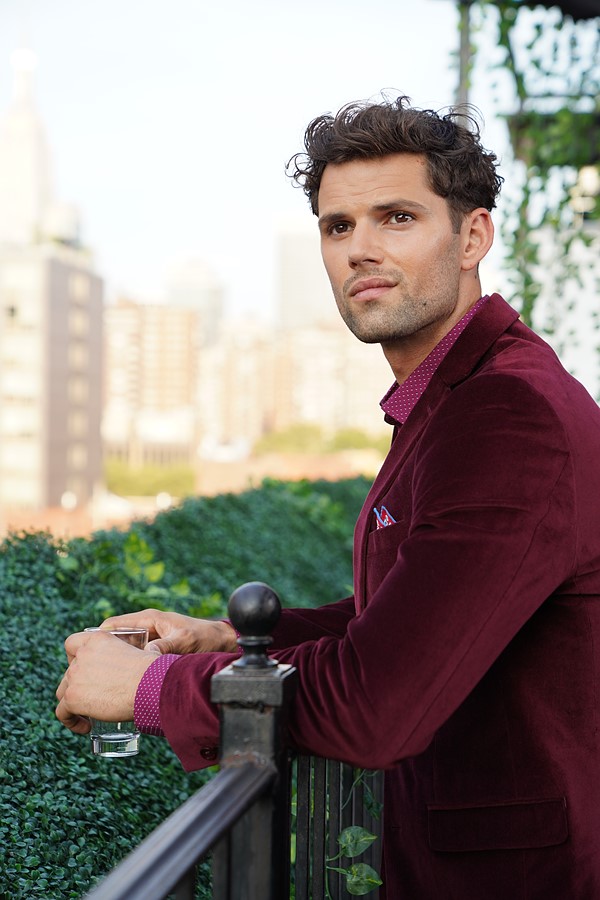

'Neutral' profile:

Note: white balance difference might result from the way WB is handled by the camera vs. the RAW converter.
Note 2: his jacket color is outside sRGB. Different gamut compression between the in-camera RAW converter and the desktop RAW converter I use are very likely to be what cause the saturation differences in the final image.

'Neutral' profile with manually adjusted white balance (with no reference, so highly subjective...):
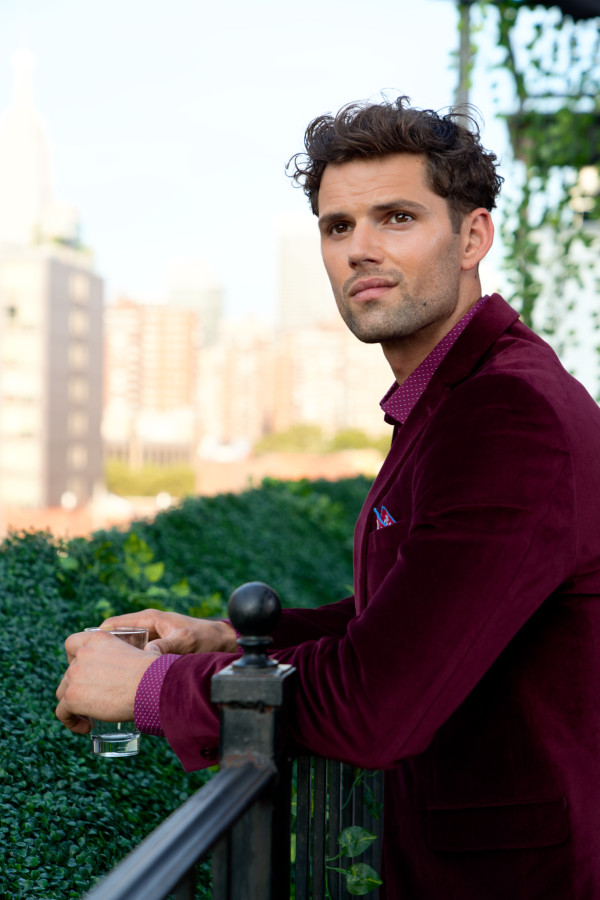

Camera JPEG:


'Neutral' profile':
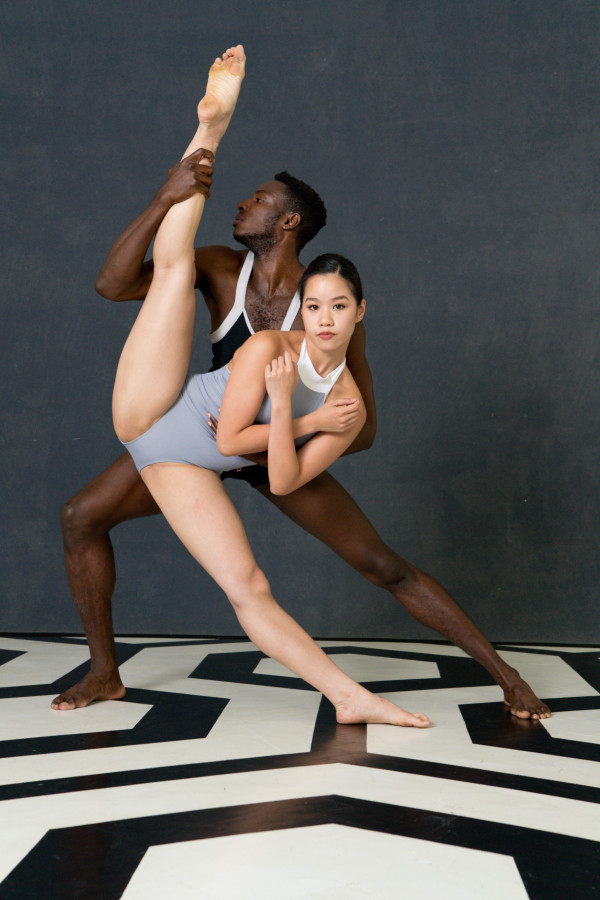
Note: white balance difference might result from the way WB is handled by the camera vs. the RAW converter.

'Neutral' profile with manually adjusted white balance (with no reference, so highly subjective...):
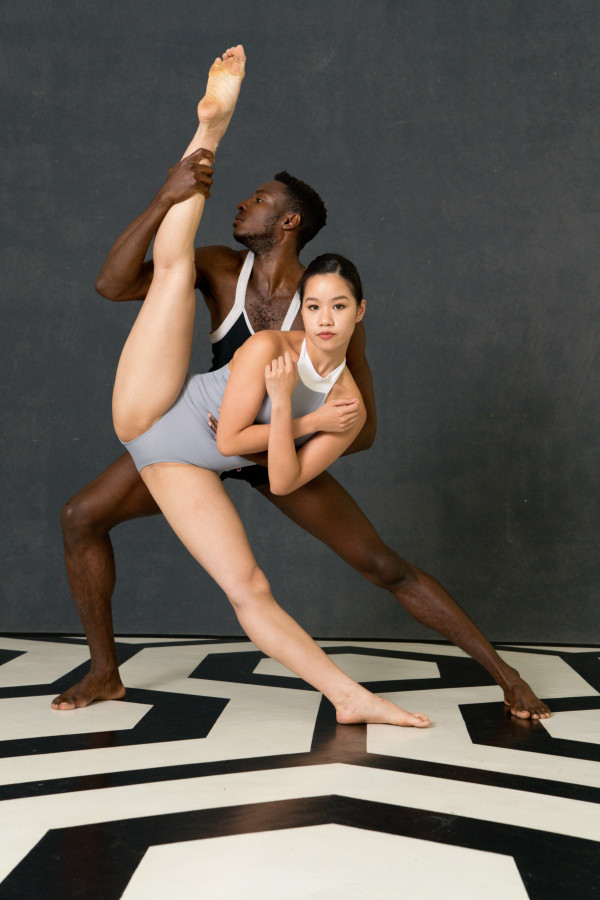

Camera JPEG:


'Neutral' profile':

Note: white balance difference might result from the way WB is handled by the camera vs. the RAW converter.

'Neutral' profile with manually adjusted white balance (with no reference, so highly subjective...):


/!Once gain, the 'neutral' profile does not aim at getting pleasant results, but a 'neutral' basis./!
I used the ACR default tone curve here. It might not be the final tone curve, but it's quite close to the Sony's 'Standard' color profile curve, so it makes the comparison easier. (The Sony it a bit more contrasty though...)
Sony has done a lot of work on the Sony a7R IV color profiles.
Although it's surprinsgly 'neutral' overall, Sony's 'Standard' color profile does desaturates the skin tones in the highlights, what is often considered as more pleasing. My 'neutral' profile does not do that (actually, it does, but to a much lesser extent...).
Sony's 'Standard' profile also has a slightly 'golden' cast, that once again is often considered as more pleasing. My 'neutral' profile doesn't. It's actually a tad reddish on the sample above, but it may be the way WB is handled by my RAW Converter which is a bit different... But if you look closely you'll see that hues variations accross skin tones are quite different between the camera JPEG and the 'neutral' profile. There are more hue variations accross, for example, the 'old guy' face with the in-camera profile. It's quite easy to correct skin hue in post, it's much more difficult to work with these variations: you don't want to remove them (what is easy with let's say Capture One Pro), but you don't want unpleasant hue shift either.

Still work in progress though...

And once again, that's only the first brick of the wall.


Apr 20, 2020 at 03:09 PM
ganji12
Offline

Upload & Sell: Off
p.8 #19 · Struggling with Sony skin tones, want that Canon look, go here -->


Hi people.

What i have see here change my life!
2 years ago i was shooting with canon and then i switch to sony.
The first years was a mess my picture looking so crap (i work really sunny place), previous years i found my way editing sony on lr classic but so much work.
And today i discover your DCP files and how simple it is to edit with!! So hudge thanks to all of us!

But messages on this board are old (and also my english is not so good so with you technical term i dont understand everything ).

So my question:
Someone can give me the lynk to dl file for a7III (find v1 on first page but maybe there new version?)
Also have an a6500 so if someone has a files or a lynk to have a DCP files canon style also.

Hudge thanks to this forum!


Jan 30, 2021 at 03:48 PM
bobby350z
Offline
• • • •
Upload & Sell: On
p.8 #20 · Struggling with Sony skin tones, want that Canon look, go here -->


Only A7rIV here. Used to be a Canon shooter and now shoot Sony and Fuji GFX. I don't see any issues with any of these cameras.


Jan 30, 2021 at 04:21 PM
1       2       3              7              9       end


FM Forums | Sony Forum | Join Upload & Sell

1       2       3              7              9       end


Welcome back
Log in to your account