p.3 #1 · Struggling with Sony skin tones, want that Canon look, go here -->
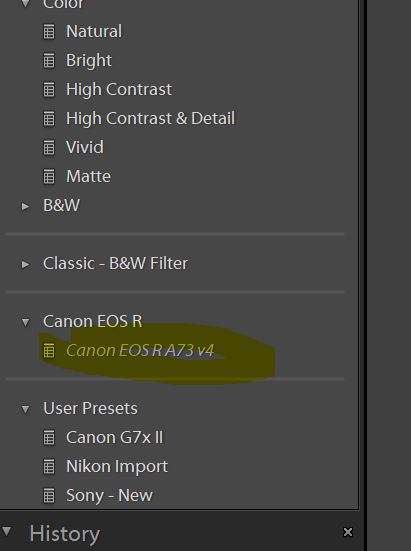
Figured it out, I was importing the DCP file in the preset and that's why it was not showing up. Once I imported the XMP, it worked and now I can see a profile that I can select but doing so makes my A7rIII files HORRIBLE.
Is there anything else I need to do? I'm using the V4 version.
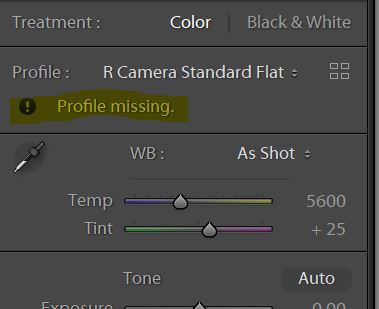
Maybe you grabbed the wrong DCP. Mine says R Camera Standard Flat.
p.3 #3 · Struggling with Sony skin tones, want that Canon look, go here -->
Figured it out, I was importing the DCP file in the preset and that's why it was not showing up. Once I imported the XMP, it worked and now I can see a profile that I can select but doing so makes my A7rIII files HORRIBLE.
Is there anything else I need to do? I'm using the V4 version.
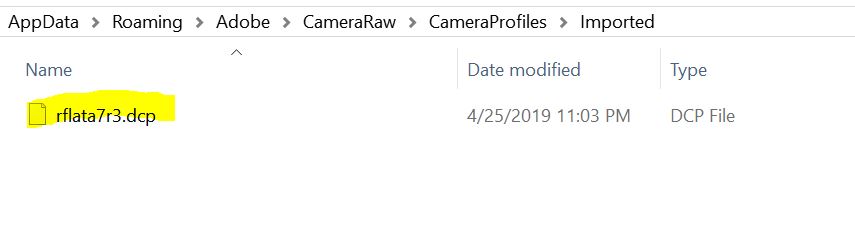
Did you pick both files from the same last folder? Because that dcp is meant to work with the older presets based on a7r2, and your xmp is one of the last versions meant to work with the r camera flat dcp. If your dcp filename is rflata7r3.dcp and it's showing in light room as r camera standard v2 then I made a mistake and I will fix it later today.
p.3 #4 · Struggling with Sony skin tones, want that Canon look, go here -->
numbertwo wrote:
Did you pick both files from the same last folder? Because that dcp is meant to work with the older presets based on a7r2, and your xmp is one of the last versions meant to work with the r camera flat dcp. If your dcp filename is rflata7r3.dcp and it's showing in light room as r camera standard v2 then I made a mistake and I will fix it later today.
Yes, they are from same folder. I only downloaded v4 folder. When I select the Preset, it gives me an error that flat profile not found.
p.3 #5 · Struggling with Sony skin tones, want that Canon look, go here -->
ajamils wrote:
Yes, they are from same folder. I only downloaded v4 folder. When I select the Preset, it gives me an error that flat profile not found.
OK I'm so sorry, so I made a mistake and the R3 is not working. I'll fix it later today (I'm not at home now). I don't have the r3 and I did not test it, sorry. In the mean time you can try the older presets and profiles based on the r2 and see if you like them...
p.3 #6 · Struggling with Sony skin tones, want that Canon look, go here -->
numbertwo wrote:
OK I'm so sorry, so I made a mistake and the R3 is not working. I'll fix it later today (I'm not at home now). I don't have the r3 and I did not test it, sorry. In the mean time you can try the older presets and profiles based on the r2 and see if you like them...
No worries. I am in no hurry. Just wanted to test them out. I do not have A7rIII anymore anyway . Going to take some new pics and try out preset wtih A9. Hopefully, it works with that.
p.3 #8 · Struggling with Sony skin tones, want that Canon look, go here -->
blob loblaw wrote:
does this work with capture one?
No, only adobe, but the camera profile in capture one is quite good out of the box. You might try Scotty Wang profiles for capture one (for a7r2/3 and a9 but you can use them In any camera, those are not camera dependant).
p.3 #11 · Struggling with Sony skin tones, want that Canon look, go here -->
numbertwo wrote:
Canon pictures are always right ooc, with pleasing white balance and pleasing colors, same as the iPhone compared with some android phones.
I found this pretty telling, as iPhone and Canon (at least the older iphones, 5S/6 era) always processed photos in a very similar way. Both were on the warmer than real life side, with an emphasis on the yellows of skin, and good handling of greens.
I think you simply have a preference for that warmer, creamier look. I know I always have! I've always preferred Canon for any skin work, but I greatly prefer Sony for nature and landscape work. Sony colors are scary accurate to the real world, but as we know, that's not always great for portraiture. Would definitely disagree that Canon is better for EVERY situation, though.
I must also be blind, because I can't tell any meaningful difference between the Canon and Sony files above.
p.3 #12 · Struggling with Sony skin tones, want that Canon look, go here -->
The blues & greens are obviously more vibrant in those examples. But the profiles mentioned here are lost on me. The "flat" profile is just that....I'm likely not doing something right though.
RoamingScott wrote:
I found this pretty telling, as iPhone and Canon (at least the older iphones, 5S/6 era) always processed photos in a very similar way. Both were on the warmer than real life side, with an emphasis on the yellows of skin, and good handling of greens.
I think you simply have a preference for that warmer, creamier look. I know I always have! I've always preferred Canon for any skin work, but I greatly prefer Sony for nature and landscape work. Sony colors are scary accurate to the real world, but as we know, that's not always great for portraiture. Would definitely disagree that Canon is better for EVERY situation, though.
I must also be blind, because I can't tell any meaningful difference between the Canon and Sony files above....Show more →
p.3 #14 · Struggling with Sony skin tones, want that Canon look, go here -->
It's very difficult to do it exactly the same, but I ensure you the Canon always look better.
Here you have 1000 jpg out of the camera from a test with another friend comparing a73 and canon eos r. Same lenses (sigma 35 and canon 70-200) and Sony 85 in some other obviously only in the Sony.
The color in the Canon is simply better everytime, there's no need to edit the pictures. The blindest person is the one covering his eyes.
p.3 #15 · Struggling with Sony skin tones, want that Canon look, go here -->
Again, you shouldn't use the.dcp profile alone. The dcp is meant to be used together with the xmp preset. Choose the preset and it automatically applies the profile and the rest of the settings.
The profile alone is a funky color mess dull thing.
KarmaKramer wrote:
The blues & greens are obviously more vibrant in those examples. But the profiles mentioned here are lost on me. The "flat" profile is just that....I'm likely not doing something right though.
p.3 #16 · Struggling with Sony skin tones, want that Canon look, go here -->
Roger that.
numbertwo wrote:
Again, you shouldn't use the.dcp profile alone. The dcp is meant to be used together with the xmp preset. Choose the preset and it automatically applies the profile and the rest of the settings.
The profile alone is a funky color mess dull thing.
p.3 #17 · Struggling with Sony skin tones, want that Canon look, go here -->
numbertwo wrote:
It's very difficult to do it exactly the same, but I ensure you the Canon always look better.
Here you have 1000 jpg out of the camera from a test with another friend comparing a73 and canon eos r. Same lenses (sigma 35 and canon 70-200) and Sony 85 in some other obviously only in the Sony.
The color in the Canon is simply better everytime, there's no need to edit the pictures. The blindest person is the one covering his eyes.
Well this is where you have totally lost me. Even the best Canon image can stand some post processing. When I shot exclusively Canon, I still did significant processing on every picture.
p.3 #19 · Struggling with Sony skin tones, want that Canon look, go here -->
The same mega link folder, I removed the flata7r3.dcp file and added the flata7r3fix.dcp file that should be working.
The xmp files are the same, no need to change.
Of course I don't support the zip files that the OP shared in the thread, I gave my original mega folders lol.
ajamils wrote:
Is that in version 4 as well or did you upload a new zip?
p.3 #20 · Struggling with Sony skin tones, want that Canon look, go here -->
RoamingScott wrote:
[...]
Well this is where you have totally lost me. Even the best Canon image can stand some post processing. When I shot exclusively Canon, I still did significant processing on every picture.
Well there's this category of images (usually referred to as "snapshots") that, while they could use some post processing, are not worth the effort as they are of little actual value. It appears that numbertwo has found that the Canon R is more adept at producing those to his taste. "De gustibus et coloribus non est disputandum".


 . Going to take some new pics and try out preset wtih A9. Hopefully, it works with that.


