farski wrote:
On the D700 there's a setting that, when in A or S mode, allows the unused command dial to act as exposure compensation. I can't seem to find that on the Z6. Does anyone know if there's still a way to do that?
I'm not sure if this is what you mean but anyways... I set "Easy Exposure Compensation" (b2) to ON. That allows me to use the rear command dial for exposure compensation without having to press the exposure compensation button (+/-) first. I've used this option on my previous DSLRs and F6. I believe you can also set the native Z lens control rings to adjust exposure compensation but I haven't tried that as I'd rather stick to what I know. To be clear, I use the Z7 but I'd assume the Z6 has the same options.
Random thought, but I was thinking about why Nikon decided to limit the EFCS up to 1/2000 on the Z6/Z7.
I initially found it kind of annoying because most mirrorless cameras have much higher EFCS max shutter speed (fuji and sony specifically). However, I now remember having issues with banding on my old A7Rii bodies when I pushed the shutter speed up past 1/1000 and used strobes in HSS. Was a pain to have to remember to turn off EFCS on the Sony bodies when I knew I was using flash and higher shutter speeds, as sometimes I'd forget and wouldn't notice the banding until I got the images into LR. I believe it has something to do with how the strobe pulses the flash in HSS mode (as in normal flash sync speeds it's just one continuous flash) and how it doesn't play well with the EFCS.
In a way having a 1/2000 SS limit on EFCS is a good thing as it reduces the chances of banding in this increasingly common flash technique. As an aside, DSLRs do not have this issue - it's limited to mirrorless cameras.
sungphoto wrote:
Random thought, but I was thinking about why Nikon decided to limit the EFCS up to 1/2000 on the Z6/Z7.
I initially found it kind of annoying because most mirrorless cameras have much higher EFCS max shutter speed (fuji and sony specifically). However, I now remember having issues with banding on my old A7Rii bodies when I pushed the shutter speed up past 1/1000 and used strobes in HSS. Was a pain to have to remember to turn off EFCS on the Sony bodies when I knew I was using flash and higher shutter speeds, as sometimes I'd forget and wouldn't notice the banding until I got the images into LR. I believe it has something to do with how the strobe pulses the flash in HSS mode (as in normal flash sync speeds it's just one continuous flash) and how it doesn't play well with the EFCS.
In a way having a 1/2000 SS limit on EFCS is a good thing as it reduces the chances of banding in this increasingly common flash technique. As an aside, DSLRs do not have this issue - it's limited to mirrorless cameras....Show more →
The issue with EFCS and high shutter speeds isn't limited to just strobe work. Sony discusses some potential side effects here:
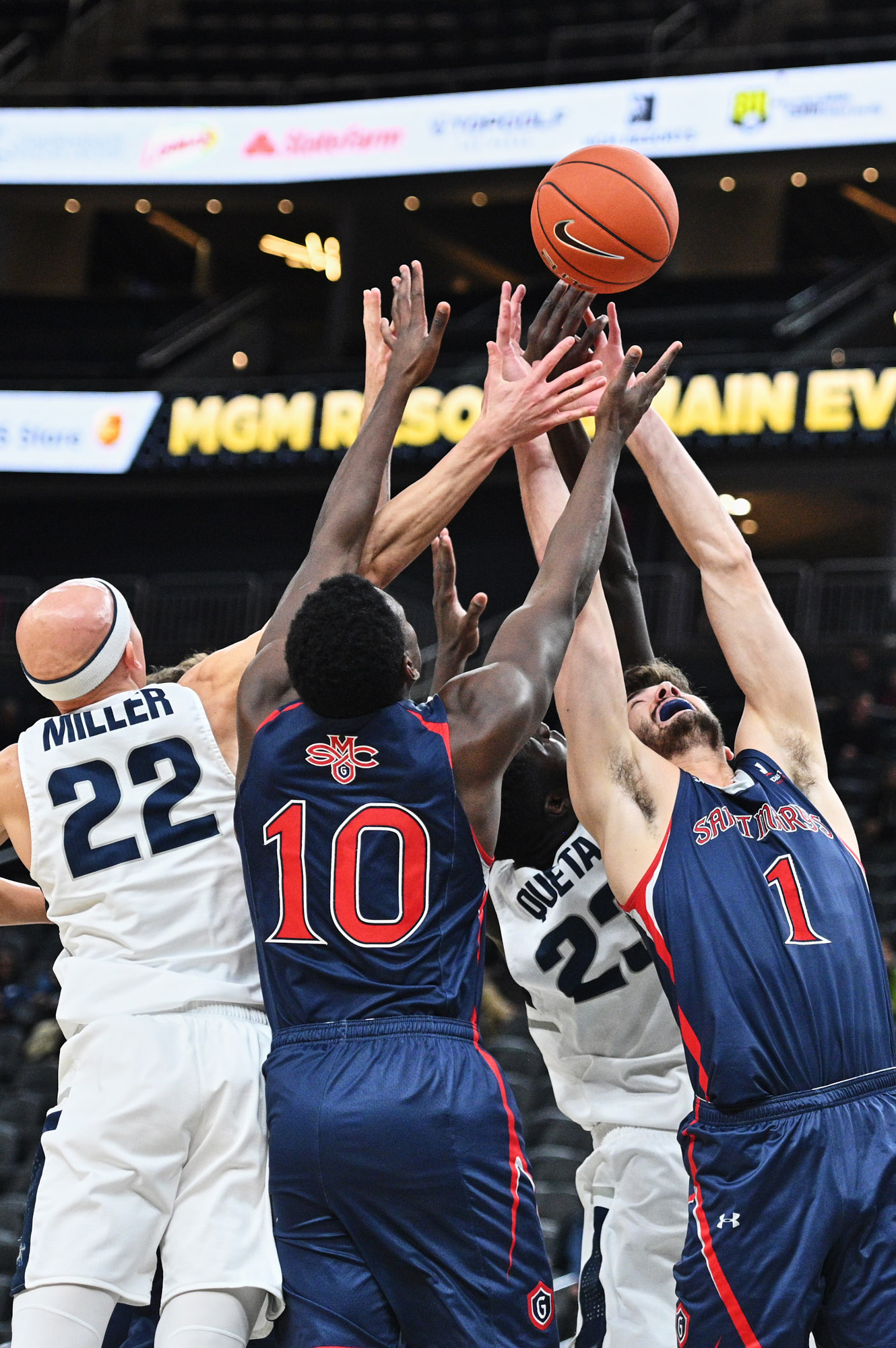
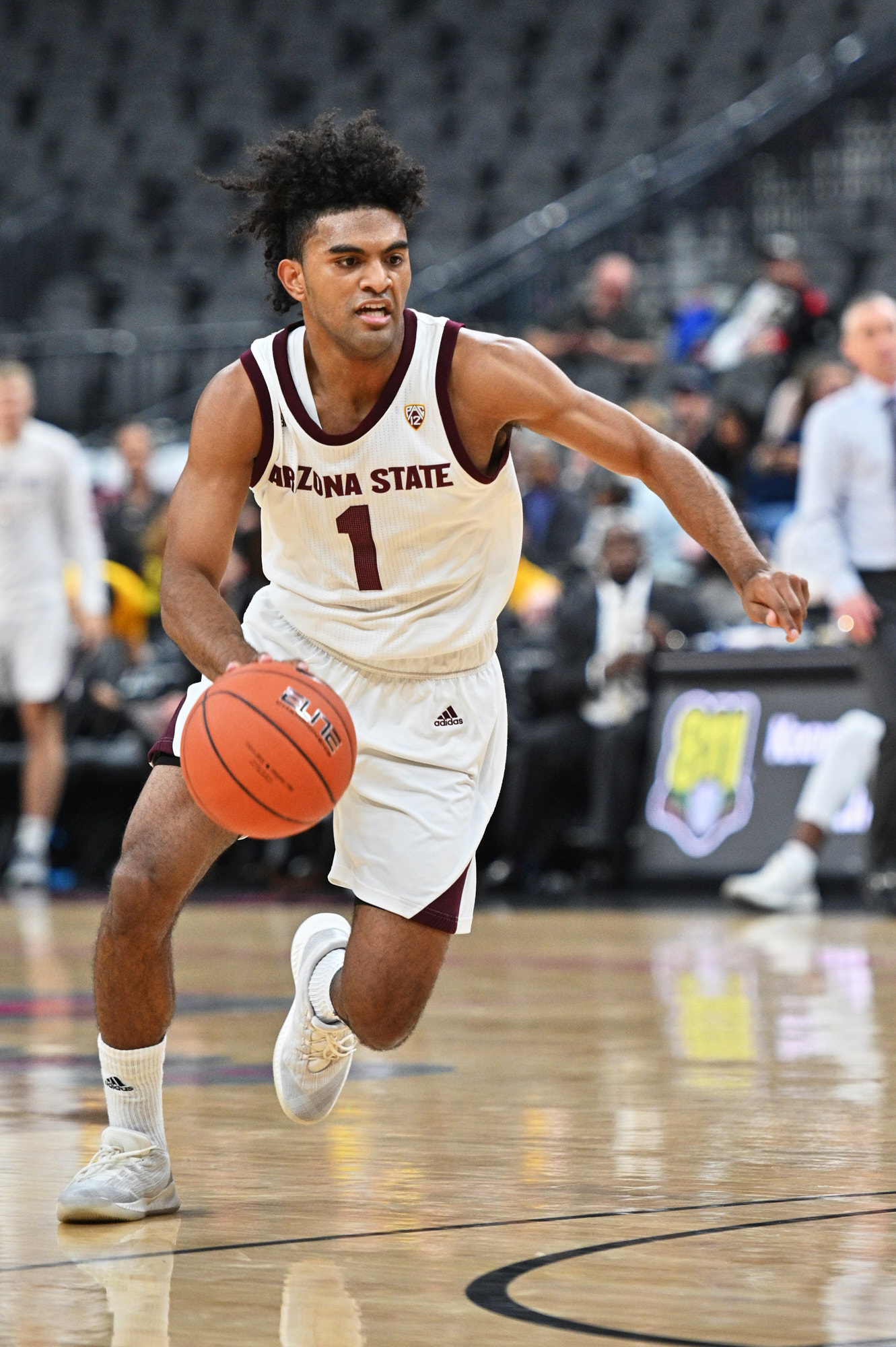
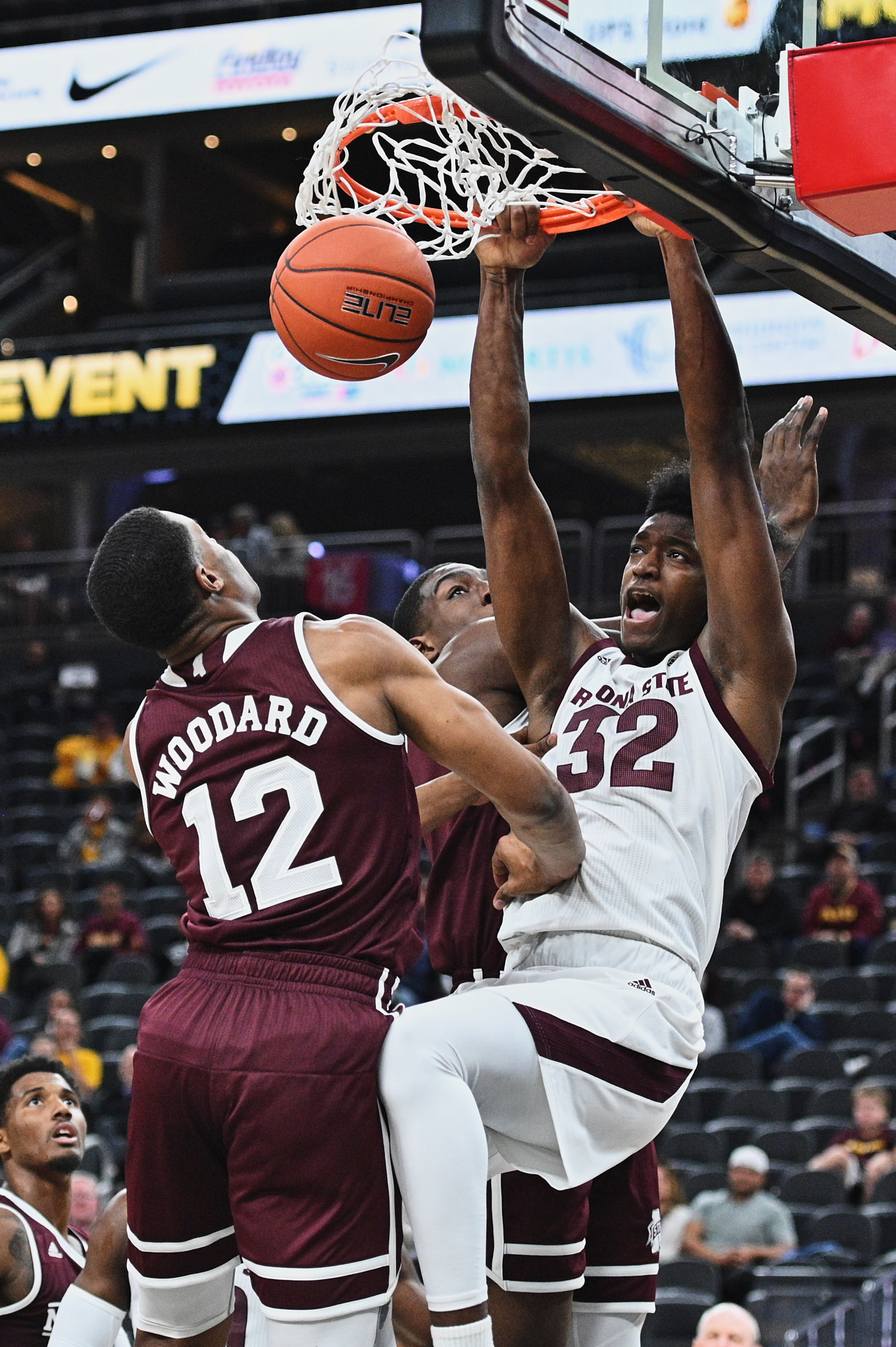
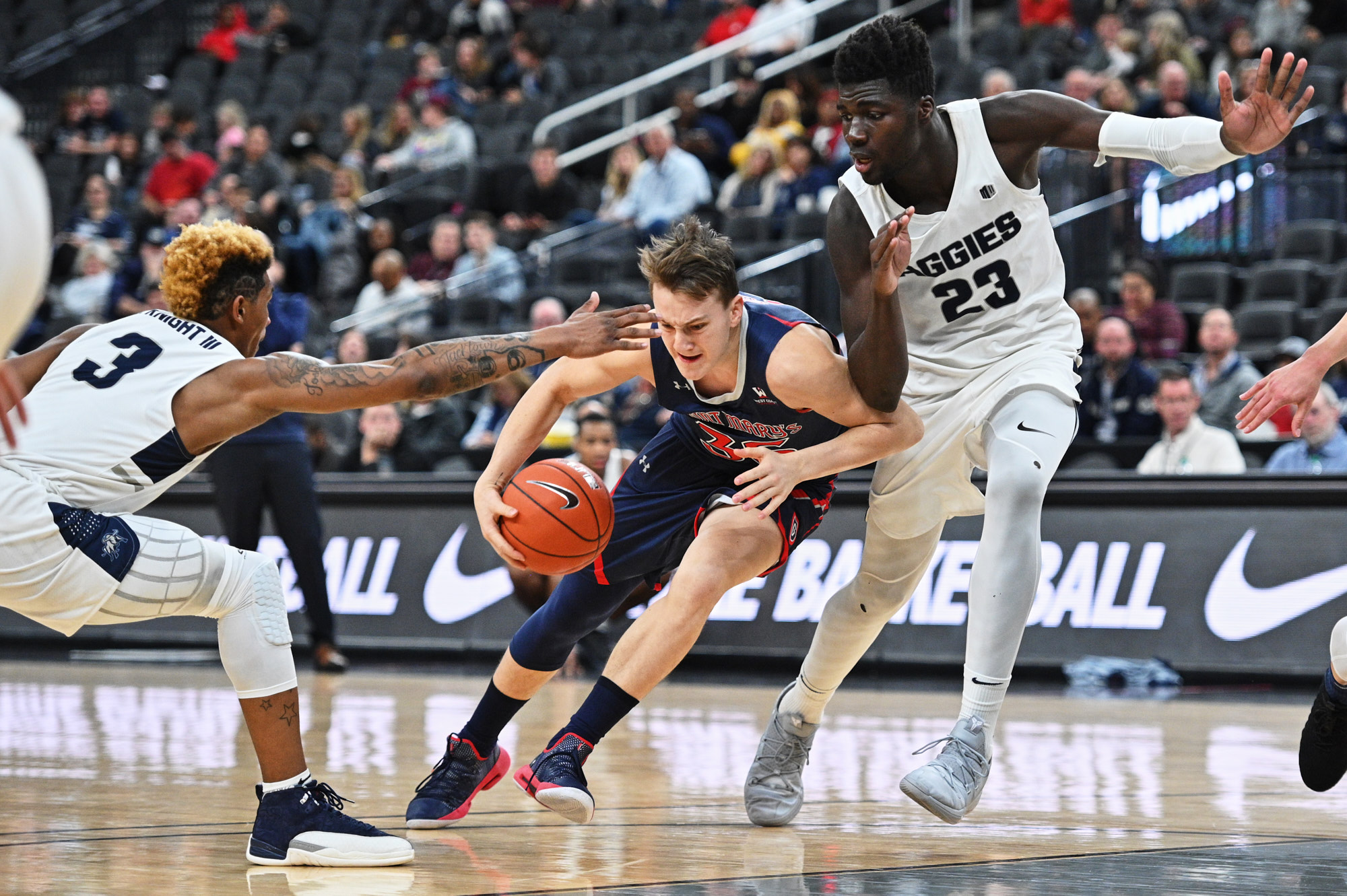
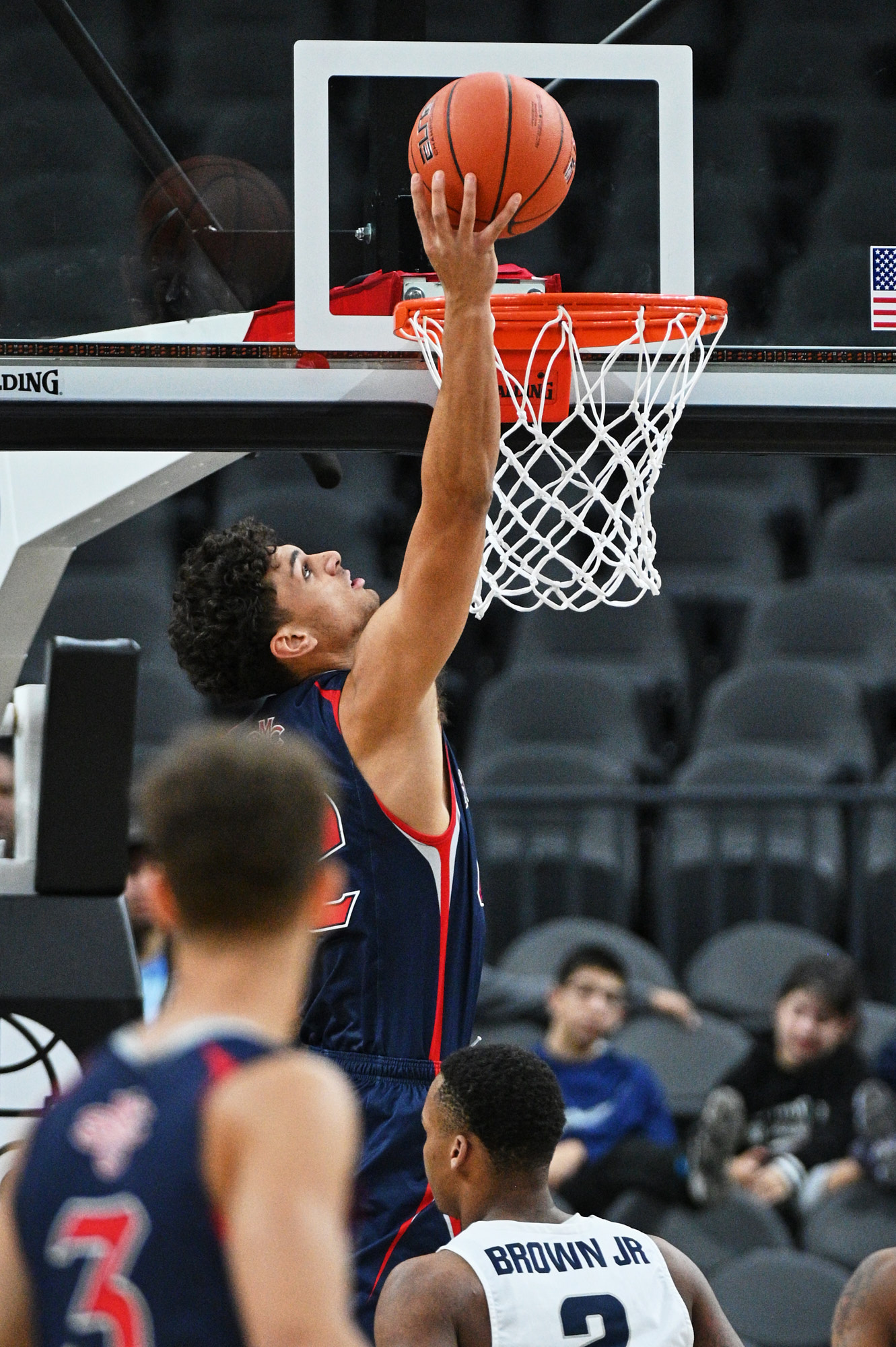
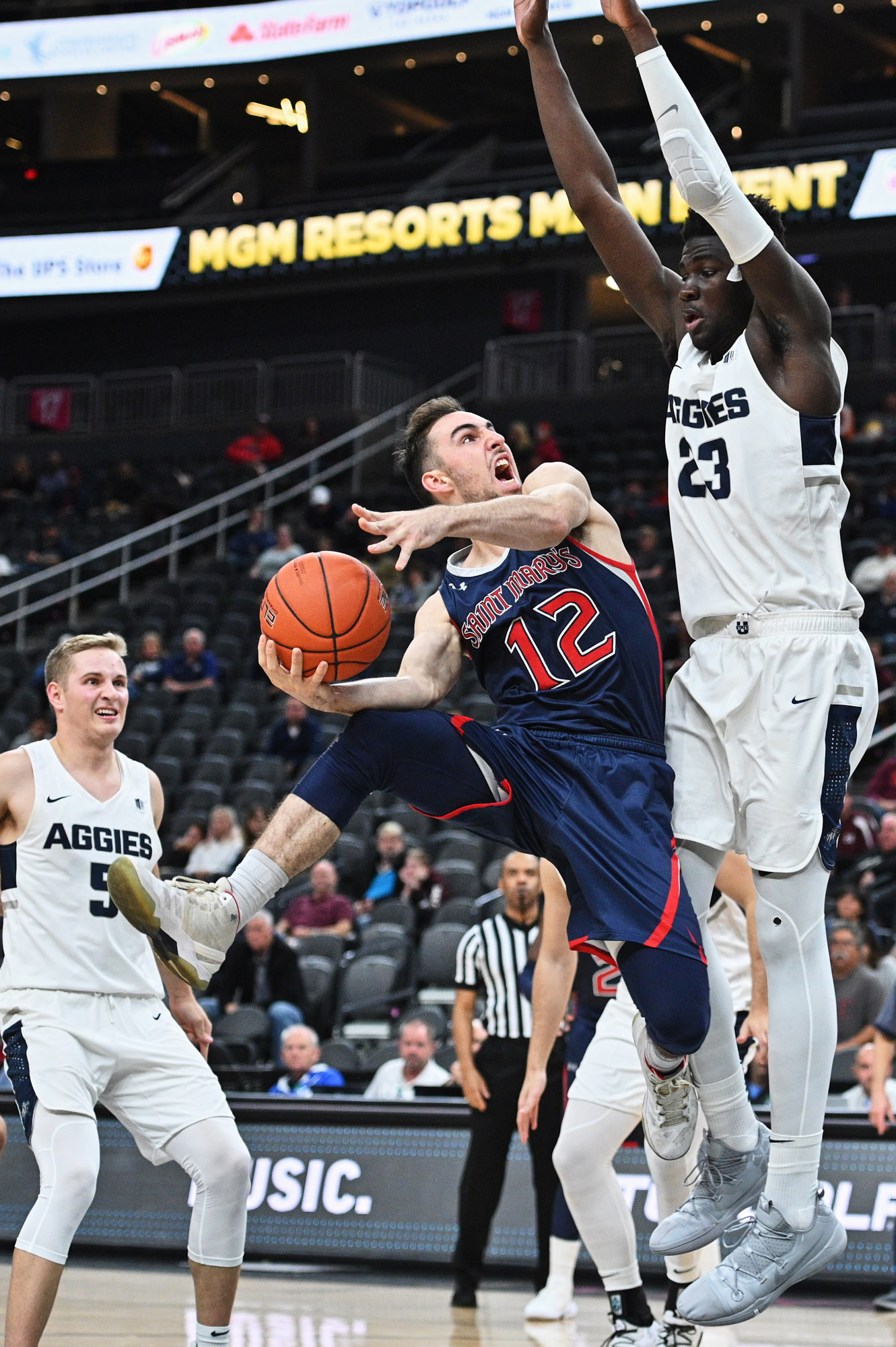
so, after using the z6 in both indoor basketball and hockey situations, i can firmly say that Autofocus is very very good. Not sure what the reviewers have been using, but i feel as though in capable hands, there is no problems whatsoever for sports shooting and tracking. im using AF-C Dynamic AF, back button focusing, Continuous H+, jpg. Used with both my 70-200 VR2, and 200-400 vr2 tonight.
player was charging toward
locked on and stuck with the player
200-400 shot thru traffic locked out from the 3pt line
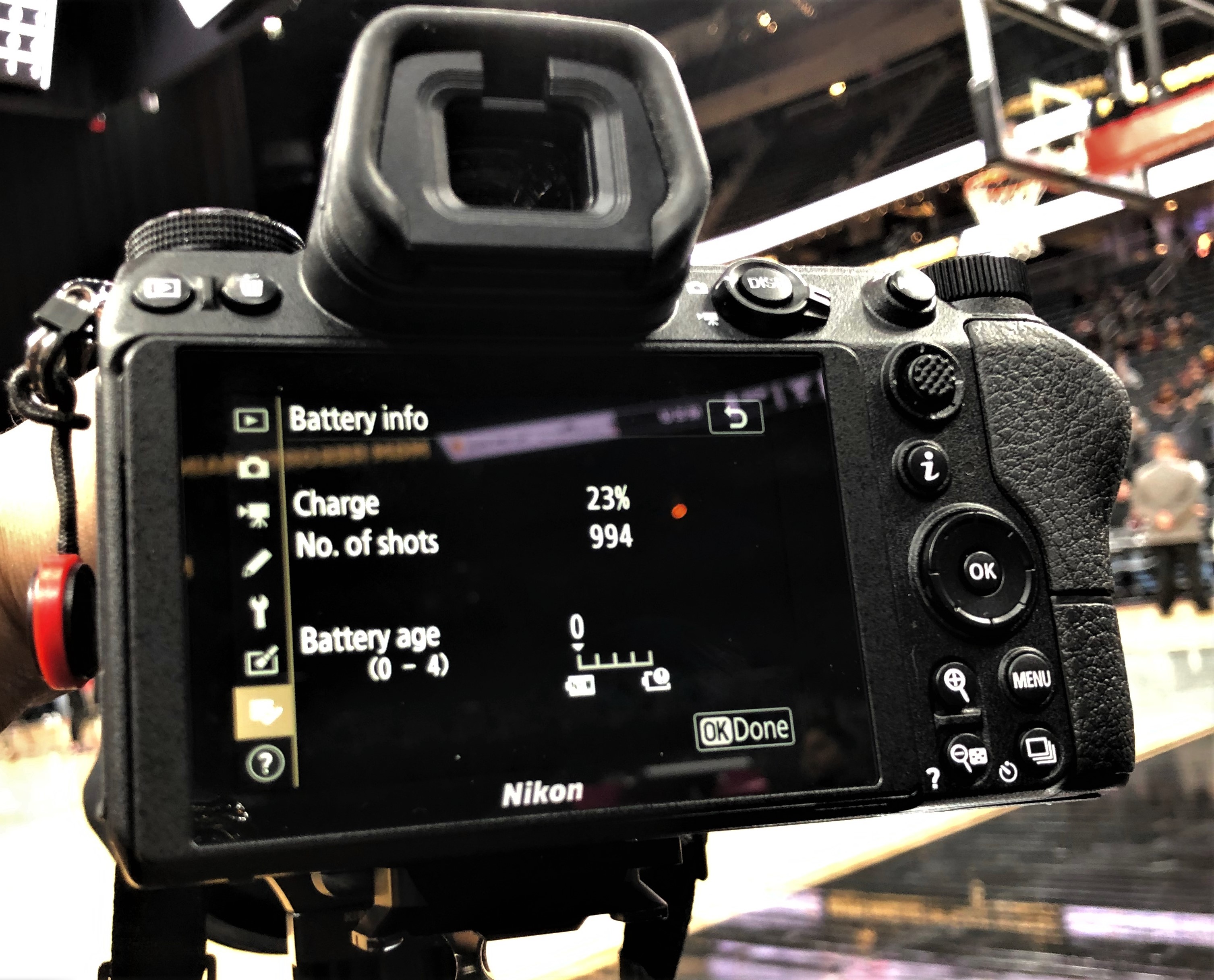
and the proof the CIPA battery rating is so wrong, so so wrong.
turbodude wrote:
so, after using the z6 in both indoor basketball and hockey situations, i can firmly say that Autofocus is very very good. Not sure what the reviewers have been using, but i feel as though in capable hands, there is no problems whatsoever for sports shooting and tracking.
Well, I think you nailed the issue - "in capable hands". I'm not expecting to kick my D5s to the curb, but if it's as capable in the AF department as a D750, then it's definitely usable. Mine arrives tomorrow but I don't have any games to shoot for a week. I can't wait to try it on a 400 and see how it does.
Your battery usage is interesting. I'm sure you aren't using image review and screwing around chimping every shot for a minute, but neither do I and seeing what you get makes me not worry about stuffing my pockets with batteries.
la puffin wrote:
Well, I think you nailed the issue - "in capable hands". I'm not expecting to kick my D5s to the curb, but if it's as capable in the AF department as a D750, then it's definitely usable. Mine arrives tomorrow but I don't have any games to shoot for a week. I can't wait to try it on a 400 and see how it does.
Your battery usage is interesting. I'm sure you aren't using image review and screwing around chimping every shot for a minute, but neither do I and seeing what you get makes me not worry about stuffing my pockets with batteries.
i dont have image review on, but not gonna lie about chimping, i look from time to time, and i also "protect"/tag images to make my deadline edit faster in photo mechanic. so im looking at the lcd a lot. Just not as much as most. Also, i have it where i look thru the viewfinder only, unless i press play button or menu button. that way the lcd doesnt just come on as i move my eye from the viewfinder, also i dont turn off the camera ever, have it on a 5min power off delay, that way it doesnt shut off or go into standby mode when i need it. also, VR was off on the lenses, shooting fast enough where i dont need it. im averaging about 1000-1200 frames per charge depending on VR usage or not. i keep one spare battery on me. Though i wish they would come out with the battery grip already, shooting vertically is not fun and my elbow waaaay out there, if it were busy on the floor, that would have pissed fellow photogs off.
turbodude wrote:
i dont have image review on, but not gonna lie about chimping, i look from time to time, and i also "protect"/tag images to make my deadline edit faster in photo mechanic. so im looking at the lcd a lot. Just not as much as most. Also, i have it where i look thru the viewfinder only, unless i press play button or menu button. that way the lcd doesnt just come on as i move my eye from the viewfinder, also i dont turn off the camera ever
Sorry for snipping you, but that's how I shoot with my D5s as well. That's pretty cool as that's real world usage to me. As I've said before, I've become skeptical of many in the pack of "photography reviewers" and the silly things they do when making their "evaluations".
I forgot to see if you can lock/tag images. That would've been tough for me. It's very cool that it has Flicker Reduction. I didn't expect that on a camera of this level.
On my D5 and every other DSLR you clock the lock button. On the z series it's much more time consuming. You review the image then press the i button, then you scroll to "protect" and hit ok
la puffin wrote:
So how do you lock/tag images? In the manual, I only see "Rating" under Custom Controls"
First, thank you to turbodude. I will only say after his shots that while of course the Z6 may not be the ultimate camera for any situation, it looks like it will work in the right hands for many opportunities. So while still early, as an all around body I have to think it would be one of the better choices available.
I was happy to receive mine yesterday. A few things for those hobbyist like myself looking at the Z6:
1. The minute you pick it up, it has that feel of being built tight and right. My perception if I were to describe it would be somewhere closer between the Olympus OM-D E-M1 Mark II and the Nikon D4. Much better than the well built Fuji XT2 and Sony a7rII. Yes, only one man's perception but it does feel great in the hand.
2. Checking my normal high ISO shots, the Z6 pulled them off as well as anything I have used. I put it in at least the same ballpark as the D4 and 1DX. I won't say it is the best because I am only commenting on initial shots but I feel comfortable that high ISO performance will be very good.
3. The 24-70 is a no brainer at the kit price and a no brainer at the stand alone price. I have found zero reason not to say it is one of the better lenses in that range. If Nikon could do one of these to cover the range of the Olympus 12-100 f4 pro(24-200mm) with this same level of performance, that would be the perfect travel combo with the Z6.
4. I have not pushed the focus performance in various modes. However in single shot mode, it finds and locks quickly in light that I have had lesser bodies struggle with. Most of my needs are covered with single shot and mashing the back focus button so I am an easy customer to satisfy these days in that regard.
Now that I never shoot HS basketball in horrible lighting, I don't require cutting edge performance from my camera. That allows me to choose a camera that feels and handles well in my hands while producing excellent image quality. The Z6 certainly checks those boxes for me. It is one of those bodies that you just want to shoot. I have normally only found that in the Nikon D3 & D4 series and the Canon 1D series. I am very pleased to find a mirrorless that finally has the feel and intuitive operation that I have previously on found on the brick bodies. Everything is just where it should be and it works.
supatyke wrote:
I'm not sure if this is what you mean but anyways... I set "Easy Exposure Compensation" (b2) to ON. That allows me to use the rear command dial for exposure compensation without having to press the exposure compensation button (+/-) first. I've used this option on my previous DSLRs and F6. I believe you can also set the native Z lens control rings to adjust exposure compensation but I haven't tried that as I'd rather stick to what I know. To be clear, I use the Z7 but I'd assume the Z6 has the same options.
diablo2112 wrote:
Excuse my ignorance, but I've seen many commenters in this thread state that the Z6 doesn't have 3D tracking. Is the Z6 different from the Z7 in this regard? Reviews of the Z7 indicate it does have a 3D tracking mode, accessed from the auto mode. Granted, the procedure to reach 3D tracking on the Z7 is different and more complex than on Nikon DSLRs, but the mode is there. From a couple of the Z7 reviews:
"The 3D tracking mode is actually hidden inside the Auto Area AF that chooses the autofocus point for you. If you hit “Ok”, the camera activates 3D tracking, which locks onto a subject and follows it around the frame."
"AF Tracking is available from Auto area mode. To engage Tracking mode you need to press the OK button (when using the viewfinder) or tap on the screen to select a subject. Half-pressing the shutter or hitting OK again will track the subject. However, unlike the '3D Tracking' in Nikon's DSLRs, you need to press OK again to reset the point, rather than just pressing the shutter to start tracking and releasing it to reset."
Nikon didn't include a "3D-tracking" mode among the choices for AF operation, but there is a 3D tracking mode underneath "auto". Yes, you activate this differently and it takes an extra step, but it's there. Am I missing something here? Does the Z6 lack this feature?...Show more →
Help me understand this, with DSLR 3D Tracking you setup your focus point and use the back button focus, you then hold down the back button focus on the eye of your subject, continue holding down the back button and recompose your shot, once you have the composition you're looking for you release the back button and take the shot - at least that is how I'm used to using 3D Tracking, I have tried the Auto Area AF for Face Tracking mentioned here (https://www.fredmiranda.com/forum/topic/1468249/1) but I find I get a higher keeper rate of eyes in focus using the method mentioned above. So with that said, does the "3D Tracking" mentioned above for the Z7/Z6 work as good (or possibly better) than the traditional 3D Tracking method of the DSLR?
I get that the "S" lenses are designed to be very good optically, but $600 for a 50mm f/1.8, this has been one of the "cheapest" lenses in Nikon's "F" lineup for years, what does this say about future offerings in "S" mount, will the 50mm f/1.2S come in at $3000 and the 70-200 f/2.8S come in at $3500? Nikon already pushes the envelope for lens cost vs. the competition but the "S" series appears to push that even further. Some thought the G Master lenses from Sony were up there, but Nikon may up the ante yet again with the S series. The good news is that the "F" lenses seem to still work very well with the FTZ adapter, hopefully that will help Nikon keep the pricing of the new "S" lenses within reason, I guess we'll have to wait and see. It'll be interesting to see how long it takes Sigma and Tamron to reverse engineer the Z mount and AF algorithms.
wjmeyer wrote:
I get that the "S" lenses are designed to be very good optically, but $600 for a 50mm f/1.8, this has been one of the "cheapest" lenses in Nikon's "F" lineup for years, what does this say about future offerings in "S" mount, will the 50mm f/1.2S come in at $3000 and the 70-200 f/2.8S come in at $3500? Nikon already pushes the envelope for lens cost vs. the competition but the "S" series appears to push that even further. Some thought the G Master lenses from Sony were up there, but Nikon may up the ante yet again with the S series. The good news is that the "F" lenses seem to still work very well with the FTZ adapter, hopefully that will help Nikon keep the pricing of the new "S" lenses within reason, I guess we'll have to wait and see. It'll be interesting to see how long it takes Sigma and Tamron to reverse engineer the Z mount and AF algorithms. ...Show more →
Not that I like it, but new 50mm S is got completely different optical formula, as far as I understand.
Just to compare two lenses at BH photo...
Nikon 50mm F1.8S - $ 596.95
Sony 55mm F1.8 - $948.00
turbodude wrote:
so, after using the z6 in both indoor basketball and hockey situations, i can firmly say that Autofocus is very very good. Not sure what the reviewers have been using, but i feel as though in capable hands, there is no problems whatsoever for sports shooting and tracking. im using AF-C Dynamic AF, back button focusing, Continuous H+, jpg. Used with both my 70-200 VR2, and 200-400 vr2 tonight.
Dude, GREAT shots. Considering you're using adapted glass, so only using phase detect, AF performance should be even better once Nikon releases S-mount versions of these lenses. That said, looks like it's not holding you back!
cvrle59 wrote:
Not that I like it, but new 50mm S is got completely different optical formula, as far as I understand.
Just to compare two lenses at BH photo...
Nikon 50mm F1.8S - $ 596.95
Sony 55mm F1.8 - $948.00
Exactly, if people think $600 for a 50 f1.8 is a bitter pill to swallow, it's good to remember the sticker shock when the 55 f1.8 was unveiled with the A7. Also, though I always take MTF charts with a grain of salt as in my opinion there's more to a lens than just sharpness, the Nikon 50 f1.8 S MTF charts seem to indicate it will be sharper than the Zeiss 55 f1.8 wide open.
wjmeyer wrote:
Help me understand this, with DSLR 3D Tracking you setup your focus point and use the back button focus, you then hold down the back button focus on the eye of your subject, continue holding down the back button and recompose your shot, once you have the composition you're looking for you release the back button and take the shot - at least that is how I'm used to using 3D Tracking, I have tried the Auto Area AF for Face Tracking mentioned here (https://www.fredmiranda.com/forum/topic/1468249/1) but I find I get a higher keeper rate of eyes in focus using the method mentioned above. So with that said, does the "3D Tracking" mentioned above for the Z7/Z6 work as good (or possibly better) than the traditional 3D Tracking method of the DSLR?...Show more →
i have also figured out that "AF AUTO" is the Z series version of 3d tracking AF - youll hit "ok" then move the cursor over whatever you want in focus, they hit the focus button, and hold it, that will use the RGB tracking to lock focus on that specific subject as it moves within the frame, or you move the camera around. it works pretty great, i can see myself using this mode in studio situations of moving subjects (dancers and etc) or concert situations where people arent crossing over my subject like in sports.
turbodude wrote:
On my D5 and every other DSLR you clock the lock button. On the z series it's much more time consuming. You review the image then press the i button, then you scroll to "protect" and hit ok
Thanks for the info. That's kind of slow and tedious but at least it's possible.
One of the ideas I had/would like to see on the D5 successor, is a way to quickly tag the whole last burst sequence. I've lost shots and plays because I'm going through trying to tag images and play will resume and I'm still looking for the images from the last play. I ingest only tagged images in Photo Mechanic because I upload immediately on the field or at the stadium before I go home and don't have time to go through everything I've shot that day.
I'm still excited about the Z6 and don't expect a $2000 body to kick a flagship D body to the curb. My intent for the Z6 is as a 3rd body for endzone closeups and post game field stuff, but it definitely seems capable of much more. I'm also grateful for the degree of weather sealing Nikon put into it.
turbodude wrote:
i have also figured out that "AF AUTO" is the Z series version of 3d tracking AF - youll hit "ok" then move the cursor over whatever you want in focus, they hit the focus button, and hold it, that will use the RGB tracking to lock focus on that specific subject as it moves within the frame, or you move the camera around. it works pretty great, i can see myself using this mode in studio situations of moving subjects (dancers and etc) or concert situations where people arent crossing over my subject like in sports.
--
I'm wondering, what was the problem for Nikon, to program the same thing, such way, that you point middle of the frame (AF point) into your object,
and you press AF-ON, or shutter button half way, then it starts tracking.
I just don't get it...