This topic is in the 2018 archive. You can read it and like its posts here. It is read only.
Archive 2018Motion detection in PixelShift files
p.3 #2Motion detection in PixelShift files
baltmin wrote:
I have downloaded raw therapee from this page: http://rawtherapee.com/downloads
I don't know if it is me, my computer or something else, but I can't use most of the tools of the software. Actually nothing else makes a difference when you touch it apart from the exposure tool. I can slide the bars right and left but nothing appears in the history on the left side and nothing changes in the photo. I uninstalled and reinstalled it but nothing changed. I'm using a windows 10 skylake 6700k computer with no issues so far.
By the way it opens the pixel shift files corrected...Show more →
A lot of tools have a power-on button top left. Just click it to enable the tool.
May 16, 2018 at 12:33 PM
p.3 #3Motion detection in PixelShift files
baltmin, RT opens the first frame of the pixel shift file by default. You need to enable Pixelshift processing in the demosaicers combobox in raw tab/bayer...
May 16, 2018 at 12:35 PM
p.3 #4Motion detection in PixelShift files
Fred Miranda wrote:
https://discuss.pixls.us/t/download-rawtherapee-development-builds/2924I have the latest built. (these samples were processed on it)
Really? The motion mask in latest builds should show shades of green. In your examples I can only see bright green in the motion mask, which is the way it was in 5.4
ogniw wrote
For MacOs there are also newer builds available here:https://discuss.pixls.us/t/download-rawtherapee-development-builds/2924
Really? The motion mask in latest builds should show shades of green. In your examples I can only see bright green in the motion mask, which is the way it was in 5.4
May 16, 2018 at 01:04 PM
p.3 #5Motion detection in PixelShift files
ogniw wrote:
The ARQ is fine
You can download the two ARQ files from my examples here:
https://www.fredmiranda.com/Buzz/arq-samples.zip (500MB)
The ARQ is fine
You can download the two ARQ files from my examples here:
https://www.fredmiranda.com/Buzz/arq-samples.zip (500MB)
May 16, 2018 at 01:22 PM
p.3 #6Motion detection in PixelShift files
ogniw wrote:
https://discuss.pixls.us/t/download-rawtherapee-development-builds/2924I have the latest built. (these samples were processed on it)Really? The motion mask in latest builds should show shades of green. In your examples I can only see bright green in the motion mask, which is the way it was in 5.4
The version has the same number though. I will download it from your link and re-install it to make sure.
Fred Miranda wrote
ogniw wrote
For MacOs there are also newer builds available here:https://discuss.pixls.us/t/download-rawtherapee-development-builds/2924
The version has the same number though. I will download it from your link and re-install it to make sure.
May 16, 2018 at 01:43 PM
p.3 #7Motion detection in PixelShift files
I've downloaded the latest version from the dev link and the processing is identical to my previous version, except that motion detection seems to be even more sensitive. (I had to use custom and -4) for both images below to be accurate. (still too much though) as the ARQ file only shows artifacts in the green areas using the ISO -4 option.
New RT version at the LEFT. (previous one RIGHT)
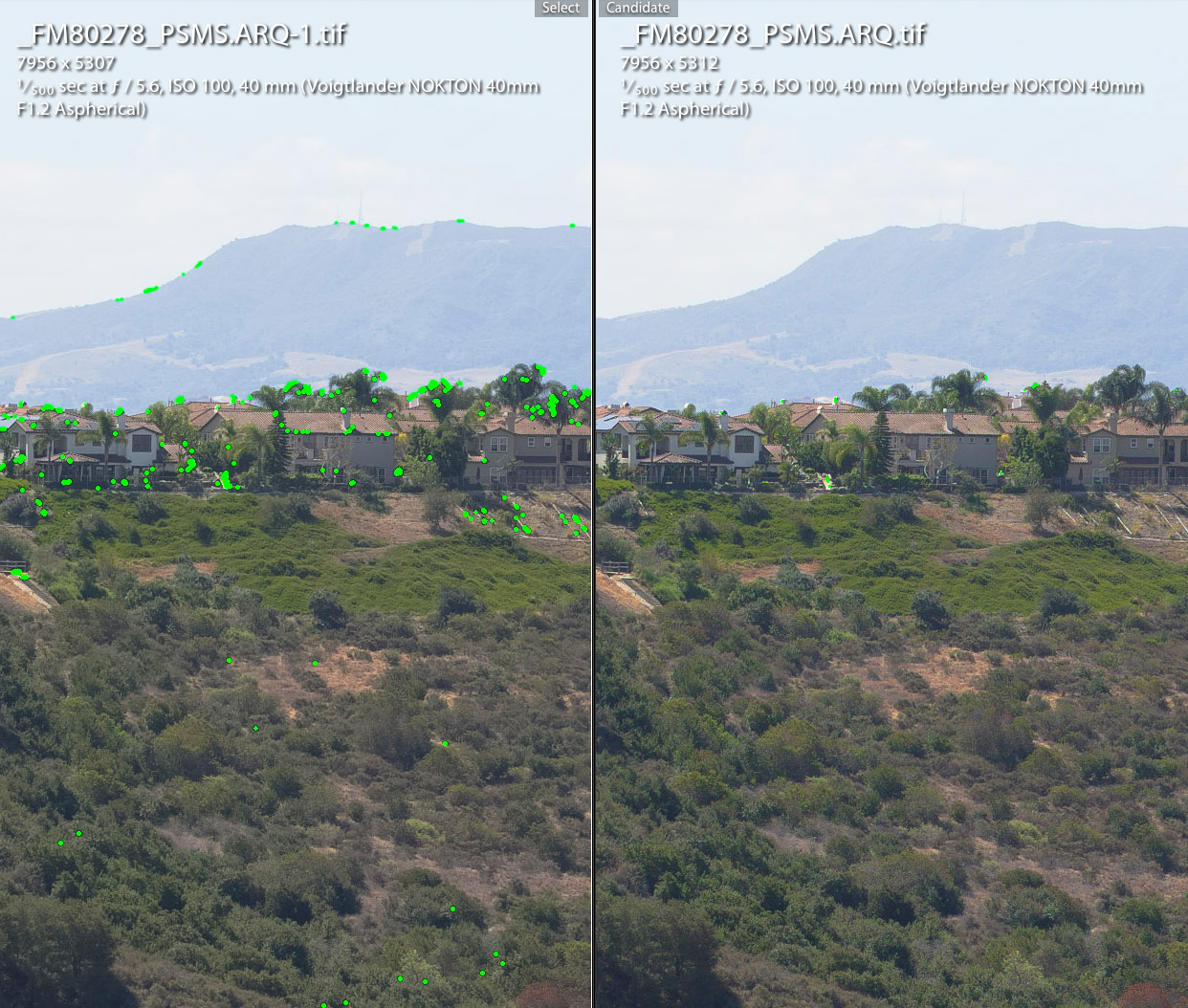
New RT version at the LEFT. (previous one RIGHT)
May 16, 2018 at 01:59 PM
p.3 #8Motion detection in PixelShift files
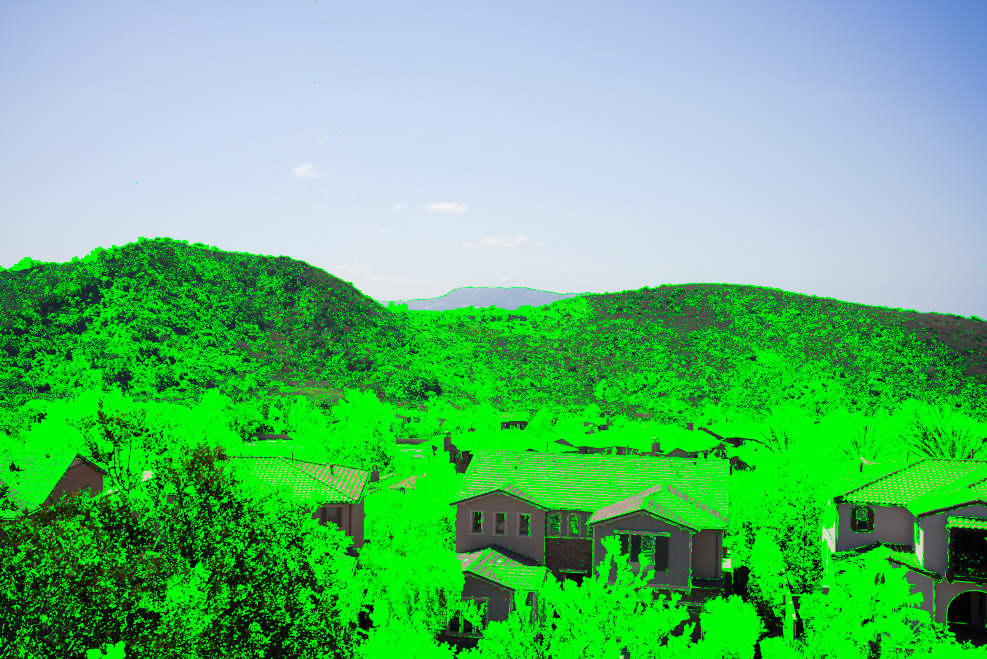
Here is with motion correction set to "auto". I think it's inaccurate as there was very little wind motion and zero lighting change for this shot. Everything is green! Unless we had a mini-earthquake..something went wrong here. 
 |
||
 |
||
|
May 16, 2018 at 02:07 PM
p.3 #9Motion detection in PixelShift files
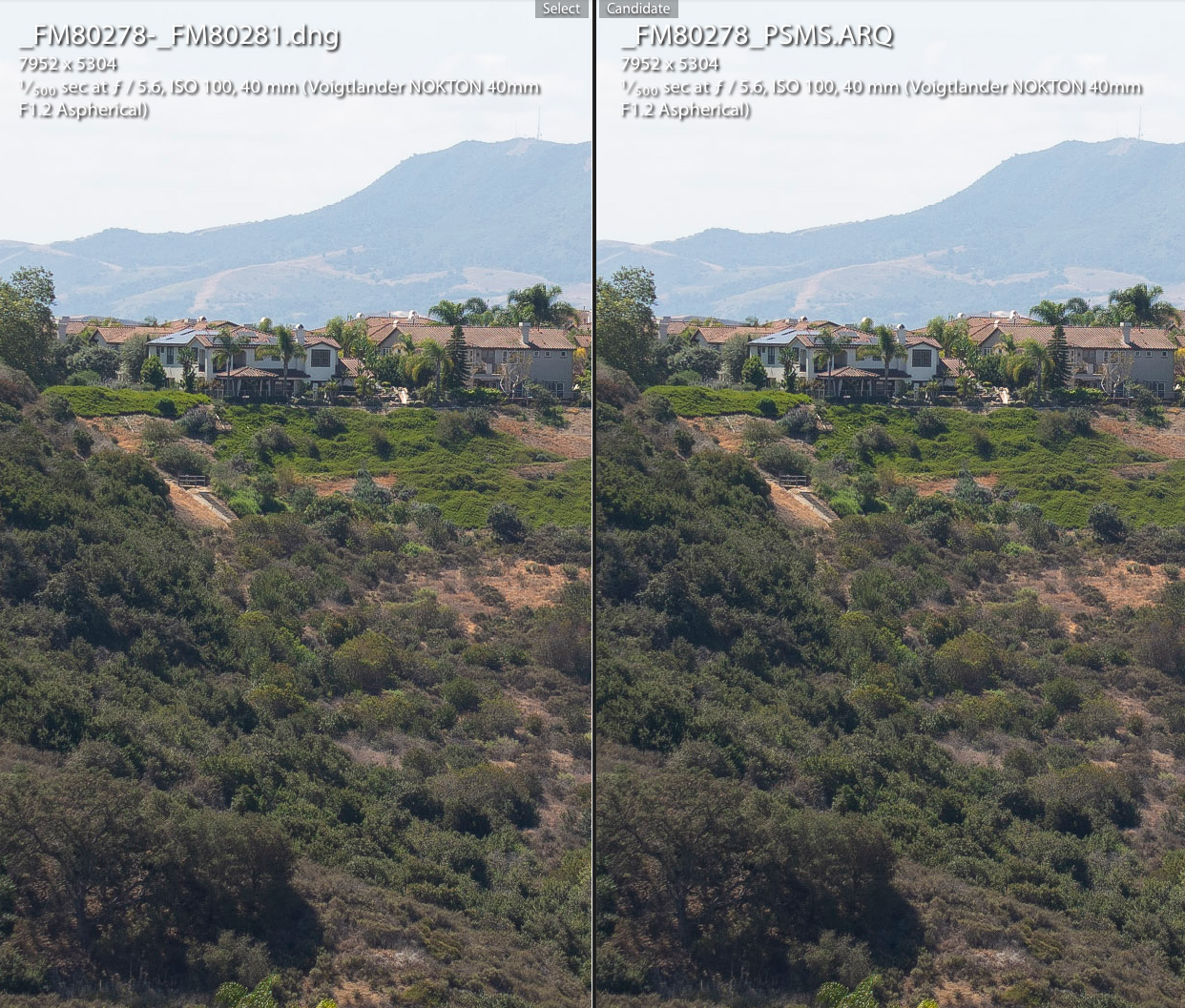
The conversion between: SonyPixelShift2DNG (LEFT) and Sony's Imaging Edge software (RIGHT) look identical.
Here are the crops at 1:1:
It would be awesome if RT offered the same exact conversion while fixing the motion issues automatically with great accuracy.
Here are the crops at 1:1:
It would be awesome if RT offered the same exact conversion while fixing the motion issues automatically with great accuracy.
|
||
 |
||
|
May 16, 2018 at 02:20 PM
p.3 #10Motion detection in PixelShift files
Thanks for the ARQ files. I think I know what's going 'wrong' with motion sensitivity:
The current motion detection in RT takes into account the ISO of the image, but not the exposure correction. Your images show (based on exif data) an exposure correction of 2.3 EV. That's the reason for the over sensitivity of the motion detection which you have to correct using the 'Sensitivity slider' until I implement a better solution.
The current motion detection in RT takes into account the ISO of the image, but not the exposure correction. Your images show (based on exif data) an exposure correction of 2.3 EV. That's the reason for the over sensitivity of the motion detection which you have to correct using the 'Sensitivity slider' until I implement a better solution.
May 16, 2018 at 02:49 PM
p.3 #11Motion detection in PixelShift files
Fred, this screenshot clearly shows that using -4 in your example does not detect all motion
Left is Sensitivity -4, right is Sensitivity -1
screenshot
Left is Sensitivity -4, right is Sensitivity -1
screenshot
May 16, 2018 at 02:59 PM
p.3 #12Motion detection in PixelShift files
ogniw wrote:
Thanks for the ARQ files. I think I know what's going 'wrong' with motion sensitivity:
The current motion detection in RT takes into account the ISO of the image, but not the exposure correction. Your images show (based on exif data) an exposure correction of 2.3 EV. That's the reason for the over sensitivity of the motion detection which you have to correct using the 'Sensitivity slider' until I implement a better solution.
I use Metering "Highlight" with the A7R3 and therefore exposure compensation of +2 is very common. I'm glad you figure it was causing the issue.
May 16, 2018 at 03:02 PM
p.3 #13Motion detection in PixelShift files
ogniw wrote:
Fred, this screenshot clearly shows that using -4 in your example does not detect all motion
Left is Sensitivity -4, right is Sensitivity -1
screenshot
With one of the samples, I went down to -4 just because I knew that solid elements like the house walls, roof and others didn't move..so I adjusted until they didn't have green on them.
This goes to show how difficult it would be to use pixel shift with a landscape image, especially when shutter speeds are very low. (like when using a ND filter)
May 16, 2018 at 03:04 PM
p.3 #14Motion detection in PixelShift files
One thing I learned as I implemented the PS motion detection (and I tried with several hundred of PS files) is, that you even can get motion artifacts in things which don't move, but are affected by other moving parts in the image (small changes of light, small changes of shadows of moving parts and so on). That's the reason RT's motion detection is kind of sensitive (though adjustable)
May 16, 2018 at 03:19 PM
p.3 #15Motion detection in PixelShift files
Fred, if you want to use the motion detection of RT to mask out the motion in Lightroom or Photoshop, you can save a monochrome motion mask in RT using 'Show motion mask'/'Show only motion mask' and save as tiff.
As the image dimensions in RT and LR are not the same (RT 7956x5312, LR don't know) you can change the RT dimensions in the camconst.json entry for the Sony until it fits the raw crop and dimensions in Lightroom (you have to restart RT when you change the camconst.json settings to get effective). Then you should be able to use a perfectly matching motion mask in LR (does LR even allow masking? Don't know) or PS
the current camconst.json entry for your camera is, the raw_crop line is the one to change
{ // Quality C,
"make_model": "Sony ILCE-7RM3",
"dcraw_matrix": [ 6640,-1847,-503,-5238,13010,2474,-993,1673,6527 ], // DNG_v10.1 D65
"raw_crop": [ 0, 0, -36, 0 ], // full raw frame 8000x5320 - 36 rightmost columns are garbage
"ranges": { "black": 512, "white": 16300 }
},
May 16, 2018 at 03:46 PM
p.3 #16Motion detection in PixelShift files
ogniw wrote:
Fred, if you want to use the motion detection of RT to mask out the motion in Lightroom or Photoshop, you can save a monochrome motion mask in RT using 'Show motion mask'/'Show only motion mask' and save as tiff.
As the image dimensions in RT and LR are not the same (RT 7956x5312, LR don't know) you can change the RT dimensions in the camconst.json entry for the Sony until it fits the raw crop and dimensions in Lightroom (you have to restart RT when you change the camconst.json settings to get effective). Then you should be able to use...Show more →
That would indeed be very useful. When I first saw the 'show only motion mask' option, I thought about using it as a mask. Lightroom does not allow masks but since any pixel shift motion retouch would have to be in Photoshop anyways, the mask would make things much easier. I just need to find a way to make the mask very accurate.
Do you know how Sony's Imaging edge deals with motion artifact? When processing a TIFF using their own conversion, I get much less artifacts and there is an option called: "Px. Shift Multi Shoot. Correction" which I think deals with motion artifacts as well.
May 16, 2018 at 04:22 PM
p.3 #17Motion detection in PixelShift files
Also, I think the LR's image dimension for the A7R3 is: 7952x5304
How would I edit this line accordingly?
{ // Quality C,
"make_model": "Sony ILCE-7RM3",
"dcraw_matrix": [ 6640,-1847,-503,-5238,13010,2474,-993,1673,6527 ], // DNG_v10.1 D65
"raw_crop": [ 0, 0, -36, 0 ], // full raw frame 8000x5320 - 36 rightmost columns are garbage
"ranges": { "black": 512, "white": 16300 }
},
May 16, 2018 at 04:24 PM
p.3 #18Motion detection in PixelShift files
Fred Miranda wrote:
Also, I think the LR's image dimension for the A7R3 is: 7952x5304
How would I edit this line accordingly?
{ // Quality C,
"make_model": "Sony ILCE-7RM3",
"dcraw_matrix": [ 6640,-1847,-503,-5238,13010,2474,-993,1673,6527 ], // DNG_v10.1 D65
"raw_crop": [ 0, 0, -36, 0 ], // full raw frame 8000x5320 - 36 rightmost columns are garbage
"ranges": { "black": 512, "white": 16300 }
},
I can't give a precise answer, but I would start trying
"raw_crop": [ 4, 8, -40, -8 ], // full raw frame 8000x5320 - 36 rightmost columns are garbage
That should match the dimensions (don't know if it matches the raw crop) and give a starting point to find the perfect match.
May 16, 2018 at 04:47 PM
p.3 #19Motion detection in PixelShift files
Fred Miranda wrote:
When I first saw the 'show only motion mask' option, I thought about using it as a mask.
That was my intention for this feature
When I first saw the 'show only motion mask' option, I thought about using it as a mask.
That was my intention for this feature
May 16, 2018 at 04:54 PM
p.3 #20Motion detection in PixelShift files
Fred Miranda wrote:
Do you know how Sony's Imaging edge deals with motion artifact? When processing a TIFF using their own conversion, I get much less artifacts and there is an option called: "Px. Shift Multi Shoot. Correction" which I think deals with motion artifacts as well.
I don't know anything about Sony's Imaging edge dealing with motion artifacts.
I know that Pentax DCU/Silkypix somehow deals with motion artifacts, but I also know, it's a bad deal.
Can't say anything about LR or SIE (Sony Imaging edgde)
May 16, 2018 at 05:00 PM