This topic is in the 2018 archive. You can read it and like its posts here. It is read only.
Archive 2018Motion detection in PixelShift files
p.4 #1Motion detection in PixelShift files
BTW: These settings matched it perfectly:
"raw_crop": [ 4, 4, -36, -4 ]
Now the file dimension is the same as the ARW file: (7952 x 5304)
May 16, 2018 at 05:15 PM
p.4 #2Motion detection in PixelShift files
So, the mask is indeed very useful.
I used it in a ARQ file and it removed all motion artifacts in one click.
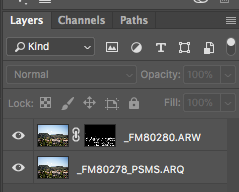
Here is how the mask looks in photoshop. (first image)
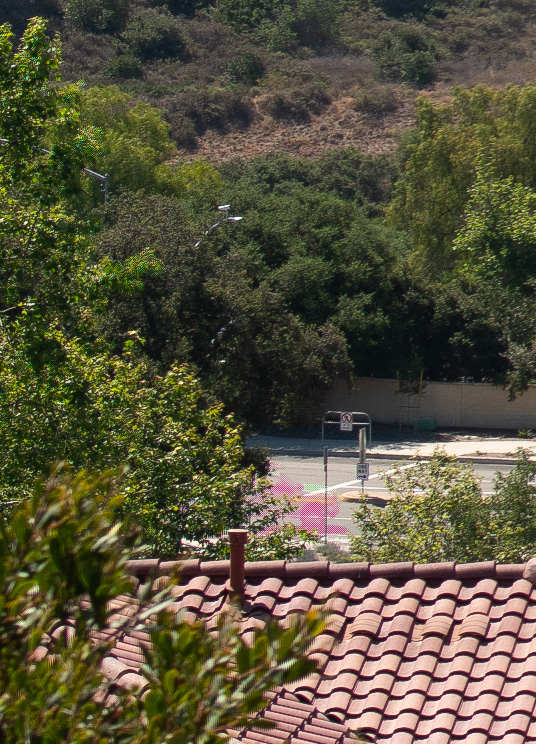
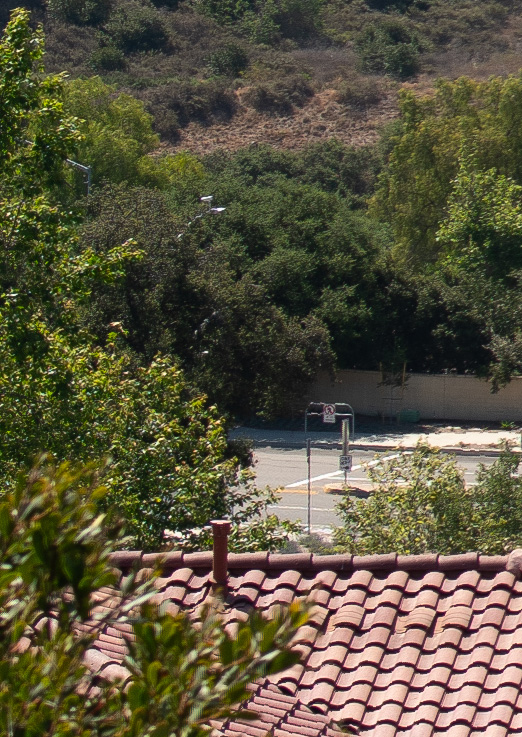
The other 2 images show how it fixed a car driving by (pink color artifact)
So, basically I brought the ARQ, Mask Tiff and a regular ARW to Photoshop as Layers (from LR).
Thank I applied the layer mask to the ARW file. Only the white portions of the mask (blur) remains in the ARW file. Everything else is replaced by the pixel shifted ARQ file.
 |
||
 |
||
|
|
||
 |
||
|
|
||
 |
||
|
May 16, 2018 at 05:35 PM
p.4 #3Motion detection in PixelShift files
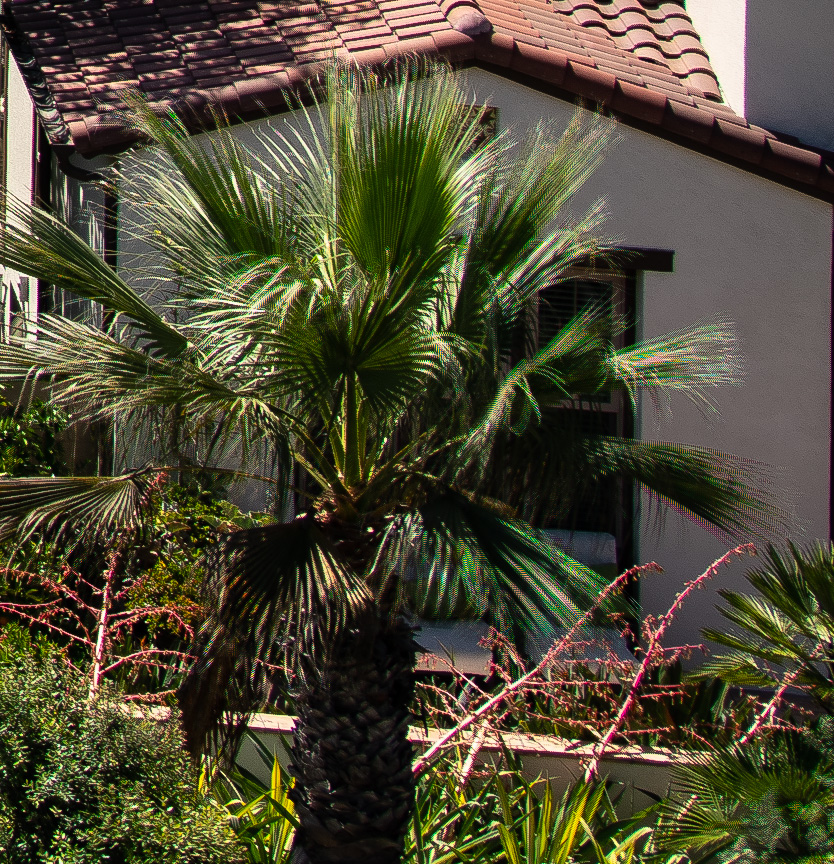
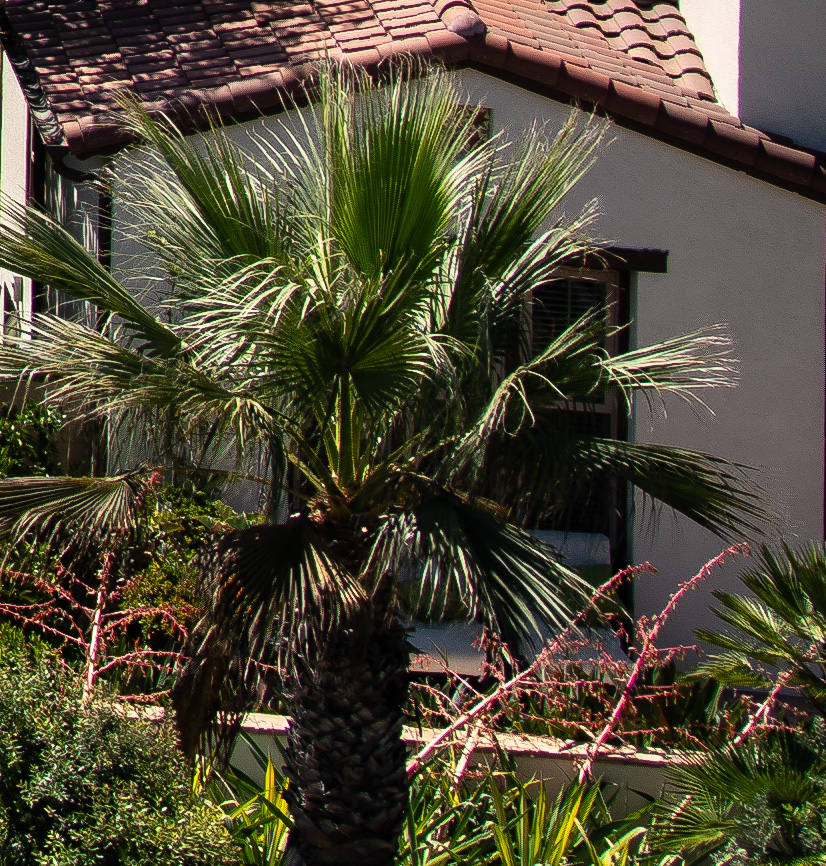
Here is another crop from the same image and how the mask fixed the motion blur artifact.
So with this mask, it will be very easy to edit landscape images. As long as the files are loaded in Photoshop the artifact fix is instant. As you can see from the mask most of the image will still be pixel shifted.
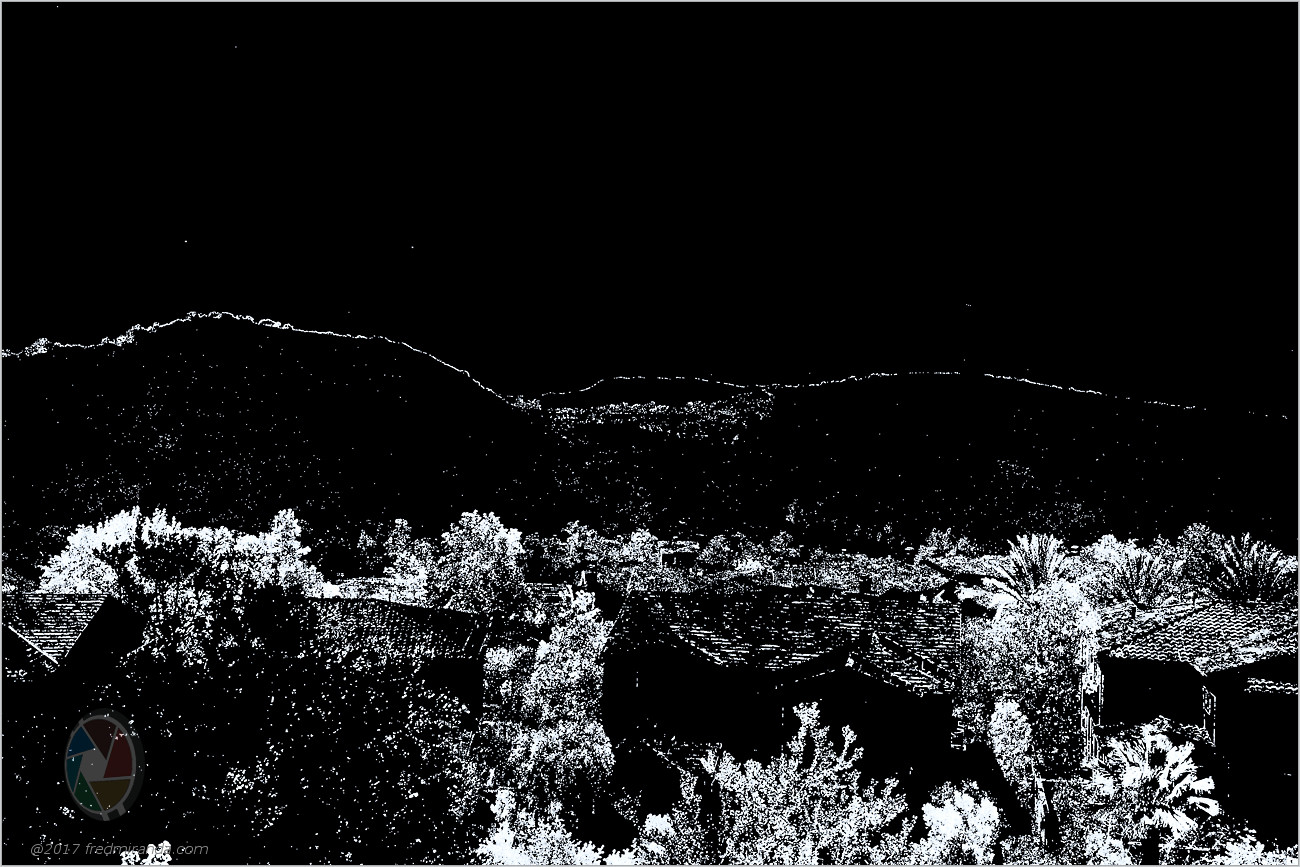
mask used from RAW Therapee. This would be a nightmare to edit manually without the mask
So with this mask, it will be very easy to edit landscape images. As long as the files are loaded in Photoshop the artifact fix is instant. As you can see from the mask most of the image will still be pixel shifted.
|
||
 |
||
|
|
||
 |
||
|
|
||
 |
||
|
mask used from RAW Therapee. This would be a nightmare to edit manually without the mask
May 16, 2018 at 05:42 PM
p.4 #4Motion detection in PixelShift files
Now, I wish the RT's pixel shifted conversion would look equal in sharpness, color and contrast as the ARQ (from Imaging Edge) and DNG (from SonyPixelShift2DNG) conversion so we could do everything in one place. (RT)
This workflow would be much easier with no need for masks and all...
May 16, 2018 at 05:50 PM
p.4 #6Motion detection in PixelShift files
Fred Miranda wrote:
Now, I wish the RT's pixel shifted conversion would look equal in sharpness, color and contrast as the ARQ (from Imaging Edge) and DNG (from SonyPixelShift2DNG) conversion so we could do everything in one place. (RT)
This workflow would be much easier with no need for masks and all...
About the colours. Can you try if this gives a closer match to Lightroom?
1.) Set the tone curve 1 in Exposure tool to Linear
2.) Enable the dcp tone curve in Colour Management tool
Here is what I get for example.
Right is with default settings. Left is with the two changes mentioned above.
May 17, 2018 at 05:18 AM
p.4 #7Motion detection in PixelShift files
ogniw wrote:
This workflow would be much easier with no need for masks and all...About the colours. Can you try if this gives a closer match to Lightroom?
1.) Set the tone curve 1 in Exposure tool to Linear
2.) Enable the dcp tone curve in Colour Management tool
Here is what I get for example.
Right is with default settings. Left is with the two changes mentioned above.
I will try that today.
Just a thought: Since RT's conversion is based on an ARQ file, would it be possible for RT to detect motion and only perform an automated mask without editing the image? Like that RT would replace the motion blur areas with the ARW data included inside the ARQ file. This would remove the need to bring the mask into Photoshop. The resulting image would look identical to the ARQ but without the artifacts.
Fred Miranda wrote
Now, I wish the RT's pixel shifted conversion would look equal in sharpness, color and contrast as the ARQ (from Imaging Edge) and DNG (from SonyPixelShift2DNG) conversion so we could do everything in one place. (RT)This workflow would be much easier with no need for masks and all...
1.) Set the tone curve 1 in Exposure tool to Linear
2.) Enable the dcp tone curve in Colour Management tool
Here is what I get for example.
Right is with default settings. Left is with the two changes mentioned above.
I will try that today.
Just a thought: Since RT's conversion is based on an ARQ file, would it be possible for RT to detect motion and only perform an automated mask without editing the image? Like that RT would replace the motion blur areas with the ARW data included inside the ARQ file. This would remove the need to bring the mask into Photoshop. The resulting image would look identical to the ARQ but without the artifacts.
May 17, 2018 at 09:46 AM
p.4 #8Motion detection in PixelShift files
Fred Miranda wrote:
Just a thought: Since RT's conversion is based on an ARQ file, would it be possible for RT to detect motion and only perform an automated mask without editing the image? Like that RT would replace the motion blur areas with the ARW data included inside the ARQ file. This would remove the need to bring the mask into Photoshop. The resulting image would look identical to the ARQ but without the artifacts.
In theory that's possible. But RT does not and will not write raw files.
May 17, 2018 at 12:40 PM
p.4 #9Motion detection in PixelShift files
ogniw wrote:
In theory that's possible. But RT does not and will not write raw files.
What I meant was instead of doing a conversion (using RT settings), would it be possible for RT just to do the motion mask and save the resulting image as a Tiff? (basically keeping the ARQ file IQ intact minus the motion fix)
Fred Miranda wrote
Just a thought: Since RT's conversion is based on an ARQ file, would it be possible for RT to detect motion and only perform an automated mask without editing the image? Like that RT would replace the motion blur areas with the ARW data included inside the ARQ file. This would remove the need to bring the mask into Photoshop. The resulting image would look identical to the ARQ but without the artifacts.What I meant was instead of doing a conversion (using RT settings), would it be possible for RT just to do the motion mask and save the resulting image as a Tiff? (basically keeping the ARQ file IQ intact minus the motion fix)
May 17, 2018 at 01:11 PM
p.4 #10Motion detection in PixelShift files
Fred Miranda wrote:
In theory that's possible. But RT does not and will not write raw files.What I meant was instead of doing a conversion (using RT settings), would it be possible for RT just to do the motion mask and save the resulting image as a Tiff? (basically keeping the ARQ file IQ intact minus the motion fix)
Can you share a DNG created by SonyPixelShift2DNG from _FM80282_PSMS.ARQ ?
ogniw wrote
Fred Miranda wrote
Just a thought: Since RT's conversion is based on an ARQ file, would it be possible for RT to detect motion and only perform an automated mask without editing the image? Like that RT would replace the motion blur areas with the ARW data included inside the ARQ file. This would remove the need to bring the mask into Photoshop. The resulting image would look identical to the ARQ but without the artifacts.Can you share a DNG created by SonyPixelShift2DNG from _FM80282_PSMS.ARQ ?
May 17, 2018 at 01:31 PM
p.4 #11Motion detection in PixelShift files
Fred Miranda wrote:
I've downloaded the latest version from the dev link and the processing is identical to my previous version, except that motion detection seems to be even more sensitive. (I had to use custom and -4) for both images below to be accurate. (still too much though) as the ARQ file only shows artifacts in the green areas using the ISO -4 option.
New RT version at the LEFT. (previous one RIGHT)
I forgot to answer on this.
The motion detection on new version is not more sensitive. It's just that the visualization of the motion mask is more accurate now.
In old version the motion mask didn't visualize all regions which have been detected as motion, which I corrected with new version.
May 17, 2018 at 01:41 PM
p.4 #12Motion detection in PixelShift files
ogniw wrote:
In theory that's possible. But RT does not and will not write raw files.What I meant was instead of doing a conversion (using RT settings), would it be possible for RT just to do the motion mask and save the resulting image as a Tiff? (basically keeping the ARQ file IQ intact minus the motion fix)Can you share a DNG created by SonyPixelShift2DNG from _FM80282_PSMS.ARQ ?
Here we go:
https://www.fredmiranda.com/Buzz/_FM80282-_FM80285.dng.zip
Fred Miranda wrote
ogniw wrote
Fred Miranda wrote
Just a thought: Since RT's conversion is based on an ARQ file, would it be possible for RT to detect motion and only perform an automated mask without editing the image? Like that RT would replace the motion blur areas with the ARW data included inside the ARQ file. This would remove the need to bring the mask into Photoshop. The resulting image would look identical to the ARQ but without the artifacts.Here we go:
https://www.fredmiranda.com/Buzz/_FM80282-_FM80285.dng.zip
May 17, 2018 at 02:11 PM
p.4 #13Motion detection in PixelShift files
ogniw wrote:
New RT version at the LEFT. (previous one RIGHT)I forgot to answer on this.
The motion detection on new version is not more sensitive. It's just that the visualization of the motion mask is more accurate now.
In old version the motion mask didn't visualize all regions which have been detected as motion, which I corrected with new version.
Perhaps I thought it was more sensitive because of the issue with the exposure compensation messing with the auto motion settings.
Fred Miranda wrote
I've downloaded the latest version from the dev link and the processing is identical to my previous version, except that motion detection seems to be even more sensitive. (I had to use custom and -4) for both images below to be accurate. (still too much though) as the ARQ file only shows artifacts in the green areas using the ISO -4 option.New RT version at the LEFT. (previous one RIGHT)
The motion detection on new version is not more sensitive. It's just that the visualization of the motion mask is more accurate now.
In old version the motion mask didn't visualize all regions which have been detected as motion, which I corrected with new version.
Perhaps I thought it was more sensitive because of the issue with the exposure compensation messing with the auto motion settings.
May 17, 2018 at 02:12 PM
p.4 #14Motion detection in PixelShift files
Fred Miranda wrote:
In theory that's possible. But RT does not and will not write raw files.What I meant was instead of doing a conversion (using RT settings), would it be possible for RT just to do the motion mask and save the resulting image as a Tiff? (basically keeping the ARQ file IQ intact minus the motion fix)Can you share a DNG created by SonyPixelShift2DNG from _FM80282_PSMS.ARQ ?Here we go:
https://www.fredmiranda.com/Buzz/_FM80282-_FM80285.dng.zip
Thanks for the file. I started download but it will take a while because for whatever reason, the download speed is ~30KB/s
ogniw wrote
Fred Miranda wrote
ogniw wrote
Fred Miranda wrote
Just a thought: Since RT's conversion is based on an ARQ file, would it be possible for RT to detect motion and only perform an automated mask without editing the image? Like that RT would replace the motion blur areas with the ARW data included inside the ARQ file. This would remove the need to bring the mask into Photoshop. The resulting image would look identical to the ARQ but without the artifacts.https://www.fredmiranda.com/Buzz/_FM80282-_FM80285.dng.zip
Thanks for the file. I started download but it will take a while because for whatever reason, the download speed is ~30KB/s
May 17, 2018 at 02:23 PM
p.4 #15Motion detection in PixelShift files
Fred, suddenly the download speed went up a lot and I could compare the DNG to the ARQ in RT.
Using the same settings there is no difference in output (with the exception of motion correction).
I can upload the tiffs from the DNG and the ARQ, but as you've RT installed, you should be able to reproduce.
For me it still looks like LR applies some sharpening and/or contrast enhancements on raw files (even if they are not raw anymore in case of the pixel shift combined dng)
May 17, 2018 at 03:13 PM
p.4 #16Motion detection in PixelShift files
The dng and arq are indeed identical as I wrote previously. What’s different (softer, lower contrast, color) is the RT conversion to Tiff in comparison. If LR has identical settings for all files, the difference is very noticeable. (I posted crops on this thread showing this)
ogniw wrote:
Fred, suddenly the download speed went up a lot and I could compare the DNG to the ARQ in RT.
Using the same settings there is no difference in output (with the exception of motion correction).
I can upload the tiffs from the DNG and the ARQ, but as you've RT installed, you should be able to reproduce.
For me it still looks like LR applies some sharpening and/or contrast enhancements on raw files (even if they are not raw anymore in case of the pixel shift combined dng)
May 17, 2018 at 03:58 PM
p.4 #17Motion detection in PixelShift files
Fred Miranda wrote:
The dng and arq are indeed identical as I wrote previously. What’s different (softer, lower contrast, color) is the RT conversion to Tiff in comparison. If LR has identical settings for all files, the difference is very noticeable. (I posted crops on this thread showing this)
Yes, but my point is, that the DNG (where the pixelshift combine is not done in RT) and the ARQ (where the pixelshift combine is done in RT) result in almost identical tiff files when processed in RT. Imho that's a very clear indication, that the pixel shift combine process is the same (except for motion) and can't be the culprit for the softer result.
Edited on May 17, 2018 at 04:18 PM · View previous versions
May 17, 2018 at 04:08 PM
p.4 #18Motion detection in PixelShift files
Fred, to verify, can you process the DNG and the ARQ using this RT processing profile to tiff and see if there are differences when loading the tiffs in LR (except motion detection)?
https://filebin.net/0n7cq3mrdsfqky9o/psfm.pp3
May 17, 2018 at 04:14 PM
p.4 #19Motion detection in PixelShift files
I'm seeing same as Fred, comparing ARQ to TIF from RT. Following ARQ was processed through RT (5.4) in auto motion correct mode with low iso bundled profile. Tif output lacks the "pop" of the original ARQ file, but cleans up motion artifacts nicely.
ARQ
Tif (RT 5.4)
ARQ
|
||
| https://c1.staticflickr.com/1/980/27324412707_6372a51da8_h.jpg | ||
|
Tif (RT 5.4)
|
||
| https://c1.staticflickr.com/1/961/41295275105_2dc2cb1550_h.jpg | ||
|
May 18, 2018 at 01:05 PM
p.4 #20Motion detection in PixelShift files
Anyone ever get this figured out?
Jun 09, 2018 at 09:22 PM