p.54 #1 · Sony RX1, RX1R, RX1R II and RX1R III Image Thread
douglasf13 wrote:
Thanks, Tariq. Do you have shading compensation switched on or off?
That was a raw shot so to get "shading compensation", the adobe lens profile has to be invoked in the conversion. It was not in that example though I did see what effect it had with color shift just now and I'm not seeing a difference. One thing though is that, since I shoot Raw+Jpeg, I looked at the jpeg version of that same shot and see noticeable color shift (and that's even with shading compensation off - I believe it was anyway) so it looks like to me that the color shift issue shows much more with jpegs vs raws.
p.54 #2 · Sony RX1, RX1R, RX1R II and RX1R III Image Thread
Tariq Gibran wrote:
That was a raw shot so to get "shading compensation", the adobe lens profile has to be invoked in the conversion. It was not in that example though I did see what effect it had with color shift just now and I'm not seeing a difference. One thing though is that, since I shoot Raw+Jpeg, I looked at the jpeg version of that same shot and see noticeable color shift (and that's even with shading compensation off - I believe it was anyway) so it looks like to me that the color shift issue shows much more with jpegs vs raws. ...Show more →
I don't think this is the way it works. When turning on shading compensation the RX1 itself does the correction and "bakes" it into the RAW file. The Lightroom lens profile is just a standard distortion and vignetting correction. It does nothing to color shifts.
p.54 #3 · Sony RX1, RX1R, RX1R II and RX1R III Image Thread
Jochenb wrote:
I don't think this is the way it works. When turning on shading compensation the RX1 itself does the correction and "bakes" it into the RAW file. The Lightroom lens profile is just a standard distortion and vignetting correction. It does nothing to color shifts.
I'm still testing this - and had read previously in reviews that the in-camera shading compensation affected RAW's- but I'm not sure that's the case. I just did back to back test shots with the in-camera lens shading set to off and then "Auto" and it's certainly not auto correcting the general vignetting with the raws. I don't believe it's affecting the color shift either with raws but I will test some more (it would be odd if it corrects one type of vignetting alone).
p.54 #4 · Sony RX1, RX1R, RX1R II and RX1R III Image Thread
HelenaN wrote:
Normally I don't do paid photography, because I have already "ruined" a hobby (drawing) by making it into a job, but when someone asked for photos of his ecological farm I couldn't resist because I love animals and taking photos of them. He wanted shots that he can use for marketing, that show how happy his animals are. And they are! I wish all farm animals could have such a good life.
I'll post more when I have processed them, but here is one of my favorites:
p.54 #6 · Sony RX1, RX1R, RX1R II and RX1R III Image Thread
rsolti13: I like the first cemetary shot a lot.
Here is a shot I took on my recent vacation. While my D800 served as my primary camera on the trip, it was great to have the RX1 along to complement it.
p.54 #7 · Sony RX1, RX1R, RX1R II and RX1R III Image Thread
Ok, well I did a studio test shot (umbrellas, 45 degree lighting but I just used the modeling lights on the strobe for illumination, so tungsten source) just to see what is actually going on with the in-camera settings for lens shading. Exp. is F2@1/30sec. ISO 100. Here is what I shot.
One shot taken with all lens compensation to off, the other shot taken with all lens comp. set to "Auto". First off, with raw in both cases, normal vignetting is not affected by in-camera setting. As far as color shift, it appears to do a tiny correction with the In-camera setting, at least going by the numbers and X-Y coordinates in Photoshop. The difference is not visible though to me - at least with this example. Here is what my numbers are for the raws:
Same X-Y coordinate comparing raw with and without in camera compensation:
Center: R-230, G-227, B-221 vs R-229, G-225, B-220
Corner: R-152, G-158, B-157 vs R-154, G-159, B-158
So, extremely subtle and not visible which is probably why I did not previously notice it. Perhaps it's more dramatic at further distances? or it varies with different lens samples? I don't know but I have not seen it yet with raws with landscape/ infinity type shots.
*Edit, just to clarify, the color vignetting is obvious in the example. What shows no visible difference is with vs without the in-camera setting activated.
p.54 #9 · Sony RX1, RX1R, RX1R II and RX1R III Image Thread
Helena, I looked at my images from a previous shoot where I was using the polarizer on every shot and most of the time the sky was pretty even across the frame. There were a few worst case shots where one side of the shot was at 90 degrees from the sun and thus at max polarization on that side vs. the other side. Adding global saturation and or contrast amplifies the difference across the sky so it is hard to compare your polarizer performance against my B&W one. In this worst case shot, when I added +7 saturation globally to the image, I masked out the left corner of the sky in order not to amplify the difference across the sky. If polarizer makes the sky to be too unbelievably blue I will desaturate and lighten the blue using a hue/sat layer.
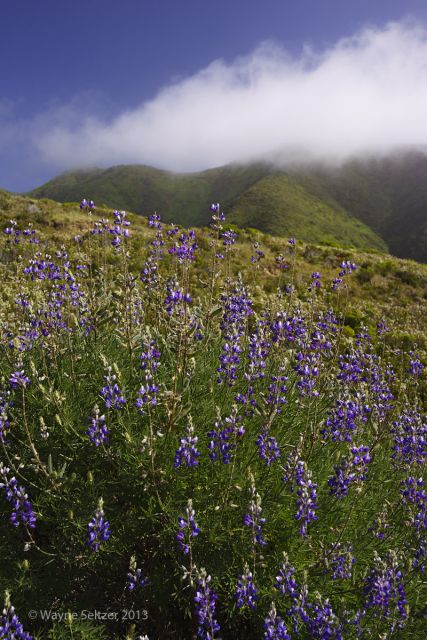
I only had two hours(earlier in the day than I would have liked) to do this hike and shoot as I was visiting my parents, so the light was very harsh but tried to make the best of it as it is a beautiful hike.
p.54 #11 · Sony RX1, RX1R, RX1R II and RX1R III Image Thread
Thank you very much Tom, Jochen, Tariq and bpark42! Glad you like it. I'll try and process the rest soon.
rsolti13, the first one is really nice!
Wayne, very pretty scene and photo of it! Looks like it was a great day to be out.
Thanks again for the polarizer info. I still find it surprising that a thin one would help with uneven coloration, but my Sigma is of low to middle class (it was the only one I could find at the time) and it's not unlikely that it makes things worse than they should be. I guess I'll just have to find a thin one and try for myself.
p.54 #12 · Sony RX1, RX1R, RX1R II and RX1R III Image Thread
Jochenb wrote:
Lovely shot Wayne
Thanks Jochen and Helena!
Helena and Jochen, I understand what you are saying about polarizer causing uneven sky on wide angle lenses and the thickness causing vignetting which should show up in all shots. But I am wondering if different polarizers, either due to different thicknesses or design/material have different performances when it comes to rendering a more even sky across the frame, especially the case when shooting at 90 degrees to the sun.Wondering if that is possible or not? Maybe experts like theSuede could answer this?
In the past, I remember having uneven sky problems more with my 21 Z* but not with 35/2 ZF.Maybe different lens designs have a factor in this too.
p.54 #13 · Sony RX1, RX1R, RX1R II and RX1R III Image Thread
Tariq Gibran wrote:
What shows no visible difference is with vs without the in-camera setting activated.
The colour shift seems to be the same for me as well with shading compensastion turned off.
It is not very dramatic, but maybe a bit worse than expected, it also makes me wonder if there is sample variations regarding the issue.
It should be correctable in post though, i believe the new radial filter in LR5 could take care of it.
My take on this shot with the polarizer is that it looks pretty normal given the direction of the light and use of the polarizer. The sky was not uniform to begin with since the light is coming from the top right, evident by the shadow cast by the barn. The top left of the sky is going to be darker to begin with. The use of the polarizer will simply accentuate the contrast and difference that is inherently there. The white clouds being backlit from the sun will also accentuate the effect given the top left has fewer clouds where we see the blue sky.
I like this shot myself. It has a very classic look, almost like a traditional dutch landscape painting. The horse - the one standing in profile- in relationship to the three red barns is perfect from a compositional point of view to me (and the diagonal fence in front brings us right into the frame).
p.54 #15 · Sony RX1, RX1R, RX1R II and RX1R III Image Thread
twoeye wrote:
The colour shift seems to be the same for me as well with shading compensastion turned off.
It is not very dramatic, but maybe a bit worse than expected, it also makes me wonder if there is sample variations regarding the issue.
It should be correctable in post though, i believe the new radial filter in LR5 could take care of it.
The flat field plug in for LR4 will already take care of it.
p.54 #17 · Sony RX1, RX1R, RX1R II and RX1R III Image Thread
Tariq Gibran wrote:
That's cool. I wasn't aware of that plug-in. I wish it worked also with ACR/ Photoshop directly.
Yeah, it makes fixing color shift nearly effortless for LR users. I haven't really noticed any color shift with the RX1, yet, but I tend to get picky about it, so I'll probably get around to making the test shots soon.
p.54 #18 · Sony RX1, RX1R, RX1R II and RX1R III Image Thread
The flat field plug seems to work fine, even if my mock-up reference images could be better... I would have preferred not having to mix .dng´s into my workflow though.
p.54 #20 · Sony RX1, RX1R, RX1R II and RX1R III Image Thread
Jgreene11 wrote:
What color profile is everyone using? Standard, portrait?
The camera is pretty new to me, but, so far, I've been using the one called "Camera Standard," with a few adjustments on the HSL color sliders, since I tend to like my blues slightly towards cyan, reds slightly towards orange, and greens slightly towards blue and brought down a bit.


 He wanted shots that he can use for marketing, that show how happy his animals are. And they are! I wish all farm animals could have such a good life.