Robert, I like Ektar too. Running low on stock at the moment and kinda hoarding it trying to burn through everything else. Interesting shot by the way!
Jon Buffington wrote:
Thank you Dan, Tom and Robert.
Robert, I like Ektar too. Running low on stock at the moment and kinda hoarding it trying to burn through everything else. Interesting shot by the way!
Hah! Jon,save some for me
And I thank you Sachman
"Here is a link to my film shots that I have posted"
kwoodard - Yes, I see what you mean here. This is a situation where you have to make some choices. The light is very flat and the focus is extremely thin, which only accentuates the flat lighting as it goes out of focus. While her teeth seem a bit bright, it may be that this type of image with the type of light and depth of field are just not working collectively in your favor - not that there's anything "wrong" per se, with the image, but that it certainly does exhibit the lack of midtone punch that you are complaining about.
Peter Figen wrote:
"Here is a link to my film shots that I have posted"
kwoodard - Yes, I see what you mean here. This is a situation where you have to make some choices. The light is very flat and the focus is extremely thin, which only accentuates the flat lighting as it goes out of focus. While her teeth seem a bit bright, it may be that this type of image with the type of light and depth of field are just not working collectively in your favor - not that there's anything "wrong" per se, with the image, but that it certainly does exhibit the lack of midtone punch that you are complaining about. ...Show more →
Does it regardless of DOF... My wife is Hispanic, so her teeth are going to be brighter as she has mocha toned skin.
This shot is with a 24/2.8 at I believe f/8. Same issues with mid-tones.
Well, my gf is similarly complected and while there might be a tendency for teeth go whiter, it's really up to you to fix that after scanning. If you printed it in the darkroom, you'd burn it down, so why not do the same in Ps too? But you have to scan it in a way that lets you have meaningful tone and detail to exploit in that area.
In the MG shot above, it's a very high contrast scene where the shadows are crushed and the highlights blown. I would think that your Nikon scanner could record the entire neg without clipping, but maybe not. It's been a long long time since I've used Nikon Scan, but I think you can get a better tonal range out of it, and I think you'll see your mid tones improve.
What developer was used for this and was it normal, plus or minus, in development time?
I used D76 developer, normal times... This was shot with a yellow filter, perhaps it is too much contrast? This was scanned on the highest settings available, multiple passes, and still the mids are barely there. This is about the best I was able to do with LR 5.
It's been a long long time since I experimented with developers and TMax, but I remember that once I settled on Kodak's own T-Max Developer, I never went back to D-76. If you're running your own film, I'd at least give that a try and see, but there should also be settings in Nikon Scan to pull more of the full range of the neg out at well. Then, I think you'd have more to work with later. And also, since I don't use Lr, I'm not sure how the tools there are for manipulating black and white scans, as compared to Ps.
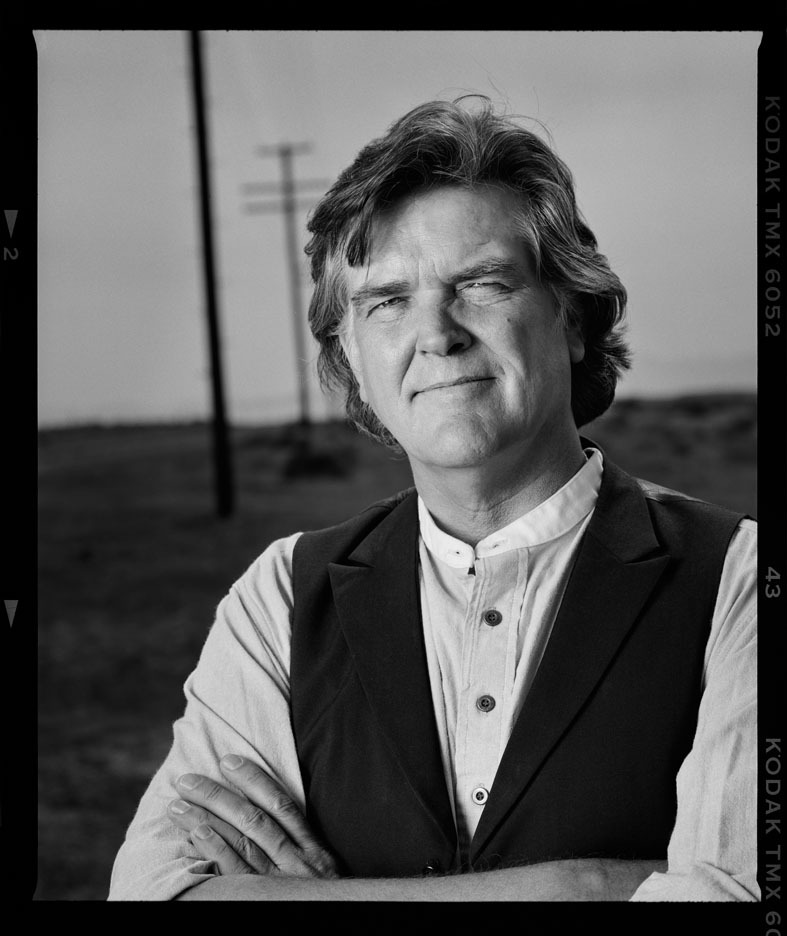
I'm going to post another example of T-Max 100, developed in T-Max developer and scanned on a Howtek drum scanner. I've been going through old images of Guy Clark, the famous Texas songwriter, for possible use in an upcoming book and documentary. This was scanned two days ago and I think it's a pretty good example of the kinds of rich tones you actually can get from T-Max 100 and why it became one of my favorite films. Why I never printed or scanned this until this week I will never know. I guess I just didn't "see" it until now.
Yeah, I need to play around with the scanning software more. I also think I need to adjust my technique a bit for shooting film. What you are getting out of TMax100 is what I am trying to achieve. I know that will be tough on 35mm, but I should be able to get closer than what I am.
Kevin,
Curious if you are using the Nikon scanner software or 3rd party like Vuescan or Silverfast.
I got away from the 3rd party ones as it was giving me grief with consistency, etc.
Had too many sliders that were not common to other post processing tools or their names/associations.
When using my Epson, I just use it's histogram after the pre-scan & move the sliders to not clip highlights or shadows. This gives me a "flat scan" that is much easier to manage in Photoshop.
Not saying I get it perfect but much better consistency.
I won't make any real difference shooting medium format or 35mm T-Max. Although the base is slightly different between them, they expose and develop pretty much the same and have the same potential tonality. I've shot plenty of 35mm T-Max and never saw a difference from 120 or 4x5, other than the limited amount of information from the smaller piece of film.
Dan's recommendation about scanning is right on. On the drum scanner scanning black and white, I do an Auto range to get in the ballpark, then switch to the histogram tool and drag the endpoints just past where the highlight and shadow data exists. This usually makes a full range but slightly flat scan that can then be worked in Ps without the risk of blowing critical highlight or shadow detail, unless, of course, you want to.
Kevin,
For some reason half of the pre-scans have some clipping in the histograms I see.
I think the auto-exposure software is trying to get it "perfect"? It's just way safer to do what Peter said.
The other thing I do is save the flat scan as-is for exposure. I might size it, do sharpening or dust cleanup.
From then on I save-as a named version of the original.
You have to turn off any Auto stuff. Not sure how the NikonScan works, but with Trident, where the Crop is set affects the histogram, so I set an initial crop just inside the borders of the image, then drag the end points in the Levels/Histogram dialog so there's just a bit of a gap between the ends of the data graph and the sliders, then re-adjust the crop to include the entire image and scan. Also, you want to make sure all sharpening is turned off as well. On the Nikon, it's usually best to set the Autofocus point not in the dead middle of the frame, but about half-way between the middle and the edge. This seems to help overall focus, as those scanners can never hold the film super flat and that gives a good average for overall focus.