I agonize over buying a lens like the 85, or the 50, even the RF 600/4, and they are preposterously expensive, but the unique "look" they are able to create is really priceless. My clients, like the marketing director, have no idea what created the look they see in their portraits, but they see it, they love it, and they know that they haven't seen it before. That is priceless.
JWilsonphoto wrote:
I remember a story where a fledgling student had her camera destroyed and a bunch of people immediately popped up and offered to replace that gear and more, this place has an amazing heart.
Yes, that was Emily, the college student that had her 70-200 destroyed by a hockey puck while I was standing next to her. I sent it to CPS for her, but they said it was not fixable.
It wasn't clear whether the school would replace the lens for her, and this group offered to contribute funds towards a new lens. She was really touched by the gesture (and so was I). Ultimately I got her a new lens with the CPS discount and the school reimbursed me.
Ray Swindle wrote:
Jim, I have not seen any distorted balls using the 70-200 and the 100-400, I did see a funny basketball using the 24-70 so I stopped using the lens for basketball. However, that softball in the photo above does have some distortion which I thought was excessive for the 1/1250 shutter speed (100-400 lens).
Ray, I remember when that happened to you before. I don't recall the details then, but this time I think it is real. These new bats with a whip action actually flex forward right after contact.
JDE1 wrote:
It has been so long since I posted anything here, I've forgotten the best size for an image. Would someone be so kind as to remind me?
Thanks.
I think about 1200 pixels on the long edge, especially if it is the horizontal axis, is fine. I usually post from Smugmug, so instead of resizing I use their link feature where I can select the size. But I think there is some compression involved, either at Smugmug or here at FM. They never seem as sharp as the original when I post here. Maybe it would be different if I used the FM upload feature.
RobMoser wrote:
Actually, my wife comes from Maryland. I was brought up in upstate NY. Both of us have zero interest in moving back to the east coast. I'm happier west of the Mississippi .
But I understand, my wife's retired and I could be; just haven't decided to call it quits yet. We've been trying to decide if we're going to move or not. But I can tell you, the coasts are not remarkable good places to retire, money-wise...
Rob
I spent many years in Baltimore traveling to DC everyday at 3am to beat the "rush hour". Suzanne and I grew up in a wonderful small country town that has now been "raped" of all its beginnings, Gaithersburg..1957's-
I was NOT ready to retire. The environment I had to work in was becoming very distracting from carrying out my job! Those I came in "service" with had retired a few years earlier. My new boss was someone 20+ years younger than myself, not that youth is to blame, and had very little "field" experience. That "don't" work in my ex-job. One can't "guess" on you next job.
Retire when YOU are ready. To hell with anyone else with the exception of family>
Dan
Thanks for that link Mark, very interesting and great photos.
This was taken with my 7D II before I got the R6. After reading the article, it must be the bat. This is a Jr. College softball player. That is some flexible aluminum!
Canon EOS 7D Mark II
Focal length:142 mm
Exposure:1/4000 at f/5
Ray Swindle wrote:
BTW, Douglas, I have been using "clear" with Topaz DeNoise. However, with this shot (^^^) I had to go back to 'Low Noise'. Love the look of 'Clear' because it adds skin texture. The above photo I used 'Low Noise' with minimal noise reduction because, even with the newer LED lights at the field, I had a crispy texture when I used 'Clear'. Keeps me on my toes.
I routinely use the "clear" option in Topaz Denoise, I rarely rarely use their AI Sharpen, too much artifacts. I got to say the Topaz Denoise is a Godsend for those who often shoot at ISO 1000+ or crop a lot.
Douglas L wrote:
I routinely use the "clear" option in Topaz Denoise, I rarely rarely use their AI Sharpen, too much artifacts. I got to say the Topaz Denoise is a Godsend for those who often shoot at ISO 1000+ or crop a lot.
Yes, I began using 'clear' upon your suggestion. I am shooting at very high ISOs, and these are printed in a newspaper. I agree the 'clear' option is the best, but last night I still had quite a bit of noise using 'clear'. The lighting really surprised me because they just added new LED lights on the field. The problem is the home plate and outfield doesn't have direct lighting so it is still pretty low light.
Steve V.: Love the photo's of the old jets, Saber was my favorite.
Ray, do they have a hinge in the middle of those new bats? That is unreal flexing. My "Ingineer" brain says that's just wrong.
On the Computer search, Steve, Jim, and Ray. Thanks for the comments on Apple. I believe they are very objective and spot on! Both will work, decide on an system and fill in the blanks. I did spend some time with my Daughter Annie; Mac kid all the way. We played some with her Macbook Air; just not finding the OS and file structure all that "intuitive"; but Annie said says it's comes to you after a bit and will be fine.
All that said: I am leaning towards an HP Envy 16 with i7 12700H, Nividia GeForce 3036 GPU, 16" diagonal WQXGA (2560 x 1600) 120 Hz IPS display, 16 Gb DDR5 ram, and 1Tb HD. All for $1325 ish. The memory might be light but that can be changed out to 32 or 64 in the future for far less than buy 32 Gb today (customize to 32 is $1950!). It just seems like a good cost / value proposition that will allow me to buy a nice 27-32 4K monitor with ISP Dark features and such. Going to have to invest in an array for backups in the near future too. In summary, Apple or Windows will work; I am very familiar with Windows and can get a whole system for the same cost as Macbook Pro 16 which is a very nice machine as well.
Finally, it is amazing what you can learn with some focus time on the web. I will also say that one HUGE advantage of Apple is their stores/techs are much deeper in knowledge than where you buy Windows machines. Means if you buy Windows you become your own expert when things go sideways vs Apples just use it and enjoy it experience. But interesting enough I enjoy the learning and fixing that occasionally happens with Windows, keeps me learning which is a good thing.
steveverrall wrote:
Thanks Jim, yes this is a great community. I find it very inspiring to see what others are doing and sharing.
Jan-Arie, thanks you are too kind.
Steve.
100% Steve! I use Nik Collection and have been since it came out. But recently many problems cropping up in the "edit" that I don't like and DXO cant fix. Maybe it is "me". NTL...not liking it! Others may not be having any problems. Excellent! But I am. And my 2 "work" computers are "state of the art"...until they ship....
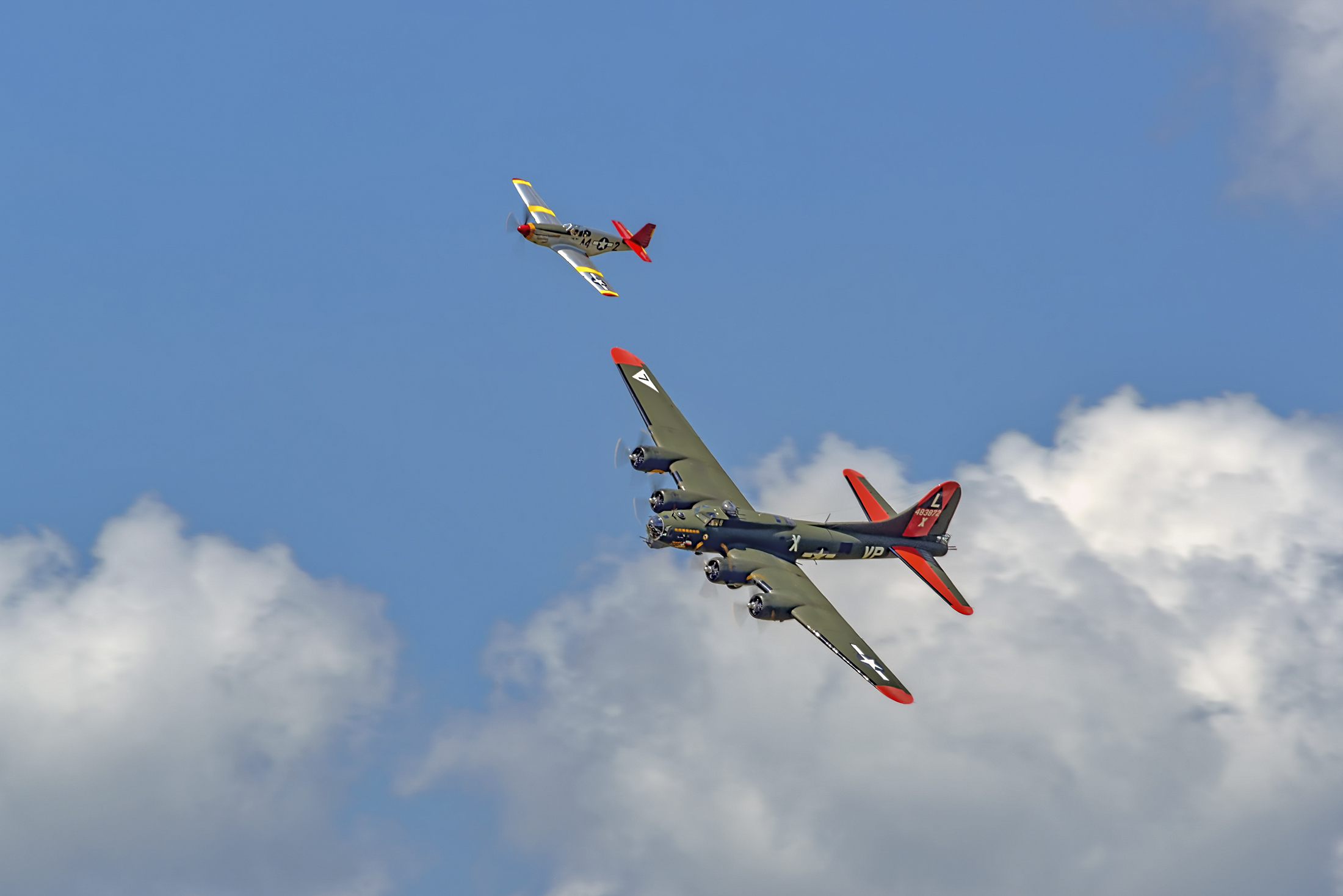
The prettiest B17 ever (IMHO). Unfortunately lost to a mid-air with a P69 at a show in Dallas last year. Photo from show at Youngstown (Ohio) Air Reserve Station in June 2017.
Danpbphoto wrote:
I spent many years in Baltimore traveling to DC everyday at 3am to beat the "rush hour". Suzanne and I grew up in a wonderful small country town that has now been "raped" of all its beginnings, Gaithersburg..1957's-
I was NOT ready to retire. The environment I had to work in was becoming very distracting from carrying out my job! Those I came in "service" with had retired a few years earlier. My new boss was someone 20+ years younger than myself, not that youth is to blame, and had very little "field" experience. That "don't" work in my ex-job. One can't "guess" on you next job.
Retire when YOU are ready. To hell with anyone else with the exception of family>
Dan
These days I’m up by 4AM because I spend all morning working with guys in Hungary and Poland. Really great tech guys and easy to work with. I do my work and my manager (who my wife work with years ago) basically lets me mentor the new guys. After all the years, working on two projects is about as easy as I’ve had it in years. Probably the stuff I”m working on now will be done in two years and I think I’ll be done with it .
Then I think my cameras will get a lot more exercise than they get now.
Douglas L wrote:
I routinely use the "clear" option in Topaz Denoise, I rarely rarely use their AI Sharpen, too much artifacts. I got to say the Topaz Denoise is a Godsend for those who often shoot at ISO 1000+ or crop a lot.
The only time I use AI Sharpen is when I have an OOF photo that I need to save. Used lightly I find it is pretty amazing.
100% Steve! I use Nik Collection and have been since it came out. But recently many problems cropping up in the "edit" that I don't like and DXO cant fix. Maybe it is "me". NTL...not liking it! Others may not be having any problems. Excellent! But I am. And my 2 "work" computers are "state of the art"...until they ship.... Time for as switch? Could be! Thanks! Dan
Hi Dan,
I still use Lightroom 6.14 and Photoshop CS6 daily, but also use Capture One 22 as my modern Lightroom (non-subscription) replacement, Affinity Photo and also DXO PhotoLab 6 for its noise reduction (with the latest Nik Collection and FilmPack 6). Like you, I have used the Nik Collection since the start but recently shelled out for the latest version and I am really impressed with the revised interface, usability and little extras.
I like using different apps/programs to see what they can do for me, both for overall 'look' and also at the fine detail level, being a tragic pixel peeper. And because I like creating artsy images I lean on Exposure Software X6 as well, for the various outcomes I can achieve.
Also, I agree with others that Topaz have great products: Denoise is very good (but can't match DXO's Deep Prime XD IMHO), Sharpen is very good generally but leaves some artifacts that must be masked out and Gigapixel AI is really good period. I have used it to upsize and then downsize, giving me good detail and sharpness without the artifacts that Sharpen alone would deliver.
Of course if I was a better photographer I wouldn't have to lean so heavily on these tools, I would get a perfectly exposed image that could be used straight out of the camera with very little work.
In 2018/2019 I was using an iMac 5K and PC alongside each other but when it came to upgrading the iMac to an iMac Pro or Mac Pro the cost stopped me in my tracks. So I specced out a new PC with 128GB of RAM and 18 cores for half the price of an iMac Pro. And it was faster. It still blazes through most things I can throw at it, and I can still upgrade it when I eventually need to. But I also use a MacBook Air M1 for travel and it is a superb machine.
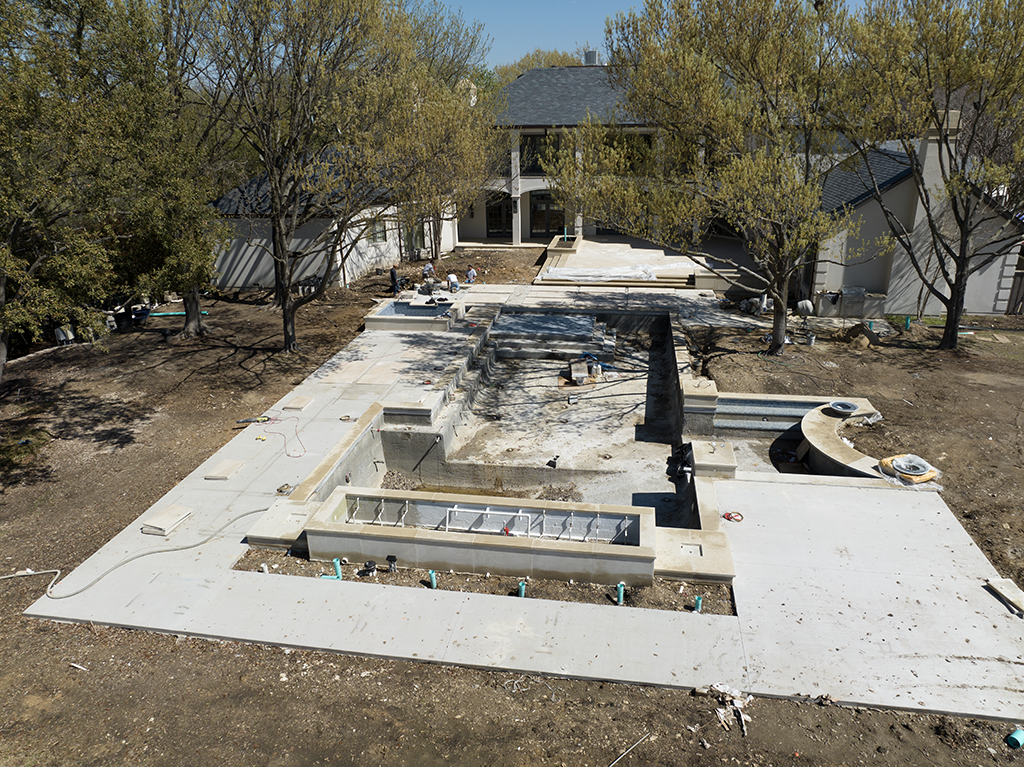
The "Ceeement Pond" project is coming along...............................This project is a block away from being unshootable from a drone, airspace is at the edge of a Presidential TFR, It's in Love Field airspace and DFW, the authorization hoops are something.


 .
. 
 ? That is unreal flexing. My "Ingineer" brain says that's just wrong.