Uneven Sharpness Across the Frame (Left vs. Right)
p.1 #1Uneven Sharpness Across the Frame (Left vs. Right)
I often take two shots of the same scene less than three seconds apart because I'm concerned about missing focus or camera shake.
However, when reviewing my photos at home, I keep noticing something strange. The sharpness seems to vary between the left and right sides of two consecutive shots of the same scene. In one shot, the left side is sharper, while in the other, the right side is sharper. The difference is less noticeable toward the center of the image.
In some pairs of photos taken just a few seconds apart, one image is sharper on the left side, while the other is sharper on the right.
Does anyone know what might be causing this?
I've considered camera shake and wind as possible factors. However, I also found several examples where the subjects are stationary rocks, so subject movement shouldn't be an issue.
Is there any reason why one side of the image would be sharper than the other, even when taking two shots just seconds apart?
Is it possible to have both the left and right sides equally sharp in a single image? Or does this mean that only one side can be in focus at a time?
I've been trying to figure this out for days, but I still can't find an explanation.
I'm not sure I've explained the issue clearly in English, so I've uploaded some example photos to Flickr. Hopefully, the photos will help illustrate what I'm experiencing.
**Flickr album:**
https://www.flickr.com/photos/65941338@N07/albums/72177720336785072/
I'd really appreciate any help or suggestions. Thank you!
Edited on Nov 10, 2026 at 01:45 PM · View previous versions
However, when reviewing my photos at home, I keep noticing something strange. The sharpness seems to vary between the left and right sides of two consecutive shots of the same scene. In one shot, the left side is sharper, while in the other, the right side is sharper. The difference is less noticeable toward the center of the image.
In some pairs of photos taken just a few seconds apart, one image is sharper on the left side, while the other is sharper on the right.
Does anyone know what might be causing this?
I've considered camera shake and wind as possible factors. However, I also found several examples where the subjects are stationary rocks, so subject movement shouldn't be an issue.
Is there any reason why one side of the image would be sharper than the other, even when taking two shots just seconds apart?
Is it possible to have both the left and right sides equally sharp in a single image? Or does this mean that only one side can be in focus at a time?
I've been trying to figure this out for days, but I still can't find an explanation.
I'm not sure I've explained the issue clearly in English, so I've uploaded some example photos to Flickr. Hopefully, the photos will help illustrate what I'm experiencing.
**Flickr album:**
https://www.flickr.com/photos/65941338@N07/albums/72177720336785072/
I'd really appreciate any help or suggestions. Thank you!
Edited on Nov 10, 2026 at 01:45 PM · View previous versions
Nov 07, 2026 at 03:23 AM
p.1 #2Uneven Sharpness Across the Frame (Left vs. Right)
It can also be issue with OSS/camera SteadyShot?
Better to check it on tripod with oss/ibis off first.
Better to check it on tripod with oss/ibis off first.
Nov 07, 2026 at 05:10 AM
p.1 #3Uneven Sharpness Across the Frame (Left vs. Right)
I did not inspect your examples closely, but here are a few thoughts.
1. Sometimes a lens can have issues where it does not focus equally on both sides (or in different corners) of the frame. Depending on the lens and the severity of the problem you may need to return it or have it adjusted.
2. If you are testing a lens for this problem you should photograph flat subjects and ensure that they are perfectly parallel to teh sensor. If the subject is further/closer on one side that can affect focus — you might focus on the correct distance for the left side subject and the right side can be out of focus if it is a bit closer/farther.
3. The effect is increased if you are testing at wide open large apertures since our depth of field increases.
sean dennis wrote:
I often take two shots of the same scene less than three seconds apart because I'm concerned about missing focus or camera shake.
However, when reviewing my photos at home, I keep noticing something strange. The sharpness seems to vary between the left and right sides of two consecutive shots of the same scene. In one shot, the left side is sharper, while in the other, the right side is sharper. The difference is less noticeable toward the center of the image.
Does anyone know what might be causing this?
I've considered camera shake and wind as possible factors. However, I also...Show more →
1. Sometimes a lens can have issues where it does not focus equally on both sides (or in different corners) of the frame. Depending on the lens and the severity of the problem you may need to return it or have it adjusted.
2. If you are testing a lens for this problem you should photograph flat subjects and ensure that they are perfectly parallel to teh sensor. If the subject is further/closer on one side that can affect focus — you might focus on the correct distance for the left side subject and the right side can be out of focus if it is a bit closer/farther.
3. The effect is increased if you are testing at wide open large apertures since our depth of field increases.
sean dennis wrote:
I often take two shots of the same scene less than three seconds apart because I'm concerned about missing focus or camera shake.
However, when reviewing my photos at home, I keep noticing something strange. The sharpness seems to vary between the left and right sides of two consecutive shots of the same scene. In one shot, the left side is sharper, while in the other, the right side is sharper. The difference is less noticeable toward the center of the image.
Does anyone know what might be causing this?
I've considered camera shake and wind as possible factors. However, I also...Show more →
Nov 07, 2026 at 06:09 AM
p.1 #4Uneven Sharpness Across the Frame (Left vs. Right)
I had a closer look at your images:
- My impression is that some sort of refocussing has happened between the shots, shifting the point of maximal focus between different objects on the left / right side.
- Some minimal tilt may also be of issue here, yielding varying degrees of sharpness on the left/right depending on different objects and their distance from the camera. This issue can only be tested with a really flat subject, or a subject (landscape) at at infinity distance.
- An issue that always cannot be ruled out is some decentering problem of the optical stabilization unit. This has allready been sugested and testing it on a tripod with optical stabilization shut off is the way to go.
Overall, I do not find the effect that serious. Yes -pixel peeping- it can be seen, but I would not find a picture with such slight softness on one side seriously impaired. The effect is interesting academically and from that perspective it is fun to follow it up.
Edited on Nov 07, 2026 at 09:31 AM · View previous versions
- My impression is that some sort of refocussing has happened between the shots, shifting the point of maximal focus between different objects on the left / right side.
- Some minimal tilt may also be of issue here, yielding varying degrees of sharpness on the left/right depending on different objects and their distance from the camera. This issue can only be tested with a really flat subject, or a subject (landscape) at at infinity distance.
- An issue that always cannot be ruled out is some decentering problem of the optical stabilization unit. This has allready been sugested and testing it on a tripod with optical stabilization shut off is the way to go.
Overall, I do not find the effect that serious. Yes -pixel peeping- it can be seen, but I would not find a picture with such slight softness on one side seriously impaired. The effect is interesting academically and from that perspective it is fun to follow it up.
Edited on Nov 07, 2026 at 09:31 AM · View previous versions
Nov 07, 2026 at 07:30 AM
p.1 #5Uneven Sharpness Across the Frame (Left vs. Right)
Most lenses have residual field curvature and that could be a cause combined with variations in focus distance. Use manual focus and turn off the OS.
EBH
EBH
Nov 07, 2026 at 07:55 AM
p.1 #6Uneven Sharpness Across the Frame (Left vs. Right)
You can have ACR show the focus point on 2 of your files to see if it shifted
https://www.fredmiranda.com/forum/topic/1954155/0#17097780
https://www.fredmiranda.com/forum/topic/1954155/0#17097780
Nov 07, 2026 at 08:11 AM
p.1 #7Uneven Sharpness Across the Frame (Left vs. Right)
sean dennis wrote:
I often take two shots of the same scene less than three seconds apart because I'm concerned about missing focus or camera shake.
However, when reviewing my photos at home, I keep noticing something strange. The sharpness seems to vary between the left and right sides of two consecutive shots of the same scene. In one shot, the left side is sharper, while in the other, the right side is sharper. The difference is less noticeable toward the center of the image.
Does anyone know what might be causing this?
I've considered camera shake and wind as possible factors. However, I also...Show more →
A couple possibilities come to mind. First is there is possibly a slightly loose internal element causing a difference in optical centering. However, given it's occurring with multiple lenses -- albeit to a significantly lesser level in the 50/GM -- it's more likely a camera internal AF error OR an IBIS issue. What I couldn't see in the exif is what body this is.
HOWEVER! In-cam jpegs are not the best test files for resolution as a lot can go sideways with internal jpeg conversion and especially in-cam sharpening settings. I would repeat the test using raw files all processed with identical settings to do this comparison before I got too concerned.
I often take two shots of the same scene less than three seconds apart because I'm concerned about missing focus or camera shake.
However, when reviewing my photos at home, I keep noticing something strange. The sharpness seems to vary between the left and right sides of two consecutive shots of the same scene. In one shot, the left side is sharper, while in the other, the right side is sharper. The difference is less noticeable toward the center of the image.
Does anyone know what might be causing this?
I've considered camera shake and wind as possible factors. However, I also...Show more →
A couple possibilities come to mind. First is there is possibly a slightly loose internal element causing a difference in optical centering. However, given it's occurring with multiple lenses -- albeit to a significantly lesser level in the 50/GM -- it's more likely a camera internal AF error OR an IBIS issue. What I couldn't see in the exif is what body this is.
HOWEVER! In-cam jpegs are not the best test files for resolution as a lot can go sideways with internal jpeg conversion and especially in-cam sharpening settings. I would repeat the test using raw files all processed with identical settings to do this comparison before I got too concerned.
Nov 07, 2026 at 08:38 AM
p.1 #8Uneven Sharpness Across the Frame (Left vs. Right)
I agree with some of the suggestions provided earlier:
1) The focus point could be shifting between shots. It looks like you are using multi-segment and that often grabs different focal points between shots.
2) At the enlargement factor, a slight shift of the sensor due to IBIS could be seen. I don't know how steady your hand is, but could be a factor.
3) Lastly, try a series of test shots using a tripod and then see if you have the same issues.
1) The focus point could be shifting between shots. It looks like you are using multi-segment and that often grabs different focal points between shots.
2) At the enlargement factor, a slight shift of the sensor due to IBIS could be seen. I don't know how steady your hand is, but could be a factor.
3) Lastly, try a series of test shots using a tripod and then see if you have the same issues.
Nov 07, 2026 at 09:33 AM
p.1 #9Uneven Sharpness Across the Frame (Left vs. Right)
Thanks everyone for your suggestions. I've uploaded the original RAW files to Google Drive for anyone who would like to download and examine them:
**RAW files:**
https://drive.google.com/drive/folders/1x4mloj2IWjYgrD-HpyE5F63NF9YgjGdo?role=reader
I'm using a Sony A7R III with two different lenses: the Sony 16-35mm F4 and the Sony 50mm F1.2 GM. I've noticed similar behavior with both lenses.
In some pairs of photos taken just a few seconds apart, one image is sharper on the left side, while the other is sharper on the right.
I also compared the RAW files with the in-camera JPEGs. The left/right sharpness difference is visible in both, and they look essentially the same in this respect.
I don't think ordinary camera shake or an insufficient shutter speed fully explains what I'm seeing, because the issue isn't simply that the entire image is blurry. Instead, the sharpness differs between the left and right sides, and the sharper side can change between two shots. However, I can't completely rule out the effects of handheld shooting.
As you can see from the EXIF data, the two shots are only a few seconds apart. I usually take one shot, pause briefly, and then take another, rather than shooting continuously in burst mode.
I was also using AF-S autofocus.
All of these photos were taken handheld while traveling, without a tripod.
Regarding field curvature, I have a question: If this is caused by field curvature in the lens, wouldn't the sharpness distribution normally remain relatively consistent? Why would the sharper side switch from left to right between two shots taken just seconds apart?
I may find some time later to test this using a tripod with image stabilization turned off, to see whether it makes any difference.
However, my main concern is understanding why this happens during normal handheld shooting, since that's how I take most of my photos. In some cases, the difference in sharpness between the left and right sides is noticeable even when viewing the images normally on a large computer monitor, without zooming in to 100%.
Thanks again for taking the time to help. I really hope we can figure out what's causing this.
**RAW files:**
https://drive.google.com/drive/folders/1x4mloj2IWjYgrD-HpyE5F63NF9YgjGdo?role=reader
I'm using a Sony A7R III with two different lenses: the Sony 16-35mm F4 and the Sony 50mm F1.2 GM. I've noticed similar behavior with both lenses.
In some pairs of photos taken just a few seconds apart, one image is sharper on the left side, while the other is sharper on the right.
I also compared the RAW files with the in-camera JPEGs. The left/right sharpness difference is visible in both, and they look essentially the same in this respect.
I don't think ordinary camera shake or an insufficient shutter speed fully explains what I'm seeing, because the issue isn't simply that the entire image is blurry. Instead, the sharpness differs between the left and right sides, and the sharper side can change between two shots. However, I can't completely rule out the effects of handheld shooting.
As you can see from the EXIF data, the two shots are only a few seconds apart. I usually take one shot, pause briefly, and then take another, rather than shooting continuously in burst mode.
I was also using AF-S autofocus.
All of these photos were taken handheld while traveling, without a tripod.
Regarding field curvature, I have a question: If this is caused by field curvature in the lens, wouldn't the sharpness distribution normally remain relatively consistent? Why would the sharper side switch from left to right between two shots taken just seconds apart?
I may find some time later to test this using a tripod with image stabilization turned off, to see whether it makes any difference.
However, my main concern is understanding why this happens during normal handheld shooting, since that's how I take most of my photos. In some cases, the difference in sharpness between the left and right sides is noticeable even when viewing the images normally on a large computer monitor, without zooming in to 100%.
Thanks again for taking the time to help. I really hope we can figure out what's causing this.
Nov 07, 2026 at 02:21 PM
|
p.1 #10Uneven Sharpness Across the Frame (Left vs. Right)
Does this happen on closer subjects, like portraits?
Nov 07, 2026 at 03:33 PM
p.1 #11Uneven Sharpness Across the Frame (Left vs. Right)
Since it's happening on two different lenses - wouldn't it be logical that it's the camera that's the issue, not the lenses? Most likely in this case it's the sensor-shifting-image-stabilization. A Sony A7R III is not a new camera - it appeared at the end of 2017. It could be the mechanism is starting slow down or even hang after 8-9 years of use (or unuse). Or maybe you're just expecting too much from Sony's IBIS.
Think about it - while you're composing the shot, the sensor is floating (compensating for your hand shaking)...when if freezes (at exposure) for frame 1, say, the sensor is over on the left side. When it freezes at frame 2 it's at the upper right corner of its travel. Image quality can fall off dramatically when you're near the limit of the lens' image circle.
So it's not unlikely that sharpness at the extremes of your image can shift from frame to frame when you have IBIS turned on and shooting handheld at shutter speeds like 1/50th and even 1/160th.
To quote Google:
"The In-Body Image Stabilization (IBIS) system in the Sony a7R III operates across 5 axes of travel to counteract handheld camera shake.
The sensor physically moves in the following five directions:
1. Pitch (Angular Shake)
The sensor tilts up and down to correct for the vertical angular tilting motion that typically occurs when pushing the shutter button or holding a heavy lens.
2. Yaw (Angular Shake)
The sensor pivots side to side (left and right) to correct for horizontal panning or twisting movements of the camera body.
3. Roll (Rotational Shake)
The sensor rotates clockwise and counter-clockwise around the center axis of the lens. This corrects for the twisting motion that occurs during long exposures or when walking while shooting video, a movement that lens-based stabilization (OSS) cannot correct on its own.
4. X-Axis (Horizontal Shift)
The sensor slides linearly left and right. This translational shift correction is highly beneficial for macro photography and close-up shooting where slight lateral movements heavily impact framing.
5. Y-Axis (Vertical Shift)
The sensor slides linearly up and down. Similar to X-axis shift, this corrects for strict up-and-down positional movement rather than tilting, which is essential for stabilizing close-up subjects."
Think about it - while you're composing the shot, the sensor is floating (compensating for your hand shaking)...when if freezes (at exposure) for frame 1, say, the sensor is over on the left side. When it freezes at frame 2 it's at the upper right corner of its travel. Image quality can fall off dramatically when you're near the limit of the lens' image circle.
So it's not unlikely that sharpness at the extremes of your image can shift from frame to frame when you have IBIS turned on and shooting handheld at shutter speeds like 1/50th and even 1/160th.
To quote Google:
"The In-Body Image Stabilization (IBIS) system in the Sony a7R III operates across 5 axes of travel to counteract handheld camera shake.
The sensor physically moves in the following five directions:
1. Pitch (Angular Shake)
The sensor tilts up and down to correct for the vertical angular tilting motion that typically occurs when pushing the shutter button or holding a heavy lens.
2. Yaw (Angular Shake)
The sensor pivots side to side (left and right) to correct for horizontal panning or twisting movements of the camera body.
3. Roll (Rotational Shake)
The sensor rotates clockwise and counter-clockwise around the center axis of the lens. This corrects for the twisting motion that occurs during long exposures or when walking while shooting video, a movement that lens-based stabilization (OSS) cannot correct on its own.
4. X-Axis (Horizontal Shift)
The sensor slides linearly left and right. This translational shift correction is highly beneficial for macro photography and close-up shooting where slight lateral movements heavily impact framing.
5. Y-Axis (Vertical Shift)
The sensor slides linearly up and down. Similar to X-axis shift, this corrects for strict up-and-down positional movement rather than tilting, which is essential for stabilizing close-up subjects."
Nov 07, 2026 at 03:59 PM
p.1 #12Uneven Sharpness Across the Frame (Left vs. Right)
sean dennis wrote:
I often take two shots of the same scene less than three seconds apart because I'm concerned about missing focus or camera shake.
However, when reviewing my photos at home, I keep noticing something strange. The sharpness seems to vary between the left and right sides of two consecutive shots of the same scene. In one shot, the left side is sharper, while in the other, the right side is sharper. The difference is less noticeable toward the center of the image.
Does anyone know what might be causing this?
I've considered camera shake and wind as possible factors. However, I also...Show more →
As other have said, this seems most likely to be either an image stabiliazation problem or a focusing problem. I would do the following:
First, take the battery out and replace it after 10 seconds.
Turn off image stabilization and shoot images using a high shutter speed to test whether eliminating IBIS removes the variation.
Then, with IBIS off, shoot images on a tripod using a small focus zone and a relatively flat or uniformly distant scene. Don't refocus between shots. I don't recall your saying what focus setting you are using, but I would suggest a small fixed zone from a tripod to test whether there is focus variation that accounts for the difference in your images.
I often take two shots of the same scene less than three seconds apart because I'm concerned about missing focus or camera shake.
However, when reviewing my photos at home, I keep noticing something strange. The sharpness seems to vary between the left and right sides of two consecutive shots of the same scene. In one shot, the left side is sharper, while in the other, the right side is sharper. The difference is less noticeable toward the center of the image.
Does anyone know what might be causing this?
I've considered camera shake and wind as possible factors. However, I also...Show more →
As other have said, this seems most likely to be either an image stabiliazation problem or a focusing problem. I would do the following:
First, take the battery out and replace it after 10 seconds.
Turn off image stabilization and shoot images using a high shutter speed to test whether eliminating IBIS removes the variation.
Then, with IBIS off, shoot images on a tripod using a small focus zone and a relatively flat or uniformly distant scene. Don't refocus between shots. I don't recall your saying what focus setting you are using, but I would suggest a small fixed zone from a tripod to test whether there is focus variation that accounts for the difference in your images.
Nov 07, 2026 at 08:29 PM
p.1 #13Uneven Sharpness Across the Frame (Left vs. Right)
It's the camera shake that ibis can not fully compensate. Ever notice the ibis is rated for the center of frame? Because the rest of the frame will travel more and become more difficult for ibis to compensate fully.
And when you have a camera shake causing a roll, the movement is never around the sensor center. On one click, the top right of the camera may move more while on another click, the bottom left may move more. while such roll movement can be offset somewhat by ibis xshift and yshift for the sensor center, the fact remains that it's never symmetrical between the sides of the sensor, thus can not be compensated equally by ibis.
The solution is very simple. Just put on the burst mode and take a sequence instead just a couple. That increases your likelihood of getting one with minimum shake. Check all 4 corners of the pictures. If all 4 corners are good, then it should be good everywhere. Yes, it takes more effort, but is the cheapest solution. Otherwise you will just have to reduce camera shake by increasing shutter speed which may have other consequences that you have to tradeoff.
And when you have a camera shake causing a roll, the movement is never around the sensor center. On one click, the top right of the camera may move more while on another click, the bottom left may move more. while such roll movement can be offset somewhat by ibis xshift and yshift for the sensor center, the fact remains that it's never symmetrical between the sides of the sensor, thus can not be compensated equally by ibis.
The solution is very simple. Just put on the burst mode and take a sequence instead just a couple. That increases your likelihood of getting one with minimum shake. Check all 4 corners of the pictures. If all 4 corners are good, then it should be good everywhere. Yes, it takes more effort, but is the cheapest solution. Otherwise you will just have to reduce camera shake by increasing shutter speed which may have other consequences that you have to tradeoff.
Nov 08, 2026 at 05:55 AM
p.1 #14Uneven Sharpness Across the Frame (Left vs. Right)
BigBabyMoses06 wrote:
Does this happen on closer subjects, like portraits?
Yes, I've noticed something similar when taking portraits.
When I take 3–4 shots of the same person in the same scene using a wide-angle lens, the eyes are usually in focus in all the photos. However, the background sharpness can vary significantly between shots.
The framing is very similar (over 90% the same), although there are slight shifts up, down, left, or right because I'm shooting handheld.
In some photos, the background is relatively sharp, while in others, it looks noticeably blurred, almost as if it were shot with a much wider aperture.
The difference is quite surprising, considering that all the shots were taken in the same scene within a short period of time.
I'm not sure which result is normal or what might be causing such a noticeable difference.
https://drive.google.com/file/d/1TtBOiEyL06YbKyAkPtPSGVA7pML1OtHp/view?usp=sharing
Does this happen on closer subjects, like portraits?
Yes, I've noticed something similar when taking portraits.
When I take 3–4 shots of the same person in the same scene using a wide-angle lens, the eyes are usually in focus in all the photos. However, the background sharpness can vary significantly between shots.
The framing is very similar (over 90% the same), although there are slight shifts up, down, left, or right because I'm shooting handheld.
In some photos, the background is relatively sharp, while in others, it looks noticeably blurred, almost as if it were shot with a much wider aperture.
The difference is quite surprising, considering that all the shots were taken in the same scene within a short period of time.
I'm not sure which result is normal or what might be causing such a noticeable difference.
https://drive.google.com/file/d/1TtBOiEyL06YbKyAkPtPSGVA7pML1OtHp/view?usp=sharing
Nov 09, 2026 at 01:45 PM
p.1 #15Uneven Sharpness Across the Frame (Left vs. Right)
tctmp wrote:
It's the camera shake that ibis can not fully compensate. Ever notice the ibis is rated for the center of frame? Because the rest of the frame will travel more and become more difficult for ibis to compensate fully.
And when you have a camera shake causing a roll, the movement is never around the sensor center. On one click, the top right of the camera may move more while on another click, the bottom left may move more. while such roll movement can be offset somewhat by ibis xshift and yshift for the sensor center, the fact remains that it's...Show more →
First of all, thank you everyone for your help and suggestions.
I've only recently learned that image stabilization has its limitations, and that it may not provide exactly the same degree of correction across the entire frame, particularly toward the edges.
I didn't really know how to edit photos before, so I would usually just browse through my pictures after returning home. Recently, I've started learning photo editing and going back through my older photos. It was only when I began zooming in and comparing different shots side by side that I noticed these sharpness issues.
I've been quite busy lately, so I'll have to wait until I have some free time to take my camera out and perform some tests based on everyone's suggestions. Hopefully, I can figure out what's causing this.
There is something else I've been wondering about: How sharp should a photo normally be? What should we consider an acceptable or expected level of sharpness?
When certain areas of an image appear soft, how can we tell whether it's caused by camera shake, missed focus, or something else?
Some differences are barely noticeable when viewing photos on a small screen or at normal viewing sizes. They only become apparent when zooming in and comparing images side by side.
Or does the standard for what we consider sharp simply vary depending on viewing size, intended use, and individual expectations?
I've included three photos below with almost identical compositions, all taken in the same scene, but with noticeably different levels of sharpness. The softer image almost has the rendering of an older vintage lens, with a noticeably softer appearance.
https://drive.google.com/drive/folders/1t8W8iKRTAmbfbNNq5rVe6HqjDTT05qIE
Which level of sharpness should be considered normal? Should the sharpest image be used as a reference for what this camera and lens combination should be capable of producing?
If this kind of variation happens frequently under similar shooting conditions, should I consider upgrading to a camera with better image stabilization? Or should I simply use a tripod whenever I want to ensure consistently sharp results?
I'm still trying to understand what's normal and what isn't, so I'd really appreciate hearing your thoughts.
Thanks again for all your help!
It's the camera shake that ibis can not fully compensate. Ever notice the ibis is rated for the center of frame? Because the rest of the frame will travel more and become more difficult for ibis to compensate fully.
And when you have a camera shake causing a roll, the movement is never around the sensor center. On one click, the top right of the camera may move more while on another click, the bottom left may move more. while such roll movement can be offset somewhat by ibis xshift and yshift for the sensor center, the fact remains that it's...Show more →
First of all, thank you everyone for your help and suggestions.
I've only recently learned that image stabilization has its limitations, and that it may not provide exactly the same degree of correction across the entire frame, particularly toward the edges.
I didn't really know how to edit photos before, so I would usually just browse through my pictures after returning home. Recently, I've started learning photo editing and going back through my older photos. It was only when I began zooming in and comparing different shots side by side that I noticed these sharpness issues.
I've been quite busy lately, so I'll have to wait until I have some free time to take my camera out and perform some tests based on everyone's suggestions. Hopefully, I can figure out what's causing this.
There is something else I've been wondering about: How sharp should a photo normally be? What should we consider an acceptable or expected level of sharpness?
When certain areas of an image appear soft, how can we tell whether it's caused by camera shake, missed focus, or something else?
Some differences are barely noticeable when viewing photos on a small screen or at normal viewing sizes. They only become apparent when zooming in and comparing images side by side.
Or does the standard for what we consider sharp simply vary depending on viewing size, intended use, and individual expectations?
I've included three photos below with almost identical compositions, all taken in the same scene, but with noticeably different levels of sharpness. The softer image almost has the rendering of an older vintage lens, with a noticeably softer appearance.
https://drive.google.com/drive/folders/1t8W8iKRTAmbfbNNq5rVe6HqjDTT05qIE
Which level of sharpness should be considered normal? Should the sharpest image be used as a reference for what this camera and lens combination should be capable of producing?
If this kind of variation happens frequently under similar shooting conditions, should I consider upgrading to a camera with better image stabilization? Or should I simply use a tripod whenever I want to ensure consistently sharp results?
I'm still trying to understand what's normal and what isn't, so I'd really appreciate hearing your thoughts.
Thanks again for all your help!
Nov 09, 2026 at 02:28 PM
p.1 #16Uneven Sharpness Across the Frame (Left vs. Right)
In some pairs of photos taken just a few seconds apart, one image is sharper on the left side, while the other is sharper on the right.
You should edit your first post and add this, in bold.
You should edit your first post and add this, in bold.
Nov 09, 2026 at 03:57 PM
p.1 #17Uneven Sharpness Across the Frame (Left vs. Right)
Time to try a different camera. Curious to see what you find. I've had a similar problem this year across 2 different bodies and a few different lenses. No idea what's causing it. For me the right side is softer than the left most of the time.
Nov 09, 2026 at 06:31 PM
p.1 #18Uneven Sharpness Across the Frame (Left vs. Right)
sean dennis wrote:
And when you have a camera shake causing a roll, the movement is never around the sensor center. On one click, the top right of the camera may move more while on another click, the bottom left may move more. while such roll movement can be offset somewhat by ibis xshift and yshift for the sensor center, the fact remains that it's never symmetrical between the sides of the sensor, thus can not be compensated equally by ibis.
The solution is very simple. Just put on the burst mode and take a sequence instead just a couple. That increases your likelihood of getting one with minimum shake. Check all 4 corners of the pictures. If all 4 corners are good, then it should be good everywhere. Yes, it takes more effort, but is the cheapest solution. Otherwise you will just have to reduce camera shake by increasing shutter speed which may have other consequences that you have to tradeoff.First of all, thank you everyone for your help and suggestions.
I've only recently learned that image stabilization has its limitations, and that it may not provide exactly the same degree of correction across the entire frame, particularly toward the edges.
I didn't really know how to edit photos before, so I would usually just browse through my pictures after returning home. Recently, I've started learning photo editing and going back through my older photos. It was only when I began zooming in and comparing different shots side by side that I noticed these sharpness issues.
I've been quite busy lately, so...Show more →
You are asking some profound questions about sharpness, and there is no simple straight answer to these.
There is no "normal" sharpness. Also, a well-executed landscape photo is not required to be equally sharp in every part, every time. There is sharpening for screen, and sharpening for print - these are different things. When "differences are barely noticeable when viewing photos on a small screen or at normal viewing sizes" - you are good; ignore the differences.
Don't pixel-peep too much - this can work as distraction. Focus on the overall look of your images. It is the composition and the overall look that matter. If you want your images to display ultimate detail, then buy a 100MP GFX camera with GF lenses - these are outstanding instruments that should work better than recovering detail by sharpening (I use the GFX100S II for most of my photography lately).
Ultimately, the choices are yours, and the usual objective is to correct raw files to your liking, to your taste. However, we should keep in mind that (a) your taste and vision should change with time, and (b) that others may or may not like your taste and vision.
One thing about sharpness that is certain - oversharpening would almost certainly ruin your photos. Thus, as a "rule of thumb," it might be advisable to err on the side of caution: first sharpen as you like, then reduce the amount of sharpening.
I processed two of your raw files in Capture One (to my taste), without ANY sharpening applied:
DSC02543Softer and DSC02545Very Sharp
Here are the resulting jpegs, resized to 10.8MP.
Do these look too soft?
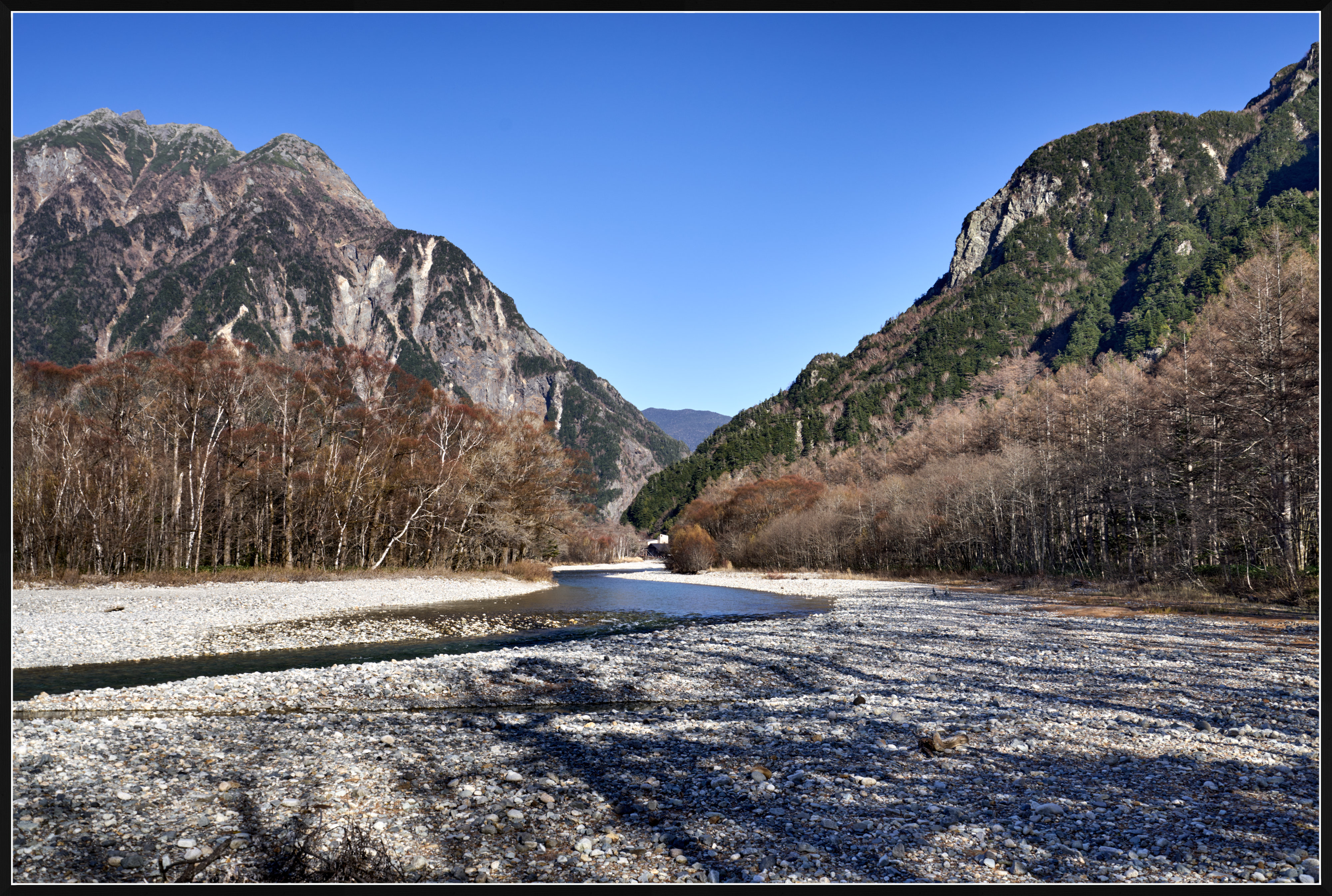
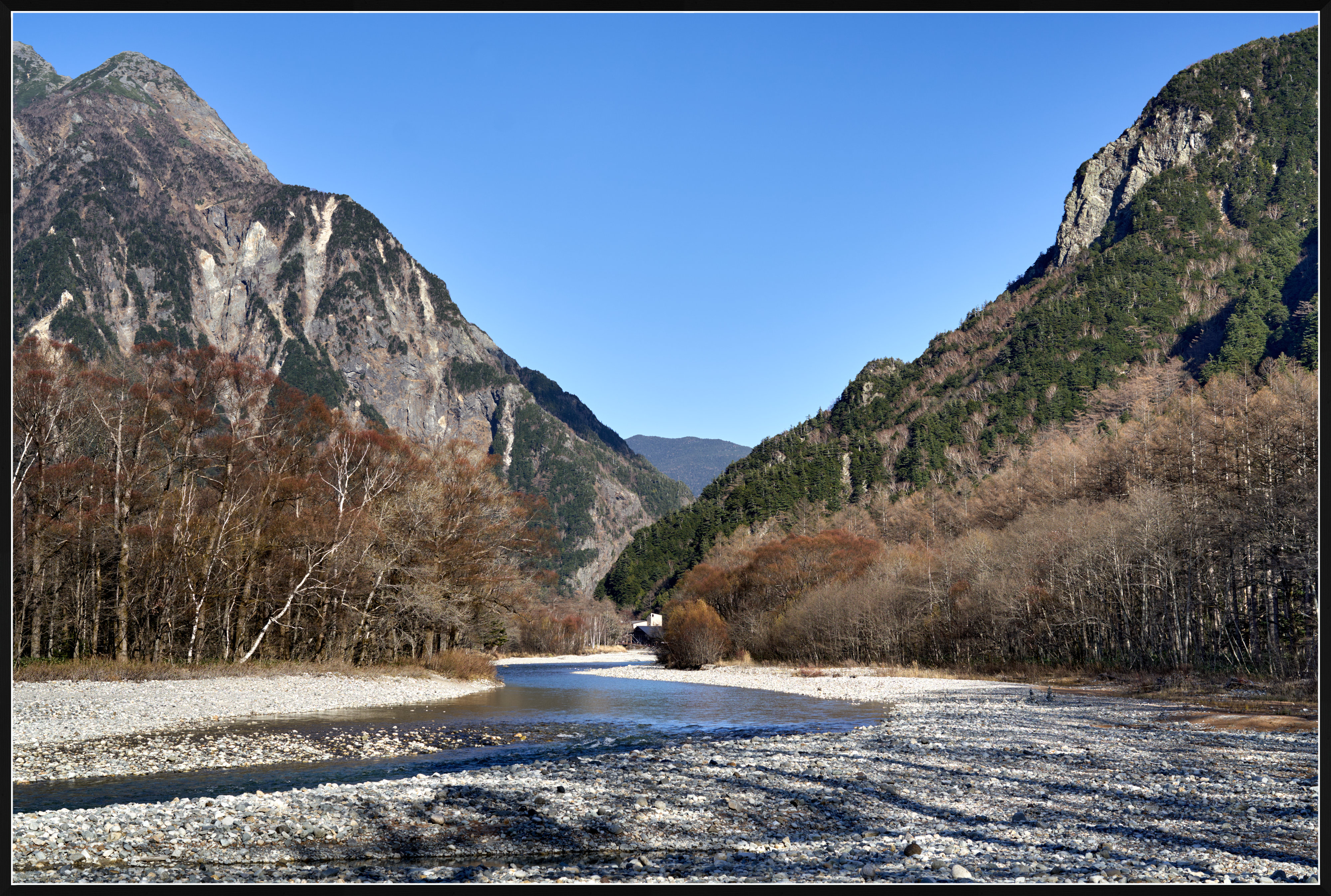
tctmp wrote
It's the camera shake that ibis can not fully compensate. Ever notice the ibis is rated for the center of frame? Because the rest of the frame will travel more and become more difficult for ibis to compensate fully.And when you have a camera shake causing a roll, the movement is never around the sensor center. On one click, the top right of the camera may move more while on another click, the bottom left may move more. while such roll movement can be offset somewhat by ibis xshift and yshift for the sensor center, the fact remains that it's never symmetrical between the sides of the sensor, thus can not be compensated equally by ibis.
The solution is very simple. Just put on the burst mode and take a sequence instead just a couple. That increases your likelihood of getting one with minimum shake. Check all 4 corners of the pictures. If all 4 corners are good, then it should be good everywhere. Yes, it takes more effort, but is the cheapest solution. Otherwise you will just have to reduce camera shake by increasing shutter speed which may have other consequences that you have to tradeoff.
I've only recently learned that image stabilization has its limitations, and that it may not provide exactly the same degree of correction across the entire frame, particularly toward the edges.
I didn't really know how to edit photos before, so I would usually just browse through my pictures after returning home. Recently, I've started learning photo editing and going back through my older photos. It was only when I began zooming in and comparing different shots side by side that I noticed these sharpness issues.
I've been quite busy lately, so...Show more →
You are asking some profound questions about sharpness, and there is no simple straight answer to these.
There is no "normal" sharpness. Also, a well-executed landscape photo is not required to be equally sharp in every part, every time. There is sharpening for screen, and sharpening for print - these are different things. When "differences are barely noticeable when viewing photos on a small screen or at normal viewing sizes" - you are good; ignore the differences.
Don't pixel-peep too much - this can work as distraction. Focus on the overall look of your images. It is the composition and the overall look that matter. If you want your images to display ultimate detail, then buy a 100MP GFX camera with GF lenses - these are outstanding instruments that should work better than recovering detail by sharpening (I use the GFX100S II for most of my photography lately).
Ultimately, the choices are yours, and the usual objective is to correct raw files to your liking, to your taste. However, we should keep in mind that (a) your taste and vision should change with time, and (b) that others may or may not like your taste and vision.
One thing about sharpness that is certain - oversharpening would almost certainly ruin your photos. Thus, as a "rule of thumb," it might be advisable to err on the side of caution: first sharpen as you like, then reduce the amount of sharpening.
I processed two of your raw files in Capture One (to my taste), without ANY sharpening applied:
DSC02543Softer and DSC02545Very Sharp
Here are the resulting jpegs, resized to 10.8MP.
Do these look too soft?
ILCE-7RM3 Sony Vario-Tessar T* FE 16-35 mm F4 ZA OSS (SEL1635Z) lens 35mm f/8.0 1/80s 100 ISO 0.0 EV
ILCE-7RM3 Sony FE 50mm F1.2 GM (SEL50F12GM) lens 50mm f/5.6 1/160s 100 ISO 0.0 EV
Nov 10, 2026 at 01:47 PM