LBJ2 wrote:
Leica Looks = Leica's in-camera creative styles/profiles that can be applied to jpegs in camera for compatible Leica cameras Q3, SL3 systems or can also be applied to other "unsupported" Leica cameras e.g, the M11, M10, Q2 SL2 series in post processing via the Leica Fotos Apps.
This is news to me and appears to be a relatively recent change. In the past, cameras like the M10 or M11 were not supported at all. It now seems that you can download a JPEG from a camera like the M10/M11 and apply a Leica Look to that JPEG using the FOTOS app. I have not tested this myself since I shoot DNG only, but this appears to be the case with the most recent FOTOS release.
Fred Miranda wrote:
This is news to me and appears to be a relatively recent change. In the past, cameras like the M10 or M11 were not supported at all. It now seems that you can download a JPEG from a camera like the M10/M11 and apply a Leica Look to that JPEG using the FOTOS app. I have not tested this myself since I shoot DNG only, but this appears to be the case with the most recent FOTOS release.
Yes this feature was introduced a few FOTOS app firmware updates back(last Dec '24). Using FOTOS app on the iPhone, I can even apply Leica Looks to my Sony jpegs
LBJ2 wrote:
Yes this feature was introduced a few FOTOS app firmware updates back(last Dec '24). Using FOTOS app on the iPhone, I can even apply Leica Looks to my Sony jpegs
Very cool. One thing worth mentioning is that while the Look will still be there, the accuracy can vary quite a bit unless you are using JPEGs from a Q3 or SL3. That's where the Cobalt profiles have a big advantage, beyond just better accuracy. The Leica Looks profiles can be applied to DNG files, which means you get higher color and tonal depth in the final output. I own the base profiles for my Leica M10-R and Sony A7CR and thing they are worth it.
Fred Miranda wrote:
The Leica Looks profiles can be applied to DNG files, which means you get higher color and tonal depth in the final output. I own the base profiles for my Leica M10-R and Sony A7CR and thing they are worth it.
I'd be curious to better understand how this improves the M10-R (color and tonality) ... and to what levels of difference (i.e. M11, Hassy X1D, X2D, etc.) in improvement you might equate the gains to. I reckon a demo is in my future to get a better clue.
I'll be honest, I really want a way to emulate the colors from the Leica JPEGs to a Leica DNG. However, I have tried the SL3 colors (natural, standard, etc..) from this pack to DNGs with matching JPEGs from a Leica M EV1 (which produces exactly the same colors as the M11). The look is wildly off, the colors don't match and all the DNGs have a muddy flat look compared to the camera JPEGs. Wildly disappointed in this.
bcaslis wrote:
I'll be honest, I really want a way to emulate the colors from the Leica JPEGs to a Leica DNG. However, I have tried the SL3 colors (natural, standard, etc..) from this pack to DNGs with matching JPEGs from a Leica M EV1 (which produces exactly the same colors as the M11). The look is wildly off, the colors don't match and all the DNGs have a muddy flat look compared to the camera JPEGs. Wildly disappointed in this.
Would you mind posting some side by side examples so we can see the Leica JPEG and the Cobalt DNG from the same image?
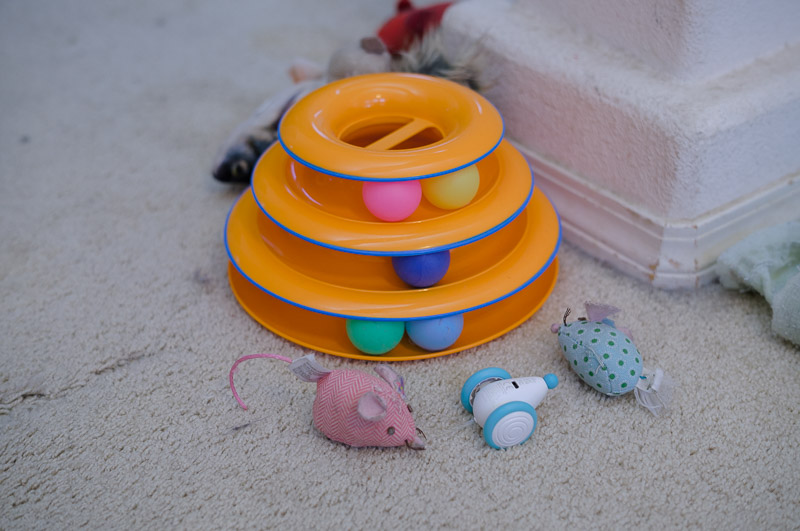
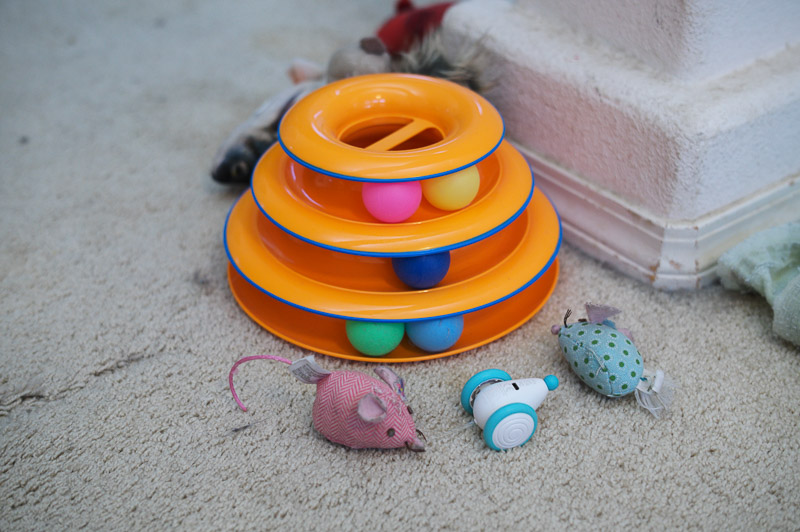
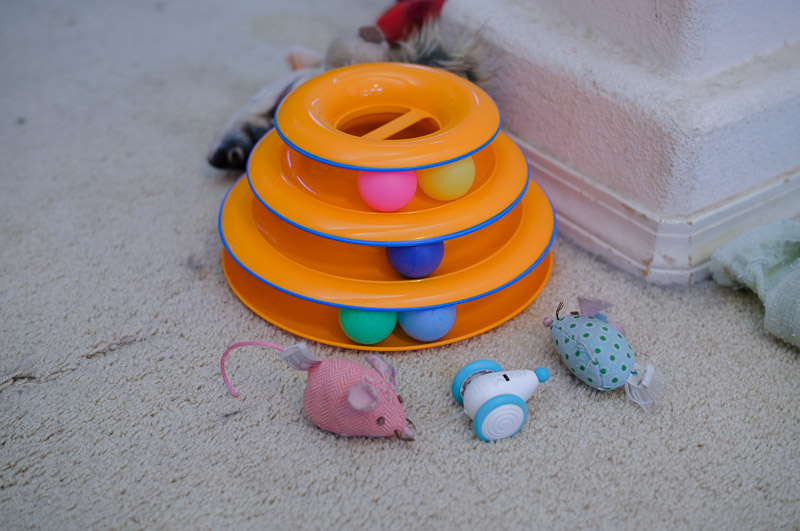
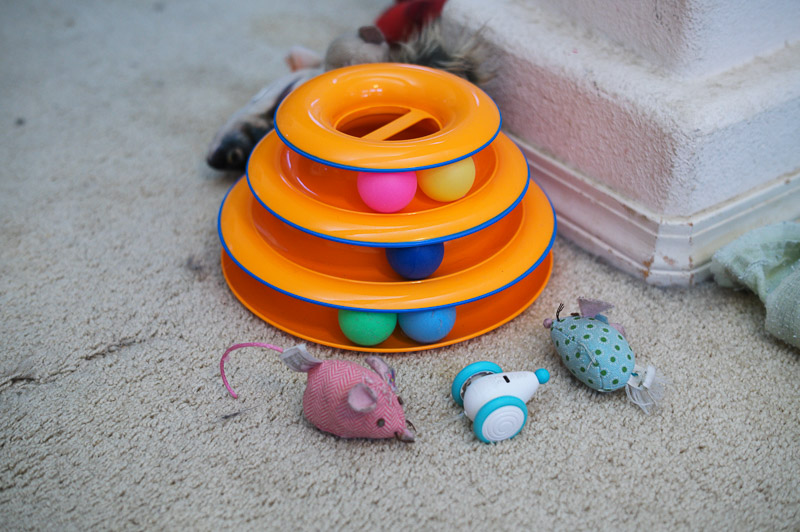
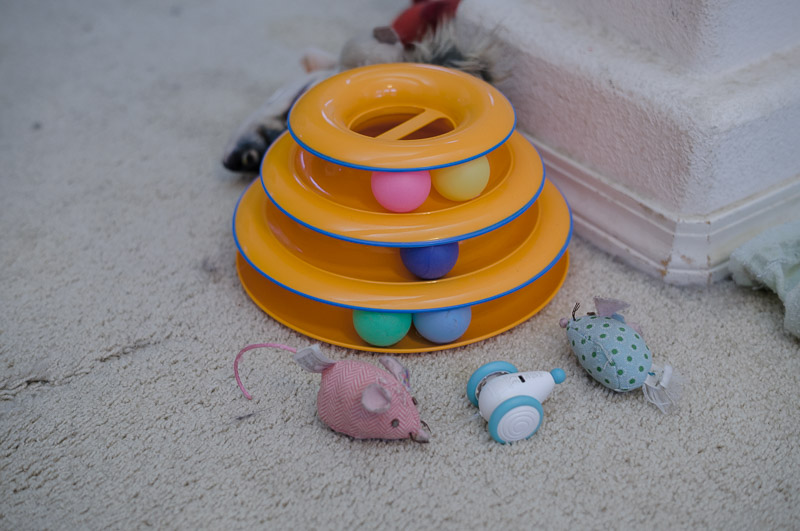
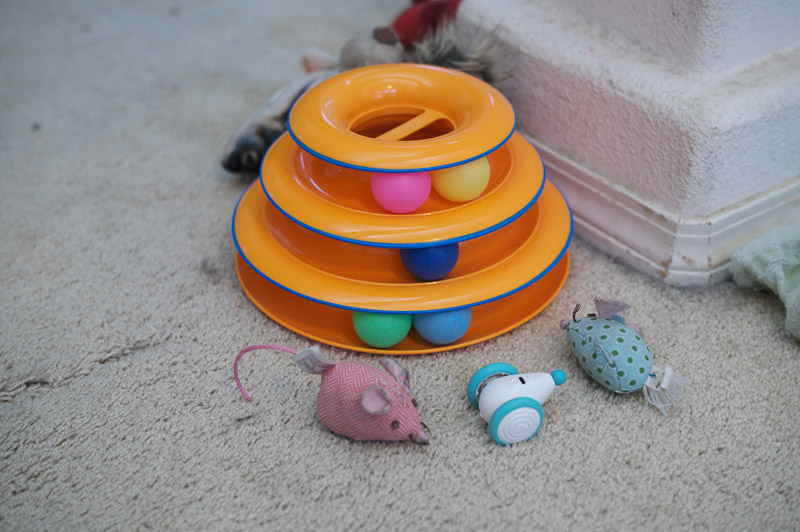
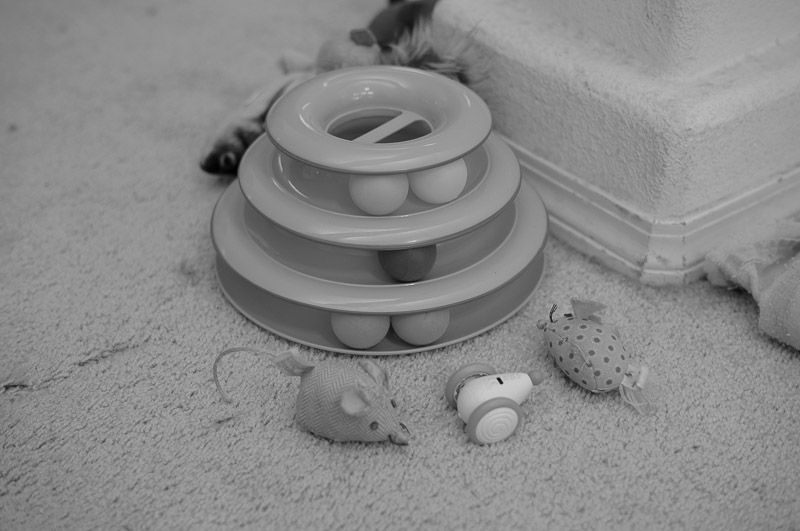
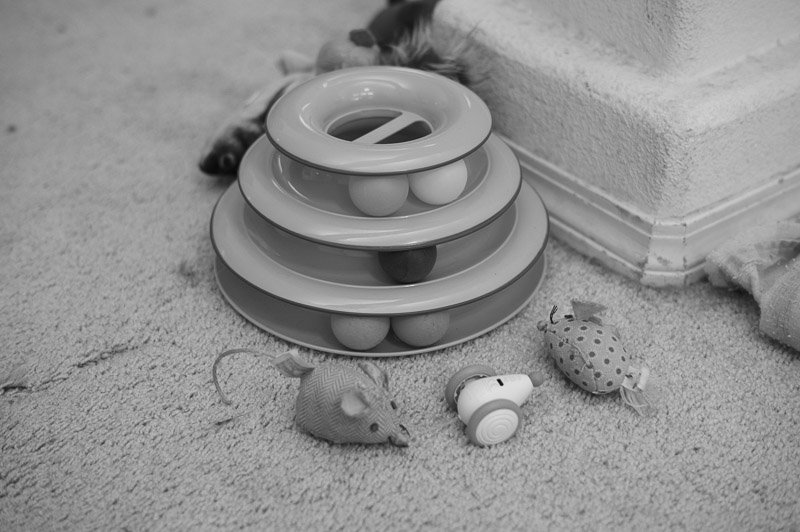
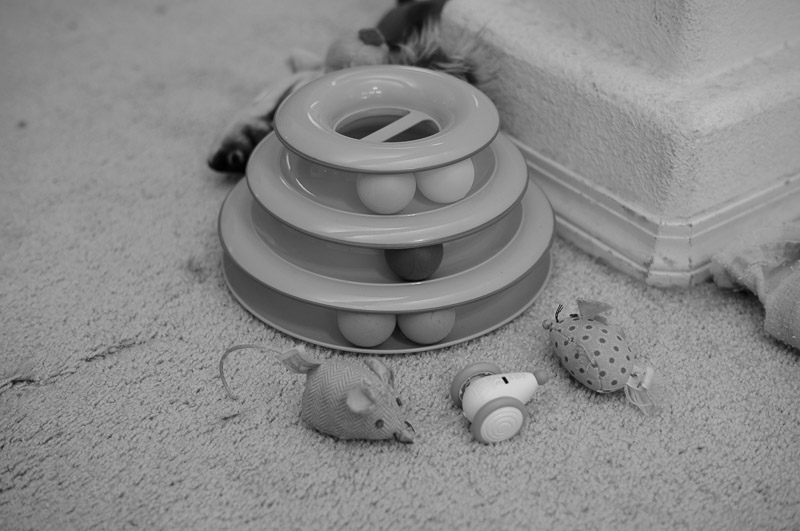
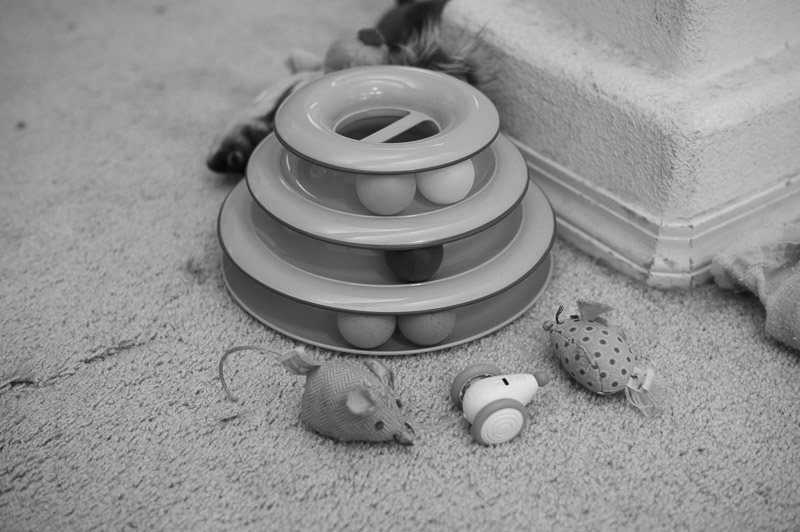
OK, here are small samples to show color, not very scientific but some cat toys with various colors I did as a quick and dirty test. The DNGs only have the camera profile changed to Colbalt profiles, I have even turned off lens corrections which I normally have on. These were all taken with the latest 50mm Summilux lens and the camera was set to DNG + JPEG for those photos.
bcaslis wrote:
OK, here are small samples to show color, not very scientific but some cat toys with various colors I did as a quick and dirty test. The DNGs only have the camera profile changed to Colbalt profiles, I have even turned off lens corrections which I normally have on. These were all taken with the latest 50mm Summilux lens and the camera was set to DNG + JPEG for those photos.
Hello, would you mind explaining exactly what workflow you followed to determine what’s happening with the photos you posted?
JPEGs out of the camera, DNGs are read into Lightroom classic and the camera profile is set to the appropriate one. No others changes. I have experimented with tone curves, etc... but not for these samples. Honestly I find these profiles unusable, they have a flat, muddy, strange color shift to them. I get more usable results with the embedded M11 profile or the adobe profiles.
The emulations are designed to replicate the SL3 colour response, not the M11.
That said—and once this conceptual distinction is clear—it’s important to state why comparing JPEG SOOC to DNG + profile, even when coming from the same camera body, is fundamentally meaningless.
A JPEG SOOC is internally “cooked” by the camera using a proprietary image-processing engine that is completely different from Adobe or Capture One. That internal engine interprets the scene data based on its own exposure metering and white-balance decisions, which are not fully disclosed, and produces a specific rendered output.
A DNG file, on the other hand, is Leica’s raw data, which is then interpreted by external software using its own tone curves and its own white-balance interpretation—which, I’ll stress again, can differ from what the camera applied internally, even if logic might suggest otherwise.
To summarize:
our LUTs achieve excellent deltaE accuracy in controlled scenarios—specifically when white balance is well managed and aligned on both sides—where it’s possible to closely approximate a near-perfect match between the camera-processed JPEG and the DNG processed via profile.
What does not make sense is constantly comparing, under arbitrary shooting conditions, what comes straight out of the camera to what an external software produces, expecting them to be identical simply because they originate from the same camera. It makes even less sense to expect the JPEGs of camera X to match LUTs that are explicitly designed to emulate camera Y.
The purpose of the M Pack is to provide access to that specific colour signature to those who do not own an M camera—or to M users who want the look of their JPEGs without shooting JPEG, when they choose to do so. With the clear understanding that contrast and exposure in a raw file processed with a LUT represent a starting point, not a final, internally “cooked” result like a SOOC JPEG.
Despite different camera bodies and assumptions, the samples show a coherent colour response.
The visible differences are primarily in the contrast and tone curves, not in the underlying colourimetry
Ulysseita wrote:
The purpose of the M Pack is to provide access to that specific colour signature to those who do not own an M camera—or to M users who want the look of their JPEGs without shooting JPEG, when they choose to do so. With the clear understanding that contrast and exposure in a raw file processed with a LUT represent a starting point, not a final, internally “cooked” result like a SOOC JPEG.
Despite different camera bodies and assumptions, the samples show a coherent colour response.
The visible differences are primarily in the contrast and tone curves, not in the underlying colourimetry
Kinda reminds me of how I used to shoot RAW + JPG (Kodak SLR/C) ... and had my JPG profile (in camera) set to Natural, so it wouldn't get baked "too hard", in case I wanted to adjust the JPG profile a bit more. Of course, I had the RAW to work from scratch, but I enjoyed the native JPG profile of the (in camera), and really just wanted the (uncompressed) RAW file to look like the camera JPG profile(s) ... Natural or Monochrome ... but, with full RAW data available for tweaks.
The salient point being that it sounds like this is saying that the software is only making an intermediate (first adjustment) LUT adjustment (to the RAW via PP) to standardize a "look" of a given / chosen camera model's JPG profile (but retaining full RAW data) ... you still have to process it to taste, for final output adjustments (which is where I liked to "soft-land" the Natural profile of the Kodak files), but you are still working with full RAW dataset.
Sounds like it is a LUT profile adjuster, applied to the RAW (different from the camera's native LUT profile) of one camera, trying to be a synthesized LUT profile, that emulates another camera's native LUT + JPG profile, without being a "baked" JPG profile. Full RAW data remains for any desired tweaking, atop the LUT.
That said, it makes a bit more sense (to me) why a "Base Pack" is the necessary first step for LUT adjustment ... in the paradigm of LUT + Profile.
Side note ... any chance you have any insight into the Kodak DCS SLR/C profiles. Iirc, Kodak was using sensor / profile similar to Leica, but I never got that info nailed down for certain.
Ulysseita wrote:
The emulations are designed to replicate the SL3 colour response, not the M11.
That said—and once this conceptual distinction is clear—it’s important to state why comparing JPEG SOOC to DNG + profile, even when coming from the same camera body, is fundamentally meaningless.
A JPEG SOOC is internally “cooked” by the camera using a proprietary image-processing engine that is completely different from Adobe or Capture One. That internal engine interprets the scene data based on its own exposure metering and white-balance decisions, which are not fully disclosed, and produces a specific rendered output.
A DNG file, on the other hand, is Leica’s raw data, which is then interpreted by external software using its own tone curves and its own white-balance interpretation—which, I’ll stress again, can differ from what the camera applied internally, even if logic might suggest otherwise.
To summarize:
our LUTs achieve excellent deltaE accuracy in controlled scenarios—specifically when white balance is well managed and aligned on both sides—where it’s possible to closely approximate a near-perfect match between the camera-processed JPEG and the DNG processed via profile.
What does not make sense is constantly comparing, under arbitrary shooting conditions, what comes straight out of the camera to what an external software produces, expecting them to be identical simply because they originate from the same camera. It makes even less sense to expect the JPEGs of camera X to match LUTs that are explicitly designed to emulate camera Y.
The purpose of the M Pack is to provide access to that specific colour signature to those who do not own an M camera—or to M users who want the look of their JPEGs without shooting JPEG, when they choose to do so. With the clear understanding that contrast and exposure in a raw file processed with a LUT represent a starting point, not a final, internally “cooked” result like a SOOC JPEG.
Despite different camera bodies and assumptions, the samples show a coherent colour response.
The visible differences are primarily in the contrast and tone curves, not in the underlying colourimetry...Show more →
I'm sorry but I don't buy this. The JPEG between an SL3 and M11 generation should be close. These are widely different.
By comparison I have lots of these packs including the Nikon one for Z7 and Z9 while they are closer the blues in skies are widely exaggerated in those packs compared to out of camera JPEGs. If they are not to match the JPEGs from the same camera what are they to match?
Back to these, I do not buy the JPEGs from an SL3 are this flat and muddy, the JPEGs from both M11 generation and SL2 are nothing like this, I really doubt Leica choose to make JPEGs from the SL3 worse than previous cameras.
At this point, continuing to go back and forth here isn’t very productive.
If you’re genuinely interested in understanding what’s happening, the only meaningful way forward is to work from actual files. You’re welcome to send DNG/JPEG reference pairs to our support email and we can look at the same data and explain the results based on facts, not impressions.
This isn’t a matter of opinion or taste, and there’s nothing to “sell” here. Colour response and JPEG rendering pipelines are technical processes, and they can only be evaluated properly when everyone is looking at the same files under known conditions.
PS. Rusty, regarding the Kodak, that’s a tough one — we’d need to get hold of a body to properly analyse the SOOC output.
Marcus Stein wrote:
Seems like it from my understanding.
For example, if you have Nikon Zf (like I do), you go purchase base pack for that first (44 pounds).
And then whatever the look/simulation you like, you add that (another 54 pounds).
I don't think it's worth the price though.
There is a way to circumvent the Leica look restrictions to certain camera profiles/shots.
You can put the photos taken from whatever the cameras in the folder of "Leica" in your phone, and then it will show up at Leica Foto gallery, then you can apply whatever the look you like to it.
I think this is only the case for Lightroom. It is much worse for Capture One, and the difference was not explained clearly on the website back when I purchased. For capture one, you have to buy every single style all over again for each camera, not just the base profile. So if you have five different styles, then you have five purchases to make for each camera rather than just one. I felt kind of ripped off by it all and it left a bad impression of the company. It looks like things are explained better on the new website though. It gives a warning when you go to purchase a capture one style.
bcaslis wrote:
I'm sorry but I don't buy this. The JPEG between an SL3 and M11 generation should be close. These are widely different.
By comparison I have lots of these packs including the Nikon one for Z7 and Z9 while they are closer the blues in skies are widely exaggerated in those packs compared to out of camera JPEGs. If they are not to match the JPEGs from the same camera what are they to match?
Back to these, I do not buy the JPEGs from an SL3 are this flat and muddy, the JPEGs from both M11 generation and SL2 are nothing like this, I really doubt Leica choose to make JPEGs from the SL3 worse than previous cameras....Show more →
I agree that the SL3 and M11 colors are similar, but I do not think they are the same. From the images you posted, the main difference looks like it comes from the post processing tone curves, since the colors that really matter line up quite well. Have you tried matching your JPEG to these DNG files using curves so you can turn it into a preset? If you are trying to match the Leica SOOC JPEG, that approach should get you very close to what you want.
As with the Cobalt profiles I own, getting the white balance and tone curve dialed in is essential to achieving the results I want when mimicking film simulations and the look of other cameras.
Fred Miranda wrote:
I agree that the SL3 and M11 colors are similar, but I do not think they are the same. From the images you posted, the main difference looks like it comes from the post processing tone curves, since the colors that really matter line up quite well. Have you tried matching your JPEG to these DNG files using curves so you can turn it into a preset? If you are trying to match the Leica SOOC JPEG, that approach should get you very close to what you want.
As with the Cobalt profiles I own, getting the white balance and tone curve dialed in is essential to achieving the results I want when mimicking film simulations and the look of other cameras....Show more →
I do agree with you Fred and tried using tone curves and other adjustments but they were still far off enough that I gave up. I agree that the M11 and SL3 are likely very close but not exact matches. The frustrating thing to me is that other Cobalt packs I have, they do not exactly match the cameras they are mimicking (such as the Nikon I mentioned) but usually are reasonably close enough not to publicly complain about. But the SL3 emulations just seem very badly off compared to any M11 or SL2 colors I have seen that when it was mentioned in this thread as a Leica looks solution I felt I had to speak up.
I will send these to their technical support but given the canned responses here, I don't have much hope of any solution.
bcaslis wrote:
I do agree with you Fred and tried using tone curves and other adjustments but they were still far off enough that I gave up. I agree that the M11 and SL3 are likely very close but not exact matches. The frustrating thing to me is that other Cobalt packs I have, they do not exactly match the cameras they are mimicking (such as the Nikon I mentioned) but usually are reasonably close enough not to publicly complain about. But the SL3 emulations just seem very badly off compared to any M11 or SL2 colors I have seen that when it was mentioned in this thread as a Leica looks solution I felt I had to speak up.
I will send these to their technical support but given the canned responses here, I don't have much hope of any solution. ...Show more →
Are you aware that Giuseppe (Ulysseita on this forum) is a co-founder of Cobalt? He invited you to send them files to discuss the issues.
bcaslis wrote:
I do agree with you Fred and tried using tone curves and other adjustments but they were still far off enough that I gave up. I agree that the M11 and SL3 are likely very close but not exact matches. The frustrating thing to me is that other Cobalt packs I have, they do not exactly match the cameras they are mimicking (such as the Nikon I mentioned) but usually are reasonably close enough not to publicly complain about. But the SL3 emulations just seem very badly off compared to any M11 or SL2 colors I have seen that when it was mentioned in this thread as a Leica looks solution I felt I had to speak up.
I will send these to their technical support but given the canned responses here, I don't have much hope of any solution. ...Show more →
I totally get what you are saying. Due to the holidays and reviews I'm writing, I haven't tried this in detail yet, just applied the effects to some of my other cameras (A7CR, M10-R, M11). So far, I feel the Leica Looks are a bit "too much" for my taste, so I usually dial the intensity down to around 65%. I get a similar impression when using FOTOS for JPEGs, but unfortunately I can't reduce the effect there like I can in Lightroom.
I don't have a Q3 or SL3 to really test this thoroughly, but I plan to play around with tone curves and white balance to see what I can get. Interestingly, my files didn't feel like they lacked contrast the way yours did, so I'm curious about that too.