Fred Miranda wrote:
Thanks to the Cobalt team for all the hard work on these profiles, and for stopping by to support everyone in this thread. I'm starting to warm up to some of the Leica Looks, especially 'Contemporary'. Do you plan to keep updating the Leica Looks pack as Leica releases new ones? I just noticed they have added a new 'Silver' look.
Thanks to you, Fred, for the space you’ve given us; we have plans to expand the offering in the coming weeks.
Ulysseita wrote:
After several tests, I can confirm that the Core Looks of the Q3, SL, and other cameras — including Standard, Vivid, Natural, BW Natural, and BW High Contrast — differ from model to model, and in the case of our packages, as expected, they are an emulation of the SL3. As a result, it makes no sense to compare them with the SOOC JPEGs produced by Q, M, etc.
We are not yet certain whether the downloadable Looks, namely Essential and Artistic, also differ, but it is reasonable to assume that if the base JPEG engine changes from one model to another, the resulting Looks will change as well....Show more →
Is there somewhere that directly shows the SL3 profile on an SL3 RAW to SL3 JPEG? I'd really like to see that given how different the results I get from a Leica JPEG are. I would expect minor variation on different models but they look completely different to me. I think providing that would at least give confidence that the profiles are doing what is expected.
bcaslis wrote:
Is there somewhere that directly shows the SL3 profile on an SL3 RAW to SL3 JPEG? I'd really like to see that given how different the results I get from a Leica JPEG are. I would expect minor variation on different models but they look completely different to me. I think providing that would at least give confidence that the profiles are doing what is expected.
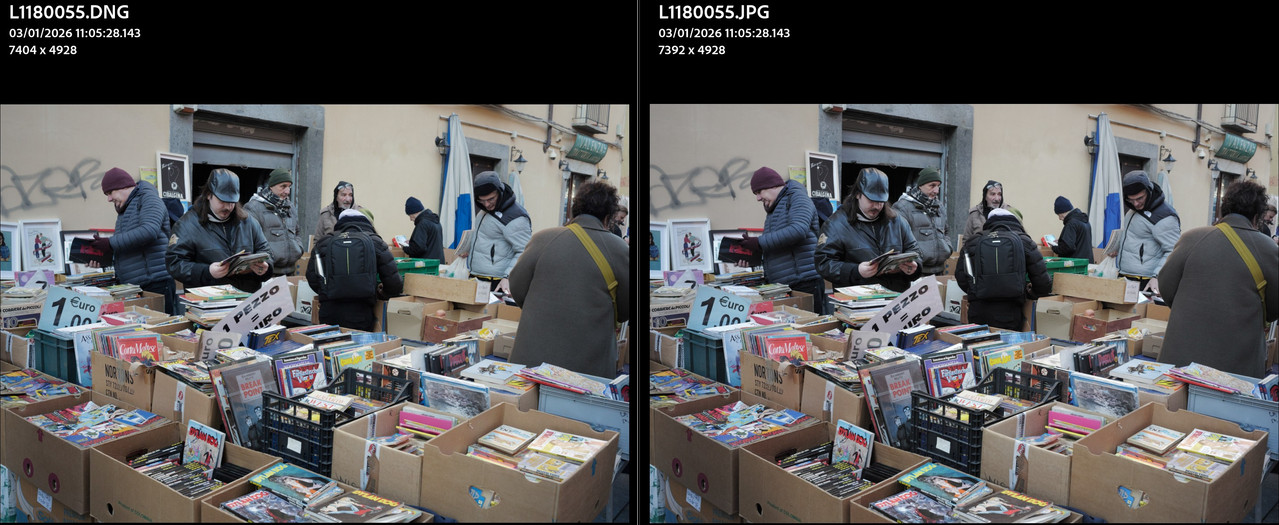
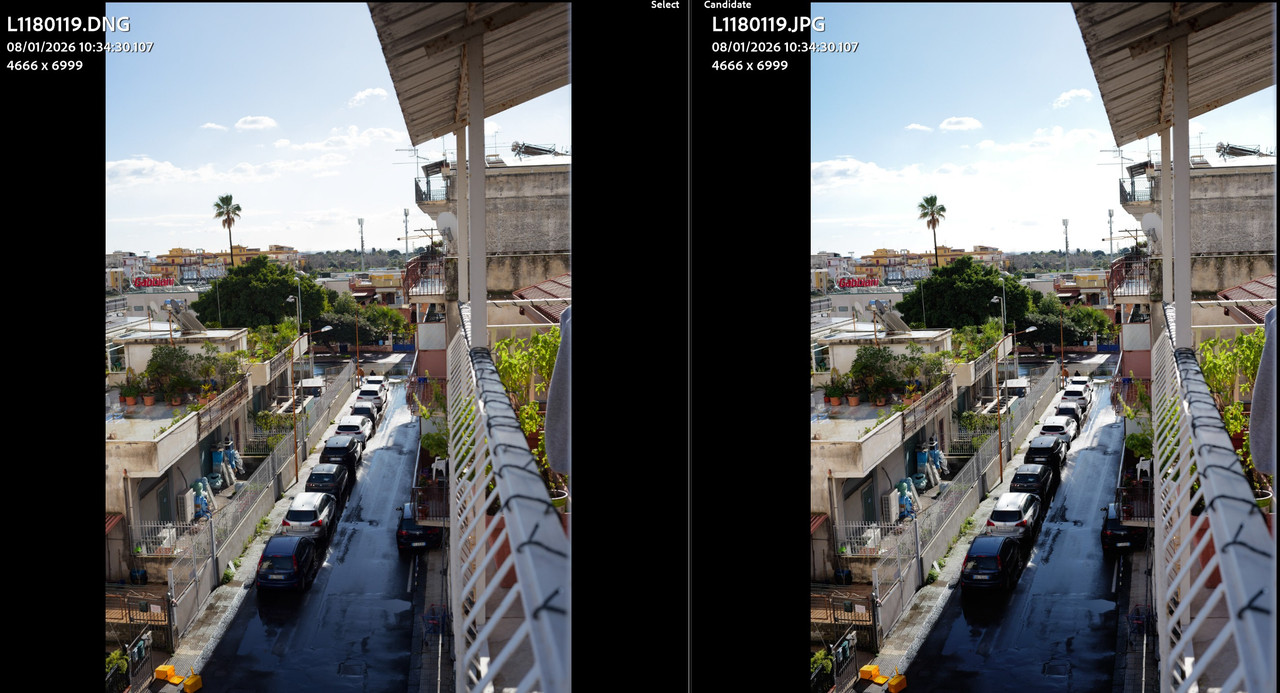
Below you can see two sample shots in generic scenes, one using the SL3 Natural profile and one using the SL3 Vivid profile, with the RAW files processed using our 3.1 profiles, compared against the corresponding SOOC JPEGs.
The differences that remain are related to the internal camera development pipeline, which follows a process unknown to us and different from what Lightroom or Capture One do when using our profiles.
Therefore, as expected, you start from an INITIAL RAW file that you can then adjust as needed, expanding or shaping your own vision, with the added possibility of reducing or increasing the strength of the applied profile.
For example, here is the “SL3 Classic” profile on a Canon file, first at 100% and then at 40%.
The ability to apply strength of profile presents some interesting aspects. The matter of consistency vs. creative variability comes to mind, like a kid in a candy store, that you could produce any flavor you want (i.e. looking at the color of her dress) ... personal testing / discipline might be part / parcel to things a bit, as well.
You mentioned the "unknown" (understood) regarding the internal development pipeline. Curious to see how the profiles might compare to native OEM Leica profiles vs. LR / C1 ... specifically as it pertains to the ability / comparison of how it handles challenging scenarios, such as 2-3 stops vs. > 3+ stops under exposed.
In one regard, the matter of emulating a different profile is a desired goal, but if the development pipelines are different (i.e. one is unknown), I'm wondering if your profiles have an added benefit regarding how they handle such challenges (be that color / mono).
I guess my question kinda boils down to which of your profiles do you think provide the best development of such (data starved) starting points ... and then, how that might compare against the native profile it is emulating.
Specific use case for me is my interior lighting handball work. Low lights, high speeds = higher ISO. ISO's can range from 800-6400, with 3200 being the lion's share, depending on how much motion freeze / blur I want to drag the shutter for. I often shoot underexposed a stop, to keep from going into > 6400+ territory.
To what degree / strategy would your profiles either allow me to shoot more underexposed vs. higher ISO and then be a "simple" matter of working with one (or two) of your profiles to get optimal results ... where the native OEM profile doesn't do a great job, vs. the labors of individual processing via LR / C1, etc. ... or, produce a "better" result. Film stock profile favorites of low light shooters can involve different matters than mainstream. Curious to hear your thoughts.
Hopefully that make a little sense as to what I'm asking about.
Ulysseita wrote:
Below you can see two sample shots in generic scenes, one using the SL3 Natural profile and one using the SL3 Vivid profile, with the RAW files processed using our 3.1 profiles, compared against the corresponding SOOC JPEGs.
The differences that remain are related to the internal camera development pipeline, which follows a process unknown to us and different from what Lightroom or Capture One do when using our profiles.
Therefore, as expected, you start from an INITIAL RAW file that you can then adjust as needed, expanding or shaping your own vision, with the added possibility of reducing or increasing the strength of the applied profile.
For example, here is the “SL3 Classic” profile on a Canon file, first at 100% and then at 40%.
I just installed version 3.1 and it now matches the Leica JPEGs even more closely. The results are very close to the in camera JPEG when adjusting the initial white balance in Lightroom.
Leica also released the new "Silver" profile this month. Do you plan to add this profile to the Cobalt package as well?
Hi RustyBug,
great question — and definitely not a trivial one. The architectural differences between raw developers play a huge role here, and it’s something that’s often overlooked.
Noise reduction isn’t typically something a profile directly “solves”, but there *are* a few important pipeline-related behaviors that strongly affect how well underexposed (data-starved) files hold up in terms of color consistency.
1) Adobe (Lightroom / ACR)
In Adobe’s pipeline, the profile is applied on **linear data before exposure controls**.
To me, this design assumes the image was exposed “correctly” in-camera. When you push exposure significantly in post, you’re not only lifting luminance — you’re also effectively shifting the point at which the profile is operating, which can lead to visible **color drift** or “sliding” colorimetry when recovering heavily underexposed shots.
That’s one reason why extreme exposure recovery in LR/ACR can sometimes feel less stable in color, even if the noise level itself is manageable.
2) Capture One
In Capture One, the profile is applied on **non-linear data after exposure controls**.
This makes C1 noticeably more robust when you need to work aggressively on exposure — ETTR and heavy exposure corrections tend to preserve color relationships better compared to Adobe.
However, C1’s pipeline also introduces its own challenges, since the raw RGB data is being curved before the colorimetric stage. That makes profile design more complex (and Phase One doesn’t exactly provide documentation to make that easier).
### So which is “better” for heavy underexposure?
Neither system is perfect — there are trade-offs.
* **C1 usually reacts better** if you’re going to underexpose and then lift exposure a lot, *assuming the profile is well matched to the lighting conditions.*
* But C1 tends to be more constrained by **single-illuminant behavior**, which can be a limitation in mixed indoor lighting.
* **Adobe can sometimes be more flexible** across varying illuminants, but its exposure-after-profile approach can lead to more noticeable color shifts when pushed hard.
So if you’re intentionally underexposing heavily and your priority is minimizing color drift, and you have a profile that fits the light well, **C1 is typically the safer choice**.
If the illuminant is unpredictable or the profile isn’t well centered on that light, **Adobe may sometimes hold up better**, simply because it’s more adaptable in that regard.