j4nu wrote:
I think the confusion stems from Sony changing the name of this button/option from "eyeAF" to "Subject detect" (or something like that).
I'm not sure when you updated firmware on your A7III, but you don't have to use a separate button for eyeAF anymore since quite a long time . You can still assign eyeAF to separate button though, to emulate the "old" eyeAF behavior . I think this should be possible also on a7V, but as I said, the function you need to assign to the button is not called "eyeAF" anymore...
Thank you. I'm quite busy right now but next week I'm on holiady so I will try to verify it.
jojib wrote:
I think so, that is what I get as well. Hopefully we'll get Adobe updates soon. My presets are available though.
Yeah, I think because the ones I have are actual profiles (color precision) they only see the file as non raw since Adobe is classifying it as beta. I’ll wait it out until they actually recognize the files correctly and see if it changes.
ariviere80 wrote:
Just got my A7V today. I’m a video shooter by profession but I do photography as my hobby. That’s my preface in case this is a dumb question. I took some shots of the kids today and noticed that there isn’t “true” raw and what you get is lossless compressed. When I take that into Lightroom it works but with limitations. The profile shows as “Beta.” When I try to use my profiles that I use on my Leica and Nikon, the only show as “non raw” versions, as if it doesn’t recognize that it’s a raw file. Is this just a matter of waiting until adobe updates and recognizes these files correctly?...Show more →
It seems that Sony is telling us now that their is zero difference between the quality of their Uncompressed RAW and Lossless Compressed RAW. On my other Sony bodies until now I always used a Lossless Compressed RAW unless there was a compatibility issue with the limitation of software that could only work with uncompressed RAW.
My concern is with operating systems like MacOS, IPAD OS, or Windows that typically can’t read proprietary files to display an image while browsing for casual usage. Now we may only open a file for display with some kind of imaging software installed. I’ve seen this with Fuji lossless compressed RAW when using the IPad file browser. You really need an uncompressed RAW file since the IPad does not open Fuji lossless compressed files.
swldstn wrote:
It seems that Sony is telling us now that their is zero difference between the quality of their Uncompressed RAW and Lossless Compressed RAW. On my other Sony bodies until now I always used a Lossless Compressed RAW unless there was a compatibility issue with the limitation of software that could only work with uncompressed RAW.
My concern is with operating systems like MacOS, IPAD OS, or Windows that typically can’t read proprietary files to display an image while browsing for casual usage. Now we may only open a file for display with some kind of imaging software installed. I’ve seen this with Fuji lossless compressed RAW when using the IPad file browser. You really need an uncompressed RAW file since the IPad does not open Fuji lossless compressed files....Show more →
Most image viewers use the full-sized embedded JPG that cameras generate and insert into their raw files. It's surprising when I hear how some viewers have issues with new raw files, since the EXIF format that describes this embedded JPG is mostly universal.
zeitlos wrote:
Thank you! It kind of fascinates me that Sony hasn't implemented such a (in my view) basic function. But then again, people seem to have found a way to get used to it or circumvent it by taking a different path.I will keep on trying.
It is not clear from your original post what you shoot. I have the impression that you developed a certain way or style of using your other camera and want to configure the new body similarly. This may or may not be an ideal approach. At least, it is hard to tell without knowing what and how you shoot. Nevertheless, consider alternatives, the simplest one that comes to mind is utilizing the 1 - 2 - 3 sets of saved settings on the PASM dial. For example, save your spot AF to 1, then wide AF with subject detection to 2.
Another option that hopefully should work on A7V: use continuous AF with tracking and a spot of suitable size for focusing. Place the spot on the intended subject, half-press the shutter, then recompose. If the camera is capable of tracking, the focus should stay on the subject, and you wouldn't need the multi-selector/joystick.
This is just to throw some ideas. Modern cameras are customizable and there can be more than one way of making your A7V do what you want.
ruthenium wrote:
It is not clear from your original post what you shoot. I have the impression that you developed a certain way or style of using your other camera and want to configure the new body similarly. This may or may not be an ideal approach. At least, it is hard to tell without knowing what and how you shoot. Nevertheless, consider alternatives, the simplest one that comes to mind is utilizing the 1 - 2 - 3 sets of saved settings on the PASM dial. For example, save your spot AF to 1, then wide AF with subject detection to 2.
Another option that hopefully should work on A7V: use continuous AF with tracking and a spot of suitable size for focusing. Place the spot on the intended subject, half-press the shutter, then recompose. If the camera is capable of tracking, the focus should stay on the subject, and you wouldn't need the multi-selector/joystick.
This is just to throw some ideas. Modern cameras are customizable and there can be more than one way of making your A7V do what you want....Show more →
So, I use eye autofocus about 90% of the time for portraits of people. The rest is probably for my dog
Yes, I know that a firmware update for the A7III years ago changed the behavior of the eye AF. But even back then, I set it up so I had my old workflow back. And yes, you might very well be right that sticking with the old workflow is ultimately questionable.
Ideally, I'd still prefer to set my focus area myself with the joystick (I never used to pan the focus point, and never wanted to, even back in the DSLR days, so it's always the joystick) and then prioritize the eye focus at the touch of a button when needed. This way the eye af doesn't intervene in my composition. That would mean pressing the eye AF button with one finger while simultaneously focusing with the shutter button and then taking the photo. That would be nice with the A7V as well. But I think that changed with the A7IV? I'm not sure if that's still possible. Secondly, I'd like a feature similar to the Leica SL2-S, which I briefly owned: the ability to use the joystick to select which person, i.e., which pair of eyes, the camera should focus on when there are multiple people in the frame. I don't mean moving a focus point with the joystick, as that takes too long, but simply being able to jump to the eyes.
Or to put it another way: If I have the focus point in the center, but the person is outside the focus point, I can't simply press the Eye AF button like I could with the A7 III to focus on the person at the edge or their eyes. I would have to move the AF point. That's very cumbersome. Previously, pressing the button triggered Eye AF, regardless of where the subject was in the frame. Is that no longer possible with the A7 IV?
Edit: I think after searching it for two more hours I can say: No, no longer possible.
j4nu wrote:
Can you say if you notice any battery life difference vs A7III, when you have the time of course ?
So far, I have been only busy with trying to find out how to set up the A7V. So the display was on for a considerable time but not really while shooting. To be honest, if I can't make it work for me, I will send it back. As I understand I have to decide between the af mode where the camera finds eyes everywhere but in this mode I cannot move the af field. Or I switch to the one I can move the af field but then I can only active eye-af after moving the af field to where the person is located. The way it was possible with my A7III (having both) seems to have vanished. But maybe I'm wrong.
Edit: If AI is correct, there's no Sony, Nikon, Panasonic body anymore that offers this anymore as the A7III did. You always more or less have to move the af field to the person first.
It seems that only the Leica SL3 has this "A7 III mode" today.
Switching to Leica SL would be the expensive version .
Have to see if spot tracking modus can be a new workflow with the A7 V.
Could those who have the camera take post simple test shots in different LED lighting conditions to show if there is any banding using the electronic shutter? The subject matter is not important. I would like this camera for the pre-capture and better AI subject recognition over my A1 but I would need to be able to use the silent shutter for my kids family and school events. Maybe some short videos showing how fast you need to pan before distortion starts becoming an issue.
zeitlos wrote:
So far, I have been only busy with trying to find out how to set up the A7V. So the display was on for a considerable time but not really while shooting. To be honest, if I can't make it work for me, I will send it back. As I understand I have to decide between the af mode where the camera finds eyes everywhere but in this mode I cannot move the af field. Or I switch to the one I can move the af field but then I can only active eye-af after moving the af field to where the person is located. The way it was possible with my A7III (having both) seems to have vanished. But maybe I'm wrong.
Edit: If AI is correct, there's no Sony, Nikon, Panasonic body anymore that offers this anymore as the A7III did. You always more or less have to move the af field to the person first.
It seems that only the Leica SL3 has this "A7 III mode" today.
Switching to Leica SL would be the expensive version .
Have to see if spot tracking modus can be a new workflow with the A7 V....Show more →
I understand your hesitancy, however there are two ways of placing a spot over a face. One is with the help of the multi-selector/joystick. The other is by moving the camera. In this second way, the spot is and remains in the center of the viewfinder. The subject recognition and tracking are on. Thus, move the camera body to have the face you want to focus on covered by the focusing spot, in the center of the viewfinder. Then, half-press the shutter to activate AF and tracking, then recompose as needed. If the tracking is sticky, the focus should stay on the target, at least in theory. This is how this focusing method works and works well on the A1. Hopefully the baby A1 - A7V has good sticky tracking as well. Something to try anyways - good luck!
Thank you. Yes, I will have to change my workflow coming from the A7 III. I will have to rely on tracking, as you have described it. Now I always have to tell the camera the starting point first. That wasn't necessary with the A7 III. You just press the Eye AF button and the camera does everything automatically. Still a bit of a shame.
I think the tracking (technically) should work very well. I just tried it in almost complete darkness (just the light of an iPhone screen aluminising the persons face – not full brightness) with a human face in the room and it was absolutely sticky. But of course, the person was stationary, I was moving the camera to compose the picture. People coming from the A7IV won't feel any differences to the AV as I understood. People who are used to a dedicated Eye-Focus Button that works all over the frame will have to adjust.
zeitlos wrote:
Thank you. Yes, I will have to change my workflow coming from the A7 III. I will have to rely on tracking, as you have described it. Now I always have to tell the camera the starting point first. That wasn't necessary with the A7 III. You just press the Eye AF button and the camera does everything automatically. Still a bit of a shame.
I think the tracking (technically) should work very well. I just tried it in almost complete darkness (just the light of an iPhone screen aluminising the persons face – not full brightness) with a human face in the room and it was absolutely sticky. But of course, the person was stationary, I was moving the camera to compose the picture. People coming from the A7IV won't feel any differences to the AV as I understood. People who are used to a dedicated Eye-Focus Button that works all over the frame will have to adjust....Show more →
zeitlos wrote:
Thank you. Yes, I will have to change my workflow coming from the A7 III. I will have to rely on tracking, as you have described it. Now I always have to tell the camera the starting point first. That wasn't necessary with the A7 III. You just press the Eye AF button and the camera does everything automatically. Still a bit of a shame.
I think the tracking (technically) should work very well. I just tried it in almost complete darkness (just the light of an iPhone screen aluminising the persons face – not full brightness) with a human face in the room and it was absolutely sticky. But of course, the person was stationary, I was moving the camera to compose the picture. People coming from the A7IV won't feel any differences to the AV as I understood. People who are used to a dedicated Eye-Focus Button that works all over the frame will have to adjust....Show more →
Why not just let the camera subject recognition do all the work for you ?
Set camera to Wide focus area and People subject detection with body/head/eye turned on.
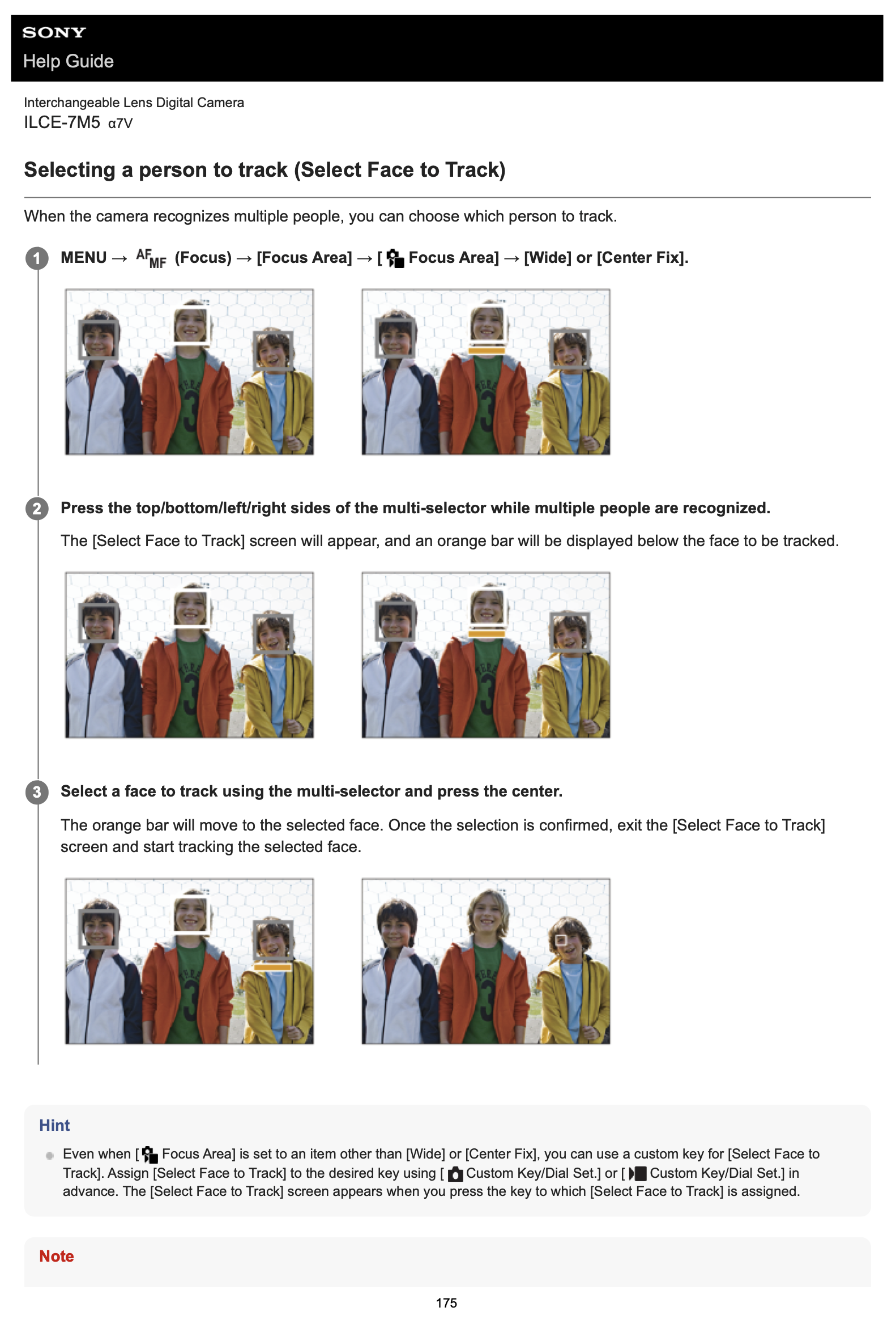
When multiple people in the frame select the person to track by pressing the top/bottom/left/right of the multi-selector and once the person you want to track is selected press the centre. An orange bar should show below the selected person.
Yeah, I think there are 2 problems to be solved here:
1) Triggering eyeAF (subject recognition) over the whole frame while having limited AF focus area selected, such as spot or center. This is solved by @ruthenium's finding.
2) Moving the target of eye(subject)AF when there are multiple recognized targets. This is solved by @duncangr's finding.
j4nu wrote:
Yeah, I think there are 2 problems to be solved here:
1) Triggering eyeAF (subject recognition) over the whole frame while having limited AF focus area selected, such as spot or center. This is solved by @ruthenium@'s finding.
2) Moving the target of eye(subject)AF when there are multiple recognized targets. This is solved by @duncangr@'s finding.
With the understanding that this is a purely theoretical consideration, I remain unconvinced that using human subject recognition with tracking in Wide and using multi-selector to move between faces in a group is easier and more efficient than using a center spot with tracking and moving the camera body to place the spot over a face, then triggering tracking and recomposing (as I suggested in my preceeding post).
My own preference would be to save a custom set for portraits to one of the 1 - 2 - 3 sets on the PASM dial, if this is often used and needed.
ruthenium wrote:
With the understanding that this is a purely theoretical consideration, I remain unconvinced that using human subject recognition with tracking in Wide and using multi-selector to move between faces in a group is easier and more efficient than using a center spot with tracking and moving the camera body to place the spot over a face, then triggering tracking and recomposing (as I suggested in my preceeding post).
My own preference would be to save a custom set for portraits to one of the 1 - 2 - 3 sets on the PASM dial, if this is often used and needed.
I think we should all shoot the way that feels the most natural to us, as this should result in fewer issues with the actual process of taking photos.
I'd agree with you if we were talking about moving the focus point, but we're talking about pushing the joystick in the right or left direction once or twice in most cases. If I move the camera, I never get the same exact composition again, unless I crop in post, which again means more time taken, or spend more time aligning with the previous photo (which takes forever if I have to review the previous photo in cam to align the framing).
I'm with @zeitlos on this one, as it simply feels more natural to me to compose and then nudge the joystick once or twice, when my finger is already on it in most cases.
It's personal in the end though .
ruthenium wrote:
I am not sure if this can help. When using [Subject Recognition AF] via a custom key, then "The focus area temporarily becomes the entire screen, regardless of the setting for [Focus Area]."
And, "The camera focuses on the recognized subject's eye, head, or body or the entirety of the subject anywhere on the screen, regardless of the setting for [Focus Area]." https://helpguide.sony.net/ilc/2540/v1/en/contents/211h_about_eye_af.html
I don't see an option for switching AF from one person to another, when focusing on a group of people - there seems to be no mention of such functionality.
I tried this once again (but now with the correct settings). Wow, it's now the closest I have come to my old work flow – might even be the same now. When I tried it once I used the (German Setting) "Motiverkennung bei AF" instead of "Motiverkennung AF". The "bei" (=> by) made the difference. Maybe that's the solution! Would be fabulous Thanks again. I will have to try it in the real world. Had no person next to me so a vinyl cover with a singer had to do it.
To contribute something substantial for a change, I tested my three Loxias lenses on the A7 V. I can focus without any problems (as far as I could tell in this short test) at magnification. However, as soon as I use the aperture ring, it throws me out of magnification with all three Loxias (25, 50, 85). The A7 V seems to behave similarly to other new Sony bodies in this respect.


 . You can still assign eyeAF to separate button though, to emulate the "old" eyeAF behavior . I think this should be possible also on a7V, but as I said, the function you need to assign to the button is not called "eyeAF" anymore...
 ?
?