Thanks to all who answered my question... I uploaded the new firmware (had to do it twice to get both in the camera). The ability to cycle through multiple AF patches with one button is one of my favorite additions.
Unlike some here, I am absolutely blown away by Nikon's commitment to continually improve the software/firmware of the Z9. It is clear that the Nikon programming engineers are looking for every opportunity to expand and improve the functions of the camera. Unlike most other brands, the Z9 feels like a living product that has potential that is only limited by the coder's ability to innovate. The fact that Nikon keeps improving this camera speaks to their commitment to professional and advanced amateur photographers!
Lee Saxon wrote:
Do y'all mean subject detection MODE cycling? As in, assigning a button to cycle between bird detect and human face detect? Because surely the Z8 & Z9 has a way for you to choose which of multiple detected objects in a given scene is the subject, right? Even my GFX has that!
Yes. You can absolutely do that by pressing a button and turning a dial (the focus mode button on the front left of the camera and using the two command dials), but we would like to be able to just push an assigned button to toggle through different modes without using a dial. For AF Area Mode toggling, you can push a button and have it toggle through a list of AF Area Modes that you select in the custom settings menu (which can be the full list of modes or a reduced set).
Wezre wrote:
Yes. You can absolutely do that by pressing a button and turning a dial (the focus mode button on the front left of the camera and using the two command dials), but we would like to be able to just push an assigned button to toggle through different modes without using a dial. For AF Area Mode toggling, you can push a button and have it toggle through a list of AF Area Modes that you select in the custom settings menu (which can be the full list of modes or a reduced set).
One work around is to assign the "detection" to a Recall Shooting Function, and then put that on a programmable button. Of course you might be limited, but you could put "Animal Detect" as your standard setting and then add "Bird-detect" to the recall shooting button. This would allow a wildlife shooter to quickly toggle between the two. Of course for a portrait shooter or plane and train spotter, you might want different options.
OwlsEyes wrote:
One work around is to assign the "detection" to a Recall Shooting Function, and then put that on a programmable button. Of course you might be limited, but you could put "Animal Detect" as your standard setting and then add "Bird-detect" to the recall shooting button. This would allow a wildlife shooter to quickly toggle between the two. Of course for a portrait shooter or plane and train spotter, you might want different options.
bruce
The problem is, at least on Z8, the recall function setup let's you to set desired subject tracking, but when you recall it, by pushing the button, it does not change subject detection.
I already asked here earlier, if it's just me, but nobody answered my question.
I think, it's a bug in the Z8 FW.
Can anyone confirm if Z9 does it the way it should be, please?
I did program MyMenu to have subject detection as first option. That let's me to assign a button to call MyMenu first option, in my case Fn1, then I scroll through list to pick what I want.
sjms wrote:
that can be done but it is rather limited. i find auto does work. like i said opinions vary
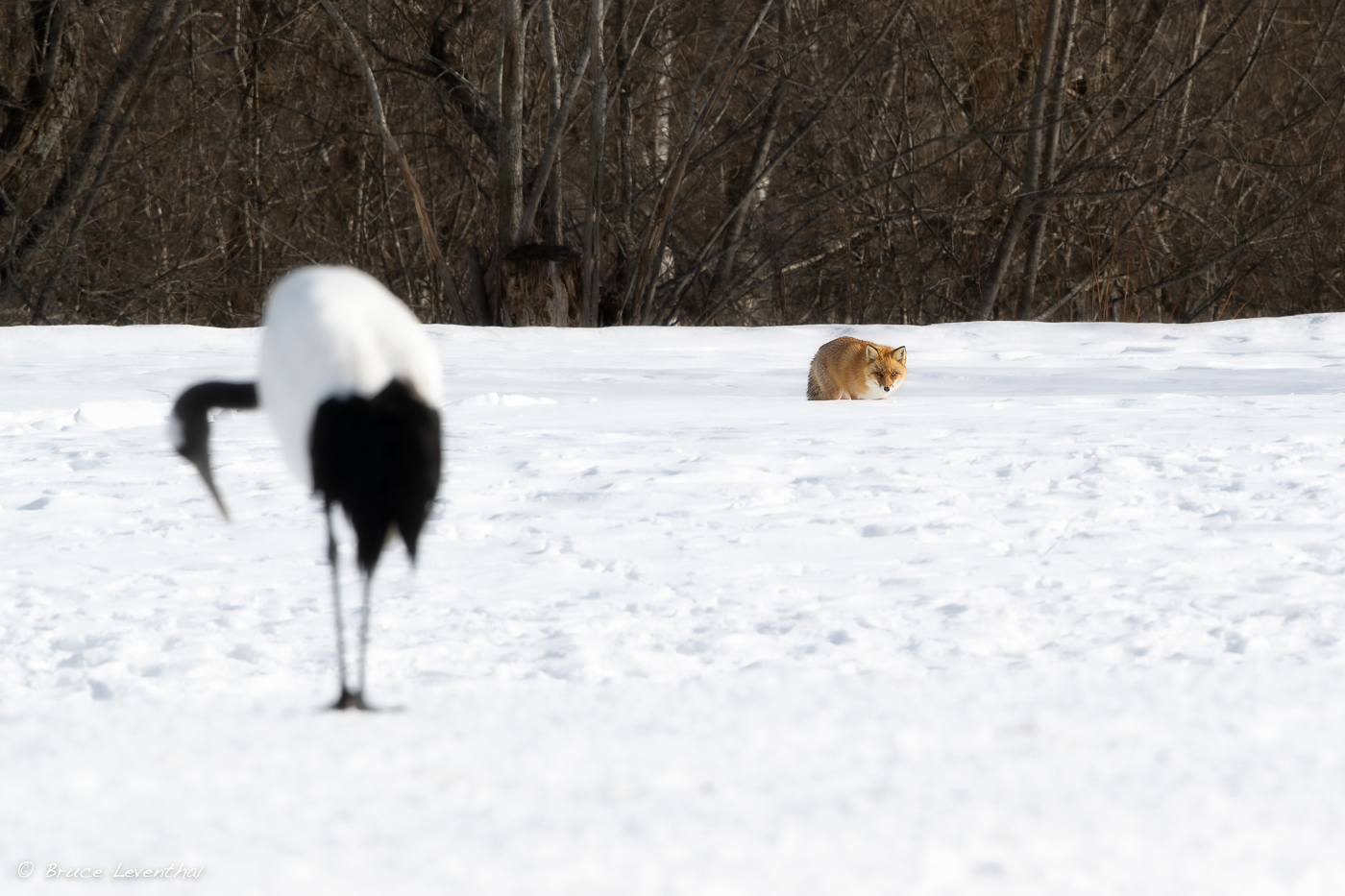
I think this really applies to you, as your work is more photo-journalistic. In my case, I either shoot wildlife or landscapes. For landscapes, I just go to single spot AF and call it a day. For wildlife, I am often in areas where I will be photographing mammals and birds... the attached photo really illustrates how toggling between animal eye AF and bird eye AF can be helpful. I was photographing this crane when a fox walked into my field of view
sjms wrote:
then wouldn't auto function, if used, of the Nikon setup go from bird to animal?
Yes.. but reports are that they "Auto" is a bit slower.. laggy.
the supposed differences between the 2 GNSS versions on the Z9 update:
GNSS 0.07:
-This version was available earlier.
-It provided basic functionality for acquiring satellite signals.
-The specific improvements or fixes in this version are not explicitly mentioned.
GNSS 0.17:
-Released in 2022.
-Improved acquisition performance in certain areas where the quasi-zenith satellite system (QZSS) can be acquired.
-QZSS is primarily used in Japan, but it may also apply to parts of the western Pacific.
-The update likely enhances accuracy in cities and challenging environments.
-It piggybacks on the US GPS system and includes other global constellations like GLONASS, Galileo, and BeiDou.
Firmware 5.00 Bug Report; "Separate Shooting Modes Now Configurable for PHOTO and VIDEO Modes": So it looks like some users who installed v5.00 Z9 firmware have the same bug as I did where the modes are not separately configurable for eg. PHOTO in mode A and VIDEO in mode D. I reported this to to Nikon Canada and here is their reply:
"Thanks for contacting Nikon Canada. This looks like the case with our Z9 as well. Thanks for letting us know, this has been passed onto our Product Manager and it is being sent to Japan as a way to improve the Z cameras as an updated setting but we cannot guarantee if/when this will be incorporated in a future firmware update."
Something no one mentioned is the memory card format screen is streamlined and requires less attention to use (no risk of a full format anymore without an extra button press).
cvrle59 wrote:
The problem is, at least on Z8, the recall function setup let's you to set desired subject tracking, but when you recall it, by pushing the button, it does not change subject detection.
I already asked here earlier, if it's just me, but nobody answered my question.
I think, it's a bug in the Z8 FW.
Can anyone confirm if Z9 does it the way it should be, please?
I did program MyMenu to have subject detection as first option. That let's me to assign a button to call MyMenu first option, in my case Fn1, then I scroll through list to pick what I want. ...Show more →
I'm surprised that nobody else is bothered by this issue, or nobody else uses this feature.
Regardless, I reported it to Nikon Canada, it's forwarded to Nikon Japan, at least, that's what they reported back to me.
cvrle59 wrote:
I'm surprised that nobody else is bothered by this issue, or nobody else uses this feature.
Regardless, I reported it to Nikon Canada, it's forwarded to Nikon Japan, at least, that's what they reported back to me.
This is unusual to quote myself two times, lol.
But, I needed to correct it, as I spent little more time to understand what's going on.
Recall function actually changes Subject Detection. What made me confused was, I-menu would show whatever was set prior to recall button was pressed.
That's where I checked if it happened, but I needed to turn all icons in view finder to see what SD is active.
It makes sense, the camera will go back to whatever is in I-menu after power down/up sequence.
My case is closed by now!
cvrle59 wrote:
This is unusual to quote myself two times, lol.
But, I needed to correct it, as I spent little more time to understand what's going on.
Recall function actually changes Subject Detection. What made me confused was, I-menu would show whatever was set prior to recall button was pressed.
That's where I checked if it happened, but I needed to turn all icons in view finder to see what SD is active.
It makes sense, the camera will go back to whatever is in I-menu after power down/up sequence.
My case is closed by now!
At least now you know why no one else had mentioned it