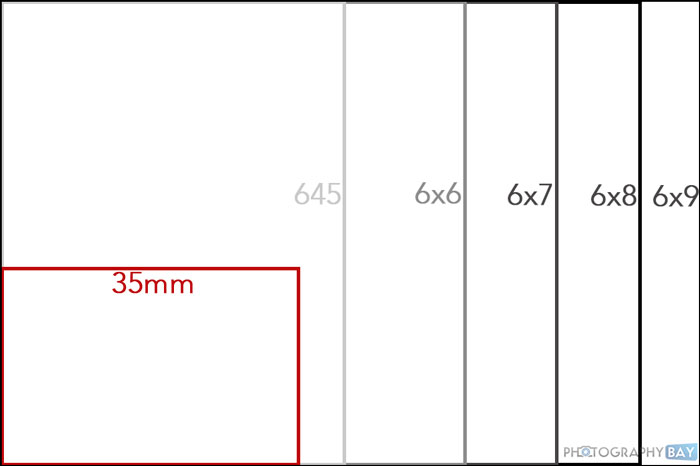
I know this is utterly ridiculous to even ask, but I've been down the YouTube rabbit hole of learning more about film photography and keep being impressed by medium format cameras like the Mamiya 7. Thoughts on that camera and medium format in general to pair with my film M's?
I shot a twin lens Autocord for like 10 years, which is 6x6, but that was always black and white. I prefer 35mm now when it comes to B&W because I like a gritty candid shot and enlarging 8x10 is mostly gainless anyways.
But for color/digitized I would consider it for the improved tonality more than anything. But the inconvenience of a larger camera and 12 shot rolls isnt something I want to sacrifice quality for when I can just shoot digital.
lifeandmylens wrote:
I know this is utterly ridiculous to even ask, but I've been down the YouTube rabbit hole of learning more about film photography and keep being impressed by medium format cameras like the Mamiya 7. Thoughts on that camera and medium format in general to pair with my film M's?
I think we are on the exact same journey: I've been looking hard at the Mamiya RZ67 but also other models; some of the Mamiyas cost less than my Canon P (the RZ67 is pricier, but my local camera store has one with two lenses for $2,200 Canadian, and one of those lenses is the excellent 110mm 2.8).
If I had to do this film adventure over again, I'd skip over 35mm and go right to medium format. The image quality is unbelievable, and I'm drawn strongly to those images.
The two things that so far have kept me from pursuing it are:
1. Cost: unless you do your own developing and scanning, shooting 120 ends up costing around $3 to $5 per photo. It's a strong motivation to make every shot count and take your time.
2. Value proposition: Full-frame digital has a lot more detail and resolution than 35mm film, but looking at images it feels more similar to medium-format film to me. So it feels hard to justify medium-format film when I can get relatively close to something like it with my existing digital cameras. Of course nothing can duplicate film, but still...
I think 6x4.5 has a lot to offer too in terms of size and camera designs.
I shot a Fuji GA645 for a while and it was hardly bigger than a Leica and the lens is so incredibly sharp.
Those 4 extra frames go a long way too.
I love medium format! Had several different bed cameras in 6X9 and right now there is a really tempting three lens set Linhof Technika 70 on the local craigslist for a thousand dollars. I avoid it because I already have two Leica's and a Retina 1 that need to be used.
Instead of diving head first into a Mamiya 7, why not try a folder first? There are a ton of them out there and mostly they need the shutter cleaned. Fits in a pocket and doesn't cost much. Even less if you have a bed scanner and a developing tank.
Love those big negatives!
ottokbre wrote:
I shot a twin lens Autocord for like 10 years, which is 6x6, but that was always black and white. I prefer 35mm now when it comes to B&W because I like a gritty candid shot and enlarging 8x10 is mostly gainless anyways.
But for color/digitized I would consider it for the improved tonality more than anything. But the inconvenience of a larger camera and 12 shot rolls isnt something I want to sacrifice quality for when I can just shoot digital.
I've recently brought my mother-in-law's Autocord back to life. Takes great photos (6x6). I just need to decide what works for me when it comes to scanning at home. My lab does a great job but the resolution is not that great.
I have a question for those who scan at home . . . DUST!
My first few rolls were not really a problem using the Valoi Easy35. My most recent roll however, has been a dust nightmare. While the Valoi has a brush where the negatives are fed into the chamber, I still blow the negatives with a Rocket blower. However, I can't believe how many dust specs I have to remove in post. I event tried wiping the negatives with a micro fiber sprayed with lens cleaning fluid. The film in this case was Kodak ProImage 100.
So for those who scan at home, any tips and tricks to keep the dust away?
rji2goleez wrote:
I have a question for those who scan at home . . . DUST!
My first few rolls were not really a problem using the Valoi Easy35. My most recent roll however, has been a dust nightmare. While the Valoi has a brush where the negatives are fed into the chamber, I still blow the negatives with a Rocket blower. However, I can't believe how many dust specs I have to remove in post. I event tried wiping the negatives with a micro fiber sprayed with lens cleaning fluid. The film in this case was Kodak ProImage 100.
So for those who scan at home, any tips and tricks to keep the dust away?...Show more →
First is to dry the home-developed film strip in a as dust-free environment as possible. I prefer using either a bathroom where I turn on the shower for about 5 minutes to suck out the dust from the air. Other option is for example my basement with not much air circulation present and low-dust environment (in a new basement where no dust has accumulated over years of course).
Before scanning, I use a rocket blower which has only little effect to remove dust from my experience since the acrylic film can be statically adhesive to dust particles. I do not recommend to wipe the strip to scan - normally more dust accumulates instead on the film. If using a cloth, don't use micro fiber - they can scratch the film! Instead use a clean cloth suitable to clean glasses. But again, I do not recommend using a cloth in general with one exemption - for darkroom prints I wet a glass cloth with technical grade ethanol to clean the negative before inserting it into the enlarger's film holder. The ethanol evaporates fast enough and leaves no residue behind.
Instead what I found effective is an automated dust removal tool in the scanning software. SilverFast 8 has one for example which is quite good. Normally I only have to clean up a few additional dust spots left over in the final scan.
retrofocus wrote:
First is to dry the home-developed film strip in a as dust-free environment as possible. I prefer using either a bathroom where I turn on the shower for about 5 minutes to suck out the dust from the air. Other option is for example my basement with not much air circulation present and low-dust environment (in a new basement where no dust has accumulated over years of course).
Before scanning, I use a rocket blower which has only little effect to remove dust from my experience since the acrylic film can be statically adhesive to dust particles. I do not recommend to wipe the strip to scan - normally more dust accumulates instead on the film. If using a cloth, don't use micro fiber - they can scratch the film! Instead use a clean cloth suitable to clean glasses. But again, I do not recommend using a cloth in general.
Instead what I found effective is an automated dust removal tool in the scanning software. SilverFast 8 has one for example which is quite good. Normally I only have to clean up a few additional dust spots left over in the final scan. ...Show more →
Thanks for these tips. My most recent roll was lab developed and put in a sleeve. This was the first time using a microfiber cloth but point taken, I'll avoid that as it did nothing and in fact, probably added more as you indicate. I'm using Negative Lab Pro to do the conversion of negatives scanned with my Sony A1 so I would have to use silverfast independantly I guess. I'll keep working at this. Thanks again.
rji2goleez wrote:
I've recently brought my mother-in-law's Autocord back to life. Takes great photos (6x6). I just need to decide what works for me when it comes to scanning at home. My lab does a great job but the resolution is not that great.
Is the focus lever ok and the focus moving without too much resistance? That's the achilleas heel but I've fixed like 4 of them.
rji2goleez wrote:
I have a question for those who scan at home . . . DUST!
My first few rolls were not really a problem using the Valoi Easy35. My most recent roll however, has been a dust nightmare. While the Valoi has a brush where the negatives are fed into the chamber, I still blow the negatives with a Rocket blower. However, I can't believe how many dust specs I have to remove in post. I event tried wiping the negatives with a micro fiber sprayed with lens cleaning fluid. The film in this case was Kodak ProImage 100.
So for those who scan at home, any tips and tricks to keep the dust away?...Show more →
First, if you’re developing at home, use your fingers to squeegee the film and a folded Kim Wipe to finish. Rocket blowers are ok but a an of compressed air is much more effective. If you want to go all out, buy a bag of lint free gloves. Wiping with a fine bristle brush before scanning should help.
lifeandmylens wrote:
I know this is utterly ridiculous to even ask, but I've been down the YouTube rabbit hole of learning more about film photography and keep being impressed by medium format cameras like the Mamiya 7. Thoughts on that camera and medium format in general to pair with my film M's?
I don't have any experience with the Mamiya 7, but I'm sure it's great.
The obvious medium format camera to pair with your Leicas is a TEXAS LEICA! I've got the GSW690II variant, the lens is excellent and I love the simplicity (fixed lens, no batteries!). I mostly use it for very long exposures with ND filters or when I want something lighter/simpler than my Pentax 67 (another great option, especially if you like a more modular system or prefer 6x7).
A couple with the GSW690II, second one was handheld
rji2goleez wrote:
I have a question for those who scan at home . . . DUST!
My first few rolls were not really a problem using the Valoi Easy35. My most recent roll however, has been a dust nightmare. While the Valoi has a brush where the negatives are fed into the chamber, I still blow the negatives with a Rocket blower. However, I can't believe how many dust specs I have to remove in post. I event tried wiping the negatives with a micro fiber sprayed with lens cleaning fluid. The film in this case was Kodak ProImage 100.
So for those who scan at home, any tips and tricks to keep the dust away?...Show more →
There are two kinds of dust, that which is stuck to the film from poor development processes and that which gets on your film during handling/scanning. I use a lab for development, I've just dealt with that kind in post processing instead of actually cleaning the film. Luckily my lab is mostly pretty good about their process.
Here's what I've found to be helpful for dust from handling/scanning:
Wear anti static gloves when handling film/scanning
Use a rocket blower and an anti static brush to remove visible dust
Use a film holder that facilitates scanning from an uncut length of film (I use Essential Film Holder, which allows you to feed the uncut film in one side and just cut it off on the other at the appropriate length for archiving). Slide the uncut film out of the sleeve a little bit at a time as you feed it into the holder.
If you clean or dust your work area, wait a few hours for everything to settle
OregonSun wrote:
There are two kinds of dust, that which is stuck to the film from poor development processes and that which gets on your film during handling/scanning. I use a lab for development, I've just dealt with that kind in post processing instead of actually cleaning the film. Luckily my lab is mostly pretty good about their process.
Here's what I've found to be helpful for dust from handling/scanning:
Wear anti static gloves when handling film/scanning
Use a rocket blower and an anti static brush to remove visible dust
Use a film holder that facilitates scanning from an uncut length of film (I use Essential Film Holder, which allows you to feed the uncut film in one side and just cut it off on the other at the appropriate length for archiving). Slide the uncut film out of the sleeve a little bit at a time as you feed it into the holder.
If you clean or dust your work area, wait a few hours for everything to settle...Show more →
Thanks for this. I have been using nitrile gloves . . . because I have a box of them! The film holder I'm currently using is the Valoi Easy35 and it has an attachment with a brush so that as the negative feeds through the chamber it gets a little sweeping. It somewhat helps but I screwed things up with the microfiber on this one roll. I also use a rocket blower and a battery operated blower by InnoDesk that I bought years ago (https://www.walvisproducts.eu/a-41235010/record-cleaning-maintenance/innodesk-dust-blower-battery-operated/).
lifeandmylens wrote:
I know this is utterly ridiculous to even ask, but I've been down the YouTube rabbit hole of learning more about film photography and keep being impressed by medium format cameras like the Mamiya 7. Thoughts on that camera and medium format in general to pair with my film M's?
I am using Hasselblad 500 C/M (preferred) in 6x6 and Mamiya RZ67 in 6x7 (less often) in parallel to film Ms. Turns out in 90% I stick to film M cameras when shooting film. Why? Simply for convenience - much easier to carry my M with a few lenses than any of my medium format cameras. Also I can either scan and print 12x18" with my Pro-100 printer or directly print in 10x14" or larger size from a 35 mm negative in my darkroom. The better resolution from medium format is barely noticeable in prints in this size. Where medium format is an advantage is for its shallower DoF effects with portraits or still life setups for example.
bjhurley wrote:
2. Value proposition: Full-frame digital has a lot more detail and resolution than 35mm film, but looking at images it feels more similar to medium-format film to me. So it feels hard to justify medium-format film when I can get relatively close to something like it with my existing digital cameras. Of course nothing can duplicate film, but still...
+1. Also my experience. This is already true with a std full frame digital sensor at much lower than 60 MP. If I use my CV 75/1.5 wide open on my M 240, I can achieve similar effects as with my Hassy 500 C/M and 80/2.8 lens wide open....with much faster workflow. One main reason why I shoot film medium format less and less these days and reverted back to digital full frame.
Another way to scratch the medium-format itch without getting a medium-format camera is to use very fine-grained, sharp/detailed film like Ektar 100, or shoot slide film. I shot the example below on Ektar with a Minolta XD and an MC Rokkor 58/1.2 lens; this doesn't look much different from the images I've shot with that same lens on Sony and feels closer to the level of detail that I see in medium-format film photos.
I decided to return the z8 that I recently purchased and got a z7 instead here on the boards. I plan to mostly use it for scanning anyway and the occasional AF use so it was overkill for my needs anyway.
I may regret it with only 10 shots a roll, but with the “savings” I bought a Mamiya 7, 65mm and 150mm kit from the boards. I guess a 645 would be better and may end up with one eventually, but I wanted to at least try the Mamiya.
And on the topic of changing cameras, my black paint MP is gorgeous. But my m7 is so ridiculously easy to use I often just grab that for “family stuff”.
So I sold the MP today on the boards here, same price I paid. The great thing about buying and selling here is being able to try out gear for minimal or no loss. Currently plan to use either the m3 or Mamiya 7 for the other stuff.
Now I just need the advance lever removal tool to arrive so I swap out the m7 advance lever for the MP style one (thanks Huss).