p.12 #1 · Official: Leica Q3 Unveiled, Now Open for Pre-Orders
flash wrote:
One question. Why?
This has been a thing for ages with the Q, for some. But I don’t get why. The digital corrections are part of the lens design. they’re supposed to be there. So that’s how *I* would judge the lens.
Is there some advantage to removing the corrections I’m missing? I certainly don’t like the look of any of the uncorrected images I’ve seen.
Gordon
Biggest advantage for me: manually correcting the distortion but removing the crop to expand the usable image area.
p.12 #2 · Official: Leica Q3 Unveiled, Now Open for Pre-Orders
snapsy wrote:
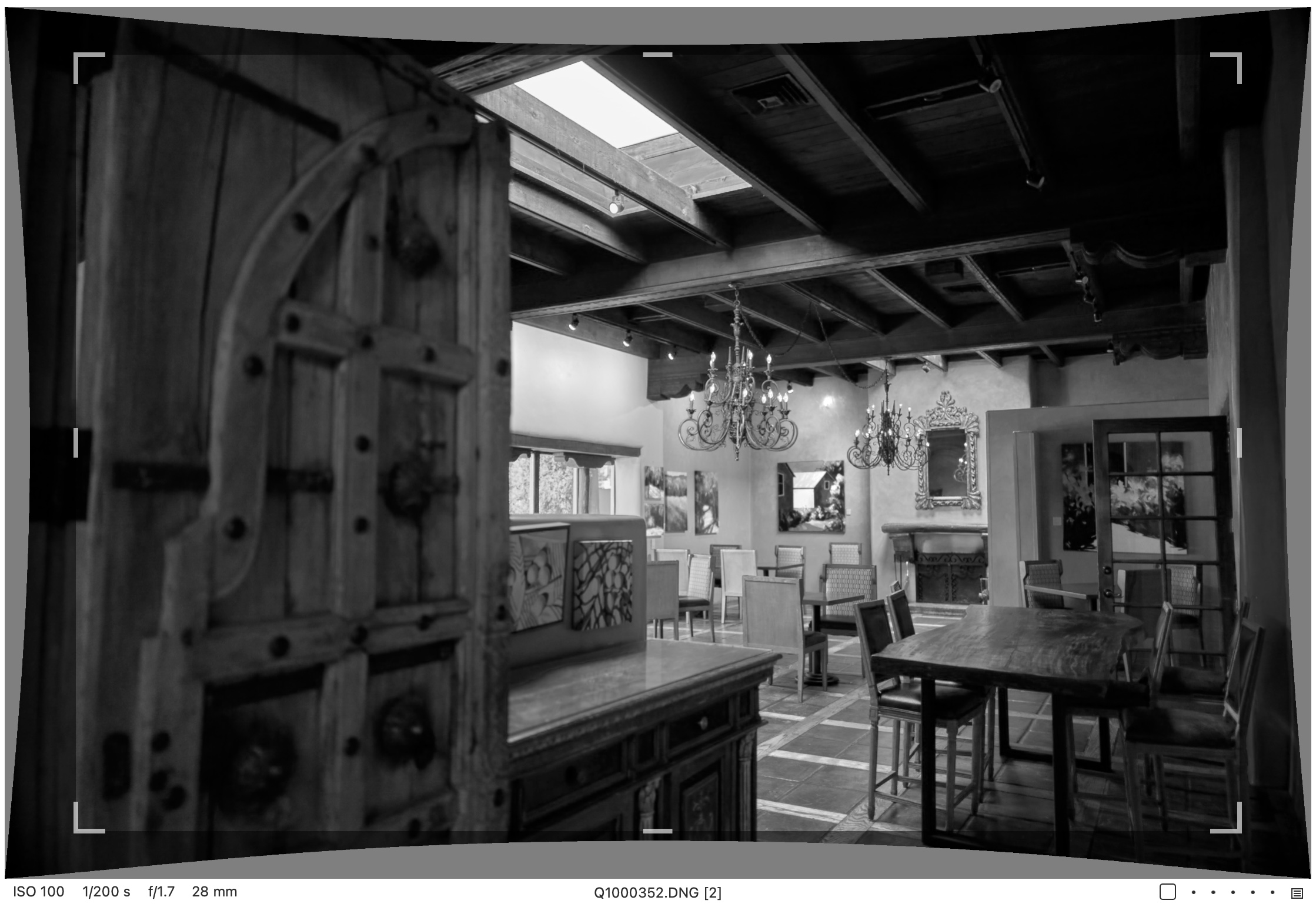
I checked a few Q2 DNGs and what's interesting is there is no vignetting correction profile - the distortion correction profile is sufficient to remove the portion of the frame with the hard vignette. Here's a f/1.7 example:
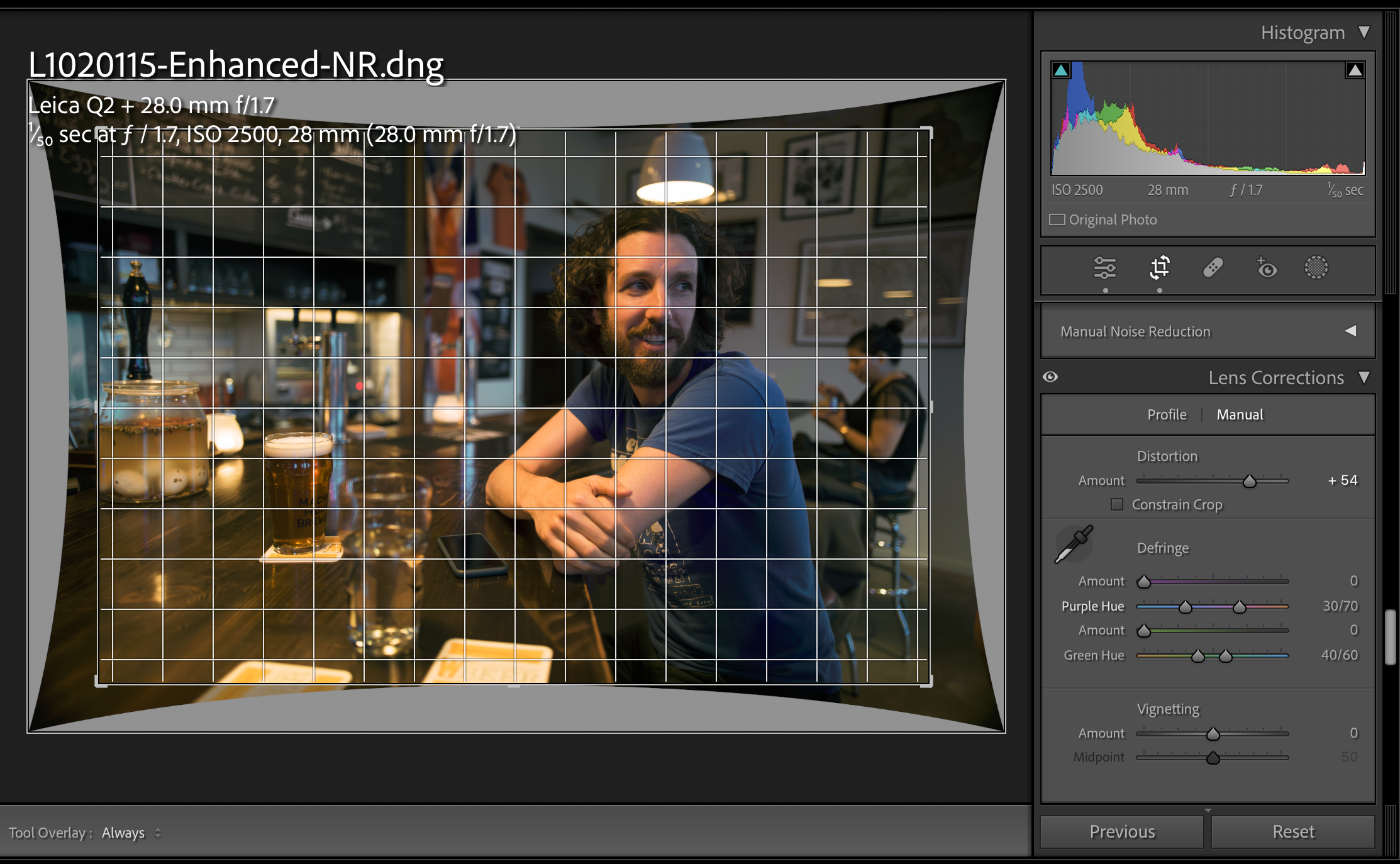
Vignetting correction is unnecessary when utilizing either in-camera distortion correction or post-processing correction for the "real" 24mm image. Regarding CaptureOne, I cannot provide specific information, but in Lightroom, a distortion level of +54 (which is huge) is required to achieve an image similar to the one corrected in-camera. However, applying approximately +20 eliminates vignetting and reduces the severity of barrel distortion, resulting in a wider perspective that is more practical and usable.
p.12 #3 · Official: Leica Q3 Unveiled, Now Open for Pre-Orders
highdesertmesa wrote:
Strange, perhaps this varies by distance and aperture. I very often had no objectionable vignette when I removed the distortion correction provided I cropped out the hard corners (without the hood attached obviously). What I'm wondering: perhaps removing corrections via an optcode/EXIF tool is removing more corrections than what is done in Capture One by turning off the manufacturer profile.
When the 24mm image is used without in-camera distortion correction, noticeable vignetting occurs. The severity of the vignetting differs depending on the distance and aperture settings. Instead of cropping the dark corners, I typically apply a distortion correction of approximately +15-20 points in LR (Lightroom). This adjustment results in a usable image with reduced distortion and minimal vignetting. However, in most cases, I prefer using the in-camera distortion corrected image. I'm actually very impressed by the lens' performance.
p.12 #4 · Official: Leica Q3 Unveiled, Now Open for Pre-Orders
Similar to @1bwana1, I also had to renew my Italian passport in Los Angeles and took the opportunity to visit the Leica store and try out the Q3. I compared the Q2 and Q3 side by side and found that I preferred the design of the former, with its flush LCD and button configuration. So, in terms of aesthetics alone, I actually prefer the Q2 over the Q3.
When it comes to resolution, I find both cameras to be quite similar, but the Q3 does offer better high ISO performance. I'm accustomed to the quality of the SL2 files, and the Q2 seems to deliver a similar level of performance, which is impressive. Nowadays, with tools like DXO PureRAW or LR's Denoise, high ISO performance has become less of a concern. It's almost like magic how these tools can enhance image quality.
The Q2's contrast autofocus performance is on par with that of the SL2, making it feel like purchasing a compact version of the SL2 with a fixed wide-angle lens. Eye-AF works quite well with the latest firmware but perhaps it was not as good with previous ones.
p.12 #5 · Official: Leica Q3 Unveiled, Now Open for Pre-Orders
Fred Miranda wrote:
Similar to @1bwana1@, I also had to renew my Italian passport in Los Angeles and took the opportunity to visit the Leica store and try out the Q3. I compared the Q2 and Q3 side by side and found that I preferred the design of the former, with its flush LCD and button configuration. So, in terms of aesthetics alone, I actually prefer the Q2 over the Q3.
When it comes to resolution, I find both cameras to be quite similar, but the Q3 does offer better high ISO performance. I'm accustomed to the quality of the SL2 files, and the Q2 seems to deliver a similar level of performance, which is impressive. Nowadays, with tools like DXO PureRAW or LR's Denoise, high ISO performance has become less of a concern. It's almost like magic how these tools can enhance image quality.
The Q2's contrast autofocus performance is on par with that of the SL2, making it feel like purchasing a compact version of the SL2 with a fixed wide-angle lens. Eye-AF works quite well with the latest firmware but perhaps it was not as good with previous ones....Show more →
Q3 rear screen really looks awkward. Not sure I'm willing to give up the thinner back profile in exchange for a tilt screen that is only useful for horizontal orientation shooting. Fujifilm nailed it with the X100V – can't even tell it's a flip screen as it's perfectly flush with the body. I keep hoping against hope that Fujifilm will make a GFX version of the X100.
p.12 #6 · Official: Leica Q3 Unveiled, Now Open for Pre-Orders
highdesertmesa wrote:
Q3 rear screen really looks awkward. Not sure I'm willing to give up the thinner back profile in exchange for a tilt screen that is only useful for horizontal orientation shooting. Fujifilm nailed it with the X100V – can't even tell it's a flip screen as it's perfectly flush with the body. I keep hoping against hope that Fujifilm will make a GFX version of the X100.
I concur. Personally, I rarely utilize the LCD screen and prefer to keep the Q2 in EVF extended mode.
By the way, I have made corrections in Lightroom to obtain the 'original' 24mm file with distortion correction applied during post-processing. Take a look at the distortion amount to align it with the JPEG file.
p.12 #7 · Official: Leica Q3 Unveiled, Now Open for Pre-Orders
Fred Miranda wrote:
I concur. Personally, I rarely utilize the LCD screen and prefer to keep the Q2 in EVF extended mode.
By the way, I have made corrections in Lightroom to obtain the 'original' 24mm file with distortion correction applied during post-processing. Take a look at the distortion amount to align it with the JPEG file.
The grid looks like those picture frame verticals are overcorrected. How much correction is need to bring the frames to vertical? I'm guessing it'll be closer to the "reasonable" amount you mentioned.
p.12 #9 · Official: Leica Q3 Unveiled, Now Open for Pre-Orders
Fred Miranda wrote:
Similar to @1bwana1@, I also had to renew my Italian passport in Los Angeles and took the opportunity to visit the Leica store and try out the Q3. I compared the Q2 and Q3 side by side and found that I preferred the design of the former, with its flush LCD and button configuration. So, in terms of aesthetics alone, I actually prefer the Q2 over the Q3.
When it comes to resolution, I find both cameras to be quite similar, but the Q3 does offer better high ISO performance. I'm accustomed to the quality of the SL2 files, and the Q2 seems to deliver a similar level of performance, which is impressive. Nowadays, with tools like DXO PureRAW or LR's Denoise, high ISO performance has become less of a concern. It's almost like magic how these tools can enhance image quality.
The Q2's contrast autofocus performance is on par with that of the SL2, making it feel like purchasing a compact version of the SL2 with a fixed wide-angle lens. Eye-AF works quite well with the latest firmware but perhaps it was not as good with previous ones....Show more →
Agreed. I like the look of the Q2 better. I also felt that way about the X1D. The original is smaller, sleeker. But in that case function trumps form and I think it does for the Q3 as well. Side by side the Q2 is a bit smaller but in time no one will care about the difference.
The only think missing is some internal memory. Saving something for the Q4, I suppose.
p.12 #10 · Official: Leica Q3 Unveiled, Now Open for Pre-Orders
Fred Miranda wrote:
I concur. Personally, I rarely utilize the LCD screen and prefer to keep the Q2 in EVF extended mode.
By the way, I have made corrections in Lightroom to obtain the 'original' 24mm file with distortion correction applied during post-processing. Take a look at the distortion amount to align it with the JPEG file.
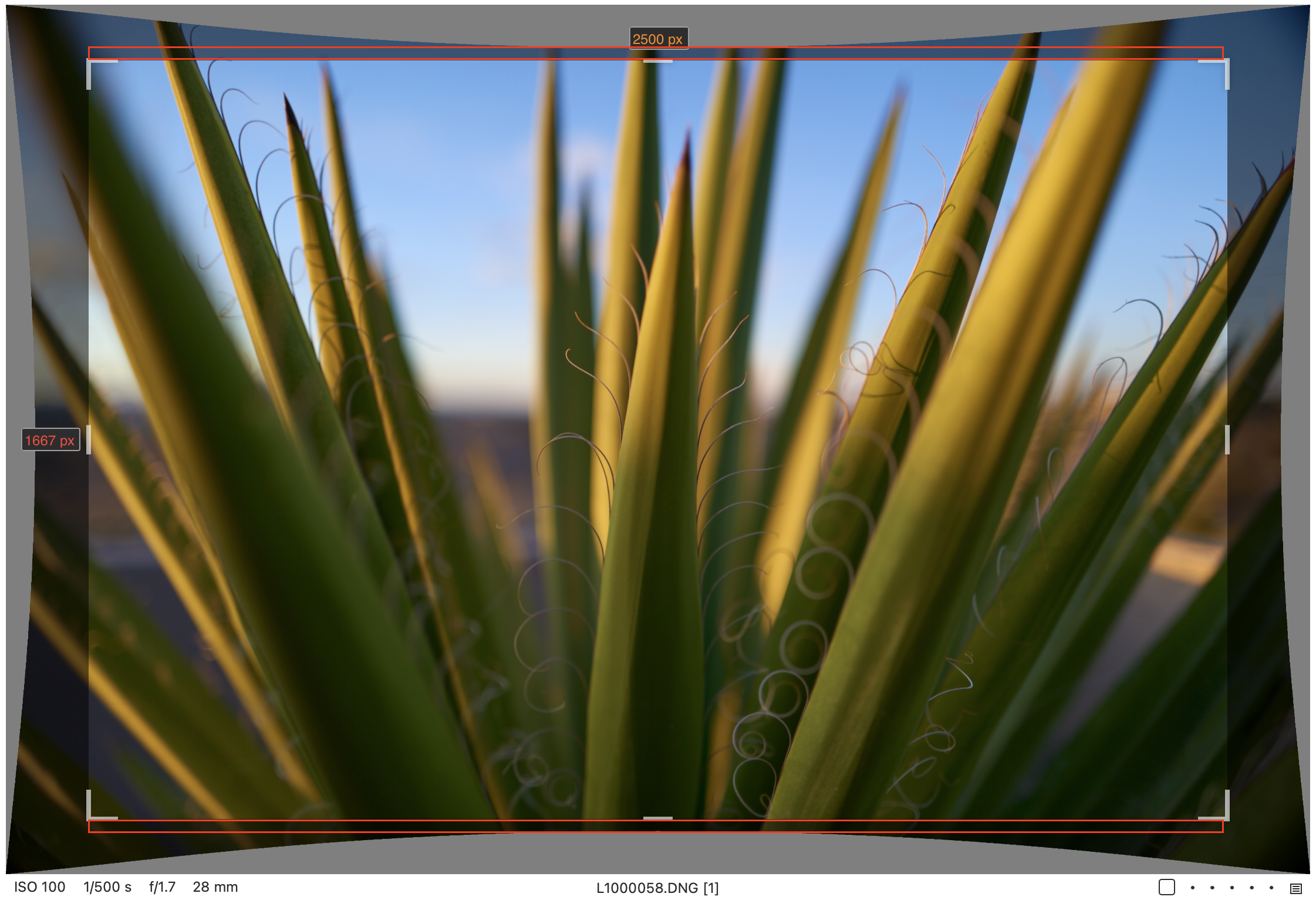
Looks like a little too much correction applied. Capture One lets you remove the crop but keep the manufacturer distortion correction applied, and this is how it looks:
p.12 #11 · Official: Leica Q3 Unveiled, Now Open for Pre-Orders
Fred Miranda wrote:
I concur. Personally, I rarely utilize the LCD screen and prefer to keep the Q2 in EVF extended mode.
By the way, I have made corrections in Lightroom to obtain the 'original' 24mm file with distortion correction applied during post-processing. Take a look at the distortion amount to align it with the JPEG file.
Have either of you seen the Q3 in person?
I can only speak for myself. The flip screen is welcome and awesome. Aesthetically the camera remains beautiful. The ability to flip out the screen for waist level shooting, when combined with the killer subject detect AF, for street shooting is revelatory.
I agree it looks odd in the photos but owning the camera, I certainly wouldn’t want to go back.
John
p.12 #12 · Official: Leica Q3 Unveiled, Now Open for Pre-Orders
highdesertmesa wrote:
Looks like a little too much correction applied. Capture One lets you remove the crop but keep the manufacturer distortion correction applied, and this is how it looks:
I was making a comparison between the uncorrected DNG file and the available JPEG file from dpreview's image gallery. I found that to align the uncorrected image with the distortion and framing of the JPEG file, an adjustment of that magnitude was necessary. Essentially, I didn't notice any cropping; instead, only barrel correction was applied to eliminate the pronounced vignetting. Even when applying a distortion value of "+20" (instead of +54), the image still appeared considerably wider than the original DNG file.
CaptureOne should give the same uncorrected distortion amount since all it's doing is removing the OpcodeList info from the DNG file.
p.12 #13 · Official: Leica Q3 Unveiled, Now Open for Pre-Orders
geddon_jt wrote:
Have either of you seen the Q3 in person?
I can only speak for myself. The flip screen is welcome and awesome. Aesthetically the camera remains beautiful. The ability to flip out the screen for waist level shooting, when combined with the killer subject detect AF, for street shooting is revelatory.
I agree it looks odd in the photos but owning the camera, I certainly wouldn’t want to go back.
John
I agree with the above - I got a Leica Q3 on launch day and so far been very happy with the camera. I don't really use the flip screen but the way it's designed doesn't bother me at all - I barely notice it unless I want to use it. I think there's $2500 good reasons to stay with the Leica Q2 over the Q3 but this fixation on the flip screen seems like a bit of a rationalization.
p.12 #14 · Official: Leica Q3 Unveiled, Now Open for Pre-Orders
geddon_jt wrote:
Have either of you seen the Q3 in person?
I can only speak for myself. The flip screen is welcome and awesome. Aesthetically the camera remains beautiful. The ability to flip out the screen for waist level shooting, when combined with the killer subject detect AF, for street shooting is revelatory.
I agree it looks odd in the photos but owning the camera, I certainly wouldn’t want to go back.
John
Yes, I compared them, and even though having the ability to flip the LCD is nice, I prefer the Q2 style because it has a sleek, seamless LCD and buttons that match other Leica bodies. However, I think it was a smart choice to add a flip LCD since many people have been asking for this feature.
p.12 #16 · Official: Leica Q3 Unveiled, Now Open for Pre-Orders
Fred Miranda wrote:
I was making a comparison between the uncorrected DNG file and the available JPEG file from dpreview's image gallery. I found that to align the uncorrected image with the distortion and framing of the JPEG file, an adjustment of that magnitude was necessary. Essentially, I didn't notice any cropping; instead, only barrel correction was applied to eliminate the pronounced vignetting. Even when applying a distortion value of "+20" (instead of +54), the image still appeared considerably wider than the original DNG file.
CaptureOne should give the same uncorrected distortion amount since all it's doing is removing the OpcodeList info from the DNG file....Show more →
Is it possible the DNG corrections are milder than those done to the JPEGs? The example I posted was not C1 discarding the profile and me manually correcting it, it was C1 showing the crop relative to the distortion correction, both taken from the DNG embedded profile.
p.12 #17 · Official: Leica Q3 Unveiled, Now Open for Pre-Orders
highdesertmesa wrote:
Is it possible the DNG corrections are milder than those done to the JPEGs? The example I posted was not C1 discarding the profile and me manually correcting it, it was C1 showing the crop relative to the distortion correction, both taken from the DNG embedded profile.
The JPG for that image in Dpreview's gallery was processed in ACR rather than being an OOC JPG, so it should've had the same correction profile applied:
JPG EXIF: History Software Agent : Adobe Photoshop Camera Raw 11.2, Adobe Photoshop Camera Raw 11.2.1 (Windows)
BTW, they claim it to be out-of-camera JPEG using the standard profile.
Went back and looked at my C1 catalog to try and find a DNG/JPG pairing. Found one for both the original Q and Q2, and the DNG crop in C1 and SOOC JPEGs are identical. Not sure what is up with the samples from DPR.
Below I highlighted in red the difference between where you had adjusted the distortion correction versus where C1 and the SOOC JPEGs put it. You had the top center of the available image pushed all the way down to the top center of the crop, whereas the DNG and JPEG crop don't push it that far down.