Fred Miranda wrote:
I had one with the issue I mentioned, but resetting it fixed the problem. I used that copy for about a year without any trouble before selling it. Later, I bought another used one here on FM, and it has been with me for about two years now. It has never given me a single problem. I use it all the time with my A7CR Kolari, and it's like getting images from an M11 with autofocus M lenses.
I do wish it were a bit lighter, but the build quality is excellent. Hopefully, Techart will come out with a smaller and lighter version in the future....Show more →
That’s actually a pretty decent track record—I am always nervous to try again after my experience and the other reports. I always love the idea of the adapter.
what a difference a day makes. I attached my 50/1.4 asph to the techart/A7CR combo, walked out on the deck and shot these test shots. The last 2 I remembered to change to animal instead of human recognition. It focused so quickly and accurately - I'm impressed! I also did a few test shots with my 35 APO indoors and likewise it focused quickly and accurately.
brick33308 wrote:
what a difference a day makes. I attached my 50/1.4 asph to the techart/A7CR combo, walked out on the deck and shot these test shots. The last 2 I remembered to change to animal instead of human recognition. It focused so quickly and accurately - I'm impressed! I also did a few test shots with my 35 APO indoors and likewise it focused quickly and accurately.
Yes - Thin Filter Legacy Lens Upgrade. Do the images look as you'd expect had they been shot with that lens on the M11P?
here are 2 more: this time with the 35 APO. No crop, and only adjustments were hitting Auto in ACR. Absolutely blown away by how fast and accurate AF is - especially with Sony's animal eye focus.
brick33308 wrote:
Yes - Thin Filter Legacy Lens Upgrade. Do the images look as you'd expect had they been shot with that lens on the M11P?
here are 2 more: this time with the 35 APO. No crop, and only adjustments were hitting Auto in ACR. Absolutely blown away by how fast and accurate AF is - especially with Sony's animal eye focus.
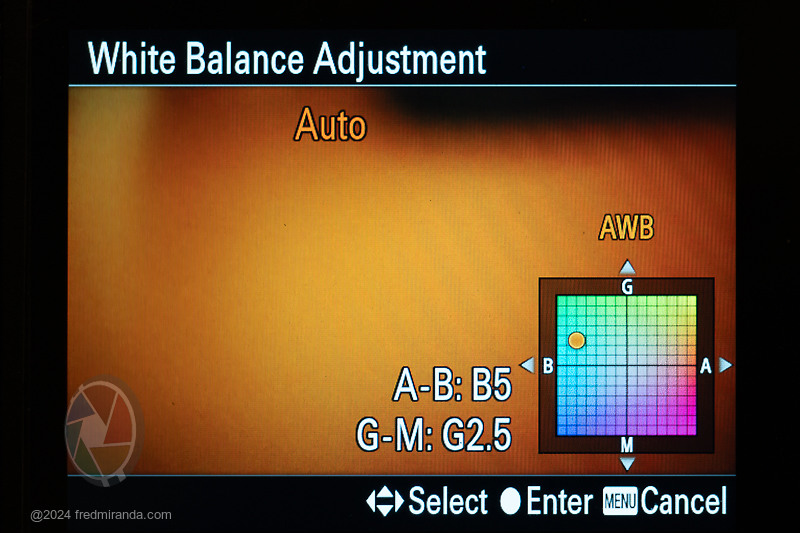
The Kolari mod adds a slight tint and temp color cast, but you can get closer to the original colors by adjusting the white balance for all presets, including Auto WB. You only have to do this once.
I think you'll be much happier with the resulting color.
Now you can use your 28mm and 35mm (also 50mm) lenses without any loss in IQ achieving the same performance across the image field as if you were shooting on an M11 60MP sensor.
I'll keep experimenting with the Sony/Techart, using different lenses in different lighting conditions. But if the Sony/Techart continues to perform well, then basically I've got a Q3 that isn't a fixed lens, but instead takes all my M lenses. And that being the case, wondering if it makes sense to sell the Q3 while they're still fetching decent prices.
Here's what the Sony/Techart (with 35 APO) looks like next to the Q3
Fred Miranda wrote:
The Kolari mod adds a slight tint and temp color cast, but you can get closer to the original colors by adjusting the white balance for all presets, including Auto WB. You only have to do this once.
I think you'll be much happier with the resulting color.
Now you can use your 28mm and 35mm (also 50mm) lenses without any loss in IQ achieving the same performance across the image field as if you were shooting on an M11 60MP sensor.
Fred, I showed ChatGPT that image and it says that there isn’t a 1:1 table of “B5 / G2.5 = exact Kelvin/Tint numbers” that you can copy into Adobe Camera Raw. So looking at the image you posted, here's what ChatGPT is telling me to do - basically nudge the sliders and see if I like how the image looks (and if so, save as a custom WB setting). Is that how you created your WB profile, or did you use actual numbers for temperature and tint?
1. Open the White Balance controls
• In the Basic panel of ACR, set White Balance to As Shot (or Auto, if you want to start from the camera’s AWB reading).
2. Translate A–B into Temperature
• “B5” means the camera AWB is nudged toward the blue side.
• In ACR that corresponds to lowering the Temperature slider slightly (a cooler color).
• Start with a small move, roughly –150 to –300 K from the current value as a first approximation, then fine-tune by eye.
3. Translate G–M into Tint
• “G2.5” means it’s shifted slightly toward green.
• In ACR that’s the Tint slider, so move it a bit toward negative values (the green direction).
• Try around –3 to –5 on the Tint scale and adjust visually.
⸻
4. Fine-tune visually
Your monitor and the image itself are the best guides. Use a neutral reference (white shirt, gray card, pavement, etc.) if you have one, or simply adjust until whites look neutral.
⸻
Quick summary:
In ACR, replicate “A-B: B5, G-M: G2.5” by slightly lowering Temperature (cooler/blue) and slightly lowering Tint (toward green). Adjust by eye to taste—the numeric equivalents vary with camera model and starting Kelvin value.
brick33308 wrote:
Fred, I showed ChatGPT that image and it says that there isn’t a 1:1 table of “B5 / G2.5 = exact Kelvin/Tint numbers” that you can copy into Adobe Camera Raw. So looking at the image you posted, here's what ChatGPT is telling me to do - basically nudge the sliders and see if I like how the image looks (and if so, save as a custom WB setting). Is that how you created your WB profile, or did you use actual numbers for temperature and tint?
1. Open the White Balance controls
• In the Basic panel of ACR, set White Balance to As Shot (or Auto, if you want to start from the camera’s AWB reading).
2. Translate A–B into Temperature
• “B5” means the camera AWB is nudged toward the blue side.
• In ACR that corresponds to lowering the Temperature slider slightly (a cooler color).
• Start with a small move, roughly –150 to –300 K from the current value as a first approximation, then fine-tune by eye.
3. Translate G–M into Tint
• “G2.5” means it’s shifted slightly toward green.
• In ACR that’s the Tint slider, so move it a bit toward negative values (the green direction).
• Try around –3 to –5 on the Tint scale and adjust visually.
⸻
4. Fine-tune visually
Your monitor and the image itself are the best guides. Use a neutral reference (white shirt, gray card, pavement, etc.) if you have one, or simply adjust until whites look neutral.
⸻
Quick summary:
In ACR, replicate “A-B: B5, G-M: G2.5” by slightly lowering Temperature (cooler/blue) and slightly lowering Tint (toward green). Adjust by eye to taste—the numeric equivalents vary with camera model and starting Kelvin value....Show more →
This AI tool isn't accurate on this point, so let me clarify. The WB adjustments need to be made in-camera, not just in post.
Here's the process:
On the A7CR, go to the WB settings menu. Select Auto WB, then press the right button on the control wheel. This opens the White Balance Adjustment screen. Refer to the image and settings I posted earlier. Using the control wheel, dial in these values: A-B: B5 and G-M: G2.5. Apply this not only to Auto WB but also to all other presets like Daylight, Cloudy, etc.
Now, it is possible to replicate these settings in Lightroom, but it took me a lot of trial and error...something chatdpt can't replicate without access to real calibration tests. Based on my calculations and visual confirmation, here's the approximate conversion between Sony's White Balance Adjustment and Lightroom’s Temperature/Tint:
• A-B: Each 0.5 step ≈ 100 points in Lightroom (temperature slider)
• G-M: Each 0.25 step ≈ 3–4 points in Lightroom (tint slider)
brick33308 wrote:
Fred do you have any of the Q cams?
I'll keep experimenting with the Sony/Techart, using different lenses in different lighting conditions. But if the Sony/Techart continues to perform well, then basically I've got a Q3 that isn't a fixed lens, but instead takes all my M lenses. And that being the case, wondering if it makes sense to sell the Q3 while they're still fetching decent prices.
Yes, I used the Q2 for years, but the A7CR paired with the Voigtländer 28mm f/1.5 Nokton convinced me to sell it. It's much smaller and I prefer the rendering from the Nokton.
Fred Miranda wrote:
Yes, I used the Q2 for years, but the A7CR paired with the Voigtländer 28mm f/1.5 Nokton convinced me to sell it. It's much smaller and I prefer the rendering from the Nokton.
and Fred, do I remember you saying you don't see that much a degredation from your FE lenses with Kolari mod or am I making that up? I have a 24 1.4 and 65 f2, and 50-300 that wasn't sure how they would react to a Kolari modded a7cr.
Seabassius wrote:
and Fred, do I remember you saying you don't see that much a degredation from your FE lenses with Kolari mod or am I making that up? I have a 24 1.4 and 65 f2, and 50-300 that wasn't sure how they would react to a Kolari modded a7cr.
You heard that right...and it can actually be beneficial for some FE lenses. Because of design compromises, many lenses show a degree of field curvature. The most common type is outward field curvature, especially with wide-angle and normal lenses. The Kolari mod shifts this from outward to nearly neutral field curvature. (By contrast, shooting with M-mount lenses on stock Sony's thicker cover glass does the opposite...it exaggerates the outward curvature even more.)
In practice, this changes how the rendering looks. With the Kolari-modded Sony, out-of-focus corners stay blurred the way they should. On the stock Sony sensor, those same corners can appear less blurred (or even more in focus) depending on the severity of the lens's field curvature. In other words, the Kolari mod evens out the rendering and makes images more natural and pleasing.
A perfect example is the TTArtisan 40mm f/2: on my regular A7R II the outward field curvature is obvious, but on the Kolari A7CR it disappears, and the results look far more balanced.
I'm curious why Sony uses this thicker sensor stack if it is seemingly superior without downside? Or perhaps its more expensive to manufacture that way?
After my adapter died almost immediately upon purchase upon release, I tried a variety of revives to no avail. I also tried to contact TechArt but received no responses.
Last night, I saw Bastian’s review with a note stating how to reset the adapter. That update was posted in 2/2024. I followed the steps. And now my adapter works—pumped!
After my adapter died almost immediately upon purchase upon release, I tried a variety of revives to no avail. I also tried to contact TechArt but received no responses.
Last night, I saw Bastian’s review with a note stating how to reset the adapter. That update was posted in 2/2024. I followed the steps. And now my adapter works—pumped!
Can you point to an URL to what Bastian wrote? I can't find it by searching. Thanks!
If your adapter isn't working properly, especially after updating the firmware to version 1.6.0, you can try these steps to fix it. Techart provided this guide:
1. Download and unzip the firmware updater from the attached link (for Windows) or (for Mac).
2. Connect the adapter to your computer using its rear cap.
3. Open the firmware updater and select "LM-EA9 v1.5," then click on "update."
4. The firmware will update automatically and load into the adapter. A loading icon will appear. This process takes less than 5 minutes. Once it's done, disconnect the cable.
5. Put the adapter with your lens on your camera.
6. Turn on the camera and set the aperture on the camera to f/90.
7. Manually focus on a subject to enable the shutter release.
8. Take a picture by releasing the shutter.
9. Set the aperture back to f/2.0 and check if the adapter motor responds. Sometimes it might take a while for the function to work again.
10. If the motor is still not responding, repeat steps 6 to 9.
11. Once the motor starts working again, reconnect the adapter to your computer.
12. Open the firmware updater and choose "LM-EA9 v1.6," then click on "update."