fredmiranda.com
Login

Moderated by: Fred Miranda
  New fredmiranda.com Mobile Site
  New Feature: SMS Notification alert
  New Feature: Buy & Sell Watchlist
  

FM Forums | Post-processing & Printing | Join Upload & Sell

1       2       3              5       end
  

Archive 2022 · Creatives on a Mac ...


rattlebonez
Offline
• • •
Upload & Sell: Off
p.4 #1 · Creatives on a Mac ...


Chez
An M2 Macbook Air with 24 GB RAM would make a nice travel laptop for Photography

I am considering one also.


Jun 21, 2022 at 03:27 PM
chez
Offline
• • • • • • •
Upload & Sell: Off
p.4 #2 · Creatives on a Mac ...


rattlebonez wrote:
Chez
An M2 Macbook Air with 24 GB RAM would make a nice travel laptop for Photography

I am considering one also.


Yeh that new release with the improved processor and more memory looks like the cat’s meow. For travel battery life is important for me as I’m quite often off the grid for days. I really don’t know what a Windows equivalent to that M2 Mac Air would be…if one really exists.


Jun 21, 2022 at 05:39 PM
RustyBug
Offline
• • • • • • •
Upload & Sell: On
p.4 #3 · Creatives on a Mac ...


franm8r wrote:
If there is an answer to this question, it probably combines elements of historical fact alongside some of the most effective marketing and advertising ever done, subsequently supported by mass adoption and self-perpetuation in creative sectors.

Historically, Apple has definitely landed some "killer app" features at opportune moments in time, that either enabled unique uses fully unavailable elsewhere, or made those uses better/smoother/easier than on other platforms. Some broad examples:

-Thunderbolt's advent was a massive deal in audio (mixing/sound design/composing) - it allowed for outboard processing hardware with the necessary low latency that was not otherwise possible at the time.
-the launch of
...Show more

Thanks, well presented. Plenty of info, took me a few to digest.


Jun 25, 2022 at 07:14 AM
RustyBug
Offline
• • • • • • •
Upload & Sell: On
p.4 #4 · Creatives on a Mac ...


CanadaMark wrote:
you could easily keep a windows machine silent with a simple custom fan curve


How does that work? Would it also involve throttling, or just allow the temperature to rise ... or, a combination?

CanadaMark wrote:
That was just one example - something like a 12700H


I'm running the H series in my TP now, and it has been reasonably well balanced between performance, heat, noise (albeit, multiple gens old now). Moving to a more powerful generation ... I'm wondering if my heat goes up, or has cooling / efficiency gains been made there, also? I do use my laptop on my lap, so more heat isn't attractive to me.

I certainly recognize the relationship of power > performance. So, some of our discussions are about max performance, and other aspects are about what I'd call "optimized" performance". For raw power, my truck has a V-8 in it. For something more efficient, the I-4 or V-6 offers a compromise, and an inline six with a turbo seems about ideally "optimized". I'm considering the Mac approach to be in the realm of the inline six with turbo. Smooth, strong and well spirited ... even if there are others more suitably designed to pull a house.


FYI, I've circled back to look at contemporary PC Laptops for comparison to the Mac experience. I've noticed that the track pad's now incorporate a similar "click" functionality (like the Mac) that isn't in my current TP.

I think that the time spent with the Mac, led me to understand that once I'm in my given program (PS, etc.) ... the Mac ethos is less noticeable, than when trying to navigate about, and many of those features / apps aren't strongly on the radar while immersed in the given task at hand.

This then leaving me to the interface, performance and cooling attributes as key considerations (moreover than the Mac ethos stuff).

So, if the interface is amenable, and the performance is also amenable to most tasks ... the cooling (heat / throttling / noise) becomes the remaining area of concern. Weight / battery life a it farther down the list ... depending on if the Air is the target, or a larger display 16" is the target.

So, it has me wondering about heat management if I were to look into a new gen H series ... or a newer AMD series.

Which, btw ... I see where ASUS ProArt is offering configurations with the H series, as well as an AMD. The matter of mention regarding processing for Metal / GPU ... is there any notable difference between the H series and the AMD's for those operations (NR, stitching, etc.), performance or cooling?

I found this:
https://www.pugetsystems.com/labs/articles/Adobe-Photoshop-12th-Gen-Intel-Core-vs-AMD-Ryzen-5000-Series-2245/

I like the (small to read) the raw operations listed in comparison. Gives (imo) a better perspective seeing the individual tasks. Wish they had the same tasks performed on the Mac for comparison, too.

Found this:

https://www.pugetsystems.com/benchmarks/?age=365&benchmark=&application=photoshop&specs=32gb#results-table

Search for Apple M1 to see their PS benchmarks. Most scores in the 700-900 range ... difference seeming more toward RAM increases 16>32>64, until you get to the 20 core that punches through the 1000 mark with 128GB going a bit higher, but not hitting above 1050.

Conversely, some (non-Mac) rigs punching into the 1200 -1300 ranks.


One example (64GB) of the 12700H, scored 1277

LENOVO LNVNB161216 (J2CN40WW)
12th Gen Intel(R) Core(TM) i7-12700H
64GB (2x32GB) 4800MHz
Intel(R) Iris(R) Xe Graphics (30.0.101.1994), NVIDIA GeForce RTX 3060 Laptop GPU (30.0.14.9753)
Microsoft Windows 11 Home (22000)
LENOVO 82RF


And another example (16GB) of the 12700H, scored 900

LENOVO LNVNB161216 (J2CN40WW)
12th Gen Intel(R) Core(TM) i7-12700H
16GB (2x8GB) 4800MHz
Intel(R) Iris(R) Xe Graphics (30.0.101.1994), NVIDIA GeForce RTX 3060 Laptop GPU (30.0.14.9753)
Microsoft Windows 11 Home (22000)
LENOVO 82RF


And an i5 variant 12500H, scored 840

LENOVO LNVNB161216 (HYCN25WW)
12th Gen Intel(R) Core(TM) i5-12500H
16GB (8x2GB) 6400MHz
NVIDIA GeForce RTX 2050 (30.0.14.9729), Intel(R) Iris(R) Xe Graphics (30.0.101.1109)
Microsoft Windows 11 ��ͥ���İ� (22000)
LENOVO 21CX


Interesting to note how much diff (40%) there is between same rig, but with 64GB RAM vs. 16GB RAM with the i7. Meanwhile, the diff between i5 vs. i7 (both 16GB RAM), is only 7% (and includes a lesser GPU model).

This data point kinda goes in line with part of the article below (which goes against certain typical thoughts), if the benchmark results are any indication of how much influence RAM vs. processor improvements are having on PS. Other programs may have a different tale to tell, but it speaks to me regarding the relationship between RAM and CPU (presumably GPU also).

https://phototacopodcast.com/amd-vs-intel-for-lightroom-and-photoshop-with-puget-systems/

Other Factors For Running Lightroom and Photoshop – RAM, GPU, Storage

I am convinced processors play a major role in the performance of Lightroom and Photoshop. Photographers who have to stick inside a budget should get the best processor offered. It is where they should spend their money first. How should photographers prioritize investing in RAM, GPU, and storage after processor?

Matt would put them in order of RAM, Storage, CPU, GPU. Here is why.
RAM For Running Lightroom and Photoshop

Matt says that because most people think of processor first he wouldn’t actually put processor first. He would put RAM first as that tends
...Show more

In either regard (Mac vs. PC), it would seem that the increased RAM is yielding benefits. Many have touted that "16GB is more than enough for PS", but these data points seem to suggest a bit differently ... i.e. more RAM does help.


A different look (not PS specific) at the Lenovo 82RF (with i9 12900HK) vs the Mac
https://browser.geekbench.com/v5/cpu/compare/11905527?baseline=11714129


Jun 25, 2022 at 07:24 AM
RustyBug
Offline
• • • • • • •
Upload & Sell: On
p.4 #5 · Creatives on a Mac ...


Just placed an order for a Macbook Air.

Got it for another family member who is in the Apple ethos already with iPhone / iPad. It'll be a shared resource for a while, so I can get a better feel for the Mac, and its capabilities (vs. benchmarks and specs).


Jun 25, 2022 at 07:19 PM
RustyBug
Offline
• • • • • • •
Upload & Sell: On
p.4 #6 · Creatives on a Mac ...


Ran the Benchmark on my rig (bottom) in an "as used" (i.e. tab monsters alive and well) status, and pulled an M1 10 Core with 32GB (probable max of what I might purchase) and an i9 (what I likely won't purchase). Plenty of others available to scour through, but for representational purposes, this worked to illustrate how the different tasks performed at these differing levels.

I found it interesting to note that between the M1 and the i9, some tasks were faster with the i9 and some tasks were faster with the M1. I don't have the tech savvy to necessarily know what the attribute is that makes the Mac or the PC handle each task better / worse. Instead, simply to understand that the sound bites of "blows away" in broad strokes, etc. may or may not be accurate, depending on the task at hand.

If you're interested, the PugetSound database is available to make any manner of comparison, based on your search criteria. Here's but three. Chosen (not cherry picked) to represent range of what's possible in laptops (i.e. not a "mine's better than yours") ... and to get a glimpse into how that relates to PS task performance. For the Mac purchasing decision, I'll likely go back and pull other comps to get a feel for how much diff 16, 24, 32, 64 GB diff makes (at the task level), or at the 8, 10, 20 core level.

The one thing that strikes me as being an important aspect of the "creative process" ... is the pace of tasks, where the waiting on tasks can be interrupting to the mental workflow. Imo, this is a different "fluidity" than bulk data transfer (say imports / exports). To which seeing how the different tasks perform within Mac vs. PC is interesting to note. I doubt that I'll make a purchasing decision based on a specific task level item, but it is interesting for me to see that to have a more realistic expectation of what I might experience ... in terms of processing differences.

HTH


Processor
Apple M1 10 Core @ 2,4 GHz
Video Card
Apple M1 Max
Memory
32 GB
Motherboard
Operating System
macOS (12.4)
System
Apple MacBook Pro

Benchmark Score 890
https://www.pugetsystems.com/benchmarks/view.php?id=92913

RAW File Open Best Time 0.67 Seconds
Resize to 500MB Best Time 3.30 Seconds
Rotate Best Time 1.34 Seconds
Magic Wand Select Best Time 11.04 Seconds
Mask Refinement Best Time 9.46 Seconds
Paint Bucket Best Time 1.75 Seconds
Gradient Best Time 0.79 Seconds
Camera Raw Filter Best Time 8.14 Seconds
Lens Correction Best Time 15.19 Seconds
Content Aware Fill Best Time 7.01 Seconds
Reduce Noise Best Time 16.29 Seconds
Smart Sharpen Best Time 17.85 Seconds
Field Blur Best Time 12.64 Seconds
Tilt-Shift Blur Best Time 12.54 Seconds
Iris Blur Best Time 13.21 Seconds
Adaptive Wide Angle Best Time 33.06 Seconds
Liquify Best Time 6.27 Seconds
PSD File Save Best Time 97.04 Seconds
PSD File Open Best Time 13.66 Seconds

Total Run Time: 281 Seconds


Processor
12th Gen Intel(R) Core(TM) i9-12950HX
Video Card
NVIDIA GeForce RTX 3080 Ti Laptop GPU (31.0.15.1640), Intel(R) UHD Graphics (30.0.101.1631)
Memory
32GB (2x16GB) 4800MHz
Motherboard
ASUSTeK COMPUTER INC. G733CX (G733CX.305)
Operating System
Microsoft Windows 11 Home (22000)
System
ASUSTeK COMPUTER INC. ROG Strix G733CX_G733CX

Benchmark Score 1358
https://www.pugetsystems.com/benchmarks/view.php?id=97034

RAW File Open Best Time 0.59 Seconds
Resize to 500MB Best Time 1.90 Seconds
Rotate Best Time 0.71 Seconds
Magic Wand Select Best Time 7.40 Seconds
Mask Refinement Best Time 3.94 Seconds
Paint Bucket Best Time 1.12 Seconds
Gradient Best Time 0.24 Seconds
Camera Raw Filter Best Time 4.41 Seconds
Lens Correction Best Time 14.91 Seconds
Content Aware Fill Best Time 3.10 Seconds
Reduce Noise Best Time 8.95 Seconds
Smart Sharpen Best Time 11.32 Seconds
Field Blur Best Time 10.42 Seconds
Tilt-Shift Blur Best Time 12.05 Seconds
Iris Blur Best Time 13.66 Seconds
Adaptive Wide Angle Best Time 56.40 Seconds
Liquify Best Time 3.53 Seconds
PSD File Save Best Time 82.12 Seconds
PSD File Open Best Time 8.68 Seconds

Total Run Time: 245 Seconds


Processor
Intel(R) Core(TM) i5-8400H CPU @ 2.50GHz
Video Card
NVIDIA GeForce GTX 1050 Ti with Max-Q Design (30.0.14.7141)
Memory
64GB (2x32GB) 2667MHz
Motherboard
LENOVO 20MFCTO1WW (N2EET52W (1.34 ))
Operating System
Microsoft Windows 10 Pro (19043)
System
LENOVO 20MFCTO1WW

Benchmark Score 439
https://www.pugetsystems.com/benchmarks/view.php?id=97309

RAW File Open Best Time 2.98 Seconds
Resize to 500MB Best Time 3.42 Seconds
Rotate Best Time 3.44 Seconds
Magic Wand Select Best Time 23.78 Seconds
Mask Refinement Best Time 9.16 Seconds
Paint Bucket Best Time 3.45 Seconds
Gradient Best Time 1.61 Seconds
Camera Raw Filter Best Time 13.81 Seconds
Lens Correction Best Time 25.81 Seconds
Content Aware Fill Best Time 10.92 Seconds
Reduce Noise Best Time 43.45 Seconds
Smart Sharpen Best Time 51.46 Seconds
Field Blur Best Time 26.03 Seconds
Tilt-Shift Blur Best Time 28.18 Seconds
Iris Blur Best Time 35.93 Seconds
Adaptive Wide Angle Best Time 134.09 Seconds
Liquify Best Time 11.87 Seconds
PSD File Save Best Time 148.53 Seconds
PSD File Open Best Time 20.62 Seconds

Total Run Time: 599 seconds

NOTE: I left my current rig off the first chart to keep the scale easier to see the differences of the other two.
Also, the sequence of operations resized (2nd test) the file to 500MB, so the following operation times are on that size of a file. Actual times for a normal sized file would be less, the point of the benchmark being relative rather than absolute.


Jun 26, 2022 at 07:45 AM
James Markus
Offline
• • • • •
Upload & Sell: On
p.4 #7 · Creatives on a Mac ...


I was surprised to see this almost 30 year old pissing contest is still kicking. The idea that a mac is the "choice of creatives", or is more "user friendly" came from the "reality distortion field" of Steve Job's mind. It was never true. When you market something - you have to make it sound as wonderful as possible for your intended target. Jobs played on people's vanity, and sold them on it hook line and sinker. I worked in the marketing dept/mac cult of a medium sized newspaper for decades. I used both platforms, but was tagged a reprobate in the 1990s when I switched to PC to save massive amounts of time processing my images. Today - that kind of differential likely no longer exists - or if it does - it may be in the mac's favor. But here is the thing. All the newspapers used Unix for page layout and construction back then. I will give Jobs credit for being a master of design, promotion and sales. The annual mac world extravaganzas were anticipated like a Billy Graham revival. The computer is a tool. The hardware and software are tools.

YMMV


Jul 12, 2022 at 09:38 AM
jhapeman
Offline
• • • •
Upload & Sell: On
p.4 #8 · Creatives on a Mac ...


I'd take the PugetBench scores with a grain of salt. They straight out note they don't have an M1-native version of the benchmark yet. How that impacts results is completely unknown. In addition, Photoshop is far from optimized for Apple Silicon; there are whole chunks of code that quite frankly aren't even optimized for the higher core counts in the newer Intel processors either. On another and perhaps more relevant/important note, in the laptop world you have to benchmark with the laptop plugged in and on battery power and look at how that impacts either performance and/or battery longevity.

What's remarkable about the Apple Silicon chips is that you can get the same performance plugged in or on battery, and even running at very high performance the wattage usage is vastly lower than the Intel laptops, and even more so when comparing to one with a discrete Nvidia GPU. In the charts above, the Nvidia GPU can draw over 3x as much as the Apple M1 Max GPU at full power (150W vs 44W). Similar numbers apply for the CPU. The way almost every Intel-based laptop handles this is to switch off the discrete GPU and use the weak integrated one when on battery power, and to throttle back the CPU. The alternative is to let them run full bore and rapidly deplete the battery.

The M1laptops feel crazy fast to many people because of this--we mostly don't use laptops plugged in, and that performance difference is vastly more noticeable there.

All of this also just puts aside the overall experience--synthetic benchmarks of linear tasks are interesting data points but they never replicate real-world performance. How do other tasks feel/perform when you're say editing Photoshop? The mix of efficiency and performance cores in the Apple Silicon means that you can have things like email and web browsing running along just fine while an app like PS gobbles up all of the power of the performance cores with no impact at all.

This isn't just theoretical stuff--the fact that Intel and AMD are scrambling to release new chips that incorporate this type of architecture tells you how much they know it matters. Hopefully we will see an overall improvement now that Intel has serious competition from more than just AMD, who always struggled in the laptop/low power space anyway (although that is very recently changing).


Jul 12, 2022 at 02:59 PM
jhapeman
Offline
• • • •
Upload & Sell: On
p.4 #9 · Creatives on a Mac ...


What I should more clearly state about the Puget Benchmarks on M1 Macs is this:

They are running in Intel emulation mode, under Apple's Rosetta2 translation engine. Taken that way, the results are remarkable--the Apple Silicon is running a non-native version of Photoshop almost as fast--and in some cases FASTER--than an Intel native version on an Intel processor.

I have zero doubt that a native version of this would show substantially different results.


Jul 12, 2022 at 03:12 PM
bjhurley
Offline
• • • •
Upload & Sell: Off
p.4 #10 · Creatives on a Mac ...


jhapeman wrote:
I'd take the PugetBench scores with a grain of salt. They straight out note they don't have an M1-native version of the benchmark yet.


Besides, Puget Systems only sells Windows PCs so it's in their interest to make the Mac look as poor as possible in comparison.


Jul 12, 2022 at 03:30 PM
BnG-Murphy
Offline

Upload & Sell: Off
p.4 #11 · Creatives on a Mac ...


When I switched from a PC to an iMac, I felt like I switched from using a tool to something actually pleasant to use. It definitely increased productivity, which included creativity.

Same to a lesser extent with Windows laptops Vs Macbooks. I really like my little 12 inch Macbook, but have zero emotion about my workstation Dell XPS laptop which is good for video editing, despite it being rather sleek for it's 15'6" screen size.

Apple do annoy the heck out of me at times though. Mainly the restrictions. I could never go back to an iPad now that Samsung make competitors to the iPad Pro. Too restricted.


Jul 14, 2022 at 08:08 AM
bjhurley
Offline
• • • •
Upload & Sell: Off
p.4 #12 · Creatives on a Mac ...


BnG-Murphy wrote:
Apple do annoy the heck out of me at times though. Mainly the restrictions. I could never go back to an iPad now that Samsung make competitors to the iPad Pro. Too restricted.


It's funny, I view those restrictions as one of the main benefits of the Apple ecosystem. Android is like the wild west -- it's more difficult for developers as there are so many models and brands, all of which implement Android a bit differently from each other, and I found lots of compatibility issues and more bugs when I was using Android than when I am using iOS. There are definitely things I like about Android but overall I was spending more time troubleshooting with Android; with iOS I spend more time getting things done as everything usually just works out of the box.


Jul 14, 2022 at 09:16 AM
Jeff
Offline
• • • • • •
Upload & Sell: On
p.4 #13 · Creatives on a Mac ...


Haven't read the entire thread, but just going to throw this out there in case it wasn't addressed in detail: PC vs. Mac laptop, and battery performance/heat generation. I recently went from a very recent stacked MacBook Pro i9 to a stacked 16" MacBook Pro M1, and the difference is startling. My former i9 would turn into a blast furnace just rooting about on the web, and battery performance would thus drop into the toilet. This new M1 machine is virtually always cool, I've never heard the fan, and runs for quite awhile without needing to be charged. For people using primarily laptops, that is not an insignificant issue.

For 'switchers', I don't think you can casually ignore Apple's move to their own chip architecture, and although Adobe may be unwilling/slow to write their software to take advantage of the capabilities of these new chips, there are ancillary benefits that cannot be ignored (benefits that don't directly relate to the historical 'Mac experience', like power efficiency).

Excel works fine on the Mac, though MS seems to dribble PC interface 'updates' to the Mac version a year or two down the road. Excel is a program I also use a lot, and I personally wish MS would quit messing with it, as looking for the locations of oft-used tools gets old.


Jul 15, 2022 at 09:15 AM
doady
Online
• •
Upload & Sell: Off
p.4 #14 · Creatives on a Mac ...


Even with Phenom II 945 X4, 4GB 1333MHz DDR3, 1GB Radeon 7850, my current desktop Windows PC that I built in 2009 still runs Capture One Pro 20 okay, so probably even Mac Mini M1 would be okay too. And it is only a matter of time before the hard drive fails, even if it is reliable WD Black (640GB), so I have to think about what my next PC should be and be prepared for that day. The huge increases in price and TDP and power consumption for video cards in recent years has been very disappointing. Even as a gamer and many of my games being Windows only, I still cannot accept paying for hardware designed for cryptocurrency mining, and post-processing RAW files rather than playing games is my main priority now. This is I am considering getting a Mac PC for my next desktop, either Mac Mini M1 or Mac Studio, with integrated GPU and unified memory.

Of course, Apple and M1 is not the only option, recent AMD CPUs have been a leap forward compared to Intel in terms of efficiency, so I have also considered building a Windows-based PC using the mini-ITX form factor and Ryzen 5600G CPU, which includes a decent integrated GPU, much higher raw power than Intel integrated GPUs, almost as powerful as my current Radeon 7850. However, mini-ITX cases still not quite as compact or elegant as even Mac Studio, let alone Mac Mini, and mini-ITX motherboards are quite expensive too, so a lot of the cost-savings of a self-built Windows PC compared to a pre-built Mac PC disappears with mini-ITX. It's a hard choice, but my current desktop PC still starts up so no need to buy a desktop PC with Mac OS immediately.


Jul 15, 2022 at 06:01 PM
RustyBug
Offline
• • • • • • •
Upload & Sell: On
p.4 #15 · Creatives on a Mac ...


jhapeman wrote:
What I should more clearly state about the Puget Benchmarks on M1 Macs is this:

They are running in Intel emulation mode, under Apple's Rosetta2 translation engine. Taken that way, the results are remarkable--the Apple Silicon is running a non-native version of Photoshop almost as fast--and in some cases FASTER--than an Intel native version on an Intel processor.

I have zero doubt that a native version of this would show substantially different results.


That's an interesting point, if it is apples to apples (but one has an anchor attached to it).


Jul 16, 2022 at 05:24 PM
RustyBug
Offline
• • • • • • •
Upload & Sell: On
p.4 #16 · Creatives on a Mac ...


Jeff wrote:
Haven't read the entire thread, but just going to throw this out there in case it wasn't addressed in detail: PC vs. Mac laptop, and battery performance/heat generation. I recently went from a very recent stacked MacBook Pro i9 to a stacked 16" MacBook Pro M1, and the difference is startling. My former i9 would turn into a blast furnace just rooting about on the web, and battery performance would thus drop into the toilet. This new M1 machine is virtually always cool, I've never heard the fan, and runs for quite awhile without needing to be charged. For people
...Show more

I'm not a switcher ... just one rig, mostly plugged in. Rarely on battery, so it isn't such a strong selling point to me as it might be to others.

+1 for Excel ... leave it alone. Quit "re-organizing" things every iteration.


Jul 16, 2022 at 05:27 PM
RustyBug
Offline
• • • • • • •
Upload & Sell: On
p.4 #17 · Creatives on a Mac ...


So, I've got yet another question ... this one is hardware related, of sorts.

I demo'd units in store, took the class in store, and during those times I struggled with the touch pad and the gestures on various models. Seemed like I couldn't find the right amount of pressure, too little, too much ... something. Just didn't get along well at all with it. Similar gestures on my ThinkPad at home, no issues.

Then, I rented the Macbook Pro for a week. 2019 (Intel) model, iirc.
I got along pretty well with the touchpad. No real issues to complain about that I wouldn't attribute to just learning curve or muscle memory. Much better interface experience than I had in the stores. Sided by side with my ThinkPad for a week, and I'm thinking ... yeah, I could do this.

So, I buy the Macbook Air (actually for another family member) and figure I can play with it for a while, to learn about it's processing speeds to get a gauge on whether I'll want a Pro / Max CPU kind of thing.

Haven't done anything with it since getting. The family member is still getting used to it (first Mac for them, too). So, I finally take a crack at transferring some pics from the card (purchased the dongle) ... and that "can't get the touch thing to work worth a hoot" is back.

So, I opened this with reference to hardware. Is there some kind of difference between the touchpad in the newer Macs from the older model? This isn't a simple learning curve issue (basic resize or basic move commands) ... but, rather an interface issue. I mean, I can try 3, 4 or more times and get no response. Then, suddenly (without understanding an iota of difference to why) I get an unexpected response.

It was like that in the store demo's and during training. It's that way now with the one I bought.

What gives? Why would I interface so much better with the older Mac, but not the newer ones?

TIA


Jul 21, 2022 at 12:47 AM
amv8
Offline
• • •
Upload & Sell: On
p.4 #18 · Creatives on a Mac ...


RustyBug wrote:
So, I've got yet another question ... this one is hardware related, of sorts.

I demo'd units in store, took the class in store, and during those times I struggled with the touch pad and the gestures on various models. Seemed like I couldn't find the right amount of pressure, too little, too much ... something. Just didn't get along well at all with it. Similar gestures on my ThinkPad at home, no issues.

Then, I rented the Macbook Pro for a week. 2019 (Intel) model, iirc.
I got along pretty well with the touchpad. No real issues to complain about that I
...Show more

I struggled with this as well coming from a 2019 MBP. My biggest challenge was with click and drag of files in the Finder, etc.. using the haptic trackpad. Interestingly, it seems to work much better recently. Maybe a change in a recent OS update?

I also found enabling three finger drag (which I used on the 2019 MPB) to be very helpful. Enabling three finger drag is not obvious, see:

https://support.apple.com/en-ca/HT204609


Jul 21, 2022 at 01:04 AM
Arka
Offline
• • • • • •
Upload & Sell: On
p.4 #19 · Creatives on a Mac ...


RustyBug wrote:
So, in the realm of my exploration into Mac ... I came a cross a question that I posed to the store where I got the rental (one data point). I'd like to pose the same question here to get additional perspective. It seems that perspective my be part of things along the way to a better understanding / experience.

Previously I've asked the question of what makes a Mac better than a PC, and got all kinds of answers about hardware / software compatibility, security, integration among devices, system stability, etc. But, given that I've not had issues with those
...Show more


A few reactions to your question:
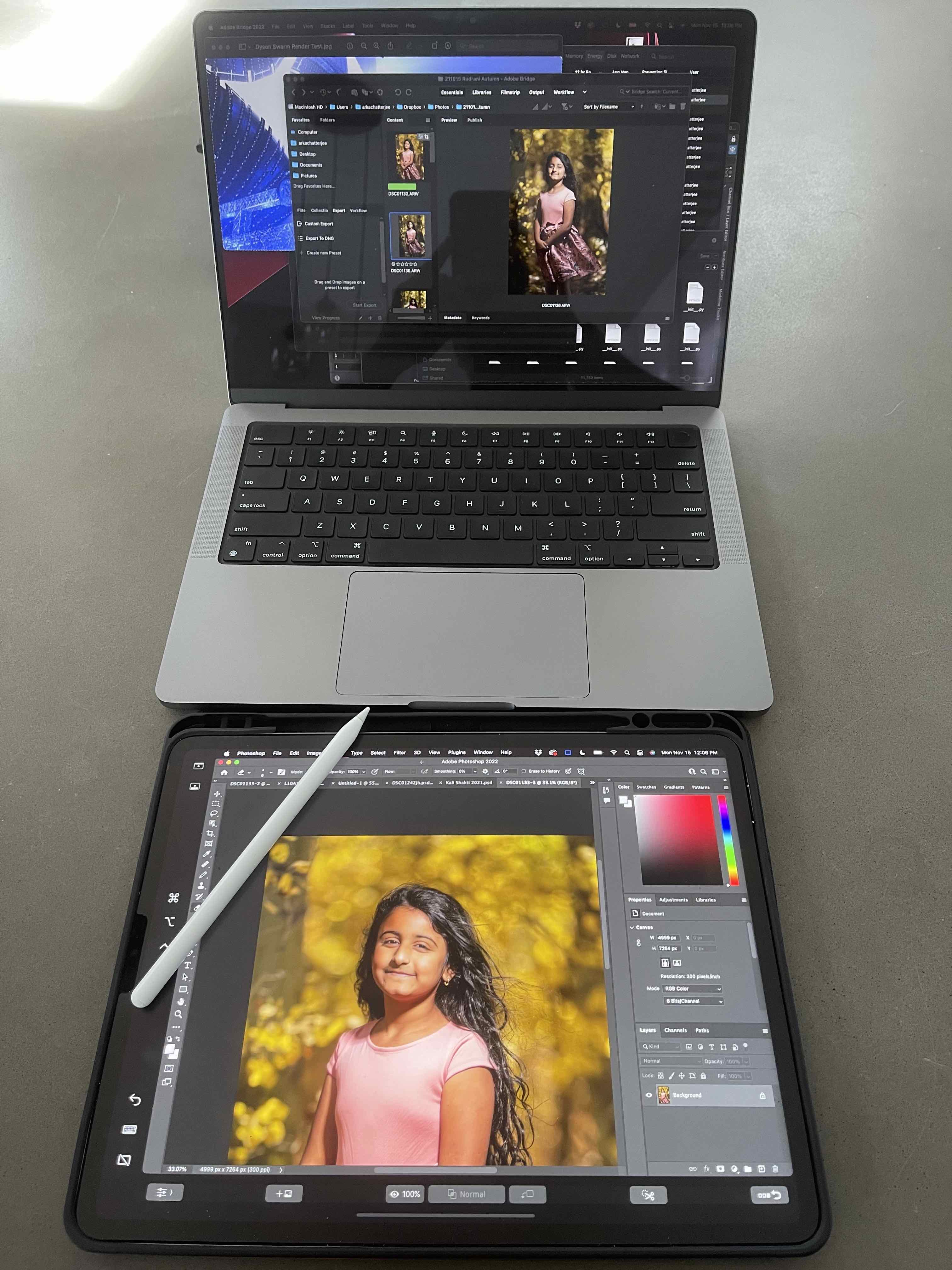
1. People have talked up Apple's legacy reputation with creatives in the past, but even in the present there are unique Mac capabilities that are nice for creatives. The image attached to this post depicts one of them. It's an image processing setup I often use with my Mac, iPad and Apple Pencil. Via Apple's Sidecar feature, I am able to use an iPad as a wireless second display and portable tablet solution. There's simply no Windows tablet equivalent that is as good (and I've tried most of them - Surface, Lenovo, Wacom...)
2. I haven't been following the processor wars of late, but when Apple's M1 chips came out (followed recently by M1 Pro and Max chips), there were few if any Windows computers that could perform at the level Macs could at equivalent power efficiency. My MacBook Pro M1 Max has excellent battery life and seemingly limitless compute power whether it's plugged in or not, and always seems to run cool. That allows you to do pretty sophisticated creative work (Photoshop, zBrush, Blender) without being plugged in or hearing the fans blasting furnace-level heat from the rear vents - a nice perk and a marked improvement over my older Intel Macs.


Jul 21, 2022 at 02:29 AM
RustyBug
Offline
• • • • • • •
Upload & Sell: On
p.4 #20 · Creatives on a Mac ...


amv8 wrote:
I struggled with this as well coming from a 2019 MBP. My biggest challenge was with click and drag of files in the Finder, etc.. using the haptic trackpad. Interestingly, it seems to work much better recently. Maybe a change in a recent OS update?

I also found enabling three finger drag (which I used on the 2019 MPB) to be very helpful. Enabling three finger drag is not obvious, see:

https://support.apple.com/en-ca/HT204609


Thanks. Good to know I'm not imagining things.

I was just informed that the Mac Air is getting messages about an update. Maybe that'll help. We'll see.


Jul 21, 2022 at 06:21 PM
1       2       3              5       end


FM Forums | Post-processing & Printing | Join Upload & Sell

1       2       3              5       end


Welcome back
Log in to your account