This topic is in the 2022 archive. You can read it and like its posts here. It is read only.
Archive 2022Leica M 6 Bit Code Template
p.7 #1Leica M 6 Bit Code Template
Sorry, I saw the markers you're talking about on Amazon, but the fine tip isn't really that thin. It is larger than the holes in the template.....how did you do it?
Vetteman wrote:
I have used the templates shown above along with a Sharpie oil based PAINT pen. I used the FINE point black and white (I found that using both colors was needed). Very easy to apply, dries in a few minutes, and all of my VM lenses show up as coded on the M10R.
The paint pens come in a pack of black, white and a couple other colors for $12 on Amazon.
https://www.amazon.com/Sharpie-37371PP-Oil-Based-Markers-Assorted/dp/B000GOYAPQ/ref=sr_1_8?crid=3MH0HMCLHIQUY&keywords=sharpie+paint+pens+oil+based&qid=1647891714&sprefix=sharpie+paint+pen%2Caps%2C96&sr=8-8
If you are able to obtain more substantial templates let me know I'll be happy to pay for them.
May 26, 2024 at 08:29 AM
p.7 #2Leica M 6 Bit Code Template
Excuse me, is the paint on this marker matte or glossy?
Fred Miranda wrote:
I'll see how long it lasts before rubbing off!Thank you for the recommendation. I bought it and found it to be the most convenient way to incorporate 6-bit code into my lens. No more dealing with paint, and the Leica M's 6-bit scanner is able to read it without any issues.
Fred Miranda wrote:
panos.v wrote
FYI I used the image attached in the first page of this thread, printed it, cut it and then used one of these https://uniball.co.uk/brands/super-ink/uni-super-ink-permanent-marker-pna-125/ to just paint the code on my VM 35/1.4 II and 75/1.5 Works perfectly on my M246.I'll see how long it lasts before rubbing off!
May 26, 2024 at 08:49 AM
p.7 #3Leica M 6 Bit Code Template
antonio-p wrote:
Excuse me, is the paint on this marker matte or glossy?
I'll see how long it lasts before rubbing off!Thank you for the recommendation. I bought it and found it to be the most convenient way to incorporate 6-bit code into my lens. No more dealing with paint, and the Leica M's 6-bit scanner is able to read it without any issues.
It's matte. I has to be matte for it to work.
Excuse me, is the paint on this marker matte or glossy?
Fred Miranda wrote
panos.v wrote
FYI I used the image attached in the first page of this thread, printed it, cut it and then used one of these https://uniball.co.uk/brands/super-ink/uni-super-ink-permanent-marker-pna-125/ to just paint the code on my VM 35/1.4 II and 75/1.5 Works perfectly on my M246.I'll see how long it lasts before rubbing off!
It's matte. I has to be matte for it to work.
May 26, 2024 at 09:09 AM
p.7 #4Leica M 6 Bit Code Template
Thanks ,
and what did you use for the white parts?
and what did you use for the white parts?
May 26, 2024 at 09:21 AM
p.7 #5Leica M 6 Bit Code Template
antonio-p wrote:
Sorry, I saw the markers you're talking about on Amazon, but the fine tip isn't really that thin. It is larger than the holes in the template.....how did you do it?
The paint pens come in a pack of black, white and a couple other colors for $12 on Amazon.
https://www.amazon.com/Sharpie-37371PP-Oil-Based-Markers-Assorted/dp/B000GOYAPQ/ref=sr_1_8?crid=3MH0HMCLHIQUY&keywords=sharpie+paint+pens+oil+based&qid=1647891714&sprefix=sharpie+paint+pen%2Caps%2C96&sr=8-8
If you are able to obtain more substantial templates let me know I'll be happy to pay for them.
---------------------------------------------
antonio-p wrote:
Thanks ,
and what did you use for the white parts?
You use a fine tip Sharpie with the template to outline the area that you want to be black. Then remove the template. Next use the UniBall pen to fill in between the lines you made with the Sharpie. I've found no need for the white. The black seems to be all that is needed.
Sorry, I saw the markers you're talking about on Amazon, but the fine tip isn't really that thin. It is larger than the holes in the template.....how did you do it?
Vetteman wrote
I have used the templates shown above along with a Sharpie oil based PAINT pen. I used the FINE point black and white (I found that using both colors was needed). Very easy to apply, dries in a few minutes, and all of my VM lenses show up as coded on the M10R.The paint pens come in a pack of black, white and a couple other colors for $12 on Amazon.
https://www.amazon.com/Sharpie-37371PP-Oil-Based-Markers-Assorted/dp/B000GOYAPQ/ref=sr_1_8?crid=3MH0HMCLHIQUY&keywords=sharpie+paint+pens+oil+based&qid=1647891714&sprefix=sharpie+paint+pen%2Caps%2C96&sr=8-8
If you are able to obtain more substantial templates let me know I'll be happy to pay for them.
---------------------------------------------
antonio-p wrote:
Thanks ,
and what did you use for the white parts?
You use a fine tip Sharpie with the template to outline the area that you want to be black. Then remove the template. Next use the UniBall pen to fill in between the lines you made with the Sharpie. I've found no need for the white. The black seems to be all that is needed.
May 26, 2024 at 09:28 AM
p.7 #6Leica M 6 Bit Code Template
antonio-p wrote:
Thanks ,
and what did you use for the white parts?
---------------------------------------------
Vetteman wrote:
The paint pens come in a pack of black, white and a couple other colors for $12 on Amazon.
https://www.amazon.com/Sharpie-37371PP-Oil-Based-Markers-Assorted/dp/B000GOYAPQ/ref=sr_1_8?crid=3MH0HMCLHIQUY&keywords=sharpie+paint+pens+oil+based&qid=1647891714&sprefix=sharpie+paint+pen%2Caps%2C96&sr=8-8
If you are able to obtain more substantial templates let me know I'll be happy to pay for them.---------------------------------------------
and what did you use for the white parts?You use a fine tip Sharpie with the template to outline the area that you want to be black. Then remove the template. Next use the UniBall pen to fill in between the lines you made with the Sharpie. I've found no need for the white. The black seems to be all that is needed.
Yes, don't worry about the white coding unless you are shooting with an M240 series. I found that some of my 6-bit coded lenses, which worked fine on my M10 series cameras, for some reason needed the white "bit" to work on the M240. In that case "Uni" sells a white paint pen.
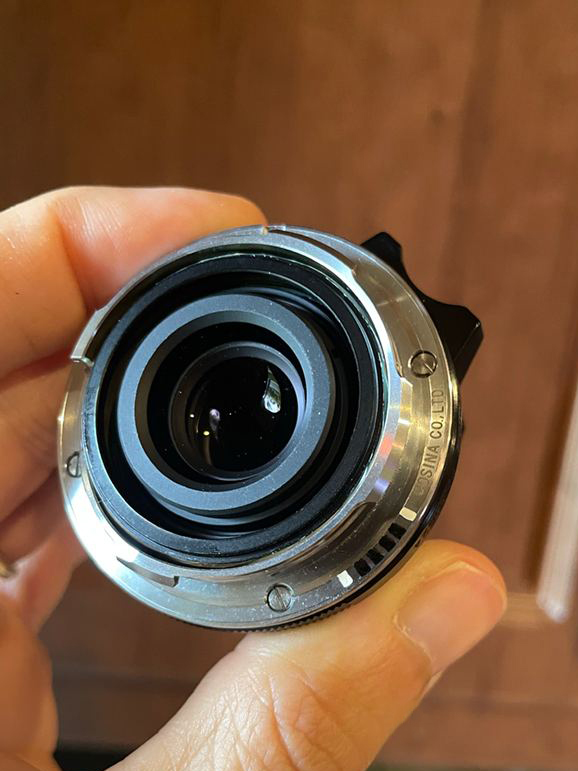
Voigtlander 35/2 Ultron coded to Leica 35/2 Summicron
Thanks ,
and what did you use for the white parts?
---------------------------------------------
Vetteman wrote:
antonio-p wrote
Sorry, I saw the markers you're talking about on Amazon, but the fine tip isn't really that thin. It is larger than the holes in the template.....how did you do it?Vetteman wrote
I have used the templates shown above along with a Sharpie oil based PAINT pen. I used the FINE point black and white (I found that using both colors was needed). Very easy to apply, dries in a few minutes, and all of my VM lenses show up as coded on the M10R.The paint pens come in a pack of black, white and a couple other colors for $12 on Amazon.
https://www.amazon.com/Sharpie-37371PP-Oil-Based-Markers-Assorted/dp/B000GOYAPQ/ref=sr_1_8?crid=3MH0HMCLHIQUY&keywords=sharpie+paint+pens+oil+based&qid=1647891714&sprefix=sharpie+paint+pen%2Caps%2C96&sr=8-8
If you are able to obtain more substantial templates let me know I'll be happy to pay for them.
antonio-p wrote
Thanks ,and what did you use for the white parts?
Yes, don't worry about the white coding unless you are shooting with an M240 series. I found that some of my 6-bit coded lenses, which worked fine on my M10 series cameras, for some reason needed the white "bit" to work on the M240. In that case "Uni" sells a white paint pen.
 |
||
 |
||
|
Voigtlander 35/2 Ultron coded to Leica 35/2 Summicron
May 26, 2024 at 10:28 AM
p.7 #7Leica M 6 Bit Code Template
Could you kindly show me the white fine tip and opaque oil-based marker from Uniball? I've looked everywhere but can't find it
Fred Miranda wrote:
and what did you use for the white parts?---------------------------------------------
The paint pens come in a pack of black, white and a couple other colors for $12 on Amazon.
https://www.amazon.com/Sharpie-37371PP-Oil-Based-Markers-Assorted/dp/B000GOYAPQ/ref=sr_1_8?crid=3MH0HMCLHIQUY&keywords=sharpie+paint+pens+oil+based&qid=1647891714&sprefix=sharpie+paint+pen%2Caps%2C96&sr=8-8
If you are able to obtain more substantial templates let me know I'll be happy to pay for them.---------------------------------------------
and what did you use for the white parts?You use a fine tip Sharpie with the template to outline the area that you want to be black. Then remove the template. Next use the UniBall pen to fill in between the lines you made with the Sharpie. I've found no need for the white. The black seems to be all that is needed.Yes, don't worry about the white coding unless you are shooting with an M240 series. I found that some of my 6-bit coded lenses, which worked fine on my M10 series cameras, for some reason needed the white "bit" to work on the M240. In that case "Uni" sells a white paint pen.
Fred Miranda wrote:
antonio-p wrote
Thanks ,and what did you use for the white parts?
Vetteman wrote
antonio-p wrote
Sorry, I saw the markers you're talking about on Amazon, but the fine tip isn't really that thin. It is larger than the holes in the template.....how did you do it?Vetteman wrote
I have used the templates shown above along with a Sharpie oil based PAINT pen. I used the FINE point black and white (I found that using both colors was needed). Very easy to apply, dries in a few minutes, and all of my VM lenses show up as coded on the M10R.The paint pens come in a pack of black, white and a couple other colors for $12 on Amazon.
https://www.amazon.com/Sharpie-37371PP-Oil-Based-Markers-Assorted/dp/B000GOYAPQ/ref=sr_1_8?crid=3MH0HMCLHIQUY&keywords=sharpie+paint+pens+oil+based&qid=1647891714&sprefix=sharpie+paint+pen%2Caps%2C96&sr=8-8
If you are able to obtain more substantial templates let me know I'll be happy to pay for them.
antonio-p wrote
Thanks ,and what did you use for the white parts?
May 27, 2024 at 03:50 AM
p.7 #8Leica M 6 Bit Code Template
antonio-p wrote:
Could you kindly show me the white fine tip and opaque oil-based marker from Uniball? I've looked everywhere but can't find it.
Hi Antonio,
I used this one:
https://www.amazon.com/dp/B00MX27VEG
Could you kindly show me the white fine tip and opaque oil-based marker from Uniball? I've looked everywhere but can't find it.
Hi Antonio,
I used this one:
https://www.amazon.com/dp/B00MX27VEG
May 27, 2024 at 10:00 AM
p.7 #9Leica M 6 Bit Code Template
Thank you, but the UNI white PC 1MR marker is not permanent and especially on smooth surfaces it can be washed off. You need a permanent opaque oil-based marker.
I would have found this....
Uni Paint PX 203 with Fine Tip, White
Fred Miranda wrote:
Hi Antonio,
I used this one:
https://www.amazon.com/dp/B00MX27VEG
I would have found this....
Uni Paint PX 203 with Fine Tip, White
Fred Miranda wrote:
antonio-p wrote
Could you kindly show me the white fine tip and opaque oil-based marker from Uniball? I've looked everywhere but can't find it.I used this one:
https://www.amazon.com/dp/B00MX27VEG
May 27, 2024 at 10:32 AM
p.7 #10Leica M 6 Bit Code Template
antonio-p wrote:
Thank you, but the UNI white PC 1MR marker is not permanent and especially on smooth surfaces it can be washed off. You need a permanent opaque oil-based marker.
I would have found this....
Uni Paint PX 203 with Fine Tip, White
Hi Antonio,
I used this one:
https://www.amazon.com/dp/B00MX27VEG
Sure, that might be a better option, but keep in mind that all those paints can be washed off, even a 'permanent' Sharpie marker. Also, remember that once the paint is inside the engraved lines of the mount, nothing touches it, especially in the case of Cosina lenses. Just to clarify, the white paint "bit" is not necessary for the camera's 6-bit code reader to accept the code, particularly with newer Leica bodies.
Thank you, but the UNI white PC 1MR marker is not permanent and especially on smooth surfaces it can be washed off. You need a permanent opaque oil-based marker.
I would have found this....
Uni Paint PX 203 with Fine Tip, White
Fred Miranda wrote
antonio-p wrote
Could you kindly show me the white fine tip and opaque oil-based marker from Uniball? I've looked everywhere but can't find it.I used this one:
https://www.amazon.com/dp/B00MX27VEG
Sure, that might be a better option, but keep in mind that all those paints can be washed off, even a 'permanent' Sharpie marker. Also, remember that once the paint is inside the engraved lines of the mount, nothing touches it, especially in the case of Cosina lenses. Just to clarify, the white paint "bit" is not necessary for the camera's 6-bit code reader to accept the code, particularly with newer Leica bodies.
May 27, 2024 at 11:05 AM
p.7 #11Leica M 6 Bit Code Template
So if I paint the coding on the original ring of a Zeiss Biogon 21 f4.5 ZM, which has no recesses or engravings, will the coding be rubbed and destroyed?
Fred Miranda wrote:
I would have found this....
Uni Paint PX 203 with Fine Tip, White
Hi Antonio,
I used this one:
https://www.amazon.com/dp/B00MX27VEGSure, that might be a better option, but keep in mind that all those paints can be washed off, even a 'permanent' Sharpie marker. Also, remember that once the paint is inside the engraved lines of the mount, nothing touches it, especially in the case of Cosina lenses. Just to clarify, the white paint "bit" is not necessary for the camera's 6-bit code reader to accept the code, particularly with newer Leica bodies.
Fred Miranda wrote:
antonio-p wrote
Thank you, but the UNI white PC 1MR marker is not permanent and especially on smooth surfaces it can be washed off. You need a permanent opaque oil-based marker.I would have found this....
Uni Paint PX 203 with Fine Tip, White
Fred Miranda wrote
antonio-p wrote
Could you kindly show me the white fine tip and opaque oil-based marker from Uniball? I've looked everywhere but can't find it.I used this one:
https://www.amazon.com/dp/B00MX27VEG
May 27, 2024 at 03:17 PM
p.7 #12Leica M 6 Bit Code Template
antonio-p wrote:
So if I paint the coding on the original ring of a Zeiss Biogon 21 f4.5 ZM, which has no recesses or engravings, will the coding be rubbed and destroyed?
I would have found this....
Uni Paint PX 203 with Fine Tip, White
Hi Antonio,
I used this one:
https://www.amazon.com/dp/B00MX27VEGSure, that might be a better option, but keep in mind that all those paints can be washed off, even a 'permanent' Sharpie marker. Also, remember that once the paint is inside the engraved lines of the mount, nothing touches it, especially in the case of Cosina lenses. Just to clarify, the white paint "bit" is not necessary for the camera's 6-bit code reader to accept the code, particularly with newer Leica bodies.
Yes, it only works with lenses that have the mount with the recessed engraving. Otherwise, when you mount the lens, the paint will come right off. Even worse, the camera's 6-bit encoder might get paint on it, which is problematic. That's the reason this can't be done with uncoded Leica M lenses.
So if I paint the coding on the original ring of a Zeiss Biogon 21 f4.5 ZM, which has no recesses or engravings, will the coding be rubbed and destroyed?
Fred Miranda wrote
antonio-p wrote
Thank you, but the UNI white PC 1MR marker is not permanent and especially on smooth surfaces it can be washed off. You need a permanent opaque oil-based marker.I would have found this....
Uni Paint PX 203 with Fine Tip, White
Fred Miranda wrote
antonio-p wrote
Could you kindly show me the white fine tip and opaque oil-based marker from Uniball? I've looked everywhere but can't find it.I used this one:
https://www.amazon.com/dp/B00MX27VEG
Yes, it only works with lenses that have the mount with the recessed engraving. Otherwise, when you mount the lens, the paint will come right off. Even worse, the camera's 6-bit encoder might get paint on it, which is problematic. That's the reason this can't be done with uncoded Leica M lenses.
May 27, 2024 at 04:38 PM