This topic is in the 2022 archive. You can read it and like its posts here. It is read only.
Archive 2022Learning Leica "M", a 30 day project
p.3 #1Learning Leica "M", a 30 day project
Day 3 image:
The goal of this experiment is to learn to shoot an M camera, and see if it integrates into my photography work flow, and life in general. I have committed to "wearing" the camera daily for the next 30 days. So far, so good, it is small and not a bother to have with me.
Today was a beautiful sunny Sunday afternoon. We are an Italian family (dual citizens) so Sunday traditionally means a mid afternoon paste dinner. Now that Covid-19 seems to be fading somewhat, my Wife and I decided to go to one of our local favorite Italian restaurant for a late lunch/ early dinner. We call it "Linner". The Leica M10-P cam with us of course.
We went a couple of hours early and walked around to build our apatite. The Liberty Station location attracts large crowds to its many shops, galleries, parks, and restaurants. This provided plenty of opportunity for me to practice with the Leica.
Today I took the Voigtlander 50mm f/1.5 Nokton II MC as my only lens. Yes, I remembered to set the proper lens in the camera, and take the lens cap off prior to shooting. No repeat of yesterday's mistakes. I also mad a rule not to depend on large apertures and zone focusing. I used the Range Finder exclusively to focus. I also switched to manual on both aperture and shutter speed, and let the ISO float. I used the exposure compensation dial for fine tuning. Exposure worked well with this system, and I felt much more in control. Most of the images were about working the camera so were pretty poor as far as subject goes.
But, at dinner a couple came in and sat down at the table next to us. They still have the tables separated for Covid-19 safety so the distance was great for the camera/lens combo. I liked the look of the guy. The light was amazing because we were in a sidewalk tent with a black bottom, and a weathered clear upper half. Both the couple and we were at tables right next to the tent material. Because of the now diffused nature of the clear material it was as if there was a nice soft box providing perfect portrait light. I couldn't resist so asked if I could take his portrait. My Wife was mortified, but he kindly agreed.
I set the aperture to f/2 because in my testing f1.5 had a little more "glow" than I wanted. But at f/2 the lens sharpens up a lot. This would also give me enough DOF for his face and his jacket, while softening the rest of the image for separation. It also meant that I had little room for error using the Range Finder for focus. I also depended solely on the Range Finder for composition. I found this difficult. So I shot with a little room to crop in post. I also don't have any aids such as grids, and levels to assist me in this mode. That made it necessary to be aware of the scene for such aids. In this case there were a number of layers that I needed to use. I used the straight and level line of the tent seam for level, and to properly position the eyes to be the focal point. I think having to be aware and deal with such things did improve my composition. I do feel like there may be some sort of weird parallax going on that makes composition even harder. I did nail focus on all of 5 of the shots of him I took. Once again, all hand held. I learned from this.
I rarely shoot for monochrome images. In fact I don't think I have ever shot a portrait with monochrome in mind. But this guy's style and outfit, along with Leica's reputation of monochrome images led me to commit to shooting it for B&W prior to taking the shot. This caused me to pay extra attention to the tonalities when setting my exposure. I am happy to report that I think I got it pretty darn close. Again, this king of leaning is exactly what I had hoped for from this project.
Below is the portrait. Edited very simply in Lightroom only. Looking forward to hearing suggestions and opinions on how I could have made it better.

Notice the EXIF says Leica as this is all the camera lets me choose. But it is a CV lens that I used and is somehow set to the wrong lens again! Jeez!!!
Edited on Feb 21, 2022 at 11:30 AM · View previous versions
The goal of this experiment is to learn to shoot an M camera, and see if it integrates into my photography work flow, and life in general. I have committed to "wearing" the camera daily for the next 30 days. So far, so good, it is small and not a bother to have with me.
Today was a beautiful sunny Sunday afternoon. We are an Italian family (dual citizens) so Sunday traditionally means a mid afternoon paste dinner. Now that Covid-19 seems to be fading somewhat, my Wife and I decided to go to one of our local favorite Italian restaurant for a late lunch/ early dinner. We call it "Linner". The Leica M10-P cam with us of course.
We went a couple of hours early and walked around to build our apatite. The Liberty Station location attracts large crowds to its many shops, galleries, parks, and restaurants. This provided plenty of opportunity for me to practice with the Leica.
Today I took the Voigtlander 50mm f/1.5 Nokton II MC as my only lens. Yes, I remembered to set the proper lens in the camera, and take the lens cap off prior to shooting. No repeat of yesterday's mistakes. I also mad a rule not to depend on large apertures and zone focusing. I used the Range Finder exclusively to focus. I also switched to manual on both aperture and shutter speed, and let the ISO float. I used the exposure compensation dial for fine tuning. Exposure worked well with this system, and I felt much more in control. Most of the images were about working the camera so were pretty poor as far as subject goes.
But, at dinner a couple came in and sat down at the table next to us. They still have the tables separated for Covid-19 safety so the distance was great for the camera/lens combo. I liked the look of the guy. The light was amazing because we were in a sidewalk tent with a black bottom, and a weathered clear upper half. Both the couple and we were at tables right next to the tent material. Because of the now diffused nature of the clear material it was as if there was a nice soft box providing perfect portrait light. I couldn't resist so asked if I could take his portrait. My Wife was mortified, but he kindly agreed.
I set the aperture to f/2 because in my testing f1.5 had a little more "glow" than I wanted. But at f/2 the lens sharpens up a lot. This would also give me enough DOF for his face and his jacket, while softening the rest of the image for separation. It also meant that I had little room for error using the Range Finder for focus. I also depended solely on the Range Finder for composition. I found this difficult. So I shot with a little room to crop in post. I also don't have any aids such as grids, and levels to assist me in this mode. That made it necessary to be aware of the scene for such aids. In this case there were a number of layers that I needed to use. I used the straight and level line of the tent seam for level, and to properly position the eyes to be the focal point. I think having to be aware and deal with such things did improve my composition. I do feel like there may be some sort of weird parallax going on that makes composition even harder. I did nail focus on all of 5 of the shots of him I took. Once again, all hand held. I learned from this.
I rarely shoot for monochrome images. In fact I don't think I have ever shot a portrait with monochrome in mind. But this guy's style and outfit, along with Leica's reputation of monochrome images led me to commit to shooting it for B&W prior to taking the shot. This caused me to pay extra attention to the tonalities when setting my exposure. I am happy to report that I think I got it pretty darn close. Again, this king of leaning is exactly what I had hoped for from this project.
Below is the portrait. Edited very simply in Lightroom only. Looking forward to hearing suggestions and opinions on how I could have made it better.
Notice the EXIF says Leica as this is all the camera lets me choose. But it is a CV lens that I used and is somehow set to the wrong lens again! Jeez!!!
Edited on Feb 21, 2022 at 11:30 AM · View previous versions
Feb 20, 2022 at 08:44 PM
p.3 #2Learning Leica "M", a 30 day project
A couple of things ergonomically that I am noticing:
There are a number of glass coverings on the Range Finder cameras, some that I am not used to having. They are the Range Finder front and rear, the finder overlay opening, the exposure meter, and the rear screen. All of them seem to be smudge magnets. Does anyone have a management scheme for keeping these clean for best performance? OR cautions on things not to do/use when cleaning?
I am finding that I really like having the focus ring knob on my 28mm. My two other lenses lack this feature. What is the best way to add these to a lens?
I will want to add the six bit encoding to my lenses to avoid forgetting to manually enter them every time I switch lenses. I have read about templates, paints, that can be used. I have also read about replacement mount rings for this. I would love to get recommendations, and "don't do experiences.
Thanks everyone!
-Steve-
There are a number of glass coverings on the Range Finder cameras, some that I am not used to having. They are the Range Finder front and rear, the finder overlay opening, the exposure meter, and the rear screen. All of them seem to be smudge magnets. Does anyone have a management scheme for keeping these clean for best performance? OR cautions on things not to do/use when cleaning?
I am finding that I really like having the focus ring knob on my 28mm. My two other lenses lack this feature. What is the best way to add these to a lens?
I will want to add the six bit encoding to my lenses to avoid forgetting to manually enter them every time I switch lenses. I have read about templates, paints, that can be used. I have also read about replacement mount rings for this. I would love to get recommendations, and "don't do experiences.
Thanks everyone!
-Steve-
Feb 21, 2022 at 11:29 AM
p.3 #3Learning Leica "M", a 30 day project
This weekend I also noticed that the firmware in my M10-P was not the latest release. The new version added some interesting new features. I did the upgrade and found that like most thing with this camera it was a simple, straightforward, and easy to do process. Just download the file to the SD card, put in the camera, go to the proper menu selection. The camera detects if the card has a proper file and make the update item available. Just accept and it is done. Some of my other cameras have been nail biters to update. Well done Leica.
Feb 21, 2022 at 11:38 AM

p.3 #4Learning Leica "M", a 30 day project
1bwana1 wrote:
A couple of things ergonomically that I am noticing:
There are a number of glass coverings on the Range Finder cameras, some that I am not used to having. They are the Range Finder front and rear, the finder overlay opening, the exposure meter, and the rear screen. All of them seem to be smudge magnets. Does anyone have a management scheme for keeping these clean for best performance? OR cautions on things not to do/use when cleaning?
I am finding that I really like having the focus ring knob on my 28mm. My two other lenses lack this feature. What is...Show more →
IIRC Fred did this and maybe he cn give you some advice.
As for cleaning the glass on the rangefinder, I just use a lens cleaning cloth.
A couple of things ergonomically that I am noticing:
There are a number of glass coverings on the Range Finder cameras, some that I am not used to having. They are the Range Finder front and rear, the finder overlay opening, the exposure meter, and the rear screen. All of them seem to be smudge magnets. Does anyone have a management scheme for keeping these clean for best performance? OR cautions on things not to do/use when cleaning?
I am finding that I really like having the focus ring knob on my 28mm. My two other lenses lack this feature. What is...Show more →
IIRC Fred did this and maybe he cn give you some advice.
As for cleaning the glass on the rangefinder, I just use a lens cleaning cloth.
Feb 21, 2022 at 11:45 AM
p.3 #5Learning Leica "M", a 30 day project
1bwana1 wrote:
A couple of things ergonomically that I am noticing:
There are a number of glass coverings on the Range Finder cameras, some that I am not used to having. They are the Range Finder front and rear, the finder overlay opening, the exposure meter, and the rear screen. All of them seem to be smudge magnets. Does anyone have a management scheme for keeping these clean for best performance? OR cautions on things not to do/use when cleaning?
I am finding that I really like having the focus ring knob on my 28mm. My two other lenses lack this feature. What is...Show more →
there are add-ons tabs, but not exactly easy to find
Not sure if you are already familiar with https://www.l-camera-forum.com/ - a good place to visit, search and read some threads a bit and then ask for help/advice - a lot of very well informed and helpful people there too
A couple of things ergonomically that I am noticing:
There are a number of glass coverings on the Range Finder cameras, some that I am not used to having. They are the Range Finder front and rear, the finder overlay opening, the exposure meter, and the rear screen. All of them seem to be smudge magnets. Does anyone have a management scheme for keeping these clean for best performance? OR cautions on things not to do/use when cleaning?
I am finding that I really like having the focus ring knob on my 28mm. My two other lenses lack this feature. What is...Show more →
there are add-ons tabs, but not exactly easy to find
Not sure if you are already familiar with https://www.l-camera-forum.com/ - a good place to visit, search and read some threads a bit and then ask for help/advice - a lot of very well informed and helpful people there too
Feb 21, 2022 at 12:07 PM
p.3 #6Learning Leica "M", a 30 day project
1bwana1 wrote:
A couple of things ergonomically that I am noticing:
There are a number of glass coverings on the Range Finder cameras, some that I am not used to having. They are the Range Finder front and rear, the finder overlay opening, the exposure meter, and the rear screen. All of them seem to be smudge magnets. Does anyone have a management scheme for keeping these clean for best performance? OR cautions on things not to do/use when cleaning?
I am finding that I really like having the focus ring knob on my 28mm. My two other lenses lack this feature. What is...Show more →
yes, like someone else already replied - a simple clean microfiber will do for the camera glass items
https://johnnymartyr.wordpress.com/2018/10/02/add-a-focus-knob-to-any-lens/ - a cute hack
https://www.ebay.com/itm/7artisans-focus-handle-Micro-camera-manual-lens-focus-wrench-focus-ring/174007315736?hash=item2883a4ed18:g:NAEAAOSw4PNbxaSM - not your lenses, but might work, or at least give you an idea of possibilities
https://www.ebay.com/itm/113381465696?chn=ps&_trkparms=ispr%3D1&amdata=enc%3A14g1vxPqVSRW_A7KrmMVCUA43&norover=1&mkevt=1&mkrid=711-117182-37290-0&mkcid=2&itemid=113381465696&targetid=1599090336897&device=c&mktype=&googleloc=9032904&poi=&campaignid=15275224983&mkgroupid=131097072938&rlsatarget=pla-1599090336897&abcId=9300697&merchantid=127669845&gclid=Cj0KCQiAjc2QBhDgARIsAMc3SqSeU_I7pp0wGWPNNDMSMx_puuK3aEuasGMbtZi6aSZIfSxuqPQZywwaAjgLEALw_wcBx - another source (ps: use the key-words)
https://www.lenstab.com/shop/ - more expensive than zip-ties
and great info on voigts:
https://www.cameraquest.com/voigtlen.htm
A couple of things ergonomically that I am noticing:
There are a number of glass coverings on the Range Finder cameras, some that I am not used to having. They are the Range Finder front and rear, the finder overlay opening, the exposure meter, and the rear screen. All of them seem to be smudge magnets. Does anyone have a management scheme for keeping these clean for best performance? OR cautions on things not to do/use when cleaning?
I am finding that I really like having the focus ring knob on my 28mm. My two other lenses lack this feature. What is...Show more →
yes, like someone else already replied - a simple clean microfiber will do for the camera glass items
https://johnnymartyr.wordpress.com/2018/10/02/add-a-focus-knob-to-any-lens/ - a cute hack
https://www.ebay.com/itm/7artisans-focus-handle-Micro-camera-manual-lens-focus-wrench-focus-ring/174007315736?hash=item2883a4ed18:g:NAEAAOSw4PNbxaSM - not your lenses, but might work, or at least give you an idea of possibilities
https://www.ebay.com/itm/113381465696?chn=ps&_trkparms=ispr%3D1&amdata=enc%3A14g1vxPqVSRW_A7KrmMVCUA43&norover=1&mkevt=1&mkrid=711-117182-37290-0&mkcid=2&itemid=113381465696&targetid=1599090336897&device=c&mktype=&googleloc=9032904&poi=&campaignid=15275224983&mkgroupid=131097072938&rlsatarget=pla-1599090336897&abcId=9300697&merchantid=127669845&gclid=Cj0KCQiAjc2QBhDgARIsAMc3SqSeU_I7pp0wGWPNNDMSMx_puuK3aEuasGMbtZi6aSZIfSxuqPQZywwaAjgLEALw_wcBx - another source (ps: use the key-words)
https://www.lenstab.com/shop/ - more expensive than zip-ties
and great info on voigts:
https://www.cameraquest.com/voigtlen.htm
Feb 21, 2022 at 12:43 PM
p.3 #7Learning Leica "M", a 30 day project
1bwana1 wrote:
A couple of things ergonomically that I am noticing:
There are a number of glass coverings on the Range Finder cameras, some that I am not used to having. They are the Range Finder front and rear, the finder overlay opening, the exposure meter, and the rear screen. All of them seem to be smudge magnets. Does anyone have a management scheme for keeping these clean for best performance? OR cautions on things not to do/use when cleaning?
I am finding that I really like having the focus ring knob on my 28mm. My two other lenses lack this feature. What is...Show more →
Funnily enough the film cameras are much more smudge-resistant as all the windows are recessed. But...don't sweat it too much, I just use my t-shirt or whatever I'm wearing.
A couple of things ergonomically that I am noticing:
There are a number of glass coverings on the Range Finder cameras, some that I am not used to having. They are the Range Finder front and rear, the finder overlay opening, the exposure meter, and the rear screen. All of them seem to be smudge magnets. Does anyone have a management scheme for keeping these clean for best performance? OR cautions on things not to do/use when cleaning?
I am finding that I really like having the focus ring knob on my 28mm. My two other lenses lack this feature. What is...Show more →
Funnily enough the film cameras are much more smudge-resistant as all the windows are recessed. But...don't sweat it too much, I just use my t-shirt or whatever I'm wearing.
Feb 21, 2022 at 01:38 PM
p.3 #8Learning Leica "M", a 30 day project
1bwana1 wrote:
A couple of things ergonomically that I am noticing:
There are a number of glass coverings on the Range Finder cameras, some that I am not used to having. They are the Range Finder front and rear, the finder overlay opening, the exposure meter, and the rear screen. All of them seem to be smudge magnets. Does anyone have a management scheme for keeping these clean for best performance? OR cautions on things not to do/use when cleaning?
I am finding that I really like having the focus ring knob on my 28mm. My two other lenses lack this feature. What is...Show more →
I prefer a small lens cloth that is heavy on the microfiber texture for the viewfinder windows. The white Leica cleaning cloth that is given away for free by some dealers works well, and the white color lets you see when areas become dirty and you can avoid them, plus you know when it's time to wash it. But rather than thinking of the cloth as part of your camera kit, you need to think of it as part of your personal items kit: keys, wallet, phone, and cloth. Keep the cloth in a shirt or pants pocket where you can quickly access it.
After a few weeks, you'll learn to avoid touching the windows. It's a bit like keeping your finger away from the trigger of a gun when handling one. And cleaning off the smudges the second you make them is a good way to train yourself to be aware of how you're holding the camera.
A couple of things ergonomically that I am noticing:
There are a number of glass coverings on the Range Finder cameras, some that I am not used to having. They are the Range Finder front and rear, the finder overlay opening, the exposure meter, and the rear screen. All of them seem to be smudge magnets. Does anyone have a management scheme for keeping these clean for best performance? OR cautions on things not to do/use when cleaning?
I am finding that I really like having the focus ring knob on my 28mm. My two other lenses lack this feature. What is...Show more →
I prefer a small lens cloth that is heavy on the microfiber texture for the viewfinder windows. The white Leica cleaning cloth that is given away for free by some dealers works well, and the white color lets you see when areas become dirty and you can avoid them, plus you know when it's time to wash it. But rather than thinking of the cloth as part of your camera kit, you need to think of it as part of your personal items kit: keys, wallet, phone, and cloth. Keep the cloth in a shirt or pants pocket where you can quickly access it.
After a few weeks, you'll learn to avoid touching the windows. It's a bit like keeping your finger away from the trigger of a gun when handling one. And cleaning off the smudges the second you make them is a good way to train yourself to be aware of how you're holding the camera.
Feb 21, 2022 at 04:16 PM
p.3 #9Learning Leica "M", a 30 day project
Go here to learn about coding and to download a template to assist.
https://lavidaleica.com/content/leica-lens-codes
Modern CV lenses have a groove in the lens mount ready to accept a code.
Use model paint. Both white and black. Otherwise the camera may not read the codes reliably.
To choose which code you can either use something close (a 28mm Summicron ASPH for the CV Ultron, for example) OR for the best results find a white wall and shoot the lens you want to code manually with each lens close to your focal length and choose the one you like the best. The link has a list of the dots you'll need to paint.
Gordon
https://lavidaleica.com/content/leica-lens-codes
Modern CV lenses have a groove in the lens mount ready to accept a code.
Use model paint. Both white and black. Otherwise the camera may not read the codes reliably.
To choose which code you can either use something close (a 28mm Summicron ASPH for the CV Ultron, for example) OR for the best results find a white wall and shoot the lens you want to code manually with each lens close to your focal length and choose the one you like the best. The link has a list of the dots you'll need to paint.
Gordon
Feb 21, 2022 at 04:34 PM
p.3 #10Learning Leica "M", a 30 day project
That's a nice portrait, though it is hard to tell (often is w/ the compression on here) whether or not the focus is truly nailed. At a glance it looks slightly out of focus, but I'll take your word for it that the eyes are sharp in full res.
At any rate, exactly the sort of photo the M system inspires one to take IME.
At any rate, exactly the sort of photo the M system inspires one to take IME.
Feb 21, 2022 at 08:23 PM
p.3 #11Learning Leica "M", a 30 day project
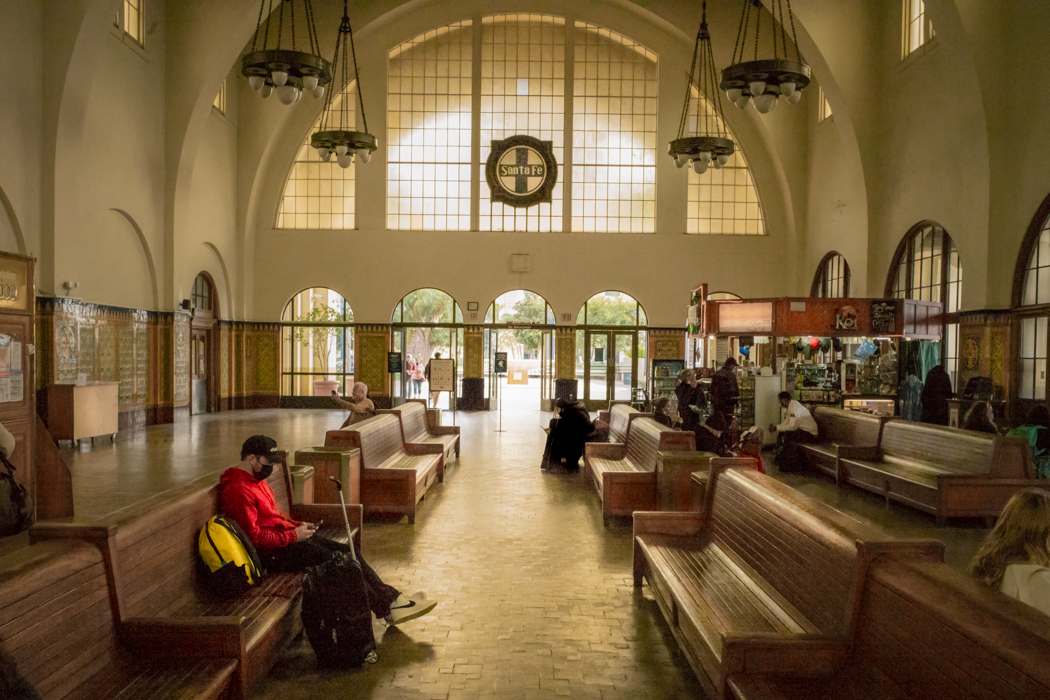
Day 4 Image:
It was a cold and cloudy day here today. Rain expected starting tonight. Because of the dark low clouds light levels were low and flat.
I was driving by the Santa FE Rail Terminal today and there was an open parking place right out front. So, I thought I would go inside and try to make an image. I chose the CV 28mm f/2 Nokton. They are keeping the lights of so it was really dark inside. The outside lights created a big contrast challenge through the window. The activity inside the station wasn't that interesting.
Since this wasn't going to be a great image anyway, even though I didn't need to I decided to stop down, shoot at a fast shutter speed and use ISO 12,500 to see how the files hold up. I have ISO 12,500 set as my highest available number in my setup. Better to know when the image isn't important how high I can go with ISO. This image was shot at F/11, 1/500 sec SS, ISO 12,500, hand held.
I think I got the exposure right, and preserved both the highlights and the shadows. I did have to underexpose the interior a bit to keep the detail outside. If this were serious work I would have used a tripod, and bracketed to get a higher IQ file. The image has a bit of noise in it, and has lost some detail as I tried to deal with that noise. Colors held up pretty well. I much prefer lower ISO with less noise, but will feel Ok using 12,500 if required.
It was a worthwhile experiment that has helped me learn the sensor and camera a bit better.
I am giving up on setting the lens to get EXIF for now. Everything is wrong, so why bother. At some point Leica should step up and include some communication capability between camera and lenses. Surely, doing so won't violate any design ethos, or shooting experience, and the data can be very useful.
Enjoy the image!
It was a cold and cloudy day here today. Rain expected starting tonight. Because of the dark low clouds light levels were low and flat.
I was driving by the Santa FE Rail Terminal today and there was an open parking place right out front. So, I thought I would go inside and try to make an image. I chose the CV 28mm f/2 Nokton. They are keeping the lights of so it was really dark inside. The outside lights created a big contrast challenge through the window. The activity inside the station wasn't that interesting.
Since this wasn't going to be a great image anyway, even though I didn't need to I decided to stop down, shoot at a fast shutter speed and use ISO 12,500 to see how the files hold up. I have ISO 12,500 set as my highest available number in my setup. Better to know when the image isn't important how high I can go with ISO. This image was shot at F/11, 1/500 sec SS, ISO 12,500, hand held.
I think I got the exposure right, and preserved both the highlights and the shadows. I did have to underexpose the interior a bit to keep the detail outside. If this were serious work I would have used a tripod, and bracketed to get a higher IQ file. The image has a bit of noise in it, and has lost some detail as I tried to deal with that noise. Colors held up pretty well. I much prefer lower ISO with less noise, but will feel Ok using 12,500 if required.
It was a worthwhile experiment that has helped me learn the sensor and camera a bit better.
I am giving up on setting the lens to get EXIF for now. Everything is wrong, so why bother. At some point Leica should step up and include some communication capability between camera and lenses. Surely, doing so won't violate any design ethos, or shooting experience, and the data can be very useful.
Enjoy the image!
Feb 21, 2022 at 10:08 PM
p.3 #12Learning Leica "M", a 30 day project
With the M 10 you can go that high even if the image is important. 20,000 is very usable.
Feb 21, 2022 at 10:15 PM
p.3 #13Learning Leica "M", a 30 day project
1bwana1 wrote:
I also depended solely on the Range Finder for composition. I found this difficult. So I shot with a little room to crop in post. I also don't have any aids such as grids, and levels to assist me in this mode. That made it necessary to be aware of the scene for such aids. In this case there were a number of layers that I needed to use. I used the straight and level line of the tent seam for level, and to properly position the eyes to be the focal point.
I have a tendency to tilt horizons and have to pay close attention if want to compose an image with things lined up correctly. Some don't like the second set of frame lines in the modern Ms, but I find them helpful for keeping the camera leveled. For example if shooting 50mm, I'll use the 75mm frame as a visual leveling aid. Either the top or bottom horizontal dashes, or the vertical lines coming up off the bottom corners. You can align along the length of the lines, or use the ends on each side on which to 'rest' the horizon (or whatever line you want to level). I use 50mm a lot, so the closeness of 75 makes the frame lines quite practical for this purpose, as the top of the bottom 75mm corner lines are just right for putting the horizon 1/3 of the frame from the edge. Shooting 28 you get the 90mm lines and 35 gets 135mm lines. Both are a bit more central but still work well IMO. For lines that are central, I'll use the long side of the RF patch for alignment. I'm often still off one or two degrees, but just fix it in post if it bothers me. I'm not at all opposed to cropping an image to improve it.
1bwana1 wrote:
Gestalt may be the perfect word to describe what I am experiencing with this camera. The specs don't read as that impressive. However, somehow the whole is so much better than the parts.
This is also my feeling about Leica M - how it all comes together. The intangible benefits/advantages of the system are difficult to explain convincingly to those who have yet to try it. Forget about convincing anyone arguing against it solely based on its supposedly underwhelming spec sheet stats.
I also depended solely on the Range Finder for composition. I found this difficult. So I shot with a little room to crop in post. I also don't have any aids such as grids, and levels to assist me in this mode. That made it necessary to be aware of the scene for such aids. In this case there were a number of layers that I needed to use. I used the straight and level line of the tent seam for level, and to properly position the eyes to be the focal point.
I have a tendency to tilt horizons and have to pay close attention if want to compose an image with things lined up correctly. Some don't like the second set of frame lines in the modern Ms, but I find them helpful for keeping the camera leveled. For example if shooting 50mm, I'll use the 75mm frame as a visual leveling aid. Either the top or bottom horizontal dashes, or the vertical lines coming up off the bottom corners. You can align along the length of the lines, or use the ends on each side on which to 'rest' the horizon (or whatever line you want to level). I use 50mm a lot, so the closeness of 75 makes the frame lines quite practical for this purpose, as the top of the bottom 75mm corner lines are just right for putting the horizon 1/3 of the frame from the edge. Shooting 28 you get the 90mm lines and 35 gets 135mm lines. Both are a bit more central but still work well IMO. For lines that are central, I'll use the long side of the RF patch for alignment. I'm often still off one or two degrees, but just fix it in post if it bothers me. I'm not at all opposed to cropping an image to improve it.
1bwana1 wrote:
Gestalt may be the perfect word to describe what I am experiencing with this camera. The specs don't read as that impressive. However, somehow the whole is so much better than the parts.
This is also my feeling about Leica M - how it all comes together. The intangible benefits/advantages of the system are difficult to explain convincingly to those who have yet to try it. Forget about convincing anyone arguing against it solely based on its supposedly underwhelming spec sheet stats.
Feb 21, 2022 at 10:33 PM
p.3 #14Learning Leica "M", a 30 day project
1bwana1 wrote:
I am giving up on setting the lens to get EXIF for now. Everything is wrong, so why bother. At some point Leica should step up and include some communication capability between camera and lenses. Surely, doing so won't violate any design ethos, or shooting experience, and the data can be very useful.
I'm not sure I understand the problem? If you set 50mm manually, EXIF still reports 28mm? At least with the M240, when you pick a lens code manually, you have to press the 'Set' button to confirm the selection. If you don't, it won't remember the change. Sometimes, to be sure, I'll enter the menus again to confirm it set the lens code I wanted. I also shoot Canon and use the 'Set' button in the center of the rear quick control dial for confirming menu changes, so sometimes I accidentally press the 'Info' button at the center of the M240's 4-way rocker instead of the 'Set' button. Naturally, in such cases the camera does not remember the change.
I am giving up on setting the lens to get EXIF for now. Everything is wrong, so why bother. At some point Leica should step up and include some communication capability between camera and lenses. Surely, doing so won't violate any design ethos, or shooting experience, and the data can be very useful.
I'm not sure I understand the problem? If you set 50mm manually, EXIF still reports 28mm? At least with the M240, when you pick a lens code manually, you have to press the 'Set' button to confirm the selection. If you don't, it won't remember the change. Sometimes, to be sure, I'll enter the menus again to confirm it set the lens code I wanted. I also shoot Canon and use the 'Set' button in the center of the rear quick control dial for confirming menu changes, so sometimes I accidentally press the 'Info' button at the center of the M240's 4-way rocker instead of the 'Set' button. Naturally, in such cases the camera does not remember the change.
Feb 21, 2022 at 10:44 PM
p.3 #15Learning Leica "M", a 30 day project
airfrogusmc wrote:
With the M 10 you can go that high even if the image is important. 20,000 is very usable.
Probably just me being OCD and zooming to 100%. I will give 20,000 a try.
Thanks for the tip. So much to learn.
Feb 21, 2022 at 10:53 PM
p.3 #16Learning Leica "M", a 30 day project
rscheffler wrote:
I'm not sure I understand the problem? If you set 50mm manually, EXIF still reports 28mm? At least with the M240, when you pick a lens code manually, you have to press the 'Set' button to confirm the selection. If you don't, it won't remember the change. Sometimes, to be sure, I'll enter the menus again to confirm it set the lens code I wanted. I also shoot Canon and use the 'Set' button in the center of the rear quick control dial for confirming menu changes, so sometimes I accidentally press the 'Info' button at the center of the...Show more →
Agree. But the EXIF will show the Leica lens I selected, not the Voigtlander I am actually using. Aperture will be a guess at best. SS and ISO are the only things that will be correct because these are not lens sttings. Not very usefull.
I can manually set the lens correctly in LR for the proper lens corrections to be made in post.
Edited on Feb 21, 2022 at 11:15 PM · View previous versions
I'm not sure I understand the problem? If you set 50mm manually, EXIF still reports 28mm? At least with the M240, when you pick a lens code manually, you have to press the 'Set' button to confirm the selection. If you don't, it won't remember the change. Sometimes, to be sure, I'll enter the menus again to confirm it set the lens code I wanted. I also shoot Canon and use the 'Set' button in the center of the rear quick control dial for confirming menu changes, so sometimes I accidentally press the 'Info' button at the center of the...Show more →
Agree. But the EXIF will show the Leica lens I selected, not the Voigtlander I am actually using. Aperture will be a guess at best. SS and ISO are the only things that will be correct because these are not lens sttings. Not very usefull.
I can manually set the lens correctly in LR for the proper lens corrections to be made in post.
Edited on Feb 21, 2022 at 11:15 PM · View previous versions
Feb 21, 2022 at 10:59 PM
p.3 #17Learning Leica "M", a 30 day project
rscheffler wrote:
I'm not sure I understand the problem? If you set 50mm manually, EXIF still reports 28mm? At least with the M240, when you pick a lens code manually, you have to press the 'Set' button to confirm the selection. If you don't, it won't remember the change. Sometimes, to be sure, I'll enter the menus again to confirm it set the lens code I wanted. I also shoot Canon and use the 'Set' button in the center of the rear quick control dial for confirming menu changes, so sometimes I accidentally press the 'Info' button at the center of the...Show more →
1bwana1 wrote:
Agree. But the EXIF will show the Leica lens I selected, not the Voigtlander I am actually using. Aperture will be a guess at best. SS and ISO are the only things that will be correct because thise are not lens sttings. Not very usefull.
I can manually set the lens correctly in LR for the proper lens corrections to be made in post.
OK, I see. Yes, the aperture value is always a guess. IIRC the initial firmware for the M10 series did not report any aperture value because of this, but people complained. And it will understandably never show the Voigtlander lens you used because it's a Leica camera. Leica has only programmed the lens codes for their own lenses.
If you see image EXIF here on the forum showing a non-Leica lens on a Leica M camera, the photographer manually edited/corrected the EXIF. I don't recall the program that is used, but I believe Fred posted about it recently.
I'm not sure I understand the problem? If you set 50mm manually, EXIF still reports 28mm? At least with the M240, when you pick a lens code manually, you have to press the 'Set' button to confirm the selection. If you don't, it won't remember the change. Sometimes, to be sure, I'll enter the menus again to confirm it set the lens code I wanted. I also shoot Canon and use the 'Set' button in the center of the rear quick control dial for confirming menu changes, so sometimes I accidentally press the 'Info' button at the center of the...Show more →
1bwana1 wrote:
Agree. But the EXIF will show the Leica lens I selected, not the Voigtlander I am actually using. Aperture will be a guess at best. SS and ISO are the only things that will be correct because thise are not lens sttings. Not very usefull.
I can manually set the lens correctly in LR for the proper lens corrections to be made in post.
OK, I see. Yes, the aperture value is always a guess. IIRC the initial firmware for the M10 series did not report any aperture value because of this, but people complained. And it will understandably never show the Voigtlander lens you used because it's a Leica camera.
Leica has only programmed the lens codes for their own lenses. If you see image EXIF here on the forum showing a non-Leica lens on a Leica M camera, the photographer manually edited/corrected the EXIF. I don't recall the program that is used, but I believe Fred posted about it recently.
Feb 21, 2022 at 11:04 PM
p.3 #18Learning Leica "M", a 30 day project
ShadowDoc wrote:
That's a nice portrait, though it is hard to tell (often is w/ the compression on here) whether or not the focus is truly nailed. At a glance it looks slightly out of focus, but I'll take your word for it that the eyes are sharp in full res.
At any rate, exactly the sort of photo the M system inspires one to take IME.
Thanks for taking the time to comment. This is a learning thread so I appreciate constructive criticism.
Do you see a place where focus is sharpest? If I missed in a certain direction I would like to learn so I can improve.
I stopped down to f/2 because at f1.5 the lens is a bit too soft for me. But from what I have see this lens doesn't reach top sharpness untill about f4. But I don't mind that so much for portraits. Especially for women.
This camera is so different from any I have ever shot that I am happy to get a decent looking image at this point. I am working hard with focus, exposure, and composition using the Range Finder. But having fun and learning.
Thanks,
Steve
Edited on Feb 21, 2022 at 11:19 PM · View previous versions
That's a nice portrait, though it is hard to tell (often is w/ the compression on here) whether or not the focus is truly nailed. At a glance it looks slightly out of focus, but I'll take your word for it that the eyes are sharp in full res.
At any rate, exactly the sort of photo the M system inspires one to take IME.
Thanks for taking the time to comment. This is a learning thread so I appreciate constructive criticism.
Do you see a place where focus is sharpest? If I missed in a certain direction I would like to learn so I can improve.
I stopped down to f/2 because at f1.5 the lens is a bit too soft for me. But from what I have see this lens doesn't reach top sharpness untill about f4. But I don't mind that so much for portraits. Especially for women.
This camera is so different from any I have ever shot that I am happy to get a decent looking image at this point. I am working hard with focus, exposure, and composition using the Range Finder. But having fun and learning.
Thanks,
Steve
Edited on Feb 21, 2022 at 11:19 PM · View previous versions
Feb 21, 2022 at 11:08 PM
p.3 #19Learning Leica "M", a 30 day project
1bwana1 wrote:
Day 4 Image:
It was a cold and cloudy day here today. Rain expected starting tonight. Because of the dark low clouds light levels were low and flat.
I was driving by the Santa FE Rail Terminal today and there was an open parking place right out front. So, I thought I would go inside and try to make an image. I chose the CV 28mm f/2 Nokton. They are keeping the lights of so it was really dark inside. The outside lights created a big contrast challenge through the window. The activity inside the station wasn't that interesting.
Since this...Show more →
Hi Steve,
I think that you meant CV 28mm f2 Ultron, not Nokton.
You are making some real strides. But, I never used an M Leica myself, only R cameras for a long time. My experience was with the Mamiya 7II as my RF cameras.
Rich
Day 4 Image:
It was a cold and cloudy day here today. Rain expected starting tonight. Because of the dark low clouds light levels were low and flat.
I was driving by the Santa FE Rail Terminal today and there was an open parking place right out front. So, I thought I would go inside and try to make an image. I chose the CV 28mm f/2 Nokton. They are keeping the lights of so it was really dark inside. The outside lights created a big contrast challenge through the window. The activity inside the station wasn't that interesting.
Since this...Show more →
Hi Steve,
I think that you meant CV 28mm f2 Ultron, not Nokton.
You are making some real strides. But, I never used an M Leica myself, only R cameras for a long time. My experience was with the Mamiya 7II as my RF cameras.
Rich
Feb 21, 2022 at 11:16 PM
p.3 #20Learning Leica "M", a 30 day project
1bwana1 wrote:
ShadowDoc wrote
That's a nice portrait, though it is hard to tell (often is w/ the compression on here) whether or not the focus is truly nailed. At a glance it looks slightly out of focus, but I'll take your word for it that the eyes are sharp in full res.At any rate, exactly the sort of photo the M system inspires one to take IME.
Do you see a place where focus is sharpest? If I missed in a certain direction I would like to learn so I can improve.
I stopped down to f/2 because at f1.5 the lens is a bit too soft for me. But from what I have see this lens doesn't reach top sharpness untill about f4. But I don't mind that so much for portraits. Especially for women.
Thanks,
Steve
At first glance I thought the sharpest plane of focus was on the bigger knuckles of his left hand, but hard to say. Looking at it again I'm not sure it isn't front-focused on the (from our POV) left edge of his hoodie's zipper/jacket. Would be interesting to see a full res version on Flickr perhaps.
Feb 21, 2022 at 11:20 PM