This topic is in the 2022 archive. You can read it and like its posts here. It is read only.
Archive 2022Learning Leica "M", a 30 day project

p.18 #1Learning Leica "M", a 30 day project
+1 ... film boxes, specific to given ISO / ASA
Same three stop diff between full sun and shade side. I learned it from the film boxes long before Wiki existed.
Understanding your incident light is the way to go, imo. In camera, reflective metering has more ways to get fooled ... not to mention the fact that the camera doesn't really know whether you want to expose for key or fill, and assumes certain other parameters on programming.
Routine stuff, reflective metering is ok, but the trickier it is ... And you know what you want to achieve, you can go without the reflective camera metering ... or go spot metering, etc. I tend to use average these days and make mental adjustments left or right, based on how I want to play it.
That said, I will use metering at times, but I also know when it is likely to get fooled ... action accordingly.
airfrogusmc wrote:
These charts used to come in the baoxes of Kodak film back in the day. They were specific to the ASA/ISO of the film though and not in EVs.
Many of the greats like Eisenstaedt and Winogrand never used meters. They would just go by those charts in the film boxes.
Same three stop diff between full sun and shade side. I learned it from the film boxes long before Wiki existed.
Understanding your incident light is the way to go, imo. In camera, reflective metering has more ways to get fooled ... not to mention the fact that the camera doesn't really know whether you want to expose for key or fill, and assumes certain other parameters on programming.
Routine stuff, reflective metering is ok, but the trickier it is ... And you know what you want to achieve, you can go without the reflective camera metering ... or go spot metering, etc. I tend to use average these days and make mental adjustments left or right, based on how I want to play it.
That said, I will use metering at times, but I also know when it is likely to get fooled ... action accordingly.
airfrogusmc wrote:
These charts used to come in the baoxes of Kodak film back in the day. They were specific to the ASA/ISO of the film though and not in EVs.
Many of the greats like Eisenstaedt and Winogrand never used meters. They would just go by those charts in the film boxes.
Mar 17, 2022 at 01:58 PM
p.18 #2Learning Leica "M", a 30 day project
1bwana1 wrote:
Day 24 Image:
Sorry, I'm a bit behind again. With that much dynamic range in the scene, but shot at ISO 2000, there's about 3 stops less recoverable information in the file compared to ISO 200. Yes, in hindsight, ISO 200 and ETTR as much as possible would be preferred, then recover shadows in post. But I like the image as it is anyway!
Fred has done good reviews of a number of the Voigtlander lenses on Leica M the past couple years, including the current 50/1.5 Nokton. Here are his sunstar examples: https://www.fredmiranda.com/forum/topic/1669693/2#15387907
Note this lens produces distinct sunstars already from f/2.8.
If you like sunstars, then usually Voigtlander lenses will deliver. This is another difference between VM and some Leica lenses. For example, the 50 Lux ASPH does not sunstar easily, which is my preference. It's probably one of the tradeoffs of the Lux's 'ninja-star' stopped down aperture shape.
Day 24 Image:
Sorry, I'm a bit behind again. With that much dynamic range in the scene, but shot at ISO 2000, there's about 3 stops less recoverable information in the file compared to ISO 200. Yes, in hindsight, ISO 200 and ETTR as much as possible would be preferred, then recover shadows in post. But I like the image as it is anyway!
Fred has done good reviews of a number of the Voigtlander lenses on Leica M the past couple years, including the current 50/1.5 Nokton. Here are his sunstar examples: https://www.fredmiranda.com/forum/topic/1669693/2#15387907
Note this lens produces distinct sunstars already from f/2.8.
If you like sunstars, then usually Voigtlander lenses will deliver. This is another difference between VM and some Leica lenses. For example, the 50 Lux ASPH does not sunstar easily, which is my preference. It's probably one of the tradeoffs of the Lux's 'ninja-star' stopped down aperture shape.
Mar 17, 2022 at 05:42 PM
p.18 #3Learning Leica "M", a 30 day project
Day 26 Image.
I had to go to the UCSD Medical Center for a blood test today, so I decided to drive through the University of California San Diego Campus on my way back to the office. I am very fortunate to have such facilities located right in La Jolla where I live. The UCSD Campus is famous for it's Modern Architecture. One of the iconic buildings is the Geisel Library named for Theodor Geisel, better known as Dr Suess. It was a perfect brilliant day here today. Not a cloud in the blue bird colored sky. The late afternoon sun shinning on the building sculpted the building beautifully for a Monochrome image, so I chose it as my subject for day 26.
It is a big building. The Voigtlander 28mm f/2 Ultron was barely wide enough to fit it in. As it was, I had to stand in a bush. I couldn't back up any further. I would have liked a little more space to each side, but this is all I could get. This lens seems to really shine in the f/8 so that is what I chose to capture the most detail. I kept the shutter speed up at 1/500 sec to make sure I got no movement. The exposure I liked best ended up being at ISO 400. All setting done manually. The composition was very tight as you can see. So, as much as I would have prefered to shoot it through the Range Finder, I am still not that confident about where the edges are when it gets critical like this was. I did use Live View to make this image. I am glad to have it in such circumstance. I almost mounted and used the EVF, but resisted that cop-out and was able to do it with LV.
I have been very pleased with the image quality I have been getting with the Voigtlander 28mm f/2 Ultron v1. But all the reviews I have read, and everyone I have spoken to has said that the v2 is a significant improvement. I had a chance to trade up for $260 with one of the big on line used sellers, so I did it. My V2 should be here on Monday.
Once again, although I very rarely did B&W in the past, I am seeing, and shooting for it these days. A nice new tool to have in my kit that greatly expands my shooting conditions.
Enjoy the image all!
-Steve-
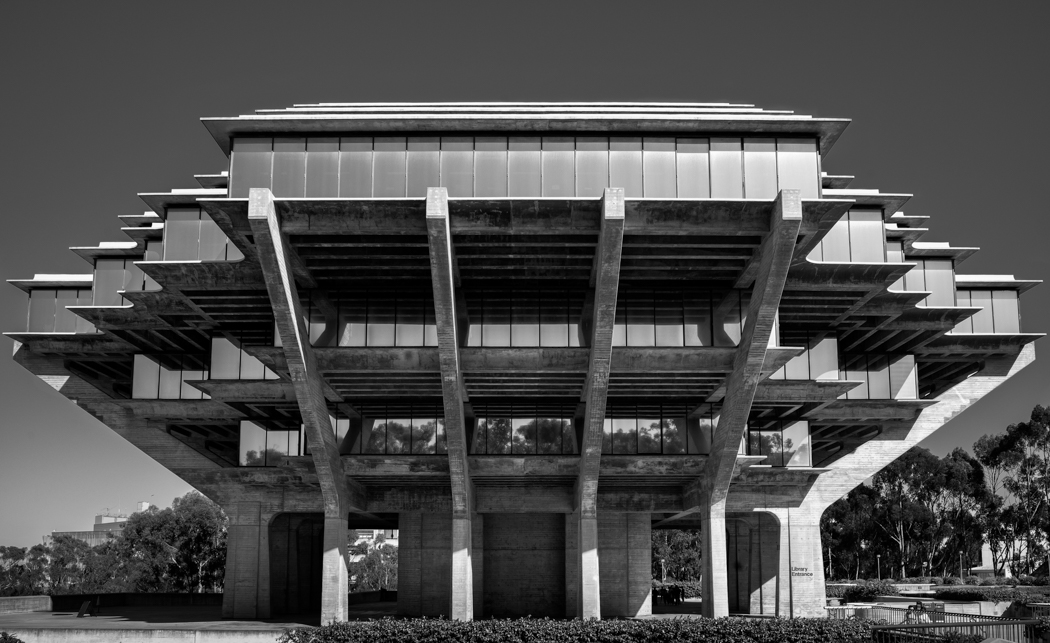
Leica M10-P, Voigtlander 28mm f/2 Ultron v1, f/8, 1/500 sec, ISO 400, AWB
I had to go to the UCSD Medical Center for a blood test today, so I decided to drive through the University of California San Diego Campus on my way back to the office. I am very fortunate to have such facilities located right in La Jolla where I live. The UCSD Campus is famous for it's Modern Architecture. One of the iconic buildings is the Geisel Library named for Theodor Geisel, better known as Dr Suess. It was a perfect brilliant day here today. Not a cloud in the blue bird colored sky. The late afternoon sun shinning on the building sculpted the building beautifully for a Monochrome image, so I chose it as my subject for day 26.
It is a big building. The Voigtlander 28mm f/2 Ultron was barely wide enough to fit it in. As it was, I had to stand in a bush. I couldn't back up any further. I would have liked a little more space to each side, but this is all I could get. This lens seems to really shine in the f/8 so that is what I chose to capture the most detail. I kept the shutter speed up at 1/500 sec to make sure I got no movement. The exposure I liked best ended up being at ISO 400. All setting done manually. The composition was very tight as you can see. So, as much as I would have prefered to shoot it through the Range Finder, I am still not that confident about where the edges are when it gets critical like this was. I did use Live View to make this image. I am glad to have it in such circumstance. I almost mounted and used the EVF, but resisted that cop-out and was able to do it with LV.
I have been very pleased with the image quality I have been getting with the Voigtlander 28mm f/2 Ultron v1. But all the reviews I have read, and everyone I have spoken to has said that the v2 is a significant improvement. I had a chance to trade up for $260 with one of the big on line used sellers, so I did it. My V2 should be here on Monday.
Once again, although I very rarely did B&W in the past, I am seeing, and shooting for it these days. A nice new tool to have in my kit that greatly expands my shooting conditions.
Enjoy the image all!
-Steve-
Leica M10-P, Voigtlander 28mm f/2 Ultron v1, f/8, 1/500 sec, ISO 400, AWB
Mar 17, 2022 at 08:14 PM
p.18 #4Learning Leica "M", a 30 day project
Day 27 Image:
Once again at the Hotel Del Coronado. This time at the main front entrance. This gentleman was waiting for something or someone. My guess is he was waiting to get picked up to go somewhere. This waiting area is just inside the main doors. The room is full of texture and soft light. The furniture is mirrored on both sides of the room. I sat opposite him, and pretended to fiddle with the camera. The lighting was complex so I used Live View while the camera was sitting on my lap to dial in exposure.
After that while looking through the Range Finder I focused and pointed it around the room so it didn't look like I was targeting him in the image. When I got it framed the way I wanted I shot the image. The M10-P has a famously quiet shutter. he didn't even notice that i took the image, or he just didn't care. My efforts and hiding my intent were probably not required. But I am still a bit uncomfortable taking pictures of strangers without asking.
As I said the are was softly lit with pretty low light levels. The room was also small so I selected the Voigtlander 28mm f/2 Ultron v1 as the lens. I opened up the aperture from my now usual f/8 to f/5.6. I also slowed down my shutter speed to 1/125 sec figuring I could hold that while seated. Still the exposure I wanted required an ISO of 4000. The image doesn't seem to be suffering from the high ISO in this case. The camera is still doing it's usual wonderful job of rendering and managing the tonality of the scene.
Enjoy,
-Steve-
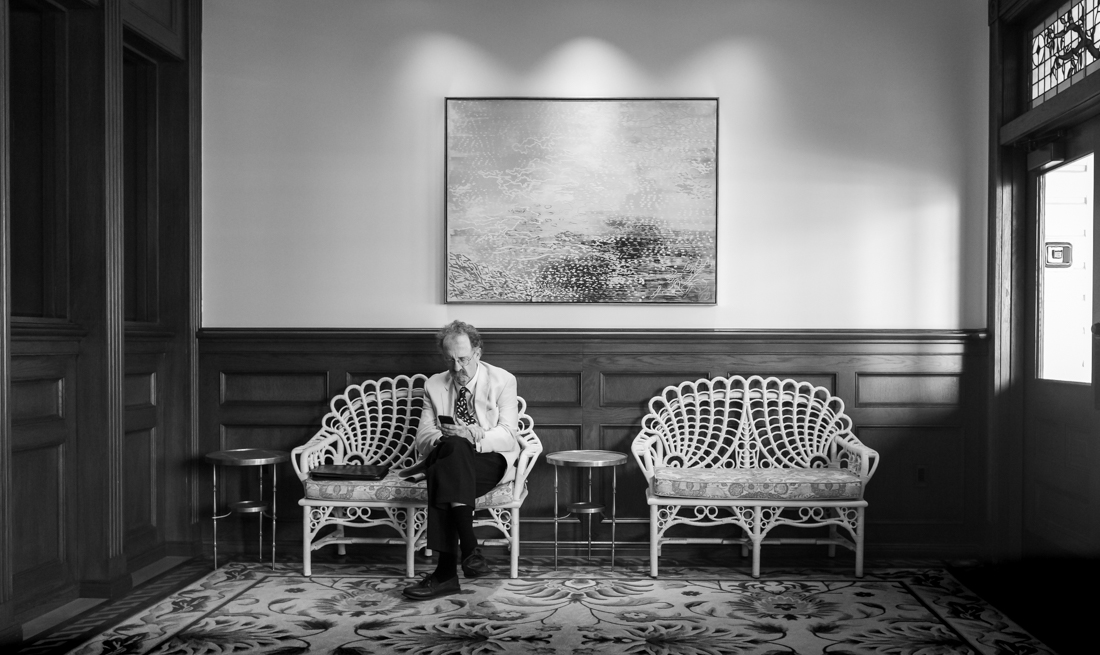
Leica M10-P, Voigtlander 28mm f/2 Ultron v1, f/5.6, 1/225 sec, ISO 4000, AW, hand Held
Once again at the Hotel Del Coronado. This time at the main front entrance. This gentleman was waiting for something or someone. My guess is he was waiting to get picked up to go somewhere. This waiting area is just inside the main doors. The room is full of texture and soft light. The furniture is mirrored on both sides of the room. I sat opposite him, and pretended to fiddle with the camera. The lighting was complex so I used Live View while the camera was sitting on my lap to dial in exposure.
After that while looking through the Range Finder I focused and pointed it around the room so it didn't look like I was targeting him in the image. When I got it framed the way I wanted I shot the image. The M10-P has a famously quiet shutter. he didn't even notice that i took the image, or he just didn't care. My efforts and hiding my intent were probably not required. But I am still a bit uncomfortable taking pictures of strangers without asking.
As I said the are was softly lit with pretty low light levels. The room was also small so I selected the Voigtlander 28mm f/2 Ultron v1 as the lens. I opened up the aperture from my now usual f/8 to f/5.6. I also slowed down my shutter speed to 1/125 sec figuring I could hold that while seated. Still the exposure I wanted required an ISO of 4000. The image doesn't seem to be suffering from the high ISO in this case. The camera is still doing it's usual wonderful job of rendering and managing the tonality of the scene.
Enjoy,
-Steve-
Leica M10-P, Voigtlander 28mm f/2 Ultron v1, f/5.6, 1/225 sec, ISO 4000, AW, hand Held
Mar 19, 2022 at 12:26 AM
p.18 #5Learning Leica "M", a 30 day project
1bwana1 wrote:
Day 26 Image.
The composition was very tight as you can see. So, as much as I would have prefered to shoot it through the Range Finder, I am still not that confident about where the edges are when it gets critical like this was. I did use Live View to make this image. I am glad to have it in such circumstance. I almost mounted and used the EVF, but resisted that cop-out and was able to do it with LV.
Depending who you ask, live view is already a cop-out, so what difference does it make if you're composing with the rear screen or through an EVF (other than the EVF being one more thing to carry)? At least with the EVF you have more comfortable shooting ergonomics and can easily tilt it to explore lower/other angles that may have given you other, as interesting options. Once again, my opinion, it's just a tool that expands the ease of use of the system in the generalist daily-carry manner you intend for it.
Without the live view 'cop-out' a solution would be to composition bracket and chimp. Or just take a test shot noting exactly the building edges relative to the frame lines, chimp and try again until you get a better feel for actual compositional content vs. what is suggested by the frame lines.
To refine further, if you can't consistently see the 28mm frame lines, use either, or both, the center RF patch or the 90mm frame lines to note exactly where they fall in the scene. Do a test shot, review the spacing around the edges, then adjust based on the position of the reference points relative to the RF patch and/or 90 frame lines.
It's not like the building will run away on you, so is an ideal practice subject. Eventually it will become second nature.
Day 26 Image.
The composition was very tight as you can see. So, as much as I would have prefered to shoot it through the Range Finder, I am still not that confident about where the edges are when it gets critical like this was. I did use Live View to make this image. I am glad to have it in such circumstance. I almost mounted and used the EVF, but resisted that cop-out and was able to do it with LV.
Depending who you ask, live view is already a cop-out, so what difference does it make if you're composing with the rear screen or through an EVF (other than the EVF being one more thing to carry)? At least with the EVF you have more comfortable shooting ergonomics and can easily tilt it to explore lower/other angles that may have given you other, as interesting options. Once again, my opinion, it's just a tool that expands the ease of use of the system in the generalist daily-carry manner you intend for it.
Without the live view 'cop-out' a solution would be to composition bracket and chimp. Or just take a test shot noting exactly the building edges relative to the frame lines, chimp and try again until you get a better feel for actual compositional content vs. what is suggested by the frame lines.
To refine further, if you can't consistently see the 28mm frame lines, use either, or both, the center RF patch or the 90mm frame lines to note exactly where they fall in the scene. Do a test shot, review the spacing around the edges, then adjust based on the position of the reference points relative to the RF patch and/or 90 frame lines.
It's not like the building will run away on you, so is an ideal practice subject.
Eventually it will become second nature.Mar 19, 2022 at 07:56 AM
p.18 #6Learning Leica "M", a 30 day project
1bwana1 wrote:
I almost mounted and used the EVF, but resisted that cop-out and was able to do it with LV.
Have you ever used a ladder to reach something you couldn't reach while standing on your own two feet?
Is it a "cop-out" to use a the tool that helps you achieve what you are trying to achieve?
I think most people will just stand and reach for whatever they can do on their own. If they can't reach it normally, they'll stand on their toes and stretch themselves as far as they can. Still can't get there, they'll jump as high as they can. If having exhausted the ability to do it themselves without the aid of a tool, they'll reach for the tool that helps them achieve what they couldn't otherwise achieve without the aid of the tool.
Yet, do people walk around carrying a ladder for everything, just because it's a capable tool. No, they tend to only use the ladder when they really need it, or it somehow fits their application for whatever reason that might be.
Where's the "cop out" for using a ladder when you can't reach the light bulb on your own? Where's the "cop out" for using a ladder when it helps give you more stability to get a more secured outcome? When is being smart or in control ... a "cop-out"?
Is using a tripod a "cop out" for not being able to hand-hold when you need an exposure of 1/6 of a second? Or is it a "cop-out" to use a tripod when you want to have exacting framing and compositional focus, even if the exposure is 1/500 second?
So ... just when is it a "cop out" to use a tool? Is it a "cop-out" to use a pair of pliers to grip something more strongly than I can with my hands? Is it a "cop-out" to wear sunglasses when driving into the sun, or use an ND filter when shooting into the sun?
is it a "cop-out" to use an electric drill, instead of a hand drill? Or, what about a chain saw, instead of a hand saw, or sandpaper, rasp or file, instead of a chisel?
Imo, using a tool when your own limitations are exceeded ... I dunno ... is kinda the reason that tools are conceived, invented, developed, engineered and brought to market.
Imo, if you (for whatever reason of YOUR choosing) choose to use a tool of YOUR choice to achieve YOUR goals that allows you to achieve YOUR goals ... I cannot fathom how that is a "cop-out".
That said, if you are using a different tool to EVADE using other tools, then THAT might be perceived as a "cop-out" as some form of EXCUSE to rationalize the evasion for doing something without a given tool, or a different tool. But, even if / when you do choose to use a tool of convenience, that still isn't an evasion (cop-out). Rather (imo), it is a decision within your realm of "nice to have choices" ... so, are choices necessarily "cop-outs".
But, you aren't EVADING the other tools. You are only recognizing the difference in utility that the different tools provide and afford for. No such thing as a "cop-out" there (imo), since you clearly are neither evading, nor rationalizing the evasion of the other tools ... in this case, the RF, LV, EVF. Rather, you simply found one of the three tools to be a preferred fit for a given application. Imo, the goal here isn't to learn the tool to the exclusion of all other tools. Rather, it is to learn the tool well enough that you can choose to use it at your discretion. Once you have developed a skill level for the various tools, you'll determine which of them fits your temperament and applications, accordingly.
You rule the tool(s). The tool doesn't rule you.
Imo, one could make a case that it's a "cop-out" to refuse and evade consideration for the viability of using other tools. Be cautious with how you perceive your tools vs. how others think you should perceive your tools. In the end ... they are YOUR tools. Learn them well, apply them better.
I fully understand that staying consistent with a given tool is a key component to developing a mastery of that tool. Yet ... all tools have limitations in application. I CAN use ONLY my eyes to walk in the dark. But, sometimes I do use a flashlight, too. Most times I just use my eyes only ... but, just because I do use a flashlight on occasion ... imo, that's not a "cop-out" for not walking in the dark without one. Rather, it is making a decision to use a tool, fit for the occasion.
Accepted the challenge(s) of doing it with a different tool ... sure, why not. I embrace such challenges plenty of times (skill building, etc.). It is an excellent training and refining approach, but doesn't mean you can't use a different tool when warranted. But, I certainly don't consider it a "cop-out" ... if I do choose to use a different tool. It just means I know how to use more than one tool. I really like using my well-honed chisels. But, if I pick up the sander or saw instead (for whatever reason) ... it's not a "cop-out" from using one of the most basic tools in the shop. I still know where my chisel is and how to use it.
"cop-out" ... (imo) you need to lose that term from your vocabulary ... immediately, if not sooner.

I almost mounted and used the EVF, but resisted that cop-out and was able to do it with LV.
Have you ever used a ladder to reach something you couldn't reach while standing on your own two feet?
Is it a "cop-out" to use a the tool that helps you achieve what you are trying to achieve?
I think most people will just stand and reach for whatever they can do on their own. If they can't reach it normally, they'll stand on their toes and stretch themselves as far as they can. Still can't get there, they'll jump as high as they can. If having exhausted the ability to do it themselves without the aid of a tool, they'll reach for the tool that helps them achieve what they couldn't otherwise achieve without the aid of the tool.
Yet, do people walk around carrying a ladder for everything, just because it's a capable tool. No, they tend to only use the ladder when they really need it, or it somehow fits their application for whatever reason that might be.
Where's the "cop out" for using a ladder when you can't reach the light bulb on your own? Where's the "cop out" for using a ladder when it helps give you more stability to get a more secured outcome? When is being smart or in control ... a "cop-out"?
Is using a tripod a "cop out" for not being able to hand-hold when you need an exposure of 1/6 of a second? Or is it a "cop-out" to use a tripod when you want to have exacting framing and compositional focus, even if the exposure is 1/500 second?
So ... just when is it a "cop out" to use a tool? Is it a "cop-out" to use a pair of pliers to grip something more strongly than I can with my hands? Is it a "cop-out" to wear sunglasses when driving into the sun, or use an ND filter when shooting into the sun?
is it a "cop-out" to use an electric drill, instead of a hand drill? Or, what about a chain saw, instead of a hand saw, or sandpaper, rasp or file, instead of a chisel?
Imo, using a tool when your own limitations are exceeded ... I dunno ... is kinda the reason that tools are conceived, invented, developed, engineered and brought to market.
Imo, if you (for whatever reason of YOUR choosing) choose to use a tool of YOUR choice to achieve YOUR goals that allows you to achieve YOUR goals ... I cannot fathom how that is a "cop-out".
That said, if you are using a different tool to EVADE using other tools, then THAT might be perceived as a "cop-out" as some form of EXCUSE to rationalize the evasion for doing something without a given tool, or a different tool. But, even if / when you do choose to use a tool of convenience, that still isn't an evasion (cop-out). Rather (imo), it is a decision within your realm of "nice to have choices" ... so, are choices necessarily "cop-outs".
But, you aren't EVADING the other tools. You are only recognizing the difference in utility that the different tools provide and afford for. No such thing as a "cop-out" there (imo), since you clearly are neither evading, nor rationalizing the evasion of the other tools ... in this case, the RF, LV, EVF. Rather, you simply found one of the three tools to be a preferred fit for a given application. Imo, the goal here isn't to learn the tool to the exclusion of all other tools. Rather, it is to learn the tool well enough that you can choose to use it at your discretion. Once you have developed a skill level for the various tools, you'll determine which of them fits your temperament and applications, accordingly.
You rule the tool(s). The tool doesn't rule you.
Imo, one could make a case that it's a "cop-out" to refuse and evade consideration for the viability of using other tools. Be cautious with how you perceive your tools vs. how others think you should perceive your tools. In the end ... they are YOUR tools. Learn them well, apply them better.
I fully understand that staying consistent with a given tool is a key component to developing a mastery of that tool. Yet ... all tools have limitations in application. I CAN use ONLY my eyes to walk in the dark. But, sometimes I do use a flashlight, too. Most times I just use my eyes only ... but, just because I do use a flashlight on occasion ... imo, that's not a "cop-out" for not walking in the dark without one. Rather, it is making a decision to use a tool, fit for the occasion.
Accepted the challenge(s) of doing it with a different tool ... sure, why not. I embrace such challenges plenty of times (skill building, etc.). It is an excellent training and refining approach, but doesn't mean you can't use a different tool when warranted. But, I certainly don't consider it a "cop-out" ... if I do choose to use a different tool. It just means I know how to use more than one tool. I really like using my well-honed chisels. But, if I pick up the sander or saw instead (for whatever reason) ... it's not a "cop-out" from using one of the most basic tools in the shop. I still know where my chisel is and how to use it.
"cop-out" ... (imo) you need to lose that term from your vocabulary ... immediately, if not sooner.
Mar 19, 2022 at 09:07 AM
p.18 #7Learning Leica "M", a 30 day project
I don't think I made myself clear on the use of the word "cop-out". I general usage I will have no issue at all using any feature that the M10-P provides me to better get an image I wish to make. It is only in the context of this project of "learning Leica M" that I am speaking about when I say "cop-out". In the Leica M camera it is the Range Finder that is the big difference I need to learn. I am already very comfortable shooting through either the EVF, or the with real screen in Live View, because of my years of experience doing that with my mirrorless cameras. I don't want to fall back on what I am already comfortable doing. I want to push myself to do things differently. In this case, in the the shot I posted I did use live view so wanted to disclose. I also did shoot some frames through the Range Finder. They were not centered as well, nor were they as level, so I choose the one shot with the rear screen and wanted to disclose that for this thread.
I even did try a couple of Pano style shots in Portrait orientation through the Range Finder. That worked well enough. So, in reality I did find an acceptable way to get the image with the Leica in a few ways.
Below is an edit from the Range Finder Pano image. I didn't like the "blemish" of the shadow of the bird on the fourth floor so I chose the single shot. It also shows more perspective distortion. The building is squared not curved. However the image may be even more dramatic because of this. Just not as accurate.
After this project i will of course not be disclosing which method I used to make an image.
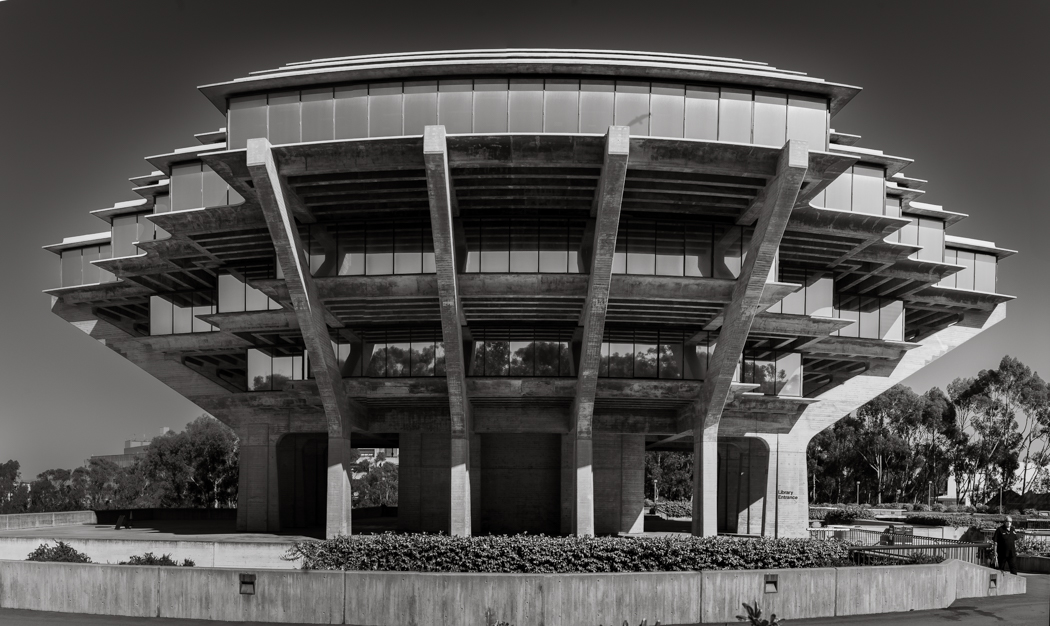
I even did try a couple of Pano style shots in Portrait orientation through the Range Finder. That worked well enough. So, in reality I did find an acceptable way to get the image with the Leica in a few ways.
Below is an edit from the Range Finder Pano image. I didn't like the "blemish" of the shadow of the bird on the fourth floor so I chose the single shot. It also shows more perspective distortion. The building is squared not curved. However the image may be even more dramatic because of this. Just not as accurate.
After this project i will of course not be disclosing which method I used to make an image.
Mar 19, 2022 at 10:11 AM
p.18 #8Learning Leica "M", a 30 day project
RustyBug wrote:
"cop-out" ... (imo) you need to lose that term from your vocabulary ... immediately, if not sooner.
Gone in three more days!!!
"cop-out" ... (imo) you need to lose that term from your vocabulary ... immediately, if not sooner.
Gone in three more days!!!
Mar 19, 2022 at 10:14 AM
p.18 #9Learning Leica "M", a 30 day project
1bwana1 wrote:
After this project i will of course not be disclosing which method I used to make an image.

After this project i will of course not be disclosing which method I used to make an image.
Mar 19, 2022 at 10:47 AM
p.18 #10Learning Leica "M", a 30 day project
1bwana1 wrote:
Gone in three more days!!!
It's been a fast moving month ... mega kudo's for your progress and the documentation / discussion you've provided to all of us.
Looking forward to seeing how your month culminates. Of course, the month is really more of a "first step" ... in the journey(s) to come. But, it's been a great joy to watch your first steps vicariously.
Crawl, walk, run ... Gold Medal.
RustyBug wrote
"cop-out" ... (imo) you need to lose that term from your vocabulary ... immediately, if not sooner.It's been a fast moving month ... mega kudo's for your progress and the documentation / discussion you've provided to all of us.
Looking forward to seeing how your month culminates. Of course, the month is really more of a "first step" ... in the journey(s) to come. But, it's been a great joy to watch your first steps vicariously.
Crawl, walk, run ... Gold Medal.
Mar 19, 2022 at 10:58 AM
p.18 #11Learning Leica "M", a 30 day project
1bwana1 wrote:
I don't think I made myself clear on the use of the word "cop-out". I general usage I will have no issue at all using any feature that the M10-P provides me to better get an image I wish to make. It is only in the context of this project of "learning Leica M" that I am speaking about when I say "cop-out". In the Leica M camera it is the Range Finder that is the big difference I need to learn. I am already very comfortable shooting through either the EVF, or the with real screen in Live View,...Show more →
I really like this shot, Steve, but. I think what might have been really nice is to have a 21mm with you which would have given you a wide enough field of view to give both a little closer and to have a bit more space on either side. I am not sure the shot needs it. You did a great job, but I think it would have been a lot easier to shoot with a 21mm.
I don't think I made myself clear on the use of the word "cop-out". I general usage I will have no issue at all using any feature that the M10-P provides me to better get an image I wish to make. It is only in the context of this project of "learning Leica M" that I am speaking about when I say "cop-out". In the Leica M camera it is the Range Finder that is the big difference I need to learn. I am already very comfortable shooting through either the EVF, or the with real screen in Live View,...Show more →
I really like this shot, Steve, but. I think what might have been really nice is to have a 21mm with you which would have given you a wide enough field of view to give both a little closer and to have a bit more space on either side. I am not sure the shot needs it. You did a great job, but I think it would have been a lot easier to shoot with a 21mm.
Mar 19, 2022 at 12:52 PM
p.18 #12Learning Leica "M", a 30 day project
Steve Spencer wrote:
I really like this shot, Steve, but. I think what might have been really nice is to have a 21mm with you which would have given you a wide enough field of view to give both a little closer and to have a bit more space on either side. I am not sure the shot needs it. You did a great job, but I think it would have been a lot easier to shoot with a 21mm.
I agree 100%. A lens in the 18mm-21mm range is definitely on my to get list. In that FL range I am not so interested in it having a wide aperture. I will focus on IQ, and size. I am still researching which lens it will be. It will likely not be my most often used FL so I am hesitant to go with Leica $$ on this one.
I really like this shot, Steve, but. I think what might have been really nice is to have a 21mm with you which would have given you a wide enough field of view to give both a little closer and to have a bit more space on either side. I am not sure the shot needs it. You did a great job, but I think it would have been a lot easier to shoot with a 21mm.
I agree 100%. A lens in the 18mm-21mm range is definitely on my to get list. In that FL range I am not so interested in it having a wide aperture. I will focus on IQ, and size. I am still researching which lens it will be. It will likely not be my most often used FL so I am hesitant to go with Leica $$ on this one.
Mar 19, 2022 at 01:06 PM
p.18 #13Learning Leica "M", a 30 day project
1bwana1 wrote:
I agree 100%. A lens in the 18mm-21mm range is definitely on my to get list. In that FL range I am not so interested in it having a wide aperture. I will focus on IQ, and size. I am still researching which lens it will be. It will likely not be my most often used FL so I am hesitant to go with Leica $$ on this one.
Fortunately, there are several really good Voigtlander and Zeiss ZM lenses in this range. The Voigtlander 21 f/1.4 is kind of big but is excellent and can be used at wide apertures. The Voigtlander 21 f/1.8 is a quite nice lens too and noticeably smaller, but I don't think it is quite in the league of the f/1.4. The Voigtlander 21 f/3.5 is wonderfully small and has quite nice performance, but does have a bit of a midzone dip at wider apertures. An often under appreciate lens is the Zeiss 18 f/4. It isn't that big (320g), has nice performance, and can be had for about $1,000. The ZM 21 f/2.8 is also a very nice lens and just a little smaller an also an excellent performer and just a bit cheaper at about $800. Really I think the choice between the Zeiss ZM lenses should be mostly about focal length preference.
These are all good choices, but I think it is still worth considering the Leica 21 SEM. You can get one used for about $2,000, so they are not that bad for price and IMO excellent in pretty much every respect.
Steve Spencer wrote
I really like this shot, Steve, but. I think what might have been really nice is to have a 21mm with you which would have given you a wide enough field of view to give both a little closer and to have a bit more space on either side. I am not sure the shot needs it. You did a great job, but I think it would have been a lot easier to shoot with a 21mm.Fortunately, there are several really good Voigtlander and Zeiss ZM lenses in this range. The Voigtlander 21 f/1.4 is kind of big but is excellent and can be used at wide apertures. The Voigtlander 21 f/1.8 is a quite nice lens too and noticeably smaller, but I don't think it is quite in the league of the f/1.4. The Voigtlander 21 f/3.5 is wonderfully small and has quite nice performance, but does have a bit of a midzone dip at wider apertures. An often under appreciate lens is the Zeiss 18 f/4. It isn't that big (320g), has nice performance, and can be had for about $1,000. The ZM 21 f/2.8 is also a very nice lens and just a little smaller an also an excellent performer and just a bit cheaper at about $800. Really I think the choice between the Zeiss ZM lenses should be mostly about focal length preference.
These are all good choices, but I think it is still worth considering the Leica 21 SEM. You can get one used for about $2,000, so they are not that bad for price and IMO excellent in pretty much every respect.
Mar 19, 2022 at 02:58 PM
p.18 #14Learning Leica "M", a 30 day project
1bwana1 wrote:
After this project i will of course not be disclosing which method I used to make an image.
Steve, I wonder if you would consider writing a post along the lines of “which of the photographs I made during the 30 day project could have been just as easily and effectively taken with my Sony gear and which could only have been made with my Leica?”
After this project i will of course not be disclosing which method I used to make an image.
Steve, I wonder if you would consider writing a post along the lines of “which of the photographs I made during the 30 day project could have been just as easily and effectively taken with my Sony gear and which could only have been made with my Leica?”
Mar 19, 2022 at 03:09 PM
p.18 #15Learning Leica "M", a 30 day project
genji wrote:
Steve, I wonder if you would consider writing a post along the lines of “which of the photographs I made during the 30 day project could have been just as easily and effectively taken with my Sony gear and which could only have been made with my Leica?”
That would be a very short post. I don't think that there is any image in this thread that I couldn't have made with my A1, or pretty much any other high end camera. The unique thing about the Leica M series camera is the process, and the esthetics of both the camera design, and the way it renders. The question to really ask is whether I would have made the image in the same way with the Sony kit. In many cases I am feeling like I would not have. The Leica has had an affect on how I see images, take images, and process images. It has broadened my photographic World in the way I had hoped it would. That seems to be a common theme among those who are Leica fans as I now am.
Hard to define, but very real none the less.
Steve, I wonder if you would consider writing a post along the lines of “which of the photographs I made during the 30 day project could have been just as easily and effectively taken with my Sony gear and which could only have been made with my Leica?”
That would be a very short post. I don't think that there is any image in this thread that I couldn't have made with my A1, or pretty much any other high end camera. The unique thing about the Leica M series camera is the process, and the esthetics of both the camera design, and the way it renders. The question to really ask is whether I would have made the image in the same way with the Sony kit. In many cases I am feeling like I would not have. The Leica has had an affect on how I see images, take images, and process images. It has broadened my photographic World in the way I had hoped it would. That seems to be a common theme among those who are Leica fans as I now am.
Hard to define, but very real none the less.
Mar 19, 2022 at 05:04 PM
p.18 #16Learning Leica "M", a 30 day project
During the course of this project I have done a lot of lens swapping out in the field. Sometimes in not very clean environments. The dusty dog park being one example. I noticed that i had started to get some dust spots on my sensor. I decided to clean them off the sensor.
The Leica M10-P doesn't have IBIS, so no shaker function to help clean the dust up. I have never found that those work well anyway. It does have two functions to assist however. Both can be found on the last page of the Main Menu. They are sub items under the "Sensor Cleaning" function.
First is the excellent "Dust Detection" function. Note that this one is only available when there is a lens mounted on the camera. You are instructed to select the smallest aperture available on the lens, set the focus to the closest position, then take a picture of a homogeneous surface like a white wall, or the sky. The camera then process this image and displays it on the rear screen. It is the clearest presentation of dust on the sensor I have ever seen. I do this manually on my other cameras, but the results are not as clear, nor convenient to use as they are on the M10-P. Excellent feature.
Second is the "Open Shutter" function. This basically opens the shutter to allow you access to the sensor for cleaning. It is the same as on all my other cameras. No need to lock down the sensor because it has no IBIS and is on a solid mount to begin with.
In my case the Dust Detection image showed about 10 small dust spots. As always I used my large Rocket Blower to try and blow the dust off the sensor. I then rechecked the sensor using the Dust Detector function. It still showed two of the spots remained. I tried this process 3 times. But those two spots were not coming off. As I usually do, I then escalated to a wet clean with dedicated single use swabs and special fluids. It is an easy process, and I have done it often enough to be comfortable that I won't hurt my sensor. After the swab I once again ran the Dust Detection function and it showed a 100% clean sensor. Done.
The entire process was fast, easy, and confidence building. Nothing fancy in the Leica camera to do this. Just a very simple, well engineered process that got the job done efficiently. This seems to be a common theme with the Leica, and is one thing I really like about how this camera works.
I hope someone finds this information useful.
-Steve-
The Leica M10-P doesn't have IBIS, so no shaker function to help clean the dust up. I have never found that those work well anyway. It does have two functions to assist however. Both can be found on the last page of the Main Menu. They are sub items under the "Sensor Cleaning" function.
First is the excellent "Dust Detection" function. Note that this one is only available when there is a lens mounted on the camera. You are instructed to select the smallest aperture available on the lens, set the focus to the closest position, then take a picture of a homogeneous surface like a white wall, or the sky. The camera then process this image and displays it on the rear screen. It is the clearest presentation of dust on the sensor I have ever seen. I do this manually on my other cameras, but the results are not as clear, nor convenient to use as they are on the M10-P. Excellent feature.
Second is the "Open Shutter" function. This basically opens the shutter to allow you access to the sensor for cleaning. It is the same as on all my other cameras. No need to lock down the sensor because it has no IBIS and is on a solid mount to begin with.
In my case the Dust Detection image showed about 10 small dust spots. As always I used my large Rocket Blower to try and blow the dust off the sensor. I then rechecked the sensor using the Dust Detector function. It still showed two of the spots remained. I tried this process 3 times. But those two spots were not coming off. As I usually do, I then escalated to a wet clean with dedicated single use swabs and special fluids. It is an easy process, and I have done it often enough to be comfortable that I won't hurt my sensor. After the swab I once again ran the Dust Detection function and it showed a 100% clean sensor. Done.
The entire process was fast, easy, and confidence building. Nothing fancy in the Leica camera to do this. Just a very simple, well engineered process that got the job done efficiently. This seems to be a common theme with the Leica, and is one thing I really like about how this camera works.
I hope someone finds this information useful.
-Steve-
Mar 19, 2022 at 05:30 PM
p.18 #17Learning Leica "M", a 30 day project
Day 28 Image.
This image is once again from one of my walks along the cliff overlooking the Pacific Ocean here in La Jolla. This one of Children's Pool which was built as a safe place for children to swim. It was a gift to the children of our city by Ellen Browning Scripts. It has since been taken over as a pupping location by the local Harbor Seals. It is pupping season and many people stop by to watch them, the birds, dolphins, whales, and other wildlife that can be seen there.
As I walk it has become my habit to set my camera up to make a shot in the given lighting conditions. This technique was suggested to me earlier in this thread. It has proven to work well for me. In this case it was full bright sunlight. This works out to f/8, 1/500 sec, and ISO 200. When I see a shot, all I have to do is estimate the distance for focus, bring the range finder up to my eye to compose, and make the shot. This is as fast as any auto camera mode available.
In this case I knew that my subject, the people on the sea wall, would be at infinity. So, I used the tab to push the focus ring there while the camera was still at my side. My intent these days is often orientated to making images "about" something, rather than "of" something. In doing that I wanted to include this gentleman sitting on the bench to both tell that story, and add more dimension to the image. However, I didn't want him to become the focus of the image. So, I stepped close behind him to where I estimated he would be slightly out of focus and softened a bit. In this case I was hoping he would be even a little softer. I also positioned him over to the side and used his head position to draw attention to the real subject which is where he was looking. I got no feedback from the Range finder on how soft he would be. I must estimate this. Some call this pre-visualization. At this level of experience I still am guessing whether I will get what I want. In this case it worked out reasonably well. Even a blind Squirrel....
I am happy with how the image turned out overall. It accomplished to some degree what I had intended. For me, this represents a great deal of progress in skill using the Leica M10-P from when I started this project. I only took two frames each in landscape and portrait orientations. This is another thing I am finding. I take fewer frames when making an image. I attribute this to the more deliberate process that the Leica M requires. I like that also.
Day 28, four weeks, only two more to go to complete this project. I credit all of you who have contributed your advice, critics, and suggestions to making this experience as enjoyable as it has been. Thanks!!!
Enjoy the image!
-Steve-
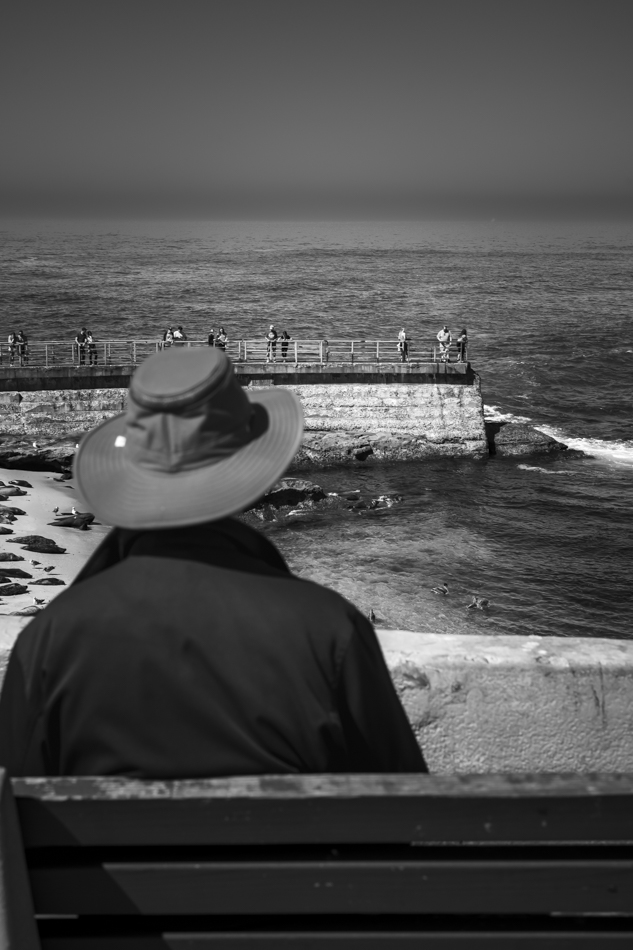
Leica M10-P, Voigtlander 50mm f/1.5 Nokton vII MC, f/8, 1/500sec, ISO 400, AWB, Hand Held
This image is once again from one of my walks along the cliff overlooking the Pacific Ocean here in La Jolla. This one of Children's Pool which was built as a safe place for children to swim. It was a gift to the children of our city by Ellen Browning Scripts. It has since been taken over as a pupping location by the local Harbor Seals. It is pupping season and many people stop by to watch them, the birds, dolphins, whales, and other wildlife that can be seen there.
As I walk it has become my habit to set my camera up to make a shot in the given lighting conditions. This technique was suggested to me earlier in this thread. It has proven to work well for me. In this case it was full bright sunlight. This works out to f/8, 1/500 sec, and ISO 200. When I see a shot, all I have to do is estimate the distance for focus, bring the range finder up to my eye to compose, and make the shot. This is as fast as any auto camera mode available.
In this case I knew that my subject, the people on the sea wall, would be at infinity. So, I used the tab to push the focus ring there while the camera was still at my side. My intent these days is often orientated to making images "about" something, rather than "of" something. In doing that I wanted to include this gentleman sitting on the bench to both tell that story, and add more dimension to the image. However, I didn't want him to become the focus of the image. So, I stepped close behind him to where I estimated he would be slightly out of focus and softened a bit. In this case I was hoping he would be even a little softer. I also positioned him over to the side and used his head position to draw attention to the real subject which is where he was looking. I got no feedback from the Range finder on how soft he would be. I must estimate this. Some call this pre-visualization. At this level of experience I still am guessing whether I will get what I want. In this case it worked out reasonably well. Even a blind Squirrel....
I am happy with how the image turned out overall. It accomplished to some degree what I had intended. For me, this represents a great deal of progress in skill using the Leica M10-P from when I started this project. I only took two frames each in landscape and portrait orientations. This is another thing I am finding. I take fewer frames when making an image. I attribute this to the more deliberate process that the Leica M requires. I like that also.
Day 28, four weeks, only two more to go to complete this project. I credit all of you who have contributed your advice, critics, and suggestions to making this experience as enjoyable as it has been. Thanks!!!
Enjoy the image!
-Steve-
Leica M10-P, Voigtlander 50mm f/1.5 Nokton vII MC, f/8, 1/500sec, ISO 400, AWB, Hand Held
Mar 20, 2022 at 08:40 AM
p.18 #18Learning Leica "M", a 30 day project
Day 29 Image:
Busy weekend because my Grandchildren are visiting from Montana. Went for a walk down on the waterfront of San Diego Bay. Had a few minutes to stop at the trolley station to grab an image for the project. This guy saw me taking pictures and walked up and took a position to be in the images. He had a challenging sort of demeanor, and I didn't want a confrontation, so took the shot. I'm glad I did. I kind of like it. I was tempted to go mono-tone again, but it is nice in color, so I kept it that way.
The best news is that I used the Range Finder all day and very rarely missed a shot. I used a variety of focus and exposure techniques that I learned during this project. I used both the 28mm and the 50mm CVs. I have learned to underexpose about 0.70 stops to make sure I preserve highlights. I did miss some compositions because of edges, and I think parallax. More so with the 50mm than the 28mm. I need to work on getting better with the frame lines. That is still very alien to me at this point.
During my whole photography time developing images in Adobe Light Room I have always used the default Adobe Color Profile. I saw a YouTube Video on working with Leica M Files in Light Room. The guy highly recommended using the appropriate Leica Camera profiles. I installed the Leica M10-P Camera Profile. The difference isn't huge, but I think the files "pop" a bit more and give a better starting point for processing. I understand that there is a way to set Adobe to use the proper camera profile by default. But I haven't gotten it to work that way yet. So, I am stuck setting the profile manually the same as setting the lens manually. This is inconvenient. I hope I am able to figure a better way to make my workflow more efficient eventually.
Enjoy the image.
-Steve-
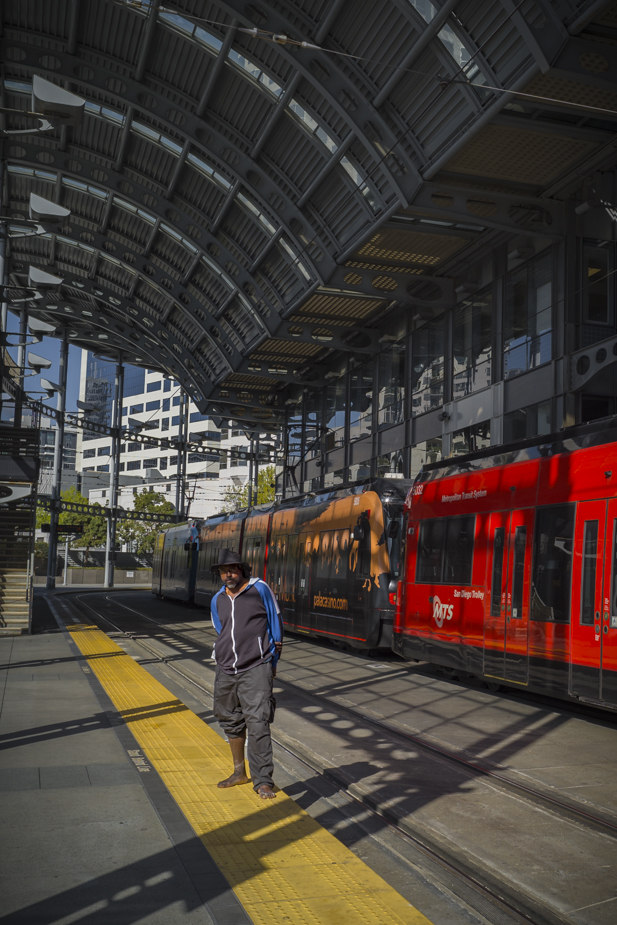
Leica M10-P, Voitlander 28mm f/2 Ultron v1, f/6.8, 1/350 sec, ISO 200, AWB
Busy weekend because my Grandchildren are visiting from Montana. Went for a walk down on the waterfront of San Diego Bay. Had a few minutes to stop at the trolley station to grab an image for the project. This guy saw me taking pictures and walked up and took a position to be in the images. He had a challenging sort of demeanor, and I didn't want a confrontation, so took the shot. I'm glad I did. I kind of like it. I was tempted to go mono-tone again, but it is nice in color, so I kept it that way.
The best news is that I used the Range Finder all day and very rarely missed a shot. I used a variety of focus and exposure techniques that I learned during this project. I used both the 28mm and the 50mm CVs. I have learned to underexpose about 0.70 stops to make sure I preserve highlights. I did miss some compositions because of edges, and I think parallax. More so with the 50mm than the 28mm. I need to work on getting better with the frame lines. That is still very alien to me at this point.
During my whole photography time developing images in Adobe Light Room I have always used the default Adobe Color Profile. I saw a YouTube Video on working with Leica M Files in Light Room. The guy highly recommended using the appropriate Leica Camera profiles. I installed the Leica M10-P Camera Profile. The difference isn't huge, but I think the files "pop" a bit more and give a better starting point for processing. I understand that there is a way to set Adobe to use the proper camera profile by default. But I haven't gotten it to work that way yet. So, I am stuck setting the profile manually the same as setting the lens manually. This is inconvenient. I hope I am able to figure a better way to make my workflow more efficient eventually.
Enjoy the image.
-Steve-
Leica M10-P, Voitlander 28mm f/2 Ultron v1, f/6.8, 1/350 sec, ISO 200, AWB
Mar 20, 2022 at 08:36 PM
p.18 #19Learning Leica "M", a 30 day project
Great shot Steve. That train station is very cool at night also. Great to hear you got all your shots in focus!
I use the Leica profiles as well in LR. I've read that at night time they can act strange, but I haven't seen that yet. If they do, just change back to Adobe.
For the Lightroom profiles, change your color profile on the picture to M10-D and any other setting you do on all pictures. Save that as a preset. Then go to Lightroom > Preferences - Set camera default and choose that preset. It will then auto apply that color profile when importing photos.
For the lens profiles on non coded lenses, I think the easiest solution is to set up user profiles in camera. Same settings, except for the lens. You could name them 28mm, 50mm, 75mm. Every time you change lenses, just remember to change user profiles (I know, easier said than done).
I use the Leica profiles as well in LR. I've read that at night time they can act strange, but I haven't seen that yet. If they do, just change back to Adobe.
For the Lightroom profiles, change your color profile on the picture to M10-D and any other setting you do on all pictures. Save that as a preset. Then go to Lightroom > Preferences - Set camera default and choose that preset. It will then auto apply that color profile when importing photos.
For the lens profiles on non coded lenses, I think the easiest solution is to set up user profiles in camera. Same settings, except for the lens. You could name them 28mm, 50mm, 75mm. Every time you change lenses, just remember to change user profiles (I know, easier said than done).
Mar 21, 2022 at 05:28 AM
p.18 #20Learning Leica "M", a 30 day project
Hey Steve, do you mind sharing the YouTube link?
Thx,
Mark
1bwana1 wrote:
Day 29 Image:
Busy weekend because my Grandchildren are visiting from Montana. Went for a walk down on the waterfront of San Diego Bay. Had a few minutes to stop at the trolley station to grab an image for the project. This guy saw me taking pictures and walked up and took a position to be in the images. He had a challenging sort of demeanor, and I didn't want a confrontation, so took the shot. I'm glad I did. I kind of like it. I was tempted to go mono-tone again, but it is nice in color, so I kept...Show more →
Thx,
Mark
1bwana1 wrote:
Day 29 Image:
Busy weekend because my Grandchildren are visiting from Montana. Went for a walk down on the waterfront of San Diego Bay. Had a few minutes to stop at the trolley station to grab an image for the project. This guy saw me taking pictures and walked up and took a position to be in the images. He had a challenging sort of demeanor, and I didn't want a confrontation, so took the shot. I'm glad I did. I kind of like it. I was tempted to go mono-tone again, but it is nice in color, so I kept...Show more →
Mar 21, 2022 at 08:00 PM